kinetic-app
 Vikram Kadam
please review attached document and make its word No.01 website.


Comments (0)
Sign in to leave a comment
System Requirements
System Requirements Document
1. Introduction
The SPML Vendor Registration & Management Portal is designed to streamline the supplier lifecycle management process for Shapoorji Pallonji Mideast in the Kingdom of Saudi Arabia. This platform replaces traditional fragmented methods with a unified, auditable system that manages vendor registration, prequalification, evaluation, and ongoing management.
2. System Overview
The portal serves as an enterprise procurement platform, facilitating the complete lifecycle of supplier relationships. It is tailored for multinational EPC organizations, ensuring vendors are prequalified based on financial capacity, technical track record, manpower, health-and-safety performance, and regulatory compliance. The platform supports both English and Arabic languages, catering to the Saudi and wider GCC market.
3. Functional Requirements
For Suppliers (Vendors)
- As a vendor, I want to complete a guided 12-step registration wizard that saves progress automatically, so I can start and finish at my convenience without losing work.
- As a vendor, I want to securely sign in using email or mobile with a one-time passcode (OTP), ensuring no passwords to manage and unique account association.
- As a vendor, I want to see a live profile-completion score to know exactly which sections remain to be submitted.
- As a vendor, I want to upload documents with expiry tracking for certificates, with clear indicators for valid, expiring, or expired statuses.
- As a vendor, I want to view my application status and participate in a revision workflow to make corrections as requested by the procurement team.
- As a vendor, I want to download approval documents with QR codes for instant verification once approved.
For Procurement Managers & Reviewers
- As a procurement manager, I want a central vendor register with enterprise search capabilities across various vendor attributes for efficient management.
- As a reviewer, I want a structured review screen displaying all vendor-submitted fields, documents, and disclosures for comprehensive evaluation.
- As a reviewer, I want an automated evaluation engine that scores vendors across six weighted dimensions, providing a consistent decision-making framework.
- As a reviewer, I want an AI Review Summary that provides a brief on strengths, risks, and suggested actions for quick decision-making.
- As a reviewer, I want a complete decision toolkit to approve, reject, request revisions, or suspend vendors, with audit trail notifications.
- As a reviewer, I want duplicate-vendor and expiry radar features to flag potential issues and manage certificate expirations proactively.
For the Organization
- As an organization, I want a tamper-evident audit log to satisfy internal-control and external-audit requirements.
- As an organization, I want role-based access control enforced at the interface level to ensure secure operations.
- As an organization, I want registration lock after approval to maintain data integrity and control over vendor records.
- As an organization, I want official document generation with QR-code verification for reliable vendor status confirmation.
- As an organization, I want a bilingual interface with full right-to-left support for regional appropriateness.
4. User Personas
- Vendor (Supplier): Individuals or companies seeking to register and manage their profiles on the portal.
- Procurement Manager: Responsible for overseeing vendor evaluations and approvals.
- Reviewer: Conducts detailed assessments of vendor submissions and manages the review process.
- Administrator: Manages system configurations and user access controls.
5. Core User Flows
Vendor Registration Flow
- Vendor accesses the portal and begins the 12-step registration process.
- Vendor uploads required documents and completes profile sections.
- Vendor submits the application and receives a reference number.
- Vendor tracks application status and responds to revision requests as needed.
Procurement Review Flow
- Procurement manager assigns a reviewer to a submitted application.
- Reviewer examines vendor submissions and runs the evaluation engine.
- Reviewer requests revisions or clarifications if necessary.
- Reviewer approves the application, generating vendor code and certificate.
6. Visuals Colors and Theme
- Primary Colors: Professional blues and teals to convey trust and reliability.
- Secondary Colors: Neutral grays and whites for a clean, modern interface.
- Typography: Sans-serif fonts for readability and a contemporary look.
7. Signature Design Concept
- Design Style: Clean and professional with a focus on usability and clarity.
- Layout: Intuitive navigation with clear section demarcations and progress indicators.
8. Interaction Model & Motion Direction
- Interaction Model: Responsive design with touch-friendly elements for mobile accessibility.
- Motion Direction: Subtle animations for feedback on actions like form submissions and status updates.
9. Non-Functional Requirements
- Performance: The system must handle concurrent access by multiple users without degradation.
- Security: Data encryption and secure access protocols must be implemented to protect sensitive information.
- Scalability: The platform should support future growth in user base and data volume.
10. Tech Stack
- Frontend: React.js
- Backend: Python + FastAPI
- Database: MySQL with Alembic migrations
11. Assumptions and Constraints
- The platform will be hosted in a secure cloud environment.
- Users will have access to stable internet connections for optimal performance.
- Compliance with regional data protection regulations is mandatory.
12. Glossary
- EPC: Engineering, Procurement, and Construction
- OTP: One-Time Passcode
- HSE: Health, Safety, and Environment
- SAR: Saudi Riyal
- UBO: Ultimate Beneficial Owner
- PEP: Politically Exposed Person
This document outlines the comprehensive requirements for the SPML Vendor Registration & Management Portal, ensuring a robust and efficient system for managing supplier relationships.
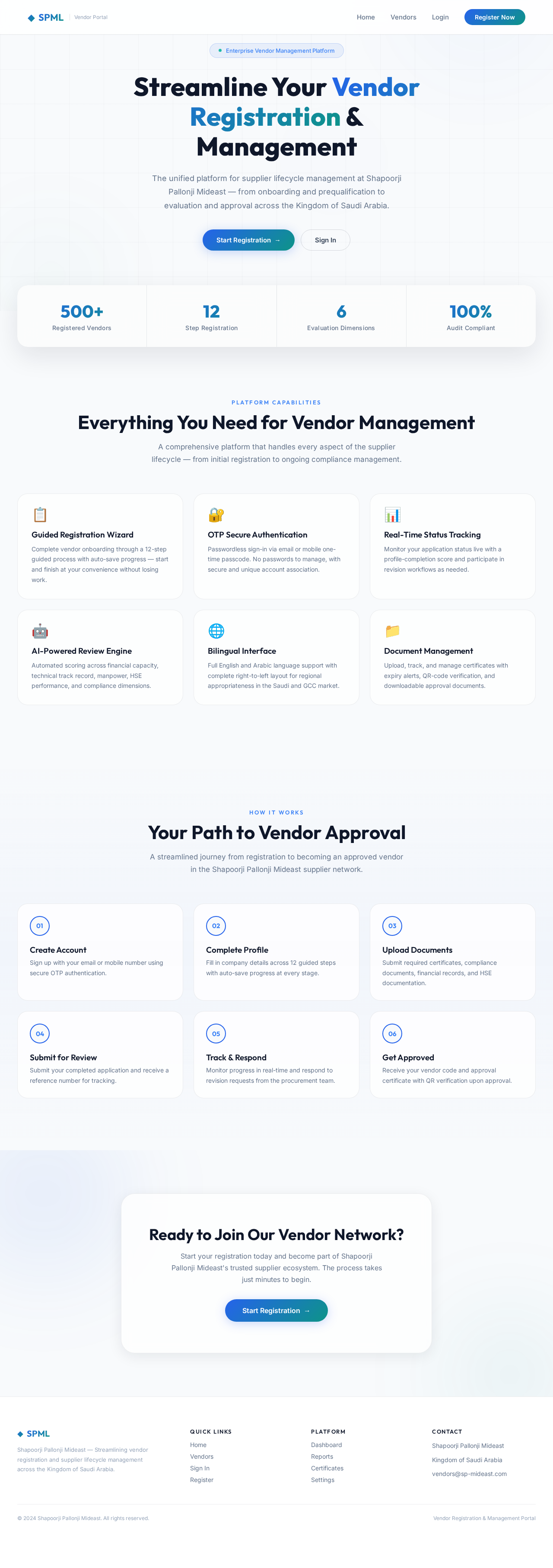
Streamline Your Vendor Registration & Management
The unified platform for supplier lifecycle management at Shapoorji Pallonji Mideast — from onboarding and prequalification to evaluation and approval across the Kingdom of Saudi Arabia.
Everything You Need for Vendor Management
A comprehensive platform that handles every aspect of the supplier lifecycle — from initial registration to ongoing compliance management.
Guided Registration Wizard
Complete vendor onboarding through a 12-step guided process with auto-save progress — start and finish at your convenience without losing work.
OTP Secure Authentication
Passwordless sign-in via email or mobile one-time passcode. No passwords to manage, with secure and unique account association.
Real-Time Status Tracking
Monitor your application status live with a profile-completion score and participate in revision workflows as needed.
AI-Powered Review Engine
Automated scoring across financial capacity, technical track record, manpower, HSE performance, and compliance dimensions.
Bilingual Interface
Full English and Arabic language support with complete right-to-left layout for regional appropriateness in the Saudi and GCC market.
Document Management
Upload, track, and manage certificates with expiry alerts, QR-code verification, and downloadable approval documents.
Your Path to Vendor Approval
A streamlined journey from registration to becoming an approved vendor in the Shapoorji Pallonji Mideast supplier network.
Create Account
Sign up with your email or mobile number using secure OTP authentication.
Complete Profile
Fill in company details across 12 guided steps with auto-save progress at every stage.
Upload Documents
Submit required certificates, compliance documents, financial records, and HSE documentation.
Submit for Review
Submit your completed application and receive a reference number for tracking.
Track & Respond
Monitor progress in real-time and respond to revision requests from the procurement team.
Get Approved
Receive your vendor code and approval certificate with QR verification upon approval.
Ready to Join Our Vendor Network?
Start your registration today and become part of Shapoorji Pallonji Mideast's trusted supplier ecosystem. The process takes just minutes to begin.
No comments yet. Be the first!