
kht

byAishwarya

You are a **senior software developer with 20 years of experience** tasked with **designing and developing a mobile application similar to a Khatabook**. Your goal is to create an **intuitive, quick, and easy-to-use app with a **simplistic yet elegant user interface** that facilitates efficient contact and transaction management. ### Project Requirements: - Develop an app based on the **shared reference link**: [Khatabook App](https://play.google.com/store/apps/details?id=com.vaibhavkalpe.android.khatabook&pcampaignid=web_share) - The app must allow users to **add contacts**, including **name, phone number, and other contact details**. - Enable users to **refer and modify contact information** in **various formats**. - Incorporate features to **record and manage transactions** related to each contact - Ensure the **UI design is minimalistic, user-friendly, and visually appealing** - The app should **perform efficiently** on different Android devices - The app must include **editable fields and flexible data input capabilities** for ease of use. - Provide **clear instructions or a plan for the development process**, including key milestones. ### Additional Information: - Focus on **quick responsiveness** and **reliable performance** - Prioritize **data security and privacy** for contact and transaction information - No specific technology stack is mandated, but suggest industry-standard tools and frameworks - the app should have **offline capabilities** - add **additional features** like notifications, backup, or synchronization with cloud services, local backup as well. ### Clarifying Questions: Please review these details and let me know if you'd like to ask any questions regarding this plan.

LandingNotifications
Landing

Comments (0)

No comments yet. Be the first!

System Requirements

System Requirement Document
Page 1 of 5

kht System Requirements Document

Introduction

The purpose of this document is to outline the system requirements for the "kht" project, a mobile application designed to facilitate efficient contact and transaction management for small business owners. The application aims to provide an intuitive, quick, and easy-to-use interface similar to the Khatabook app.

System Overview

The "kht" project is a mobile application targeted at small business owners in India. The app will enable users to manage contacts and transactions efficiently with a minimalistic and elegant user interface. It will be available in English and optimized for performance on various Android devices. The application will also include offline capabilities and features like notifications, backup, and synchronization with cloud services.

Page 2 of 5

Functional Requirements

  • As a User, I should be able to add contacts, including name, phone number, and other contact details.
  • As a User, I should be able to refer and modify contact information in various formats.
  • As a User, I should be able to record and manage transactions related to each contact.
  • As a User, I should experience a minimalistic, user-friendly, and visually appealing UI design.
  • As a User, I should be able to use the app efficiently on different Android devices.
  • As a User, I should have access to editable fields and flexible data input capabilities for ease of use.
  • As a User, I should receive clear instructions or a plan for the development process, including key milestones.
  • As a User, I should experience quick responsiveness and reliable performance.
  • As a User, I should have assurance of data security and privacy for contact and transaction information.
  • As a User, I should be able to use the app in offline mode.
  • As a User, I should receive notifications for important updates or reminders.
  • As a User, I should be able to backup data locally and synchronize with cloud services.

User Personas

  • Small Business Owner: Primary user who manages contacts and transactions.
  • Admin: Manages app settings and oversees data security and privacy.

Core User Flows

  • Small Business Owner adds a contact -> enters contact details -> saves contact -> records a transaction -> views transaction history.
  • Small Business Owner modifies contact information -> updates transaction details -> receives notification for due transactions.
  • Admin configures app settings -> ensures data security protocols are in place -> manages backup and synchronization settings.
Page 3 of 5

Visuals Colors and Theme

  • primary: #1A73E8 (deep blue)
  • primary_light: #E8F0FE (light blue)
  • secondary: #FF6F61 (coral)
  • accent: #FFD700 (gold)
  • highlight: #FFA500 (orange)
  • bg: #FFFFFF (white)
  • surface: rgba(240, 240, 240, 0.8)
  • text: #333333 (dark gray)
  • text_muted: #777777 (light gray)
  • border: rgba(200, 200, 200, 0.5)

Signature Design Concept

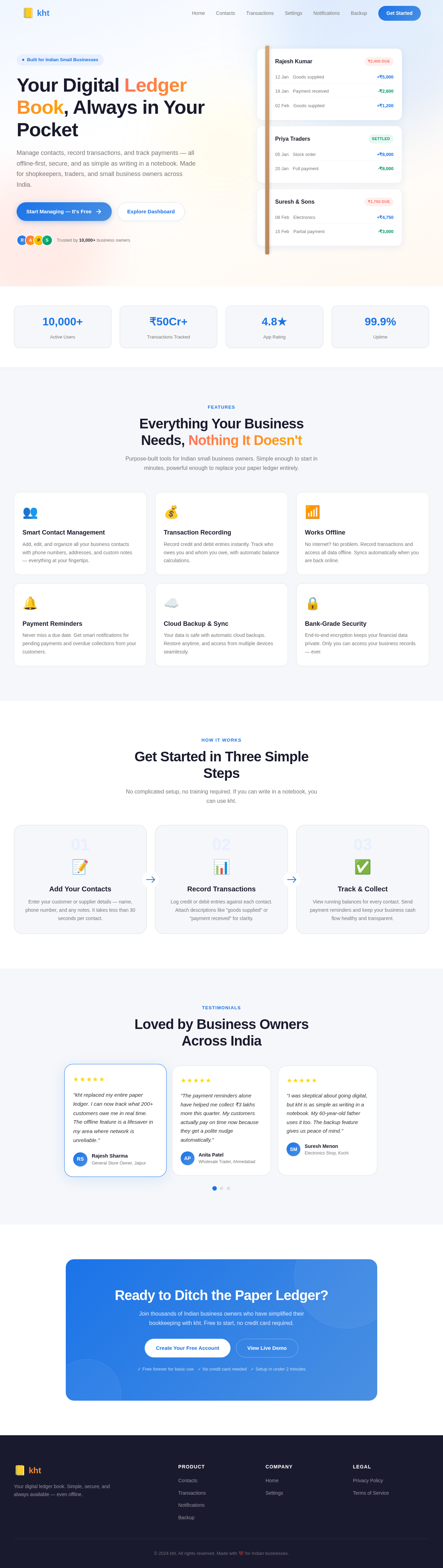
The "kht" app will feature an interactive "Ledger Book" homepage. Users will see a digital ledger book that opens with a realistic page-turning animation. Each page represents a contact, and users can swipe to flip through pages. Tapping a page will zoom into detailed contact and transaction information. The design will use framer-motion for smooth animations and gsap for page transitions, creating an engaging and memorable user experience.

Interaction Model & Motion Direction

The landing page will employ a "parallax" interaction model, creating a layered depth effect as users scroll through the app. Decorative elements will move at different speeds, enhancing the storytelling aspect of the app. Internal pages will maintain a "static" interaction model for clarity and ease of use.

Page 4 of 5

Non-Functional Requirements

  • The app must ensure data security and privacy for all user information.
  • It should perform efficiently across various Android devices.
  • The app must support offline functionality.
  • It should provide quick responsiveness and reliable performance.

Tech Stack

  • Frontend: React Native for mobile app development.
  • Backend: Python with FastAPI.
  • Database: MySQL or MariaDB, using Alembic for migrations.
  • AI Models: Not applicable.
  • AI Tools: Not applicable.
  • Local Orchestration: Docker, docker-compose.
  • Server-side Orchestration: Kubernetes.

Assumptions and Constraints

  • The app will be developed for Android devices only.
  • The primary language for the app is English.
  • Users are assumed to have basic smartphone literacy.
Page 5 of 5

Glossary

  • Contact: An individual or entity with whom the user interacts and records transactions.
  • Transaction: A record of financial or other exchanges between the user and a contact.
  • UI: User Interface, the visual part of the app that users interact with.
  • Offline Mode: The ability of the app to function without an internet connection.
Landing design preview
Landing: View App
Settings: Configure App
Settings: Set Security Protocols
Settings: Manage Backup
Settings: Configure Sync
Settings: View Data Privacy
Notifications: Manage Alerts