keen-menu
 Sharifullah Waziri
Full Stack App O Mobile App & Website 456 For the one functional site preview, go all out: - Parallax scrolling hero with the business name and a CTA - About section with human-written copy based on the business details - Menu/services section with realistic items and prices - Gallery with real stock photos matched to the cuisine/business - Reviewalection - 3-4 reviews that sound like real Google reviews (first namA, 83, cind ratings) - Location & hours with the address and click-to-call - Footer - Mobile responsive - Real Images, not placeholders

Comments (0)
Sign in to leave a comment
System Requirements
System Requirements Document (SRD)
Project Name: keen-menu
1. Introduction
The keen-menu project is a comprehensive digital solution designed to provide businesses with an engaging and functional online presence. This project includes both a mobile application and a responsive website, ensuring accessibility across all devices. The system will cater to businesses of various industries, offering features like a dynamic menu/services section, a gallery, customer reviews, and essential business details such as location and hours.
This document outlines the system requirements for keen-menu, ensuring that the project meets the needs of its target users while maintaining scalability and adaptability for future enhancements.
2. System Overview
The keen-menu system aims to deliver a seamless user experience for businesses and their customers. The platform will include:
- A visually appealing and interactive website with parallax scrolling and responsive design.
- A mobile application for on-the-go access to business information.
- Features tailored to showcase business offerings, including menus/services, galleries, reviews, and contact details.
- Integration with real-world data, such as realistic menu items, stock photos, and customer reviews, to create an authentic and trustworthy user experience.
- Support for both administrators (business owners) and end-users (customers).
The system will be developed using modern technologies, ensuring scalability, security, and ease of use.
3. Functional Requirements
As a User:
- I should be able to view a parallax scrolling hero section with the business name and a call-to-action (CTA).
- I should be able to browse an about section with human-written content about the business.
- I should be able to view a menu/services section with realistic items and prices.
- I should be able to explore a gallery with real stock photos matched to the business type.
- I should be able to read a reviews section with 3-4 realistic customer reviews, including names, ratings, and comments.
- I should be able to find the business location and hours, with a click-to-call feature for easy contact.
- I should be able to access the website on mobile devices with a responsive design.
As an Admin:
- I should be able to update the business name, CTA, and hero section content.
- I should be able to add, edit, or delete menu/services items and their prices.
- I should be able to upload and manage gallery images.
- I should be able to moderate and manage customer reviews.
- I should be able to update location, hours, and contact details.
4. User Personas
1. Business Owner (Admin)
- Description: The primary user responsible for managing the business's online presence.
- Goals: To showcase their business offerings, attract customers, and provide accurate and up-to-date information.
- Needs: Easy-to-use tools for updating content, managing reviews, and uploading images.
2. Customer (User)
- Description: End-users who visit the website or app to learn more about the business.
- Goals: To explore the business offerings, view the menu/services, and find contact details.
- Needs: A visually appealing, easy-to-navigate interface with accurate and relevant information.
5. Visuals Colors and Theme
The keen-menu project will feature a modern and vibrant color palette that reflects professionalism and approachability.
- Background: #F9F9F9 (Soft Light Gray)
- Surface: #FFFFFF (Pure White)
- Text: #333333 (Deep Charcoal)
- Accent: #FF6F61 (Warm Coral)
- Muted Tones: #B0BEC5 (Cool Gray)
This palette ensures readability, visual appeal, and a welcoming atmosphere for users.
6. Signature Design Concept
The keen-menu homepage will feature an Interactive Parallax Scrolling Experience that immerses users in the business's story.
Key Features:
-
Dynamic Hero Section:
- A full-screen parallax scrolling effect with the business name prominently displayed.
- A bold call-to-action button (e.g., "Explore Our Menu" or "Contact Us") that changes color on hover.
- Subtle animations, such as floating elements or text that fades in as users scroll.
-
Interactive Menu/Services Section:
- Menu items displayed as interactive cards that "flip" to reveal details like descriptions and prices.
- Smooth transitions and hover effects for an engaging user experience.
-
Gallery with Lightbox Effect:
- Clicking on any image in the gallery opens a full-screen lightbox view with navigation arrows.
- Subtle zoom-in animation when hovering over images.
-
Review Section with Animated Ratings:
- Customer reviews displayed in a carousel format with animated star ratings.
- A "Write a Review" button for users to submit feedback.
-
Location & Hours Section:
- An interactive map with a pin marking the business location.
- Click-to-call and click-to-navigate buttons for easy access.
This design concept ensures that the keen-menu platform stands out as a modern, engaging, and user-friendly solution for businesses.
7. Non-Functional Requirements
- Performance: The system should load within 2 seconds on both desktop and mobile devices.
- Scalability: The platform should support up to 10,000 concurrent users.
- Security: All user data must be encrypted, and the system should comply with GDPR and CCPA regulations.
- Accessibility: The website and app must meet WCAG 2.1 AA standards.
- Localization: Support for multiple languages and regional settings, starting with English (US).
8. Tech Stack
Frontend:
- React for Web
- React Native for Mobile App
Backend:
- Python
- FastAPI
Database:
- MySQL (with Alembic for migrations)
AI Tools:
- GPT 5.4 for user-friendly responses
- Google Nano Banana for image generation
Local Orchestration:
- Docker
- docker-compose
Server-Side Orchestration:
- Kubernetes
9. Assumptions and Constraints
- The system will initially target businesses in the US, with USD as the default currency and EST as the default timezone.
- The platform will use real stock photos and realistic menu items for demonstration purposes.
- The system will require internet connectivity for full functionality.
10. Glossary
- Parallax Scrolling: A web design technique where background images move slower than foreground images, creating a 3D effect.
- CTA (Call-to-Action): A prompt that encourages users to take a specific action, such as "Contact Us" or "Explore Our Menu."
- Lightbox Effect: A feature that displays images in a larger view when clicked, often with navigation controls.
- WCAG 2.1 AA: Web Content Accessibility Guidelines, a set of standards for making web content accessible to people with disabilities.

Discover a Dining Experience Like No Other
Fresh flavors, warm ambiance, and unforgettable moments crafted with passion. Your next favorite meal is just a tap away.
About Keen Menu
Welcome to Keen Menu — your all-in-one digital platform designed to help businesses shine online. We believe every business deserves a beautiful, functional presence that connects with customers and tells a compelling story. From cozy neighborhood cafes to bustling service providers, we craft digital experiences that feel as inviting as walking through your front door.
Our platform brings together everything your customers need in one place: an interactive menu showcasing your offerings with vivid detail, a curated gallery that captures the essence of your brand, authentic customer reviews that build trust, and clear location and contact details so visitors can find you effortlessly. Every element is thoughtfully designed to drive engagement and keep your audience coming back.
Built with modern technology and a passion for great design, Keen Menu is more than just a website builder — it’s a partner in your growth. Whether you’re updating your seasonal specials, managing customer feedback, or uploading new photos from last weekend’s event, our intuitive tools make it simple. Your story matters, and we’re here to help you tell it.

Our Menu
Crafted with the finest ingredients and a passion for flavor. Explore our carefully curated selection of dishes and drinks.
 Popular
Bruschetta Classica
Toasted artisan bread topped with vine-ripened tomatoes, fresh basil, garlic, and extra virgin olive oil.
Bruschetta Classica
Hand-selected vine-ripened tomatoes are diced and combined with aromatic fresh basil, minced garlic, and a generous drizzle of premium extra virgin olive oil. Served on perfectly toasted artisan bread slices.
- Vegetarian Friendly
- Freshly Prepared
- Serves 2-3

Grilled Salmon Fillet
Atlantic salmon grilled to perfection, served with roasted seasonal vegetables and lemon herb butter.
Grilled Salmon Fillet
Premium Atlantic salmon fillet, seasoned with our signature herb blend and grilled over an open flame. Accompanied by a medley of roasted seasonal vegetables and finished with a house-made lemon herb butter sauce.
- Gluten Free
- High Protein
- Chef Recommended
 New
NewTiramisu
Classic Italian dessert with layers of espresso-soaked ladyfingers, mascarpone cream, and cocoa.
Tiramisu
Our signature tiramisu features delicate ladyfingers soaked in freshly brewed espresso, layered with a velvety mascarpone cream and dusted with premium Dutch cocoa powder. Made fresh daily.
- Contains Dairy
- Made Fresh Daily
- Single Serving

Caesar Salad
Crisp romaine lettuce, house-made croutons, shaved Parmesan, and our signature Caesar dressing.
Caesar Salad
Freshly harvested romaine lettuce hearts are tossed with our house-made garlic croutons, generous shavings of aged Parmesan cheese, and a creamy signature Caesar dressing prepared from a time-honored recipe.
- Add Chicken +$5
- Add Shrimp +$7
- Serves 1-2
 Chef Special
Filet Mignon
Premium 8oz center-cut beef tenderloin, served with truffle mashed potatoes and asparagus.
Filet Mignon
An exquisite 8-ounce center-cut filet, seared to your preferred doneness. Presented atop creamy truffle-infused mashed potatoes alongside tender roasted asparagus spears with a red wine reduction.
- Premium Cut
- Cooked to Order
- Pairs with Cabernet

Craft Lemonade
Freshly squeezed lemonade infused with lavender and a touch of honey, served over ice.
Craft Lemonade
Hand-squeezed lemons combined with house-infused lavender syrup and locally sourced wildflower honey. Served tall over crushed ice with a sprig of fresh lavender and a lemon wheel.
- Non-Alcoholic
- Freshly Squeezed
- Refills Available

Mushroom Risotto
Creamy Arborio rice slow-cooked with wild mushrooms, Parmesan, and white truffle oil.
Mushroom Risotto
Arborio rice is lovingly stirred to creamy perfection with a rich mushroom broth, a selection of wild forest mushrooms, aged Parmesan, and a finishing drizzle of aromatic white truffle oil.
- Vegetarian
- Gluten Free
- Rich & Creamy
 Signature
Chocolate Lava Cake
Warm dark chocolate cake with a molten center, served with vanilla bean ice cream.
Chocolate Lava Cake
A decadent dark chocolate cake with a perfectly molten center that flows when broken open. Served warm alongside a scoop of Madagascar vanilla bean ice cream and garnished with fresh raspberries.
- Contains Dairy
- Allow 12min Prep
- Must Try
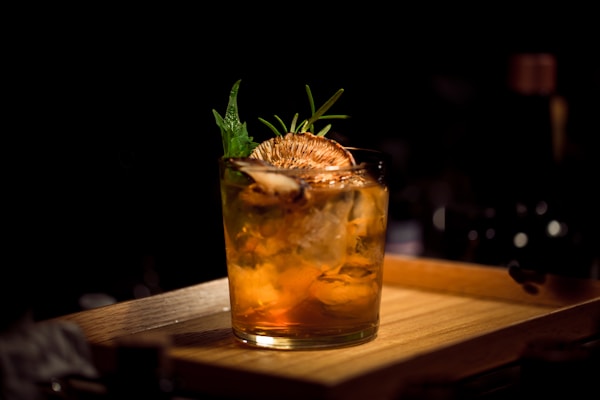
Espresso Martini
Freshly brewed espresso shaken with premium vodka, coffee liqueur, and a touch of vanilla.
Espresso Martini
A sophisticated cocktail combining freshly pulled double espresso with premium vodka, Kahlua coffee liqueur, and a hint of vanilla syrup. Vigorously shaken and strained into a chilled coupe glass.
- Contains Alcohol
- 21+ Only
- Handcrafted
Gallery
A glimpse into our space, cuisine, and memorable moments


Customer Reviews
Hear what our guests have to say about their experience
Find Us
Business Hours
Phone
(212) 555-0198Ready to Experience Keen Menu?
Discover our curated selection of dishes, explore our gallery, and see why our customers keep coming back. Your next favorite meal is just a tap away.
Explore Our Menu
No comments yet. Be the first!