jungle-tic
 Meghna Rajawat
make me a tic tac toe app

Comments (0)
Sign in to leave a comment
System Requirements
System Requirements Document for jungle-tic
1. Introduction
jungle-tic is a small, local, two-player tic tac toe game delivered as a playful jungle toy-box. The product intent is a bright, immediate, toy-like object that a person picks up and fiddles with for two minutes — not a productivity tool, not an account-based service, and not a networked game. A single device is passed between two players who take turns placing marks on a 3×3 grid until the game resolves to a win, a loss, or a draw.
The audience is anyone with a spare minute, on phone or laptop. The experience is deliberately local and ephemeral: two players share one board on one screen, and the whole product is the board, the pieces, the turn indicator, the outcome, and the ability to start another match.
2. System Overview
jungle-tic is a client-side game with two first-party pages:
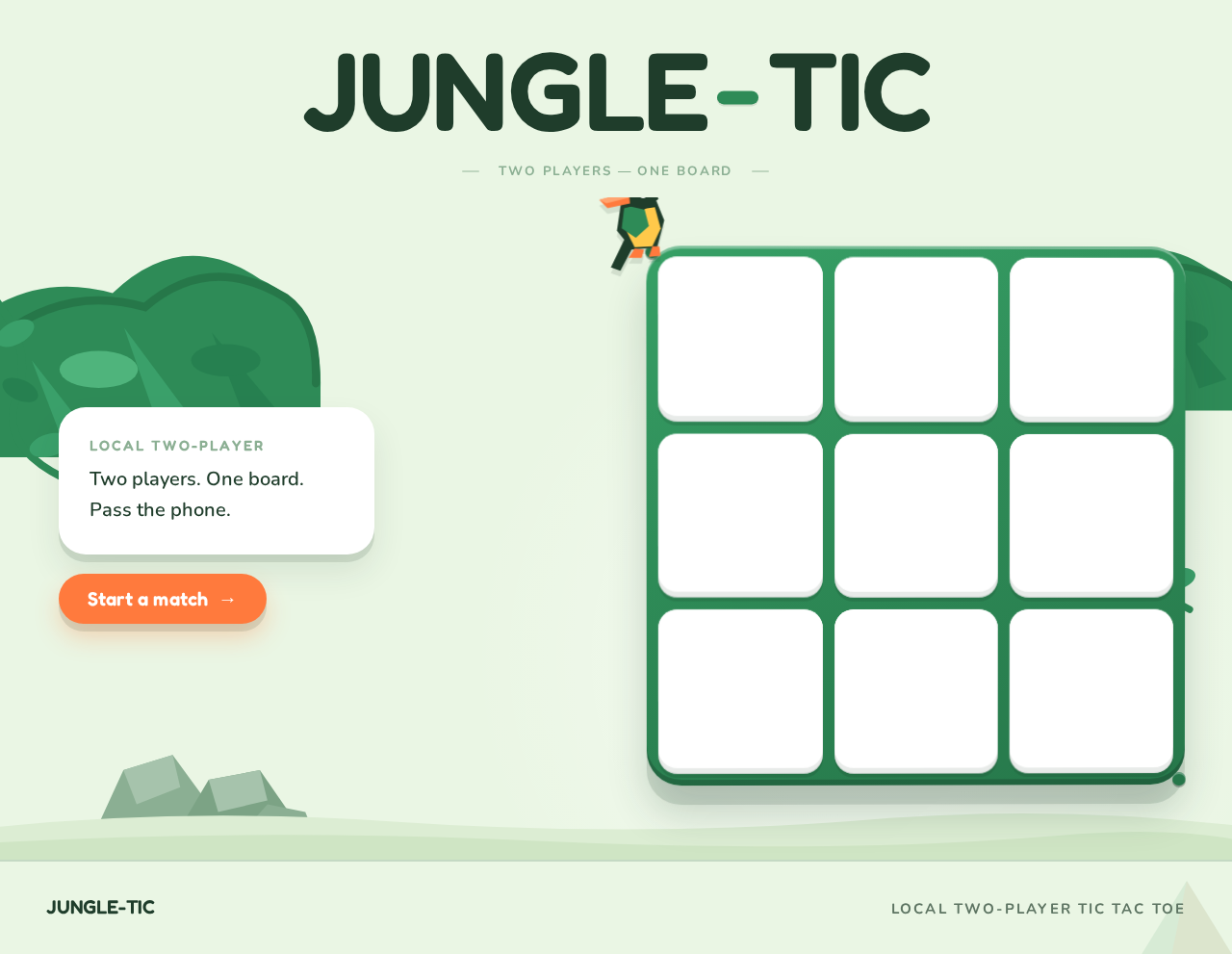
- Landing — the anonymous public entry surface. It presents the wordmark, explains in one line what the product is ("Two players. One board. Pass the phone."), and offers the primary call to action that begins a match.
- Game — the complete local tic tac toe lifecycle: starting a new game, alternating marks on the 3×3 board, showing the win/loss/draw outcome, and resetting or starting another game.
The only accepted human actor is the Player. Both players in a match are instances of that same role sharing one device; there is no separate opponent persona, no account, no login, and no server-side matchmaking. The board, the turn state, the score counts, and the outcome are all local to the session.
2a. Product Interpretation and Delivery Boundary
Delivery. jungle-tic is delivered as a first-party custom web UI. Both pages are application-owned and anonymously reachable — the Planning Scope assigns access_requirement: none to Landing and Game, and nothing in the accepted requirements asks a player to identify themselves, sign in, or resume a match later. A match is a short, local, in-the-moment activity between two people holding the same device, so there is no durable actor-specific state that must be privately owned or resumed, and therefore no identity establishment or verification step is introduced.
Current boundary. Current scope is exactly: a Landing entry surface, and a Game surface that runs a complete local two-player tic tac toe match — turn alternation on a 3×3 grid, resolution to win/loss/draw, and the ability to reset or start another match.
Future boundary. Nothing beyond the current scope is committed. Online or networked play, computer opponents, accounts, persistent history, and leaderboards are not part of this product and are not planned here.
Exclusions. No blue, indigo, or violet primaries or accents. No centred headline-plus-subtext-plus-button hero with a gradient blob. No flat text X and O glyphs. No grids of identical hover-lift cards. No Inter, Roboto, Arial, Helvetica, system-ui, or Poppins for headings or body text. No photorealistic jungle photography or stock imagery. No editorial serif headlines or Swiss-grid tabular layouts. No long easing curves or slow cinematic transitions. The generic indigo/blue-on-white SaaS template is forbidden for this project.
2c. Page Content and Component Coverage
Landing
- Information and state. The page is a single full-viewport "clearing." It carries the wordmark JUNGLE-TIC, the one-line product statement "Two players. One board. Pass the phone.", and the primary call to action. There is no loading state, no empty state, and no error state — the page is static content plus one navigation action.
- Primary action. The coral CTA pill "Start a match" navigates the player to the Game page and begins a fresh match.
- Supporting actions. None. The landing page does not start a game in place, does not configure anything, and does not collect input.
- Domain entities. None persisted. The page references the product name and the two-player local premise only.
- Component responsibilities.
- Wordmark — "JUNGLE-TIC" set in Fredoka SemiBold at
clamp(44px, 9vw, 128px), tight letter-spacing, running edge-to-edge across the top of the viewport. - Hero board object — a 3D 3×3 board: a thick 12px rounded-square green bezel (#2E8B57) holding nine white tiles, floating right-of-centre at roughly 46vw, idling with a slow 6s tilt (rotateX 2deg / rotateY 3deg) that the cursor nudges. On the landing page this board is a display object, not an interactive play surface.
- Toucan prop — a small low-poly toucan perched on the board's top-left corner.
- Label card — a white capsule card at 28px radius carrying the line "Two players. One board. Pass the phone." in 20px Nunito, positioned to the left of the board.
- CTA pill — the coral (#FF7A3D) pill labelled "Start a match", pinned beneath the label card.
- Jungle props — flat-shaded canopy leaf cluster, three rounded rocks, and two vine arcs composing the clearing.
- Wordmark — "JUNGLE-TIC" set in Fredoka SemiBold at
- States. Default: the clearing renders with the idling board tilt. Reduced motion: the idle tilt is removed and the board holds a static pose; all readable text and the CTA remain whole and fully visible. Narrow viewport (375px): the wordmark scales down via its clamp minimum, the label card and CTA stack beneath it, and the board scales to fit without covering any text or control.
Game
- Information and state. The page owns the live match: the 3×3 board with its nine tiles and any placed pieces, the active turn, the two score counts, and the resolved outcome when the match ends. The board is centred at a 44vw max-width on desktop; at 375px the HUD stacks above the board and the board fills the width minus 24px gutters.
- Primary action. A player taps or clicks an empty tile to place their mark. This is the core repeated action of the match.
- Supporting actions. "New match" — a full pill that resets the board, clears placed pieces, and begins a fresh match. It flips its fill from white to coral on hover, and pressing it shakes the whole board for 200ms as it clears.
- Domain entities.
- Board — a 3×3 grid of nine tiles, each either empty or holding a mark.
- Mark — either X (canopy green #2E8B57) or O (coral #FF7A3D), drawn as low-poly extruded blocks with a visible bevel, never flat text glyphs.
- Turn — which mark is currently active; X moves first.
- Score — two ruled numbers, one per mark, counting matches won in the current session.
- Outcome — win for X, win for O, or draw.
- Component responsibilities.
- HUD strip — a single thin capsule strip above the board reading "YOUR TURN — X" with the active player's piece shown as a small low-poly block rather than a text label; the two score counts sit as ruled numbers either side.
- Board tray — the thick 12px rounded-square green bezel holding nine white tiles at 20px radius; tiles depress 4px on press with a 120ms ease-out.
- Piece layer — placed pieces drop in from 24px above with a soft squash-and-stretch using
cubic-bezier(0.34,1.56,0.64,1)over 260ms. - Winning line — a hand-drawn coral stroke that sweeps left-to-right across the three winning tiles in 400ms.
- Outcome banner — the win/draw banner set in Fredoka at
clamp(28px, 5vw, 56px). - Reset pill — the "New match" control described above.
- States.
- Loading: none — the match state is local and available immediately.
- Empty: a fresh board with nine empty tiles, turn set to X, scores carried over from the session.
- In progress: alternating marks placed on empty tiles; the HUD reflects the active mark after every placement.
- Success: three marks in a row, column, or diagonal — the winning line draws across the three tiles and the outcome banner names the winner; the winning mark's score count increments.
- Draw: all nine tiles filled with no three in a row — the outcome banner declares a draw and no score count changes.
- Error / recovery: an occupied tile cannot be marked — the tap is rejected and the turn does not advance. After a match resolves, the board accepts no further marks until "New match" is pressed.
- Reduced motion: pieces fade in over 150ms, the idle tilt is removed, and the winning line appears instantly.
3. Functional Requirements
FR-1 — Start a match from the landing page. explicit
As a Player, I should be able to start a match from the landing page so that I can begin playing immediately.
- Trigger: the player activates the "Start a match" CTA pill on Landing.
- Observable result: the Game page opens with a fresh board — nine empty tiles, turn set to X, and the HUD reading "YOUR TURN — X".
- Access state: anonymous; no identity is required to reach or use either page.
- Failure/recovery: if the Game page cannot be reached, the player remains on Landing with the CTA still available to retry.
- Continuation: the player places the first mark.
FR-2 — Place a mark on an empty tile. explicit
As a Player, I should be able to place my mark on an empty tile on my turn so that the match progresses.
- Trigger: the player taps or clicks an empty tile while it is their turn.
- Observable result: the tile depresses 4px on press, the player's low-poly mark drops into the tile with squash-and-stretch, and the tile becomes occupied.
- Access state: anonymous.
- Failure/recovery: tapping an occupied tile is rejected — no mark is placed and the turn does not advance.
- Continuation: the turn passes to the other mark and the HUD updates.
FR-3 — Alternate turns between the two marks. explicit
As a Player, I should see whose turn it is so that the two players can alternate correctly on one device.
- Trigger: every successful mark placement.
- Observable result: the HUD capsule strip updates to show the active player's piece as a small low-poly block alongside the "YOUR TURN" label; X moves first, then O, alternating.
- Access state: anonymous.
- Failure/recovery: a rejected placement leaves the turn indicator unchanged.
- Continuation: the newly active player places the next mark.
FR-4 — Resolve the match to a win. explicit
As a Player, I should see the match resolve when three of my marks line up so that I know I have won.
- Trigger: a placement that completes three matching marks in a row, column, or diagonal.
- Observable result: a hand-drawn coral stroke sweeps left-to-right across the three winning tiles in 400ms, the outcome banner names the winner in Fredoka at
clamp(28px, 5vw, 56px), and that mark's score count increments. - Access state: anonymous.
- Failure/recovery: none — the outcome is terminal for the match.
- Continuation: the board accepts no further marks until "New match" is pressed.
FR-5 — Resolve the match to a draw. explicit
As a Player, I should see the match resolve to a draw when the board fills with no line so that the match ends fairly.
- Trigger: the ninth mark is placed with no three in a row, column, or diagonal.
- Observable result: the outcome banner declares a draw; no score count changes.
- Access state: anonymous.
- Failure/recovery: none — the outcome is terminal for the match.
- Continuation: the board accepts no further marks until "New match" is pressed.
FR-6 — Reset and start another match. explicit
As a Player, I should be able to start a new match so that we can play again without leaving the page.
- Trigger: the player presses the "New match" pill.
- Observable result: the whole board shakes for 200ms and clears; all nine tiles return to empty, the turn resets to X, and the session score counts are preserved.
- Access state: anonymous.
- Failure/recovery: if the reset does not take effect, the pill remains available to press again.
- Continuation: the player places the first mark of the new match.
FR-7 — Track session score. required_inference
As a Player, I should see how many matches each mark has won so that repeated matches on one device have a running result.
- Trigger: a match resolving to a win.
- Observable result: the winning mark's ruled score number increments; the two counts sit either side of the HUD strip.
- Access state: anonymous; the counts are local to the session and are not persisted or attributed to an identity.
- Failure/recovery: a draw leaves both counts unchanged.
- Continuation: the counts carry into the next match started with "New match".
- Rationale: the accepted Game lifecycle includes resetting and starting another game on the same device; a running count is the minimal observable state that makes repeated matches meaningful, and it introduces no new user goal, data operation, or destination.
FR-8 — Reach the game without an account. explicit
As a Player, I should be able to play without signing in so that a two-minute game starts instantly.
- Trigger: opening the product.
- Observable result: Landing renders anonymously and "Start a match" leads directly to a playable board.
- Access state: anonymous on both pages; no identity establishment, verification, or account management exists.
- Failure/recovery: not applicable.
- Continuation: the match proceeds.
4. User Personas
Player
Product context. The Player is one of the two people sharing a single device for a short, local match of tic tac toe. They arrive with a spare minute — on a phone passed between two people, or on a laptop with someone sitting alongside. They are not signing up for anything, not building a profile, and not returning to a saved game; the whole value is the two minutes in front of them.
Primary goal. Get into a match immediately, take turns on a clear 3×3 board, and see the result — win, loss, or draw — without any setup friction.
Distinct accepted responsibilities.
- Starting a match from the landing page.
- Placing their mark on an empty tile on their turn.
- Reading the turn indicator to know when it is their move and handing the device over when it is not.
- Reading the outcome when the match resolves.
- Pressing "New match" to play again.
Relevant inputs and decisions. Which empty tile to claim on their turn; whether to start another match after the current one resolves. The Player makes no configuration decisions — there is nothing to set up, name, or choose before playing.
Interactions with other accepted participants. The Player's counterpart is the second Player sharing the same device. The two are the same role, distinguished only by their mark: X moves first, O moves second, and the HUD capsule strip tells them whose turn it is so the device can be passed correctly. Neither player has a separate account, a separate view, or a separate destination.
Observable success. The board shows their mark in the tile they chose, the turn indicator flips to the other mark, and at the end of the match the winning line or the draw banner tells them exactly how it finished.
What makes this role distinct. The Player is simultaneously the initiator and the recipient of every state change in the product: they cause each placement and they are the one who must read the resulting turn, outcome, and score. There is no administrator, no spectator, and no operator behind them — the entire product is the surface they touch.
5. Core User Flows
Flow 1 — Start a match from the landing page
- The Player opens jungle-tic. The Landing page renders as a full-viewport clearing: the wordmark JUNGLE-TIC spans the top edge-to-edge in Fredoka SemiBold, the low-poly 3×3 board floats right-of-centre with a toucan perched on its top-left corner, idling with a slow 6s tilt that the cursor nudges, and the white capsule card reading "Two players. One board. Pass the phone." sits to its left with the coral "Start a match" pill pinned beneath it.
- The Player reads the one-line premise and understands this is a local two-player game on one device.
- The Player activates the "Start a match" pill.
- The Game page opens with a fresh board: nine empty white tiles inside the green bezel tray, the HUD capsule strip reading "YOUR TURN — X" with a small low-poly green X block, and the two score counts at zero either side.
- Continuation: the Player places the first mark (Flow 2).
Flow 2 — Play a match to a win
- The Player whose turn it is taps an empty tile. The tile depresses 4px over 120ms, and their low-poly mark — green X or coral O — drops in from 24px above with a soft squash-and-stretch over 260ms.
- The HUD capsule strip updates to show the other mark as the active piece. The Player hands the device to the second Player.
- The second Player taps an empty tile and their mark drops in. The turn indicator flips back.
- Steps 1–3 repeat, each placement landing on an empty tile only. A tap on an occupied tile is rejected: no mark appears and the turn does not advance, so the Player simply chooses a different tile.
- On the placement that completes three matching marks in a row, column, or diagonal, a hand-drawn coral stroke sweeps left-to-right across the three winning tiles in 400ms, and the outcome banner names the winner in Fredoka at
clamp(28px, 5vw, 56px). - The winning mark's ruled score count increments.
- The board accepts no further marks. Continuation: either Player presses "New match" (Flow 4).
Flow 3 — Play a match to a draw
- The two Players alternate placements as in Flow 2, each mark landing on an empty tile with the turn indicator flipping between them.
- On the ninth placement the board is full with no three marks in a line.
- The outcome banner declares a draw. Neither score count changes.
- The board accepts no further marks. Continuation: either Player presses "New match" (Flow 4).
Flow 4 — Start another match
- With a match resolved — win or draw — either Player presses the "New match" pill. The pill flips its fill from white to coral on hover as they approach it.
- The whole board shakes for 200ms and clears: all nine tiles return to empty, the winning line and outcome banner are removed, and the turn resets to X with the HUD reading "YOUR TURN — X".
- The session score counts are preserved, so the running result of the sitting remains visible.
- Continuation: the Player places the first mark of the new match (Flow 2).
Flow 5 — Play with reduced motion enabled
- The Player opens jungle-tic with
prefers-reduced-motionactive. The Landing page renders the same clearing with the idle board tilt removed and the board held in a static pose; the wordmark, label card, and CTA remain whole and fully visible. - The Player activates "Start a match" and the Game page opens as in Flow 1.
- Placed pieces fade in over 150ms instead of dropping with squash-and-stretch, and the winning line appears instantly rather than sweeping.
- All other behaviour — turn alternation, outcome resolution, score counts, and "New match" — is unchanged.
6. Visuals, Colors and Theme
The muse is Bruno Simon, and the headline idea is "Playable jungle toy-box": the page is a toy you play with, not a dashboard you read. The register is playful, immediate, and toy-like — a bright plastic object on a table.
Colour tokens (light mode).
| Role | Hex | Use |
|---|---|---|
| Background | #EAF6E4 | Pale leaf-mist ground — sunlight through canopy |
| Surface | #FFFFFF | The nine board tiles and the label card |
| Text | #1F3D2B | Deep jungle-ink for all readable text |
| Primary | #2E8B57 | Vine/canopy green — board bezel frame and the X pieces |
| Accent | #FF7A3D | Coral-orange — the CTA, the O pieces, and the winning-line stroke only |
| Muted | #8BAF93 | HUD labels, rules, and secondary copy |
One hot signal on a green field. No blue anywhere. No gradients on text surfaces.
Typography.
- Headings: Fredoka, SemiBold at 600, tight-to-normal tracking, sentence case with occasional all-caps micro-labels at 0.14em tracking. Huge display sizes for the hero wordmark and the win/draw banner so the type reads as a toy label, not a headline.
- Body: Nunito.
- Scale: 1.333 modular — 84 / 56 / 36 / 28 / 20 / 17 / 15.
- Display:
clamp(44px, 9vw, 128px)for the hero wordmark;clamp(28px, 5vw, 56px)for the outcome banner; 17px body at 1.6 line-height.
Shape language. Chunky rounded blocks and capsules. Board tiles at 20px radius. Buttons as full pills. Cards at 28px radius with a soft 0 8px 0 rgba(31,61,43,0.12) offset shadow so they read as physical toy pieces. The board frame is a thick 12px rounded-square green bezel, like a plastic tray. Piece marks are drawn as low-poly extruded shapes with a visible bevel — never flat glyphs.
Spacing rhythm. Generous, toy-like breathing room around the board as the dominant object; a slim HUD strip above and a single pill below, with no sidebars and no card grids.
Imagery style. Low-poly 3D jungle props rendered in CSS 3D or a small Three.js scene: a flat-shaded canopy leaf cluster, three rounded rocks, two vine arcs, and a small toucan perched on the board frame. Pieces are low-poly X and O blocks in green and coral. No photography, no stock people, no flat clip art, no gradient blobs.
7. Signature Design Concept
The clearing and the tray. The first screen is a sunlit low-poly clearing, not a SaaS hero. The wordmark JUNGLE-TIC is set in Fredoka SemiBold at clamp(44px, 9vw, 128px) with tight letter-spacing, spanning the viewport width edge-to-edge across the top — the type is the sign. Beneath it, the dominant element is a 3D 3×3 board: a thick rounded green bezel (#2E8B57) holding nine white tiles, floating right-of-centre at roughly 46vw and idling with a slow 6s tilt that the cursor nudges. A small low-poly toucan perches on its top-left corner. To the left, a white capsule card at 28px radius carries "Two players. One board. Pass the phone." in 20px Nunito, with the coral CTA pill "Start a match" pinned beneath it.
The composition is an asymmetric toy still-life with the board as the object: no centred headline, no subtext stack, no blue button, no gradient blob. The board is the product, and the page presents it as something you pick up.
8. Interaction Model & Motion Direction
Interaction Model: Animated Motion Tempo: expressive Hero Dimensionality: dimensional_css
Landing Hero Motion Brief.
- Focal subject: the low-poly 3×3 board — a thick rounded green bezel tray with nine white tiles — floating right-of-centre at ~46vw, with a small low-poly toucan perched on its top-left corner.
- Input → transformation → outcome thesis: as the cursor moves across the clearing, the board's idle tilt is nudged — the slow 6s rotateX 2deg / rotateY 3deg float responds to the pointer, so the still-life reads as a physical object sitting in the light rather than a rendered image. The transformation is purely presentational; it changes no game state and starts nothing.
- Motion vocabulary: physics-driven and bouncy. Tiles depress 4px on press with a 120ms ease-out. Placed pieces drop in from 24px above with a soft squash-and-stretch using
cubic-bezier(0.34,1.56,0.64,1)over 260ms. The winning line draws as a coral stroke left-to-right in 400ms. The landing board idles with a very slow 6s floating tilt that the cursor nudges. - Composed first frame: the wordmark spanning the top edge-to-edge, the board floating right-of-centre mid-tilt with the toucan on its corner, the white capsule card and coral CTA pill to the left, and the low-poly canopy, rocks, and vine arcs composing the clearing around them.
- Reduced-motion state: the idle tilt is removed and the board holds a static pose; pieces fade in over 150ms; the winning line appears instantly. All readable text and controls remain whole and fully visible.
9. Non-Functional Requirements
NFR-1 — Readable text and controls stay whole. explicit
At 375px, 768px, and 1280px, headlines, the wordmark, labels, numbers, card text, and controls stay entirely inside the viewport and their container, wrapping or scaling (for example font-size: clamp(...) with its mobile size) to fit. No other element covers any part of them. Where the creative direction asks readable text or a control to be cropped, clipped, covered, or run off an edge, it is kept whole and the gesture is carried with imagery or decoration instead.
NFR-2 — Imagery and decoration may bleed; readable content may not. explicit
A photograph, artwork, shape, texture, or animation may be cropped, bled off an edge, rotated, overlapped, or cut exactly as the direction asks, as long as it covers no readable text or control.
NFR-3 — Reduced-motion support. explicit
With prefers-reduced-motion, the product provides a usable static arrangement: the idle tilt is removed, pieces fade in over 150ms, and the winning line appears instantly. All readable text and controls remain whole and fully visible.
NFR-4 — No blue. explicit
No blue, indigo, or violet primaries or accents anywhere in the product. The palette is a green ground with one coral signal only.
NFR-5 — Local, single-device play. explicit
The match runs locally on one device shared by two players. There is no networked play, no matchmaking, and no server-side match state.
NFR-6 — Immediate availability. required_inference
The Game page presents a playable board with no loading state, because the match state is local and available immediately. Rationale: the accepted lifecycle begins with starting a match and placing a mark; any intervening wait would be an invented step.
NFR-7 — Responsive board sizing. explicit
The Game page centres the board at a 44vw max-width on desktop; at 375px the HUD stacks above the board and the board fills the width minus 24px gutters. No sidebars and no card grids.
10. Tech Stack
- Frontend: React — a single client-side application serving the Landing and Game pages.
[Default — not specified by user] - Styling: CSS with the direction's tokens — Fredoka and Nunito webfonts, the specified hex palette, 20px tile radius, 28px card radius, full-pill buttons, and the
0 8px 0 rgba(31,61,43,0.12)offset shadow.[Default — not specified by user] - 3D / dimensional rendering: CSS 3D transforms for the board tilt and piece extrusion, with an optional small Three.js scene for the low-poly jungle props and toucan, as the creative direction allows.
[Default — not specified by user] - Backend: none required. The accepted product is a local two-player game with no accounts, no persistence, and no server-side match state.
[Default — not specified by user] - Storage: none. Session score counts live in client memory for the duration of the sitting.
[Default — not specified by user]
11. Assumptions and Constraints
Assumptions.
- A1. Both players share one device and one screen; the device is physically passed between turns.
[Assumption — grounded in the accepted "Pass the phone." premise] - A2. X always moves first, and the two players are distinguished only by their mark.
[Assumption — the accepted requirements specify alternating marks on a 3×3 grid without naming a first mover] - A3. Session score counts are held in client memory and reset when the page is reloaded.
[Assumption — no persistence is accepted] - A4. The landing board is a display object and is not itself playable; play happens on the Game page.
[Assumption — the accepted lifecycle places starting a match on the entry surface and the match itself on the Game surface]
Constraints.
- C1. No blue, indigo, or violet primaries or accents.
explicit - C2. No centred headline-plus-subtext-plus-button hero with a gradient blob.
explicit - C3. No flat text X and O glyphs — pieces are low-poly physical blocks.
explicit - C4. No grids of identical hover-lift cards.
explicit - C5. No Inter, Roboto, Arial, Helvetica, system-ui, or Poppins for any heading or body text.
explicit - C6. No photorealistic jungle photography or stock imagery of any kind.
explicit - C7. No editorial serif headlines or Swiss-grid tabular layouts.
explicit - C8. No long easing curves or slow cinematic transitions — motion is snappy, bouncy, and toy-like.
explicit - C9. The generic indigo/blue-on-white SaaS template is forbidden for this project.
explicit - C10. Both pages are anonymously reachable; no account, sign-in, or identity verification is introduced.
explicit
12. Glossary
- Match — one complete game of tic tac toe, from the first mark placed to its resolution as a win or a draw.
- Board — the 3×3 grid of nine tiles on which marks are placed.
- Tile — one of the nine cells of the board; either empty or occupied by a mark.
- Mark — a player's piece: X (canopy green #2E8B57) or O (coral #FF7A3D), drawn as a low-poly extruded block.
- Turn — the period during which one mark is active and may be placed; X moves first, then O, alternating.
- Winning line — three matching marks in a row, column, or diagonal, drawn over with a coral stroke.
- Draw — a match in which all nine tiles are filled with no winning line.
- Outcome banner — the Fredoka display text announcing the winner or the draw.
- HUD strip — the thin capsule strip above the board showing the active turn and the two session score counts.
- Session score — the running count of matches won by each mark during the current sitting, held in client memory.
- Clearing — the full-viewport low-poly jungle scene composing the Landing page.
- Player — the accepted human actor who plays tic tac toe against an opponent on a shared device.
JungleTic
Two players — one board
Two players. One board. Pass the phone.
JungleTic
Two players — one board
Two players. One board. Pass the phone.
No comments yet. Be the first!