jungle-start
 Diya Trivedi
start a project to build a simple single page design of the calculator

Comments (0)
Sign in to leave a comment
System Requirements
System Requirements Document for jungle-start
1. Introduction
jungle-start is a simple calculator delivered as a single page design. The product exists so that everyday users can perform casual arithmetic quickly and pleasantly: they enter numbers and arithmetic operators, and the page shows the computed result. The design intent is deliberately minimal — one page, one object — with the calculator itself as the entire experience rather than a multi-section application.
The audience is everyday people doing quick, casual calculations who want a delightful, tactile tool rather than a utilitarian spreadsheet. The single-page constraint is a hard product boundary: the calculator is presented as one page, and no additional pages, sections, or destinations are part of the current product.
2. System Overview
jungle-start is a client-facing, single-page calculator. The page presents a calculator surface — a display and a keypad — on which a user enters numbers and arithmetic operators and reads the computed result. The calculator is the anonymous public entry: no account, sign-in, or identity establishment is required to use it, and no durable user-specific state is created or resumed.
The only active human actor is the Calculator user, who opens the page, enters numbers and operators, reads the result, and clears or reuses the calculator for the next calculation. All computation and display behavior is owned by the single Calculator page; there is no separate backend workflow, provider surface, or external destination in the current product.
Current delivery is a custom single-page UI. The page is the working calculator itself — there is no marketing hero, no additional navigation, and no secondary destinations.
Removed from scope
- None — no concepts were explicitly removed by the user.
2a. Product Interpretation and Delivery Boundary
The product is one page and one object: a calculator. The page is publicly reachable without identity, because the accepted behavior — entering numbers and operators and seeing a computed result — requires no continuity, ownership, or commitment that would justify an account. Nothing is saved between visits, and no user-specific state is resumed.
Everything the user does happens on the single Calculator page: number entry, operator entry, result display, and clearing. There is no separate settings page, history page, or account area, and none is implied. The single-page constraint is treated as binding for the current product; any expansion beyond one page would be a future decision, not part of this document's current scope.
2c. Page Content and Component Coverage
Calculator
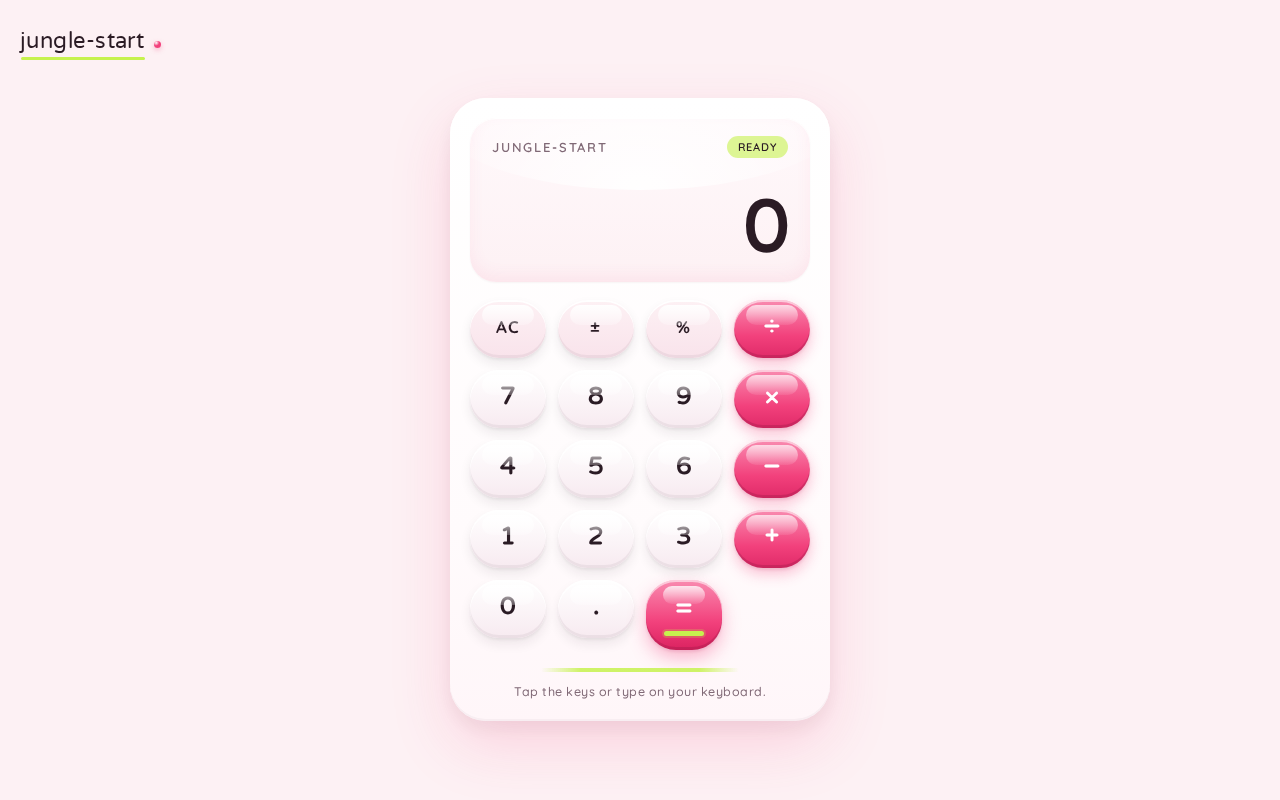
The single page of the product, and the anonymous public entry. It presents the calculator as one glossy card floating on a pale rose field, with a small wordmark top-left and no other sections.
Information and state
- Current display value: the number currently shown, set large in the display panel.
- Pending entry state: the digits and operator the user has entered so far, and whether the calculator is awaiting a first operand, an operator, or a second operand.
- Computed result state: the result shown after an operation is evaluated.
- Cleared state: the display reset to its initial value, ready for a new calculation.
Primary actions
- Enter digits (0–9) and a decimal point to build a number.
- Enter arithmetic operators (addition, subtraction, multiplication, division).
- Evaluate the entered expression to produce and display the result.
- Clear the calculator to begin a new calculation.
Supporting actions
- Continue from a displayed result into a new calculation.
Domain entities
- Display value (the current numeral shown).
- Pending operand(s) and pending operator.
- Computed result.
Component responsibilities
- Wordmark: small product wordmark, top-left, in Varela Round.
- Calculator card: the glossy white surface (32–40px radius, soft pink shadow) containing the display and keypad; max-width ~420px on desktop, near-full-width with 20px gutters on mobile.
- Display panel: occupies the top third of the card; shows the current value in large Varela Round numerals (clamp(48px, 12vw, 96px)); carries a curved glossy highlight arc across its top edge.
- Keypad: the 4×5 grid occupying the rest of the card; digit keys as white glossy pills, operator keys and the equals key in bubblegum pink, with the lime accent used sparingly on the equals key or display highlight.
- Decorative blobs: two oversized soft blob shapes (pink and lime) bleeding off the left and lower edges behind the card, decoration only, never overlapping text or keys.
States
- Loading: not applicable — the calculator is available immediately on page load with its initial display value.
- Empty: the initial state shows the calculator's starting display value with no pending operation.
- Success: after evaluation, the computed result is shown in the display; the user can continue from it or clear.
- Error: an invalid operation (for example division by zero) is surfaced in the display rather than silently producing a wrong value; the user can clear to recover.
- Recovery: clearing resets the display and pending state so the user can start a new calculation.
3. Functional Requirements
FR-1 — Single-page calculator presentation (explicit) As a Calculator user, I should see the calculator presented as a single page design, so that the whole experience is one simple, self-contained object.
- Trigger: the user opens the page.
- Observable result: the calculator — display and keypad — is presented on one page with no additional pages or sections.
- Access: anonymous; no identity required.
- Failure/recovery: not applicable.
- Continuation: the user proceeds to enter numbers and operators.
FR-2 — Enter numbers and arithmetic operators and see the computed result (explicit) As a Calculator user, I should enter numbers and arithmetic operators and see the computed result, so that I can perform everyday arithmetic.
- Trigger: the user presses digit keys and operator keys, then evaluates.
- Input: digits, a decimal point, and the arithmetic operators addition, subtraction, multiplication, and division.
- Observable result: the computed result is displayed in the display panel.
- Access: anonymous.
- Failure/recovery: an invalid operation is surfaced in the display; the user clears to recover.
- Continuation: the user continues from the displayed result into a new calculation or clears the calculator.
FR-3 — Clear the calculator and reuse it (required_inference) As a Calculator user, I should clear the calculator and reuse it for the next calculation, so that I can perform successive calculations without reloading the page.
- Trigger: the user activates clear.
- Observable result: the display resets to its initial value and pending entry state is discarded.
- Access: anonymous.
- Failure/recovery: not applicable.
- Continuation: the user begins a new calculation on the same page.
4. User Personas
Calculator user
Product context. An everyday person doing quick, casual arithmetic — not a data-heavy or regulated task. They arrive at the single page expecting a calculator they can use immediately, with no setup, sign-in, or navigation.
Primary goal. Enter numbers and arithmetic operators and read the correct computed result, then clear or reuse the calculator for the next calculation.
Distinct responsibilities.
- Builds a number using digit keys and a decimal point.
- Selects an arithmetic operator.
- Evaluates the expression to produce a result.
- Reads the result in the display.
- Clears the calculator to start a new calculation.
Inputs and decisions. Which digits and operator to enter, when to evaluate, and when to clear.
Interactions with other participants. None — the Calculator user is the only active human actor; there is no counterparty, recipient, or approver in the accepted behavior.
Observable success. The displayed result is correct for the entered expression, and the calculator can be cleared and reused for the next calculation.
5. Core User Flows
Flow 1 — Perform a calculation
- The Calculator user opens the page. The Calculator page loads with its initial display value and the keypad visible; no sign-in is required.
- The user presses digit keys (and a decimal point if needed) to build the first number. The display shows the entered number.
- The user presses an arithmetic operator (addition, subtraction, multiplication, or division). The calculator records the pending operator and awaits the second operand.
- The user presses digit keys to build the second number. The display shows the entered number.
- The user presses the equals key. The calculator evaluates the expression and the display shows the computed result.
- Failure/recovery: if the operation is invalid (for example division by zero), the display surfaces the error instead of a wrong value; the user presses clear to reset and retry.
- Continuation: the user either continues from the displayed result into a new calculation or clears the calculator.
Flow 2 — Clear and reuse the calculator
- The Calculator user, on the Calculator page, presses clear.
- The display resets to its initial value and any pending entry is discarded.
- The user begins a new calculation following Flow 1.
6. Visuals Colors and Theme
The creative direction is authoritative: sensual pop minimalism for a calculator that feels like a glossy toy, after the muse Karim Rashid. The headline idea: the calculator is the hero — one glossy candy object on a pale rose field.
Colour tokens (light mode)
- Background:
#FDF1F4(pale rose-white ground) - Surface:
#FFFFFF(glossy white calculator card) - Text:
#2A1B24(deep plum-ink for all readable text and numerals) - Primary:
#F2417C(bubblegum pink — operator keys and equals key) - Accent:
#C6F24E(lime — single hot accent, used sparingly on the equals key or display highlight) - Muted:
#8A7280(muted mauve for secondary labels)
Contrast: plum on white/rose is ~12:1; white on pink is ~4.6:1 (large numerals only).
Typography
- Headings: Varela Round — rounded futuristic geometric, soft terminals, medium-to-bold weight, slightly open tracking.
- Body: Quicksand.
- Scale: 1.25 modular rhythm — display numerals
clamp(48px, 12vw, 96px); section headingclamp(28px, 5vw, 44px); key labels 22–28px; body/labels 15–17px with 1.6 line-height.
Shape language. Everything is a capsule or soft blob: calculator body with 32–40px radius; keys as full pills (radius 999px) or squircle-rounded squares; curved section edges; a glossy highlight arc across the top of the display. No sharp corners anywhere; buttons carry a subtle inner top highlight and a soft drop shadow to read as glossy plastic.
Layout. Single centered column on the pale rose field: a small wordmark top-left, then the calculator as one large glossy card floating with a soft pink shadow, max-width ~420px on desktop and near-full-width with 20px gutters on mobile. Display occupies the top third of the card; the 4×5 keypad the rest. Generous outer whitespace; no other sections.
Imagery. No photography. The imagery is the calculator itself as a glossy 3D-feeling object: gradient-lit key surfaces, a soft specular arc, and two or three floating candy-coloured blob shapes (pink, lime, orange) drifting behind the card as decoration only, never overlapping text or keys.
Avoid. Blue/indigo primary or gradient-blob SaaS hero; Inter, Roboto, Arial, Helvetica, system-ui fonts; sharp corners, flat grey keypad, spreadsheet-grid look; photography or stock people; dense multi-section marketing page; neon-on-black or dark mode.
7. Signature Design Concept
The public entry is the calculator itself as a single glossy object floating on a pale rose field. The white calculator card sits centered (~420px on desktop, full-bleed-minus-gutters on mobile) with a large plum display numeral at clamp(48px, 12vw, 96px). Behind it, two oversized soft blobs — bubblegum pink #F2417C and lime #C6F24E — bleed off the left and bottom edges as pure decoration, giving the page a sculptural, non-rectangular silhouette.
Signature moves, all recomposing accepted content only:
- Candy-pill keys: each key is a full capsule with an inner top specular highlight and a soft offset shadow — pink for operators, white for digits, one lime equals key.
- Glossy display arc: a curved highlight sweeps across the top edge of the display panel, like light on a bubblegum bubble, with the current value set huge in Varela Round.
- Sculptural blobs: the pink and lime blobs behind the card, decoration only, never overlapping text or keys.
- Physical squish: key-press motion as a scale-down to 0.94 with a springy overshoot on release, plus a tiny scale-in morph of the result number.
- Lime seam: a slim horizontal ribbon of the lime accent used as the equals-key underline, echoing Rashid's glossy product seams.
There is no centered marketing headline and no blue button — the working calculator is the hero.
8. Interaction Model & Motion Direction
Interaction Model: Animated Motion Tempo: expressive Hero Dimensionality: layered_2d
Landing Hero Motion Brief
- Focal subject: the white calculator card as a single glossy object, with the large plum display numeral and the candy-pill keypad.
- Input → transformation → outcome thesis: a key press depresses the key (scale to 0.94 with springy overshoot on release) and, on evaluation, the display value morphs with a tiny scale-in — the outcome is the computed result shown large in the display. Only accepted calculator behavior is used.
- Motion vocabulary: expressive but soft — quick key depression with spring-back (150–220ms cubic-bezier overshoot), a tiny scale-in morph of each new result, and a slow glossy highlight drifting across the card top on idle.
- Composed first frame: the calculator card centered on the pale rose field, display showing its initial value, keypad fully visible, pink and lime blobs bleeding off the left and lower edges behind the card.
- Reduced-motion state: the idle highlight drift is removed and state changes are instant; the calculator remains fully usable and static.
9. Non-Functional Requirements
- Single-page constraint (explicit): the calculator design must be a single page. No additional pages, routes, or sections are part of the current product.
- Simplicity (explicit): the design must remain a simple single-page calculator; the calculator is the entire experience.
- Readable text and controls (creative direction): headlines, wordmarks, labels, numbers, and controls stay entirely inside the viewport and their container at 375px, 768px, and 1280px, wrapping or scaling (for example
clamp(...)) to fit; no other element covers any part of them. Decoration and motion may bleed off edges but must never cover readable text or controls. - Reduced motion (creative direction): with
prefers-reduced-motion, the idle highlight drift is removed and state changes are instant, while the calculator remains fully usable. - Accessibility contrast (creative direction): plum on white/rose is ~12:1; white on pink is ~4.6:1 and is used for large numerals only.
10. Tech Stack
- Frontend: React single-page application rendering the Calculator page.
- Styling: CSS with the specified palette, Varela Round and Quicksand fonts, capsule shape language, and motion tokens.
- Computation: client-side arithmetic within the page; no backend service is required for the accepted behavior.
- Deployment: static hosting of the single-page build.
11. Assumptions and Constraints
- Assumption (required_inference): the calculator supports the four basic arithmetic operations (addition, subtraction, multiplication, division) and decimal input, as the minimum needed to satisfy "enter numbers and arithmetic operators and see the computed result."
- Assumption (required_inference): clearing resets the calculator to its initial display value so it can be reused for the next calculation.
- Assumption (required_inference): no calculation history, memory functions, or saved state are part of the current product; the calculator is stateless between visits.
- Constraint (explicit): the product is a single page; no additional pages or destinations are in scope.
- Constraint (explicit): the design must remain simple.
- Constraint (creative direction): the palette, fonts, surfaces, tone, and layout specified in the creative direction are preserved; the generic indigo/blue-on-white SaaS template is forbidden.
12. Glossary
- Calculator page: the single page of the product, hosting the display and keypad.
- Display panel: the top third of the calculator card showing the current value in large numerals.
- Keypad: the 4×5 grid of digit, operator, equals, and clear keys.
- Pending entry state: the digits and operator entered so far before evaluation.
- Computed result: the value produced by evaluating the entered expression.
- Candy-pill key: a full-capsule key with an inner top specular highlight and soft offset shadow.
- Blob: an oversized soft decorative shape bleeding off the page edge, never overlapping text or keys.
jungle-start
Tap the keys or type on your keyboard.
jungle-start
Tap the keys or type on your keyboard.
No comments yet. Be the first!