jungle-scheduling
 EDIGA SATISH URK23CS1153
Scheduling and distributed management of resources i need a website and project for htis

Comments (0)
Sign in to leave a comment
System Requirements
jungle-scheduling — System Requirements Document (SRD)
Project: jungle-scheduling Prepared for: EDIGA SATISH (URK23CS1153) Region: India (IN) Version: 1.0.0 Date: 2025
1. Introduction
This System Requirements Document (SRD) defines the complete functional and non-functional requirements for jungle-scheduling, a web-based platform for scheduling and distributed management of resources. The system is designed to help teams, organizations, and administrators efficiently allocate, track, and manage resources across distributed environments.
This document serves as the single source of truth for the design, development, and deployment of the jungle-scheduling platform. It is intended for use by developers, designers, project managers, and stakeholders involved in the project.
2. System Overview
jungle-scheduling is a full-stack web application that enables organizations to manage resource scheduling in a distributed and collaborative manner. The platform supports multiple user roles — Admins, Managers, and Team Members — each with tailored access and capabilities.
Core capabilities include:
- Resource creation, assignment, and availability tracking
- Visual scheduling dashboards with calendar and timeline views
- Role-based access control for distributed teams
- Real-time notifications and conflict detection
- Reporting and analytics on resource utilization
The system is built for scalability, supporting multiple organizations or tenants, and is deployable via containerized infrastructure suitable for both local development and cloud production environments.
3. Functional Requirements
Resource Management
- As an Admin I should be able to create, update, and delete resources (e.g., people, equipment, rooms)
- As an Admin I should be able to assign resources to specific teams or departments
- As an Admin I should be able to view the full inventory of all resources across the organization
- As a Manager I should be able to request new resources and track their approval status
- As a Manager I should be able to view resource availability in real time
- As a Team Member I should be able to view resources assigned to me
Scheduling
- As an Admin I should be able to create and manage scheduling rules and constraints
- As a Manager I should be able to schedule resources for specific tasks, projects, or time slots
- As a Manager I should be able to view a calendar or timeline view of all scheduled resources
- As a Manager I should be able to detect and resolve scheduling conflicts automatically
- As a Team Member I should be able to view my own schedule and upcoming assignments
- As a Team Member I should be able to request changes to my schedule
Notifications & Alerts
- As a User I should be able to receive real-time notifications when my schedule changes
- As a Manager I should be able to receive alerts when a scheduling conflict is detected
- As an Admin I should be able to configure notification preferences for the entire organization
- As a Team Member I should be able to set personal notification preferences (email, in-app)
User & Role Management
- As an Admin I should be able to create, update, and deactivate user accounts
- As an Admin I should be able to assign roles (Admin, Manager, Team Member) to users
- As an Admin I should be able to manage organization-level settings and permissions
- As a User I should be able to log in securely using email and password
- As a User I should be able to reset my password via email
Reporting & Analytics
- As an Admin I should be able to generate reports on resource utilization and scheduling efficiency
- As a Manager I should be able to view team-level analytics on resource usage
- As a Manager I should be able to export reports in PDF or CSV format
- As a Team Member I should be able to view a summary of my own activity and assignments
4. User Personas
4.1 Admin
- Description: The system administrator or organization owner who has full control over the platform.
- Goals: Manage all resources, users, and system-wide settings. Ensure smooth operations across the organization.
- Access Level: Full access — can create, read, update, and delete all entities.
4.2 Manager
- Description: A team lead or department manager responsible for scheduling resources within their scope.
- Goals: Efficiently schedule resources, avoid conflicts, and track team performance.
- Access Level: Scoped access — can manage resources and schedules within their assigned team or department.
4.3 Team Member
- Description: An individual contributor who is assigned to tasks and resources.
- Goals: View their schedule, understand their assignments, and request changes when needed.
- Access Level: Read-only access to their own data; limited write access for schedule change requests.
4.4 Guest / Viewer
- Description: An external stakeholder or read-only observer who may need visibility into schedules without editing rights.
- Goals: View published schedules and resource availability.
- Access Level: Read-only, limited to publicly shared or explicitly granted views.
5. Visuals, Colors and Theme
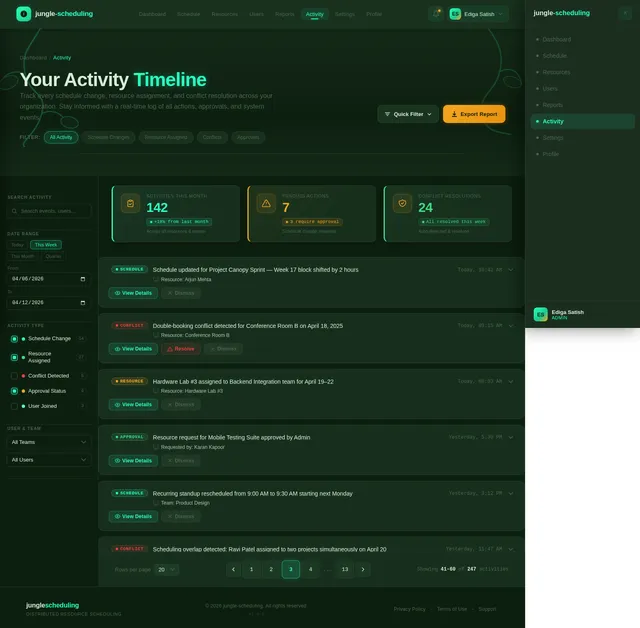
The jungle-scheduling platform draws its visual identity from the concept of a dense, living jungle ecosystem — organized yet wild, layered yet navigable. The palette is deep, earthy, and vibrant, evoking the richness of a tropical canopy.
Color Palette
| Role | Name | Hex Code |
|---|---|---|
| Background | Deep Canopy | #0D1F0F |
| Surface | Moss Stone | #1A3320 |
| Surface Alt | Undergrowth | #22422C |
| Text | Pale Fern | #D6EDD8 |
| Accent | Bioluminescent Teal | #2AFFC2 |
| Accent Alt | Jungle Amber | #F5A623 |
| Muted | Shadowed Bark | #4A6650 |
| Danger | Crimson Bloom | #E84040 |
| Success | Canopy Green | #3DDC84 |
| Border | Vine Grey | #2E4A35 |
Typography
- Headings:
Syne— bold, geometric, modern - Body:
Inter— clean, readable, professional - Monospace / Data:
JetBrains Mono— for schedules, timestamps, and code-like data
Design Language
- Dark-first UI with deep jungle greens and glowing accents
- Rounded cards with subtle moss-textured borders
- Glowing teal highlights on active states and CTAs
- Amber used sparingly for warnings and important callouts
6. Signature Design Concept
🌿 "The Living Canopy" — An Immersive Jungle Dashboard Experience
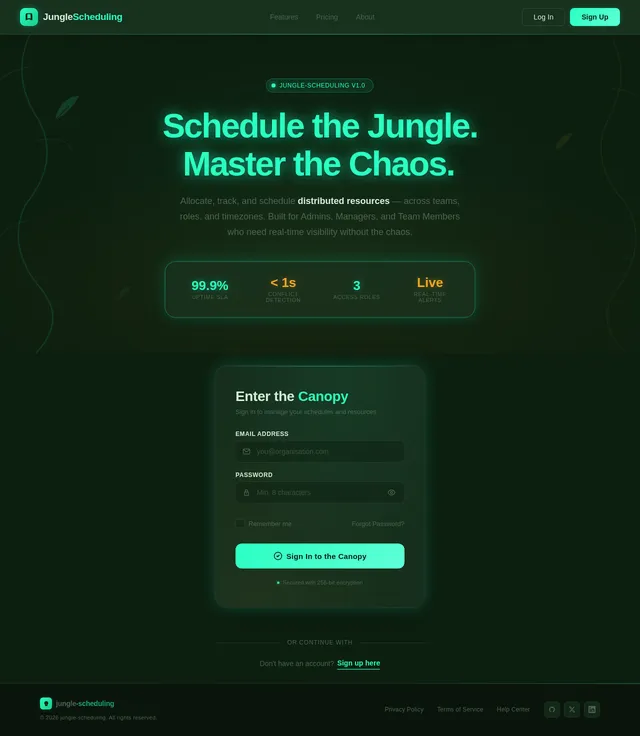
Concept: The homepage of jungle-scheduling is not a static landing page — it is a breathing, living jungle canopy rendered in layered parallax. When the user first lands on the page, they are greeted by a multi-depth jungle scene: towering dark trees in the background, mid-layer vines and foliage slowly swaying, and a glowing forest floor in the foreground where the UI elements live.
What the User Sees:
- Background Layer: A deep
#0D1F0Fsky with procedurally animated fireflies (small#2AFFC2glowing dots) drifting upward slowly — like bioluminescent insects in a night jungle. - Mid Layer: SVG-rendered jungle vines and leaves that sway gently using CSS keyframe animations, responding subtly to mouse movement via a parallax effect (moving 2–5% relative to cursor position).
- Foreground Layer: A glowing "jungle floor" where the main CTA card floats — a frosted glass panel with a
#2AFFC2border glow that pulses softly like a heartbeat (2s ease-in-out loop).
Hero Section Interaction:
- The headline "Schedule the Jungle. Master the Chaos." types itself letter by letter in
Synefont, as if being carved into bark. - Below it, a sub-headline fades in with a soft upward drift animation.
- The CTA button "Enter the Canopy" has a ripple effect on hover — a ring of teal light expands outward from the click point, like a drop hitting still water.
**Dashboard

Schedule
Tame distributed resource scheduling with an intelligent, real-time platform built for teams that move fast and manage complexity.
Why Teams Choose Jungle Scheduling
Three foundational pillars that transform how distributed teams allocate, track, and optimize their resources.
Eliminate Scheduling Chaos
Stop wrestling with overlapping bookings and last-minute conflicts. Centralize every resource, room, and team member into one unified scheduling hub.
Automated constraint enforcement ensures every assignment respects availability rules, shift limits, and team preferences.
Real-Time Resource Visibility
See exactly who and what is available right now. Live dashboards surface resource status, utilization rates, and upcoming availability gaps at a glance.
Calendar and timeline views update in real time across all connected users, so decisions are always based on current data.
Intelligent Conflict Resolution
Let the system catch double-bookings and constraint violations before they happen. Smart detection flags issues and suggests optimal alternatives automatically.
Managers receive instant alerts with resolution options, reducing scheduling errors and freeing time for higher-value work.
Everything You Need to Tame the Schedule
Six powerful capabilities working together to bring order to resource scheduling across distributed teams.
Resource Management
Create, assign, and track resources across your entire organization with a centralized inventory and real-time availability.
Visual Calendars
Interactive calendar and timeline views let managers schedule resources across tasks, projects, and time slots at a glance.
Role-Based Access
Tailored dashboards for Admins, Managers, and Team Members ensure everyone sees exactly what they need.
Real-Time Alerts
Instant notifications when schedules change, conflicts arise, or approvals are needed — via email or in-app.
Conflict Detection
Automatically detect and resolve double-bookings and scheduling overlaps before they disrupt your workflow.
Analytics & Reports
Generate utilization reports, track team efficiency, and export insights as PDF or CSV for stakeholders.
From Sign-Up to Full Control in Four Steps
Get your team onboarded and managing resources efficiently in minutes. Our streamlined workflow takes you from account creation to real-time monitoring.
Sign Up
Create your account in seconds and set up your organization workspace with role-based access.
Create Resources
Add people, equipment, and rooms to your resource inventory for full visibility across teams.
Schedule & Assign
Use visual calendars and timeline views to allocate resources, detect conflicts, and optimize assignments.
Monitor & Report
Track utilization in real time, receive smart alerts, and export detailed analytics reports.
One Platform, Four Perspectives
Every role in your organization gets a tailored experience with the right tools and the right level of access.
Admin
Full platform control with organization-wide oversight and configuration authority.
- Create, update & delete all resources
- Manage user accounts & role assignments
- Configure org-wide notification rules
Manager
Team-level scheduling authority with resource allocation and conflict resolution power.
- Schedule resources for tasks & projects
- Detect & resolve scheduling conflicts
- View team analytics & export reports
Team Member
Personal schedule management with visibility into assigned resources and tasks.
- View personal schedule & assignments
- Request changes to your schedule
- Set personal notification preferences
Guest / Viewer
Read-only access for stakeholders needing visibility without editing privileges.
- View shared schedules & calendars
- Browse resource availability status
- Access published reports & summaries
Everything You Need to Master the Jungle
Eight powerful modules working in harmony to bring order to distributed resource scheduling across your entire organization.
Resource Management
Create, organize, and track people, equipment, and rooms across your entire organization with full inventory visibility.
Scheduling Workflows
Build flexible scheduling rules, assign resources to tasks and time slots, and manage calendar and timeline views effortlessly.
Notification System
Receive real-time alerts for schedule changes and conflicts. Configure preferences at the organization or personal level.
Role-Based Access
Assign Admin, Manager, or Team Member roles with tailored permissions ensuring secure, scoped access for every user.
Conflict Resolution
Automatically detect overlapping assignments and scheduling collisions, then resolve them with intelligent suggestions.
Real-Time Tracking
Monitor resource availability and scheduling status live. Stay in sync with your team through instant status updates.
Reporting Suite
Generate utilization reports, team-level analytics, and exportable summaries in PDF or CSV for data-driven decisions.
Integration Options
Connect with external calendars, communication tools, and enterprise systems through flexible API and webhook support.
Experience the Jungle Dashboard
Step into an immersive, layered interface inspired by the living jungle ecosystem. Every element — from bioluminescent data visualizations to animated canopy overlays — is designed to make resource scheduling feel intuitive, alive, and deeply connected to your workflow.
Explore Dashboard Demo→Trusted by Teams Across the Canopy
See how organizations tame scheduling chaos with jungle-scheduling.
Choose Your Canopy
Simple, transparent pricing that scales with your team. Start free and upgrade as your scheduling needs grow.
- ✓Up to 10 resources
- ✓Calendar scheduling view
- ✓Basic conflict detection
- ✓3 team members
- ✓Email notifications
- ✕Role-based access control
- ✕Analytics & reports
- ✕Priority support
- ✓Unlimited resources
- ✓Calendar & timeline views
- ✓Smart conflict resolution
- ✓Up to 50 team members
- ✓Real-time notifications
- ✓Role-based access control
- ✓Analytics & PDF/CSV export
- ✕Priority support
- ✓Unlimited resources
- ✓All views + custom dashboards
- ✓AI-powered conflict resolution
- ✓Unlimited team members
- ✓Custom notification rules
- ✓Advanced RBAC & SSO
- ✓Full analytics suite
- ✓Dedicated support & SLA
Ready to Master Your Schedule?
Bring order to the chaos. Allocate resources, resolve conflicts, and keep your entire team in sync — all from one living dashboard.
No comments yet. Be the first!