jungle-awebserver
Awebserver

Comments (0)
Sign in to leave a comment
System Requirements
System Requirements Document for Awebserver
1. Introduction
Awebserver is a web server: a running service that answers HTTP requests and returns a page to whoever asks for it. The product intent is deliberately small and concrete — the server runs, it replies to requests, and a visitor who opens the site in a browser reads the content the server sends back. There is no account system, no dashboard, no content-management workflow, and no administrative console in the current scope.
The audience is twofold. Web Server Operators are responsible for running the server and confirming that it answers requests. Site Visitors are anonymous people who open the served site in a browser and read what the server sends. The product's public face is a single landing page whose content is the response the server produces.
This document is the System Requirements Document for Awebserver, written for Toubi Adde's project of that name.
2. System Overview
Awebserver is delivered as a small full-stack application. A React frontend renders the public landing page. A shared FastAPI backend process serves the application's HTTP responses and domain logic. A MariaDB instance is provisioned as the application-owned persistent store. The backend is the component that actually answers requests; the frontend is the surface through which a visitor reads the answer.
Two active human personas exist: the Web Server Operator, who runs and monitors the server and confirms it answers requests, and the Site Visitor, who opens the served site anonymously and reads its content. There is exactly one page in the current information architecture: Landing, publicly reachable with no access requirement, owned by the application and used by the Site Visitor.
Current accepted behavior is narrow: the server runs, it answers requests, and the Landing page presents the content the server sends. The operator's responsibility is availability and confirmation of response; the visitor's responsibility is reading. Nothing else is in scope.
Removed from scope
- User accounts, sign-in, registration, and session identity (also: authentication, login, accounts)
- Administrative dashboards, control panels, and operator consoles (also: admin UI, dashboard)
- Content management, editing, and publishing workflows (also: CMS, authoring)
- Multi-page site navigation, routing beyond the single landing surface, and additional destinations (also: site map, navigation menu)
- Analytics, telemetry dashboards, and reporting surfaces (also: metrics UI, analytics)
- Blue or indigo SaaS styling and dark developer-tool surfaces (also: indigo template, dark mode developer theme)
2a. Product Interpretation and Delivery Boundary
Awebserver is a first-party web server with a first-party public page. The application owns both the server process that answers requests and the Landing page that presents the answer. The visitor's access is anonymous and public: no identity is established, no account is created, and no private state is owned on the visitor's behalf. The operator's relationship to the product is operational — running the process and confirming it responds — and does not require a first-party operator interface in the current scope.
The delivery boundary is therefore simple and hard: one public page, one backend that answers, one database provisioned for application-owned persistence. The database is provisioned infrastructure and does not by itself justify domain entities, authentication, or user records; no such entities are required by the accepted behavior. Future ideas such as operator dashboards or content authoring are explicitly outside the current horizon and must not appear in current pages or acceptance.
2c. Page Content and Component Coverage
Landing
Information and state
- The page is the server's response rendered in the browser: a cream editorial field carrying the product's headline, subline, and a single call to action.
- Hero headline: "A web server that answers every request".
- Hero subline: "Awebserver runs and replies. The visitor opens the page and reads what it sends."
- Primary call to action: "Open the site".
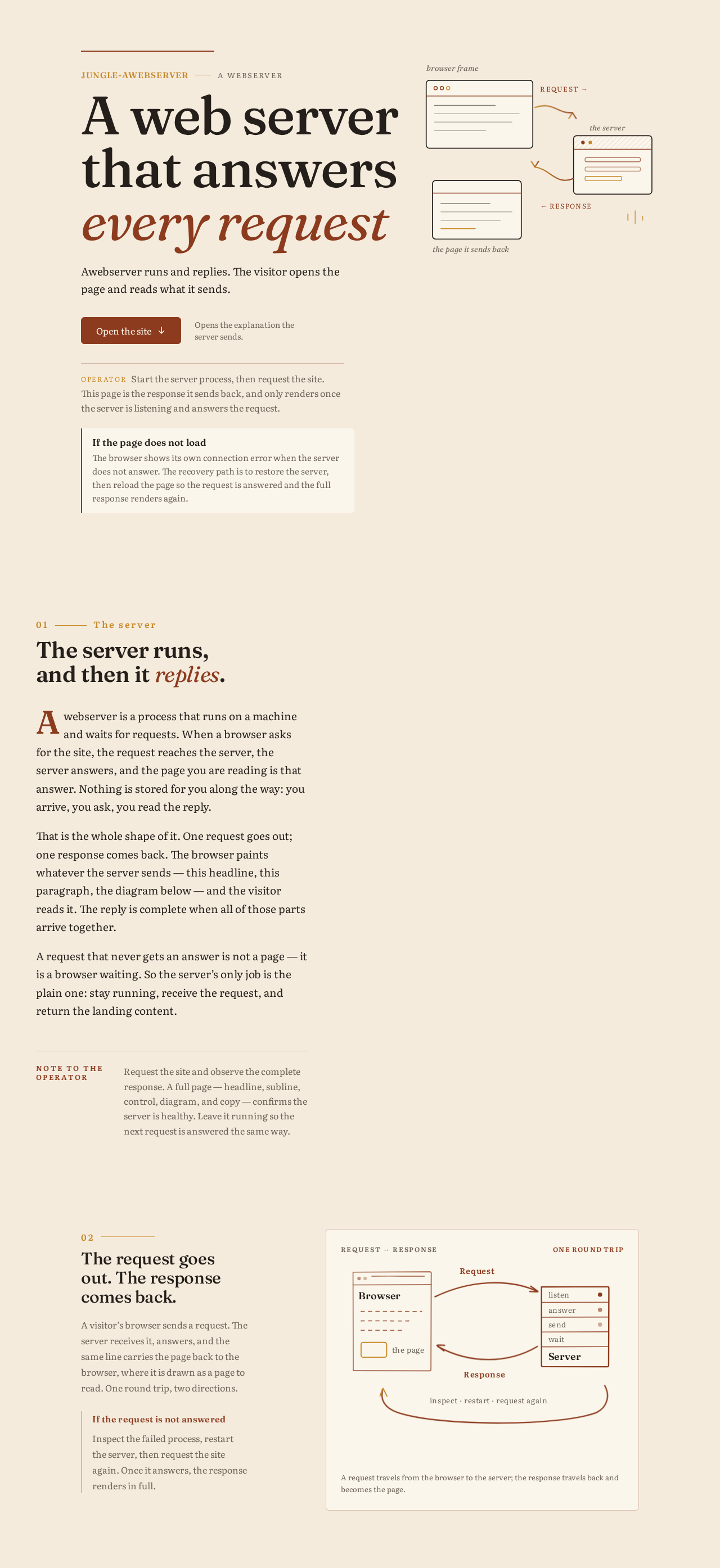
- A hand-drawn request-to-response diagram illustrating a request travelling to the server and back.
- Section openers carrying a small mustard numbered label above a serif title, introducing the plain-words explanation of what the server does.
- Body copy explaining, in plain language, that the server runs and replies to requests.
Primary actions
- Read the headline, subline, and body copy.
- Activate "Open the site" to proceed into the served content.
Supporting actions
- Scroll through the single-column reading measure.
- Observe the request-to-response diagram as it draws once on load.
Domain entities
- None persisted for the visitor. The page is a rendered response; no visitor-specific record, account, or session is created.
Component responsibilities
- Hero block — full-width cream field, rust rule above an oversized Fraunces headline set flush left, subline beneath, and the "Open the site" control. Responsible for the page's first impression and its single entry action.
- Request-to-response diagram — a warm flat illustration of a request travelling to the server and back, with hand-drawn arrows and a simple browser frame; draws its line once on load and holds a static arrangement under reduced motion.
- Numbered section openers — mustard numbered labels above serif titles that introduce each explanatory section.
- Body copy column — Literata text held to a 68-character measure with generous leading.
- Asymmetric diagram block — one illustrated block that breaks the single-column measure to carry the request/response explanation.
States
- Loading — the page renders from the server's response; while the response is in flight the browser shows its own loading state. No custom skeleton is required.
- Empty — not applicable; the page always carries its headline, subline, and body copy.
- Success — the server's response renders fully: headline, subline, call to action, diagram, and body copy all readable at 375px, 768px, and 1280px.
- Error — if the server does not answer, the browser displays its own connection error; the page cannot render its content. Recovery is the operator restoring the server so the next request is answered.
- Recovery — once the server answers again, reloading the page renders the full response.
3. Functional Requirements
FR-1 — The server runs and answers requests (explicit) As a Web Server Operator, I should run the Awebserver process so that it is listening and able to answer incoming HTTP requests.
- Trigger: the operator starts the server process.
- Observable result: the server is running and returns a response to a request for the site.
- Failure/recovery: if the process is not running, requests fail; the operator restarts it and confirms a response.
- Continuation: the operator confirms the server continues to answer requests.
FR-2 — The server returns the landing content (required_inference) As a Web Server Operator, I should confirm that a request to the site returns the landing content, so that the visitor receives a complete page.
- Trigger: a request reaches the running server.
- Observable result: the server responds with the Landing page content — headline, subline, call to action, diagram, and body copy.
- Failure/recovery: an incomplete or failed response is investigated and the server corrected until the full response is returned.
- Continuation: subsequent requests return the same complete content.
FR-3 — The visitor opens the site and reads the response (required_inference) As a Site Visitor, I should open the site in my browser and read the content the web server sends, so that I understand what Awebserver does.
- Trigger: the visitor navigates to the site.
- Access state: anonymous and public; no identity is established.
- Observable result: the Landing page renders with its headline, subline, call to action, diagram, and body copy.
- Failure/recovery: if the server does not answer, the browser shows a connection error; the visitor retries once the server is available.
- Continuation: the visitor activates "Open the site" to proceed into the served content.
FR-4 — The visitor proceeds via the call to action (required_inference) As a Site Visitor, I should activate "Open the site" to move from the hero into the served content, so that I continue reading what the server sends.
- Trigger: the visitor activates the "Open the site" control.
- Observable result: the visitor is taken into the served content of the site.
- Failure/recovery: if the control does not respond, the visitor can scroll to the same content directly.
- Continuation: the visitor reads the explanatory sections.
4. User Personas
Web Server Operator
The operator is the person responsible for Awebserver being alive. Their product context is operational: they start the server process, keep it listening, and verify that requests are answered with the complete landing content. Their primary goal is availability — a server that answers every request. Their distinct accepted responsibilities are running the process (FR-1) and confirming that a request returns the landing content (FR-2). Their relevant inputs are the server process state and the response returned to a request; their decision is whether the server is healthy or needs restarting. They interact with the Site Visitor only indirectly: the visitor's successful read is the operator's observable success. Their success is observable as a running server that returns the full page on request. No operator interface, account, or dashboard is part of their accepted work.
Site Visitor
The visitor is an anonymous person who opens the site in a browser. Their product context is reading: they arrive with no account and no prior state, and they want to understand what Awebserver is. Their primary goal is to read the content the web server sends. Their distinct accepted responsibilities are opening the site and reading the response (FR-3) and proceeding via the "Open the site" call to action into the served content (FR-4). Their relevant inputs are the rendered headline, subline, diagram, and body copy; their decision is whether to continue reading. They interact with the operator only through the server's availability — a response that arrives is the operator's side of the handoff. Their success is observable as a fully rendered page they can read at any viewport, with the call to action available and legible.
5. Core User Flows
Flow A — Operator runs the server and confirms it answers
- The Web Server Operator starts the Awebserver process on the host.
- The server begins listening for HTTP requests.
- The operator issues a request for the site.
- The server answers with the Landing page content: headline, subline, call to action, diagram, and body copy.
- The operator observes the complete response and confirms the server is healthy.
- Failure/recovery: if no response arrives, the operator inspects the process, restarts it, and repeats the request until a complete response is returned.
- Continuation: the operator leaves the server running so subsequent requests continue to be answered.
Flow B — Visitor opens the site and reads the response
- The Site Visitor navigates to the site in a browser, anonymously.
- The browser sends a request; the running server answers.
- The Landing page renders: the rust rule above the oversized Fraunces headline "A web server that answers every request", the subline "Awebserver runs and replies. The visitor opens the page and reads what it sends.", and the "Open the site" control.
- The request-to-response diagram draws its line once on load; under reduced motion it appears as a static arrangement.
- The visitor reads the numbered section openers and the body copy held to a 68-character measure.
- The visitor activates "Open the site" and proceeds into the served content.
- Failure/recovery: if the server does not answer, the browser shows a connection error; the visitor retries once the server is available, and the page renders fully.
- Continuation: the visitor continues reading the explanatory sections.
6. Visuals Colors and Theme
The creative direction is authoritative: warm editorial calm in the voice of Frank Chimero — a server explained in plain words, on a cream ground, with measured type.
Palette (light mode)
- Background:
#F4EBDD— cream ground covering most of the page. - Surface:
#FBF6EC— soft flat panels. - Text:
#241F1A— ink, carrying all reading. - Primary:
#8C3B1E— rust, the primary action colour and the hero rule. - Accent:
#C98A2B— mustard, used only for rules and small numbered labels. - Muted:
#6E6459— secondary text and captions.
Typography
- Headings: Fraunces, weight 500–600, tight leading, large sizes with soft optical warmth.
- Body: Literata.
- Scale: 1.333 modular — 40 / 30 / 24 / 19 / 16 px.
- Hero:
clamp(40px, 8vw, 96px).
Shape language
- Soft flat panels with 6px radii.
- Thin rust rules and hand-drawn diagram lines.
- No glossy surfaces, no glass cards, no gradient blobs.
Layout
- Single-column reading measure of 68 characters.
- Wide cream margins and illustrated section openers.
- One asymmetric diagram block breaks the column.
Imagery
- Warm flat illustrations of a request travelling to a server and back, with hand-drawn arrows and simple browser frames.
Avoid
- Dark developer-tool surfaces; glass cards and gradient blobs; blue or indigo accents; identical hover-lift card grids.
7. Signature Design Concept
The public entry is a cream full-width field. A rust rule sits above an oversized Fraunces headline set flush left across nine columns: "A web server that answers every request". Beneath it, in Literata, the subline reads "Awebserver runs and replies. The visitor opens the page and reads what it sends." To the right, at half height, a hand-drawn request-to-response diagram draws its line once on load — a request travelling to the server and back, with hand-drawn arrows and a simple browser frame. The single "Open the site" control sits in rust beneath the subline. Section openers below carry a small mustard numbered label above a serif title, and body copy holds a 68-character measure with generous leading. The one asymmetric diagram block breaks the column to carry the request/response explanation. All readable text and controls stay whole at 375px, 768px, and 1280px, wrapping or scaling to fit; the diagram may bleed and overlap as decoration but never covers text or controls.
8. Interaction Model & Motion Direction
Interaction Model: Animated Motion Tempo: restrained Hero Dimensionality: flat
Landing Hero Motion Brief
- Focal subject: the hand-drawn request-to-response diagram to the right of the headline — a request travelling to the server and back.
- Thesis: on load, the diagram's line draws once from the request origin to the server and back to the browser frame; the outcome is a completed request/response loop that mirrors the server answering a request. No other behavior is introduced.
- Motion vocabulary: slow fades on section openers; a single line-draw on the diagram; no parallax, no scroll-linked depth, no hover-lift grids.
- Composed first frame: cream field, rust rule, oversized Fraunces headline flush left, subline beneath, "Open the site" in rust, and the diagram at half height to the right with its line beginning to draw.
- Reduced-motion state: the diagram appears fully drawn as a static arrangement; section openers appear without fades; all text and controls remain whole and readable.
9. Non-Functional Requirements
- Availability of response (explicit): the server must run and answer requests before a visitor can open the site. The operator is responsible for keeping it running.
- Public anonymous access (required_inference): the Landing page is reachable without identity, account, or session. No private state is owned on the visitor's behalf.
- Readability across viewports (explicit, from design constraints): headlines, wordmarks, labels, numbers, and controls stay entirely inside the viewport and their container at 375px, 768px, and 1280px, wrapping or scaling to fit; no element covers any part of them.
- Reduced motion (explicit, from design constraints): with
prefers-reduced-motion, a usable static arrangement is provided — the diagram fully drawn, openers without fades. - Plain-words clarity (explicit, from creative direction): the page explains the server in plain language; body copy holds a 68-character measure with generous leading.
- No dark developer-tool styling, no blue/indigo accents, no glass or gradient surfaces (explicit, from creative direction).
10. Tech Stack
- Frontend: React application rendering the Landing page.
- Backend: shared FastAPI process serving the application's HTTP responses and domain modules.
- Database: MariaDB, provisioned as application-owned persistent storage. No domain entities, authentication records, or user tables are required by the accepted behavior; the database remains provisioned infrastructure.
- Deployment: the frontend, backend, and database run as the provisioned services; the backend is the component that answers requests.
11. Assumptions and Constraints
- A-1 (assumption): The server is reachable at a public address so an anonymous visitor can open the site.
- A-2 (assumption): The operator has the means to start, stop, and restart the server process.
- A-3 (constraint): No identity, account, or session is established for the visitor; the Landing page is public and anonymous.
- A-4 (constraint): No operator interface, dashboard, or admin console exists in the current scope; the operator's work is operational, not in-product.
- A-5 (constraint): The database is provisioned but does not justify domain entities, authentication, or user records.
- A-6 (constraint): Future ideas such as operator dashboards or content authoring are outside the current horizon and must not appear in current pages or acceptance.
12. Glossary
- Awebserver — the web server product described in this document.
- Web Server Operator — the persona who runs the server and confirms it answers requests.
- Site Visitor — the anonymous persona who opens the site and reads the content the server sends.
- Landing — the single public page presenting the server's response.
- Request-to-response diagram — the hand-drawn illustration of a request travelling to the server and back.
- Open the site — the single call to action on the Landing page that takes the visitor into the served content.
jungle-awebserverA webserver
A web server that answers every request
Awebserver runs and replies. The visitor opens the page and reads what it sends.
OperatorStart the server process, then request the site. This page is the response it sends back, and only renders once the server is listening and answers the request.
The browser shows its own connection error when the server does not answer. The recovery path is to restore the server, then reload the page so the request is answered and the full response renders again.
The server runs, and then it replies.
Awebserver is a process that runs on a machine and waits for requests. When a browser asks for the site, the request reaches the server, the server answers, and the page you are reading is that answer. Nothing is stored for you along the way: you arrive, you ask, you read the reply.
That is the whole shape of it. One request goes out; one response comes back. The browser paints whatever the server sends — this headline, this paragraph, the diagram below — and the visitor reads it. The reply is complete when all of those parts arrive together.
A request that never gets an answer is not a page — it is a browser waiting. So the server’s only job is the plain one: stay running, receive the request, and return the landing content.
02
The request goes out. The response comes back.
A visitor’s browser sends a request. The server receives it, answers, and the same line carries the page back to the browser, where it is drawn as a page to read. One round trip, two directions.
If the request is not answeredInspect the failed process, restart the server, then request the site again. Once it answers, the response renders in full.
No comments yet. Be the first!