jungle-app
 Radhika Goel
Build an app to track my daily expenses
Comments (0)
Sign in to leave a comment
System Requirements
System Requirements Document (SRD) for jungle-app
1. Introduction
The jungle-app is a daily expense tracking application designed to help users like Radhika Goel from India manage their finances effectively. The app will allow users to categorize expenses, set budget limits, and generate monthly reports, providing a clear overview of their spending habits. By focusing on simplicity and practicality, the jungle-app aims to empower users to make informed financial decisions.
2. System Overview
The jungle-app is a mobile-first application that enables users to track their daily expenses with ease. It provides features such as categorizing expenses, setting budget limits, and generating monthly summaries. The app is designed to be intuitive and user-friendly, ensuring that users can quickly log expenses and monitor their financial health. Locale-specific defaults, such as Indian Rupees (₹) as the currency and IST (Indian Standard Time) as the timezone, will be implemented to cater to the target audience.
Key features include:
- Categorization of expenses for better organization.
- Budget tracking to prevent overspending.
- Monthly reports to analyze spending patterns.
3. Functional Requirements
As User:
- I should be able to add daily expenses with details like amount, category, and date.
- I should be able to categorize expenses (e.g., Food, Travel, Shopping).
- I should be able to set monthly budget limits for each category.
- I should be able to view a summary of my expenses for the current month.
- I should be able to generate and view monthly reports of my spending habits.
4. User Personas
1. Primary User: Individual User
- Description: A person who wants to track their daily expenses and manage their budget effectively.
- Goals:
- To log expenses quickly and efficiently.
- To monitor spending habits and stay within budget.
- To analyze monthly financial data for better decision-making.
- Pain Points:
- Forgetting to log expenses.
- Overspending in certain categories without realizing it.
- Difficulty in understanding spending patterns without clear reports.
5. Visuals Colors and Theme
The jungle-app will use a fresh and vibrant color palette to reflect its focus on financial health and simplicity. The colors are designed to be visually appealing while maintaining readability and usability.
- Background: #F9F9F9 (light neutral for a clean look)
- Surface: #FFFFFF (pure white for cards and input fields)
- Text: #333333 (dark gray for high contrast and readability)
- Accent: #4CAF50 (vivid green to symbolize growth and financial health)
- Muted Tones: #B0BEC5 (soft gray-blue for secondary elements)
6. Signature Design Concept
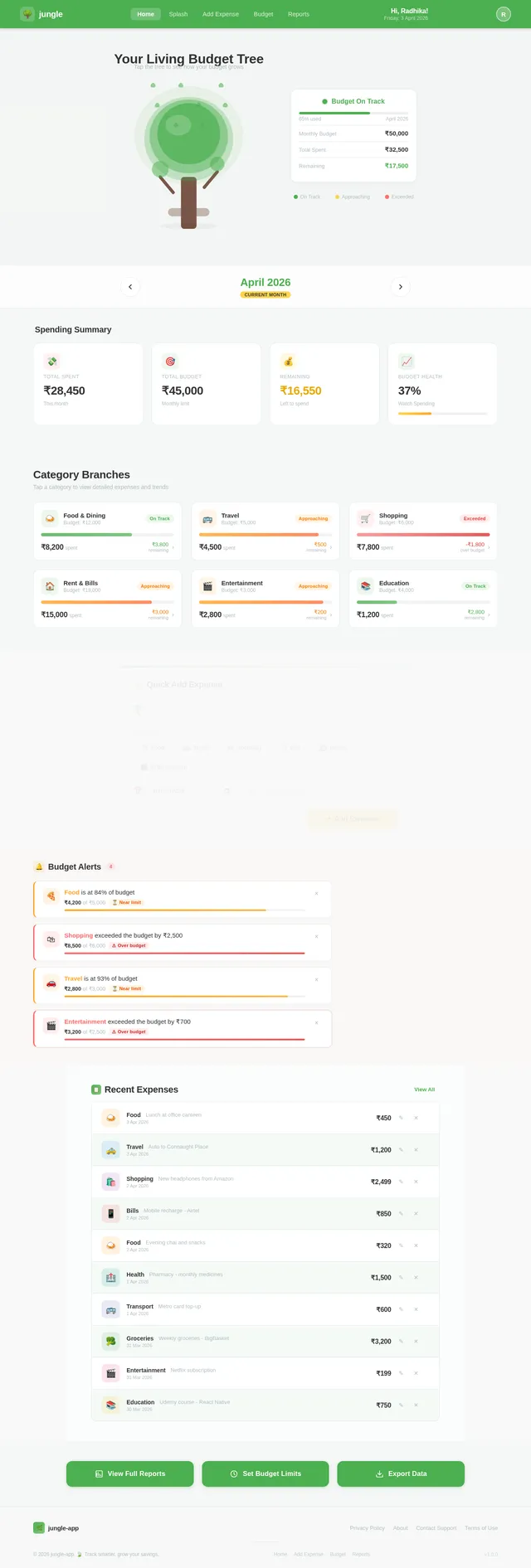
The jungle-app will feature a "Living Budget Tree" on the homepage. This interactive visual will represent the user's financial health as a growing tree:
- Tree Design: The tree grows as users log expenses and stay within budget. Each category is represented as a branch, with leaves symbolizing individual expenses.
- Animations: Leaves will "fall" when users overspend in a category, providing a subtle yet engaging visual cue.
- Color Shifts: The tree's color will change based on the user's budget status:
- Green: On track with the budget.
- Yellow: Approaching the budget limit.
- Red: Exceeded the budget.
- Micro-Interactions: Tapping on a branch will display detailed expense data for that category, while swiping will navigate between months.
This concept not only makes the app visually unique but also provides an intuitive way for users to understand their financial health at a glance.
7. Non-Functional Requirements
- The app must load within 2 seconds on a standard 4G connection.
- The app must support devices running Android 8.0 (Oreo) and above.
- Data must be stored securely, with encryption for sensitive information.
- The app must handle up to 10,000 expense entries per user without performance degradation.
- The app must support both light and dark modes.
8. Tech Stack
Frontend:
- React Native for mobile app development.
Backend:
- Python with FastAPI for API development.
Database:
- MySQL for structured data storage, using Alembic for migrations.
AI Tools:
- GPT 5.4 for generating user-friendly responses.
Local Orchestration:
- Docker and docker-compose for containerization.
Server-Side Orchestration:
- Kubernetes for managing deployments.
9. Assumptions and Constraints
- The app will primarily target users in India, with Indian Rupees (₹) as the default currency.
- The app will operate in IST (Indian Standard Time) timezone.
- Users are expected to have basic familiarity with mobile applications.
- The app will not include advanced financial tools like investment tracking or tax calculations in its initial version.
10. Glossary
- Expense Category: A predefined group (e.g., Food, Travel) used to organize expenses.
- Budget Limit: The maximum amount a user plans to spend in a specific category within a month.
- Monthly Report: A summary of the user's expenses for a given month, including totals and category breakdowns.
- IST: Indian Standard Time, the timezone used in India.
- Rupees (₹): The official currency of India.
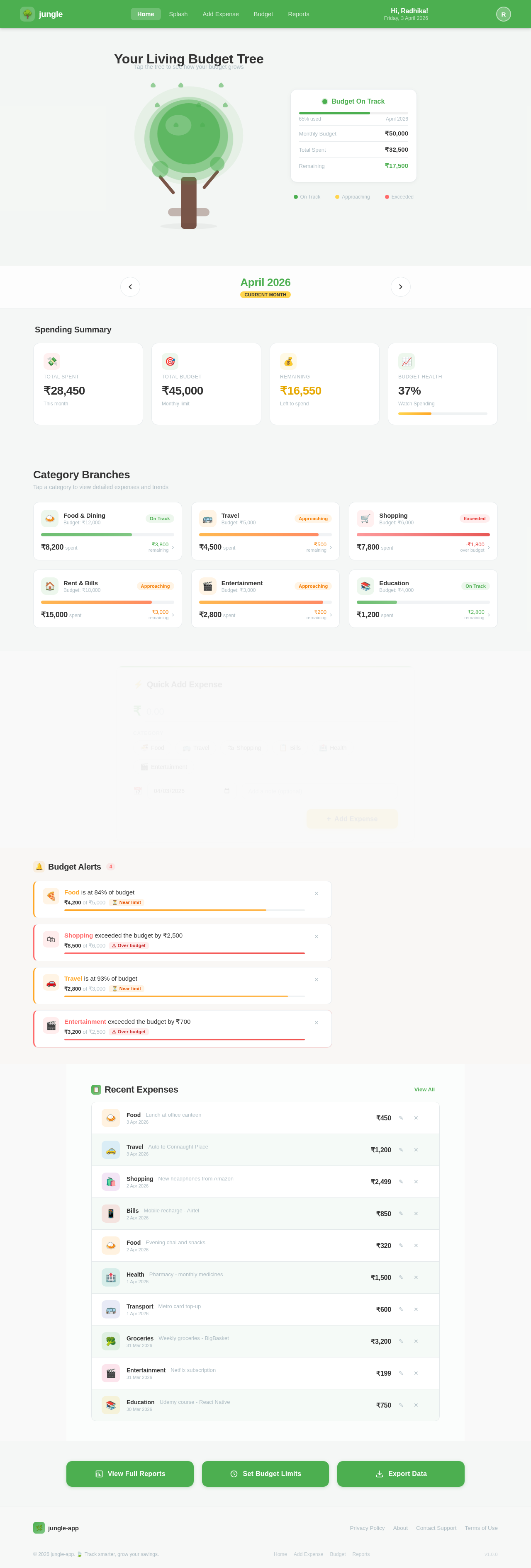
Your Living Budget Tree
Tap the tree to see how your budget grows
☝ Tap to interact
Spending Summary
Category Branches
Tap a category to view detailed expenses and trends
Budget Alerts4
Recent Expenses
View All- FoodLunch at office canteen3 Apr 2026₹450🗑️
- TravelAuto to Connaught Place3 Apr 2026₹1,200🗑️
- ShoppingNew headphones from Amazon2 Apr 2026₹2,499🗑️
- BillsMobile recharge - Airtel2 Apr 2026₹850🗑️
- FoodEvening chai and snacks2 Apr 2026₹320🗑️
- HealthPharmacy - monthly medicines1 Apr 2026₹1,500🗑️
- TransportMetro card top-up1 Apr 2026₹600🗑️
- GroceriesWeekly groceries - BigBasket31 Mar 2026₹3,200🗑️
- EntertainmentNetflix subscription31 Mar 2026₹199🗑️
- EducationUdemy course - React Native30 Mar 2026₹750🗑️
No comments yet. Be the first!