JUAL BELI BARANG BEKAS MASIH LAYAK KEPAKE
25kUKURAN L
PENJUALNOMINUS
MINATMINAT ? pc aja
 almusa27 27
TOLONG BUAT KAN poster SIMPEL DAN KECE,dengan JUDUL jual belI BARANG BEKAS MASIH LAYAK KEPAKE PRICE ' 25k SIZE ' L NOMINUS MINAT ? pc aja

Sign in to leave a comment
jual-beli is a small, focused tool for producing a simple and cool-looking (simpel dan kece) poster advertising second-hand goods that are still usable. The poster is the product: a single printed-paper artefact that a seller can screenshot, forward into a neighbourhood chat group, or hand to a friend-of-a-friend.
The poster carries exactly the facts the seller supplied:
The audience is the seller who needs the poster made, and the neighbour or friend-of-a-friend who reads it and decides whether to reach out. The register is honest, unpretentious and calm — a note taped to a fence, not a billboard. "Simpel dan kece" here means quiet confidence: the object, the price and the seller's name carry everything, and the empty paper around them does the rest.
The current delivery is a small first-party web application with three pages: Landing, Poster Editor, and Poster Preview. All three are anonymously reachable; no account, sign-in, or stored profile is part of the accepted scope.
The Poster Creator arrives at the Landing page, understands in one screen what the tool makes, and starts a poster. In the Poster Editor the creator composes the poster from the five accepted facts — title, price, size, seller name, and the PC/chat contact note — seeing the poster update live as a piece of paper on a table. The finished poster is then presented on the Poster Preview page as a shareable output, where the creator can download it or copy it as an image and send it onward.
The Interested Buyer never operates the application. The buyer receives the finished poster as an image in a chat group or a direct message, reads the title, the price (25k), the size (L) and the seller's name (NOMINUS), and follows the stated instruction to make contact via PC/chat only. The buyer's side of the lifecycle is the poster artefact itself and the contact channel named on it.
Narrow exclusions: there is no marketplace, no listing feed, no bidding, no payment, no shipping, no buyer account, no seller account, no messaging inside the product, and no inventory of multiple items. The poster is a single-item, single-seller artefact. Contact happens outside the product, through PC/chat, exactly as the poster states.
Everything the product does happens in the browser, first-party, with no identity gate. The Landing page is the anonymous entry surface: it explains the tool and offers one way forward. The Poster Editor is where the poster is actually made. The Poster Preview is where the finished poster is presented as an output to be taken away.
The poster's onward journey is deliberately outside the product's ownership. The creator downloads or copies the image; the buyer reads it wherever it lands and makes contact through PC/chat. The application does not send, post, host, or track the poster after it leaves, and it does not mediate the conversation that follows. That boundary is a product decision, not a gap: the poster is designed to survive as a screenshot, so it must be complete and legible on its own.
Nothing in the current scope is deferred. There is no future horizon in the accepted requirements beyond the poster described here.
The poster's content is fixed by the authoritative request and is reproduced exactly:
| Field | Value |
|---|---|
| Title | JUAL BELI BARANG BEKAS MASIH LAYAK KEPAKE |
| Price | 25k |
| Size | L |
| Seller name | NOMINUS |
| Interest / contact note | MINAT ? pc aja |
No other product facts, collections, dates, links, or media references were supplied.
POSTER BARANG BEKAS sits top-left. The poster title JUAL BELI BARANG BEKAS MASIH LAYAK KEPAKE is set in Shippori Mincho at clamp(40px, 10vw, 112px), stacked across four left-aligned lines filling roughly 70% of the viewport width on desktop. Beneath a 1px charcoal rule spanning the column, a single row carries 25k in seal-red at clamp(56px, 12vw, 128px) on the left and UKURAN L in charcoal all-caps on the right. One poster-shaped white rectangle with a 1px charcoal hairline and an 8%-of-width empty margin shows what the tool produces. The ground is unbleached paper #F2EDE4, roughly 80% of the screen.BUAT POSTER — a quiet outlined button, charcoal 1px border, transparent fill, no radius beyond 2px — moves the creator into the Poster Editor.BUAT POSTER. Error: not applicable at this surface. Recovery: not applicable.HARGA — 25k, UKURAN — L, PENJUAL — NOMINUS, MINAT — PC AJA, with the label in small all-caps stone grey and the value in charcoal. The live poster is the same poster-shaped white rectangle with a 1px charcoal hairline and an 8%-of-width empty margin, updating as the creator edits. On mobile the poster sits above the form and the form collapses to one column.25k in seal-red, UKURAN L, PENJUAL NOMINUS, and MINAT ? pc aja in seal-red. Beneath it, a plain row of text actions.UNDUH — take the finished poster away as an image.SALIN GAMBAR — copy the finished poster as an image for pasting into a chat.FR-1 — Produce a simple, cool-looking used-goods poster (explicit) As a Poster Creator, I should be able to produce a simple and cool-looking (simpel dan kece) poster for selling used goods that are still usable, so that I have something to post or send to interested buyers.
UNDUH or SALIN GAMBAR.FR-2 — Carry the exact title (explicit)
As a Poster Creator, I should have the poster carry the title JUAL BELI BARANG BEKAS MASIH LAYAK KEPAKE, so that a reader immediately knows what is being offered.
FR-3 — Carry the price 25k (explicit)
As a Poster Creator, I should have the poster carry the price 25k, so that a buyer can judge the offer at a glance.
25k appears in seal-red #C2452F, set in the serif numerals at clamp(56px, 12vw, 128px).FR-4 — Carry the size L (explicit)
As a Poster Creator, I should have the poster carry the size L, so that a buyer knows the item's size before making contact.
UKURAN L appears in charcoal all-caps beside the price, separated by the hairline rule.FR-5 — Carry the seller name NOMINUS (explicit)
As a Poster Creator, I should have the poster carry the seller name NOMINUS, so that a buyer knows who is selling and can trust the offer.
PENJUAL — NOMINUS appears as a printed-form row on the poster.FR-6 — Carry the interest/contact note "MINAT ? pc aja" (explicit)
As a Poster Creator, I should have the poster carry the interest note MINAT ? pc aja, so that an interested buyer knows exactly how to make contact.
MINAT ? pc aja appears in seal-red #C2452F, as the second and only other use of the accent colour on the poster.FR-7 — Contact is via PC/chat only (explicit) As an Interested Buyer, I should be able to reach the seller through PC/chat only, as the poster states, so that my inquiry reaches the right person.
FR-8 — Understand the offer from the poster alone (required_inference)
As an Interested Buyer, I should be able to read the title, the price 25k, the size L and the seller NOMINUS from the poster image alone, so that I can decide whether to inquire without asking the seller for basics.
FR-9 — Take the finished poster away (required_inference) As a Poster Creator, I should be able to download the finished poster or copy it as an image, so that I can post it or send it to interested buyers.
FR-10 — See the poster update as it is edited (required_inference) As a Poster Creator, I should see the poster update as I edit its facts, so that I know the finished poster is correct before I take it away.
The Poster Creator is the person who asked for the poster: someone selling a used item that is still usable, at 25k, in size L, under the name NOMINUS. Their context is a neighbourhood or friend-of-friend chat culture where a poster is screenshotted and forwarded rather than clicked. They are not a designer and do not want a design tool; they want the poster to be made, correctly, and to look good enough to forward without embarrassment.
Their primary goal is a finished, shareable poster image carrying the title, the price, the size, the seller name and the contact note, all legible. Their distinct responsibilities are: recognising the tool on the Landing page, composing the poster's five facts in the Poster Editor, confirming the poster reads correctly, and taking it away via UNDUH or SALIN GAMBAR. Their relevant inputs are the five accepted facts and their own judgement of whether the poster looks simple and cool. Their decisions are whether the poster is finished and whether to download or copy it.
They interact with the Interested Buyer only indirectly: the buyer receives the poster as an image and acts on the instruction printed on it. The creator's observable success is a poster that is complete, legible, and ready to post or send.
The Interested Buyer is a neighbour or friend-of-a-friend who receives the poster as an image in a chat group or a direct message. Their context is a phone screen, a forwarded image, and a decision made in seconds on price, size and trust in the seller's name. They never open the application and have no account.
Their primary goal is to understand the offer and reach the seller. Their distinct responsibilities are: reading the title, the price 25k, the size L and the seller NOMINUS from the poster image alone, and following the printed instruction MINAT ? pc aja to make contact through PC/chat only. Their relevant inputs are the poster image and the contact channel it names. Their decision is whether the offer is worth an inquiry.
They interact with the Poster Creator through the contact channel the poster names, outside the product. Their observable success is a completed inquiry about the item. The poster's legibility as a screenshot is what makes that possible, which is why the design keeps the facts whole and the paper empty.
#F2EDE4; a small all-caps label POSTER BARANG BEKAS sits top-left, the title JUAL BELI BARANG BEKAS MASIH LAYAK KEPAKE fills roughly 70% of the viewport width across four left-aligned lines, and beneath a 1px charcoal rule the row reads 25k in seal-red on the left and UKURAN L in charcoal on the right.BUAT POSTER and arrives at the Poster Editor.HARGA — 25k, UKURAN — L, PENJUAL — NOMINUS, MINAT — PC AJA — and the live poster on the right as a white 4:5 rectangle with a 1px charcoal hairline on the paper ground. On mobile the poster sits above the form and the form is one column.JUAL BELI BARANG BEKAS MASIH LAYAK KEPAKE, the price 25k, the size L, the seller NOMINUS, and the contact note MINAT ? pc aja.25k in seal-red, UKURAN L, PENJUAL NOMINUS, and MINAT ? pc aja in seal-red. Beneath it sits a plain row of text actions.UNDUH to save the poster as an image, or SALIN GAMBAR to copy it as an image for pasting into a chat.JUAL BELI BARANG BEKAS MASIH LAYAK KEPAKE and understands that used goods that are still usable are being offered.25k in seal-red and the size UKURAN L beside it, and judges the offer.NOMINUS and weighs whether to trust the offer.MINAT ? pc aja in seal-red and understands that contact is through PC/chat only.The muse is Kenya Hara, and the headline idea is emptiness as content: the poster is a note taped to a fence, not a billboard. "Simpel dan kece" is read here as quiet confidence — nothing to hide, nothing to shout, the object and the price carry everything. The paper/kraft palette reads as bekas: honest, used, real.
Palette (light mode). Unbleached paper ground #F2EDE4 covers roughly 80% of every screen. White #FFFFFF is reserved only for the poster card itself, so the finished poster reads as a piece of paper laid on a table. Charcoal ink #2B2823 for all type. Warm stone #6E6355 for rules, captions, labels and secondary UI. A single seal-red #C2452F appears exactly twice per screen: the 25k price and the MINAT ? pc aja line — like a hanko stamp on a receipt. No other colour exists. Any blue, indigo or violet is forbidden.
Typography. Headings in Shippori Mincho at 700 weight, set large with wide tracking (+0.06em) and tight leading (0.95) in sentence case for the title; numerals in the same serif so 25k and L feel like printed paper. Body and UI in Zen Kaku Gothic New at 400/500 for labels, controls and body, all-caps with +0.18em tracking for micro-labels (HARGA, UKURAN, PENJUAL, MINAT). Body type is never bold — emphasis comes from size and space. Scale is a 1.25 modular: poster title clamp(40px, 10vw, 112px), section heading clamp(26px, 4.2vw, 44px), price clamp(56px, 12vw, 128px), label 12px, body 16px, caption 13px. Inter, Roboto, Poppins, Montserrat and any geometric sans are forbidden as the display face.
Shape language. Square and near-square only. The poster is a true 4:5 rectangle with a 1px charcoal hairline and no border radius anywhere on it. UI controls use a 2px radius maximum — a rounded rectangle that reads as a printed button, not a pill. Thin 1px rules divide metadata rows, like a printed form. No shadows, no blobs, no stickers. The poster's outer margin is never less than 8% of its width.
Layout. A single centred column on a paper ground, maximum 720px of readable measure. Landing: one vertical stack — small all-caps label, the product sentence, one poster-shaped preview, one quiet button. Editor: form on the left as a printed form with hairline-ruled label/value rows, live poster on the right; on mobile the poster sits above the form and the form collapses to one column. Preview: the finished poster centred, with a plain row of text actions beneath it (UNDUH, SALIN GAMBAR). Nothing is a card grid; every section is separated by a hairline rule and 96–160px of empty space.
Imagery. No stock photos, no illustration, no 3D. The only imagery is the poster artefact itself and one optional single still-life photograph of a folded second-hand garment on a plain paper ground, shot flat and softly lit, bled off the bottom edge of the landing hero. Everything else is type, rules and empty paper.
Avoid. Any blue, indigo or violet anywhere. Red banners, starbursts, MURAH!!! stickers, WhatsApp logos or emoji in the poster. Card grids, hover-lift tiles, drop shadows, glassmorphism, gradient blobs. Rounded pill buttons and 16px+ border radii on the poster or its controls. Photography of people, stock lifestyle imagery, or 3D renders in the hero. Marquees, parallax, bounce easing, or any motion beyond a 400–600ms fade. Filling the empty paper with decoration — the emptiness is the design.
The public entry is a sheet of unbleached paper with one column of printed type on it, and the product's defining object laid on that paper as the only white thing in the frame.
The first screen is 80% empty paper #F2EDE4. Top-left, a 12px all-caps stone-grey label reads POSTER BARANG BEKAS. Centre, the title JUAL BELI BARANG BEKAS MASIH LAYAK KEPAKE is set in Shippori Mincho at clamp(40px, 10vw, 112px), stacked across four lines, each line left-aligned to the same invisible column, filling roughly 70% of the viewport width on desktop. Directly beneath, separated by a 1px charcoal rule that spans the column, a single row carries 25k in seal-red at clamp(56px, 12vw, 128px) on the left and UKURAN L in charcoal all-caps on the right. Beneath that, one quiet outlined button BUAT POSTER — charcoal 1px border, transparent fill, no radius beyond 2px. No gradient, no blob, no image behind the type: the emptiness is the composition.
The signature move is that the finished poster is the only card in the product — a poster-shaped white rectangle with a 1px charcoal hairline and an 8%-of-width empty margin, laid on the paper ground. Metadata is rendered as a printed form: hairline-ruled label/value rows (HARGA — 25k, UKURAN — L, PENJUAL — NOMINUS, MINAT — PC AJA), label in small all-caps stone grey, value in charcoal, exactly like a receipt. The seal-red accent appears exactly twice per screen — the price and the MINAT ? pc aja line — so the eye lands on the two things a buyer needs. The poster title is set in Shippori Mincho at up to 112px across four left-aligned lines occupying 70% of the viewport width, with 0.95 leading so the four lines read as one block of printed type.
Interaction Model: Static Motion Tempo: still Hero Dimensionality: flat
Landing Hero Motion Brief. The focal subject is the printed type itself: the four-line title in Shippori Mincho, the hairline rule, and the 25k / UKURAN L row, with the optional still-life photograph of a folded second-hand garment bled off the bottom edge. The thesis is that a poster which must survive as a screenshot should not move: the creator arrives, reads the sentence and the price, and the only transformation is the 400ms opacity fade as the section enters view — input is attention, transformation is a quiet fade-in, outcome is a composed first frame that is already the poster's own register. The motion vocabulary is limited to 400ms opacity fades on section entry via IntersectionObserver, a 150ms colour change on control focus, and one slow 600ms crossfade when the poster preview updates after an edit. The composed first frame is the full hero at rest: label, four-line title, rule, price row, outlined button, all on empty paper. With prefers-reduced-motion, every fade becomes instant and the first frame is identical, just already present.
NFR-1 — Legibility at every viewport (explicit, from the creative direction)
Readable text and controls stay whole at every viewport: headlines, labels, numbers and controls stay entirely inside the viewport and their container at 375px, 768px and 1280px, wrapping or scaling (for example font-size: clamp(...) with its mobile size) to fit, and no other element covers any part of them. Rationale: the poster is screenshotted and forwarded, so its facts must never be cropped or covered.
NFR-2 — The poster survives as a screenshot (explicit, from the creative direction) The poster must be complete and legible as a still image, because the Interested Buyer reads it as a forwarded image rather than an interactive surface. Rationale: the buyer's whole journey happens on the image.
NFR-3 — Reduced motion (explicit, from the creative direction)
With prefers-reduced-motion, all fades become instant and the layout remains a usable static arrangement. Rationale: accessibility, and consistency with a still tempo.
NFR-4 — No motion beyond a fade (explicit, from the creative direction) No parallax, no bounce, no hover-lift, no marquee. Motion is limited to 400ms opacity fades on section entry, 150ms colour change on control focus, and one 600ms crossfade on poster update. Rationale: a poster that must survive as a screenshot should not depend on motion to be understood.
NFR-5 — Anonymous access (explicit, from the planning scope) All three pages are reachable without an account. No sign-in, no stored profile, no session continuity is required. Rationale: the accepted journeys need no durable actor-specific state, and the poster is taken away as a file rather than stored.
NFR-6 — Contact stays outside the product (explicit) The application does not send, post, host, or track the poster after it leaves, and does not mediate the buyer's inquiry. Contact is via PC/chat only, as the poster states. Rationale: an explicit hard constraint in the authoritative request.
JUAL BELI BARANG BEKAS MASIH LAYAK KEPAKE, price 25k, size L, seller NOMINUS, note MINAT ? pc aja — are the complete content of the poster. No additional fields, images of the item, or seller details are in scope.UNDUH or SALIN GAMBAR; the application does not send, post, host, or track it afterwards.#C2452F, used exactly twice per screen: the price and the contact note.#F2EDE4 covering roughly 80% of every screen.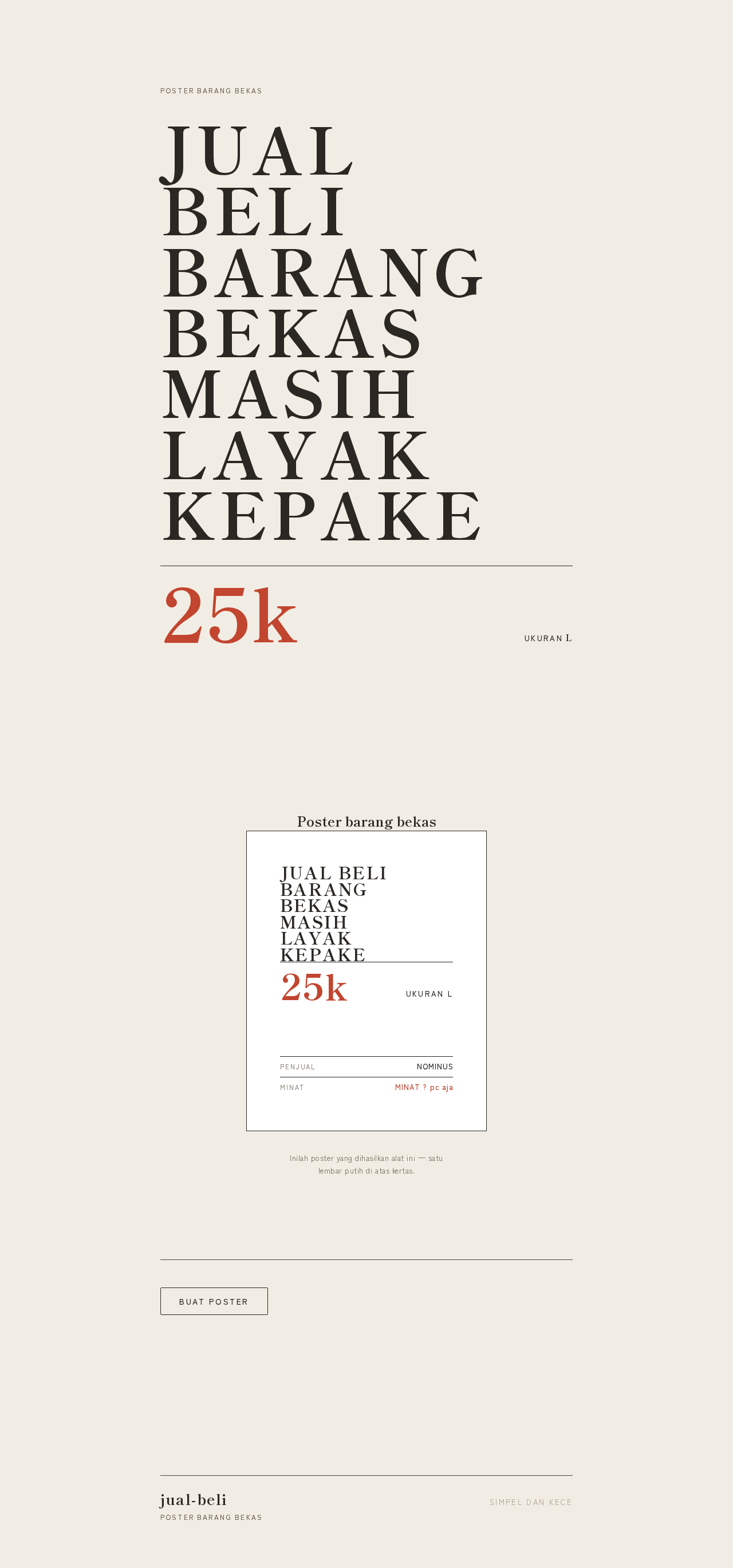
Poster Barang Bekas
JUAL BELI BARANG BEKAS MASIH LAYAK KEPAKE
Inilah poster yang dihasilkan alat ini — satu lembar putih di atas kertas.
Poster Barang Bekas
JUAL BELI BARANG BEKAS MASIH LAYAK KEPAKE
Inilah poster yang dihasilkan alat ini — satu lembar putih di atas kertas.
No comments yet. Be the first!