jolly-zuntria
 Olamide Emmanuel Ojo
I can’t render or upload an actual video file directly here. But I can give you a complete, copy-paste production kit so you can make the video in CapCut, Canva, InVideo AI, Pictory, or HeyGen in about 15–30 minutes. Important: Because your own Zuntria directive says zero fake states, do not post the £630 figure unless it is a real verified user result. If it’s illustrative, label it clearly as an example. Replace with real numbers or “illustrative example” before posting. --- ZUNTRIA VIRAL VIDEO KIT Format: 9:16 vertical for LinkedIn, Facebook, Reels, TikTok, Shorts Length: 60 seconds Style: Fast cuts, screen recording, kinetic text, captions burned in --- A. FASTEST OPTION — PASTE THIS INTO AN AI VIDEO GENERATOR Use InVideo AI, Pictory, Canva Magic Media, HeyGen, or Synthesia. Paste this prompt: ``` Create a 60-second vertical 9:16 social media video for Zuntria, a money and opportunity execution app. Style: fast-paced, screen-recording + kinetic typography. Music: upbeat tech/hip-hop, 90–110 BPM. Voiceover: confident UK male/female. Captions burned in. Scene 1 (0:00–0:05): Text on screen: “I told my app I need £500 this week”. Phone screen. VO: “I literally typed one sentence into Zuntria…” Scene 2 (0:05–0:15): Split screen of messy tabs, notes, calendar, banking app, job site. VO: “Before this, I had 47 tabs open. Job sites. Freelance platforms. My notes. My banking. My calendar. And still no clue what to actually DO.” Text: “The real problem isn’t lack of opportunities. It’s lack of execution.” Scene 3 (0:15–0:35): Screen recording of Zuntria Daily Briefing. Show: GOAL: Make £500 this week CONFIRMED: £280 PIPELINE: £420 REMAINING: £220 ⚡ NEXT BEST ACTION: Respond to qualified opportunity → Client needs urgent design work → Match score: 94% → Potential value: £350 VO: “It didn’t give me motivation quotes. It gave me a MOVE. A real opportunity. With a real next step.” Scene 4 (0:35–0:50): Quick cuts: proposal, dispatch, verification, invoice, payment. Text chain: OPPORTUNITY → ACTION → EXECUTION → DISPATCH → VERIFICATION → INVOICE → PAYMENT → OUTCOME VO: “One tap to respond. Proposal auto-drafted. Sent. Client replies. Job dispatched. Work verified. Invoice generated. Payment confirmed.” Scene 5 (0:50–0:55): Updated Daily Briefing: GOAL: Make £500 this week ✅ CONFIRMED: £630 STATUS: Goal exceeded NEXT: £1,000 week → 3 opportunities in pipeline VO: “£630 confirmed. In five days. Because I finally had ONE system that connected everything.” Scene 6 (0:55–0:60): Zuntria logo. Text: “Zuntria. What should you do next? Now you’ll know.” VO: “Zuntria. Stop collecting opportunities. Start executing them.” End with link in bio. ``` --- B. SHOT-BY-SHOT STORYBOARD — RECORD YOUR REAL APP Time Visual On-Screen Text Voiceover 0:00–0:05 Phone in hand, thumb typing “I told my app I need £500 this week” “I literally typed one sentence into Zuntria…” 0:05–0:10 Quick cuts: Notes, Calendar, Banking, Job site, Freelance platform “47 tabs. No direction.” “Before this, I had 47 tabs open…” 0:10–0:15 Close-up stressed face or messy desk “The real problem isn’t opportunities. It’s execution.” “…and still no clue what to actually DO.” 0:15–0:20 Screen recording: Zuntria Daily Briefing GOAL: Make £500 this week “Then I found Zuntria. I set one goal.” 0:20–0:35 Zoom into Next Best Action card CONFIRMED: £280 / PIPELINE: £420 / REMAINING: £220 / ⚡ NEXT BEST ACTION: Respond to qualified opportunity / Match: 94% / Value: £350 “It didn’t give me motivation quotes. It gave me a MOVE.” 0:35–0:50 Fast cuts: tap respond, proposal draft, send, client reply, dispatch, verification, invoice, payment confirmed OPPORTUNITY → ACTION → EXECUTION → DISPATCH → VERIFICATION → INVOICE → PAYMENT → OUTCOME “One tap to respond. Proposal auto-drafted. Sent. Client replies. Job dispatched. Work verified. Invoice generated. Payment confirmed.” 0:50–0:55 Updated Daily Briefing GOAL: £500 ✅ / CONFIRMED: £630 / STATUS: Goal exceeded / NEXT: £1,000 week / → 3 opportunities in pipeline “£630 confirmed. In five days.” 0:55–0:60 Zuntria logo + CTA “Zuntria. What should you do next? Now you’ll know.” “Zuntria. Stop collecting opportunities. Start executing them.” --- C. FULL VOICEOVER SCRIPT — READ EXACTLY ``` I literally typed one sentence into Zuntria… Before this, I had 47 tabs open. Job sites. Freelance platforms. My notes. My banking. My calendar. And still no clue what to actually DO. The real problem isn’t lack of opportunities. It’s lack of execution. Then I found Zuntria. I set one goal. Make £500 this week. And this is what happened… It didn’t give me motivation quotes. It gave me a MOVE. A real opportunity. With a real next step. One tap to respond. Proposal auto-drafted. Sent. Client replies. Job dispatched. Work verified. Invoice generated. Payment confirmed. And the whole time, my Daily Briefing kept updating. Showing me exactly what to do next. No guessing. No fake numbers. Just verified progress. £630 confirmed. In five days. Because I finally had ONE system that connected everything. Zuntria. Stop collecting opportunities. Start executing them. ``` --- D. ON-SCREEN TEXT / CAPTIONS — COPY-PASTE ``` I told my app I need £500 this week 47 tabs. No direction. The real problem isn’t lack of opportunities. It’s lack of execution. GOAL: Make £500 this week CONFIRMED: £280 PIPELINE: £420 REMAINING: £220 ⚡ NEXT BEST ACTION: Respond to qualified opportunity → Client needs urgent design work → Match score: 94% → Potential value: £350 OPPORTUNITY → ACTION → EXECUTION → DISPATCH → VERIFICATION → INVOICE → PAYMENT → OUTCOME GOAL: Make £500 this week ✅ CONFIRMED: £630 STATUS: Goal exceeded NEXT: £1,000 week → 3 opportunities in pipeline Zuntria. What should you do next? Now you’ll know. ``` --- E. MUSIC & EDIT SETTINGS · Music: Upbeat tech/hip-hop, 90–110 BPM. Search CapCut/Canva for: “business hustle beat”, “tech motivational”, “UK drill instrumental”, “corporate trap”. · Transitions: Quick cuts, zoom punches, whoosh sounds on text. · Captions: Auto-generate, then fix spelling. Burn them in. · Export: 1080 x 1920, 30fps, H.264, high bitrate. · Aspect ratio: 9:16 for Reels/TikTok/Shorts. For LinkedIn/Facebook feed, also export 1:1 square. --- F. LINKEDIN POST ``` I asked my app “what should I do next?” and it actually showed me. Not motivation. Not quotes. A real opportunity with a real next step. Then it connected: proposal → dispatch → work → verification → invoice → payment. £630 confirmed in 5 days. [Replace with real verified result or label as illustrative.] This is Zuntria. One goal in. One execution system out. Most tools give you more tabs. Zuntria gives you a move. 👇 Watch how it works. #Zuntria #ExecutionNotMotivation #NextBestAction #FreelanceUK #SideHustle #Productivity #FinTech #Ajo #Truffl #Dispatch ``` --- G. FACEBOOK POST ``` I told my app I need £500 this week. It didn’t give me a quote. It gave me a MOVE. 🎯 One tap → proposal sent → job won → work done → invoice paid. £630 confirmed in 5 days. No guesswork. No fake numbers. Just verified progress. [Replace with real verified result or label as illustrative.] This is Zuntria. What should you do next? Now you’ll know. 🔥 👇 Watch the full video. #Zuntria #MakeMoneyOnline #SideHustle #FreelanceLife #Ajo #Truffl #Dispatch #ExecutionNotMotivation ``` --- H. 10-MINUTE CAPCUT BUILD 1. Open CapCut → New project → 9:16. 2. Import your screen recordings and any phone/laptop clips. 3. Add voiceover: record directly in CapCut or import from your phone. 4. Add text overlays using the copy-paste text above. Time them to the table. 5. Add music from CapCut’s library. Lower volume to 20–30% under voiceover. 6. Tap “Captions” → Auto captions → fix any errors. 7. Add zoom punches and whoosh sounds on key text. 8. Export 1080p. Post to LinkedIn and Facebook. --- If you want, I can now make you: · a 30-second cut for Reels/Shorts, · a text-only kinetic version with no voiceover, · or a HeyGen/Synthesia avatar script so an AI presenter reads it.

Comments (0)
Sign in to leave a comment
System Requirements
System Requirements Document for jolly-zuntria
1. Introduction
jolly-zuntria is the product and marketing system for Zuntria, a money and opportunity execution app. Zuntria's promise is one goal in, one next action out: the user states a single money goal (for example, "Make £500 this week"), and the app answers with a Next Best Action — a real, qualified opportunity with a real next step — rather than motivation quotes. The app then carries that opportunity through a connected execution chain: OPPORTUNITY → ACTION → EXECUTION → DISPATCH → VERIFICATION → INVOICE → PAYMENT → OUTCOME, with the Daily Briefing updating as progress is verified.
The audience is UK freelancers and side-hustlers chasing a hard weekly number — people who are stressed, tab-flooded (job sites, freelance platforms, notes, banking, calendar) and sceptical of motivation content. The product's emotional register is kinetic momentum: relief that arrives as a single, responsive MOVE.
This document also governs the accompanying Zuntria Viral Video Kit: a copy-paste production kit (for CapCut, Canva, InVideo AI, Pictory or HeyGen) for a 60-second 9:16 vertical social video plus LinkedIn and Facebook post copy. The kit is a deliverable of this project, not a rendered video file — the source explicitly cannot render or upload an actual video file.
2. System Overview
Zuntria is delivered as a first-party web application with application-owned identity, plus a companion marketing production kit.
Current actors
- Zuntria user pursuing a money goal — sets one money goal, reads the Daily Briefing, acts on the Next Best Action, and drives the execution chain to a confirmed payment.
- Client commissioning work — posts a need that is matched to the user as a qualified opportunity, receives the proposal, replies, and has the job dispatched to the user.
Current accepted behaviour
- One-goal intake and a Next Best Action answer (never motivation quotes).
- A Daily Briefing ledger showing GOAL, CONFIRMED, PIPELINE and REMAINING for the active goal, plus a Next Best Action card carrying the opportunity description, match score and potential value.
- The full execution chain with one-tap response, auto-drafted proposal, sending, client reply, dispatch, work verification, invoice generation and payment confirmation.
- Briefing updates on verified progress, goal status (e.g. goal exceeded) and the next goal with opportunities in pipeline.
- Zero fake states: every figure is a real verified result, or is clearly labelled as an illustrative example.
- The viral video kit: AI-generator prompt, shot-by-shot storyboard, full voiceover script, copy-paste on-screen text, music/edit settings, LinkedIn and Facebook post copy, and a 10-minute CapCut build guide.
Narrow exclusions
- The project does not render or upload an actual video file; the video deliverable is a copy-paste production kit for third-party editors/generators.
- No motivation-quote content, no stock photography of stressed people or messy desks, no gradient-blob or glassmorphism surfaces, no grids of identical hover-lift cards.
2a. Product Interpretation and Delivery Boundary
Zuntria is a first-party application. The Landing page is anonymously reachable and explains the product before any identity work. A user establishes identity through self-service Sign Up, and returning users verify through Login; the Daily Briefing and Opportunity pages are protected and require login. Identity is application-owned because the user's goal, briefing figures and execution-chain state are durable, private and must remain bound to the correct person.
The video kit is a content deliverable, not an in-app feature: it is produced outside Zuntria in CapCut, Canva, InVideo AI, Pictory or HeyGen, and its copy is posted to LinkedIn and Facebook by the user. The kit's illustrative figures (£280 / £420 / £220 / £630 / £350 / 94%) are examples of the interface and must be labelled as illustrative examples wherever they are not real verified results. The £630 figure in particular must not be posted unless it is a real verified user result.
Future ideas mentioned in the source (a 30-second cut, a text-only kinetic version, a HeyGen/Synthesia avatar script) are explicitly optional offers and are not current requirements.
2b. Source Content Inventory
The authoritative source supplies the following verified content for the production kit. All figures below are illustrative examples of the Zuntria interface and must be labelled as such unless replaced with real verified results.
Video specification
- Format: 9:16 vertical for LinkedIn, Facebook, Reels, TikTok, Shorts.
- Length: 60 seconds.
- Style: fast cuts, screen recording, kinetic text, captions burned in.
- Music: upbeat tech/hip-hop, 90–110 BPM; search terms "business hustle beat", "tech motivational", "UK drill instrumental", "corporate trap"; volume lowered to 20–30% under voiceover.
- Transitions: quick cuts, zoom punches, whoosh sounds on text.
- Captions: auto-generate, then fix spelling; burn them in.
- Export: 1080 x 1920, 30fps, H.264, high bitrate; additional 1:1 square export for LinkedIn/Facebook feed.
- Voiceover: confident UK male/female.
Scene-by-scene storyboard (time / visual / on-screen text / voiceover)
- 0:00–0:05 — Phone in hand, thumb typing — "I told my app I need £500 this week" — "I literally typed one sentence into Zuntria…"
- 0:05–0:10 — Quick cuts: Notes, Calendar, Banking, Job site, Freelance platform — "47 tabs. No direction." — "Before this, I had 47 tabs open…"
- 0:10–0:15 — Close-up stressed face or messy desk — "The real problem isn't opportunities. It's execution." — "…and still no clue what to actually DO."
- 0:15–0:20 — Screen recording: Zuntria Daily Briefing — "GOAL: Make £500 this week" — "Then I found Zuntria. I set one goal."
- 0:20–0:35 — Zoom into Next Best Action card — "CONFIRMED: £280 / PIPELINE: £420 / REMAINING: £220 /\x20\xe2\x9a\xa1 NEXT BEST ACTION: Respond to qualified opportunity / Match: 94% / Value: £350" — "It didn't give me motivation quotes. It gave me a MOVE."
- 0:35–0:50 — Fast cuts: tap respond, proposal draft, send, client reply, dispatch, verification, invoice, payment confirmed — "OPPORTUNITY → ACTION → EXECUTION → DISPATCH → VERIFICATION → INVOICE → PAYMENT → OUTCOME" — "One tap to respond. Proposal auto-drafted. Sent. Client replies. Job dispatched. Work verified. Invoice generated. Payment confirmed."
- 0:50–0:55 — Updated Daily Briefing — "GOAL: £500 ✅ / CONFIRMED: £630 / STATUS: Goal exceeded / NEXT: £1,000 week / → 3 opportunities in pipeline" — "£630 confirmed. In five days."
- 0:55–0:60 — Zuntria logo + CTA — "Zuntria. What should you do next? Now you'll know." — "Zuntria. Stop collecting opportunities. Start executing them."
Full voiceover script (read exactly)
I literally typed one sentence into Zuntria…
Before this, I had 47 tabs open. Job sites. Freelance platforms. My notes. My banking. My calendar. And still no clue what to actually DO.
The real problem isn't lack of opportunities. It's lack of execution.
Then I found Zuntria. I set one goal. Make £500 this week. And this is what happened…
It didn't give me motivation quotes. It gave me a MOVE. A real opportunity. With a real next step.
One tap to respond. Proposal auto-drafted. Sent. Client replies. Job dispatched. Work verified. Invoice generated. Payment confirmed.
And the whole time, my Daily Briefing kept updating. Showing me exactly what to do next. No guessing. No fake numbers. Just verified progress.
£630 confirmed. In five days. Because I finally had ONE system that connected everything.
Zuntria. Stop collecting opportunities. Start executing them.
On-screen text / captions (copy-paste)
I told my app I need £500 this week

47 tabs. No direction.

The real problem isn't lack of opportunities.
It's lack of execution.

GOAL: Make £500 this week
CONFIRMED: £280
PIPELINE: £420
REMAINING: £220

\xe2\x9a\xa1 NEXT BEST ACTION:
Respond to qualified opportunity
→ Client needs urgent design work
→ Match score: 94%
→ Potential value: £350

OPPORTUNITY → ACTION → EXECUTION →
DISPATCH → VERIFICATION → INVOICE →
PAYMENT → OUTCOME

GOAL: Make £500 this week ✅
CONFIRMED: £630
STATUS: Goal exceeded

NEXT: £1,000 week
→ 3 opportunities in pipeline

Zuntria.
What should you do next?
Now you'll know.
LinkedIn post copy
I asked my app "what should I do next?" and it actually showed me.
Not motivation. Not quotes. A real opportunity with a real next step.
Then it connected: proposal → dispatch → work → verification → invoice → payment.
£630 confirmed in 5 days. [Replace with real verified result or label as illustrative.]
This is Zuntria. One goal in. One execution system out.
Most tools give you more tabs. Zuntria gives you a move.
\x20\xf0\x9f\x91\x87 Watch how it works.
#Zuntria #ExecutionNotMotivation #NextBestAction #FreelanceUK #SideHustle #Productivity #FinTech #Ajo #Truffl #Dispatch
Facebook post copy
I told my app I need £500 this week.
It didn't give me a quote. It gave me a MOVE.\x20\xf0\x9f\x8e\xaf
One tap → proposal sent → job won → work done → invoice paid.
£630 confirmed in 5 days. No guesswork. No fake numbers. Just verified progress. [Replace with real verified result or label as illustrative.]
This is Zuntria. What should you do next? Now you'll know.\x20\xf0\x9f\x94\xa5
\x20\xf0\x9f\x91\x87 Watch the full video.
#Zuntria #MakeMoneyOnline #SideHustle #FreelanceLife #Ajo #Truffl #Dispatch #ExecutionNotMotivation
10-minute CapCut build guide
- Open CapCut → New project → 9:16.
- Import your screen recordings and any phone/laptop clips.
- Add voiceover: record directly in CapCut or import from your phone.
- Add text overlays using the copy-paste text above. Time them to the table.
- Add music from CapCut's library. Lower volume to 20–30% under voiceover.
- Tap "Captions" → Auto captions → fix any errors.
- Add zoom punches and whoosh sounds on key text.
- Export 1080p. Post to LinkedIn and Facebook.
2c. Page Content and Component Coverage
Landing
- Information/state: Anonymous public entry. Full-bleed near-black ground (#0B0B0C). A single oversized display headline — "What should you do next? Now you'll know." — left-aligned, spanning the viewport, with the word "NEXT" in acid #E8FF47. Beneath it, pinned left, a solid #E8FF47 pill reading "Set one goal →" with black text, and a hairline-ruled live figure strip reading GOAL £500 / CONFIRMED £0 / REMAINING £500 in tabular type. No centred stack, no subtext paragraph, no gradient.
- Primary action: "Set one goal →" leads to Sign Up (first use) or Login (returning).
- Supporting actions: Navigate to Login or Sign Up from the header.
- Domain entities: Goal (illustrative preview only), Next Best Action (concept preview).
- Component responsibilities: Cursor-reactive headline (letters shear/skew toward the pointer, snap back on leave); figure strip with tabular figures; primary pill CTA; header with wordmark and Login/Sign Up links.
- States: Loading (headline and figure strip render immediately; no data fetch required for the anonymous preview); empty (figure strip shows the illustrative GOAL £500 / CONFIRMED £0 / REMAINING £500 preview, labelled as an illustrative example); success (CTA navigates to Sign Up or Login); error (if navigation fails, the CTA remains visible and retryable); recovery (reduced-motion users get a static stacked hero with the headline wrapped and the figure strip stacked).
Login
- Information/state: Returning verification for the Zuntria user. Email and password fields, a primary "Log in" button, and a link to Sign Up.
- Primary action: Submit credentials to verify identity and reach the Daily Briefing.
- Supporting actions: Navigate to Sign Up; recover from a failed login.
- Domain entities: User identity.
- Component responsibilities: Credential form, inline validation, submit control, error banner.
- States: Loading (submit disabled with a progress indicator); empty (blank fields with labels); success (redirect to Daily Briefing); error (invalid credentials shown inline without clearing the email field); recovery (retry, or navigate to Sign Up).
Sign Up
- Information/state: Self-service first-use enrollment. Fields for the user's identity details and credentials, a primary "Create account" button, and a link to Login.
- Primary action: Create the account and continue to the Daily Briefing to set the first goal.
- Supporting actions: Navigate to Login.
- Domain entities: User identity.
- Component responsibilities: Enrollment form, inline validation, submit control, error banner.
- States: Loading (submit disabled with a progress indicator); empty (blank fields with labels); success (account created, redirect to Daily Briefing); error (validation or duplicate-account error shown inline); recovery (correct and resubmit, or navigate to Login).
Daily Briefing
- Information/state: Protected. A ticking marquee of OPPORTUNITY → ACTION → EXECUTION → DISPATCH → VERIFICATION → INVOICE → PAYMENT → OUTCOME across the top. A strict ruled ledger — label left, figure right, hairline between — showing GOAL, CONFIRMED, PIPELINE and REMAINING for the active goal, with the £ figure as the largest element on the page. The acid-yellow Next Best Action card breaks out of the ruled grid and is the only bright surface on the page, carrying the opportunity description, match score and potential value. Goal status (e.g. goal exceeded) and the next goal with opportunities in pipeline appear once verified progress changes.
- Primary action: Set one money goal (e.g. "Make £500 this week") and read the Next Best Action.
- Supporting actions: Open the Next Best Action card to the Opportunity page; set the next goal after the current one is exceeded.
- Domain entities: Goal, Briefing figures (GOAL, CONFIRMED, PIPELINE, REMAINING), Next Best Action, Opportunity, Verified progress.
- Component responsibilities: Goal intake control; ruled ledger rows; rolling £ figure; Next Best Action card; execution-chain marquee; goal-status banner; next-goal control.
- States: Loading (ledger skeleton with labels, figures pending); empty (no goal set — goal intake is the primary focus, ledger rows show zero and the Next Best Action card is absent); success (goal set, figures populated, Next Best Action card visible); error (if the briefing cannot load, a retry control is shown and the last known figures are not fabricated); recovery (retry; reduced-motion users see the chain wrapped into rows instead of a marquee).
Opportunity
- Information/state: Protected. A vertical execution chain rendered as a ruled spine of pills — OPPORTUNITY → ACTION → EXECUTION → DISPATCH → VERIFICATION → INVOICE → PAYMENT → OUTCOME — with the active node pulsing. The opportunity shows the client's posted need (e.g. urgent design work), the match score (e.g. 94%) and the potential value (e.g. £350), each labelled as an illustrative example where not a real verified result. The client's reply, dispatch state, verification state, invoice and payment confirmation appear as the chain advances.
- Primary action: One-tap respond to the qualified opportunity, which auto-drafts the proposal.
- Supporting actions: Review and send the auto-drafted proposal; read the client's reply; confirm dispatch; confirm work verification; view the generated invoice; confirm payment.
- Domain entities: Opportunity, Proposal, Client reply, Dispatch, Verification, Invoice, Payment, Outcome.
- Component responsibilities: Execution-chain spine with pulsing active node; opportunity summary (need, match score, potential value); one-tap respond control; proposal draft editor and send control; client-reply panel; dispatch, verification, invoice and payment status nodes.
- States: Loading (chain spine renders with the active node pending); empty (no qualified opportunity — the chain shows the OPPORTUNITY node awaiting a match); success (each node advances with a single 180ms orange wipe and the briefing figures update on verified progress); error (a failed send or failed verification shows an inline error on the affected node and the chain does not advance); recovery (retry the failed step; the chain resumes from the last confirmed node).
3. Functional Requirements
FR-1 — One goal in, one Next Best Action out (explicit) As a Zuntria user pursuing a money goal, I should state one money goal (e.g. "Make £500 this week") and receive a Next Best Action rather than motivation quotes, so that I know exactly what to do next.
- Trigger/input: the user enters a single money goal.
- Observable result: the Daily Briefing shows the goal and a Next Best Action card with the opportunity description, match score and potential value.
- Access: login required.
- Failure/recovery: if no qualified opportunity is available, the card is absent and the goal intake remains the primary focus; the user can retry later.
- Continuation: the user opens the Next Best Action card to the Opportunity page.
- Acceptance: a stated goal produces a Next Best Action card containing a description, a match score and a potential value; no motivation-quote content is shown.
FR-2 — Daily Briefing ledger (explicit) As a Zuntria user pursuing a money goal, I should see GOAL, CONFIRMED, PIPELINE and REMAINING amounts for my active goal in the Daily Briefing, so that I can see exactly where I stand against the number.
- Trigger/input: the user opens the Daily Briefing with an active goal.
- Observable result: four ruled ledger rows — GOAL, CONFIRMED, PIPELINE, REMAINING — each with its figure, the £ figure being the largest element on the page.
- Access: login required.
- Failure/recovery: if the briefing cannot load, a retry control is shown and no figure is fabricated.
- Continuation: the user reads the Next Best Action card.
- Acceptance: all four labelled figures are visible for the active goal and update when verified progress changes.
FR-3 — Next Best Action card (explicit) As a Zuntria user pursuing a money goal, I should see a Next Best Action card carrying the opportunity description, match score and potential value, so that I can judge the move before committing.
- Trigger/input: a qualified opportunity is matched to the user's goal.
- Observable result: an acid-yellow card breaking the ruled ledger grid, showing e.g. "Respond to qualified opportunity — Client needs urgent design work — Match score: 94% — Potential value: £350" (illustrative example where not a real verified result).
- Access: login required.
- Failure/recovery: if the match data is unavailable, the card is not shown rather than showing an unlabelled figure.
- Continuation: the user opens the card to the Opportunity page.
- Acceptance: the card shows description, match score and potential value, and any non-real figure carries an "illustrative example" label.
FR-4 — One-tap response and auto-drafted proposal (explicit) As a Zuntria user pursuing a money goal, I should respond to a qualified opportunity with one tap and have a proposal auto-drafted, so that responding takes a single move.
- Trigger/input: the user taps respond on the Opportunity page.
- Observable result: a proposal is auto-drafted for the opportunity and presented for sending.
- Access: login required.
- Failure/recovery: if drafting fails, an inline error appears on the ACTION node and the chain does not advance; the user can retry.
- Continuation: the user reviews and sends the proposal.
- Acceptance: one tap produces a drafted proposal tied to the selected opportunity.
FR-5 — Proposal sent and client reply (explicit) As a Zuntria user pursuing a money goal, I should send the auto-drafted proposal and see the client's reply, so that the opportunity moves forward.
- Trigger/input: the user sends the proposal.
- Observable result: the proposal is marked sent and the client's reply appears on the chain.
- Access: login required.
- Failure/recovery: a failed send shows an inline error on the affected node and the chain does not advance; retry resumes from the last confirmed node.
- Continuation: the job is dispatched.
- Acceptance: the sent proposal and the client's reply are both visible on the execution chain.
FR-6 — Dispatch, verification, invoice and payment (explicit) As a Zuntria user pursuing a money goal, I should have the job dispatched, the work verified, an invoice generated and payment confirmed, so that the opportunity reaches a real outcome.
- Trigger/input: the client's reply accepts the proposal.
- Observable result: the chain advances through DISPATCH → VERIFICATION → INVOICE → PAYMENT → OUTCOME, each node wiping orange as it advances.
- Access: login required.
- Failure/recovery: a failed verification or payment shows an inline error on the affected node and the chain does not advance; retry resumes from the last confirmed node.
- Continuation: the confirmed payment updates the Daily Briefing.
- Acceptance: each of the four steps is observable on the chain and the OUTCOME node is reached only after payment is confirmed.
FR-7 — Briefing updates on verified progress (explicit) As a Zuntria user pursuing a money goal, I should see my Daily Briefing update as progress is verified, so that I always know what to do next.
- Trigger/input: a payment is confirmed on the execution chain.
- Observable result: CONFIRMED and REMAINING update, the £ figure rolls mechanically, and the goal status changes (e.g. goal exceeded).
- Access: login required.
- Failure/recovery: if the update cannot be fetched, the last known figures remain and a retry control is shown; no figure is fabricated.
- Continuation: the user sees the next goal with opportunities in pipeline.
- Acceptance: a confirmed payment changes CONFIRMED and REMAINING and the goal status reflects the new total.
FR-8 — Goal exceeded and next goal (explicit) As a Zuntria user pursuing a money goal, I should see when my goal is exceeded and be shown the next goal with opportunities in pipeline, so that I keep executing.
- Trigger/input: CONFIRMED exceeds GOAL.
- Observable result: the briefing shows "GOAL: Make £500 this week ✅ / STATUS: Goal exceeded / NEXT: £1,000 week / → 3 opportunities in pipeline" (illustrative example where not a real verified result).
- Access: login required.
- Failure/recovery: if no next goal is available, the exceeded status is still shown and the user can set the next goal.
- Continuation: the user sets the next goal.
- Acceptance: an exceeded goal shows the exceeded status and a next goal with a pipeline count.
FR-9 — Zero fake states (explicit) As a Zuntria user pursuing a money goal, I should see only real verified results, with any illustrative figure clearly labelled as an example, so that I can trust every number.
- Trigger/input: any figure is displayed in the app or in marketing content.
- Observable result: every figure is either a real verified result or carries an "illustrative example" label.
- Access: applies to all surfaces, including the anonymous Landing preview and the marketing kit.
- Failure/recovery: an unlabelled non-real figure is a defect; the fix is to replace it with a real verified result or add the label.
- Continuation: the user can rely on the figures.
- Acceptance: no unlabelled non-real figure appears anywhere; the £630 figure is never posted unless it is a real verified user result.
FR-10 — Self-service enrollment (required_inference) As a Zuntria user pursuing a money goal, I should create my own account on first use, so that my goal, briefing and execution-chain state are privately mine.
- Trigger/input: the user selects "Set one goal →" on the Landing page.
- Observable result: an account is created and the user reaches the Daily Briefing to set the first goal.
- Access: anonymous entry on Sign Up.
- Failure/recovery: validation or duplicate-account errors are shown inline; the user can correct and resubmit or go to Login.
- Continuation: the user sets the first goal.
- Acceptance: a new user can create an account without an invitation and lands on the Daily Briefing.
FR-11 — Returning verification (required_inference) As a Zuntria user pursuing a money goal, I should verify my identity when I return, so that I can resume my own briefing and execution chain.
- Trigger/input: the user submits credentials on Login.
- Observable result: the user reaches the Daily Briefing with their own goal and figures.
- Access: anonymous entry on Login; protected destinations require login.
- Failure/recovery: invalid credentials are shown inline without clearing the email field; the user can retry or go to Sign Up.
- Continuation: the user resumes the briefing.
- Acceptance: a returning user reaches their own Daily Briefing and Opportunity state after verification.
FR-12 — Client posts a need and receives the proposal (required_inference) As a client commissioning work, I should post a need that is matched to the user as a qualified opportunity, receive the user's proposal and reply, so that the job can be dispatched and the work delivered.
- Trigger/input: the client posts a need (e.g. urgent design work).
- Observable result: the need is matched to the user as a qualified opportunity with a match score and potential value; the client receives the user's proposal and replies.
- Access: the client's side of the lifecycle is reached through the Opportunity page's client-reply state.
- Failure/recovery: if the client does not reply, the chain remains at the client-reply node and the user can see that state.
- Continuation: the job is dispatched to the user.
- Acceptance: the client's posted need, the user's proposal and the client's reply are all visible on the execution chain.
FR-13 — Viral video kit (explicit) As a Zuntria marketer, I should have a complete copy-paste production kit for a 60-second 9:16 vertical social video, so that I can produce and post it in 15–30 minutes.
- Trigger/input: the marketer opens the kit.
- Observable result: the kit contains the AI-generator prompt, the shot-by-shot storyboard, the full voiceover script, the copy-paste on-screen text, the music/edit settings, the LinkedIn and Facebook post copy, and the 10-minute CapCut build guide.
- Access: the kit is a content deliverable, not an in-app feature.
- Failure/recovery: if a figure in the kit is not a real verified result, it is labelled as an illustrative example before posting.
- Continuation: the marketer produces the video in CapCut, Canva, InVideo AI, Pictory or HeyGen and posts to LinkedIn and Facebook.
- Acceptance: every kit section is present and every non-real figure is labelled.
FR-14 — Video format and edit constraints (explicit) As a Zuntria marketer, I should produce the video to the specified format and edit settings, so that it is ready for every target platform.
- Trigger/input: the marketer builds the video.
- Observable result: 9:16 vertical, 60 seconds, fast cuts, screen recording, kinetic text, burned-in captions; music at 90–110 BPM lowered to 20–30% under voiceover; export 1080 x 1920, 30fps, H.264, high bitrate; additional 1:1 square export for LinkedIn/Facebook feed.
- Access: content deliverable.
- Failure/recovery: if a platform rejects the export, re-export at the specified settings.
- Continuation: post to LinkedIn and Facebook.
- Acceptance: the exported files match the specified dimensions, frame rate, codec and aspect ratios.
4. User Personas
Zuntria user pursuing a money goal
Product context. A UK freelancer or side-hustler chasing a hard weekly number. Before Zuntria they had 47 tabs open — job sites, freelance platforms, notes, banking, calendar — and still no clue what to actually do. They are sceptical of motivation content and want a move, not a quote.
Primary goal. Hit a stated money goal (e.g. "Make £500 this week") by executing the single best next action, and see verified progress toward the number.
Distinct accepted responsibilities.
- State one money goal and read the Next Best Action.
- Read the Daily Briefing ledger: GOAL, CONFIRMED, PIPELINE, REMAINING.
- Respond to a qualified opportunity with one tap and send the auto-drafted proposal.
- Follow the execution chain through dispatch, verification, invoice and payment.
- See the goal exceeded and set the next goal with opportunities in pipeline.
Relevant inputs or decisions. The weekly money goal; whether to respond to the Next Best Action; whether to send the auto-drafted proposal; the next goal after the current one is exceeded.
Interactions with other accepted participants. The user's proposal goes to the client commissioning work; the client's reply and the job dispatch come back to the user; the confirmed payment updates the user's briefing.
Observable success. The Daily Briefing shows verified progress, the goal status changes to exceeded, and the next goal with opportunities in pipeline is visible.
Constraints. Every figure the user sees is a real verified result or is labelled as an illustrative example.
Client commissioning work
Product context. A client with a real need (e.g. urgent design work) that is matched to the Zuntria user as a qualified opportunity.
Primary goal. Get the work delivered and verified so the invoice and payment can follow.
Distinct accepted responsibilities.
- Post a need that is matched to the user as a qualified opportunity.
- Receive the user's proposal and reply.
- Have the job dispatched to the user.
- Have the work delivered and verified.
Relevant inputs or decisions. The posted need; whether to accept the proposal and reply; confirmation that the work is delivered.
Interactions with other accepted participants. The client's posted need and reply appear on the user's Opportunity page; the client's acceptance triggers dispatch, verification, invoice and payment.
Observable success. The work is delivered and verified, and the invoice and payment follow.
Constraints. The client's side of the lifecycle is reached through the Opportunity page's client-reply state; no separate client account or destination is established.
5. Core User Flows
Flow 1 — First use: set one goal and get a move
- The Zuntria user pursuing a money goal opens the Landing page anonymously. The headline "What should you do next? Now you'll know." is visible with the illustrative figure strip labelled as an example.
- The user selects "Set one goal →" and lands on Sign Up.
- The user creates an account and is taken to the Daily Briefing.
- The user types one goal: "Make £500 this week."
- The Daily Briefing shows GOAL £500, CONFIRMED £0, REMAINING £500, and a Next Best Action card: "Respond to qualified opportunity — Client needs urgent design work — Match score: 94% — Potential value: £350" (illustrative example where not a real verified result).
- The user opens the card to the Opportunity page. Next step: Flow 2.
Flow 2 — Execute the opportunity to a confirmed payment
- On the Opportunity page, the user sees the execution chain with the OPPORTUNITY node active and the client's posted need.
- The user taps respond once. A proposal is auto-drafted.
- The user reviews and sends the proposal. The ACTION node advances with an orange wipe.
- The client commissioning work receives the proposal and replies. The client's reply appears on the chain.
- The job is dispatched to the user. The DISPATCH node advances.
- The work is verified. The VERIFICATION node advances.
- An invoice is generated. The INVOICE node advances.
- Payment is confirmed. The PAYMENT and OUTCOME nodes advance.
- The Daily Briefing updates: CONFIRMED rises, REMAINING falls, and the £ figure rolls mechanically. Next step: Flow 3.
Failure/recovery. If the proposal send fails, an inline error appears on the ACTION node and the chain does not advance; the user retries and the chain resumes from the last confirmed node. If verification or payment fails, the same inline error and retry apply.
Flow 3 — Goal exceeded and next goal
- The user returns to the Daily Briefing after a confirmed payment.
- The briefing shows "GOAL: Make £500 this week ✅ / STATUS: Goal exceeded / NEXT: £1,000 week / → 3 opportunities in pipeline" (illustrative example where not a real verified result).
- The user sets the next goal: "Make £1,000 this week."
- The briefing resets GOAL, CONFIRMED, PIPELINE and REMAINING for the new goal and shows a fresh Next Best Action. Next step: Flow 2 for the new goal.
Flow 4 — Returning user resumes
- The returning user opens the Landing page and selects Login.
- The user submits credentials. On success they reach the Daily Briefing with their own goal and figures.
- If credentials are invalid, an inline error appears without clearing the email field; the user retries or goes to Sign Up.
- The user continues from Flow 2 or Flow 3.
Flow 5 — Client's side of the lifecycle
- The client commissioning work posts a need (e.g. urgent design work).
- The need is matched to the user as a qualified opportunity with a match score and potential value.
- The client receives the user's proposal and replies.
- The job is dispatched to the user; the client's successful outcome is the work delivered and verified so the invoice and payment can follow.
- If the client does not reply, the chain remains at the client-reply node and the user can see that state.
Flow 6 — Produce and post the viral video kit
- The Zuntria marketer opens the kit and pastes the AI-generator prompt into InVideo AI, Pictory, Canva Magic Media, HeyGen or Synthesia — or follows the shot-by-shot storyboard to record the real app.
- The marketer records the voiceover from the full script and adds the copy-paste on-screen text timed to the storyboard table.
- The marketer adds music at 90–110 BPM, lowered to 20–30% under the voiceover, with quick cuts, zoom punches and whoosh sounds.
- The marketer auto-generates captions, fixes spelling and burns them in.
- The marketer exports 1080 x 1920, 30fps, H.264, high bitrate, plus a 1:1 square export for LinkedIn/Facebook feed.
- Before posting, the marketer checks every figure: the £630 figure is replaced with a real verified result or labelled as an illustrative example.
- The marketer posts the video with the LinkedIn and Facebook post copy.
6. Visuals Colors and Theme
Muse and headline. Kinetic execution after Yugo Nakamura — "What should you do next? Now you'll know."
Mode. Dark mode throughout.
Colour tokens (exact hex by role)
- Background:
#0B0B0C— near-black ground carrying ~70% of every screen so kinetic type reads loudest. - Surface:
#161618— briefing panels and opportunity cards. - Hairline border:
#2A2A2C— 1px rules dividing briefing rows. - Text primary:
#F4F1EA— body and headings on both grounds (≥12:1 contrast). - Text muted:
#8A8A85— labels at 14px+ only, never for figures. - Primary signal:
#E8FF47— acid yellow-green; the single signal colour for the Next Best Action, the live counter and the active goal; used on under 8% of pixels but always the brightest thing on screen. - Accent:
#FF5A1F— hot orange; marks the execution chain (OPPORTUNITY → … → OUTCOME) and whoosh/zoom-punch moments.
Typography
- Headings: Space Grotesk 700, set very large and tight (-0.03em tracking), uppercase for kinetic words ("MOVE", "EXECUTE", "NOW"), sentence case for the Daily Briefing figures.
- Numbers: Space Grotesk tabular-ish figures at display weight — the £ figure is the biggest type on any screen.
- Micro-labels (GOAL / CONFIRMED / PIPELINE / REMAINING): 500 weight, uppercase, 0.16em letterspacing.
- Body: Space Grotesk.
- Scale (1.5 modular): display
clamp(44px, 8vw, 128px); h1 32→64; h2 24→40; figure 56→112; body 16→18; label 12→13 uppercase. Line-height 0.95 on display, 1.5 on body.
Shape language. Stark black rectangles with zero radius on hero type blocks; only controls (buttons, the Next Best Action card, chain nodes) get 999px pill or 12px radius so the interactive things feel touchable while the type stays architectural. Hairline 1px rules divide briefing rows. Chain arrows are drawn as literal thin strokes, not emoji.
Layout. Full-viewport kinetic playground on the landing hero: a single oversized headline that responds to the cursor (letters shear/skew toward the pointer). Below, the Daily Briefing is a strict ruled ledger — label left, figure right, hairline between — with the Next Best Action card breaking out of the grid in acid yellow. The Opportunity page is a vertical execution chain: each node a pill on a ruled spine, the active node pulsing. No card grids, no hover-lift tiles.
Spacing rhythm. 8px base unit; 24px between ledger rows; 48px between major blocks; 96px+ around the hero headline.
Imagery style. Motion is the imagery: no photography, no stock people, no gradient blobs. Generative ruled lines and number rolls carry the visual weight; the app's own interface (Daily Briefing, Next Best Action card, execution chain) is the art direction, shown at full scale and cropped tight.
Avoid. Blue/indigo accents on white grounds; gradient-blob heroes and glassmorphism panels; grids of identical hover-lift cards; Inter, Roboto, Poppins or system-ui for headings or body; stock photography of stressed people or messy desks; motivation-quote copy or decorative particles; unlabelled illustrative figures — every non-real number carries an "illustrative example" tag; centred headline + subtext + button SaaS hero.
Readability rule. Headlines, wordmarks, labels, numbers, cards' text and controls stay entirely inside the viewport and their container at 375px, 768px and 1280px, wrapping or scaling (e.g. font-size: clamp(...) with its mobile size) to fit, and no other element covers any part of them. Marquees and tickers may cross the viewport edge by design; under reduced motion they wrap into rows so every item is fully readable.
7. Signature Design Concept
"The answering page." The Landing page is a dark full-bleed ground (#0B0B0C) with a single line of display type — "What should you do next? Now you'll know." — set at clamp(44px, 8vw, 128px) in #F4F1EA, left-aligned and spanning the viewport, with the word "NEXT" in acid #E8FF47. The whole headline is cursor-reactive: letters shear toward the pointer and settle back on leave, so the page literally answers the question it asks. Beneath it, pinned left, a solid #E8FF47 pill reading "Set one goal →" with black text, and a hairline-ruled live figure strip reading GOAL £500 / CONFIRMED £0 / REMAINING £500 in tabular type, labelled as an illustrative example. No centred stack, no subtext paragraph, no gradient. The concept recomposes only accepted content — the product's own headline, its one-goal intake and its briefing figures — into the first frame of the product's promise.
8. Interaction Model & Motion Direction
Interaction Model: Animated Motion Tempo: cinematic Hero Dimensionality: layered_2d
Landing Hero Motion Brief
- Focal subject. The oversized display headline "What should you do next? Now you'll know." with "NEXT" in acid #E8FF47, plus the pinned "Set one goal →" pill and the hairline-ruled figure strip.
- Input → transformation → outcome thesis. Pointer movement over the headline → letters shear and drift toward the pointer, then snap back on leave → the page answers the question it asks, and the user selects "Set one goal →" to begin the accepted one-goal intake.
- Motion vocabulary. Cursor-reactive kinetic type (shear/skew/drift, snap-back); mechanical number roll on the £ figure when verified progress changes; single 180ms orange wipe on chain nodes; a ticking marquee of OPPORTUNITY → ACTION → EXECUTION → DISPATCH → VERIFICATION → INVOICE → PAYMENT → OUTCOME across the top of the Daily Briefing.
- Composed first frame. Dark ground; left-aligned headline spanning the viewport with "NEXT" in acid; pinned-left acid pill; hairline figure strip beneath; no centred stack, no subtext, no gradient.
- Reduced-motion state. All decorative motion pauses: the hero becomes a static stacked headline with the figure strip stacked, and the execution-chain marquee wraps into rows so every item is fully readable.
9. Non-Functional Requirements
- Zero fake states (explicit). Do not present the £630 figure (or similar) unless it is a real verified user result; if illustrative, label it clearly as an example before posting. Rationale: the source's own Zuntria directive; trust in every number is the product's core promise.
- Video format (explicit). 9:16 vertical, 60 seconds, fast cuts, screen recording, kinetic text, captions burned in; export 1080 x 1920, 30fps, H.264, high bitrate, with an additional 1:1 square export for LinkedIn/Facebook feed. Rationale: platform requirements for Reels/TikTok/Shorts and LinkedIn/Facebook feed.
- Music (explicit). Upbeat tech/hip-hop at 90–110 BPM, lowered to 20–30% volume under voiceover. Rationale: voiceover intelligibility and the kit's energy.
- No rendered video file (explicit). The source cannot render or upload an actual video file; the deliverable is a copy-paste production kit for CapCut, Canva, InVideo AI, Pictory or HeyGen. Rationale: explicit delivery boundary.
- Readable text and controls (explicit). Headlines, wordmarks, labels, numbers, cards' text and controls stay entirely inside the viewport and their container at 375px, 768px and 1280px; marquees and tickers may cross the edge by design and must wrap into rows under reduced motion. Rationale: accessibility and the direction's readability rule.
- Contrast (explicit). Body text #F4F1EA on both grounds at ≥12:1; muted #8A8A85 only for labels at 14px+ and never for figures. Rationale: legibility of the ledger.
- Reduced motion (explicit). All decorative motion pauses under
prefers-reduced-motion, leaving a static stacked hero and a wrapped chain list. Rationale: accessibility. - Durable state (required_inference). The user's goal, briefing figures and execution-chain state persist across sessions and remain bound to the correct user. Rationale: the accepted lifecycle spans days ("in five days") and must resume.
10. Tech Stack
- Frontend: React web application with the Space Grotesk typeface and the dark-mode token set in Section 6.
- Backend: Python/FastAPI service extending a single shared backend for goals, briefing figures, opportunities, proposals, dispatch, verification, invoices and payments.
- Storage: Persistent storage for user identity, goals, briefing figures and execution-chain state.
- AI: A model service for matching a client's posted need to the user's goal and for auto-drafting the proposal.
- Deployment: Docker/docker-compose for the application services; Kubernetes only if deployment requires it.
- Marketing kit: Content deliverable produced in CapCut, Canva, InVideo AI, Pictory or HeyGen — no in-app video rendering.
11. Assumptions and Constraints
- Assumption — identity. Application-owned identity is required because the user's goal, briefing figures and execution-chain state are durable, private and must remain bound to the correct person. Self-service Sign Up and returning Login are the chosen bootstrap; no invitation or provisioning boundary is established.
- Assumption — client access. The client commissioning work reaches their side of the lifecycle through the Opportunity page's client-reply state; no separate client account or destination is established by the source.
- Assumption — illustrative figures. The figures £280, £420, £220, £630, £350 and 94% in the source are illustrative examples of the interface and must be labelled as such unless replaced with real verified results.
- Constraint — zero fake states. The £630 figure must not be posted unless it is a real verified user result; if illustrative, it must be labelled clearly as an example before posting.
- Constraint — no rendered video. The project does not render or upload an actual video file; the video deliverable is a copy-paste production kit.
- Constraint — future ideas are not current. The 30-second cut, the text-only kinetic version and the HeyGen/Synthesia avatar script are optional offers in the source and are not current requirements.
- Constraint — visual exclusions. No blue/indigo accents on white grounds, no gradient-blob or glassmorphism surfaces, no grids of identical hover-lift cards, no Inter/Roboto/Poppins/system-ui for headings or body, no stock photography of stressed people or messy desks, no motivation-quote copy or decorative particles, no unlabelled illustrative figures, no centred headline + subtext + button SaaS hero.
12. Glossary
- Zuntria — the money and opportunity execution app: one goal in, one next action out.
- Goal — the single money target the user states (e.g. "Make £500 this week").
- Daily Briefing — the protected page showing GOAL, CONFIRMED, PIPELINE and REMAINING, the Next Best Action card, goal status and the next goal.
- Next Best Action — the single qualified opportunity with a real next step that the app returns instead of motivation quotes.
- Opportunity — a client's posted need matched to the user, carrying a description, match score and potential value.
- Execution chain — OPPORTUNITY → ACTION → EXECUTION → DISPATCH → VERIFICATION → INVOICE → PAYMENT → OUTCOME.
- CONFIRMED — money verified as received toward the active goal.
- PIPELINE — money in opportunities not yet confirmed.
- REMAINING — the gap between the goal and confirmed progress.
- Zero fake states — the rule that every figure is a real verified result or is clearly labelled as an illustrative example.
- Viral video kit — the copy-paste production kit for the 60-second 9:16 social video and its LinkedIn/Facebook post copy.
- Illustrative example — a figure shown as an example of the interface, not a real verified user result, and labelled as such.
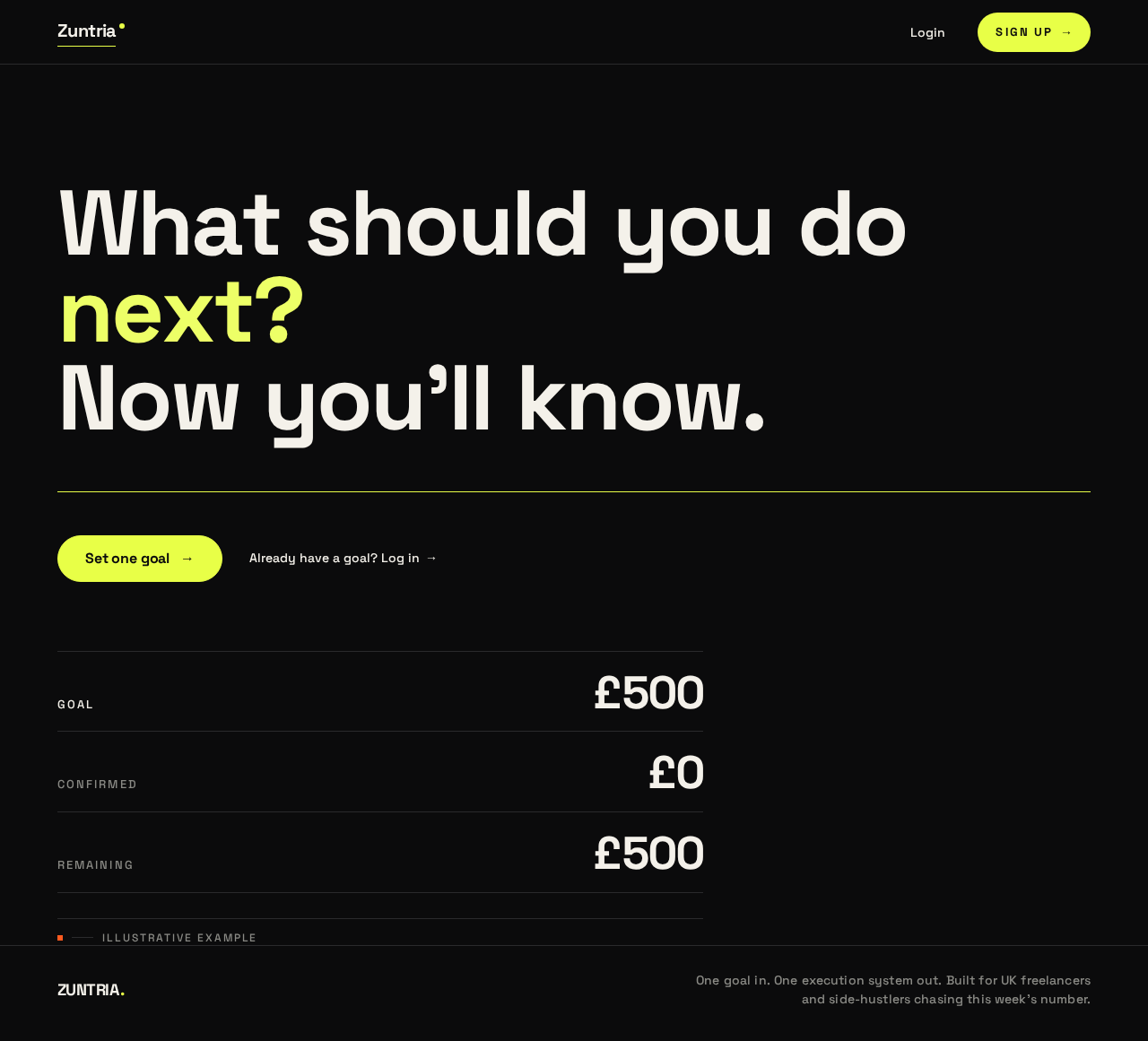
Illustrative briefing preview
- GOAL
- £500
- CONFIRMED
- £0
- REMAINING
- £500
Illustrative example
Illustrative briefing preview
- GOAL
- £500
- CONFIRMED
- £0
- REMAINING
- £500
Illustrative example
No comments yet. Be the first!