jolly-system
selling prints, postcards, and t-shirts from a webstore


Comments (0)
Sign in to leave a comment
System Requirements
Jolly-System System Requirements Document
1. Introduction
The purpose of this document is to outline the system requirements for the Jolly-System project. The Jolly-System is designed to facilitate the sale of prints, postcards, and t-shirts through an online shop integrated into an existing website. This document will detail the functional and non-functional requirements, user personas, core user flows, and design elements necessary for the successful implementation of the Jolly-System.
2. System Overview
The Jolly-System will serve as an online shop integrated into an existing website, allowing users to easily purchase prints, postcards, and t-shirts. The system will provide a seamless shopping experience, ensuring that users can browse products, add items to their cart, and complete purchases efficiently. The system will also support inventory management and order processing.
3. Functional Requirements
- As a Customer, I should be able to browse available prints, postcards, and t-shirts.
- As a Customer, I should be able to add items to my shopping cart.
- As a Customer, I should be able to view my shopping cart and make adjustments to quantities.
- As a Customer, I should be able to proceed to checkout and complete a purchase using various payment methods.
- As a Customer, I should receive a confirmation email after completing a purchase.
- As an Admin, I should be able to manage product listings, including adding, updating, and removing items.
- As an Admin, I should be able to view and manage customer orders.
- As an Admin, I should be able to update inventory levels to reflect stock changes.
4. User Personas
- Customer: Individuals who visit the website to purchase prints, postcards, and t-shirts.
- Admin: Individuals responsible for managing the online shop, including product listings and order processing.
5. Core User Flows
- Customer browses products -> adds items to cart -> views cart -> proceeds to checkout -> completes purchase -> receives confirmation email.
- Admin logs into the system -> manages product listings -> updates inventory -> views and processes customer orders.
6. Visuals Colors and Theme
- primary: #2A9D8F (Emerald Green)
- primary_light: #A8DADC (Light Aqua)
- secondary: #E76F51 (Coral)
- accent: #F4A261 (Sandy Orange)
- highlight: #E9C46A (Golden Yellow)
- bg: #F1FAEE (Soft White)
- surface: rgba(233, 233, 233, 0.8)
- text: #264653 (Deep Blue)
- text_muted: #6D6875 (Muted Gray)
- border: rgba(38, 70, 83, 0.2)
7. Signature Design Concept
The Jolly-System's homepage will feature an interactive gallery wall concept. As users scroll, they will navigate through a virtual art gallery where each product category (prints, postcards, t-shirts) is displayed as a framed artwork on the wall. Users can click on a frame to "zoom in" and view product details, simulating the experience of stepping closer to inspect a piece of art. The gallery will use @react-three/fiber for 3D effects and gsap for smooth scrolling animations, providing an immersive and engaging shopping experience.
8. Interaction Model & Motion Direction
The landing page will utilize a "parallax" interaction model, creating a sense of depth as users scroll through the virtual gallery. Decorative elements, such as floating frames and subtle lighting effects, will move at different speeds to enhance the visual storytelling. Internal pages, such as the checkout and product management interfaces, will adopt a "static" model to prioritize clarity and usability.
9. Non-Functional Requirements
- The system must ensure secure transactions and protect customer data.
- The system should be responsive and accessible on various devices and screen sizes.
- The system should support multiple payment gateways for customer convenience.
- The system must handle concurrent users efficiently without performance degradation.
10. Tech Stack
- Frontend: React for Web
- Backend: Python, FastAPI
- Database: MySQL or MariaDB, using Alembic for migrations
- Local Orchestration: Docker, docker-compose
- Server-side Orchestration: Kubernetes
11. Assumptions and Constraints
- The existing website infrastructure will support the integration of the online shop.
- The system will comply with local regulations regarding online transactions and data protection.
- The system will be designed to accommodate future scalability and additional product categories.
12. Glossary
- Customer: An individual who purchases products from the online shop.
- Admin: A user with permissions to manage the online shop's backend operations.
- Parallax: A design technique where background images move slower than foreground images, creating a 3D effect.
- React: A JavaScript library for building user interfaces.
- FastAPI: A modern, fast (high-performance) web framework for building APIs with Python.
- Docker: A platform for developing, shipping, and running applications in containers.
- Kubernetes: An open-source system for automating the deployment, scaling, and management of containerized applications.
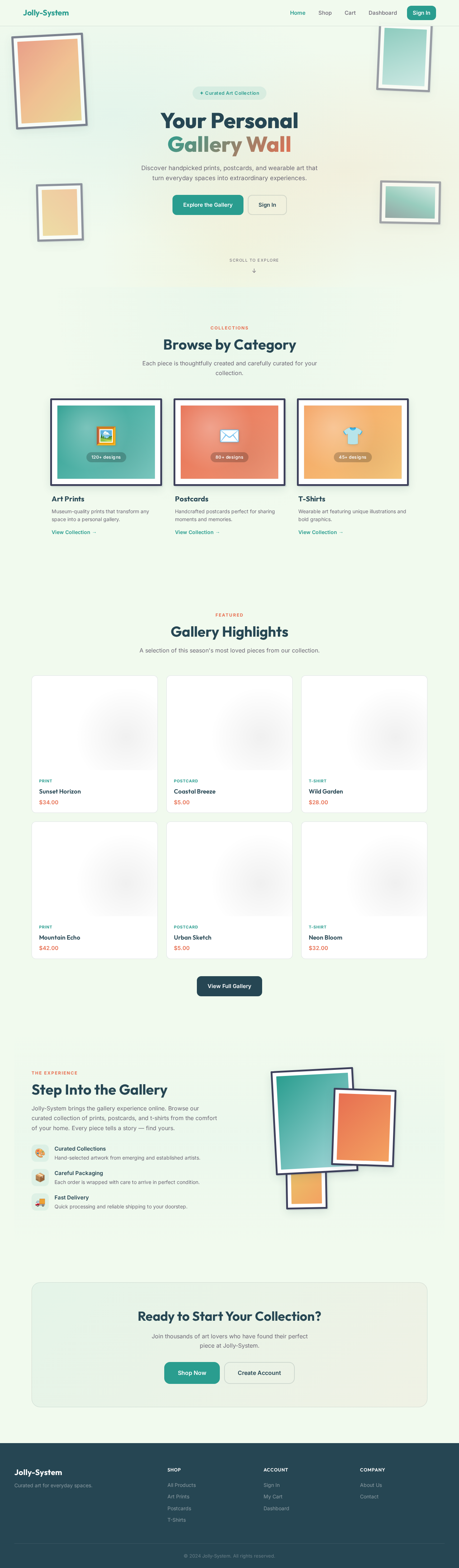
Your Personal
Gallery Wall
Discover handpicked prints, postcards, and wearable art that turn everyday spaces into extraordinary experiences.
Browse by Category
Each piece is thoughtfully created and carefully curated for your collection.
Art Prints
Museum-quality prints that transform any space into a personal gallery.
View Collection →Postcards
Handcrafted postcards perfect for sharing moments and memories.
View Collection →T-Shirts
Wearable art featuring unique illustrations and bold graphics.
View Collection →Gallery Highlights
A selection of this season's most loved pieces from our collection.
Step Into the Gallery
Jolly-System brings the gallery experience online. Browse our curated collection of prints, postcards, and t-shirts from the comfort of your home. Every piece tells a story — find yours.
Hand-selected artwork from emerging and established artists.
Each order is wrapped with care to arrive in perfect condition.
Quick processing and reliable shipping to your doorstep.
Ready to Start Your Collection?
Join thousands of art lovers who have found their perfect piece at Jolly-System.
No comments yet. Be the first!