jolly-start
 Diya Trivedi
start a project to build a simple single design of todo

Comments (0)
Sign in to leave a comment
System Requirements
System Requirements Document for jolly-start
1. Introduction
jolly-start is a simple todo application with a single, consistent design. Its purpose is narrow and deliberate: one person keeps a personal list of things to do, sees that list in one place, marks items complete, and deletes items no longer needed. The product's success is a clear, uncluttered view of what remains to be done — nothing more.
The audience is a single self-starting individual (the Todo user) who wants to record and complete tasks without ceremony. There is no team collaboration, no project hierarchy, no scheduling engine, and no dashboard. The interface is the list.
This document is the System Requirements Document for jolly-start, derived from the requester's instruction to "start a project to build a simple single design of todo."
2. System Overview
jolly-start is delivered as a first-party web application with application-owned identity and durable, per-user todo state.
Current delivery shape
- A React frontend provides four custom pages: Landing (anonymous public entry), Login (anonymous identity-access surface), Sign Up (anonymous identity-access surface), and Todos (login-protected workspace).
- A shared FastAPI backend process owns the application APIs and domain modules for identity and todo items.
- A MariaDB database provides durable storage for user identity records and each user's todo items.
- The frontend talks to the backend; the backend talks to the database. No other runnable services are provisioned.
Actors
- Todo user — the single active human persona. They enroll once, verify on return, and then add, view, complete, and delete their own todo items.
- Application backend — a non-persona system actor that persists and returns todo state and enforces that the protected Todos workspace is only reachable by an authenticated user.
- Database — a non-persona storage actor owned by the backend.
Accepted behavior
- Self-service enrollment for a new Todo user.
- Returning verification before accessing the protected todo list.
- Adding todo items to a list.
- Viewing todo items in one list.
- Marking todo items as complete.
- Deleting todo items.
- A simple single design throughout.
Narrow exclusions
- No multiple list types, projects, tags, priorities, due dates, reminders, sharing, or collaboration.
- No dashboard, sidebar, tabs, or multi-page marketing site.
- No third-party identity provider; identity is application-owned.
Removed from scope
- None. No concept was explicitly removed by the user.
2a. Product Interpretation and Delivery Boundary
jolly-start is a first-party application, not a headless or provider-owned service. The user reaches it through the browser, establishes their own identity inside the product, and works entirely within the product's own pages.
Access ownership
- Landing, Login, and Sign Up are anonymously reachable. They are the entry boundary where a person learns what the product is and either starts a list or returns to an existing one.
- Todos is protected. It is reachable only after the user has established identity through Sign Up or verified identity through Login. The protected workspace does not own the interaction that grants access to itself.
- Identity is application-owned: the backend stores user records and verifies returning users. There is no invitation, provisioning, or deployment-bootstrap path — enrollment is self-service.
Current vs. future boundary
Everything described in this document is current. No future-horizon requirements were stated by the user. The single-design constraint applies to the whole product: one visual and interaction language across all four pages, with the todo list as the central object.
2c. Page Content and Component Coverage
Landing
- Purpose and access: Anonymous public entry. Explains the simple single-design todo app, who it is for, and what it does before identity establishment.
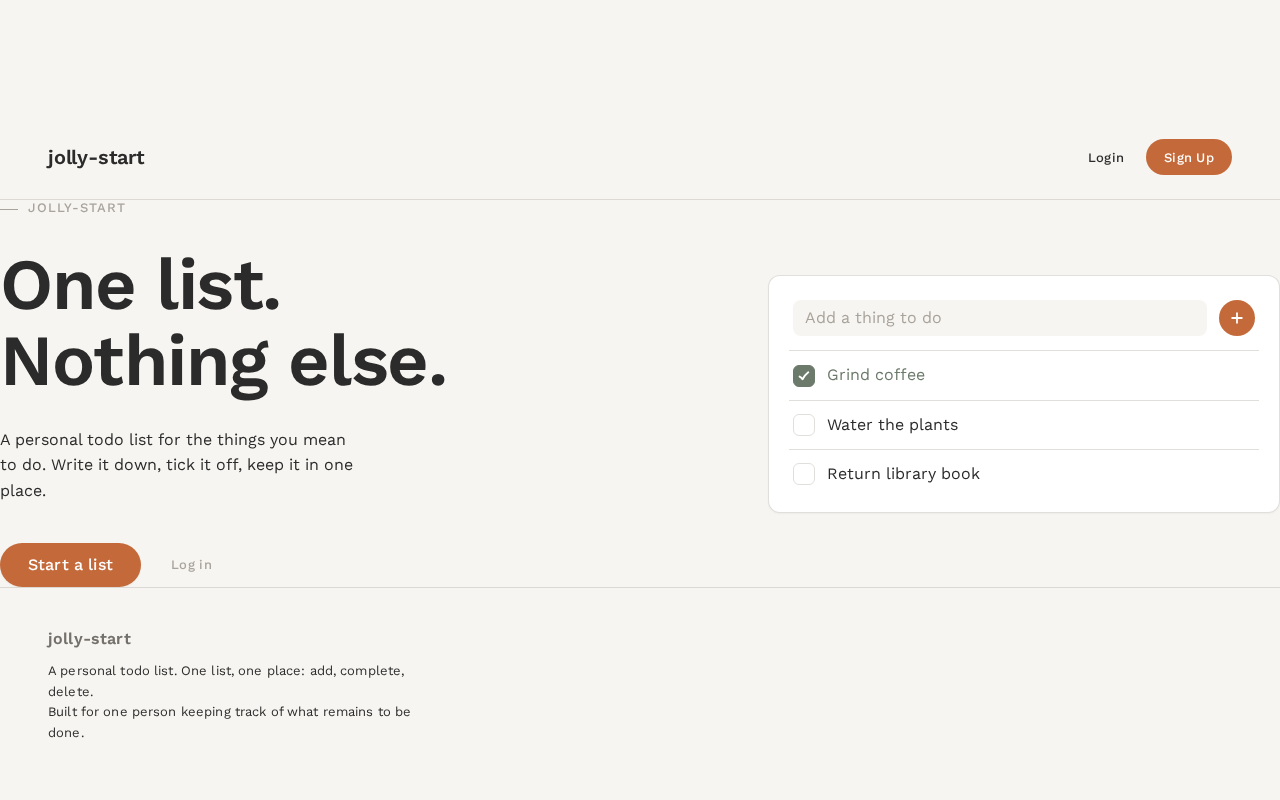
- Information and state: Oversized left-aligned headline "One list. Nothing else."; a short supporting line describing a personal todo list; a single flat preview card of the todo list (one input row, three sample items, one checked). No marketing sections beyond one screen.
- Primary action: "Start a list" terracotta pill button → navigates to Sign Up.
- Supporting action: A quiet text link to Login for returning users.
- Domain entities: None persisted; the preview card is static illustrative content.
- Component responsibilities: Headline block (55% width on desktop, full width on mobile); preview card (40% width on desktop, below the headline on mobile); primary pill button; secondary login link.
- States:
- Loading: not applicable (static content).
- Empty: not applicable.
- Success: page renders fully; both entry actions are visible and operable.
- Error: not applicable.
- Recovery: not applicable.
Sign Up
- Purpose and access: Anonymous self-service enrollment for a new Todo user.
- Information and state: A short form collecting the credentials needed to establish an application-owned identity (email/username and password). Inline validation messages for missing or malformed input and for an already-registered identity.
- Primary action: Submit enrollment → on success, the user is authenticated and taken to Todos.
- Supporting action: Link to Login for users who already have an identity.
- Domain entities: User identity record (created on success).
- Component responsibilities: Form fields with 8px-radius inputs; submit button; inline error region; link to Login.
- States:
- Loading: submit button shows a pending state while the request is in flight; fields disabled.
- Empty: blank form with placeholders in muted #A8A39B.
- Success: identity created, session established, redirect to Todos.
- Error: field-level validation errors; "identity already exists" error with a link to Login.
- Recovery: the form retains entered values (except password) so the user can correct and resubmit.
Login
- Purpose and access: Anonymous returning verification so the Todo user can reach their durable personal todo list.
- Information and state: A short form for the credentials established at Sign Up. Inline error for incorrect credentials.
- Primary action: Submit credentials → on success, the user is authenticated and taken to Todos.
- Supporting action: Link to Sign Up for users without an identity.
- Domain entities: User identity record (verified on success).
- Component responsibilities: Credential fields; submit button; inline error region; link to Sign Up.
- States:
- Loading: submit button pending; fields disabled.
- Empty: blank form with placeholders.
- Success: session established, redirect to Todos.
- Error: "credentials not recognized" message; no indication of which field was wrong.
- Recovery: the form retains the entered identifier so the user can retry.
Todos
- Purpose and access: Login-protected single workspace where the user adds, views, completes, and deletes todo items in one simple list.
- Information and state: One white card on warm paper ground containing an input row at the top and a vertical stack of todo items separated by 1px warm-grey rules. Each item shows its text and a 22px rounded-square checkbox. Completed items render in sage-green with a hand-drawn check. An empty state shows a small line-art pebble in muted grey with the copy "Nothing here yet. Add one thing."
- Primary action: Add a todo by typing in the input row and submitting (Enter or the terracotta pill "+" button pinned to the right of the input row).
- Supporting actions: Toggle an item's completion via its checkbox; delete an item via its delete control.
- Domain entities: Todo item (text, completion state, ownership by the authenticated user).
- Component responsibilities: Input row with pill add button; item list with hairline dividers; tactile checkbox; delete control; empty-state illustration and copy; loading skeleton for the initial fetch; error banner with retry.
- States:
- Loading: initial fetch shows a calm skeleton of the card; the input row remains usable.
- Empty: pebble illustration and "Nothing here yet. Add one thing."
- Success: new item fades in (180ms); completion triggers a 120ms scale pulse on the checkbox; deletion slides the item out to the left (160ms) with a brief 1px terracotta baseline rule, then the list closes the gap.
- Error: failed add, toggle, or delete shows a non-blocking banner with a retry action; the item's prior state is restored.
- Recovery: retry re-issues the failed operation; the list re-syncs from the backend.
3. Functional Requirements
FR-1 — Self-service enrollment (required_inference) As a Todo user, I should be able to create my own identity so that I can keep a personal todo list.
- Trigger/input: from Landing, the user selects "Start a list" and submits the Sign Up form.
- Observable result: an application-owned identity record is created; the user is authenticated and lands on Todos.
- Access state: anonymous at Sign Up; authenticated after success.
- Failure/recovery: malformed input shows field-level errors; an existing identity shows an "already exists" error with a link to Login; entered values are retained for correction.
- Continuation: the user proceeds directly to adding their first todo.
FR-2 — Returning verification (required_inference) As a Todo user, I should be able to verify my identity on return so that I can reach my durable todo list.
- Trigger/input: the user opens Login and submits their credentials.
- Observable result: a session is established and the user lands on Todos with their previously stored items.
- Access state: anonymous at Login; authenticated after success.
- Failure/recovery: incorrect credentials show a generic "credentials not recognized" message; the identifier is retained for retry.
- Continuation: the user resumes working on their list.
FR-3 — Add a todo item (explicit) As a Todo user, I should be able to add todo items to my list.
- Trigger/input: the user types text into the input row on Todos and submits via Enter or the "+" pill button.
- Observable result: the item is persisted to the backend and appears at the end of the list with a 180ms fade-in.
- Access state: authenticated.
- Failure/recovery: a failed save shows a non-blocking error banner with retry; the typed text is preserved so the user can resubmit.
- Continuation: the input row clears and remains focused for the next item.
FR-4 — View the todo list (explicit) As a Todo user, I should be able to view my todo items in one list.
- Trigger/input: the user opens Todos (after Login or Sign Up).
- Observable result: all of the user's todo items render in a single vertical list, each with its text and completion state; completed items are visually distinguished in sage-green.
- Access state: authenticated; unauthenticated access redirects to Login.
- Failure/recovery: a failed fetch shows an error banner with retry; the input row remains usable.
- Continuation: the user acts on items in place.
FR-5 — Mark a todo item complete (explicit) As a Todo user, I should be able to mark todo items as complete.
- Trigger/input: the user taps the 22px checkbox on an item.
- Observable result: the item's completion state is persisted; the checkbox fills sage-green with a hand-drawn check and a 120ms scale pulse; the item's text reflects the completed treatment.
- Access state: authenticated.
- Failure/recovery: a failed update reverts the checkbox to its prior state and shows a retry banner.
- Continuation: the user continues with other items; toggling again returns the item to incomplete.
FR-6 — Delete a todo item (explicit) As a Todo user, I should be able to delete todo items.
- Trigger/input: the user activates the delete control on an item.
- Observable result: the item is removed from the backend and slides out to the left (160ms) with a brief 1px terracotta baseline rule; the list closes the gap.
- Access state: authenticated.
- Failure/recovery: a failed delete restores the item in place and shows a retry banner.
- Continuation: the remaining list stays intact and usable.
FR-7 — Single design consistency (explicit) As a Todo user, I should experience one consistent visual and interaction design across the product.
- Trigger/input: any navigation among Landing, Sign Up, Login, and Todos.
- Observable result: the same palette, typography, shape language, spacing rhythm, and motion vocabulary apply on every page.
- Access state: applies in all access states.
- Failure/recovery: not applicable.
- Continuation: the product feels like one object, not a set of screens.
4. User Personas
Todo user
Product context. A single self-starting individual who wants to keep a personal list of things to do. They arrive at jolly-start without an invitation or a provisioned account and expect to begin immediately. Their relationship with the product is private and personal: the list is theirs alone.
Primary goal. A clear, uncluttered view of what remains to be done.
Distinct accepted responsibilities.
- Enroll themselves once through Sign Up, choosing their own credentials.
- Verify their identity on return through Login.
- Add todo items to their list.
- View all their items in one list.
- Mark items complete as they finish them.
- Delete items they no longer need.
Relevant inputs and decisions. The text of each todo; whether an item is done; whether an item should be removed; their own credentials at enrollment and return.
Interactions with other accepted participants. The Todo user is the only human participant. Their work is mediated by the application backend, which persists their items and enforces that Todos is reachable only when authenticated. There is no counterparty, approver, or collaborator.
Observable success. The user opens the app, sees exactly their remaining items, checks one off with a satisfying tactile tick, and removes what no longer matters — with no ceremony and no clutter.
What makes this role distinct. The role is defined by private, durable, single-owner state: the list belongs to exactly one person and must survive across sessions. That is why identity establishment and returning verification are part of the role's work rather than an afterthought.
5. Core User Flows
Flow A — First-time enrollment and first todo
- The Todo user opens jolly-start and lands on Landing (anonymous). They see the headline "One list. Nothing else." and a flat preview card of the todo list.
- The user selects the terracotta pill button "Start a list" and is taken to Sign Up.
- On Sign Up, the user enters their chosen credentials and submits.
- The backend creates the identity record and establishes a session. The user is redirected to Todos.
- On Todos, the user sees the empty state: a small line-art pebble and "Nothing here yet. Add one thing."
- The user types a task into the input row and submits via Enter or the "+" pill. The item fades in (180ms) at the end of the list, and the input clears for the next entry.
- The user adds further items the same way. Their list is now durable and private to them.
Failure/recovery: If enrollment fails because the identity already exists, the user follows the link to Login instead. If a field is malformed, inline errors appear and the entered values are retained.
Flow B — Returning to the list
- The Todo user opens jolly-start and selects the quiet link to Login from Landing.
- On Login, the user enters their credentials and submits.
- The backend verifies the credentials and establishes a session; the user is redirected to Todos.
- On Todos, the user sees their previously stored items in one list, with completed items in sage-green.
- The user continues with Flow C, D, or E as needed.
Failure/recovery: Incorrect credentials show "credentials not recognized"; the identifier is retained so the user can retry. If the user has no identity, the link to Sign Up starts Flow A.
Flow C — Completing an item
- From Todos, the user taps the 22px checkbox on an item.
- The checkbox fills sage-green with a hand-drawn check and pulses (scale 1→0.92→1, 120ms ease-out).
- The backend persists the completion state; the item's completed treatment is visible in the list.
- The user continues with other items. Tapping the checkbox again returns the item to incomplete.
Failure/recovery: If the update fails, the checkbox reverts to its prior state and a non-blocking banner offers retry.
Flow D — Deleting an item
- From Todos, the user activates the delete control on an item.
- The item slides out to the left (160ms) with a brief 1px terracotta rule at its baseline; the list closes the gap.
- The backend removes the item; the remaining list stays intact.
Failure/recovery: If the delete fails, the item is restored in place and a retry banner appears.
Flow E — Viewing the list after a session gap
- The Todo user returns and completes Flow B.
- On Todos, the initial fetch shows a calm skeleton of the card while items load; the input row remains usable.
- The full list renders: each item with its text and completion state, separated by hairline rules.
- The user reads what remains to be done and proceeds with Flow C or D.
Failure/recovery: If the fetch fails, an error banner with retry appears; the user can retry without losing their place.
6. Visuals Colors and Theme
The creative direction is authoritative for this section. The muse is Naoto Fukasawa; the headline is "One list. Nothing else."
Color tokens (light mode)
| Role | Hex | Use |
|---|---|---|
| Background | #F7F5F1 | Warm paper-white ground |
| Surface | #FFFFFF | Pure-white cards |
| Text | #2B2B2B | Body and headings (ink) |
| Primary | #6B7A6B | Completed states, subtle controls (muted sage-green) |
| Accent | #C46A3A | The single action: add button, active filter (soft terracotta) |
| Muted | #A8A39B | Secondary labels, placeholders, dividers |
No gradients. No blue or indigo anywhere.
Typography
- Family: Work Sans for both headings and body.
- Weights: headings 600, body 400, labels 500 with slight positive tracking.
- Scale (1.25 modular): 48 / 38 / 30 / 24 / 20 / 16 / 14 px.
- Headline:
clamp(2.5rem, 6vw, 4.5rem); body base1rem; labels0.8125rem. - No all-caps except tiny metadata.
Shape language
- Cards: 12px radius with continuous curves.
- Inputs: 8px radius.
- Add button: 999px pill.
- No hard corners except hairline dividers.
- Shadows almost imperceptible:
0 1px 2px rgba(0,0,0,0.04).
Layout rhythm
- Single centered column, max-width 640px, 64px top padding.
- The todo list is the page: one input row at the top, then a calm vertical stack of items separated by 1px warm-grey rules.
- No sidebar, no tabs, no dashboard chrome.
- Mobile: column fills the width with 20px gutters.
Imagery
- No photography. The only visual subject is the list itself and a single small hand-drawn-style checkmark icon.
- Empty state: a tiny line-art illustration of a single rounded object (a pebble) in
#A8A39B.
Readability guarantee
- Headlines, labels, numbers, card text, and controls stay entirely inside the viewport and their container at 375px, 768px, and 1280px, wrapping or scaling via
clamp(...)as needed. No element covers any part of them.
7. Signature Design Concept
The list as an everyday object.
The public entry is not a marketing hero. It is a composed, asymmetric first frame on warm paper ground (#F7F5F1):
- Left, 55% of the viewport: the oversized headline "One list. Nothing else." in Work Sans 600 at
clamp(2.5rem, 6vw, 4.5rem), left-aligned, with generous breathing room above and below. - Beneath the headline: a single terracotta pill button, "Start a list" (
#C46A3A, 999px radius), and a quiet muted text link to Login. - Right, 40% of the viewport: a single flat white card preview of the todo list — one input row, three sample items separated by hairline rules, one item checked in sage-green with a hand-drawn check.
- On mobile: the type block stacks above the card, both full-width with 20px gutters.
The composition is deliberately empty. No gradient, no illustration, no centered stack, no grid of cards. The card preview is the product itself, shown at rest — the same object the user will meet on Todos. The gesture is carried entirely by type, whitespace, and one small card, so nothing readable is ever cropped or covered.
8. Interaction Model & Motion Direction
Interaction Model: Static (direction) Motion Tempo: still Hero Dimensionality: flat
Landing Hero Motion Brief
- Focal subject: the flat white todo-list preview card, offset to the right of the oversized headline.
- Input → transformation → outcome thesis: the page loads composed and still; the only motion is the tactile response of the "Start a list" pill on hover/press (a subtle 120ms ease-out), which carries the user into Sign Up. No entrance animation, no parallax, no decorative loops.
- Motion vocabulary: 120ms ease-out for tactile feedback; 180ms fade for new items entering; 160ms slide-out for delete. Nothing bouncy, nothing springy.
- Composed first frame: warm paper ground; headline left at 55%; card right at 40%; pill button and login link beneath the headline; generous empty space.
- Reduced-motion state: all transitions collapse to instant state changes; the layout is unchanged and fully usable.
The same motion vocabulary governs Todos: the checkbox tick (scale 1→0.92→1, 120ms), the new-item fade (180ms), and the delete slide-out (160ms) with a brief 1px terracotta baseline rule. These are the only animations in the product.
9. Non-Functional Requirements
- NFR-1 — Single design consistency (explicit): One palette, one type system, one shape language, and one motion vocabulary across all four pages. No page may introduce a divergent visual style.
- NFR-2 — Durable per-user state (required_inference): Todo items and identity records persist in MariaDB and survive sessions; each user sees only their own items.
- NFR-3 — Protected workspace (required_inference): The Todos page is reachable only by an authenticated user; unauthenticated requests are redirected to Login. The backend enforces this, not only the frontend.
- NFR-4 — Readability at every viewport (explicit, from creative direction): Readable text and controls remain whole and uncovered at 375px, 768px, and 1280px.
- NFR-5 — Reduced motion (explicit, from creative direction): With
prefers-reduced-motion, all transitions collapse to instant state changes while the layout remains fully usable. - NFR-6 — Calm performance (basic_default): The initial Todos fetch renders a skeleton rather than a blank screen; interactions acknowledge input immediately and reconcile with the backend.
- NFR-7 — No forbidden visual patterns (explicit): No blue or indigo accents, no gradient blobs, no glassmorphism, no centered hero, no grid of hover-lift cards, no Inter/Roboto/Arial/system-ui/Poppins, no decorative icons or emoji in the list, no shadows deeper than 2px blur, no bouncy motion.
10. Tech Stack
- Frontend: React application UI (four pages: Landing, Sign Up, Login, Todos).
- Backend: shared FastAPI process for application APIs and domain modules (identity and todo items). New APIs extend this existing process rather than adding a separate service.
- Database: MariaDB for application-owned persistent data (user identity records and todo items).
- Orchestration: docker-compose with the three provisioned services —
frontend,backend,database. No additional services are required for the current product. - Typography: Work Sans (headings and body).
11. Assumptions and Constraints
- A-1 (explicit constraint): The app uses a simple single design. This is a hard constraint on every page.
- A-2 (required_inference): Identity is application-owned and self-service; there is no invitation, provisioning, or deployment-bootstrap path.
- A-3 (required_inference): Each user's todo list is private to them; there is no sharing or collaboration.
- A-4 (basic_default): Credentials are an identifier (email or username) plus a password; the exact field names are an implementation detail consistent with the Sign Up and Login pages.
- A-5 (basic_default): The Landing preview card shows three sample items with one checked, as specified by the creative direction; these are illustrative, not persisted data.
- A-6 (basic_default): No future-horizon requirements were stated; everything in this document is current.
12. Glossary
- Todo user — the single active human persona; the owner of a private todo list.
- Todo item — a single task in the user's list, with text and a completion state.
- Landing — the anonymous public entry page.
- Sign Up — the anonymous self-service enrollment page.
- Login — the anonymous returning-verification page.
- Todos — the login-protected workspace containing the single todo list.
- Single design — one consistent palette, typography, shape language, layout rhythm, and motion vocabulary across the whole product.
- Tactile checkbox — the 22px rounded-square control that fills sage-green with a hand-drawn check and a 120ms scale pulse.
jolly-start
One list. Nothing else.
A personal todo list for the things you mean to do. Write it down, tick it off, keep it in one place.
jolly-start
One list. Nothing else.
A personal todo list for the things you mean to do. Write it down, tick it off, keep it in one place.
No comments yet. Be the first!