jolly-healthcare
 Shantanu Kesarwani
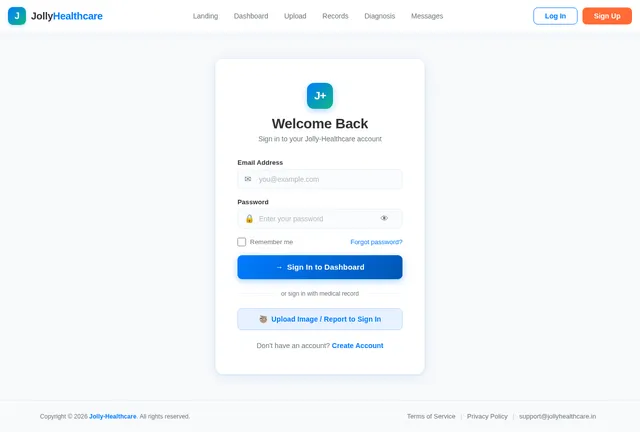
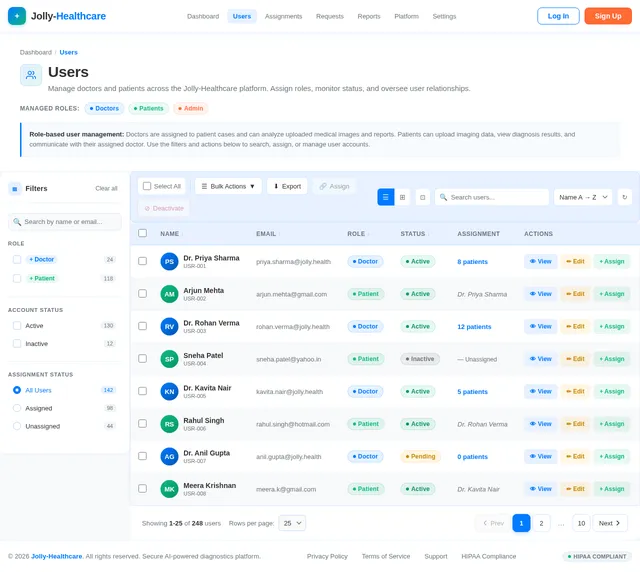
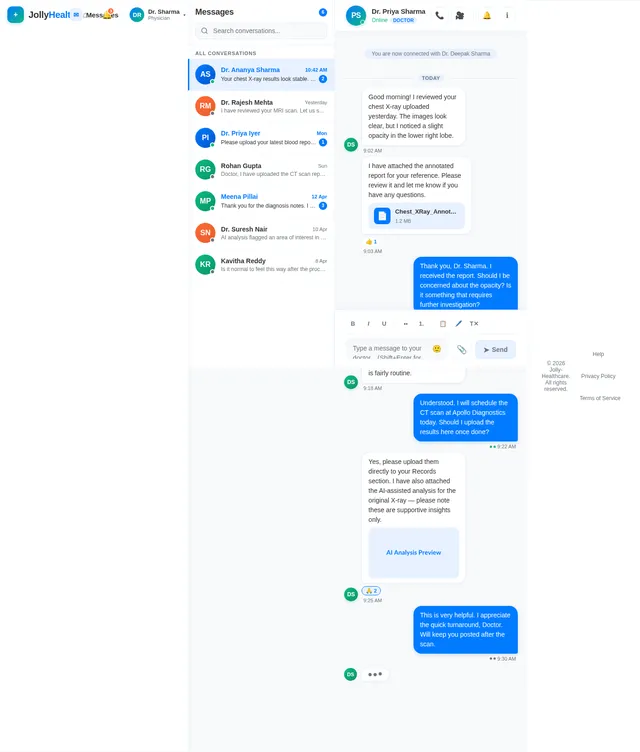
Act as a senior full-stack engineer, healthcare product designer, and AI-integrated system architect with 15+ years of experience in building secure, scalable medical applications. Your task is to design and develop a modern, production-ready web application for medical image diagnosis that supports both Doctors and Patients with separate authentication flows. The website must include secure login, logout, and sign-up functionality for both roles, with role-based dashboards and access control. Patients should be able to register, log in, upload medical images (such as X-rays, MRI, CT scans) and reports (PDF, images), view diagnosis results, track history, and communicate with assigned doctors. Doctors should have a dashboard to view assigned patient cases, access uploaded images and reports, analyze results, add diagnosis notes, and manage patient records. Additionally, include a specialized “Login with Image/Report” feature, where users can upload a medical image or report directly during login to trigger analysis or quick access to previously associated records (handled via backend integration or AI matching). The UI should be clean, modern, and healthcare-friendly, with strong emphasis on usability, accessibility, and trust (light colors, clear typography, structured layouts). Implement features such as file upload validation, preview before submission, progress indicators, and secure handling of sensitive data. The system should be API-ready, with clearly structured service layers for authentication, file uploads, diagnosis processing, and user management. Include proper error handling, loading states, and role-based navigation. Ensure responsiveness across devices and follow best practices for security (JWT/session handling, protected routes). The final result should be a complete, intuitive, and scalable medical diagnosis platform frontend that can seamlessly integrate with AI models and backend services.

Comments (0)
Sign in to leave a comment
System Requirements
System Requirements Document (SRD) for Jolly-Healthcare
1. Introduction
Welcome to the System Requirements Document (SRD) for Jolly-Healthcare, a modern, AI-integrated medical image diagnosis platform designed to support both doctors and patients. This document outlines the functional and non-functional requirements, user personas, design concepts, and technical specifications for the development of the platform.
Jolly-Healthcare aims to provide a secure, scalable, and intuitive solution for medical diagnostics, ensuring trust, usability, and accessibility for users in India and beyond. The platform will leverage cutting-edge AI capabilities to enhance diagnostic workflows while maintaining the highest standards of data security and user experience.
2. System Overview
Jolly-Healthcare is a web-based application that facilitates seamless interaction between doctors and patients for medical image diagnosis. The platform will include:
- Role-based Dashboards: Separate interfaces for doctors and patients with tailored functionality.
- AI Integration: Advanced AI capabilities for image/report-based record retrieval and diagnostic suggestions.
- Secure Authentication: Role-specific login, logout, and sign-up flows.
- Medical Image and Report Management: Patients can upload, preview, and track medical images and reports, while doctors can analyze and annotate them.
- Communication Tools: Secure messaging between patients and their assigned doctors.
- Hybrid Role Management: Admin-assigned doctor-patient relationships initially, with later support for patient-selected doctors and doctor acceptance/rejection of requests.
The system will be API-ready, responsive across devices, and built with a focus on security, scalability, and user-centric design.
3. Functional Requirements
As User:
- I should be able to register, log in, and securely manage my account.
- I should be able to upload medical images (X-rays, MRI, CT scans) and reports (PDF, images).
- I should be able to preview uploaded files before submission.
- I should be able to view my diagnosis results and track my medical history.
- I should be able to communicate with my assigned doctor.
As Doctor:
- I should be able to log in and access my dashboard to view assigned patient cases.
- I should be able to analyze uploaded medical images and reports.
- I should be able to add diagnosis notes and manage patient records.
- I should be able to accept or reject patient requests for consultation.
As Admin:
- I should be able to assign doctors to patients for structured onboarding.
AI-Specific Features:
- As User, I should be able to log in using an uploaded image or report to retrieve associated records.
- As Doctor, I should be able to view AI-assisted diagnostic suggestions for uploaded images/reports, clearly marked as supportive insights.
4. User Personas
1. Patient
- Description: Individuals seeking medical diagnosis and consultation.
- Key Actions: Register, upload medical images/reports, view diagnosis results, track history, communicate with doctors.
2. Doctor
- Description: Medical professionals analyzing patient cases and providing diagnoses.
- Key Actions: Log in, view assigned cases, analyze images/reports, add notes, manage patient records, accept/reject patient requests.
3. Admin
- Description: System administrators managing user roles and assignments.
- Key Actions: Assign doctors to patients, oversee platform operations.
5. Visuals Colors and Theme
Color Palette:
- Background: #F8F9FA (soft white for a clean, healthcare-friendly look)
- Surface: #FFFFFF (pure white for cards and modals)
- Text: #333333 (dark gray for readability)
- Accent: #007BFF (calming blue for interactive elements like buttons and links)
- Muted: #6C757D (subtle gray for secondary text and icons)
Theme:
The theme will emphasize clarity, trust, and professionalism, with a clean layout, ample white space, and intuitive navigation.
6. Signature Design Concept
Interactive Medical Dashboard with AI-Driven Insights
The homepage will feature an interactive medical dashboard that immediately immerses users in the platform's capabilities. Key elements include:
- Dynamic AI Visualization: A rotating 3D medical model (e.g., a human body or organ system) that highlights areas based on uploaded images/reports. For example, if a patient uploads a chest X-ray, the model will zoom into the chest area, visually linking the uploaded file to the diagnostic process.
- AI Insights Panel: A side panel displaying AI-generated suggestions in real-time, with clear disclaimers that these are supportive insights for doctors to review.
- Seamless Transitions: Smooth animations as users navigate between sections, such as file uploads, diagnosis results, and communication tools.
- Micro-Interactions: Subtle feedback on user actions, like button clicks, file uploads, and progress indicators.
This design will create a memorable first impression, showcasing the platform's innovation and user-centric approach.
7. Non-Functional Requirements
- Security: Implement JWT for secure authentication and encrypted file uploads.
- Scalability: Support concurrent users with scalable backend architecture.
- Accessibility: Ensure WCAG 2.1 compliance for all user interfaces.
- Performance: Optimize for fast load times and responsive interactions.
- Localization: Default to Indian locale settings (e.g., date formats, time zones).
8. Tech Stack
Frontend:
- React for Web
- React Native for Mobile App
Backend:
- Python
- FastAPI
Database:
- MySQL (with Alembic for migrations)
AI Models:
- GPT 5.4 for user-friendly responses
- Claude 4.6 Opas for academic or coding work
- Gemini 3.1 Pro for friendly responses
- Google Nano Banana for image generation
AI Tools:
- Litellm for LLM Routing
- Langchain
Orchestration:
- Docker and docker-compose for local development
- Kubernetes for server-side orchestration
9. Assumptions and Constraints
-
Assumptions:
- Users will have access to modern devices and stable internet connections.
- AI models will be pre-trained and integrated via APIs.
- Admins will manage initial doctor-patient assignments.
-
Constraints:
- Compliance with Indian healthcare data regulations (e.g., HIPAA-equivalent standards).
- Limited to English and Hindi language support initially.
10. Glossary
- AI: Artificial Intelligence
- JWT: JSON Web Token
- WCAG: Web Content Accessibility Guidelines
- HIPAA: Health Insurance Portability and Accountability Act
- RDBMS: Relational Database Management System

Intelligent Medical Diagnosis, Trusted Care
AI-powered imaging analysis for doctors and patients. Upload medical scans, receive AI-assisted insights, and connect with specialists — all on one secure platform.
AI-Powered Diagnostic Insights
Experience how Jolly-Healthcare analyzes medical imaging in real time, providing actionable AI suggestions to support clinical decision-making.
AI Insights Panel
Possible consolidation detected in right lower lobe — recommend specialist review for further evaluation.
Mild hilar prominence noted on the left side. Consider follow-up CT for lymphadenopathy assessment.
Both costophrenic angles are clear with no evidence of pleural effusion. Normal finding.
Built on Trust & Security
Jolly-Healthcare meets the highest standards for data protection, accessibility, and compliance.
HIPAA Compliant
Full compliance with healthcare data privacy regulations
VerifiedEncrypted File Uploads
End-to-end encryption for all medical images and reports
AES-256JWT-Secured
Token-based authentication protecting every API request
SecuredWCAG 2.1 Accessible
Fully accessible interface meeting international standards
AA LevelTrusted by 1,000+ Doctors
Healthcare professionals rely on Jolly-Healthcare daily
TrustedEverything You Need for Smarter Diagnostics
Jolly-Healthcare combines AI-powered analysis, secure communication, and intuitive tools to streamline medical diagnosis for doctors and patients.
Image Upload & Preview
Upload X-rays, MRIs, and CT scans with instant preview before submission to your doctor.
Learn MoreAI-Assisted Analysis
Get AI-powered diagnostic suggestions clearly marked as supportive insights for doctor review.
Learn MoreSecure Messaging
Communicate directly with your assigned doctor through end-to-end encrypted messaging.
Learn MoreMedical History Tracking
Track your complete diagnosis history, uploaded records, and treatment progress over time.
Learn MoreDoctor-Patient Matching
Get matched with qualified specialists or choose your own doctor for personalized consultations.
Learn MoreReal-Time Insights
View live analysis updates and diagnostic feedback as your medical images are processed.
Learn MoreYour Journey from Upload to Diagnosis
Jolly-Healthcare streamlines the diagnostic workflow for patients and doctors alike — powered by AI, secured by design.
Create a secure account as a patient or doctor. Your data is protected with end-to-end encryption from day one.
Patients upload X-rays, MRIs, or CT scans with a simple drag-and-drop interface. Preview files before submission.
Our AI engine analyzes medical images in real time, generating preliminary insights and flagging areas of concern.
A qualified doctor reviews the AI analysis, adds clinical notes, and delivers a verified diagnosis to the patient.
Built for Every Healthcare Role
Jolly-Healthcare adapts to your needs — whether you’re a patient seeking answers, a doctor providing care, or an admin keeping things running.
Patient
Individuals seeking medical diagnosis
- ✓Upload medical images and reports for AI-powered analysis
- ✓Track your diagnosis history and medical records securely
- ✓Communicate directly with your assigned doctor
Doctor
Medical professionals providing diagnoses
- ✓View AI-assisted diagnostic suggestions for patient images
- ✓Manage assigned patient cases and add diagnosis notes
- ✓Accept or decline patient consultation requests
Admin
System administrators managing the platform
- ✓Assign doctors to patients for structured onboarding
- ✓Oversee platform operations and user management
- ✓Monitor system health and compliance reports
Your Data, Protected at Every Layer
Jolly-Healthcare is built with industry-leading security standards to ensure patient data remains confidential, integral, and accessible only to authorized users.
- End-to-End Encryption
- HIPAA Compliant
- Regular Security Audits
- JWT Authentication
- Secure API Gateway
Ready to Transform Your Medical Diagnosis?
Join thousands of healthcare professionals using AI-powered imaging analysis to deliver faster, more accurate diagnoses and better patient outcomes.
Frequently Asked Questions
Everything you need to know about Jolly-Healthcare. Can't find the answer you're looking for? Reach out to our support team.
Still have questions? We're here to help.
Contact Support
No comments yet. Be the first!