jewellery-store
 Aryan singh
I WANT A WEBSITE FOR MY JEWELLERY STORE


Comments (0)
Sign in to leave a comment
System Requirements
System Requirements Document for jewellery-store
1. Introduction
jewellery-store is a first-party website for a jewellery store owned and operated by Aryan Singh (IN). The product intent is a warm, tactile, humane-luxury storefront where shoppers can browse jewellery products, read the details of a single piece, add pieces to a cart, and complete a purchase, and where the store owner can keep the jewellery catalogue current and review incoming orders.
The audience is two-fold: Shoppers — gift buyers and self-purchasers who want to discover and buy jewellery — and the Store owner, who manages the catalogue and fulfils the orders that arrive. The site is delivered as a custom React front end over a shared FastAPI backend with a MariaDB database, with application-owned identity so the store owner can return to protected catalogue and order work.
2. System Overview
2a. Product Interpretation and Delivery Boundary
The product is a single first-party website. Public, anonymous surfaces — Landing, Shop, Product Details, Cart, and Order Confirmation — let any visitor discover the store, browse the jewellery catalogue, inspect a piece, assemble a cart, and complete a purchase without an account. The purchase produces a durable order that the store owner can see.
The store owner's work — Products (catalogue management) and Orders (incoming order review) — is protected. Because the store owner must privately own and resume durable catalogue and order state, the application owns identity: a new store owner establishes access through Sign Up, and a returning store owner verifies identity through Login. These two anonymous entry surfaces are the only way into the protected work; the protected pages themselves never establish access to themselves. Identity here is continuity of ownership, not a differentiated permission scheme beyond the store owner's protected catalogue and order work.
All current behaviour is delivered by the application itself: the React front end, the shared FastAPI backend, and MariaDB for persistent catalogue, cart, order, and identity data. There are no provider-owned or external destinations in the current scope, and no headless delivery. Nothing in this document is deferred to a future horizon; the future section is empty by design.
2b. Source Content Inventory
Not applicable — no reference directive declares content_source.
2c. Page Content and Component Coverage
Landing
- Information / state: Anonymous public entry. A full-bleed warm oat band carries an oversized three-line Fraunces headline on the left and a single gold-ring macro photograph bleeding off the right edge at roughly 60% width. Below the band, a short store introduction and a curated selection of jewellery pieces drawn from the live catalogue.
- Primary action: A sage capsule call-to-action leading into Shop.
- Supporting actions: Navigate to Shop, open a featured piece in Product Details, open Cart, and reach Login / Sign Up for the store owner.
- Domain entities: Product (featured selection), Cart (badge count only).
- Component responsibilities: Hero band (headline, CTA, bleeding image), featured product strip on material swatches, persistent header with wordmark, navigation, and capsule cart button carrying a terracotta count dot.
- States: Loading — skeleton band and skeleton product cards. Empty — if the catalogue has no products, the featured strip is replaced by a calm line inviting the visitor to browse later; the hero and CTA remain. Success — hero and featured pieces render. Error — if the catalogue cannot be loaded, the featured strip shows a retry control while the hero and CTA stay usable. Recovery — retry re-fetches the featured selection.
Shop
- Information / state: The full jewellery catalogue as product cards, each card sitting on a material swatch (linen, walnut, stone) with the swatch shown as a thin bottom strip. Each card shows the piece's name, price in terracotta, and a short descriptor.
- Primary action: Open a piece in Product Details.
- Supporting actions: Add a piece directly to the cart from its card; open Cart; return to Landing.
- Domain entities: Product, Cart.
- Component responsibilities: Product grid, product card (image, name, price, swatch strip, add-to-cart control), header with cart badge.
- States: Loading — card skeletons in the grid. Empty — a message that the catalogue is currently empty, with no cards. Success — cards render with prices and swatch strips. Error — an inline error with a retry control replacing the grid. Recovery — retry re-fetches the catalogue; adding to cart from a card confirms with the cart badge incrementing.
Product Details
- Information / state: One jewellery piece: macro imagery, name, price in terracotta, description, and material/craft details as recorded by the store owner.
- Primary action: Add the piece to the cart.
- Supporting actions: Adjust quantity before adding; open Cart; return to Shop.
- Domain entities: Product, Cart.
- Component responsibilities: Image panel, detail column (name, price, description, material details), quantity control, add-to-cart capsule button, header with cart badge.
- States: Loading — image and detail skeletons. Empty — not applicable to a single piece; an unknown or removed piece shows a not-found message with a link back to Shop. Success — details render and adding confirms via the cart badge. Error — detail fetch failure shows a retry control. Recovery — retry re-fetches the piece; a failed add leaves the cart unchanged and surfaces an inline message.
Cart
- Information / state: The shopper's current cart lines with piece name, unit price, quantity, and line total; the cart subtotal; and the checkout form collecting the shopper's contact and delivery details.
- Primary action: Complete the purchase (place the order).
- Supporting actions: Change a line's quantity; remove a line; return to Shop to keep browsing.
- Domain entities: Cart, Cart line, Product, Order, shopper contact and delivery details.
- Component responsibilities: Line-item list with quantity and remove controls, subtotal summary, checkout form with validation, place-order capsule button.
- States: Loading — cart skeleton while the cart is fetched. Empty — a message that the cart is empty with a link to Shop, and the checkout form hidden. Success — lines and subtotal render; placing an order moves the shopper to Order Confirmation. Error — invalid or missing required checkout fields are flagged inline and the order is not placed; a failed order submission keeps the cart intact and shows a retry control. Recovery — correcting fields or retrying resubmits the same cart.
Order Confirmation
- Information / state: The placed order's reference, the purchased lines with quantities and prices, the order total, and the delivery details the shopper supplied.
- Primary action: Return to Shop to continue browsing.
- Supporting actions: Return to Landing.
- Domain entities: Order, Order line, Product.
- Component responsibilities: Confirmation summary, order line list, total, delivery details block, continuation links.
- States: Loading — confirmation skeleton while the order is fetched. Empty — not applicable; an unknown order reference shows a not-found message with a link to Shop. Success — the confirmation renders. Error — fetch failure shows a retry control. Recovery — retry re-fetches the order.
Products
- Information / state: The store owner's catalogue workspace: the list of jewellery products with name, price, and material, and the editable fields of the selected product. Protected — reachable only after Sign Up or Login.
- Primary action: Add a new jewellery product to the catalogue.
- Supporting actions: Edit an existing product's name, price, description, material, and imagery; save changes; open Orders.
- Domain entities: Product, Store owner identity.
- Component responsibilities: Product list, product editor form with validation, save and create controls, protected header with the store owner's session state.
- States: Loading — list and editor skeletons. Empty — when the catalogue has no products, an invitation to add the first product with the editor open. Success — a saved product appears or updates in the list with a confirmation. Error — validation failures are flagged inline and nothing is saved; a failed save keeps the entered values and offers retry. Recovery — retry resubmits the same values. An expired or absent session redirects to Login.
Orders
- Information / state: The incoming orders placed by shoppers, each with its reference, date, purchased lines, total, and the shopper's delivery details. Protected — reachable only after Sign Up or Login.
- Primary action: Open an order to review its contents.
- Supporting actions: Move between orders in the list; open Products.
- Domain entities: Order, Order line, Product, Store owner identity.
- Component responsibilities: Order list, order detail panel, protected header with the store owner's session state.
- States: Loading — list skeleton. Empty — a message that no orders have arrived yet. Success — orders render with their lines and totals. Error — fetch failure shows a retry control. Recovery — retry re-fetches the order list. An expired or absent session redirects to Login.
Sign Up
- Information / state: An anonymous form for a new store owner to establish access to the protected catalogue and order work, collecting the store owner's name, email, and password.
- Primary action: Create the store owner account and enter the protected work.
- Supporting actions: Switch to Login if the store owner already has access.
- Domain entities: Store owner identity.
- Component responsibilities: Sign-up form with validation, submit control, link to Login.
- States: Loading — submit control in a pending state. Empty — not applicable. Success — the store owner is signed in and taken to Products. Error — invalid or missing fields, or an email already in use, are flagged inline and no account is created. Recovery — correcting the fields and resubmitting.
Login
- Information / state: An anonymous form for a returning store owner to verify identity, collecting email and password.
- Primary action: Verify identity and return to the protected catalogue and order work.
- Supporting actions: Switch to Sign Up if the store owner has no access yet.
- Domain entities: Store owner identity.
- Component responsibilities: Login form with validation, submit control, link to Sign Up.
- States: Loading — submit control in a pending state. Empty — not applicable. Success — the store owner is signed in and taken to Products. Error — incorrect credentials are reported without revealing which field was wrong, and no session is created. Recovery — re-entering credentials and resubmitting.
3. Functional Requirements
FR-1 — Store website (explicit) As a visitor, I should reach a first-party website for the jewellery store, so that I can discover the store and its pieces.
- Trigger: the visitor opens the site.
- Observable result: the Landing page renders the store's hero, introduction, and featured pieces.
- Failure/recovery: if the featured selection cannot load, the hero and CTA remain usable and the strip offers retry.
- Continuation: the visitor proceeds to Shop.
FR-2 — Browse jewellery products (explicit) As a Shopper, I should browse the jewellery catalogue, so that I can find pieces I want.
- Trigger: the Shopper opens Shop.
- Observable result: product cards render with name, price, and material swatch strip.
- Failure/recovery: a catalogue fetch failure shows an inline error with retry; an empty catalogue shows an empty message.
- Continuation: the Shopper opens a piece or adds it to the cart.
FR-3 — View product details (explicit) As a Shopper, I should view the details of a single jewellery piece, so that I can decide whether to buy it.
- Trigger: the Shopper selects a piece from Shop or Landing.
- Observable result: Product Details shows the piece's imagery, name, price, description, and material details.
- Failure/recovery: an unknown piece shows a not-found message with a link to Shop; a fetch failure offers retry.
- Continuation: the Shopper adds the piece to the cart.
FR-4 — Add products to a cart (explicit) As a Shopper, I should add pieces to a cart, so that I can assemble a purchase.
- Trigger: the Shopper uses add-to-cart on Shop or Product Details, optionally setting a quantity.
- Observable result: the cart gains the line and the capsule cart button's terracotta count dot increments.
- Failure/recovery: a failed add leaves the cart unchanged and shows an inline message.
- Continuation: the Shopper opens Cart.
FR-5 — Review and adjust the cart (required_inference) As a Shopper, I should review the cart and change quantities or remove lines, so that the purchase reflects what I want.
- Trigger: the Shopper opens Cart.
- Observable result: lines, quantities, and subtotal render; quantity changes and removals update the subtotal.
- Failure/recovery: an empty cart shows an empty message with a link to Shop and hides checkout.
- Continuation: the Shopper proceeds to checkout.
FR-6 — Complete a purchase (explicit) As a Shopper, I should complete checkout with my contact and delivery details, so that I receive the pieces I chose.
- Trigger: the Shopper submits the checkout form on Cart.
- Observable result: an order is created and the Shopper lands on Order Confirmation showing the reference, lines, total, and delivery details.
- Failure/recovery: invalid fields are flagged inline and no order is placed; a failed submission keeps the cart intact with retry.
- Continuation: the Shopper returns to Shop.
FR-7 — Receive order confirmation (required_inference) As a Shopper, I should see a confirmation of my placed order, so that I know the purchase succeeded.
- Trigger: the order is placed.
- Observable result: Order Confirmation shows the order reference, purchased lines, total, and delivery details.
- Failure/recovery: an unknown reference shows a not-found message; a fetch failure offers retry.
- Continuation: the Shopper continues browsing.
FR-8 — Manage the jewellery catalogue (explicit) As the Store owner, I should add and edit jewellery products, so that the catalogue stays current.
- Trigger: the Store owner opens Products after signing in.
- Observable result: a new or edited product is saved and reflected in the catalogue list with a confirmation.
- Failure/recovery: validation failures are flagged inline and nothing is saved; a failed save keeps the entered values with retry.
- Continuation: the Store owner continues editing or opens Orders.
FR-9 — Review incoming orders (explicit) As the Store owner, I should review incoming orders, so that I can see what shoppers have purchased.
- Trigger: the Store owner opens Orders after signing in.
- Observable result: the order list renders each order with reference, date, lines, total, and delivery details.
- Failure/recovery: a fetch failure offers retry; no orders shows an empty message.
- Continuation: the Store owner opens another order or returns to Products.
FR-10 — Self-service enrollment (required_inference) As a new Store owner, I should establish access to the protected catalogue and order work, so that I can begin managing the store.
- Trigger: the Store owner opens Sign Up and submits name, email, and password.
- Observable result: the account is created, the Store owner is signed in, and Products opens.
- Failure/recovery: invalid fields or an email already in use are flagged inline and no account is created.
- Continuation: the Store owner manages the catalogue.
FR-11 — Returning identity verification (required_inference) As a returning Store owner, I should verify my identity, so that I can resume protected catalogue and order work.
- Trigger: the Store owner opens Login and submits email and password.
- Observable result: the session is established and Products opens.
- Failure/recovery: incorrect credentials are reported without revealing which field was wrong and no session is created.
- Continuation: the Store owner resumes catalogue or order work.
4. User Personas
Shopper
- Product context: A gift buyer or self-purchaser visiting the jewellery store's public website, arriving with no account and no obligation to create one.
- Primary goal: Discover a jewellery piece they want and buy it with as little friction as possible.
- Distinct accepted responsibilities: Browsing the catalogue, opening a single piece to read its details, assembling a cart, adjusting or removing lines, supplying contact and delivery details at checkout, and receiving the order confirmation.
- Relevant inputs or decisions: Which pieces to open, which to add and in what quantity, whether to keep or remove a line, and the contact and delivery details supplied at checkout.
- Interactions with other accepted participants: The Shopper's placed order becomes the record the Store owner reviews in Orders; the Shopper never interacts with the Store owner directly.
- Observable success: The cart reflects the chosen pieces, the order is placed, and Order Confirmation shows the reference, lines, total, and delivery details.
Store owner
- Product context: Aryan Singh's store operator, working on the same first-party website behind application-owned identity, responsible for the catalogue and the orders that arrive.
- Primary goal: Keep the jewellery catalogue accurate and current, and see the orders shoppers have placed.
- Distinct accepted responsibilities: Establishing access through Sign Up, verifying identity on return through Login, adding new jewellery products, editing existing products' name, price, description, material, and imagery, and reviewing incoming orders with their lines, totals, and delivery details.
- Relevant inputs or decisions: The product fields entered or changed in Products, and which order to open in Orders.
- Interactions with other accepted participants: The Store owner's catalogue entries are what Shoppers browse and buy; the orders the Store owner reviews are the ones Shoppers placed.
- Observable success: Saved products appear correctly in the catalogue Shoppers see, and every placed order appears in Orders with its full contents.
5. Core User Flows
Flow A — Shopper discovers and buys a piece
- The Shopper opens the site and lands on Landing, seeing the hero band, the store introduction, and featured pieces.
- The Shopper selects the sage capsule CTA and arrives at Shop, where product cards render with names, terracotta prices, and material swatch strips.
- The Shopper selects a piece and arrives at Product Details, reading its imagery, name, price, description, and material details.
- The Shopper sets a quantity and adds the piece to the cart; the capsule cart button's terracotta dot increments.
- The Shopper opens Cart and reviews the lines and subtotal, adjusting a quantity or removing a line as needed; the subtotal updates.
- The Shopper fills in contact and delivery details and places the order.
- The order is created and the Shopper lands on Order Confirmation, which shows the reference, purchased lines, total, and delivery details.
- The Shopper returns to Shop to continue browsing.
Failure and recovery: If the catalogue fails to load on Shop, an inline error with retry replaces the grid. If an add fails, the cart is unchanged and an inline message appears. If checkout fields are invalid, they are flagged inline and no order is placed; if submission fails, the cart stays intact and the Shopper retries.
Flow B — Shopper's order reaches the Store owner
- The Shopper completes Flow A, creating an order.
- The order is persisted with its lines, total, and delivery details.
- The Store owner, signed in, opens Orders and sees the new order in the list.
- The Store owner opens the order and reviews its reference, date, lines, total, and the Shopper's delivery details.
Failure and recovery: If the order list fails to load, a retry control re-fetches it; if no orders exist, an empty message is shown.
Flow C — New Store owner establishes access and adds a product
- The Store owner opens Sign Up and enters name, email, and password.
- The Store owner submits; the account is created and the session is established.
- The Store owner arrives at Products and sees the current catalogue list.
- The Store owner adds a new jewellery product, entering its name, price, description, material, and imagery.
- The Store owner saves; the product appears in the list with a confirmation and becomes visible to Shoppers in Shop.
Failure and recovery: Invalid fields or an email already in use are flagged inline and no account is created. A failed product save keeps the entered values and offers retry.
Flow D — Returning Store owner verifies identity and edits the catalogue
- The Store owner opens Login and enters email and password.
- The Store owner submits; the session is established and Products opens.
- The Store owner selects an existing product and edits its name, price, description, material, or imagery.
- The Store owner saves; the updated product is reflected in the list and in the catalogue Shoppers browse.
Failure and recovery: Incorrect credentials are reported without revealing which field was wrong and no session is created; the Store owner re-enters credentials. An expired session on a protected page redirects to Login.
Flow E — Store owner reviews incoming orders
- The Store owner, signed in, opens Orders from the protected header.
- The order list renders each order with reference, date, lines, total, and delivery details.
- The Store owner opens an order to review its contents.
- The Store owner moves to another order or returns to Products.
Failure and recovery: A fetch failure shows a retry control; an empty list shows a message that no orders have arrived yet.
6. Visuals Colors and Theme
Muse and headline: Humane luxury after Yves Béhar — warm, tactile, and calm, not loud luxury.
Mode: Light.
Colour tokens (exact hex by role):
| Role | Hex | Use |
|---|---|---|
| Background (oat ground) | #F4EFE7 | Page ground, holds most of every page |
| Surface | #E8DFD2 | Material bands, cards, form panels |
| Text | #2A2622 | Body and heading text |
| Primary (sage) | #3F5B4E | Navigation, primary actions, capsule buttons, 1px rules |
| Accent (terracotta) | #B5623C | Prices and the cart count dot — the single hot accent |
| Muted | #8A7F72 | Secondary labels, captions, supporting text |
Typography:
- Headings: Fraunces, light 300 with soft optical size, sentence case, tight tracking. Display sizes 44 / 72 / 96 / 128 px on a 1.333 modular scale.
- Body: Karla. Body sizes 28 / 22 / 18 / 16 px.
- Headline sizes use
clamp(...)with their mobile size so headlines stay whole at 375px, 768px, and 1280px.
Shape language: Soft rounded blocks with a 24px radius; capsule buttons and pill tags; thin 1px sage rules; no sharp corners.
Layout: Single wide column on a 12-column grid; product rows sit in warm material bands; generous 96px vertical rhythm.
Imagery style: Macro jewellery photography on oat linen and skin, natural side light, soft shadows. No white studio voids, no gold-foil gradients or sparkle effects, no blue accents.
7. Signature Design Concept
The public entry is a full-bleed warm oat band. On the left, an oversized Fraunces headline stacks in three lines at 96px, light 300, sentence case, tight tracking, with a sage capsule CTA beneath it. On the right, one macro gold-ring photograph bleeds off the right edge at roughly 60% width, cropped by the viewport as the direction asks while the headline and CTA stay whole and uncovered at every viewport.
The signature moves carry through the storefront: product cards sit on material swatches — linen, walnut, stone — each showing its swatch as a thin bottom strip; the capsule cart button in sage grows a terracotta dot with the item count; and section openers use one full-width macro photograph with a small sage caption pinned to the lower left. Prices are always terracotta; navigation and primary actions are always sage. The concept recomposes only accepted content and controls — the hero CTA leads to Shop, the cart button opens Cart, and the featured strip opens Product Details.
8. Interaction Model & Motion Direction
Interaction Model: Animated Motion Tempo: restrained Hero Dimensionality: layered_2d
Landing Hero Motion Brief
- Focal subject: the oversized gold-ring macro photograph bleeding off the right edge of the oat band.
- Input → transformation → outcome thesis: as the visitor arrives, the hero band fades in over 400ms ease-out and the ring photograph performs a gentle pan; the headline and sage CTA settle into place. The outcome is a calm, complete first frame that invites the visitor to enter Shop — no accepted behaviour is added.
- Motion vocabulary: slow 400ms ease-out fades, a gentle image pan, and a 4px hover lift on product cards. Nothing bounces.
- Composed first frame: oat band full-bleed, three-line Fraunces headline left, sage capsule CTA beneath, ring photograph bleeding right at 60% width, header with wordmark, navigation, and capsule cart button.
- Reduced-motion state: with
prefers-reduced-motion, the hero renders as a static composed frame — no fade, no pan, no hover lift — with the headline, CTA, and image fully visible and whole.
9. Non-Functional Requirements
- Readable text and controls stay whole (explicit, user design constraint): headlines, wordmarks, labels, numbers, and card text and controls stay entirely inside the viewport and their container at 375px, 768px, and 1280px, wrapping or scaling with
clamp(...)to fit; no other element covers any part of them. Imagery and decoration may crop, bleed, or overlap as the direction asks, but never over readable text or controls. - Reduced motion (explicit, user design constraint): with
prefers-reduced-motion, a usable static arrangement is provided; any moving or scrollable content wraps into rows or allows horizontal scrolling so each item can be brought fully into view. - Durable state (explicit, Planning Scope): catalogue, cart, orders, and store owner identity persist in MariaDB so that the Store owner can resume protected work and Shoppers' orders survive checkout.
- Protected access (required_inference): Products and Orders are reachable only with an established store owner session; an absent or expired session redirects to Login. Public surfaces remain anonymously reachable.
- Credential handling (required_inference): store owner passwords are stored hashed and never returned in responses; login errors do not reveal which field was wrong.
- Responsive layout (explicit, user design constraint): the single wide column and 12-column grid adapt across 375px, 768px, and 1280px without horizontal overflow of readable content.
- Performance (basic_default): catalogue and order lists render with loading skeletons so the interface stays responsive while data is fetched.
10. Tech Stack
- Frontend: React application UI, served as the first-party website.
- Backend: shared FastAPI process hosting the application APIs and domain modules for catalogue, cart, orders, and store owner identity.
- Database: MariaDB for application-owned persistent data — products, carts, orders, and store owner accounts.
- Infrastructure: Docker and docker-compose for the
frontend,backend, anddatabaseservices; no additional services are required for the current workflows.
11. Assumptions and Constraints
- Assumption (basic_default): the store owner is the sole operator of the protected catalogue and order work; no differentiated permission scheme beyond store owner access is required.
- Assumption (basic_default): shoppers complete purchases without creating an account; the cart is associated with the shopper's session and the order records the contact and delivery details supplied at checkout.
- Assumption (basic_default): payment collection is outside the current scope; checkout records the order and its delivery details, and no payment provider is integrated.
- Constraint (explicit): the palette, fonts, surfaces, tone, and layout of the creative direction are preserved; the generic indigo/blue-on-white SaaS template is forbidden.
- Constraint (explicit): no white studio void behind jewellery, no gold-foil gradients or sparkle effects, no sharp corners, and no blue accents.
- Constraint (explicit): the page inventory is fixed to the nine pages in section 2c; no additional pages are introduced.
12. Glossary
- Shopper — an anonymous visitor who browses jewellery, assembles a cart, and completes a purchase.
- Store owner — the operator of the jewellery store who manages the catalogue and reviews orders behind application-owned identity.
- Product — a single jewellery piece with name, price, description, material, and imagery.
- Cart — the shopper's current selection of product lines with quantities and a subtotal.
- Order — the durable record created when a shopper completes checkout, with its lines, total, and delivery details.
- Material swatch — the linen, walnut, or stone strip shown at the bottom of a product card.
- Oat band — the full-bleed
#F4EFE7hero band carrying the headline, CTA, and bleeding ring photograph. - Capsule button — a pill-shaped sage control used for primary actions.
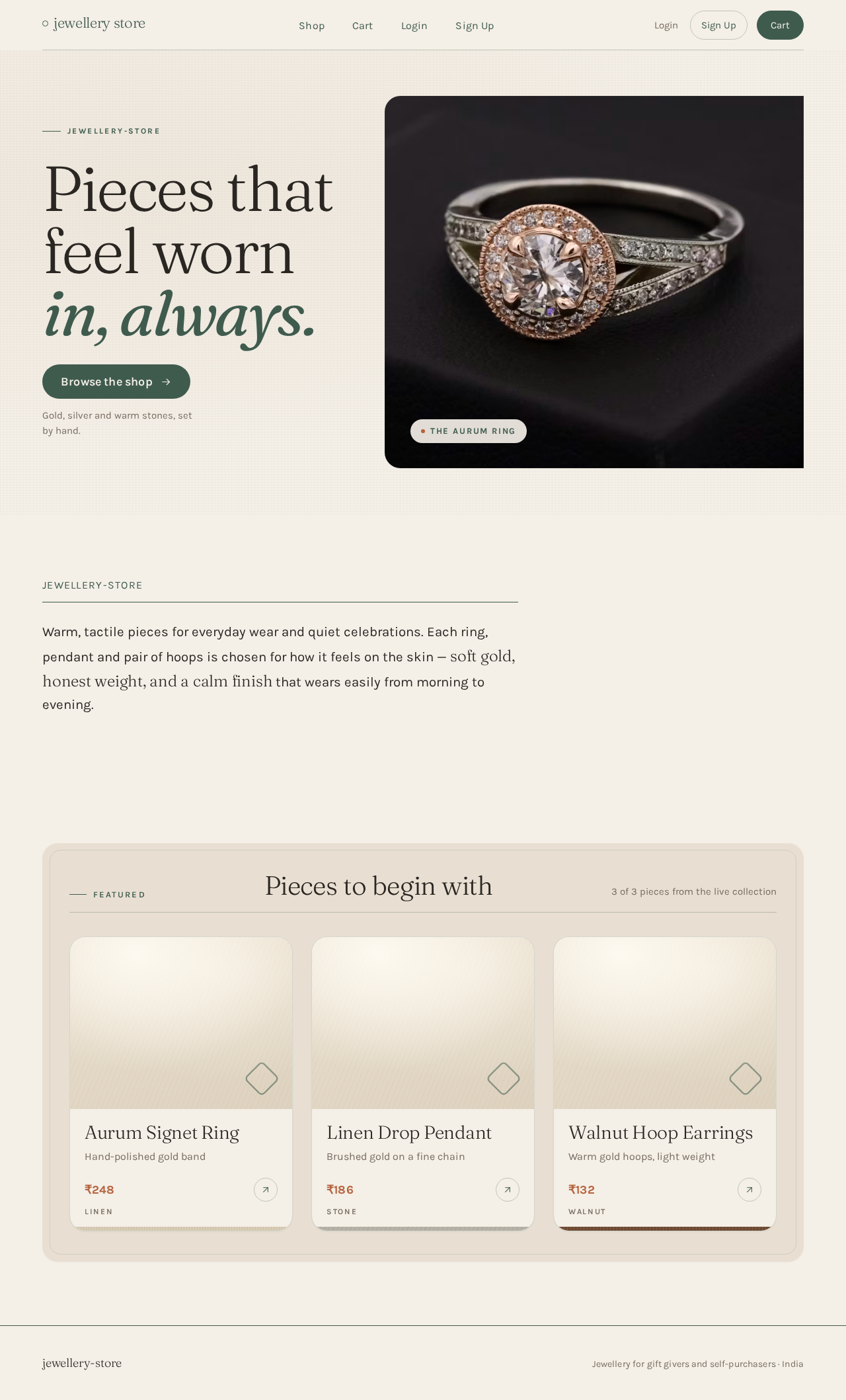
Pieces thatfeel wornin, always.
Gold, silver and warm stones, set by hand.

Warm, tactile pieces for everyday wear and quiet celebrations. Each ring, pendant and pair of hoops is chosen for how it feels on the skin — soft gold, honest weight, and a calm finish that wears easily from morning to evening.
Pieces thatfeel wornin, always.
Gold, silver and warm stones, set by hand.
Warm, tactile pieces for everyday wear and quiet celebrations. Each ring, pendant and pair of hoops is chosen for how it feels on the skin — soft gold, honest weight, and a calm finish that wears easily from morning to evening.
No comments yet. Be the first!