
java

bySakshi Suthar

Sure. If you want a **basic and simple Yoga Application** for a college/project submission, you can keep it focused on yoga exercises, routines, and basic progress tracking. ## ๐Ÿง˜ Basic Yoga Application โ€” Project Details ### 1. Project Name **YogaMate โ€“ Yoga Application** ### 2. Project Objective The main objective of the application is to help users practice yoga easily at home. The app provides simple yoga poses, instructions, benefits, and daily routines for beginners. ### 3. Target Users * Beginners learning yoga * Students * People who want simple home workouts * Users interested in relaxation and flexibility ### 4. Main Features **1. User Login/Register** * Create an account * Login securely * Basic user profile **2. Home/Dashboard** * Welcome message * Today's yoga routine * Quick access to yoga exercises * Daily progress **3. Yoga Exercises** Display different yoga poses such as: * ๐Ÿง˜ Mountain Pose * ๐Ÿง˜ Tree Pose * ๐Ÿง˜ Child's Pose * ๐Ÿง˜ Cobra Pose * ๐Ÿง˜ Warrior Pose * ๐Ÿง˜ Cat-Cow Pose For each pose: * Name * Image * Short description * Steps * Benefits * Recommended duration **4. Yoga Routine** Users can select a simple routine: * 5-minute beginner routine * 10-minute relaxation routine * Morning yoga * Evening yoga **5. Exercise Timer** * Start/stop timer * Shows remaining time * Next exercise notification **6. Progress Tracking** * Completed sessions * Daily practice * Weekly progress * Number of poses completed **7. Profile** * User name * Age * Yoga level * Completed sessions * Personal progress ### 5. Basic App Flow **Login โ†’ Home โ†’ Select Yoga โ†’ View Pose โ†’ Start Exercise โ†’ Complete Exercise โ†’ Track Progress** ### 6. Main Screens 1. Splash Screen 2. Login/Register 3. Home Dashboard 4. Yoga Exercise List 5. Yoga Pose Details 6. Yoga Routine 7. Exercise Timer 8. Progress 9. User Profile ### 7. Simple Database You can use around **4โ€“5 tables**: | Table | Main Data | | --------- | ---------------------------------------------- | | User | User ID, Name, Email, Password | | Yoga Pose | Pose ID, Name, Description, Benefits, Duration | | Routine | Routine ID, Name, Duration, Level | | Progress | User ID, Pose ID, Date, Status | | Feedback | User ID, Rating, Comment | ### 8. Technology Stack For a simple college project: * **Frontend:** HTML, CSS, JavaScript / React * **Backend:** Python Flask or Node.js * **Database:** MySQL * **Design:** Figma * **Development:** VS Code If you want it **very simple**, you can even make it as a frontend application using **HTML + CSS + JavaScript**, with predefined yoga data. ### 9. Admin Side Keep the admin panel simple: * Admin Login * Add Yoga Pose * Edit Yoga Pose * Delete Yoga Pose * Manage Yoga Routines * View Users * View User Progress * View Feedback ### 10. Project Summary **YogaMate is a basic yoga application designed to help beginners practice yoga at home. Users can explore different yoga poses, learn their steps and benefits, follow predefined yoga routines, use an exercise timer, and track their daily progress. An admin panel allows administrators to manage yoga poses, routines, users, and feedback.** ### 11. Future Scope * AI-based yoga pose detection * Personalized yoga plans * Video tutorials * Voice guidance * Wearable-device integration * Notifications and reminders * Diet and wellness recommendations * Online yoga classes For a **college-level project**, I would recommend keeping the actual implementation to **Login + Dashboard + Yoga Poses + Routine + Timer + Progress + Profile + Admin CRUD**. That is enough to make the project look complete without making it unnecessarily complicated.

LandingExercise TimerYoga RoutineYoga ExercisesAdmin Panel
Landing

Comments (0)

No comments yet. Be the first!

System Requirements

System Requirement Document
Page 1 of 8

YogaMate โ€“ Yoga Application

Introduction

YogaMate is a basic yoga application designed to help beginners practice yoga at home. The application provides simple yoga poses, instructions, benefits, and daily routines for beginners. It aims to facilitate easy yoga practice at home, focusing on yoga exercises, routines, and basic progress tracking.

System Overview

Page 2 of 8

Product Interpretation and Delivery Boundary

  • Domain Descriptor: Yoga Practice Application

    • Source Evidence: The application focuses on helping users practice yoga at home with simple poses and routines.
    • Confidence: 0.9
  • What is Being Built: A standalone yoga application with its own user interface and identity management, designed to help beginners practice yoga at home.

  • Excluded Assumptions:

    • AI-based yoga pose detection
    • Personalized yoga plans
    • Video tutorials
    • Voice guidance
    • Wearable-device integration
    • Notifications and reminders
    • Diet and wellness recommendations
    • Online yoga classes
  • Access: Application-owned identity with persistent user accounts for login and progress tracking.

  • Behavior Contracts:

    • User Registration: Users can register by providing their name, email, and password. Successful registration creates an account and initializes a user profile.
    • User Login: Users can log in using their email and password to access the dashboard.
    • View Yoga Exercises: Users can view a list of yoga poses with details such as name, image, description, steps, benefits, and duration.
    • Start Yoga Routine: Users can select and start a yoga routine, initiating a timer.
    • Track Progress: Users can track their progress by recording completed sessions and poses.
    • Admin Manage Content: Admins can manage yoga poses, routines, users, and feedback through an admin panel.
    • View Home Dashboard: Users can view a welcome message, today's yoga routine, quick access to exercises, and daily progress on the dashboard.
Page 3 of 8

Page Content and Component Coverage

  1. User Login/Register Page

    • Components: Registration form, login form
    • States: Empty, loading, success, error
    • Responsibilities: Allow users to create an account and log in securely.
  2. Home/Dashboard Page

    • Components: Welcome message, today's yoga routine, quick access to exercises, daily progress
    • States: Empty, loading, success, error
    • Responsibilities: Provide an overview of the user's yoga activities and progress.
  3. Yoga Exercises Page

    • Components: List of yoga poses, pose details (name, image, description, steps, benefits, duration)
    • States: Empty, loading, success, error
    • Responsibilities: Display different yoga poses with detailed information.
  4. Yoga Routine Page

    • Components: Routine selection, start routine button
    • States: Empty, loading, success, error
    • Responsibilities: Allow users to select and start a yoga routine.
  5. Exercise Timer Page

    • Components: Timer display, start/stop button, next exercise notification
    • States: Running, paused, completed
    • Responsibilities: Provide a timer for exercises with start/stop functionality and notifications.
  6. Progress Tracking Page

    • Components: Completed sessions, daily practice, weekly progress, number of poses completed
    • States: Empty, loading, success, error
    • Responsibilities: Track and display user progress.
  7. Profile Page

    • Components: User information (name, age, yoga level, completed sessions, personal progress)
    • States: Empty, loading, success, error
    • Responsibilities: Display user profile information.
  8. Admin Panel

    • Components: Admin login, manage yoga poses, manage routines, view users, view user progress, view feedback
    • States: Empty, loading, success, error
    • Responsibilities: Allow administrators to manage yoga poses, routines, users, and feedback.
Page 4 of 8

Functional Requirements as Story Points

  • As a beginner, I should be able to create an account to start using the application. explicit
  • As a user, I should be able to log in securely to access my dashboard. explicit
  • As a user, I should be able to view a list of yoga exercises with details like name, image, description, steps, benefits, and duration. explicit
  • As a user, I should be able to select and start a yoga routine with a timer. explicit
  • As a user, I should be able to track my progress, including completed sessions and poses. explicit
  • As an admin, I should be able to manage yoga poses, routines, users, and feedback through an admin panel. explicit
  • As a user, I should be able to view a welcome message, today's yoga routine, quick access to exercises, and daily progress on the dashboard. explicit

User Personas

  1. User

    • Description: Beginners learning yoga, students, people wanting simple home workouts, and users interested in relaxation and flexibility.
    • Responsibilities: Register, log in, view exercises, start routines, track progress.
  2. Admin

    • Description: Manages yoga poses, routines, users, and feedback.
    • Responsibilities: Manage content and user data through the admin panel.
Page 5 of 8

Core User Flows

  1. User Registration Flow

    • Navigate to the registration page.
    • Fill in the registration form with name, email, and password.
    • Submit the form to create an account.
    • Receive confirmation of successful registration.
  2. User Login Flow

    • Navigate to the login page.
    • Enter email and password.
    • Submit the form to log in.
    • Access the home/dashboard page.
  3. Yoga Exercise Flow

    • Navigate to the yoga exercises page.
    • Browse the list of yoga poses.
    • Select a pose to view detailed information.
  4. Yoga Routine Flow

    • Navigate to the yoga routine page.
    • Select a routine to start.
    • Initiate the exercise timer.
  5. Progress Tracking Flow

    • Navigate to the progress tracking page.
    • View completed sessions and poses.
    • Track daily and weekly progress.
  6. Admin Content Management Flow

    • Log in to the admin panel.
    • Manage yoga poses, routines, users, and feedback.
Page 6 of 8

Visuals Colors and Theme

  • Primary: #4CAF50 (Green)
  • Primary Light: #81C784 (Light Green)
  • Secondary: #FFC107 (Amber)
  • Accent: #FF5722 (Deep Orange)
  • Highlight: #FFEB3B (Yellow)
  • Background: #FFFFFF (White)
  • Surface: #F5F5F5 (Light Grey)
  • Text: #212121 (Dark Grey)
  • Text Muted: #757575 (Grey)
  • Border: #E0E0E0 (Light Grey)

Signature Design Concept

The YogaMate application will feature a clean and calming design, reflecting the serene nature of yoga. The home/dashboard page will serve as the focal point, with a welcoming message and easy navigation to yoga exercises and routines. The design will use a soft color palette with green as the primary color to evoke a sense of tranquility and balance. Typography will be clear and legible, with ample white space to ensure a clutter-free interface. The user interface will be intuitive, allowing users to easily navigate through the application and access the information they need.

Page 7 of 8

Interaction Model & Motion Direction

  • Interaction Model: Animated

    • The application will feature moderate scroll-triggered reveals and hover transitions to enhance user engagement without overwhelming the user.
    • Interactive elements such as buttons and links will have smooth transitions to provide feedback to the user.
  • Motion Direction:

    • The home/dashboard page will have a subtle animation to welcome users and guide them to their yoga routine for the day.
    • The exercise timer will have a smooth countdown animation to visually indicate the passage of time.

Non-Functional Requirements

  • Performance: The application should load quickly and respond promptly to user interactions. required_inference
  • Usability: The application should be easy to use, with intuitive navigation and clear instructions. required_inference
  • Security: User data should be securely stored and transmitted, with secure login and registration processes. required_inference

Tech Stack

  • Frontend: HTML, CSS, JavaScript
  • Backend: Python Flask or Node.js
  • Database: Predefined yoga data (no database required for the simplest version)
  • Design: Figma
  • Development: VS Code
Page 8 of 8

Assumptions and Constraints

  • The application will be developed as a simple frontend application using HTML, CSS, and JavaScript with predefined yoga data.
  • The application will not include advanced features such as AI-based yoga pose detection or personalized yoga plans.
  • The application will be designed for beginners and will not require complex user interactions.

Glossary

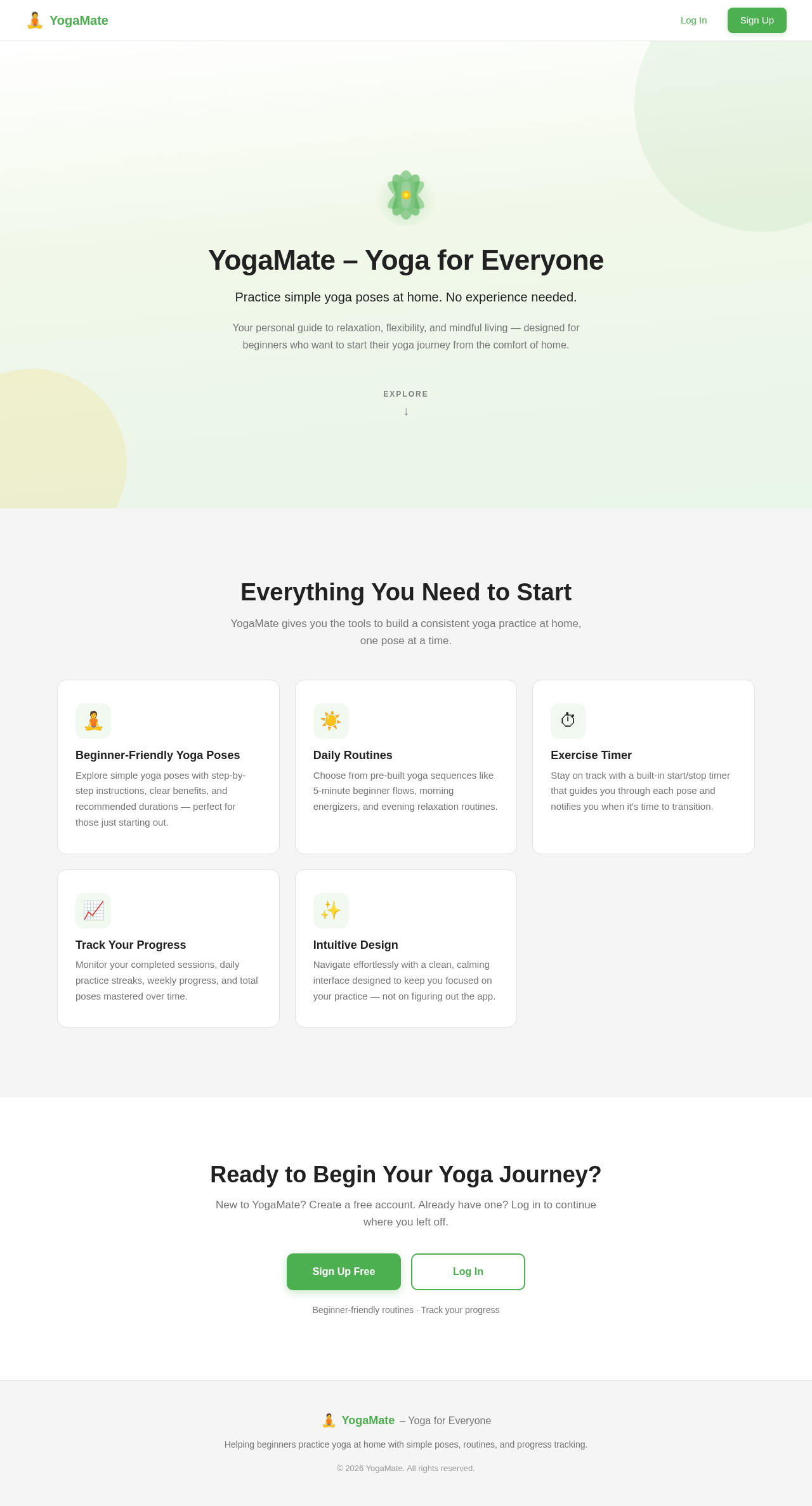
Landing design preview
Admin Panel: Admin logs in to the admin panel
Admin Panel: Admin manages yoga poses, routines, users, and feedback
Admin Panel: Content management succeeded?
Admin Panel: Content management failed
Admin Panel: Yoga poses, routines, and user data updated
Landing design preview
Admin Panel: Admin logs in to the admin panel
Admin Panel: Admin manages yoga poses, routines, users, and feedback
Admin Panel: Content management succeeded?
Admin Panel: Content management failed
Admin Panel: Yoga poses, routines, and user data updated