irctc-ticket-status
 Umang Suthar
online 1 page IRCTC ticket status check website..

Comments (0)
Sign in to leave a comment
System Requirements
System Requirements Document for irctc-ticket-status
1. Introduction
irctc-ticket-status is a single-page, publicly reachable website that lets a rail passenger check the current status of an IRCTC ticket. The visitor supplies ticket details on the page, and the page returns that ticket's current status — confirmed, RAC, waitlisted, or cancelled — so the passenger can decide whether to travel or act on the booking.
The product intent is narrow and deliberate: one page, one job. There is no account, no booking, no payment, no cancellation, and no itinerary management. The audience is a traveler holding an IRCTC ticket who needs fast, legible certainty about that ticket's standing, frequently on a phone at a platform under time pressure. The page is therefore designed as a public information sheet — a ruled, colour-coded departure board — rather than a marketing landing page.
2. System Overview
The system is a single public web page. It presents the ticket-status checker, accepts ticket details from the visitor, submits them to a backend that resolves the ticket's current status, and displays the returned status on the same page. No visitor identity is required, and no visitor-specific state is stored or resumed.
Actors
- Rail Passenger (active human persona): the traveler who opens the page, enters ticket details, and reads the returned status.
- IRCTC / Indian Railways status source (external system actor): the authoritative provider of ticket status data that the backend queries. It is not a persona and has no first-party UI in this product.
- Status resolution backend (system actor): the application-owned service that receives the submitted ticket details, queries the external status source, and returns a normalized status result to the page.
Accepted behavior
- A single online page that explains the checker, accepts ticket details, and displays the returned status.
- Ticket details are entered either as a PNR or as a train number, selected through a segmented PNR / Train toggle.
- The returned status is presented as a timetable-style result panel with ruled label/value rows and a colour-coded status word and dot.
- A colour-code legend explains what CONFIRMED, RAC, WAITLIST, and CANCELLED mean.
Ownership
- The page and its interaction are owned by the application.
- Ticket status data is owned by the external IRCTC / Indian Railways source; the application only requests and presents it.
Narrow exclusions
- The website is limited to one page. No additional pages, routes, or destinations are part of this product.
- No login, account creation, or user profile is part of this product.
- No booking, cancellation, payment, refund, or seat-selection capability is part of this product.
- No history, saved searches, or resumable state is part of this product.
2a. Product Interpretation and Delivery Boundary
Delivery. The website is online and publicly hosted — not a local-only tool. It is reachable by any visitor with a browser and a network connection, with no installation and no sign-in.
Access ownership. The single page is publicly accessible with no access requirement. The visitor does not establish an identity, does not create an account, and does not resume prior state. This is a deliberate product boundary: the accepted journey is a one-shot check of a ticket the visitor already holds, and nothing in the accepted behavior requires the application to privately own or resume visitor-specific state. Because no durable actor-specific state, commitment, entitlement, or value transfer is bound to the visitor, no application-owned identity is introduced.
Current vs. future. Everything described in this document is current. No future-horizon requirements were accepted. Anything not listed here — additional pages, accounts, booking actions, saved history — is out of scope rather than deferred.
Provider boundary. The authoritative ticket status is owned by the external IRCTC / Indian Railways source. The application does not own, compute, or guarantee that status; it requests it and presents what is returned, including the case where the source cannot be reached.
2b. Source Content Inventory
Not applicable. No reference directive in the authoritative sources declares a content_source, so no source content inventory is produced.
2c. Page Content and Component Coverage
The page contract is versioned and exact: one page, named Landing, with access requirement none, owned by the application, serving the Rail Passenger.
Landing
Information and state
- Product wordmark:
IRCTC TICKET STATUS, flush left in all caps. - A live context label flush right:
Indian Railways · public status check. - An oversized all-caps headline in three stacked lines:
CHECK YOUR / TICKET / STATUS. - A schematic route-line diagram: a horizontal black line with two station ticks and a yellow position marker, above a thin ruled caption.
- A segmented mode toggle offering two modes: PNR and Train.
- The ticket-detail input field, whose label and expected value change with the selected mode.
- The result panel, revealed after a successful check, laid out as ruled label/value rows.
- A colour-code legend strip explaining CONFIRMED, RAC, WAITLIST, and CANCELLED.
- A footer metadata block: source note, disclaimer, and a small colour-code key.
Primary actions
- Select the PNR mode or the Train mode on the segmented toggle.
- Enter ticket details in the input field.
- Submit the check with the red submit button, which sits flush right inside the check panel.
Supporting actions
- Read the legend strip to interpret a returned status word.
- Re-submit with corrected or different ticket details after an error or after reading a result.
Domain entities
- Ticket details: either a PNR or a train number, depending on the selected mode.
- Status result: the returned status word (CONFIRMED, RAC, WAITLIST, CANCELLED) plus the ticket attributes the source returns for that booking — PNR, train number, coach, seat, and any timestamp the source supplies.
- Status code: the colour mapping applied to a status word — deep green for CONFIRMED, signal yellow for RAC and WAITLIST, IRCTC red for CANCELLED, muted grey for labels and timestamps.
Component responsibilities
- Header band: carries the wordmark and the live context label, separated by a hairline, with a 1px horizontal rule beneath.
- Hero block: carries the three-line headline across columns 1–9 and the route-line diagram in columns 10–12, closed by a full-width 2px red rule.
- Check panel: a white sheet holding the segmented toggle, the input field, and the red submit button; it is the page's call to action.
- Result panel: the same white sheet, revealed below the check panel, rendering the returned status as ruled label/value rows with tabular-numeral values right-aligned and the status word in its own colour code, plus the circular status dot.
- Legend strip: four small filled squares (red, yellow, green, grey), each with an uppercase 11px label, doubling as the page's explanation of the statuses.
- Footer metadata block: source note, disclaimer, and colour-code key.
States
- Loading: after submit, the check panel shows that the status is being resolved; the submit control is not re-triggerable while a request is in flight.
- Empty: before any submission, the result panel is absent and the legend strip stands alone as the page's explanation of the statuses.
- Success: the result panel arrives with a 180ms opacity + 8px upward translate, ruled rows appear in a 40ms stagger, and the status dot pulses once on reveal. The status word renders in its colour code and the dot matches it.
- Error: when the submitted details are incomplete or malformed for the selected mode, the page states what is required and keeps the entered value so the visitor can correct it. When the external status source cannot be reached or returns no result for the submitted details, the page states that the status could not be retrieved and offers a retry.
- Recovery: after any error, the visitor corrects the input or retries the same submission; the check panel remains fully usable and the previous result, if any, is replaced rather than stacked.
3. Functional Requirements
Each requirement is a distinct story point with its provenance, lifecycle facts, and observable acceptance.
FR-1 — Single-page public checker (explicit) As a Rail Passenger, I should reach one online page that checks IRCTC ticket status, so that I can get an answer without navigating a multi-page site or signing in.
- Trigger: the visitor opens the site's public URL.
- Observable result: the Landing page renders with the wordmark, headline, check panel, and legend strip.
- Access state: publicly reachable, no access requirement, no identity established.
- Failure/recovery: if the page cannot load, the visitor reloads the URL; no partial or alternate page exists.
- Continuation: the visitor proceeds to enter ticket details.
- Acceptance: exactly one page exists in the product; the page is served from a public host, not a local-only environment.
FR-2 — Accept ticket details on the page (explicit) As a Rail Passenger, I should enter my ticket details on the page, so that the site can look up that specific ticket.
- Trigger: the visitor selects a mode and types into the input field.
- Observable result: the entered value is held in the input field and is visible to the visitor.
- Access state: no identity required; the input is available immediately on page load.
- Failure/recovery: if the value is empty or malformed for the selected mode, submission is refused with a stated reason and the entered value is preserved for correction.
- Continuation: the visitor submits the check.
- Acceptance: the page accepts ticket details without any sign-in step.
FR-3 — Choose between PNR and train-number lookup (explicit, from the accepted segmented PNR / Train toggle) As a Rail Passenger, I should choose whether I am checking by PNR or by train number, so that I can supply the kind of detail I actually have.
- Trigger: the visitor selects one side of the segmented PNR / Train toggle.
- Observable result: the active side is filled IRCTC red with its label inverted to white; the input field's label and expected value change to match the selected mode.
- Access state: no identity required.
- Failure/recovery: the toggle always has exactly one active side; there is no unselected state to recover from.
- Continuation: the visitor enters the value appropriate to the selected mode.
- Acceptance: the two modes are presented as two hard-edged rectangles sharing a 1px black border, with the active side visually distinct.
FR-4 — Submit the check (explicit) As a Rail Passenger, I should submit my ticket details, so that the site resolves the ticket's current status.
- Trigger: the visitor activates the red submit button inside the check panel.
- Observable result: the page enters its loading state and the request is sent to the status resolution backend.
- Access state: no identity required.
- Failure/recovery: the submit control is not re-triggerable while a request is in flight; on failure the page returns to a usable state with the entered value intact.
- Continuation: the page either reveals the result panel or states the error.
- Acceptance: the submit button sits flush right inside the check panel and inverts from red to black over 90ms on press.
FR-5 — Return the ticket's current status (explicit) As a Rail Passenger, I should see the current status of my ticket returned on the same page, so that I know whether my booking stands.
- Trigger: a successful response from the status resolution backend.
- Observable result: the result panel is revealed below the check panel, showing the status word — CONFIRMED, RAC, WAITLIST, or CANCELLED — together with the ticket attributes the source returns for that booking (PNR, train number, coach, seat, and any timestamp the source supplies), rendered as ruled label/value rows with tabular-numeral values right-aligned.
- Access state: no identity required; the result is shown to the visitor who submitted the check.
- Failure/recovery: if the source returns no result for the submitted details, the page states that no status was found and offers a retry with corrected details.
- Continuation: the visitor reads the status and decides whether to travel or act on the booking, or submits a different ticket.
- Acceptance: the status is displayed on the same page as the input, with no navigation and no sign-in.
FR-6 — Colour-code the returned status (explicit, from the accepted colour-code legend and status dot) As a Rail Passenger, I should be able to tell my status at a glance, so that I do not have to parse a paragraph to find the answer.
- Trigger: the result panel is revealed.
- Observable result: the status word renders in its own colour code — deep green for CONFIRMED, signal yellow for RAC and WAITLIST, IRCTC red for CANCELLED — and the circular status dot with a 2px ring matches that colour and pulses once on reveal.
- Access state: no identity required.
- Failure/recovery: if the source returns a status outside the four known codes, the status word is shown in the neutral text colour with the dot in muted grey rather than being mis-coloured.
- Continuation: the visitor reads the legend strip if the code is unfamiliar.
- Acceptance: colour is used only for status codes and the primary action, never decoratively.
FR-7 — Explain the status codes (explicit, from the accepted legend strip) As a Rail Passenger, I should be able to learn what each status means, so that I can interpret a status I have not seen before.
- Trigger: the visitor reads the legend strip on the page.
- Observable result: four small filled squares (red, yellow, green, grey), each with an uppercase 11px label, explain CONFIRMED, RAC, WAITLIST, and CANCELLED.
- Access state: no identity required; the legend is present on the page before any submission.
- Failure/recovery: not applicable — the legend is static content.
- Continuation: the visitor returns to the check panel or reads the result panel.
- Acceptance: the legend is visible without submitting a check.
FR-8 — Recover from a failed or empty lookup (required_inference) As a Rail Passenger, I should be told when my check could not be completed and be able to try again, so that a failed lookup does not leave me without an answer or force me to reload the page.
- Trigger: the submitted details are incomplete or malformed for the selected mode, or the external status source cannot be reached or returns no result.
- Observable result: the page states the reason in the check panel area, keeps the entered value, and offers a retry; any previously displayed result is replaced rather than stacked.
- Access state: no identity required.
- Failure/recovery: this requirement is the recovery path; the check panel remains fully usable throughout.
- Continuation: the visitor corrects the input or retries the same submission.
- Acceptance: after any failure the visitor can submit again without reloading the page.
- Inference basis: causally necessary for FR-4 and FR-5 to be usable — a lookup that can fail must tell the visitor and allow another attempt. It introduces no new user goal, data operation, or product outcome.
FR-9 — Resolve status through the external source (required_inference) As the system, I should query the authoritative IRCTC / Indian Railways status source with the submitted ticket details and normalize the response for the page, so that the status shown is the source's current status rather than a locally invented one.
- Trigger: a valid submission from the Landing page.
- Observable result: a normalized status result — status word plus the ticket attributes the source returns — delivered to the page, or a defined failure signal.
- Access state: server-side; no visitor identity is transmitted or required.
- Failure/recovery: an unreachable or non-responsive source produces the failure signal that drives FR-8.
- Continuation: the page renders the result or the error.
- Acceptance: the application does not compute or guarantee status; it presents what the source returns.
- Inference basis: causally necessary for FR-5 — the page cannot return a current status without a resolution path to the authoritative owner of that status. It introduces no separately invoked user goal.
4. User Personas
Rail Passenger
Product context. The Rail Passenger holds an IRCTC ticket — a booking they have already made — and wants to know where that booking currently stands. They arrive at the page from a search, a bookmark, or a link, often on a phone, often at a station or on the way to one, and often with limited time. They are not shopping for a ticket and are not managing an account; they have one question and want it answered.
Primary goal. Learn the current status of their specific ticket — confirmed, RAC, waitlisted, or cancelled — quickly and without ambiguity, so they can decide whether to travel or act on the booking.
Distinct accepted responsibilities.
- Choosing the lookup mode that matches the detail they actually hold: a PNR or a train number.
- Supplying the ticket detail for that mode.
- Submitting the check.
- Reading the returned status and interpreting it, using the legend strip when the status code is unfamiliar.
- Correcting the input or retrying when the check fails or returns nothing.
Relevant inputs and decisions. The passenger's input is a PNR or a train number, selected through the segmented toggle. Their decision is which mode to use, and then what to do about the answer — travel, wait, or act on the booking. The page does not make that decision for them; it gives them the status and the meaning of the status code.
Interactions with other accepted participants. The passenger interacts only with the page. The status itself originates from the external IRCTC / Indian Railways source, which the passenger never contacts directly and never sees; the page presents the source's answer as its own visible result. There is no other human participant in this product — no agent, no operator, no administrator — and no handoff to another person.
Observable success. The passenger sees the status word for their ticket on the same page where they entered the details, in the correct colour code, with the ticket attributes the source returned, and understands what that status means. Success is a single completed check with no sign-in, no navigation, and no ambiguity about which ticket the answer belongs to.
What makes this role distinct. The Rail Passenger is the only human actor in the product, and their work is a one-shot lookup rather than a session. They do not accumulate state, do not return to a saved record, and do not manage anything — they ask one question about a booking they already own and read the answer. Every design decision on the page serves that single, time-pressured act of reading.
5. Core User Flows
Flow 1 — Check a ticket status by PNR
- The Rail Passenger opens the public URL of irctc-ticket-status on their device. The Landing page renders: the
IRCTC TICKET STATUSwordmark flush left, theIndian Railways · public status checklabel flush right, the three-lineCHECK YOUR / TICKET / STATUSheadline, the schematic route line, and the white check panel below the 2px red rule. No sign-in is requested. - The passenger reads the headline and the check panel, and confirms the segmented toggle is set to PNR. If it is not, they select PNR; the active side fills IRCTC red with its label inverted to white, and the input field's label changes to expect a PNR.
- The passenger types their PNR into the input field. The value is held and visible in the field.
- The passenger activates the red submit button, which sits flush right inside the check panel and inverts red-to-black over 90ms on press. The page enters its loading state and the request is sent to the status resolution backend.
- The backend queries the authoritative IRCTC / Indian Railways status source with the submitted PNR and normalizes the response.
- On success, the result panel is revealed below the check panel: it arrives with a 180ms opacity + 8px upward translate, its ruled label/value rows appear in a 40ms stagger, and the circular status dot pulses once on reveal. The rows show the returned ticket attributes — PNR, train number, coach, seat, and any timestamp the source supplied — as label/value pairs separated by 1px black hairlines, with tabular-numeral values right-aligned.
- The passenger reads the status word. If it is CONFIRMED, it renders in deep green with a matching dot. If it is RAC or WAITLIST, it renders in signal yellow with a matching dot. If it is CANCELLED, it renders in IRCTC red with a matching dot.
- If the passenger is unsure what the status means, they read the colour-code legend strip — four small filled squares with uppercase labels — which explains CONFIRMED, RAC, WAITLIST, and CANCELLED.
- Continuation: the passenger decides whether to travel or act on the booking. If they hold another ticket to check, they edit the input field and submit again; the new result replaces the previous one rather than stacking.
Failure and recovery. If the PNR is empty or malformed, the page states what is required, keeps the entered value, and lets the passenger correct it and submit again. If the external status source cannot be reached or returns no result for that PNR, the page states that the status could not be retrieved and offers a retry; the check panel remains fully usable and no reload is needed.
Flow 2 — Check a ticket status by train number
- The Rail Passenger opens the Landing page. No sign-in is requested.
- The passenger selects Train on the segmented toggle. The Train side fills IRCTC red with its label inverted to white, and the input field's label changes to expect a train number.
- The passenger types the train number into the input field.
- The passenger activates the red submit button. The page enters its loading state and the request is sent to the status resolution backend.
- The backend queries the authoritative IRCTC / Indian Railways status source with the submitted train number and normalizes the response.
- On success, the result panel is revealed with the same arrival motion and stagger as Flow 1, showing the status word and the ticket attributes the source returned for that train.
- The passenger reads the status word in its colour code and, if needed, the legend strip to interpret it.
- Continuation: the passenger decides whether to travel or act on the booking, or switches the toggle back to PNR and checks a different ticket.
Failure and recovery. If the train number is empty or malformed, the page states what is required, keeps the entered value, and lets the passenger correct it. If the source cannot be reached or returns no result, the page states that the status could not be retrieved and offers a retry without a reload.
Flow 3 — Interpret an unfamiliar status code
- The Rail Passenger has completed a check and the result panel shows a status word they do not recognize — for example RAC.
- The passenger looks at the colour-code legend strip on the page, which is present before and after any submission.
- The passenger matches the status word's colour to the corresponding legend square and reads its uppercase label, learning what that status means.
- Continuation: the passenger returns to the result panel with the status interpreted, and decides whether to travel or act on the booking.
Failure and recovery. If the source returns a status outside the four known codes, the status word is shown in the neutral text colour with the dot in muted grey rather than being mis-coloured, so the passenger is never given a false colour signal.
6. Visuals Colors and Theme
The creative direction is authoritative for this section. It names Massimo Vignelli as the muse and frames the page as a public information and wayfinding problem: a ruled, colour-coded information sheet that reads like a departure board, not a SaaS landing page. The emotional register is trust, legibility, and fast certainty.
Colour tokens — light mode
| Role | Hex | Use |
|---|---|---|
| Background (paper ground) | #F4F1EA | Covers the whole page |
| Surface | #FFFFFF | Reserved for the status-result panel and the input fields |
| Text | #111111 | Type and rules only |
| Primary | #D22630 | Submit action, active toggle side, left rule of the result panel |
| Accent | #F2B705 | Waitlist/RAC states and the route-line position marker |
| Status — confirmed | #0B6E4F | CONFIRMED status text and its dot only |
| Muted | #6B6B6B | Labels, timestamps, helper copy |
Proportion: approximately 70% paper ground, 20% white panels, 10% colour codes. No colour is ever used decoratively. The warm off-white ground covers the whole page; pure white is reserved for the status-result panel and the input fields, so the returned answer physically sits on a brighter sheet. Black is type and rules only. IRCTC red is the primary code. Signal yellow is the second code. Deep green is used only for CONFIRMED status text and its dot. Muted grey carries labels, timestamps, and helper copy.
Typography
- One grotesque family across the whole page: Archivo for both headings and body. Hierarchy is built from weight, size, and rules rather than from a second typeface.
- Headline: 800 weight, all-caps, tracking
-0.01em, flush-left ragged-right, set very large. - Section labels: 600 weight, 11–12px, uppercase, letter-spacing
0.14em. - Data values (PNR, train number, coach, seat, status): 700 weight with tabular numerals so columns align.
- Body copy: 400 weight at 16–17px with 1.55 line-height.
- No italics, no script, no rounded faces.
Type scale — 1.333 modular on a 4px baseline:
| Token | Mobile | Desktop |
|---|---|---|
| Display | 40px | 88px — clamp(2.5rem, 7vw, 5.5rem) |
| H2 | 28px | 40px |
| Data value | 24px | 32px |
| Body | 16px | 17px |
| Label | 11px | 12px |
Line-height: 1.02 for display, 1.15 for headings, 1.55 for body.
Shape language. Hard edges only: 0px radius on inputs, buttons, panels, and rules. Structure comes from 1px black rules, 2px red rules on emphasis, and colour-filled rectangles. The one curved form is the circular status indicator — a filled dot with a 2px ring — used as the single pictogram on the page. No shadows, no gradients, no glass, no rounded cards.
Layout. A strict 12-column grid on a 1280px max-width sheet, with an always-visible 1px horizontal rule under the header and above the footer. Reading order top to bottom:
- Header band — wordmark
IRCTC TICKET STATUSflush left in caps, liveIndian Railways · public status checklabel flush right, separated by a hairline. - Hero — an oversized all-caps headline spanning columns 1–9 in three stacked lines, with a small route-line diagram occupying columns 10–12.
- Check panel — a white sheet spanning columns 2–11 on desktop, full width on mobile, holding the PNR/booking input, the segmented PNR / Train toggle, and the red submit.
- Result panel — the same sheet, revealed below, laid out as ruled label/value rows in two columns (label left, value right) so it reads like a timetable entry.
- Legend strip — a colour-coded strip explaining what CONFIRMED / RAC / WAITLIST / CANCELLED mean.
- Footer — a metadata block with source note, disclaimer, and a small colour-code key.
At 375px everything collapses to a single column, the headline drops to 40px and wraps, the route diagram moves below the headline as a horizontal strip, and label/value rows stack label-above-value.
Imagery. No photography, no 3D, no illustration for its own sake. The only graphics are diagrammatic: a horizontal route line with two station ticks and a moving position marker, and the circular status dot. Type and rules are the image. Any map-like element is a schematic line diagram in black on paper, with red and yellow used as line codes.
Readable-content rule. Headlines, wordmarks, labels, numbers, and controls stay entirely inside the viewport and their container at 375px, 768px, and 1280px, wrapping or scaling to fit, with no other element covering any part of them. Crops, bleeds, and off-edge placement are reserved for decoration only — shapes, textures, rules, and background art.
7. Signature Design Concept
The public entry is composed as a ruled information poster, not a centred SaaS hero.
The dominant element is a three-line all-caps headline — CHECK YOUR / TICKET / STATUS — set flush left at clamp(2.5rem, 7vw, 5.5rem), spanning columns 1–9 and running close to the left edge of the sheet. To its right, in columns 10–12, sits a small black-and-red schematic route line with two station ticks and a yellow position marker, above a thin ruled caption. Directly beneath the headline, a full-width 2px red rule separates the hero from the white check panel and acts as the hero's baseline.
There is no subheadline paragraph, no gradient, and no button in the hero. The input field inside the panel below is the call to action, and the red submit button sits flush right inside that panel. The whole first screen reads as a printed departure board.
The signature moves that carry the concept:
- The three-line all-caps headline at
clamp(2.5rem, 7vw, 5.5rem), flush left across columns 1–9, with the full-width 2px red rule beneath it. - The result panel rendered as a timetable: label/value rows separated by 1px black hairlines, tabular-numeral values right-aligned, and the status word in its own colour code — green CONFIRMED, yellow RAC/WAITLIST, red CANCELLED.
- The colour-code legend strip: four small filled squares (red, yellow, green, grey), each with an uppercase 11px label, doubling as the page's explanation of what the statuses mean.
- The circular status dot with a 2px ring that pulses once when the result arrives — the only curved form on an otherwise hard-edged page.
- The segmented PNR / Train toggle built as two hard-edged rectangles sharing a 1px black border, with the active side filled IRCTC red and its label inverted to white.
This concept only recomposes accepted content, states, and controls. It introduces no new behavior, page, or destination.
8. Interaction Model & Motion Direction
Interaction Model: Static Motion Tempo: still Hero Dimensionality: flat
The tempo is copied from the creative direction: instant and mechanical, matching Vignelli's no-decoration stance. There is no parallax, no scroll-triggered reveal, and no marquee.
Landing Hero Motion Brief
- Focal subject. The three-line all-caps headline
CHECK YOUR / TICKET / STATUSspanning columns 1–9, with the schematic route line and its yellow position marker in columns 10–12. - Input → transformation → outcome thesis. The visitor's typed ticket detail is the input; the submit action sends it to the status resolution backend; the outcome is the result panel arriving below the check panel with the status word in its colour code. The hero itself does not animate — it is the fixed frame the answer arrives into.
- Motion vocabulary. The only motion on the page is the result panel arriving: a 180ms opacity + 8px upward translate, then ruled rows appearing in a 40ms stagger. The status dot pulses once on reveal to draw the eye to the answer. The submit button has a 90ms colour inversion on press, red to black.
- Composed first frame. The header band with wordmark and context label, the three-line headline flush left, the route line at right, the full-width 2px red rule, and the white check panel with the segmented toggle, input field, and red submit button — all rendered at rest, with no entrance animation.
- Reduced-motion state. With
prefers-reduced-motion, the result panel appears immediately with no translate, no stagger, and no dot pulse; the submit button's press state changes colour without a transition. All content remains whole and readable.
No 3D or WebGL scene is required or requested; the hero dimensionality is flat.
9. Non-Functional Requirements
NFR-1 — Single-page constraint (explicit) The product consists of exactly one page. No additional routes, pages, or destinations are built. Rationale: the authoritative requirement states "online 1 page IRCTC ticket status check website."
NFR-2 — Public online hosting (explicit) The website is publicly hosted and reachable over the network, not local-only. Rationale: the authoritative requirement states the site is online.
NFR-3 — No access barrier (explicit, from the page contract's access_requirement: none)
The page is reachable without sign-in, account creation, or any identity step. No authentication UI is built. Rationale: the accepted journey is a one-shot check of a ticket the visitor already holds, and no durable actor-specific state is bound to the visitor.
NFR-4 — Legibility under time pressure (source-backed, from the creative direction) Type, rules, and colour codes must let a status value be found at a glance on a phone at a platform. Data values use tabular numerals so columns align; the status word is colour-coded; the legend strip explains the codes. Rationale: the creative direction frames the page as a public information and wayfinding problem.
NFR-5 — Responsive integrity (source-backed, from the creative direction) At 375px, 768px, and 1280px, headlines, wordmarks, labels, numbers, and controls stay entirely inside the viewport and their container, wrapping or scaling to fit, with no other element covering any part of them. At 375px the layout collapses to a single column, the headline drops to 40px and wraps, the route diagram moves below the headline as a horizontal strip, and label/value rows stack label-above-value.
NFR-6 — Accessible colour coding (required_inference) Because status is conveyed by colour, each status word is also rendered as text and each legend square carries an uppercase text label, so the status is never conveyed by colour alone. Rationale: causally necessary for FR-6 and FR-7 to be usable by a visitor who cannot distinguish the colour codes.
NFR-7 — Reduced-motion support (source-backed, from the creative direction)
The page honours prefers-reduced-motion: the result panel appears immediately with no translate, no stagger, and no dot pulse, and all content remains whole and readable.
NFR-8 — External source dependency (required_inference) The application depends on the external IRCTC / Indian Railways status source for status data and must degrade to a stated, retryable error when that source is unreachable or returns no result. Rationale: causally necessary for FR-5 and FR-9 — the application does not own the status it presents.
10. Tech Stack
No technology choices were specified by the user. The following are coherent defaults for a single-page public checker with a backend status lookup, labelled as defaults.
- Frontend: React — a single-page application rendering the one Landing page.
[Default — not specified by user] - Backend: Python with FastAPI — exposes the status-check endpoint that receives ticket details, queries the external IRCTC / Indian Railways status source, and returns a normalized result.
[Default — not specified by user] - Storage: none required. The product holds no durable visitor state, no history, and no saved searches.
[Default — not specified by user] - Containerization: Docker with docker-compose for local and single-host deployment of the frontend and backend.
[Default — not specified by user] - Orchestration: Kubernetes is not required for this single-page, stateless product and is not included.
[Default — not specified by user]
11. Assumptions and Constraints
Constraints (binding)
- The website is limited to one page. This is an explicit hard constraint from the authoritative user evidence.
- The website is online — publicly hosted, not local-only. This is an explicit hard constraint from the authoritative user evidence.
- The page is publicly accessible with no access requirement. This is the page contract's stated access for the Landing page.
- The product is a ticket status checker only. Booking, cancellation, payment, refund, seat selection, accounts, and saved history are outside the accepted scope.
Assumptions (narrow, labelled)
- A-1
[Assumption]The external IRCTC / Indian Railways status source is reachable from the backend over the network and returns a status for a valid PNR or train number. The application does not own or guarantee this source. - A-2
[Assumption]The status vocabulary presented to the visitor is the four accepted codes — CONFIRMED, RAC, WAITLIST, CANCELLED. A status outside this set is displayed in the neutral text colour with a muted dot rather than being mis-coloured. - A-3
[Assumption]The ticket attributes shown in the result panel are those the external source returns for the submitted booking; the application does not invent or fill missing attributes. - A-4
[Assumption]No visitor identity, session, or stored preference is required, because the accepted journey is a one-shot check with no durable actor-specific state. - A-5
[Assumption]The segmented PNR / Train toggle is the accepted mechanism for choosing the lookup mode, as established by the creative direction's signature moves.
Uncertainty retained
- The authoritative sources do not specify the exact ticket attributes the external source returns beyond PNR, train number, coach, seat, and any timestamp the source supplies. The result panel renders whatever the source returns for the submitted booking and does not require attributes the source omits.
12. Glossary
- IRCTC — Indian Railway Catering and Tourism Corporation; the body associated with Indian Railways ticketing. In this product it names the ticket domain and the external status source.
- PNR — Passenger Name Record; the reference number identifying a specific railway booking. One of the two accepted lookup modes.
- Train number — The identifier of a specific train service. The other accepted lookup mode.
- Ticket status — The current standing of a booking as reported by the authoritative source: CONFIRMED, RAC, WAITLIST, or CANCELLED.
- CONFIRMED — The booking is confirmed; rendered in deep green (
#0B6E4F) with a matching status dot. - RAC — Reservation Against Cancellation; rendered in signal yellow (
#F2B705) with a matching status dot. - WAITLIST — The booking is waitlisted; rendered in signal yellow (
#F2B705) with a matching status dot. - CANCELLED — The booking is cancelled; rendered in IRCTC red (
#D22630) with a matching status dot. - Status dot — The circular filled dot with a 2px ring that matches the status colour and pulses once when the result arrives; the only curved form on the page.
- Legend strip — The colour-code strip of four small filled squares with uppercase labels that explains what CONFIRMED, RAC, WAITLIST, and CANCELLED mean.
- Check panel — The white sheet holding the segmented PNR / Train toggle, the ticket-detail input field, and the red submit button.
- Result panel — The white sheet revealed below the check panel, rendering the returned status as ruled label/value rows.
- Segmented toggle — The two hard-edged rectangles sharing a 1px black border that select between PNR and Train lookup modes, with the active side filled IRCTC red.
- Status resolution backend — The application-owned service that receives submitted ticket details, queries the external status source, and returns a normalized result to the page.
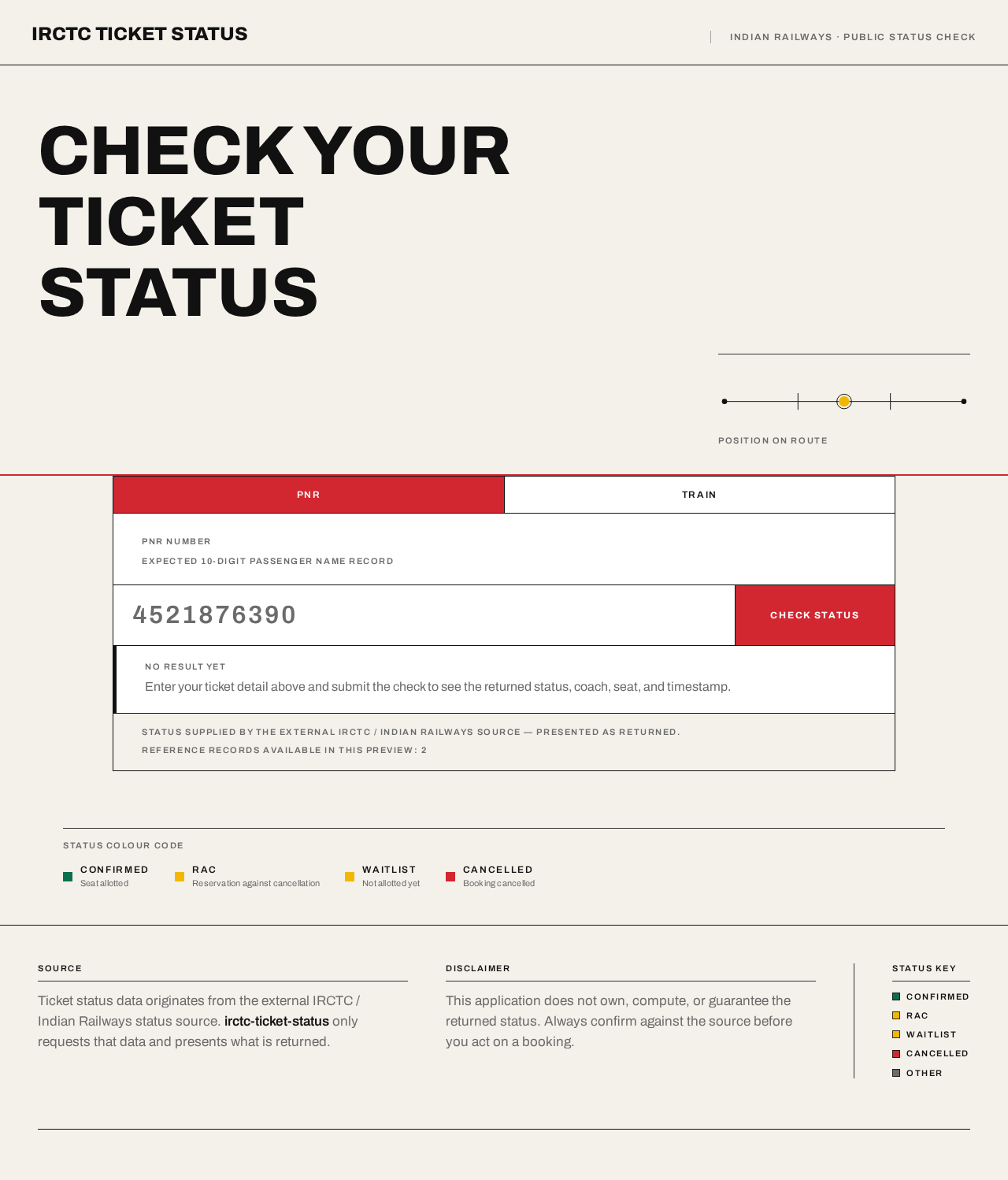
IRCTC TICKET STATUS
Indian Railways · public status check
Check yourTicketStatus
Expected 10-digit passenger name record
Enter your ticket detail above and submit the check to see the returned status, coach, seat, and timestamp.
Status supplied by the external IRCTC / Indian Railways source — presented as returned.
Reference records available in this preview: 2
Status colour code
- CONFIRMEDSeat allotted
- RACReservation against cancellation
- WAITLISTNot allotted yet
- CANCELLEDBooking cancelled
IRCTC TICKET STATUS
Indian Railways · public status check
Check yourTicketStatus
Expected 10-digit passenger name record
Enter your ticket detail above and submit the check to see the returned status, coach, seat, and timestamp.
Status supplied by the external IRCTC / Indian Railways source — presented as returned.
Reference records available in this preview: 2
Status colour code
- CONFIRMEDSeat allotted
- RACReservation against cancellation
- WAITLISTNot allotted yet
- CANCELLEDBooking cancelled
No comments yet. Be the first!