inventory-dashboard
 Riyas Mohammed
I have 100 products being sent from Dubai to Kerala via courier, and I need to keep track of the inventory in a dashboard. Each item must be stored with a label beforehand, so when I receive the box, I will have control over how each product is classified on the dashboard. I want this system to be completely functional, requiring minimal effort and no complications.


Comments (0)
Sign in to leave a comment
System Requirements
System Requirements Document for Inventory Dashboard
1. Introduction
Inventory Dashboard is a private, single-owner inventory tracking system for a shipment of 100 products sent from Dubai to Kerala by courier. The owner prepares the shipment by recording every product in the system with a label before the box is dispatched, so that when the box arrives in Kerala each physical item can be matched to its stored record and classified on the dashboard.
The product intent is narrow and operational: give one person a fast, low-friction way to (1) pre-label and store each of the 100 products before receipt, and (2) on receipt of the box, control how each product is classified on the dashboard. The system must be completely functional, require minimal effort, and introduce no complications.
The audience is the Inventory Owner — the single person who ships, labels, receives, and classifies the products. There is no multi-user collaboration, no customer-facing catalog, and no shipping-carrier integration in the current scope.
2. System Overview
The system is delivered as a web application with three runnable services:
- frontend — a React application providing the public entry, identity access, and the protected inventory workspace.
- backend — a shared FastAPI process exposing the application APIs and domain modules for products, labels, and classification.
- database — MariaDB holding application-owned persistent data (owner identity, product records, labels, classification state).
The only active human actor is the Inventory Owner. The system itself performs persistence, identity verification, and state transitions; the courier is an external party with no system surface.
Accepted behavior in the current scope:
- The owner enrolls with a self-service account and returns via login to reach private inventory records.
- The owner records each of the 100 products with a label before the box is received.
- On receipt, the owner classifies each product on the dashboard, with full control over classification.
- The dashboard presents the inventory so the owner can see label, item, and classification together.
Narrow exclusions: no carrier tracking integration, no multi-warehouse or multi-tenant support, no customer storefront, no barcode-scanning hardware requirement, no role-based permission tiers (single owner).
Removed from scope
- None. No concept from the authoritative requirement thread was removed or superseded.
2a. Product Interpretation and Delivery Boundary
The product is a first-party web application owned and operated by the application itself. Identity is application-owned: the Inventory Owner creates an account through self-service enrollment and verifies identity at login to reach protected inventory work. The public entry surface (Landing) is anonymously reachable and explains the product before identity is established; Sign Up and Login are anonymously reachable access surfaces; the dashboard and Add Product require login.
All inventory data is durable and private to the authenticated owner. The courier is an external, out-of-band party — the system does not track the parcel in transit, only the products the owner has labeled and will classify on arrival. There is no future-horizon feature set defined in the authoritative source; everything described here is current scope.
2b. Source Content Inventory
Not applicable — no reference directive declares content_source.
2c. Page Content and Component Coverage
Landing
- Information/state: Anonymous public entry. Full-width ink band with oversized quoted headline "Label every item before the box arrives"; subline "Track 100 products from Dubai to Kerala and classify each one on arrival."; a moving safety-orange ticker tape across the band; a white label card with a punched hole below the band.
- Primary action: "Start labeling" tag-shaped black button → Sign Up.
- Supporting action: Link to Login for a returning owner.
- Domain entities: None persisted; presents product intent only.
- Component responsibilities: Hero band, ticker tape (reduced-motion → static wrapped rows), label card, primary CTA, secondary login link.
- States: Static content; no loading/empty/error states beyond standard page load. Reduced-motion renders a static ticker arrangement.
Sign Up
- Information/state: Anonymous identity-establishment surface. Collects the minimum credentials to create the owner account.
- Primary action: Submit enrollment → account created → redirect to dashboard.
- Supporting action: Link to Login for existing accounts.
- Domain entities: Owner identity (credentials, created timestamp).
- Component responsibilities: Enrollment form, validation messaging, submit control.
- States: Loading (submitting), success (redirect to dashboard), error (invalid or duplicate credentials with recovery message), empty (blank form).
Login
- Information/state: Anonymous identity-verification surface for a returning owner.
- Primary action: Submit credentials → verified → redirect to dashboard.
- Supporting action: Link to Sign Up.
- Domain entities: Owner identity.
- Component responsibilities: Login form, validation messaging, submit control.
- States: Loading, success (redirect), error (invalid credentials with recovery message), empty.
dashboard
- Information/state: Protected inventory workspace. Shows all recorded products as tag-label rows with label code, item name, and classification in aligned columns; summary of total products (target 100) and classification counts; unclassified items marked with hazard-stripe chips.
- Primary action: Classify a product (set/change its classification) directly on its row.
- Supporting action: Navigate to Add Product; filter or scan the list by label/classification.
- Domain entities: Product (label code, item name, classification, created timestamp, classified timestamp).
- Component responsibilities: Inventory table with tag-label rows (punched hole, barcode strip), classification chips (hazard-stripe for unclassified), summary counters, Add Product entry point.
- States: Loading (fetching inventory), empty (no products yet — prompt to add first product), success (rows rendered), error (fetch/update failure with retry), recovery (failed classification reverts chip to prior state with message).
Add Product
- Information/state: Protected form to record a product with its label before the box arrives.
- Primary action: Save product (label code + item name) → returns to dashboard with the new row.
- Supporting action: Cancel/return to dashboard.
- Domain entities: Product.
- Component responsibilities: Label code field, item name field, save control, validation messaging.
- States: Loading (saving), success (redirect to dashboard), error (validation or persistence failure with recovery), empty (blank form).
3. Functional Requirements
FR-1 — Track inventory of 100 products in a dashboard (explicit) As the Inventory Owner, I should see all products sent from Dubai to Kerala tracked in a dashboard, so that I have a single view of the shipment inventory.
- Trigger: owner opens the dashboard while authenticated.
- Observable result: dashboard lists every recorded product with label code, item name, and classification; summary shows total count against the 100-product target.
- Access: login required.
- Failure/recovery: fetch failure shows an error with retry; empty inventory shows a prompt to add the first product.
- Continuation: owner proceeds to add or classify products.
FR-2 — Store each item with a label beforehand (explicit) As the Inventory Owner, I should store each item with a label before the box is received, so that every physical product has a matching record when it arrives.
- Trigger: owner opens Add Product and submits a label code and item name.
- Observable result: product record persisted with its label; new row appears on the dashboard.
- Access: login required.
- Failure/recovery: validation or persistence error keeps the form populated with a recovery message.
- Continuation: owner returns to the dashboard and repeats for remaining products.
- Constraint: labeling must occur before receipt — the system stores labels at entry time, independent of arrival.
FR-3 — Control classification of each product on receipt (explicit) As the Inventory Owner, I should control how each product is classified on the dashboard when the box is received, so that classification reflects my decision, not an automatic rule.
- Trigger: owner selects a classification for a product row on the dashboard.
- Observable result: the product's classification updates and persists; the chip reflects the chosen classification.
- Access: login required.
- Failure/recovery: failed update reverts the chip to its prior state with an error message.
- Continuation: owner continues classifying remaining products.
FR-4 — Completely functional, minimal effort, no complications (explicit) As the Inventory Owner, I should be able to complete labeling and classification with minimal steps and no complications, so that the system is fully functional end to end.
- Observable result: every accepted action (enroll, login, add product, classify) completes without dead ends; errors are recoverable in place.
- Acceptance: no accepted workflow requires more than the necessary inputs; failures present a clear recovery path.
FR-5 — Self-service enrollment (required_inference) As the Inventory Owner, I should be able to create my own account before protected inventory work, so that my inventory records are durable and private.
- Trigger: owner submits the Sign Up form.
- Observable result: account created; owner redirected to the dashboard.
- Access: anonymous.
- Failure/recovery: invalid or duplicate credentials show a recovery message.
- Continuation: owner begins adding products.
FR-6 — Return via identity verification (required_inference) As the Inventory Owner, I should verify my identity at login to return to my inventory records, so that I can resume labeling and classification across sessions.
- Trigger: owner submits the Login form.
- Observable result: session established; owner redirected to the dashboard with prior records intact.
- Access: anonymous entry, protected result.
- Failure/recovery: invalid credentials show a recovery message.
- Continuation: owner resumes inventory work.
4. User Personas
Inventory Owner
- Product context: A single individual shipping 100 products from Dubai to Kerala by courier. They prepare the shipment in Dubai, label each product, and later receive the box in Kerala.
- Primary goal: Keep accurate, low-effort control over the inventory — every product labeled before dispatch and correctly classified on arrival.
- Distinct accepted responsibilities:
- Enrolls with a self-service account and logs in to reach private records.
- Records each of the 100 products with a label before the box is received.
- On receipt, decides and sets the classification of each product on the dashboard.
- Relevant inputs/decisions: Label code and item name per product; classification choice per product on arrival.
- Interactions with other participants: None within the system — the courier is external and out of band. The owner is the sole active human actor.
- Observable success: All 100 products appear on the dashboard with labels before arrival, and each is classified by the owner after receipt, with no unresolved errors.
5. Core User Flows
Flow A — First-time enrollment and first product labeling
- Owner opens the Landing page (anonymous) and reads the headline and subline.
- Owner selects Start labeling → Sign Up.
- Owner submits enrollment credentials; on success the system creates the account and redirects to the dashboard.
- Dashboard is empty and prompts the owner to add the first product.
- Owner selects Add Product, enters a label code and item name, and saves.
- System persists the product; owner returns to the dashboard and sees the new tag-label row.
- Owner repeats step 5–6 for the remaining products until all 100 are labeled.
- Failure/recovery: Invalid enrollment shows a recovery message on Sign Up; invalid product input keeps the Add Product form populated with an error.
Flow B — Returning owner resumes labeling
- Owner opens Login (anonymous) and submits credentials.
- On success the system establishes the session and redirects to the dashboard with prior records intact.
- Owner continues adding products via Add Product until labeling is complete.
- Failure/recovery: Invalid credentials show a recovery message; the owner retries.
Flow C — Classifying products on receipt of the box
- Owner logs in and opens the dashboard.
- Owner sees all labeled products as tag-label rows; unclassified items show hazard-stripe chips.
- For each product, the owner selects a classification on its row.
- System persists the classification; the chip updates to reflect the owner's choice.
- Owner continues until every product is classified; summary counters reflect progress.
- Failure/recovery: A failed update reverts the chip to its prior state with an error message; the owner retries.
- Continuation: Owner can revisit the dashboard at any time to review or change classifications.
6. Visuals Colors and Theme
Authoritative creative direction: Remixed logistics labels after Virgil Abloh.
- Muse / headline: Virgil Abloh — logistics label language; headline treatment is oversized Archivo Black caps in quotation marks.
- Mode: Light.
- Colour tokens (exact hex by role):
- Background / concrete grey ground:
#F2F0EC - Surface (label cards):
#FFFFFF - Text / ink:
#111111 - Primary:
#111111 - Accent (status + primary action only):
#FF5A00 - Muted:
#8A8A85
- Background / concrete grey ground:
- Typography:
- Headings: Archivo — Archivo Black caps with wide tracking; labels sit in quotation marks like product tags.
- Body: IBM Plex Mono.
- Scale: 1.25 modular — 48 / 36 / 24 / 16 / 13; headline 40px mobile to 88px desktop (
clamp()).
- Shape language: Sharp corners, 1px ink borders, hazard-stripe bands, tag-shaped chips with a punched-hole detail.
- Spacing rhythm: Asymmetric grid; full-width label band on top; inventory rows in aligned columns (label code, item name, classification).
- Imagery style: Flat label art, barcode strips, concrete-grey texture. No stock photography.
- Avoid: Blue/indigo primaries, rounded soft cards, gradient blobs, stock photos, decorative motion that delays a label action.
7. Signature Design Concept
The public entry (Landing) is a full-width ink band carrying a huge Archivo Black quoted headline, crossed by a moving safety-orange ticker tape. Below the band sits a white label card with a punched hole and a barcode strip, and the primary CTA is a black tag-shaped button ("Start labeling"). The concept recomposes only accepted content — headline, subline, CTA, login link — into a logistics-label composition. On the dashboard, the same language carries through: inventory rows are drawn as tag labels with punched holes and barcode strips, and unclassified items use hazard-stripe chips.
8. Interaction Model & Motion Direction
Interaction Model: Animated Motion Tempo: expressive Hero Dimensionality: flat
Landing Hero Motion Brief
- Focal subject: The ink band with oversized quoted headline and the white punched-hole label card.
- Input → transformation → outcome thesis: On load, the safety-orange ticker tape begins moving across the ink band; the label card settles into place; the tag-shaped CTA is immediately actionable. Motion never delays the "Start labeling" action.
- Motion vocabulary: Snappy 140ms state changes; continuous thin ticker tape; no bounce.
- Composed first frame: Ink band, quoted headline, ticker mid-cross, label card below, black tag CTA.
- Reduced-motion state: Ticker becomes a static wrapped row of items; all content remains fully readable and the CTA remains usable.
9. Non-Functional Requirements
- NFR-1 — Durability (explicit, via durable_state_required): Product records, labels, and classifications persist across sessions in MariaDB.
- NFR-2 — Minimal effort / no complications (explicit): Every accepted workflow completes with the minimum necessary inputs; errors are recoverable in place.
- NFR-3 — Private inventory (required_inference): Inventory records are accessible only to the authenticated owner; dashboard and Add Product require login.
- NFR-4 — Readable at all viewports (creative direction): Headlines, labels, numbers, cards' text and controls stay fully inside the viewport and container at 375px, 768px, and 1280px; ticker content remains fully readable as it passes or via reduced-motion wrapping.
- NFR-5 — Scale to 100 items (explicit): The dashboard must present 100 products with aligned label/item/classification columns without loss of readability.
10. Tech Stack
- Frontend: React (web application UI).
- Backend: Python / FastAPI — shared process for application APIs and domain modules (products, labels, classification, identity).
- Database: MariaDB for application-owned persistent data.
- Deployment: docker-compose with the three services (
frontend,backend,database). No Kubernetes required for current scope.
11. Assumptions and Constraints
- A-1 (assumption): The Inventory Owner is the sole active human user; no multi-user or role-based access is required.
- A-2 (assumption): Classification values are owner-defined at classification time; the source does not prescribe a fixed taxonomy, so the system must let the owner control classification rather than auto-assign it.
- A-3 (constraint, explicit): Each item must be stored with a label before the box is received.
- A-4 (constraint, explicit): The system must be completely functional, require minimal effort, and have no complications.
- A-5 (assumption): The courier is external and out of band; no carrier tracking integration is in scope.
12. Glossary
- Inventory Owner: The single person who ships, labels, receives, and classifies the 100 products.
- Label: The pre-assigned code stored with a product before the box is received.
- Classification: The owner-controlled category assigned to a product on the dashboard after receipt.
- Tag-label row: A dashboard inventory row styled as a logistics tag with punched hole and barcode strip.
- Hazard-stripe chip: The classification chip style used for unclassified items.
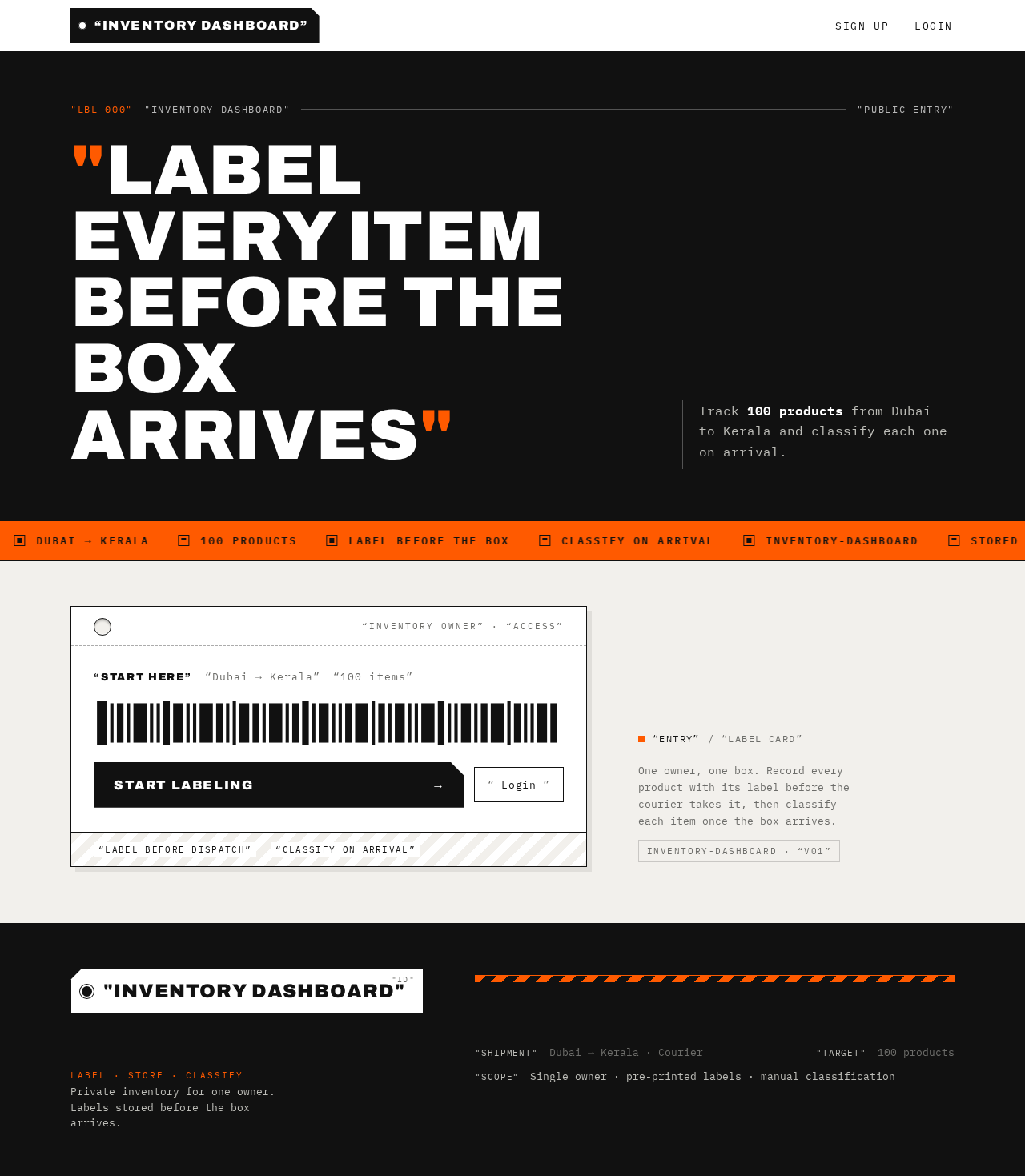
Label every item before the box arrives
Track 100 products from Dubai to Kerala and classify each one on arrival.
“Start here”“Dubai → Kerala”“100 items”
Label every item before the box arrives
Track 100 products from Dubai to Kerala and classify each one on arrival.
“Start here”“Dubai → Kerala”“100 items”
No comments yet. Be the first!