instagram-carousel
 satya v
instagram Carousel creations based on the topic given on text box. give industrial popular Carousel templets , user can customise them or modify them as per their interest.


Comments (0)
Sign in to leave a comment
System Requirements
System Requirements Document for instagram-carousel
1. Introduction
instagram-carousel is a web application for creating Instagram carousels from a topic typed into a text box. A creator enters a topic, the product generates a multi-slide carousel draft, and the creator selects from popular industrial-style carousel templates and customizes or modifies the slides to match their own interest. The product's output is intended for Instagram, so slides are composed at Instagram's native 4:5 portrait aspect ratio.
The audience is independent Instagram creators — designers, small-brand founders, and meme-native marketers — who want carousels that look art-directed rather than auto-generated. The product is delivered as a first-party web application with application-owned accounts, a shared backend API, and an AI model gateway for slide generation.
This document is the System Requirements Document for the project named instagram-carousel.
2. System Overview
instagram-carousel is delivered as three first-party tiers plus supporting infrastructure:
- Frontend — a React application providing the public Landing page, Sign Up and Login access surfaces, the Create Carousel topic-entry and generation surface, the Templates browsing surface, and the three-pane Carousel Editor.
- Backend — a shared FastAPI process that owns application APIs and domain modules: account enrollment and verification, carousel draft persistence, template catalog serving, slide editing persistence, and orchestration of AI generation calls.
- Database — MariaDB holding application-owned persistent data: creator accounts, saved carousel drafts and their slides, template catalog records, and generation runs.
- LiteLLM gateway — the backend's model-provider gateway, used for AI generation of carousel slide content from an entered topic.
- PostgreSQL — supporting storage for LiteLLM, separate from application-owned storage.
Actors. The single active human actor is the Carousel Creator. The AI model provider (reached through the LiteLLM gateway) is a non-persona system actor that produces generated slide content on the backend's request.
Accepted behavior. A creator enrolls or verifies identity, enters a topic in a text box, receives an AI-generated carousel draft, browses popular industrial-style templates, selects one, and customizes or modifies the generated slides — text, layout, font, and color — to their own interest, with the draft saved to their account for return visits.
Exclusions. The product does not publish, post, or schedule to Instagram; it produces carousel output intended for Instagram. It does not provide stock photography, social analytics, or team collaboration.
Removed from scope
- None.
2a. Product Interpretation and Delivery Boundary
The product is a first-party, application-owned web tool. Identity is application-owned: a new Carousel Creator enrolls through Sign Up, and a returning creator verifies through Login. Landing, Sign Up, and Login are anonymously reachable; Create Carousel, Templates, and Carousel Editor require a verified session because they read and write creator-specific saved carousels.
AI generation is performed by the backend through the LiteLLM gateway; the creator never interacts with the model provider directly. All generation, template selection, and editing outcomes are observable in the first-party UI and persisted to the creator's account so work can be resumed.
Everything described in this document is current scope. No future-horizon features are committed.
2c. Page Content and Component Coverage
Landing
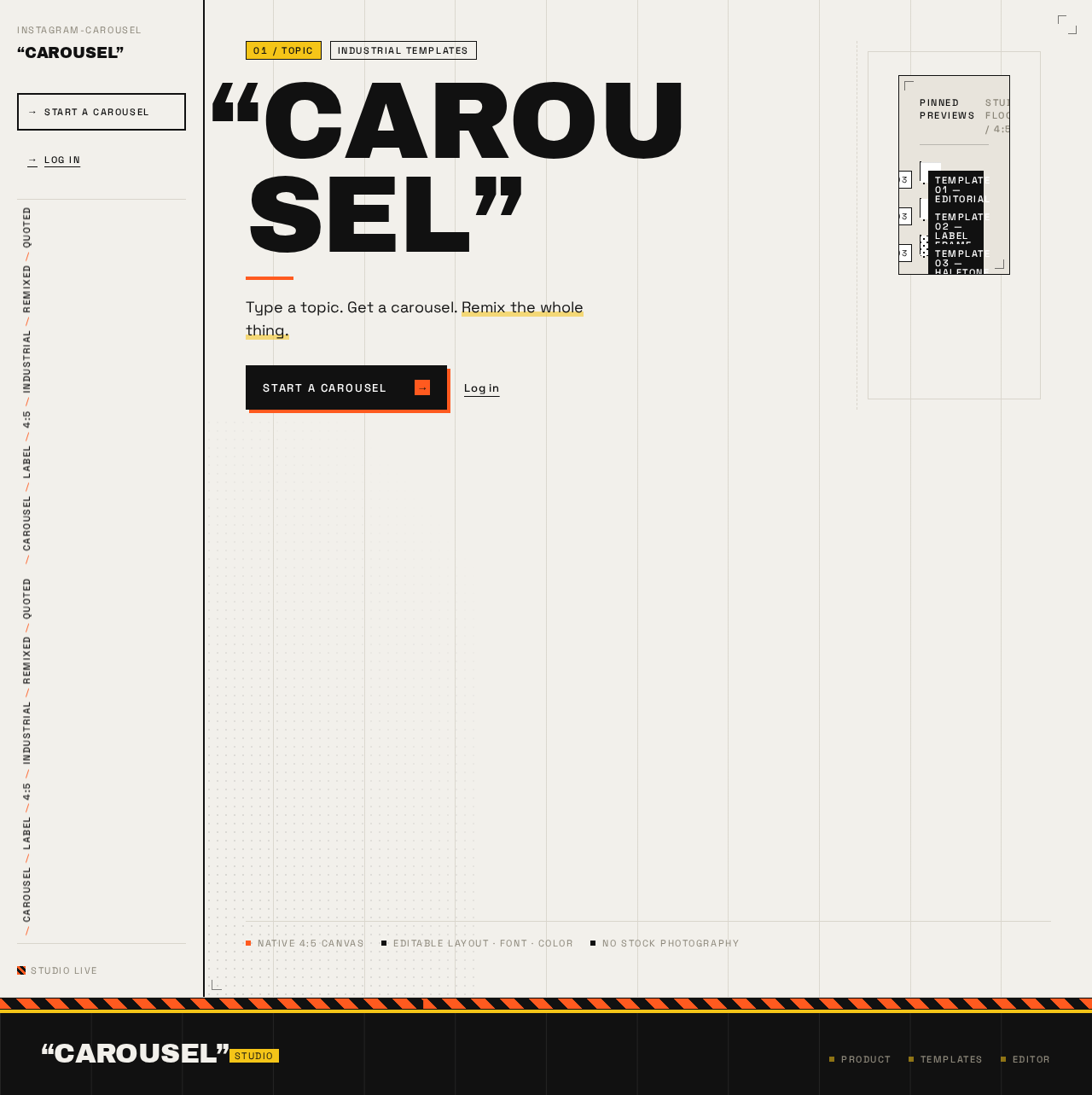
- Information/state: Anonymous public entry. Oversized quoted wordmark "CAROUSEL", one-line value statement ("Type a topic. Get a carousel. Remix the whole thing."), a stack of three 4:5 template previews with small-caps corner tags, and a hazard-stripe divider band.
- Primary action: "START A CAROUSEL" — routes an unauthenticated visitor to Sign Up; a creator with an existing session proceeds to Create Carousel.
- Supporting actions: Navigate to Login for returning creators.
- Domain entities: Template preview (name, tag label, preview image).
- Component responsibilities: Hero block (headline, value line, CTA), pinned preview stack, marquee hazard band, left rail with wordmark and nav.
- States: Loading (preview thumbnails), empty (previews unavailable — hero and CTA remain usable), success (default), error (preview fetch failure shows a static placeholder frame with the CTA intact), recovery (retry preview load).
Sign Up
- Information/state: Anonymous enrollment surface for a new Carousel Creator. Fields for the creator's identifying credentials and a submit control.
- Primary action: Submit enrollment; on success the creator is verified and routed to Create Carousel.
- Supporting actions: Navigate to Login if already enrolled.
- Domain entities: Creator account.
- Component responsibilities: Enrollment form, inline field validation, submit control with offset-shadow sticker treatment.
- States: Idle, validating, submitting (segmented progress), success (redirect to Create Carousel), error (duplicate identity or invalid input shown inline with recovery by correcting the field), recovery (retry submit).
Login
- Information/state: Anonymous returning-verification surface. Credential fields and a submit control.
- Primary action: Verify identity; on success the creator reaches their saved carousels and Templates.
- Supporting actions: Navigate to Sign Up for a new creator.
- Domain entities: Creator account, session.
- Component responsibilities: Verification form, inline error region, submit control.
- States: Idle, submitting, success (redirect to Create Carousel or the creator's most recent draft), error (invalid credentials with recovery by re-entry), recovery (retry).
Create Carousel
- Information/state: Authenticated. A topic text box, a generate control, and the resulting carousel draft shown as a 4:5 slide sequence with slide count numerals (01/08).
- Primary action: Enter a topic and trigger AI generation of a carousel draft.
- Supporting actions: Open the generated draft in Carousel Editor; browse Templates; revisit previously saved drafts.
- Domain entities: Carousel draft, slide, generation run, topic.
- Component responsibilities: Topic text box, generate CTA (orange accent), segmented generation progress bar labeled "GENERATING SLIDE 03/08", draft slide strip, saved-draft list.
- States: Empty (no topic entered — generate disabled), generating (segmented progress with slide counter), success (draft rendered and persisted), error (generation failure with a retry control that preserves the entered topic), recovery (retry generation or edit topic and regenerate).
Templates
- Information/state: Authenticated. A masonry of 4:5 slide previews at true Instagram aspect ratio, each with a small-caps corner tag (e.g. "TEMPLATE 01 — EDITORIAL") on a concrete-grey backdrop.
- Primary action: Select a template to apply to the current carousel draft.
- Supporting actions: Preview a template at full size; return to Create Carousel or Carousel Editor.
- Domain entities: Template (name, tag, preview, layout/font/color defaults).
- Component responsibilities: Masonry grid, template card with tag-flip hover, selection control, apply confirmation.
- States: Loading (skeleton previews), empty (no templates available — message with return link), success (grid populated, selection applied), error (catalog fetch failure with retry), recovery (retry fetch).
Carousel Editor
- Information/state: Authenticated. Three-pane layout: slide filmstrip (left), canvas (center) showing the selected slide at 4:5, inspector (right) with small-caps label/value rows (SLIDE 03/08, LAYOUT, FONT, COLOR).
- Primary action: Customize or modify the selected slide's text, layout, font, and color, and save the changes to the draft.
- Supporting actions: Reorder or select slides via the filmstrip; apply a different template; return to Create Carousel.
- Domain entities: Carousel draft, slide, template, slide style properties.
- Component responsibilities: Filmstrip with tabular slide numerals, canvas renderer, inspector with editable values underlined in orange on focus, save control.
- States: Loading (draft fetch), empty (no draft selected — prompt to create one), editing (unsaved changes indicated), saving, success (changes persisted), error (save failure with retry that preserves edits), recovery (retry save or revert to last saved state).
3. Functional Requirements
FR-1 — Create a carousel from a topic (explicit) As a Carousel Creator, I should enter a topic in a text box and receive an AI-generated Instagram carousel draft, so that I can start from content rather than a blank canvas.
- Trigger/input: authenticated creator submits a non-empty topic on Create Carousel.
- Observable result: a multi-slide 4:5 carousel draft is rendered with slide numerals and persisted to the creator's account.
- Failure/recovery: generation failure shows an error with a retry that preserves the topic.
- Continuation: the creator opens the draft in Carousel Editor or browses Templates.
FR-2 — AI generation of slides from the topic (required_inference) As a Carousel Creator, I should have the backend generate slide content from my topic through the AI gateway, so that the draft contains usable slide copy.
- Trigger/input: backend receives the topic and requests generation through the LiteLLM gateway.
- Observable result: generated slide content populates the draft; segmented progress labeled "GENERATING SLIDE 03/08" reflects progress.
- Failure/recovery: provider error surfaces as a generation error with retry.
- Continuation: draft is editable.
FR-3 — Browse popular industrial-style templates (explicit) As a Carousel Creator, I should browse popular industrial-style carousel templates, so that I can choose a look that fits my topic.
- Trigger/input: creator opens Templates.
- Observable result: masonry of 4:5 previews with small-caps corner tags.
- Failure/recovery: catalog fetch failure shows retry.
- Continuation: creator selects a template.
FR-4 — Select a template (required_inference) As a Carousel Creator, I should select a template and apply it to my carousel draft, so that the draft adopts that template's layout, font, and color defaults.
- Trigger/input: creator selects a template card.
- Observable result: the draft's slides adopt the template styling; selection is confirmed.
- Failure/recovery: apply failure shows an error with retry.
- Continuation: creator opens Carousel Editor to refine.
FR-5 — Customize or modify the carousel (explicit) As a Carousel Creator, I should customize or modify the generated carousel slides as per my interest, so that the final carousel reflects my own intent.
- Trigger/input: creator edits slide text, layout, font, or color in Carousel Editor.
- Observable result: canvas reflects edits; saved changes persist to the draft.
- Failure/recovery: save failure shows an error with retry that preserves edits.
- Continuation: creator continues editing or returns to Create Carousel.
FR-6 — Self-service enrollment (required_inference) As a new Carousel Creator, I should enroll through Sign Up, so that I can generate and save carousels under my own account.
- Trigger/input: anonymous visitor submits enrollment on Sign Up.
- Observable result: verified session; routed to Create Carousel.
- Failure/recovery: duplicate or invalid input shown inline with correction.
- Continuation: begin creating a carousel.
FR-7 — Returning verification (required_inference) As a returning Carousel Creator, I should verify through Login, so that I can access my saved carousels and templates.
- Trigger/input: anonymous visitor submits credentials on Login.
- Observable result: verified session; routed to saved work.
- Failure/recovery: invalid credentials shown inline with re-entry.
- Continuation: resume a saved draft.
FR-8 — Instagram output constraint (explicit) As a Carousel Creator, I should see my carousel composed at Instagram's 4:5 portrait aspect ratio, so that the output is intended for Instagram.
- Trigger/input: any draft render or preview.
- Observable result: slides render at 4:5.
- Failure/recovery: n/a.
- Continuation: editing and saving preserve 4:5.
4. User Personas
Carousel Creator
- Product context: An independent Instagram creator — designer, small-brand founder, or meme-native marketer — who wants carousels that look art-directed rather than auto-generated. Works in a browser, typically iterating on a topic until the slides feel right.
- Primary goal: Turn a topic into a polished, on-brand Instagram carousel with minimal blank-canvas effort.
- Distinct responsibilities: Enters the topic; reviews the AI-generated draft; browses and selects from popular industrial-style templates; customizes and modifies slide text, layout, font, and color to their own interest; saves the draft for return visits.
- Inputs/decisions: The topic text; which template to apply; which slide properties to change; when the draft is finished.
- Interactions with other participants: Interacts with the AI model provider only indirectly — the backend requests generation through the LiteLLM gateway and returns slide content to the creator's draft.
- Observable success: A saved 4:5 carousel draft whose slides reflect the entered topic and the creator's chosen template and edits.
5. Core User Flows
Flow A — New creator enrolls and generates a first carousel
- Visitor lands on Landing and reads the quoted wordmark and value line.
- Visitor selects "START A CAROUSEL"; because no session exists, they are routed to Sign Up.
- On Sign Up, the visitor submits enrollment; on success they are verified and routed to Create Carousel.
- On Create Carousel, the creator types a topic into the text box and triggers generation.
- The backend requests slide generation through the LiteLLM gateway; the UI shows segmented progress labeled "GENERATING SLIDE 03/08".
- On success, the 4:5 draft renders with slide numerals and is persisted to the creator's account.
- If generation fails, the creator sees an error and retries with the topic preserved.
- The creator opens the draft in Carousel Editor (Flow C) or browses Templates (Flow B).
Flow B — Creator selects a template
- From Create Carousel or Carousel Editor, the creator opens Templates.
- The creator browses the masonry of 4:5 previews with small-caps corner tags.
- The creator selects a template; the draft adopts its layout, font, and color defaults and the selection is confirmed.
- If the catalog fails to load, the creator retries.
- The creator continues in Carousel Editor.
Flow C — Creator customizes and saves the carousel
- The creator opens Carousel Editor with a draft loaded into the three-pane layout.
- The creator selects a slide in the filmstrip (numerals like 03/08).
- The creator edits text, layout, font, or color in the inspector; the canvas reflects the change.
- The creator saves; changes persist to the draft.
- If saving fails, the creator retries with edits preserved.
- The creator returns to Create Carousel to start another topic or resumes later.
Flow D — Returning creator resumes work
- Returning creator opens Login and submits credentials.
- On success they are routed to their saved work on Create Carousel.
- On invalid credentials, they re-enter and retry.
- They resume a saved draft in Carousel Editor.
6. Visuals Colors and Theme
Muse: Virgil Abloh — industrial carousel studio with quotation-mark swagger.
Headline treatment: Archivo Black, uppercase, tracking -0.02em, flush-left, with a single word or phrase wrapped in literal quotation marks (e.g. "CAROUSEL").
Palette (light mode):
| Role | Hex |
|---|---|
| Background (concrete-white) | #F2F0EB |
| Surface | #FFFFFF |
| Text / primary | #111111 |
| Accent (safety orange) | #FF5A1F |
| Muted | #8A8578 |
| Construction-tape yellow | #F5C518 |
| Exposed grid lines | #D9D5CC |
| Template backdrop (concrete-grey) | #E8E4DC |
Concrete-white carries ~60% of surface; ink black is primary for type, buttons, and label bars; safety orange is the single hot accent used sparingly on the AI-generate CTA, active template tabs, and the hazard-stripe band — never as a background fill. Yellow appears only as thin 4px tape stripes and small quoted badges. Muted grey handles metadata and disabled states. No blue anywhere.
Typography: Headings Archivo Black; body and UI Space Grotesk at 400/500; label chips 11px uppercase, tracking 0.14em. Scale 1.333 modular on a 4px baseline: 96/72/48/32/24/18/16/13. Mobile headline clamp(40px, 11vw, 72px); desktop hero wordmark up to 128px. Numerals tabular for slide counts (01/08).
Shape language: Hard edges, zero border-radius on cards and buttons; the only curves are the 4:5 carousel slide previews. 2px ink borders on every interactive surface with a 4px solid offset shadow in ink or orange. Hazard stripes (repeating 45° orange/black, 12px band) as section dividers. Exposed 1px grid lines in #D9D5CC marking the 12-column layout.
Layout: Asymmetric 12-column grid with a persistent 240px left rail carrying the wordmark, nav, and a vertical "QUOTED" ticker. Hero uses a 9/3 split. Templates page is a masonry of 4:5 previews. Editor is a three-pane filmstrip/canvas/inspector with small-caps label/value rows.
Imagery: No stock photography. Visuals are the carousel slides themselves — real 4:5 previews in industrial template styles (concrete textures, oversized type, label frames). Supporting graphics: construction-tape stripes, exposed grid lines, halftone dots at 12% opacity, corner registration marks. Template thumbnails sit on #E8E4DC backdrops with 1px ink borders.
Accessibility: Readable text and controls stay whole at 375px, 768px, and 1280px, wrapping or scaling to fit; decoration may bleed but never covers text or controls.
7. Signature Design Concept
The public entry is a 9/3 split on the concrete-white ground. Left 9 columns: the word "CAROUSEL" in Archivo Black at clamp(56px, 12vw, 128px), uppercase, wrapped in literal quotation marks, flush-left and bleeding slightly past the left margin so the opening quote sits at x=0. Beneath it, one line of Space Grotesk body ("Type a topic. Get a carousel. Remix the whole thing.") and a black rectangular button with orange offset shadow reading "START A CAROUSEL". Right 3 columns: a vertical stack of three 4:5 template previews, each tagged with a small-caps label and slightly rotated (-2deg, 0deg, +1deg) so they read as physical prints pinned to the page. A 12px hazard-stripe band runs full-bleed across the bottom of the hero, marquee-scrolling left. No centred layout, no gradient, no subtext paragraph — the type and pinned previews carry it. At 375px the wordmark wraps to two lines with quote marks kept whole.
8. Interaction Model & Motion Direction
Interaction Model: Animated Motion Tempo: expressive Hero Dimensionality: flat
Landing Hero Motion Brief
- Focal subject: The oversized quoted "CAROUSEL" wordmark and the three pinned 4:5 template previews.
- Input → transformation → outcome thesis: On load, the wordmark and pinned previews settle into place; hovering a preview triggers a 2px tag-flip (corner tag rotates -6deg and turns orange); the hazard-stripe band marquee-scrolls left at 40s linear. Selecting "START A CAROUSEL" transitions to Sign Up.
- Motion vocabulary: 180ms cubic-bezier(0.2, 0.8, 0.2, 1) hover transitions; 40s linear marquee; 2px tag-flip; segmented progress bar labeled "GENERATING SLIDE 03/08" during generation. No bounce, no particles, no gradient drift.
- Composed first frame: Concrete-white ground, quoted wordmark bleeding left, value line and CTA beneath, three rotated previews stacked right, hazard band at the hero's bottom edge.
- Reduced-motion state: Marquee freezes to a static hazard band; tag-flip becomes a static orange tag; previews remain fully readable.
9. Non-Functional Requirements
- NFR-1 — Instagram aspect ratio (explicit): All carousel slides render and persist at 4:5 portrait.
- NFR-2 — Persistence (required_inference): Creator accounts, drafts, slides, and template selections persist in MariaDB so work resumes across sessions.
- NFR-3 — AI gateway isolation (required_inference): Model-provider calls route only through the LiteLLM gateway; provider credentials never reach the frontend.
- NFR-4 — Access control (required_inference): Create Carousel, Templates, and Carousel Editor require a verified session; Landing, Sign Up, and Login are anonymous.
- NFR-5 — Readability (explicit design constraint): Text and controls remain whole and uncovered at 375px, 768px, and 1280px.
- NFR-6 — Reduced motion (explicit design constraint):
prefers-reduced-motionfreezes the marquee and swaps tag-flip for a static orange tag.
10. Tech Stack
- Frontend: React.
- Backend: Python / FastAPI (shared process for all feature APIs).
- Application database: MariaDB.
- AI gateway: LiteLLM, backed by PostgreSQL (separate from application storage).
- Deployment: Docker / docker-compose with services
frontend,backend,database,litellm,postgres.
11. Assumptions and Constraints
- A-1: Carousel output is intended for Instagram; the product does not post or publish to Instagram.
- A-2: Identity is application-owned and self-service; no invitation or provisioning flow is in scope.
- A-3: Templates are a curated catalog of popular industrial-style designs served by the backend.
- A-4: AI generation is performed server-side through LiteLLM; the creator never selects a model.
- A-5: No stock photography is used; visuals are the rendered slides and graphic motifs.
- A-6: No future-horizon features are committed.
12. Glossary
- Carousel: A multi-slide Instagram post; here composed at 4:5 portrait.
- Carousel Creator: The single active human persona who generates, templates, and edits carousels.
- Draft: A persisted carousel under a creator's account, comprising ordered slides.
- Template: A popular industrial-style design preset (layout, font, color) applied to a draft.
- Slide: One 4:5 frame within a carousel.
- Generation run: A single backend request to the AI gateway producing slide content from a topic.
- LiteLLM gateway: The backend's model-provider gateway.
- Hazard band: The 45° orange/black 12px marquee divider.
- Tag-flip: The 2px corner-tag rotation hover effect on template cards.
CAROUSEL
Type a topic. Get a carousel. Remix the whole thing.
CAROUSEL
Type a topic. Get a carousel. Remix the whole thing.
No comments yet. Be the first!