instagram automation
 Akib Islam
create this as a automation tool


Comments (0)
Sign in to leave a comment
System Requirements
Instagram Automation
Introduction
This document outlines the system requirements for the Instagram Automation project. The tool is designed to assist social media managers in automating tasks such as multi-account management, advanced analytics, and auto-scheduling and posting.
System Overview
The Instagram Automation tool aims to streamline social media management by providing features that automate routine tasks, enhance analytics, and support multiple accounts. This tool is intended to increase efficiency and provide valuable insights for social media managers.
Functional Requirements
- As a Social Media Manager, I should be able to manage multiple Instagram accounts from a single interface.
- As a Social Media Manager, I should be able to view advanced analytics for each account.
- As a Social Media Manager, I should be able to schedule posts in advance.
- As a Social Media Manager, I should be able to automate the posting of scheduled content.
- As a Social Media Manager, I should be able to receive notifications for scheduled posts and analytics updates.
User Personas
- Social Media Manager: Responsible for managing multiple Instagram accounts, analyzing performance metrics, and planning content strategies.
Core User Flows
- Social Media Manager logs in -> Connects multiple Instagram accounts -> Schedules posts -> Views analytics dashboard -> Adjusts strategy based on insights.
Visuals Colors and Theme
- primary: #1A1A2E (Dark Blue)
- primary_light: #16213E (Lighter Blue)
- secondary: #0F3460 (Deep Purple)
- accent: #E94560 (Vibrant Red)
- highlight: #F9D342 (Warm Yellow)
- bg: #1A1A2E (Dark Background)
- surface: rgba(26, 26, 46, 0.8)
- text: #FFFFFF (White)
- text_muted: #B0B0B0 (Muted Gray)
- border: rgba(233, 69, 96, 0.2)
Signature Design Concept
Interactive Dashboard Experience
The homepage will feature an interactive dashboard that feels dynamic and engaging. Users can hover over different sections to reveal detailed analytics and insights. The dashboard will utilize framer-motion for smooth transitions and animations, making the experience lively and intuitive. Each section of the dashboard will be interactive, allowing users to click and drag elements to customize their view. The design will incorporate a dark theme with vibrant accent colors to highlight key metrics and actions.
Interaction Model & Motion Direction
- Interaction Model: Parallax
- Motion Direction: The landing page will feature layered depth with scroll-triggered animations. Key metrics and analytics will animate into view as users scroll, providing a visually rich and engaging experience.
Non-Functional Requirements
- The system should support high availability and scalability to manage multiple accounts simultaneously.
- The tool must ensure data security and privacy for all user accounts.
Tech Stack
- Frontend: React for Web
- Backend: Python, FastAPI
- Database: MySQL or MariaDB
- AI Models: GPT 5.4 for user-friendly responses
- Local Orchestration: Docker, docker-compose
Assumptions and Constraints
- The tool will primarily be used by social media managers.
- The system must comply with Instagram's API usage policies.
Glossary
- API: Application Programming Interface
- AI: Artificial Intelligence
- UI: User Interface
- UX: User Experience
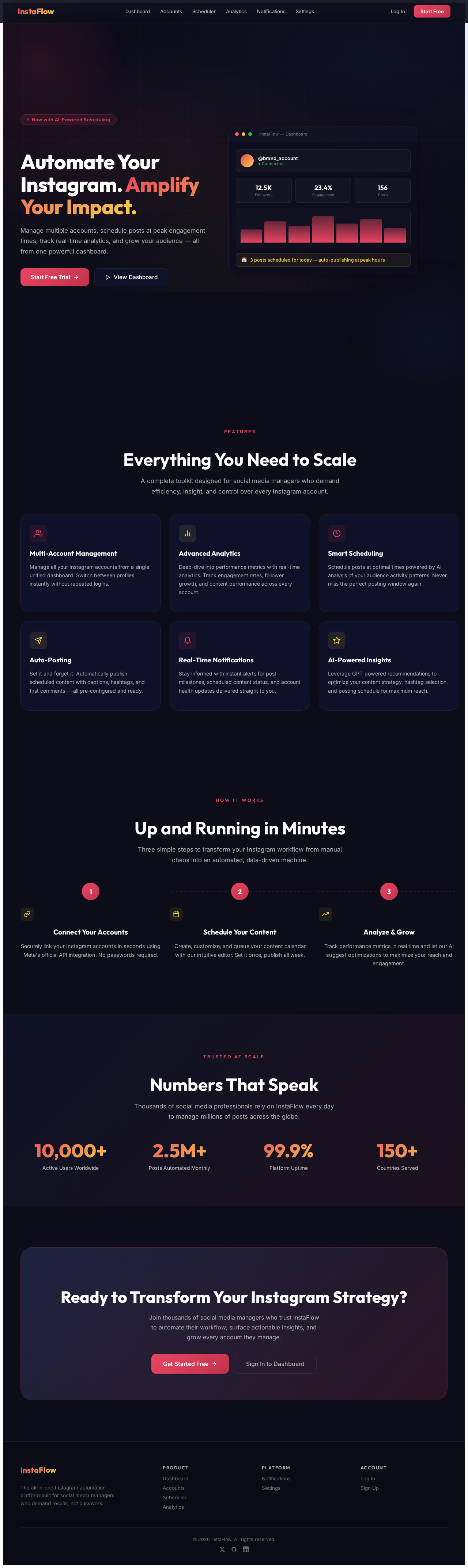
Automate Your Instagram. Amplify Your Impact.
Manage multiple accounts, schedule posts at peak engagement times, track real-time analytics, and grow your audience — all from one powerful dashboard.
Features
Everything You Need to Scale
A complete toolkit designed for social media managers who demand efficiency, insight, and control over every Instagram account.
Multi-Account Management
Manage all your Instagram accounts from a single unified dashboard. Switch between profiles instantly without repeated logins.
Advanced Analytics
Deep-dive into performance metrics with real-time analytics. Track engagement rates, follower growth, and content performance across every account.
Smart Scheduling
Schedule posts at optimal times powered by AI analysis of your audience activity patterns. Never miss the perfect posting window again.
Auto-Posting
Set it and forget it. Automatically publish scheduled content with captions, hashtags, and first comments — all pre-configured and ready.
Real-Time Notifications
Stay informed with instant alerts for post milestones, scheduled content status, and account health updates delivered straight to you.
AI-Powered Insights
Leverage GPT-powered recommendations to optimize your content strategy, hashtag selection, and posting schedule for maximum reach.
How It Works
Up and Running in Minutes
Three simple steps to transform your Instagram workflow from manual chaos into an automated, data-driven machine.
Connect Your Accounts
Securely link your Instagram accounts in seconds using Meta's official API integration. No passwords required.
Schedule Your Content
Create, customize, and queue your content calendar with our intuitive editor. Set it once, publish all week.
Analyze & Grow
Track performance metrics in real time and let our AI suggest optimizations to maximize your reach and engagement.
Trusted at Scale
Numbers That Speak
Thousands of social media professionals rely on InstaFlow every day to manage millions of posts across the globe.
Ready to Transform Your Instagram Strategy?
Join thousands of social media managers who trust InstaFlow to automate their workflow, surface actionable insights, and grow every account they manage.
Automate Your Instagram. Amplify Your Impact.
Manage multiple accounts, schedule posts at peak engagement times, track real-time analytics, and grow your audience — all from one powerful dashboard.
Features
Everything You Need to Scale
A complete toolkit designed for social media managers who demand efficiency, insight, and control over every Instagram account.
Multi-Account Management
Manage all your Instagram accounts from a single unified dashboard. Switch between profiles instantly without repeated logins.
Advanced Analytics
Deep-dive into performance metrics with real-time analytics. Track engagement rates, follower growth, and content performance across every account.
Smart Scheduling
Schedule posts at optimal times powered by AI analysis of your audience activity patterns. Never miss the perfect posting window again.
Auto-Posting
Set it and forget it. Automatically publish scheduled content with captions, hashtags, and first comments — all pre-configured and ready.
Real-Time Notifications
Stay informed with instant alerts for post milestones, scheduled content status, and account health updates delivered straight to you.
AI-Powered Insights
Leverage GPT-powered recommendations to optimize your content strategy, hashtag selection, and posting schedule for maximum reach.
How It Works
Up and Running in Minutes
Three simple steps to transform your Instagram workflow from manual chaos into an automated, data-driven machine.
Connect Your Accounts
Securely link your Instagram accounts in seconds using Meta's official API integration. No passwords required.
Schedule Your Content
Create, customize, and queue your content calendar with our intuitive editor. Set it once, publish all week.
Analyze & Grow
Track performance metrics in real time and let our AI suggest optimizations to maximize your reach and engagement.
Trusted at Scale
Numbers That Speak
Thousands of social media professionals rely on InstaFlow every day to manage millions of posts across the globe.
Ready to Transform Your Instagram Strategy?
Join thousands of social media managers who trust InstaFlow to automate their workflow, surface actionable insights, and grow every account they manage.
No comments yet. Be the first!