inner-uber

byRajveer Jatav

Create Uber jaisa app

Landing
Landing

Comments (0)

No comments yet. Be the first!

System Requirements

System Requirements Document for inner-uber

1. Introduction

inner-uber is a ride-hailing application modeled on the general workflow of Uber: it connects riders who need to get from a pickup location to a drop-off location with drivers who review incoming ride requests, accept a trip, and complete it. The product is a two-sided mobility marketplace used by two very different audiences — riders in a hurry on a phone, and drivers working a shift and reading requests at a glance.

The product intent is to make the core ride-hailing loop usable end to end: a rider specifies where they are and where they are going and requests a ride; a driver sees that request, accepts it, and marks the trip complete; the rider can follow the status of their ride toward pickup. Both audiences enroll themselves and verify their identity on return so that their durable ride and trip records stay bound to the correct person.

Uber is used only as a general reference for ride-hailing workflows. Its branding and proprietary content are not copied.

Page 1 of 27

2. System Overview

inner-uber is a custom-UI web application with an application-owned backend. It has two active human personas — Rider and Driver — and a small set of first-party pages that own the accepted lifecycles:

  • Landing — anonymous public entry explaining the product to both audiences.
  • Login and Sign Up — shared, anonymous identity surfaces for returning verification and first-use self-service enrollment.
  • Request Ride and Ride Status — rider-owned destinations for entering pickup/drop-off and requesting a ride, and for following the active ride's status and progress toward pickup.
  • Ride Requests and Active Trip — driver-owned destinations for reviewing incoming requests and accepting one, and for viewing the accepted trip's pickup/drop-off details and marking it complete.

The backend persists durable state: rider and driver identities, ride requests, their acceptance by a driver, and trip completion. Access to rider-owned and driver-owned destinations is restricted to the corresponding authenticated role; Landing, Login, and Sign Up are anonymously reachable.

Page 2 of 27

2a. Product Interpretation and Delivery Boundary

The current delivery is a first-party web application with its own identity and its own durable ride/trip records. Riders and drivers establish identity themselves (self-service enrollment, then returning verification) — there is no invitation, provisioning, or deployment-bootstrap boundary. Identity is required because a ride request, its acceptance, and its completion are durable commitments that must remain bound to the correct rider and the correct driver.

The current horizon covers exactly the ride-hailing loop described above: request, review/accept, track, complete. It does not include payment processing, fare calculation or billing, ratings/reviews, in-app chat or calling, driver onboarding documents or background checks, live map rendering or turn-by-turn navigation, ride cancellation flows, scheduled/future rides, or ride-option pricing tiers beyond the ride-option selection the rider makes when requesting. These are outside the current delivery boundary and are not implemented as part of it.

2b. Source Content Inventory

Not applicable — no reference directive declares content_source.

2c. Page Content and Component Coverage

Page 3 of 27

Landing

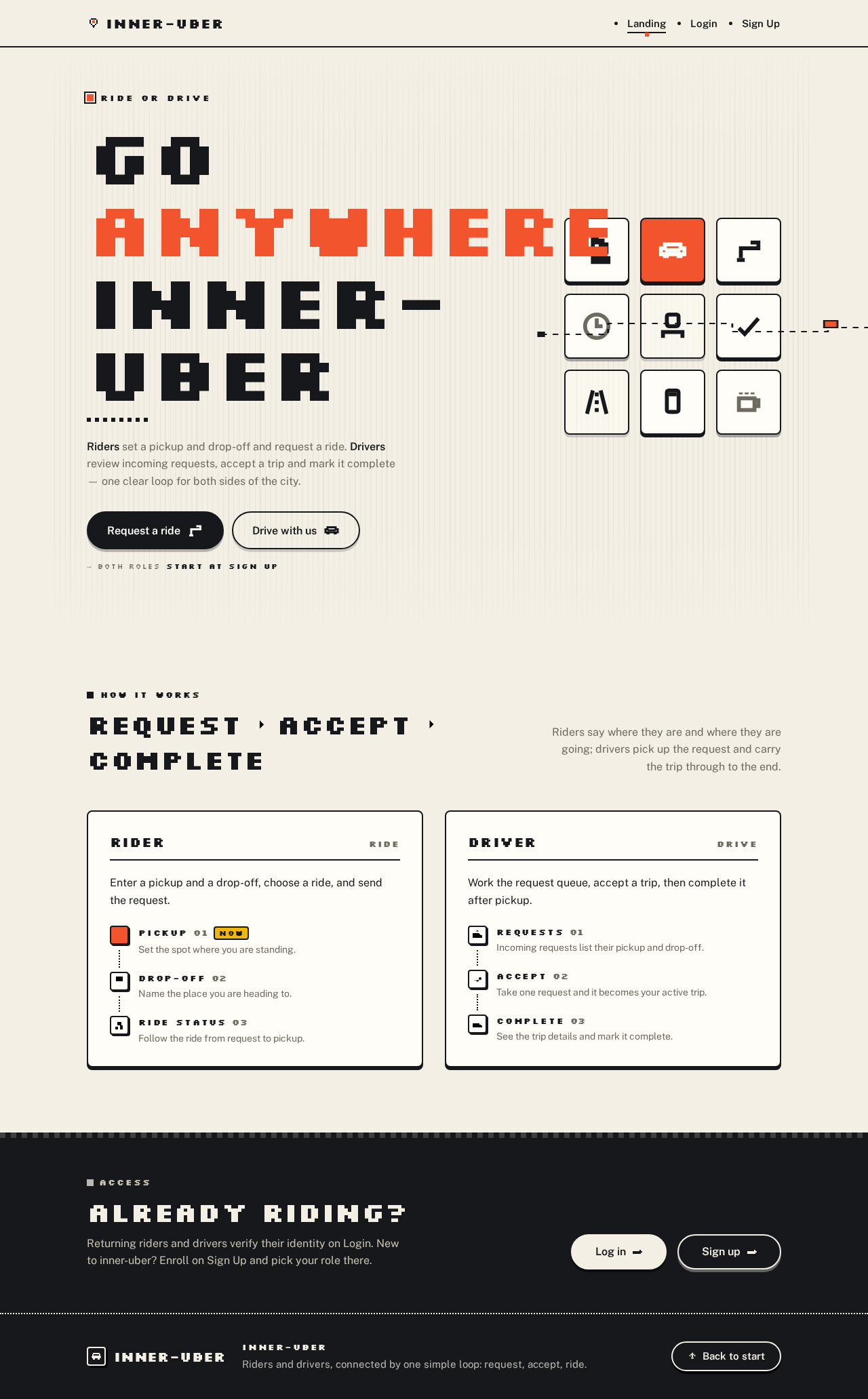
  • Information/state: Anonymous public entry. Explains the ride-hailing product, its two audiences (riders and drivers), and how requesting and fulfilling rides works. Poster-like split layout: left column holds the oversized pixel headline and two role buttons; right column is a 3×3 mosaic of pixel icon tiles showing the journey (pin → car → check).
  • Primary actions: "Request a ride" (solid ink pill) → routes an anonymous visitor toward rider enrollment/verification; "Drive with us" (outlined pill) → routes toward driver enrollment/verification. Links to Login and Sign Up.
  • Supporting actions: Navigate to Login (returning users) or Sign Up (new users).
  • Domain entities: None persisted; presents the Rider and Driver roles and the request→accept→complete journey.
  • Component responsibilities: Hero headline (Silkscreen, ink, one ember word); role buttons; 3×3 icon-tile mosaic with dotted route line bleeding off the right edge; all-caps Silkscreen micro-labels.
  • States: Loading (static content, no data fetch); empty/success not applicable; error not applicable. Recovery: if a role button leads to a protected destination while unauthenticated, the visitor is routed to Login/Sign Up and returned to the intended role context after identity is established.
Page 4 of 27

Login

  • Information/state: Shared neutral returning-verification surface for riders and drivers. Anonymous access.
  • Primary actions: Submit credentials to verify identity; on success, route to the destination appropriate to the verified role (rider → Request Ride / Ride Status; driver → Ride Requests / Active Trip).
  • Supporting actions: Navigate to Sign Up for first-use enrollment; return to Landing.
  • Domain entities: Account identity (email/identifier + credential), role (Rider or Driver).
  • Component responsibilities: Labelled credential fields with all-caps Silkscreen micro-labels; primary submit pill; inline error region; link to Sign Up.
  • States: Loading (submit in progress, control disabled); empty (blank form); success (identity verified, redirect by role); error (invalid credentials → inline message, form retained for retry); recovery (retry submission; or go to Sign Up).
Page 5 of 27

Sign Up

  • Information/state: Self-service first-use enrollment for riders and drivers. Anonymous access. The enrollee chooses their role (Rider or Driver) as part of enrollment.
  • Primary actions: Submit enrollment details (identity fields + role selection) to create an account; on success, establish identity and route to the role-appropriate destination.
  • Supporting actions: Navigate to Login for returning users; return to Landing.
  • Domain entities: Account identity, role (Rider or Driver).
  • Component responsibilities: Labelled fields with all-caps Silkscreen micro-labels; role selector (Rider / Driver); primary submit pill; inline validation/error region; link to Login.
  • States: Loading (submit in progress); empty (blank form); success (account created, identity established, redirect by role); error (validation failure or duplicate identifier → inline message, entered values retained); recovery (correct and resubmit, or switch to Login).
Page 6 of 27

Request Ride

  • Information/state: Rider-owned, role-restricted. Single centred card: pickup and drop-off rows stacked as labelled fields with leading pixel icons, then a row of ride-option tiles, then a full-width accent CTA.
  • Primary actions: Enter pickup location; enter drop-off location; select a ride option; submit the request (full-width ember CTA).
  • Supporting actions: Edit pickup/drop-off before submitting; navigate to Ride Status after a successful request.
  • Domain entities: Ride request (pickup, drop-off, selected ride option, requesting rider, status).
  • Component responsibilities: Pickup field (leading pin icon, "PICKUP" micro-label); drop-off field (leading pin icon, "DROP-OFF" micro-label); ride-option tiles (square 1:1 icon tiles, selectable); submit CTA; inline validation/error region.
  • States: Loading (submit in progress, CTA disabled); empty (no locations entered); success (request created with status "requesting", route to Ride Status); error (missing pickup/drop-off or submit failure → inline message, entered values retained); recovery (correct and resubmit).
Page 7 of 27

Ride Status

  • Information/state: Rider-owned, role-restricted. Shows the active ride request's status and progress toward pickup using a vertical step rail: each stage a small pixel icon in a 28px tile connected by a 2px dotted rule, current stage filled ember, rest outlined ink. Live status dot uses a 4-step pixel blink.
  • Primary actions: View current ride status and progress; refresh/return to see updated state.
  • Supporting actions: Return to Request Ride to start a new request once the current ride is no longer active.
  • Domain entities: Ride request (status: requesting → accepted → driver arriving → in progress → completed), assigned driver, pickup, drop-off.
  • Component responsibilities: Step rail with per-stage pixel icon tiles; status chip; live status dot; pickup/drop-off summary.
  • States: Loading (fetching current ride); empty (no active ride → prompt to request one, link to Request Ride); success (current stage highlighted, status chip shown); error (fetch failure → inline message with retry); recovery (retry fetch; or return to Request Ride).
Page 8 of 27

Ride Requests

  • Information/state: Driver-owned, role-restricted. Tight list of incoming request cards, each with route (pickup → drop-off), ETA, a status chip (pixel yellow "waiting", pixel green "accepted"), chunky 2px outline, and an "Accept" pill.
  • Primary actions: Review incoming ride requests; accept one request via its "Accept" pill.
  • Supporting actions: Refresh the list to see new requests.
  • Domain entities: Ride request (pickup, drop-off, ETA, status, requesting rider), driver assignment.
  • Component responsibilities: Request card (route, ETA, status chip, Accept pill); list container; empty-state region; inline error region.
  • States: Loading (fetching requests); empty (no incoming requests → empty-state message); success (list of waiting requests; after accepting, the accepted card shows the green "accepted" chip and the driver is routed to Active Trip); error (fetch or accept failure → inline message with retry); recovery (retry fetch or accept).
Page 9 of 27

Active Trip

  • Information/state: Driver-owned, role-restricted. Shows the accepted trip's pickup and drop-off details and lets the driver mark the trip complete. Uses a vertical step rail (pickup → drop-off → complete) with the current stage filled ember.
  • Primary actions: View pickup and drop-off details; mark the trip complete.
  • Supporting actions: Return to Ride Requests after completion to review new requests.
  • Domain entities: Accepted trip (pickup, drop-off, assigned driver, status).
  • Component responsibilities: Step rail; pickup/drop-off detail block with all-caps micro-labels; "Complete trip" pill; inline error region.
  • States: Loading (fetching active trip); empty (no active trip → prompt to review Ride Requests); success (trip details shown; after completion, trip marked completed and driver returned to Ride Requests); error (fetch or completion failure → inline message with retry); recovery (retry).
Page 10 of 27

3. Functional Requirements

FR-1 — Ride-hailing marketplace (explicit). As a Rider or Driver, I should be able to use inner-uber as a ride-hailing app that connects riders who request rides with drivers who fulfill them, so that a ride can be requested and completed end to end.

  • Lifecycle: Rider requests → Driver accepts → Driver completes. Observable acceptance: a rider's request becomes visible to drivers, a driver's acceptance is reflected to the rider, and completion is recorded.
  • Access: identity required for protected work (see FR-4–FR-7). Failure/recovery: if no driver accepts, the request remains in "requesting" state and the rider can see that status on Ride Status.

FR-2 — Rider specifies locations and requests a ride (explicit). As a Rider, I should be able to specify my pickup and drop-off locations and request a ride, so that a driver can be matched to my trip.

  • Trigger/input: pickup location, drop-off location, selected ride option. Observable result: a ride request is created with status "requesting" and appears on Ride Status; it becomes available to drivers on Ride Requests.
  • Access: authenticated Rider only (role-restricted). Failure/recovery: missing pickup or drop-off → inline validation, values retained; submit failure → inline error with retry. Continuation: on success, route to Ride Status.
Page 11 of 27

FR-3 — Driver views and accepts requests and completes trips (explicit). As a Driver, I should be able to view incoming ride requests, accept one, and complete the trip, so that I can fulfill rides.

  • Trigger/input: incoming ride requests list; "Accept" action on a chosen request; "Complete trip" action on the active trip. Observable result: the accepted request shows the green "accepted" chip and becomes the driver's active trip; completion marks the trip completed and returns the driver to Ride Requests.
  • Access: authenticated Driver only (role-restricted). Failure/recovery: fetch or accept failure → inline error with retry; completion failure → inline error with retry. Continuation: after completion, driver reviews new requests.

FR-4 — Self-service enrollment (required_inference). As a Rider or Driver, I should be able to enroll myself on Sign Up before doing protected work, so that my rides and trips are bound to my identity.

  • Trigger/input: identity fields and role selection (Rider or Driver). Observable result: an account is created, identity is established, and the user is routed to the role-appropriate destination.
  • Access: anonymous (Sign Up is publicly reachable). Failure/recovery: validation failure or duplicate identifier → inline message, entered values retained; recovery by correcting and resubmitting or switching to Login.

FR-5 — Returning verification (required_inference). As a returning Rider or Driver, I should be able to verify my identity on Login, so that I can resume my durable ride and trip records.

  • Trigger/input: credentials. Observable result: identity verified and the user routed by role (rider → Request Ride / Ride Status; driver → Ride Requests / Active Trip).
  • Access: anonymous (Login is publicly reachable). Failure/recovery: invalid credentials → inline message, form retained for retry; recovery by retrying or going to Sign Up.
Page 12 of 27

FR-6 — Rider identity before rider work (required_inference). As a Rider, my identity should be established before I can request a ride or view ride status, so that my ride request stays bound to me.

  • Access: Request Ride and Ride Status are role-restricted to authenticated Riders. Failure/recovery: an unauthenticated visitor attempting these destinations is routed to Login/Sign Up and returned to the intended rider context after identity is established.

FR-7 — Driver identity before driver work (required_inference). As a Driver, my identity should be established before I can view ride requests or manage an active trip, so that accepted trips stay bound to me.

  • Access: Ride Requests and Active Trip are role-restricted to authenticated Drivers. Failure/recovery: an unauthenticated visitor attempting these destinations is routed to Login/Sign Up and returned to the intended driver context after identity is established.

FR-8 — Rider tracks ride status (required_inference, supporting FR-2/FR-3). As a Rider, I should be able to view my active ride request's status and progress toward pickup on Ride Status, so that I know where my ride stands.

  • Trigger/input: an existing ride request. Observable result: the current stage is highlighted on the step rail and a status chip is shown; the live status dot blinks in 4 hard pixel steps (static filled dot under reduced motion).
  • Access: authenticated Rider only. Failure/recovery: fetch failure → inline message with retry; no active ride → empty state prompting a new request. Continuation: return to Request Ride for a new request once the current ride is no longer active.
Page 13 of 27

FR-9 — Driver reviews and accepts a request (required_inference, supporting FR-3). As a Driver, I should be able to review incoming request cards (route, ETA, status chip) and accept one, so that I take on a trip.

  • Trigger/input: "Accept" pill on a request card. Observable result: the card shows the green "accepted" chip and the driver is routed to Active Trip.
  • Access: authenticated Driver only. Failure/recovery: accept failure → inline error with retry; empty list → empty-state message.

FR-10 — Driver views trip details and completes the trip (required_inference, supporting FR-3). As a Driver, I should be able to view the accepted trip's pickup and drop-off details and mark the trip complete on Active Trip, so that the ride is finished.

  • Trigger/input: "Complete trip" action. Observable result: the trip is marked completed and the driver returns to Ride Requests.
  • Access: authenticated Driver only. Failure/recovery: fetch or completion failure → inline error with retry; no active trip → empty state prompting review of Ride Requests.

4. User Personas

Page 14 of 27

Rider

  • Product context: A passenger who needs to get from where they are to a destination and wants to know their ride is on its way. They use the app in short, hurried sessions on a phone.
  • Primary goal: Request a ride to a destination and follow its progress to a successful pickup and completed journey.
  • Distinct accepted responsibilities: Entering pickup and drop-off locations, choosing a ride option, requesting the trip, and following the driver's progress on Ride Status.
  • Relevant inputs/decisions: Pickup location, drop-off location, ride-option selection, and the decision to submit the request.
  • Interactions with other participants: The Rider's request is what the Driver reviews and accepts; the Rider observes the resulting status change (requesting → accepted → progress toward pickup) on Ride Status.
  • Observable success: A ride request exists with status "requesting", becomes accepted by a driver, and the Rider can see the current stage on the step rail.
  • Constraints: Rider-owned destinations (Request Ride, Ride Status) require an established Rider identity; the Rider enrolls via Sign Up or verifies via Login first.
Page 15 of 27

Driver

  • Product context: A driver working a shift who reads incoming requests at a glance and needs to accept and complete trips to earn from the journey.
  • Primary goal: Review incoming ride requests, accept a trip, navigate to the rider's pickup location, and complete the ride.
  • Distinct accepted responsibilities: Reviewing incoming request cards (route, ETA, status chip), accepting one via the "Accept" pill, viewing the accepted trip's pickup and drop-off details on Active Trip, and marking the trip complete.
  • Relevant inputs/decisions: Which incoming request to accept, and when to mark the active trip complete.
  • Interactions with other participants: The Driver acts on the Rider's request; acceptance changes the Rider's observable status, and completion closes the trip.
  • Observable success: An accepted request shows the green "accepted" chip, the trip appears on Active Trip, and completion returns the Driver to Ride Requests with the trip marked completed.
  • Constraints: Driver-owned destinations (Ride Requests, Active Trip) require an established Driver identity; the Driver enrolls via Sign Up or verifies via Login first.

5. Core User Flows

Page 16 of 27

Flow A — Rider enrolls and requests a ride

  1. The Rider opens Landing (anonymous) and reads how requesting and fulfilling rides works.
  2. The Rider selects "Request a ride", which routes them toward rider identity.
  3. On Sign Up, the Rider enters identity details, selects the Rider role, and submits. The account is created and identity is established.
  4. The Rider lands on Request Ride. They enter a pickup location in the "PICKUP" field and a drop-off location in the "DROP-OFF" field, and select a ride-option tile.
  5. The Rider submits the full-width ember CTA. The request is created with status "requesting" and the Rider is routed to Ride Status.
  6. On Ride Status, the Rider sees the step rail with the current stage highlighted and the live status dot blinking. The request is now visible to drivers on Ride Requests.
  7. Failure/recovery: if pickup or drop-off is missing, an inline validation message appears and the entered values are retained; the Rider corrects and resubmits. If submission fails, an inline error offers retry.
Page 17 of 27

Flow B — Returning Rider verifies and tracks a ride

  1. The returning Rider opens Login (anonymous) and submits credentials.
  2. Identity is verified and the Rider is routed to Ride Status (or Request Ride if no active ride).
  3. On Ride Status, the Rider sees the current stage of their active request on the step rail and the status chip. When a driver accepts, the stage advances to "accepted" and the step rail fills one segment at a time.
  4. Failure/recovery: invalid credentials show an inline message and the form is retained for retry; a fetch failure on Ride Status shows an inline message with retry. If there is no active ride, an empty state prompts a new request with a link to Request Ride.
  5. Continuation: once the current ride is no longer active, the Rider returns to Request Ride to start a new request.

Flow C — Driver enrolls, reviews requests, and accepts a trip

  1. The Driver opens Landing (anonymous) and selects "Drive with us".
  2. On Sign Up, the Driver enters identity details, selects the Driver role, and submits. The account is created and identity is established.
  3. The Driver lands on Ride Requests, which shows a tight list of incoming request cards, each with route, ETA, a status chip (pixel yellow "waiting"), and an "Accept" pill.
  4. The Driver reviews the cards and taps "Accept" on one. The card shows the green "accepted" chip and the Driver is routed to Active Trip.
  5. Failure/recovery: if the list is empty, an empty-state message is shown; if fetching or accepting fails, an inline error offers retry.
Page 18 of 27

Flow D — Driver completes an active trip

  1. On Active Trip, the Driver sees the accepted trip's pickup and drop-off details and the step rail with the current stage filled ember.
  2. The Driver taps "Complete trip". The trip is marked completed and the Driver returns to Ride Requests.
  3. Failure/recovery: if fetching the trip or completing it fails, an inline error offers retry. If there is no active trip, an empty state prompts the Driver to review Ride Requests.
  4. Continuation: back on Ride Requests, the Driver reviews new incoming requests.

Flow E — Returning Driver verifies and resumes

  1. The returning Driver opens Login (anonymous) and submits credentials.
  2. Identity is verified and the Driver is routed to Ride Requests (or Active Trip if a trip is in progress).
  3. The Driver continues with Flow C step 4 or Flow D as appropriate.
  4. Failure/recovery: invalid credentials show an inline message with the form retained; the Driver retries or goes to Sign Up.
Page 19 of 27

6. Visuals, Colors and Theme

Muse: Susan Kare. Headline idea: Charming clarity — a ride-hailing app drawn in crisp pixels and warm signal colour.

The register is trust plus everyday friendliness: legible, quick, and human rather than corporate or futuristic. The visual vocabulary is a small, characterful pixel icon system on a tidy grid — pin, car, route, clock, person — carrying the app's core objects better than any photo hero.

Colour tokens (light mode):

RoleHexUse
Background#F4EFE4Warm paper ground, carries most of the page
Surface#FFFDF7Off-white cards with 2px ink outlines
Text / Primary#16181CInk for type and controls
Accent#F2542DEmber orange — live state only ("requesting", "driver arriving", active trip); never more than ~10% of a screen
Muted#6E6A60Secondary labels and metadata
Support — accepted#3E8E5APixel green, only inside status chips
Support — waiting#F2B705Pixel yellow, only inside status chips
Page 20 of 27

Typography:

  • Headings: Silkscreen at 700 — wordmark, section labels, short display headlines; pixel-grid letterforms, all-caps for labels, tight tracking at large sizes.
  • Body: Public Sans 400/600 — all reading copy and form UI.
  • Scale: 1.333 modular with a pixel display step — hero headline clamp(64px → 112px), section heads 28/40, card titles 20/24, body 16/17, all-caps Silkscreen micro-labels 13px with wide tracking.
  • Headlines stay short (2–5 words) so the pixel face remains a gesture, not a wall of noise. Pixel font is never used for body copy or long labels.

Shape language: Tiles and chips use 8px radii on cards, 2px solid ink outlines, and chunky 4px bottom-offset shadows instead of blur. Primary actions are pill buttons; ride options are square 1:1 icon tiles. Icons are drawn on a 16px pixel grid with 2px strokes. No gradients, no glass, no soft blobs.

Layout: A visible 12-column grid on paper ground. Max content width 1120px; 24px gutters at 375px, 48px at 1280px; everything single-column below 768px. Request Ride is a single centred card (labelled pickup/drop-off rows with leading pixel icons → ride-option tile row → full-width accent CTA). Ride Status and Active Trip use a vertical step rail (28px icon tiles joined by a 2px dotted rule, current stage filled ember). Ride Requests is a tight list of chunky-outlined request cards with route, ETA, status chip, and "Accept" pill.

Imagery: No photography. The pixel icon set is the imagery — a schematic map of blocks and a dotted route line in ink on paper with the ember accent marking the car's position. Small hand-placed pixel details (a tiny road, a traffic light, a coffee cup for the wait) add warmth.

Page 21 of 27

Readability constraint: Headlines, wordmarks, labels, numbers, card text, and controls stay entirely inside the viewport and their container at 375px, 768px, and 1280px, wrapping or scaling to fit; no other element covers them. Decoration may bleed off edges; readable text and controls may not.

7. Signature Design Concept

The public entry (Landing) is a poster-like split hero on warm paper (#F4EFE4), not a centred SaaS stack.

  • Left (two-thirds): an oversized pixel headline in Silkscreen at clamp(64px → 112px), set in ink, breaking across three lines — "GO / ANYWHERE / INNER-UBER" — with the ember accent (#F2542D) on exactly one word. Beneath it, two pill buttons sit side by side: solid ink "Request a ride" and outlined "Drive with us".
  • Right: a 3×3 mosaic of 96px square icon tiles with 2px ink outlines and hard 4px offset shadows, each tile a step of the journey (pin, car, route, check), the car tile filled ember. A dotted ink route line runs across the mosaic and bleeds off the right edge of the viewport.
  • Micro-labels: all-caps Silkscreen labels (13px, wide tracking) above every field and section — "PICKUP", "DROP-OFF", "FARE", "ETA" — so the UI reads like a labelled instrument panel.

No blob, no gradient, no product mockup, no stock photography or 3D car render. The concept only recomposes accepted Landing content and controls.

Page 22 of 27

8. Interaction Model & Motion Direction

Interaction Model: Animated Motion Tempo: restrained Hero Dimensionality: flat

Landing Hero Motion Brief

  • Focal subject: the 3×3 mosaic of pixel icon tiles (pin, car, route, check) crossed by a dotted ink route line that bleeds off the right edge, beside the oversized Silkscreen headline.
  • Input → transformation → outcome thesis: as the visitor's attention settles on the hero, the dotted route line draws across the mosaic in hard pixel steps and the car tile's ember fill snaps into place — the journey (pin → car → check) is legible at a glance, and the two role buttons ("Request a ride" / "Drive with us") are the immediate next action.
  • Motion vocabulary: frame-based and restrained — a 4-step pixel "blink" on the live status dot (hard steps, no easing); request cards snapping in with a 90ms stamp (scale 1.04 → 1.00, no bounce); the step rail filling one segment at a time as trip state advances. No parallax, no hover-lift, no gradient drift, no continuous looping motion.
  • Composed first frame: warm paper ground; left column with the three-line ink headline (one ember word) and the two pill buttons; right column with the 3×3 outlined tile mosaic, the car tile filled ember, and the dotted route line already crossing it and exiting the right edge.
  • Reduced-motion state: the blink becomes a static filled dot, the stamp becomes an instant appear, and the route line is shown fully drawn — a complete, usable static arrangement with all text and controls whole.
Page 23 of 27

9. Non-Functional Requirements

  • NFR-1 — Durable state (required_inference, from Planning Scope durable_state_required). Rider and driver identities, ride requests, driver acceptance, and trip completion must persist server-side so that a returning rider or driver resumes the correct records. Rationale: rides and trips are commitments that must survive sessions.
  • NFR-2 — Role-restricted access (required_inference, from Planning Scope authorization_change_required). Request Ride and Ride Status are accessible only to authenticated Riders; Ride Requests and Active Trip only to authenticated Drivers. Landing, Login, and Sign Up are anonymously reachable. Rationale: ride and trip records must remain bound to the correct participant.
  • NFR-3 — Readable text and controls (explicit design constraint). Headlines, wordmarks, labels, numbers, card text, and controls stay entirely inside the viewport and their container at 375px, 768px, and 1280px, wrapping or scaling to fit; no other element covers them. Decoration and motion may bleed off edges; readable text and controls may not.
  • NFR-4 — Reduced motion (explicit design constraint). Under prefers-reduced-motion, the live status dot is a static filled dot, the card stamp is an instant appear, and the hero route line is shown fully drawn; the interface remains fully usable.
  • NFR-5 — No forbidden visual treatment (explicit design constraint). No indigo/blue-on-white SaaS palette, no gradient blobs, glassmorphism, or soft blurred shadows, no stock photography or 3D car renders in the hero, no bouncy spring easing or continuous looping motion.
  • NFR-6 — Backend integration (from Planning Scope requires_backend_integration). The custom UI must integrate with the application backend for identity, ride requests, acceptance, and completion.
Page 24 of 27

10. Tech Stack

  • Frontend: React (custom UI, single-page web application).
  • Backend: Python / FastAPI, extending a single shared backend process for identity, ride requests, acceptance, and trip completion.
  • Storage: A relational database for durable identities, ride requests, and trips.
  • Deployment: Docker / docker-compose for the frontend and backend services.

No source-specified technology beyond the above; these are the minimal stack items needed for the accepted workflows.
Page 25 of 27

11. Assumptions and Constraints

  • A-1 (required_inference): Identity is application-owned and self-service — riders and drivers enroll on Sign Up and verify on Login; there is no invitation, provisioning, or deployment-bootstrap boundary.
  • A-2 (required_inference): A user's role (Rider or Driver) is chosen at enrollment and determines which role-restricted destinations they can reach. This is role-based access to the correct participant's records, not a differentiated-permissions feature beyond that.
  • A-3 (required_inference): A ride request has a status lifecycle (requesting → accepted → progress toward pickup → completed) sufficient to drive the Ride Status step rail and the driver's Active Trip.
  • A-4 (explicit boundary): Payment, fare calculation/billing, ratings, chat/calling, driver document verification, live map rendering, navigation, cancellation, and scheduled rides are outside the current delivery boundary.
  • A-5 (explicit): Uber is a general workflow reference only; no Uber branding or proprietary content is used.
  • A-6 (default — not specified by user): The exact identity fields (e.g., email + password) are a coherent default; no source specifies them.
Page 26 of 27

12. Glossary

  • Rider: The passenger persona who requests a ride and tracks its status.
  • Driver: The persona who reviews incoming requests, accepts a trip, and completes it.
  • Ride request: A rider's request with pickup, drop-off, selected ride option, and status.
  • Ride option: A selectable tile on Request Ride representing the type of ride chosen.
  • Active trip: A ride request that a driver has accepted and is fulfilling.
  • Step rail: The vertical progress indicator on Ride Status and Active Trip showing trip stages as pixel icon tiles.
  • Status chip: A small chip showing "waiting" (pixel yellow) or "accepted" (pixel green) on request cards.
  • Role-restricted: Reachable only by an authenticated user of the corresponding role.
Page 27 of 27
Landing design preview
Landing: Read how driving works
Landing: Select Drive with us
Sign Up: 1. Enter details and select Driver role
Sign Up: 2. Correct validation error and resubmit
Login: 1. Submit credentials
Login: 2. Retry after invalid credentials
Ride Requests: 1. Review incoming request cards
Ride Requests: 2. Refresh for new requests
Ride Requests: 1. Accept a request
Ride Requests: 2. Retry after accept failure
Active Trip: View pickup and drop-off details
Active Trip: 1. Mark trip complete
Active Trip: 2. Retry after completion failure
Ride Requests: Review new requests after completion
Landing design preview
Landing: Read how driving works
Landing: Select Drive with us
Sign Up: 1. Enter details and select Driver role
Sign Up: 2. Correct validation error and resubmit
Login: 1. Submit credentials
Login: 2. Retry after invalid credentials
Ride Requests: 1. Review incoming request cards
Ride Requests: 2. Refresh for new requests
Ride Requests: 1. Accept a request
Ride Requests: 2. Retry after accept failure
Active Trip: View pickup and drop-off details
Active Trip: 1. Mark trip complete
Active Trip: 2. Retry after completion failure
Ride Requests: Review new requests after completion