
inner-testimonial

byAditya

Testimonial collection for a specific industry Businesses want testimonials but usually collect them through scattered emails, Google reviews, WhatsApp messages, and spreadsheets. Senja’s reported growth shows that companies will pay for a focused system to collect, organize, approve, and publish customer proof. A better-than-generic version could target one customer type: Testimonial software for marketing agencies. Video testimonial collection for coaches. Review collection for clinics. Customer-story management for B2B SaaS. WhatsApp testimonial collection for local businesses. Shopify review-to-testimonial conversion. Useful features: Automated testimonial-request campaigns. Video and audio transcription. Consent and approval workflow. Branded testimonial pages. Website widgets. AI-generated case-study drafts. Import from Google, G2, Capterra, LinkedIn, or WhatsApp. The key is not merely “collect testimonials.” The product should help customers turn one testimonial into a landing-page block, LinkedIn post, email, case study, and sales-deck slide. Pricing test: Free plan with limited testimonials, then $19–$99 per month. Agencies could pay $149–$299 per month for multiple client workspaces.

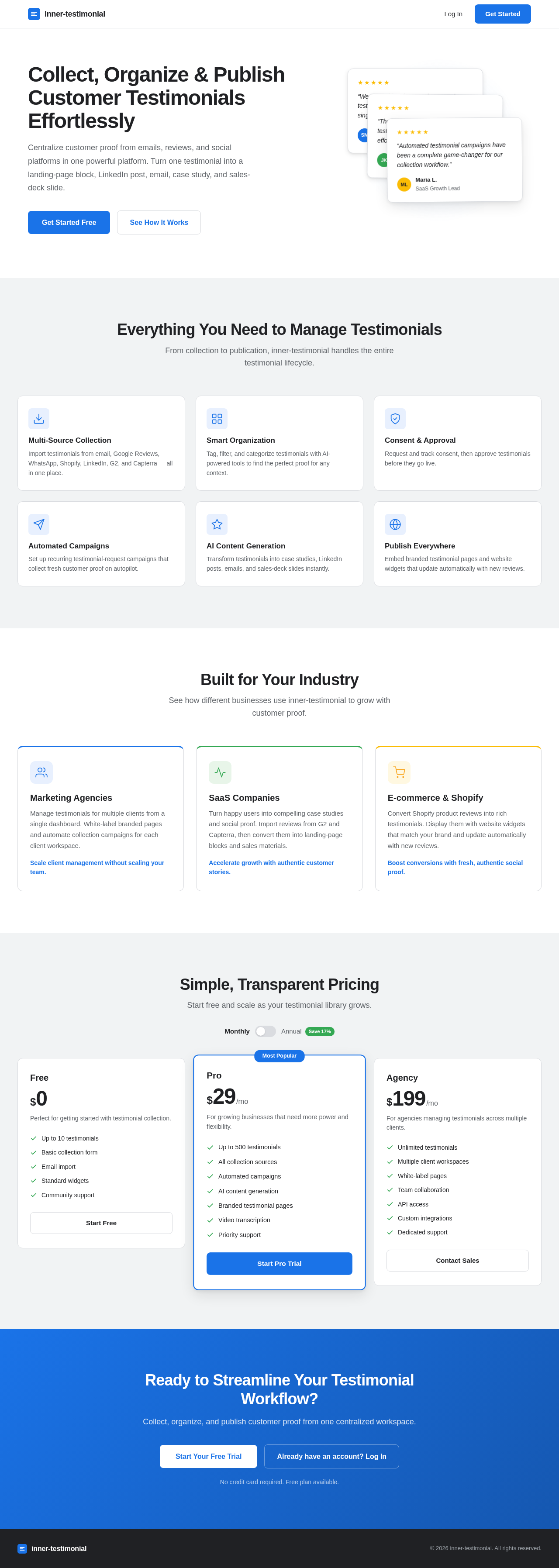
LandingAuthenticationTestimonial Management Dashboard
Landing

Comments (0)

No comments yet. Be the first!

System Requirements

System Requirement Document
Page 1 of 7

System Requirements Document for inner-testimonial

1. Introduction

The "inner-testimonial" project aims to develop a focused system for collecting, organizing, approving, and publishing testimonials tailored for specific industries. This document outlines the system requirements to ensure the successful implementation of the project.

2. System Overview

The inner-testimonial system is designed to streamline the process of testimonial management for businesses. It will provide a centralized platform to collect testimonials from various sources, organize them, and facilitate their approval and publication. The system will also offer additional features such as automated testimonial-request campaigns, video and audio transcription, and AI-generated case-study drafts.

Page 2 of 7

2a. Product Interpretation and Delivery Boundary

  • Domain Descriptors:

    • Testimonial Management System: A centralized system to manage customer testimonials effectively.
  • Product Intent: A focused system for collecting, organizing, approving, and publishing testimonials tailored for specific industries.

  • Excluded Assumptions: Generic testimonial collection features and conventional CRM functionalities are excluded.

  • First-Party Custom Pages:

    • Testimonial Management Dashboard
    • Landing Page
    • Authentication Page
  • Provider-Owned Surfaces: None

  • Access Mode: Application-owned identity with authentication required.

  • Behavior Contracts:

    • Collect Testimonials: Initiated by the Business User to gather testimonials from emails, Google reviews, WhatsApp messages, and spreadsheets.
    • Organize Testimonials: Allows the Business User to organize collected testimonials.
    • Approve Testimonials: Facilitates the approval process for testimonials.
    • Publish Testimonials: Enables the publication of approved testimonials.
    • Automated Testimonial-Request Campaigns: Automates the sending of testimonial requests.
    • Transcribe Video and Audio Testimonials: Converts video and audio testimonials into text.
    • Consent and Approval Workflow: Manages consent and approval processes for testimonials.
    • Generate Branded Testimonial Pages: Creates branded pages for testimonials.
    • Embed Website Widgets: Provides widgets for displaying testimonials on external sites.
    • AI-Generated Case-Study Drafts: Generates case-study drafts using AI.
    • Import Testimonials from External Platforms: Imports testimonials from platforms like Google, G2, Capterra, LinkedIn, or WhatsApp.
    • Convert Testimonial into Multiple Content Formats: Converts testimonials into various content formats.
    • Shopify Review-to-Testimonial Conversion: Converts Shopify reviews into testimonials.
Page 3 of 7

3. Functional Requirements as Story Points

  • As a Business User, I should be able to collect testimonials from emails, Google reviews, WhatsApp messages, and spreadsheets. explicit
  • As a Business User, I should be able to organize collected testimonials. explicit
  • As a Business User, I should be able to approve testimonials. explicit
  • As a Business User, I should be able to publish testimonials. explicit
  • As a Business User, I should be able to automate testimonial-request campaigns. explicit
  • As a Business User, I should be able to transcribe video and audio testimonials. explicit
  • As a Business User, I should be able to manage consent and approval workflows for testimonials. explicit
  • As a Business User, I should be able to generate branded testimonial pages. explicit
  • As a Business User, I should be able to embed website widgets for testimonials. explicit
  • As a Business User, I should be able to generate AI-based case-study drafts from testimonials. explicit
  • As a Business User, I should be able to import testimonials from Google, G2, Capterra, LinkedIn, or WhatsApp. explicit
  • As a Business User, I should be able to convert testimonials into landing-page blocks, LinkedIn posts, emails, case studies, and sales-deck slides. explicit
  • As a Business User, I should be able to convert Shopify reviews into testimonials. explicit
  • As a Business User, I should be able to sign up, log in, and maintain session access to manage testimonials. required_inference

4. User Personas

  • Business User: A human operator managing testimonials for their business or clients. This persona performs all accepted behaviors within the system.

5. Core User Flows

Page 4 of 7

Business User Flow

  1. Landing Page:

    • The Business User accesses the public landing page for product orientation and discovery.
  2. Authentication:

    • The Business User signs up or logs in to access the Testimonial Management Dashboard.
  3. Testimonial Management Dashboard:

    • Collect testimonials from various sources.
    • Organize and approve testimonials.
    • Publish testimonials to external sites.
    • Automate testimonial-request campaigns.
    • Transcribe video and audio testimonials.
    • Manage consent and approval workflows.
    • Generate branded testimonial pages.
    • Embed website widgets.
    • Generate AI-based case-study drafts.
    • Import testimonials from external platforms.
    • Convert testimonials into multiple content formats.
    • Convert Shopify reviews into testimonials.
Page 5 of 7

6. Visuals Colors and Theme

  • Primary: #1A73E8
  • Primary Light: #E8F0FE
  • Secondary: #34A853
  • Accent: #EA4335
  • Highlight: #FBBC05
  • Background: #FFFFFF
  • Surface: #F1F3F4
  • Text: #202124
  • Text Muted: #5F6368
  • Border: #DADCE0

7. Signature Design Concept

The design concept for the inner-testimonial project will focus on a clean and professional interface that highlights the ease of managing testimonials. The Testimonial Management Dashboard will feature a user-friendly layout with intuitive navigation. Key elements include:

  • Typography: Use of modern sans-serif fonts for readability and professionalism.
  • Layout: A grid-based layout to organize testimonial management features effectively.
  • Color Scheme: A cohesive color palette that aligns with the brand identity.
  • Interaction: Smooth transitions and hover effects to enhance user experience.
  • Accessibility: Ensure all elements are accessible and easy to navigate for all users.
Page 6 of 7

8. Interaction Model & Motion Direction

  • Interaction Model: Animated
    • The Testimonial Management Dashboard will feature moderate scroll-triggered reveals and hover transitions to provide a polished user experience.
    • Internal pages will prioritize clarity and task completion with minimal motion.

9. Non-Functional Requirements

  • Pricing Plan: Implement a tiered pricing model with a free plan for limited testimonials, $19–$99 per month for standard plans, and $149–$299 per month for agencies managing multiple client workspaces. explicit

10. Tech Stack

  • Frontend: React for Web
  • Backend: Python with FastAPI
  • Database: MySQL or MariaDB, using Alembic for migrations
  • AI Models: GPT 5.4 for user-friendly responses
  • Local Orchestration: Docker, docker-compose
  • Server-Side Orchestration: Kubernetes

11. Assumptions and Constraints

  • The system will focus on testimonial management and exclude generic CRM functionalities.
  • The application will require user authentication for access to the Testimonial Management Dashboard.
  • The system will support integration with external platforms for importing testimonials.
Page 7 of 7

12. Glossary

  • Testimonial: A statement testifying to someone's character or qualifications.
  • Dashboard: A user interface that organizes and presents information in an easy-to-read format.
  • AI-Generated Drafts: Content created by artificial intelligence based on input data.
  • Widget: A small application with limited functionality that can be installed and executed within a web page.

This document serves as a comprehensive guide for the development of the inner-testimonial project, ensuring all requirements are clearly defined and understood.

Landing design preview
Landing: Business User views public landing page
Authentication: Business User signs up or logs in
Testimonial Management Dashboard: dashboard loaded
Testimonial Management Dashboard: Dashboard: collect testimonials from emails, Google reviews, WhatsApp, spreadsheets
Dashboard: import testimonials from Google, G2, Capterra, LinkedIn, or WhatsApp
Dashboard: convert Shopify reviews into testimonials
Dashboard: transcribe uploaded video/audio testimonial
Testimonial Management Dashboard: Dashboard: organize collected testimonials
Dashboard: run consent and approval workflow for testimonial
Consent not granted, testimonial rejected
Testimonial Author: notified of consent request outcome
Testimonial Management Dashboard: Dashboard: approve testimonial
Testimonial Management Dashboard: Testimonial approval denied
Testimonial Management Dashboard: Dashboard: publish approved testimonial
Testimonial Management Dashboard: Public Website: published testimonial delivered
Dashboard: generate branded testimonial page
Public Website: branded testimonial page published
Dashboard: configure and embed website widget
Public Website: widget displays approved testimonials
Dashboard: schedule automated testimonial-request campaign
Testimonial Recipients: receive automated testimonial requests
Dashboard: generate AI case-study draft from testimonials
Dashboard: convert testimonial into landing block, LinkedIn post, email, case study, or sales-deck slide
Landing design preview
Landing: Business User views public landing page
Authentication: Business User signs up or logs in
Testimonial Management Dashboard: dashboard loaded
Testimonial Management Dashboard: Dashboard: collect testimonials from emails, Google reviews, WhatsApp, spreadsheets
Dashboard: import testimonials from Google, G2, Capterra, LinkedIn, or WhatsApp
Dashboard: convert Shopify reviews into testimonials
Dashboard: transcribe uploaded video/audio testimonial
Testimonial Management Dashboard: Dashboard: organize collected testimonials
Dashboard: run consent and approval workflow for testimonial
Consent not granted, testimonial rejected
Testimonial Author: notified of consent request outcome
Testimonial Management Dashboard: Dashboard: approve testimonial
Testimonial Management Dashboard: Testimonial approval denied
Testimonial Management Dashboard: Dashboard: publish approved testimonial
Testimonial Management Dashboard: Public Website: published testimonial delivered
Dashboard: generate branded testimonial page
Public Website: branded testimonial page published
Dashboard: configure and embed website widget
Public Website: widget displays approved testimonials
Dashboard: schedule automated testimonial-request campaign
Testimonial Recipients: receive automated testimonial requests
Dashboard: generate AI case-study draft from testimonials
Dashboard: convert testimonial into landing block, LinkedIn post, email, case study, or sales-deck slide