infini-simple
 Diya Trivedi
start a project to build simple single page design of calculator

Comments (0)
Sign in to leave a comment
System Requirements
System Requirements Document for infini-simple
1. Introduction
infini-simple is a simple calculator delivered as a single-page design. The product intent is narrow and complete: one page that lets a person perform everyday arithmetic — entering numbers and operators, reading the computed result, and clearing the entry — without navigating away. The audience is anyone who needs quick arithmetic and wants a sturdy, legible, tactile tool rather than a feature-rich application.
The page is anonymous and public: no account, sign-in, or identity is required to use the calculator. The design language is a hand-built, workwear-inspired poster (after Aaron Draplin): kraft field-notes ground, near-black ink calculator panel, cream and mustard keycaps, orange reserved for the equals/clear signal, thick outlines, hard offset shadows, and slab/condensed all-caps typography.
2. System Overview
infini-simple is a single-page, client-side calculator. The page presents a wordmark badge, an oversized headline, a calculator panel containing a ruled result display and a keypad, and a short "how it works" band. All arithmetic entry, operation, result display, and clearing happen on that one page.
Actors
- Calculator user (human, active): opens the single page, enters numbers and operators, reads the result, and clears the entry.
- No other human personas exist. There are no provider-owned or external-destination surfaces; the calculator is first-party and self-contained.
Accepted behavior
- A simple calculator: digit entry, the four basic operators (add, subtract, multiply, divide), equals to compute, and clear to reset.
- Delivered as exactly one page, anonymously reachable, with no navigation to other destinations.
Ownership
- The single Calculator page owns all accepted human behavior: entry, operation, result display, clearing, and the explanatory "how it works" content.
Narrow exclusions
- No multi-page navigation, no accounts, no persistence of history across sessions, no scientific/financial functions, no unit conversion, no sharing or export.
Removed from scope
- None. No concepts were removed by the user.
2a. Product Interpretation and Delivery Boundary
The requester asked for a simple single-page calculator design. That is the whole current product: one anonymously accessible page that performs basic arithmetic in the browser. There is no sign-in, no account, no server-side calculation requirement, and no second destination. The page is the product.
Everything the calculator does — accepting digits, applying an operator, computing on equals, showing the result, and clearing — is delivered on the Calculator page itself. The "how it works" band is explanatory content on the same page, not a separate destination. No future features are committed; anything beyond basic arithmetic is out of current scope.
2c. Page Content and Component Coverage
Calculator
The single public page. Anonymous access; no identity required. It is one continuous framed poster on a kraft ground.
Information and state
- Current entry / expression being built (digits and a pending operator).
- Displayed result (initially
0). - An all-caps
RESULTmicro-label above the displayed value. - A small
FIELD CALCULATOR / MODEL 01stamp. - A circular badge wordmark reading
INFINI · SIMPLE · EST. 2024. - An oversized two-line headline
INFINI / SIMPLE. - A
HOW IT WORKSband with three numbered notes:01 ENTER,02 OPERATE,03 READ.
Primary actions
- Press digit keys
0–9to enter numbers. - Press operator keys
+,−,×,÷to select an operation. - Press
=to compute and display the result. - Press
C(clear) to reset the entry and display to0.
Supporting actions
- Keyboard input mirroring the on-screen keys (digits, operators, equals, clear) for users who prefer typing.
Domain entities
- Entry buffer (the number currently being typed).
- Pending operand and pending operator.
- Result value.
Component responsibilities
- Badge wordmark: circular ink badge with curved
INFINI · SIMPLE · EST. 2024lettering; shrinks to a small stamp at 375px. - Headline block: stacked
INFINI / SIMPLEin Alfa Slab One with a mustard rule beneath, flush left. - Calculator panel: near-black ink panel with hard 6px offset shadow; contains the display strip and keypad.
- Display strip: ruled cream strip inset into the panel, mustard rule above the value,
RESULTmicro-label, digits in Oswald bold. - Keypad grid: 4×5 grid of chunky cream and mustard keycaps; orange only on
=; each key has a 3px ink outline and 4px hard offset shadow that collapses on press. - How-it-works band: ruled strip with three numbered notes separated by dividers, each number in a small ink square.
States
- Loading: not applicable — the page renders immediately with display
0; no network fetch. - Empty/initial: display shows
0; no pending operator. - Success: on
=, the computed result replaces the display value with a 120ms scale-in stamp (1.06 → 1.0). - Error: division by zero shows a clear error indication (e.g.,
ERROR) in the display; the next digit or clear resets to normal entry. - Recovery:
Cclears entry, pending operator, and display back to0at any time.
3. Functional Requirements
-
As a Calculator user, I should see a single calculator page on load so that I can begin arithmetic immediately. (explicit)
- Trigger: opening the page. Result: the Calculator page renders with display
0and a full keypad. Access: anonymous. Failure/recovery: none expected; page is static client-side. Continuation: begin entering digits.
- Trigger: opening the page. Result: the Calculator page renders with display
-
As a Calculator user, I should enter digits 0–9 into the display so that I can build a number. (explicit)
- Trigger: pressing a digit key (or typing a digit). Result: the digit appends to the current entry and is shown in the display. Failure/recovery: leading-zero handling keeps a single
0until a non-zero digit is entered. Continuation: enter more digits or choose an operator.
- Trigger: pressing a digit key (or typing a digit). Result: the digit appends to the current entry and is shown in the display. Failure/recovery: leading-zero handling keeps a single
-
As a Calculator user, I should select an operator (+, −, ×, ÷) so that I can specify the operation to perform. (explicit)
- Trigger: pressing an operator key after entering a number. Result: the current entry is stored as the first operand and the operator is pending; the display reflects the chosen operation. Failure/recovery: pressing an operator with no entry uses the current displayed value. Continuation: enter the second operand.
-
As a Calculator user, I should press equals to compute the result so that I can see the outcome of my arithmetic. (explicit)
- Trigger: pressing
=with a pending operator and second operand. Result: the computed value replaces the display with a 120ms scale-in stamp. Failure/recovery: division by zero shows an error state; the next digit or clear recovers. Continuation: chain further operations or clear.
- Trigger: pressing
-
As a Calculator user, I should clear the calculator so that I can start a fresh calculation. (explicit)
- Trigger: pressing
C. Result: entry, pending operator, and display reset to0. Failure/recovery: works from any state, including error. Continuation: begin a new entry.
- Trigger: pressing
-
As a Calculator user, I should read the result in a clearly labeled display so that I can trust what the calculator shows. (explicit)
- Trigger: any entry or computation. Result: the value is shown in the ruled cream display strip under the
RESULTmicro-label. Continuation: continue or clear.
- Trigger: any entry or computation. Result: the value is shown in the ruled cream display strip under the
-
As a Calculator user, I should use the keypad with visible press feedback so that I can confirm each key registered. (explicit)
- Trigger: pressing a key. Result: the keycap translates 2px and its hard shadow collapses for 80ms, then returns. Continuation: next key.
-
As a Calculator user, I should optionally use my keyboard so that I can enter arithmetic without the mouse. (required_inference)
- Trigger: typing digits, operators,
Enter/=, orEscape/C. Result: mirrors the on-screen keys. Continuation: same as keypad.
- Trigger: typing digits, operators,
4. User Personas
Calculator user
- Product context: A person who needs quick everyday arithmetic and opens the single-page calculator in a browser. They want a sturdy, legible, tactile tool — not an app with accounts or menus.
- Primary goal: Complete a basic calculation (enter numbers, apply an operator, read the result) on one page without navigating away.
- Distinct responsibilities: Enters digits, selects an operator, presses equals to compute, reads the result, and clears to start over. Optionally uses the keyboard.
- Inputs and decisions: Which numbers to enter, which operator to apply, when to compute, and when to clear.
- Interactions with other participants: None — the calculator is self-contained; no other human participant is involved.
- Observable success: The correct result appears in the display after pressing equals, and the page never navigates away.
5. Core User Flows
Flow 1 — Perform a basic calculation
- Calculator user opens the Calculator page (anonymous). The display shows
0. - User presses digit keys to enter the first number; digits appear in the display.
- User presses an operator key (
+,−,×, or÷); the first operand is stored and the operator is pending. - User presses digit keys to enter the second number.
- User presses
=; the computed result replaces the display with a 120ms scale-in stamp. - User reads the result under the
RESULTlabel. Next step: chain another operation or clear.
Flow 2 — Clear and start over
- From any state (including an error), user presses
C. - Entry, pending operator, and display reset to
0. - User begins a new entry.
Flow 3 — Recover from division by zero
- User enters a number, presses
÷, enters0, and presses=. - The display shows an error indication (e.g.,
ERROR). - User presses a digit or
Cto recover; the calculator returns to normal entry.
Flow 4 — Keyboard entry
- User types digits and operators on the keyboard; the display mirrors the on-screen keys.
- User presses
Enter(or=) to compute; the result appears. - User presses
Escape(orC) to clear.
6. Visuals Colors and Theme
Authoritative creative direction: bold, honest, hand-built arithmetic after Aaron Draplin.
Palette (light mode)
- Background (kraft ground):
#E9DFC9 - Surface (calculator body / ink):
#1C1B18 - Text (ink):
#161512 - Primary (signal — equals/clear, badge outlines):
#E85D1F - Accent (mustard — small stamps, operator row):
#F2B41C - Muted (secondary labels, rules):
#6E6553 - Cream keycaps:
#E9DFC9(on ink panel) - Proportion: ~60% kraft, 30% ink, 10% orange/mustard.
Typography
- Headings: Alfa Slab One — wordmark and oversized
INFINI / SIMPLEstamp headline; all-caps, tight tracking, one weight. - Body and operational text: Oswald — all-caps labels, keypad digits, operator names; medium and bold; micro-labels tracked +0.12em.
- Scale: 1.5 modular rhythm — 88/64/40/24/18/16 with clamp (display 40px mobile → 96px desktop; keypad digits 28px mobile → 34px desktop; labels 11px uppercase tracked +0.12em).
Shape language
- Thick 3px ink outlines; square corners with 6px radius on keycaps; hard offset shadows (4px 4px 0 ink) instead of soft blurs; badge and stamp shapes (circles, rounded rectangles); ruled divider panels; chunky 2px borders around every group.
Layout
- Poster-like single column on kraft. Top band: badge wordmark left,
FIELD CALCULATOR / MODEL 01stamp right. Centre: large ink calculator panel with ruled cream display strip and 4×5 keypad. Bottom: ruledHOW IT WORKSstrip with three numbered notes. One continuous framed poster with visible outer border at 1280px; full-bleed single column at 375px.
Imagery
- Vector-only: thick-line pictograms (plus, minus, multiply, divide, equals) at 3px stroke; low-opacity halftone-dot texture on kraft; circular badge with curved
INFINI · SIMPLE · EST. 2024lettering; ruled index lines in margins. No photography, no gradients.
Avoid: blue/indigo anywhere; soft blurred shadows, glass, gradient blobs; rounded pill buttons or 20px+ radii; centred headline+subtext+button hero; photography or 3D renders; bouncy easing or floating elements; identical hover-lift card grids; thin 1px hairlines or airy whitespace-heavy layouts.
7. Signature Design Concept
The public entry is the calculator itself as a poster artefact. A full-bleed kraft ground with a visible 2px ink border framing the viewport. Top-left: a large circular ink badge with cream slab lettering (INFINI · SIMPLE · EST. 2024), and stacked beside it an oversized Alfa Slab One headline INFINI / SIMPLE (40px mobile → 96px desktop), flush left with a mustard rule beneath. Dominant element: the near-black calculator panel (~520px wide on desktop), offset slightly right of centre with a 6px hard ink shadow; its cream display strip reads 0 in large Oswald under a RESULT micro-label; the keypad below in cream and mustard keycaps with orange only on =. On mobile the badge shrinks to a small stamp above the headline and the panel fills the column edge-to-edge inside its own ink frame. All readable text and controls stay whole inside the viewport and their containers at 375px, 768px, and 1280px.
8. Interaction Model & Motion Direction
Interaction Model: Animated Motion Tempo: restrained Hero Dimensionality: flat
Landing Hero Motion Brief
- Focal subject: the ink calculator panel with its cream display strip and chunky keycaps.
- Input → transformation → outcome thesis: a key press translates the keycap 2px and collapses its hard shadow (80ms, linear/steps), registering the input; on
=, the result stamps into the display with a 120ms scale from 1.06 to 1.0. - Motion vocabulary: sturdy and mechanical — snap-down keys, hard shadow collapse, result stamp-in, single ink-stamp reveal of the badge wordmark on load. No bounces, no floats.
- Composed first frame: kraft ground, ink border, badge and headline at top-left, calculator panel offset right with display
0. - Reduced-motion state: with
prefers-reduced-motion, the badge reveal and result scale-in are suppressed; key press feedback becomes an instant state change; the layout remains fully usable and static.
9. Non-Functional Requirements
- Single page (explicit): the calculator must be delivered as exactly one page; no additional routes or destinations.
- Simple design (explicit): the interface must remain a simple calculator — basic arithmetic only.
- Anonymous access (explicit): no account, sign-in, or identity is required.
- Readability (explicit): all readable text and controls stay entirely inside the viewport and their containers at 375px, 768px, and 1280px, wrapping or scaling with
clamp(...). - Accessibility (required_inference): keys are operable by keyboard and expose accessible labels; the display value is announced on change; reduced-motion is respected.
- Performance (required_inference): the page is client-side and renders immediately with no network dependency for calculation.
10. Tech Stack
- Frontend: React single-page application (client-side arithmetic; no backend required for calculation).
- Styling: CSS with the specified palette, fonts (Alfa Slab One, Oswald via web font loading), and hard-shadow/outline tokens.
- Storage: none — no persistence of history or state across sessions.
- Deployment: static hosting of the built single page; no server-side service is required for the accepted behavior.
11. Assumptions and Constraints
- Assumption: the calculator supports the four basic operators (add, subtract, multiply, divide), equals, and clear — the minimal set implied by "simple calculator." (required_inference)
- Assumption: division by zero is handled with a visible error state and recoverable by clear or new entry. (required_inference)
- Assumption: keyboard input mirrors the on-screen keypad. (required_inference)
- Constraint: exactly one page; no navigation, accounts, or persistence. (explicit)
- Constraint: the design follows the supplied Draplin-inspired creative direction; blue/indigo and generic SaaS styling are forbidden. (explicit)
12. Glossary
- Calculator page: the single public page hosting the display, keypad, and explanatory content.
- Display strip: the ruled cream area showing the current entry or result under the
RESULTlabel. - Keycap: a chunky cream or mustard button with a 3px ink outline and 4px hard offset shadow.
- Pending operator: the operator selected but not yet applied until
=is pressed. - Hard offset shadow: a solid, non-blurred shadow (
4px 4px 0ink) used instead of soft shadows. - Badge wordmark: the circular ink badge with curved
INFINI · SIMPLE · EST. 2024lettering.
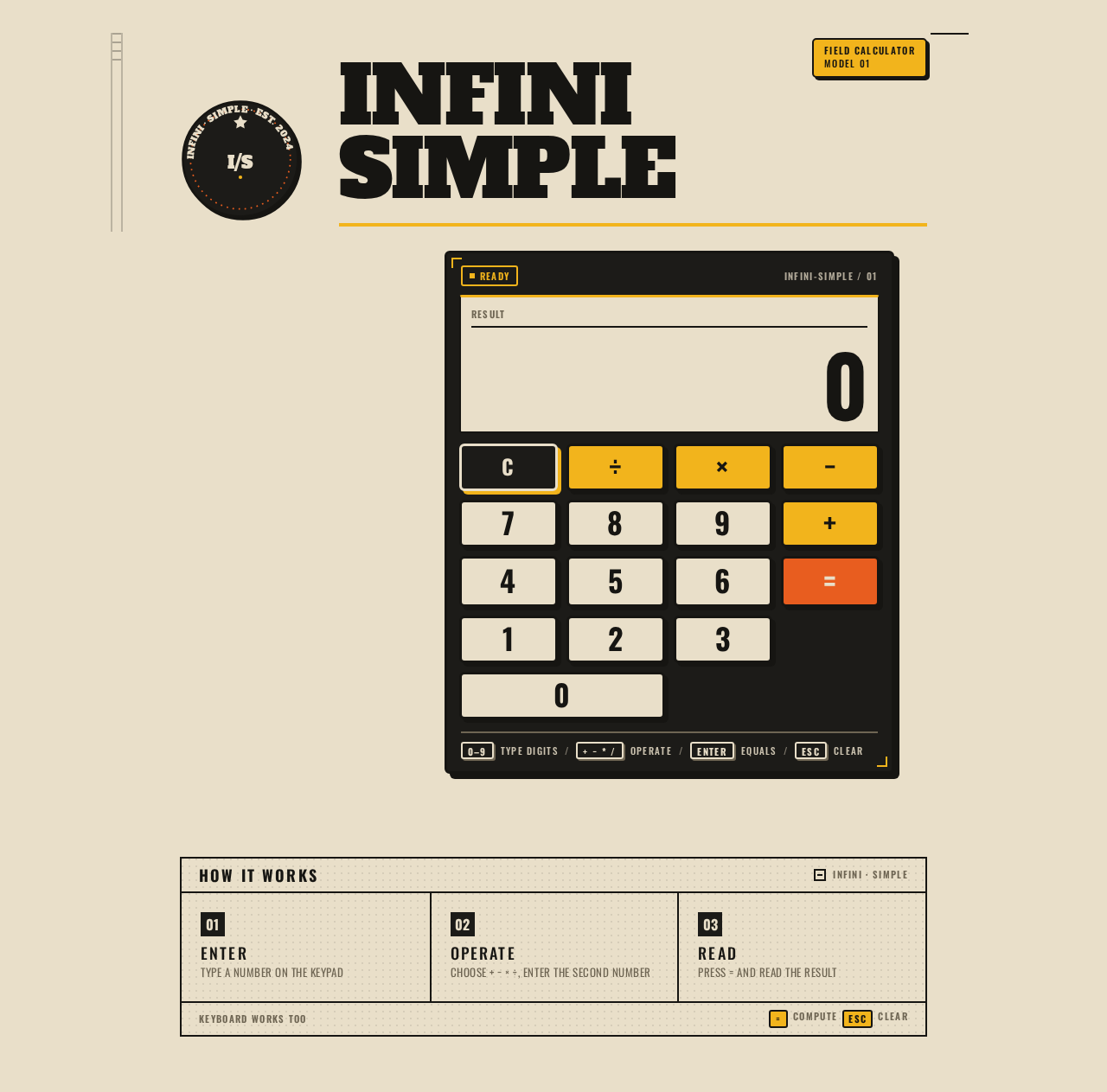
INFINISIMPLE
FIELD CALCULATORMODEL 01
Calculator
How it works
- 01 — EnterType a number on the keypad
- 02 — OperateChoose + − × ÷, enter the second number
- 03 — ReadPress = and read the result
INFINISIMPLE
FIELD CALCULATORMODEL 01
Calculator
How it works
- 01 — EnterType a number on the keypad
- 02 — OperateChoose + − × ÷, enter the second number
- 03 — ReadPress = and read the result
No comments yet. Be the first!