infini-profile
 77 7
77 7https://bsky.app/profile/askr93.bsky.social
Comments (0)
Sign in to leave a comment
System Requirements
System Requirements Document (SRD)
Project Name: infini-profile
1. Introduction
Welcome to the System Requirements Document (SRD) for infini-profile, a project designed to extract, organize, and display all images posted by a specified Bluesky user. This tool aims to provide users with a seamless way to access and interact with visual content from Bluesky profiles, including potential future capabilities for handling deleted images, depending on API permissions and platform policies.
This document outlines the functional and non-functional requirements, user personas, design concepts, and technical specifications for the development of infini-profile.
2. System Overview
infini-profile is a web-based application that allows users to input a Bluesky username or profile link and retrieve all publicly available images posted by that user. The system will organize these images into a visually appealing gallery format for easy browsing and downloading.
The system will leverage Bluesky's API for data retrieval, ensuring compliance with platform policies. Future iterations may explore additional functionalities, such as retrieving deleted images, depending on API capabilities and legal considerations.
Key features include:
- Integration with Bluesky API for image extraction.
- A gallery-style interface for displaying images.
- Support for image downloads.
- Scalability for future enhancements.
3. Functional Requirements
As User:
- I should be able to input a Bluesky username or profile link to retrieve all publicly available images.
- I should be able to view the images in a gallery-style interface.
- I should be able to download individual images or multiple images at once.
As Admin:
- I should be able to monitor API usage and ensure compliance with Bluesky's policies.
- I should be able to manage system settings, such as API keys and rate limits.
As Guest:
- I should be able to browse the gallery without logging in (optional feature).
4. User Personas
Persona 1: Regular User
- Description: A Bluesky user who wants to extract and organize images from their own or others' profiles.
- Goals: Easy access to visual content for personal use or analysis.
- Pain Points: Limited tools for extracting and organizing Bluesky images.
Persona 2: Admin
- Description: A system administrator responsible for maintaining the application and ensuring compliance with Bluesky's API policies.
- Goals: Smooth operation of the system and adherence to platform rules.
- Pain Points: Managing API limits and troubleshooting technical issues.
Persona 3: Guest User
- Description: A casual visitor who wants to explore the gallery without creating an account.
- Goals: Quick and easy access to images without commitment.
- Pain Points: Limited functionality compared to registered users.
5. Visuals Colors and Theme
Color Palette
The visual identity of infini-profile will reflect a modern, clean, and professional aesthetic, emphasizing clarity and user engagement.
- Background:
#F3F8FB(soft sky blue for a calm and inviting feel) - Surface:
#FFFFFF(pure white for clean content presentation) - Text:
#2C3E50(deep slate for high readability) - Accent:
#3498DB(vibrant blue for interactive elements like buttons and links) - Muted Tones:
#BDC3C7(light gray for secondary elements and borders)
6. Signature Design Concept
Interactive Floating Gallery
The homepage of infini-profile will feature an Interactive Floating Gallery design. Upon entering the site, users will be greeted by a dynamic, 3D gallery interface where images appear to "float" in space.
Key Features:
- Hover Effects: As users hover over an image, it gently rotates and enlarges, creating a tactile interaction.
- Infinite Scroll: Users can scroll through the gallery seamlessly, with new images loading dynamically.
- Background Animation: A subtle gradient animation mimicking the sky transitions throughout the day (morning, afternoon, evening).
- Micro-Interactions: Clicking an image triggers a smooth zoom-in effect, opening a detailed view with download options.
This design concept ensures infini-profile stands out as a visually captivating and memorable platform.
7. Non-Functional Requirements
- Performance: The system must load images within 2 seconds for optimal user experience.
- Scalability: The system should support up to 10,000 images per user profile without performance degradation.
- Security: Ensure data privacy and compliance with Bluesky's API policies.
- Availability: The system must maintain 99.9% uptime.
8. Tech Stack
Frontend
- React for Web
Backend
- Python
- FastAPI
Database
- MySQL or MariaDB (preferred for relational data)
- MongoDB (optional for unstructured data)
AI Models
- GPT 5.2 for user-friendly responses
AI Tools
- Langchain
- Litellm for LLM Routing
Local Orchestration
- Docker
- docker-compose
Server-Side Orchestration
- Kubernetes
9. Assumptions and Constraints
Assumptions
- Bluesky's API provides access to all publicly available images.
- Users will input valid Bluesky profile links or usernames.
- The system will operate within Bluesky's API rate limits.
Constraints
- Retrieval of deleted images may not be possible due to API limitations.
- The system must comply with Bluesky's privacy policies and terms of service.
10. Glossary
- Bluesky: A decentralized social media platform.
- API: Application Programming Interface, used for interacting with Bluesky's data.
- Gallery Interface: A visual layout for displaying images.
- Interactive Floating Gallery: A dynamic, 3D gallery design concept for the homepage.
This concludes the updated System Requirements Document for infini-profile.
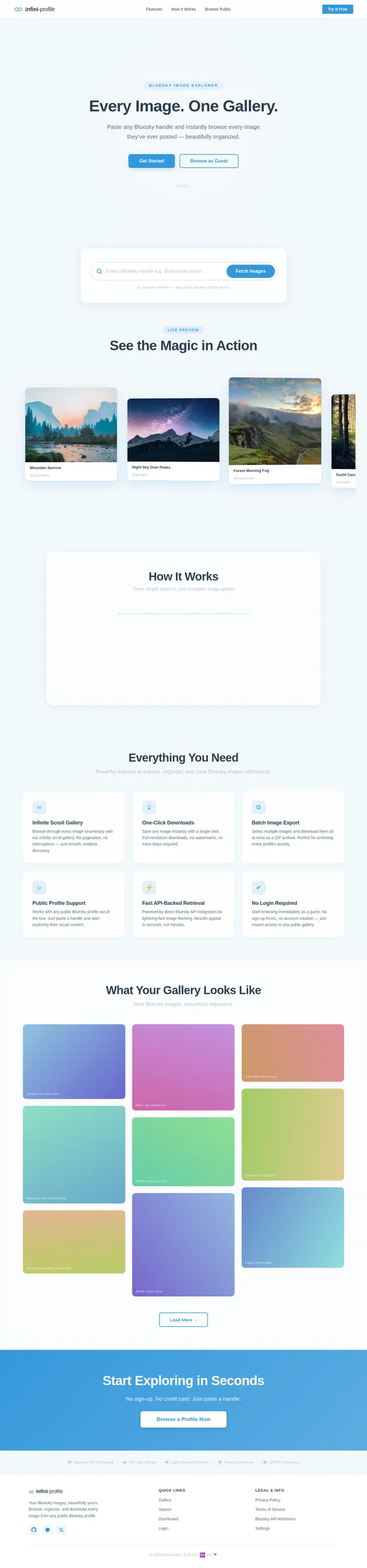
Every Image. One Gallery.
Paste any Bluesky handle and instantly browse every image they’ve ever posted — beautifully organized.
No account needed — any public Bluesky profile works.
See the Magic in Action
How It Works
Three simple steps to your complete image gallery
Paste a Handle
Enter any Bluesky username or profile link — yours or anyone else’s.
We Fetch Everything
Our system pulls all public images via the Bluesky API in seconds.
Browse & Download
Scroll, zoom, and save what you love — beautifully organized.
Everything You Need
Powerful features to explore, organize, and save Bluesky images effortlessly.
Infinite Scroll Gallery
Browse through every image seamlessly with our infinite scroll gallery. No pagination, no interruptions — just smooth, endless discovery.
One-Click Downloads
Save any image instantly with a single click. Full-resolution downloads, no watermarks, no extra steps required.
Batch Image Export
Select multiple images and download them all at once as a ZIP archive. Perfect for archiving entire profiles quickly.
Public Profile Support
Works with any public Bluesky profile out of the box. Just paste a handle and start exploring their visual content.
Fast API-Backed Retrieval
Powered by direct Bluesky API integration for lightning-fast image fetching. Results appear in seconds, not minutes.
No Login Required
Start browsing immediately as a guest. No sign-up forms, no account creation — just instant access to any public gallery.
What Your Gallery Looks Like
Real Bluesky images, beautifully organized.
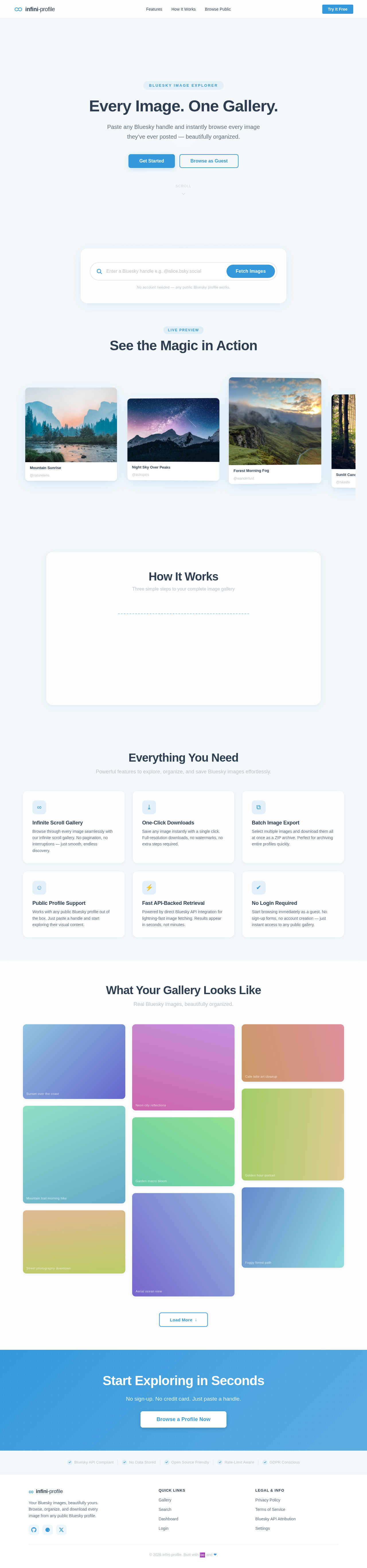
Every Image. One Gallery.
Paste any Bluesky handle and instantly browse every image they’ve ever posted — beautifully organized.
No account needed — any public Bluesky profile works.
See the Magic in Action
How It Works
Three simple steps to your complete image gallery
Paste a Handle
Enter any Bluesky username or profile link — yours or anyone else’s.
We Fetch Everything
Our system pulls all public images via the Bluesky API in seconds.
Browse & Download
Scroll, zoom, and save what you love — beautifully organized.
Everything You Need
Powerful features to explore, organize, and save Bluesky images effortlessly.
Infinite Scroll Gallery
Browse through every image seamlessly with our infinite scroll gallery. No pagination, no interruptions — just smooth, endless discovery.
One-Click Downloads
Save any image instantly with a single click. Full-resolution downloads, no watermarks, no extra steps required.
Batch Image Export
Select multiple images and download them all at once as a ZIP archive. Perfect for archiving entire profiles quickly.
Public Profile Support
Works with any public Bluesky profile out of the box. Just paste a handle and start exploring their visual content.
Fast API-Backed Retrieval
Powered by direct Bluesky API integration for lightning-fast image fetching. Results appear in seconds, not minutes.
No Login Required
Start browsing immediately as a guest. No sign-up forms, no account creation — just instant access to any public gallery.
What Your Gallery Looks Like
Real Bluesky images, beautifully organized.
No comments yet. Be the first!