infini-camp
 sanaiya camp
Camp Data Management related with data
Comments (0)
Sign in to leave a comment
System Requirements
System Requirements Document (SRD) for infini-camp
1. Introduction
Welcome to the System Requirements Document (SRD) for infini-camp, a comprehensive data management system tailored for camp accommodations and employee tracking. This document outlines the system's objectives, features, and technical specifications to ensure efficient organization and access to critical data.
Designed specifically for Sanaiya Camp in Qatar, infini-camp aims to streamline the management of room assignments, employee details, and work-related information. By leveraging modern technologies, this system will empower camp organizers, staff, and sponsors to efficiently manage accommodations and resources.
2. System Overview
The infini-camp system is a web-based application that facilitates the management of camp accommodations and employee-related data. It provides tools for tracking room assignments, employee details, and work-related information, ensuring seamless operations for camp organizers and sponsors.
Key features include:
- Room assignment tracking with detailed fields.
- Employee data management, including personal and work-related information.
- Role-based access for admins, sponsors, and employees.
- API integration for real-time data updates and synchronization.
The system will be optimized for use in Qatar, adhering to local standards and preferences, including timezone (Arabian Standard Time, UTC+3) and currency (Qatari Riyal).
3. Functional Requirements
Room Assignment and Employee Data Management
- As Admin, I should be able to add, update, and delete room assignments with fields including Room No., Status, Sponsor, Employee details (Emp. No., Name, Gender, Position, Nationality), and work information (Work Location, Work Area, Mobile No.).
- As Admin, I should be able to view and search room assignments and employee data using filters like Room No., Status, Sponsor, and Work Location.
- As Sponsor, I should be able to view room assignments and employee details associated with my sponsorship.
- As Employee, I should be able to view my own room assignment and work-related details.
API Integration
- As Admin, I should be able to synchronize room assignment data with pre-resolved fields via API integration.
Reporting and Analytics
- As Admin, I should be able to generate reports on room occupancy, employee demographics, and work area distribution.
4. User Personas
Admin
- Role: Camp organizer or manager.
- Responsibilities: Manage room assignments, employee data, and system settings. Generate reports and analytics.
- Access Level: Full access to all system features.
Sponsor
- Role: Individual or organization sponsoring employees.
- Responsibilities: View room assignments and employee details under their sponsorship.
- Access Level: Restricted access to sponsored employee data.
Employee
- Role: Camp resident.
- Responsibilities: View personal room assignment and work-related details.
- Access Level: Limited access to personal data only.
5. Visuals Colors and Theme
Color Palette
The infini-camp system will feature a unique color palette inspired by the desert and camp environment, reflecting warmth, professionalism, and clarity.
- Background: #FDF6E3 (Soft Sand)
- Surface: #F4E3C1 (Desert Beige)
- Text: #3E3E3E (Charcoal Gray)
- Accent: #FF8C42 (Sunset Orange)
- Muted Tones: #C4B8A5 (Muted Taupe)
This palette ensures a visually appealing and user-friendly interface that aligns with the camp's identity.
6. Signature Design Concept
Interactive Room Map with Dynamic Filters
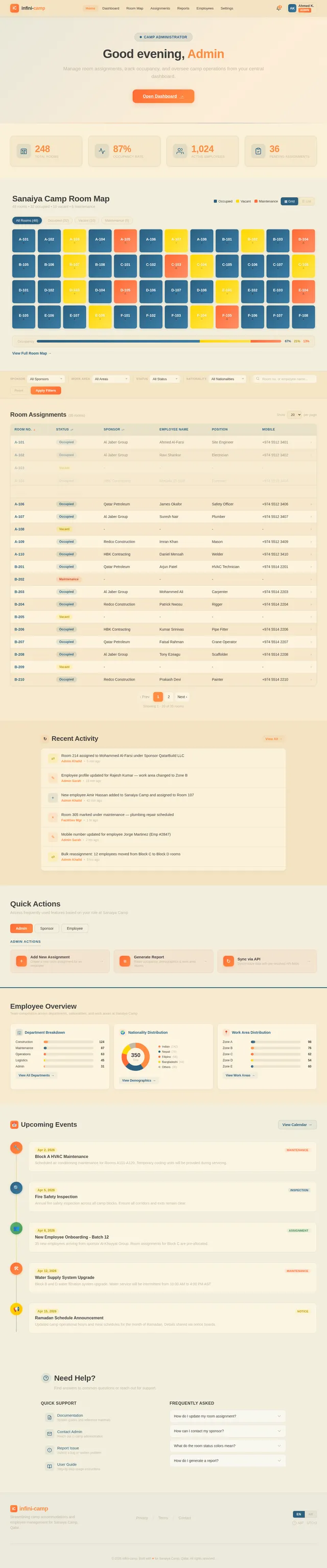
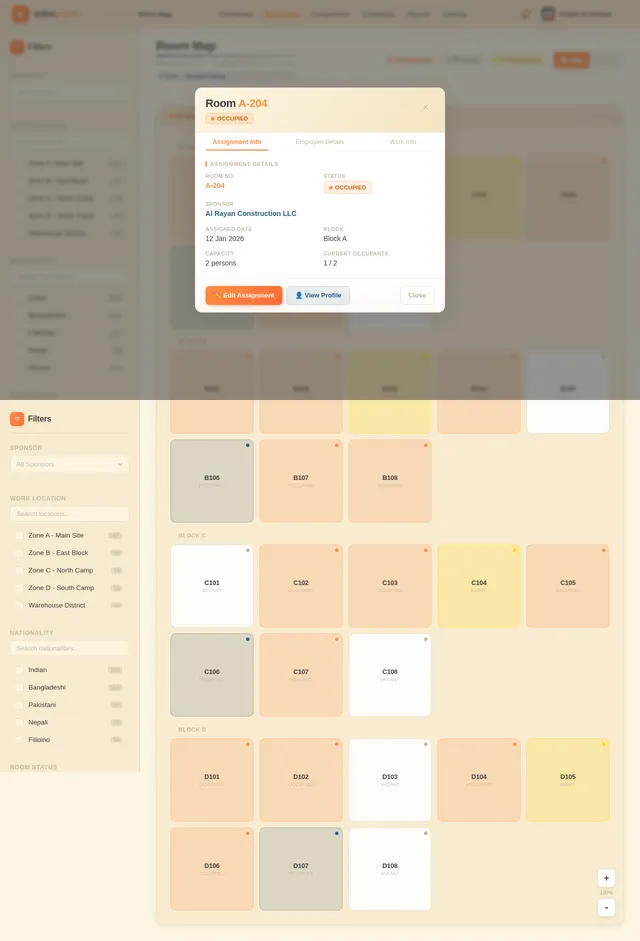
The homepage of infini-camp will feature an interactive room map that visually represents the camp layout. Each room will be displayed as a clickable unit, color-coded based on its status (e.g., occupied, vacant, under maintenance). Users can:
- Hover over rooms to view quick details (Room No., Status, Sponsor).
- Click on rooms to access detailed employee and work-related information.
- Use dynamic filters to highlight rooms based on criteria like sponsor, work area, or nationality.
The map will include smooth animations, such as transitions when filters are applied, and micro-interactions like tooltips that appear on hover. This design ensures an engaging and intuitive experience, making data exploration effortless.
7. Non-Functional Requirements
- Performance: The system must support up to 10,000 concurrent users without degradation in performance.
- Scalability: The architecture should allow for easy scaling to accommodate future expansions.
- Security: Implement role-based access control and encryption for sensitive data.
- Localization: Support for Arabic and English languages.
- Availability: Ensure 99.9% uptime with robust disaster recovery mechanisms.
8. Tech Stack
Frontend
- React for Web
Backend
- Python
- FastAPI
Database
- MySQL (preferred for relational data)
- Alembic for migrations
AI Models
- GPT 5.4 for user-friendly responses
- Claude 4.6 Opas for coding and academic tasks
AI Tools
- Litellm for LLM Routing
- Langchain
Orchestration
- Docker for local development
- Kubernetes for server-side orchestration
9. Assumptions and Constraints
Assumptions
- Users will have access to stable internet connections.
- The system will primarily be accessed via web browsers.
- Sponsors and employees will have limited access based on their roles.
Constraints
- The system must comply with Qatar's data protection regulations.
- Deployment must align with local hosting requirements.
10. Glossary
- Room Assignment: The process of allocating rooms to employees within the camp.
- Sponsor: An individual or organization responsible for supporting employees.
- Work Area: The specific location within the camp where an employee performs their duties.
- API Integration: The process of connecting the system with external services for data synchronization.
End of Document
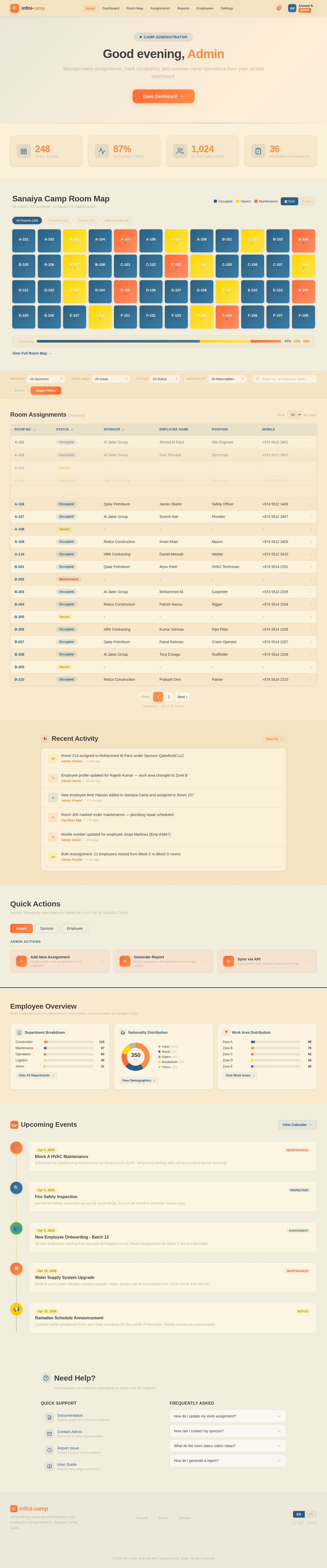
Good morning, Admin
Manage room assignments, track occupancy, and oversee camp operations from your central dashboard.
Open Dashboard→Sanaiya Camp Room Map
48 rooms • 32 occupied • 10 vacant • 6 maintenance
Room Assignments(35 rooms)
| Room No. | Status | Sponsor | Employee Name | Position | Mobile | |
|---|---|---|---|---|---|---|
| A-101 | Occupied | Al Jaber Group | Ahmed Al-Farsi | Site Engineer | +974 5512 3401 | › |
| A-102 | Occupied | Al Jaber Group | Ravi Shankar | Electrician | +974 5512 3402 | › |
| A-103 | Vacant | - | - | - | - | › |
| A-104 | Occupied | HBK Contracting | Mostafa El-Said | Foreman | +974 5512 3404 | › |
| A-105 | Maintenance | - | - | - | - | › |
| A-106 | Occupied | Qatar Petroleum | James Okafor | Safety Officer | +974 5512 3406 | › |
| A-107 | Occupied | Al Jaber Group | Suresh Nair | Plumber | +974 5512 3407 | › |
| A-108 | Vacant | - | - | - | - | › |
| A-109 | Occupied | Redco Construction | Imran Khan | Mason | +974 5512 3409 | › |
| A-110 | Occupied | HBK Contracting | Daniel Mensah | Welder | +974 5512 3410 | › |
| B-201 | Occupied | Qatar Petroleum | Arjun Patel | HVAC Technician | +974 5514 2201 | › |
| B-202 | Maintenance | - | - | - | - | › |
| B-203 | Occupied | Al Jaber Group | Mohammed Ali | Carpenter | +974 5514 2203 | › |
| B-204 | Occupied | Redco Construction | Patrick Nwosu | Rigger | +974 5514 2204 | › |
| B-205 | Vacant | - | - | - | - | › |
| B-206 | Occupied | HBK Contracting | Kumar Srinivas | Pipe Fitter | +974 5514 2206 | › |
| B-207 | Occupied | Qatar Petroleum | Faisal Rahman | Crane Operator | +974 5514 2207 | › |
| B-208 | Occupied | Al Jaber Group | Tony Ezeagu | Scaffolder | +974 5514 2208 | › |
| B-209 | Vacant | - | - | - | - | › |
| B-210 | Occupied | Redco Construction | Prakash Devi | Painter | +974 5514 2210 | › |
Recent Activity
View All→Room 214 assigned to Mohammed Al-Farsi under Sponsor QatarBuild LLC
Employee profile updated for Rajesh Kumar — work area changed to Zone B
New employee Amir Hassan added to Sanaiya Camp and assigned to Room 107
Room 305 marked under maintenance — plumbing repair scheduled
Mobile number updated for employee Jorge Martinez (Emp #2847)
Quick Actions
Access frequently used features based on your role at Sanaiya Camp
Employee Overview
Team composition across departments, nationalities, and work areas at Sanaiya Camp
Nationality Distribution
Upcoming Events
View Calendar→Block A HVAC Maintenance
Scheduled air conditioning maintenance for Rooms A101-A120. Temporary cooling units will be provided during servicing.
Fire Safety Inspection
Annual fire safety inspection across all camp blocks. Ensure all corridors and exits remain clear.
New Employee Onboarding - Batch 12
35 new employees arriving from sponsor Al-Khayyat Group. Room assignments for Block C are pre-allocated.
Water Supply System Upgrade
Block B and D water filtration system upgrade. Water service will be intermittent from 10:00 AM to 4:00 PM AST.
Ramadan Schedule Announcement
Updated camp operational hours and meal schedules for the month of Ramadan. Details shared via notice boards.
Need Help?
Find answers to common questions or reach out for support.
Quick Support
- DocumentationSystem guides and reference materials
- Contact AdminReach out to camp administration
- Report IssueSubmit a bug or system problem
- User GuideStep-by-step usage instructions
Frequently Asked
Admins can update room assignments from the Dashboard or Room Map. Navigate to the room, click on it, and select "Edit Assignment" to modify details.
Visit your Profile page to see your assigned sponsor details. You can also reach out through the Contact Admin link for assistance.
Green indicates occupied rooms, yellow marks vacant rooms available for assignment, and red shows rooms under maintenance or temporarily unavailable.
Admins can generate reports from the Reports page. Select the report type, apply filters for date range or department, and export as PDF or Excel.
No comments yet. Be the first!