incrivia-nexus-paios
 paios technologies


Comments (0)
Sign in to leave a comment
System Requirements
System Requirements Document for incrivia-nexus-paios
1. Introduction
Absolutely. Below is the clean copy-and-paste master prompt, with no explanatory commentary around it.
INCRIVIA NEXUS
MASTER APP CREATION SPECIFICATION
PROJECT TYPE
Build Incrivia Nexus as a production-grade, modular, intelligent, multi-agent AI application operating as a major intelligence layer of PAIOS — Personal AI Operating System.
- CORE IDENTITY
Application Name
Incrivia Nexus
Parent System
PAIOS — Personal AI Operating System
First Operating Environment
Living Words
Living Words should operate as the first publishing and intellectual-property environment inside Incrivia Nexus.
- CORE MISSION
Incrivia Nexus exists to help the user:
-
Capture ideas
-
Develop ideas
-
Research subjects
-
Analyze information
-
Build intellectual frameworks
-
Develop books
-
Write manuscripts
-
Edit manuscripts
-
Critique arguments
-
Create educational materials
-
Create media
-
Develop intellectual property
-
Build publishing products
-
Create marketing assets
-
Manage projects
The central principle is:
Transform raw thought into structured knowledge, intellectual property, creative output and commercially useful assets.
Incrivia Nexus must function as an intelligence ecosystem, not simply an AI conversation interface.
- MASTER APP-BUILDER INSTRUCTION
Build Incrivia Nexus as a production-grade, modular autonomous intelligence platform operating on top of PAIOS — Personal AI Operating System.
Do not create a simple chatbot.
Create a multi-agent orchestration system with:
The final product should be capable of evolving from a personal AI assistant into a full intellectual-production, research, publishing, knowledge and autonomous workflow ecosystem.
The objective is to create an expandable AI intellectual ecosystem, not merely another AI application.
Project name: incrivia-nexus-paios.
2. System Overview
It must function as an integrated:
-
AI command center
-
Research intelligence system
-
Knowledge management system
-
Multi-agent orchestration platform
-
Writing and publishing environment
-
Intellectual-property development system
-
Creative production system
-
Strategic decision system
-
Personal knowledge system
-
Agent-training environment
-
MCP/tool integration platform
-
Autonomous workflow system
-
Preserve knowledge
-
Train AI agents
-
Coordinate specialized AI agents
-
Connect external tools
-
Execute approved workflows
-
Maintain institutional memory
-
Support strategic decision-making
- CORE ARCHITECTURE
Use the following architecture:
PAIOS
│
└── Incrivia Nexus
├── Nexus Command Center
├── Nexus Intelligence Engine
├── Nexus Orchestrator
├── Master Training Agent
├── Research Intelligence
├── Writing Intelligence
├── Editorial Intelligence
├── Publishing Intelligence
├── Strategic Intelligence
├── Creative Intelligence
├── Marketing Intelligence
├── Knowledge Nexus
├── Memory System
├── Project Intelligence
├── IP Vault
├── Research Lab
├── Manuscript Workspace
├── Creative Studio
├── Publishing Center
├── MCP Registry
├── Task & Workflow Engine
├── Decision Center
├── Analytics
├── Notifications
└── Governance & Audit
Top navigation
Include:
-
Incrivia Nexus logo
-
Global search
-
Notifications
-
System status
-
AI provider status
-
MCP status
- User profile
↓
INGESTION
CLASSIFICATION
VALIDATION
KNOWLEDGE EXTRACTION
STRUCTURING
INDEXING
TRAINING DATA
AGENT KNOWLEDGE
General knowledge.
Agent Memory
Specialized agent knowledge.
Conversation Memory
Current conversation context.
Institutional Memory
Approved methodologies, frameworks, systems and intellectual structures developed by the user.
- LIVING WORDS ENVIRONMENT
Create Living Words as the first publishing environment inside Nexus.
INCRIVIA NEXUS
│
└── LIVING WORDS
├── Books
├── Authors
├── Research
├── Courses
├── Media
├── Marketing
└── Publishing
MCPs
MCPTools
Permissions
Workflows
WorkflowRuns
Outputs
Publications
MediaAssets
Notifications
AuditLogs
AIProviders
AIModels
Settings
Each entity should have:
-
Unique ID
-
Created timestamp
- MOST IMPORTANT ARCHITECTURAL RULE
BUILD:
USER
↓
NEXUS COMMAND CENTER
ORCHESTRATION CORE
KNOWLEDGE + AGENTS + TOOLS
WORKFLOW ENGINE
Implement the database architecture, authentication, project system, task engine, agent registry, knowledge system, memory layers, research workspace, manuscript workspace, IP Vault, publishing center, MCP registry, workflow engine, audit system and Nexus Command Center as interconnected modules.
Living Words is the first publishing environment inside Incrivia Nexus.
- FINAL SYSTEM VISION
PAIOS = OPERATING SYSTEM
INCRIVIA NEXUS = INTELLIGENCE LAYER
NEXUS ORCHESTRATOR = EXECUTIVE COORDINATION
MASTER TRAINING AGENT = INTELLIGENCE DEVELOPMENT
AGENTS = SPECIALIZED INTELLIGENCE
KNOWLEDGE NEXUS = INSTITUTIONAL MEMORY
WORKFLOW ENGINE = EXECUTION
DECISION CENTER = STRATEGIC MEMORY
AUDIT SYSTEM = ACCOUNTABILITY
HUMAN APPROVAL = SOVEREIGNTY
3. Functional Requirements
- NEXUS COMMAND CENTER
Create the main home screen as an intelligent command center.
- Settings
Display:
Show:
-
Active projects
-
Active agents
-
Current tasks
-
Research operations
-
Manuscripts in progress
-
Items awaiting approval
-
Recent decisions
-
Knowledge updates
-
System alerts
-
Recent outputs
Main dashboard
Nexus Status
Main command interface
Create a prominent input field:
"What would you like Nexus to accomplish?"
Examples:
-
Research this subject.
-
Develop this idea.
-
Create a book project.
-
Analyze this manuscript.
-
Compare these two documents.
-
Find weaknesses in this argument.
-
Turn this chapter into social-media content.
-
Build a publishing strategy.
-
Continue Project X.
-
Audit this chapter.
-
Develop this concept into intellectual property.
The system must interpret the request and route it to the appropriate agents and workflows.
- GLOBAL NEXUS AI
Create a universal AI interface.
Support these modes:
ASK
General questions and explanations.
RESEARCH
Deep investigation and evidence gathering.
CREATE
Generate intellectual and creative assets.
ANALYZE
Analyze information, arguments, projects and documents.
BUILD
Create structured projects, systems and frameworks.
STRATEGIZE
Develop strategic recommendations and plans.
EXECUTE
Perform approved actions through connected tools.
TEACH
Explain concepts and train the user.
AUDIT
Critically inspect work for weaknesses, errors and inconsistencies.
Allow the user to manually select a mode.
Also allow Nexus to automatically determine the appropriate mode.
- NEXUS ORCHESTRATOR
The Nexus Orchestrator is the executive intelligence layer.
It must:
-
Understand the user's objective.
-
Determine whether the request is simple or complex.
-
Break complex requests into subtasks.
-
Select appropriate agents.
-
Assign tasks.
-
Provide each agent with necessary context.
-
Execute tasks.
-
Collect outputs.
-
Compare conflicting outputs.
-
Run quality control.
-
Resolve or expose disagreements.
-
Synthesize the final result.
-
Request human approval where necessary.
-
Store important outputs and decisions.
-
MASTER TRAINING AGENT
Create a dedicated Master Training Agent.
This must be one of the most important components of the system.
Its purpose is to improve the intelligence, knowledge and specialization of the Nexus ecosystem.
Responsibilities
The Master Training Agent should:
-
Acquire approved knowledge.
-
Analyze uploaded materials.
-
Extract useful information.
-
Organize knowledge.
-
Create structured training datasets.
Training pipeline
SOURCE
-
Improve agent instructions.
-
Improve agent knowledge.
-
Develop specialized agents.
Training pipeline
SOURCE
-
Evaluate agents.
-
Test agent performance.
-
Identify weaknesses.
-
Recommend improvements.
Training pipeline
SOURCE
-
Version agent configurations.
-
Maintain training history.
Training pipeline
SOURCE
↓
EVALUATION
APPROVAL
DEPLOYMENT
All major changes must follow:
PROPOSED
TESTED
EVALUATED
APPROVED
DEPLOYED
- AGENT ECOSYSTEM
Build agents as modular, independently configurable components.
Each agent must have:
-
Agent ID
-
Name
-
Description
-
Role
-
System instructions
-
Knowledge sources
-
Capabilities
-
Tools
-
MCP permissions
-
AI model/provider
-
Configuration
-
Output formats
-
Restrictions
-
Evaluation criteria
-
Status
-
Version
-
Creation date
-
Last updated date
-
Performance history
- INITIAL AGENT ROSTER
Create the following initial agents.
9.1 Nexus Orchestrator
Executive coordination and task management.
- INITIAL AGENT ROSTER
Create the following initial agents.
9.2 Master Training Agent
Agent training and knowledge development.
- INITIAL AGENT ROSTER
Create the following initial agents.
9.3 Research Agent
Responsibilities:
-
Web research
-
Literature research
-
Source collection
-
Source comparison
-
Fact verification
-
Evidence extraction
-
Research synthesis
-
Bibliography generation
-
Research-gap identification
9.4 Deep Research Agent
9.5 Writer Agent
Specialize in:
-
Books
-
Chapters
-
Essays
-
Articles
-
Scripts
-
Courses
-
Educational materials
-
Marketing content
-
Structural coherence
9.7 Developmental Editor
Evaluate:
-
Structure
-
Thesis
-
Argument
-
Narrative
-
Chapter architecture
-
Redundancy
-
Reader progression
-
Conceptual coherence
9.8 Line Editor
Evaluate:
-
Sentence quality
-
Rhythm
-
Voice
-
Clarity
-
Precision
-
Word choice
-
Flow
9.9 Copy Editor
Check:
-
Grammar
-
Punctuation
-
Spelling
-
Terminology
-
Style consistency
-
Formatting
9.10 Intellectual Critic
The Intellectual Critic must actively challenge the user's work.
Ask:
- Is the claim justified?
-
What evidence supports it?
-
What evidence contradicts it?
-
What assumptions are hidden?
-
What would a serious critic argue?
-
Is the argument logically valid?
-
Is the conclusion stronger than the evidence?
-
Is the concept genuinely original?
-
Is the work merely rhetorical?
-
Where is the intellectual vulnerability?
The Critic must not simply praise the user.
9.11 Philosophy Agent
Specialize in:
-
Metaphysics
-
Epistemology
-
Ethics
-
Phenomenology
-
Philosophy of mind
-
Existential philosophy
-
Comparative philosophy
9.12 Spirituality and Mysticism Agent
Specialize in:
-
Kabbalah
-
Hermeticism
-
Christian mysticism
-
Martinism
-
Comparative mysticism
-
Contemplative traditions
-
Symbolism
9.13 Market Intelligence Agent
Analyze:
-
Markets
-
Audience
-
Trends
-
Competition
-
Positioning
-
Product opportunities
-
Commercial potential
9.14 Marketing Agent
Handle:
- Positioning
-
Audience research
-
Campaign strategy
-
Launch strategy
-
Social content
-
Email campaigns
-
Sales pages
-
Product positioning
-
Book promotion
-
Course promotion
9.15 Publishing Agent
Handle:
-
Publishing preparation
-
Metadata
-
Manuscript readiness
-
Production workflow
-
Distribution planning
-
Publication status
9.16 Creative Agent
Handle:
- Visual concepts
-
Cover concepts
-
Diagrams
-
Infographics
-
Posters
- EPISTEMIC GOVERNANCE
Build epistemic classification directly into the system.
Every significant claim should be capable of being classified as:
LEVEL 1 — ESTABLISHED FACT
Strongly supported by reliable evidence.
Every significant claim should be capable of being classified as:
LEVEL 2 — SUPPORTED INTERPRETATION
Reasonable interpretation supported by evidence.
Every significant claim should be capable of being classified as:
LEVEL 3 — SCHOLARLY DISAGREEMENT
Multiple legitimate scholarly interpretations exist.
Every significant claim should be capable of being classified as:
LEVEL 4 — PHILOSOPHICAL OR SPECULATIVE PROPOSITION
Intellectually defensible but not established fact.
When relevant, display:
- Evidence level
-
Confidence
-
Source quality
-
Disagreement
-
Uncertainty
- KNOWLEDGE NEXUS
Create a permanent knowledge architecture.
Create relationships such as:
Concept → related to → Concept
Author → wrote → Book
Book → discusses → Concept
Research → supports → Claim
Claim → contradicts → Claim
Project → contains → Manuscript
Manuscript → contains → Chapter
Chapter → contains → Idea
Idea → becomes → IP Asset
This should function as a knowledge graph.
- MEMORY SYSTEM
Create multiple memory layers.
Personal Memory
Stable user preferences and working conventions.
Project Memory
Information belonging to individual projects.
Do not automatically convert every conversation into permanent memory.
Use:
Candidate Memory
↓
Relevance Check
Stability Check
Conflict Check
↓
Approval / Policy
Permanent Memory
- PROJECT MANAGEMENT
Every major intellectual undertaking must be represented as a Nexus Project.
Example:
PROJECT: THE LIVING TREE
├── Research
├── Knowledge
├── Manuscript
├── Chapters
├── Editorial
├── References
├── Images
Each project must have:
-
Project name
-
Objective
-
Mission
-
Thesis
-
Audience
-
Status
-
Progress
-
Milestones
-
Tasks
-
Files
-
Agents
-
Research
-
Decisions
-
Outputs
-
IP
-
Publication status
-
Version history
- IDEA INBOX
Create a universal Idea Capture system.
The user should be able to enter an unstructured idea.
Example:
"I think consciousness may be better understood as..."
Nexus should automatically identify:
-
Core idea
-
Category
-
Keywords
Idea development stages:
RAW IDEA
↓
SEED
CONCEPT
DEVELOPING
VALIDATED
↓
PROJECT
IP ASSET
- RESEARCH LAB
Create a dedicated Research Lab.
Include:
-
Research question
-
Research objectives
-
Research plan
-
Sources
-
Evidence matrix
-
Claims
-
Counterclaims
-
Contradictions
-
Research gaps
-
Notes
-
Citations
-
Bibliography
-
Final synthesis
Classify sources as:
-
Primary
-
Secondary
- Tertiary
Track source quality and reliability.
- SOURCE VERIFICATION
For factual outputs, track:
-
Source
-
Author
-
Institution
-
Publication date
-
Evidence type
-
Reliability
-
Corroboration
-
Contradiction
-
Confidence
Do not treat search-engine snippets as authoritative evidence.
- BOOK DEVELOPMENT ENGINE
Create a dedicated book-development workflow.
IDEA
↓
CONCEPT
THESIS
↓
INTELLECTUAL CRITIQUE
REVISION
LINE EDIT
COPY EDIT
FACT CHECK
FINAL MANUSCRIPT
DESIGN
MARKETING
↓
PUBLICATION
The system must know which stage each book is currently in.
- MANUSCRIPT WORKSPACE
Create a professional manuscript editor.
Features:
-
Chapter navigation
-
Section navigation
Features:
-
Word count
-
Character count
- Reading time
Features:
-
Version history
-
Draft comparison
Features:
- Comments
Features:
-
AI suggestions
-
Accept/reject changes
-
Research links
-
Citation links
-
Cross-reference detection
-
Consistency checking
-
Repetition detection
AI commands:
- Improve
AI commands:
- Critique
AI commands:
- Expand
AI commands:
- Condense
AI commands:
- Rewrite
AI commands:
- Fact-check
AI commands:
- Deepen
AI commands:
- Clarify
AI commands:
-
Compare
-
Continue
-
Find repetition
-
Find unsupported claims
-
Strengthen argument
-
Simplify
-
Change voice
- INTELLECTUAL PROPERTY VAULT
Create a dedicated IP management system.
Each IP asset must contain:
-
Name
-
Description
-
Origin
-
Creator
-
Creation date
-
Related project
-
Related documents
-
Development stage
- MEDIA ENGINE
Allow one intellectual asset to become multiple media assets.
Example:
BOOK CHAPTER
↓
ESSAY
NEWSLETTER
↓
SOCIAL POSTS
SHORT VIDEOS
LONG VIDEO
PODCAST SCRIPT
QUOTE CARDS
COURSE LESSON
MARKETING MATERIAL
The system should preserve the original source asset and maintain links between derivatives.
- CREATIVE STUDIO
Create a Creative Studio for:
-
Images
-
Book covers
-
Illustrations
-
Diagrams
-
Infographics
-
Posters
-
Social graphics
-
Video concepts
-
Audio concepts
Creative outputs must inherit context from their associated project.
For example:
BOOK
↓
THEME
↓
AUDIENCE
VISUAL IDENTITY
CREATIVE BRIEF
CREATIVE OUTPUT
- PUBLISHING CENTER
Create a complete publishing workspace.
Manuscript
Track:
-
Draft
-
Edited
Metadata
Include:
-
Title
-
Subtitle
-
Author
-
Description
-
Keywords
-
Categories
-
ISBN
-
Edition
-
Copyright
-
Publication date
Support:
-
PDF
-
EPUB
-
Print interior
-
Cover
-
Digital edition
-
Print edition
Distribution
Track:
-
Platform
-
Publication date
-
Status
-
Product link
-
Price
-
Edition
- Sales information
- AI PROVIDER ARCHITECTURE
Do not hard-code the application around one AI provider.
Create an AI abstraction layer:
NEXUS AI ORCHESTRATOR
│
├── AI Provider A
├── AI Provider B
├── AI Provider C
├── Local Model
└── Future Providers
Each provider record must include:
-
Provider
-
API configuration
-
Available models
-
Capabilities
-
Cost
-
Context window
-
Speed
-
Reliability
- Availability
The orchestrator should select models based on task requirements.
- MCP REGISTRY
Create an MCP Registry.
Each MCP must have:
-
Name
-
Provider
-
Description
-
Capabilities
-
Tools
-
Resources
-
Authentication method
-
Permissions
Use permission scopes.
- Agent eligibility
Research Agent:
Web Search = YES
Browser = YES
Files = YES
Email = NO
Finance = NO
Publishing = YES
-
Rate limits
-
Status
-
Version
-
Last tested
-
Error history
Example:
- TASK ORCHESTRATION
Every complex request should become a structured task graph.
Example:
USER:
"Develop this book idea."
NEXUS ORCHESTRATOR
↓
Research Agent
Philosophy Agent
Market Agent
Book Architect
↓
Writer
Intellectual Critic
Editor
Quality Control
User Approval
Final Output
Display task status to the user.
- DECISION CENTER
Create a Decision Center.
For significant decisions store:
-
Decision
-
Context
-
Options
-
Evidence
-
Risks
-
Benefits
-
Assumptions
-
Recommendation
-
Final decision
-
Date
-
Consequences
-
Related project
This creates institutional memory of why important decisions were made.
- APPROVAL GATES
Require explicit user approval for:
-
Publishing
-
External communications
-
Financial transactions
-
Legal submissions
-
Public statements
-
Deleting important information
-
Changing core system instructions
-
Deploying major agent changes
-
Publishing intellectual property
-
High-impact external actions
Use:
DRAFT
↓
REVIEW
APPROVE
↓
EXECUTE
- SECURITY
Implement:
-
Role-based permissions
-
Project-level permissions
-
Agent-level permissions
- SECURITY
Implement:
-
Secure API-key storage
-
Secret management
- SECURITY
Implement:
- Audit logging
- SECURITY
Implement:
-
Data isolation
-
File permissions
-
Tool permissions
-
Session protection
- AUDIT SYSTEM
Every important action should create an audit event.
Record:
-
Timestamp
-
User
-
Agent
-
Action
-
Resource
-
Input
-
Output
-
Tool used
-
Result
-
Approval
-
Status
-
Error if applicable
The user must be able to inspect significant system actions.
- NOTIFICATION CENTER
Notify the user when:
-
Research is completed.
-
A workflow finishes.
-
A task fails.
-
An agent requires approval.
-
A manuscript requires review.
-
An MCP fails.
-
A publishing milestone is reached.
-
A critical contradiction is discovered.
-
A system error requires attention.
- GLOBAL SEARCH
Search across:
-
Projects
-
Conversations
-
Books
-
Chapters
-
Ideas
-
Research
-
Knowledge
-
IP
-
Agents
-
Tasks
-
Decisions
-
Files
-
Publications
Allow filtering by:
-
Date
-
Project
-
Type
-
Agent
-
Status
-
Source
- FILE MANAGEMENT
Support:
-
PDF
-
DOCX
-
TXT
-
Markdown
-
Images
-
CSV
-
XLSX
-
PPTX
Document ingestion:
UPLOAD
↓
EXTRACT
OCR IF NECESSARY
CHUNK
CLASSIFY
INDEX
LINK TO PROJECT
↓
ADD TO KNOWLEDGE SYSTEM
Preserve document provenance.
- QUALITY CONTROL
Before returning important outputs, Nexus should perform:
Accuracy Check
Is the information factually sound?
Instruction Check
Did the output follow the user's instructions?
Logic Check
Are there contradictions or invalid reasoning?
Source Check
Are important claims adequately supported?
Hallucination Check
Are unsupported claims being presented as facts?
Redundancy Check
Is information unnecessarily repeated?
Tone Check
Does the output fit the intended audience?
Project Alignment
Does it serve the project's purpose?
IP Check
Does it preserve authorship and source provenance?
Governance Check
Does the action require approval?
Workflow:
DRAFT
↓
QUALITY CONTROL
INTELLECTUAL CRITIC
↓
REVISION
FINAL
- AUTONOMY LEVELS
Create four levels.
LEVEL 0 — MANUAL
Nexus only responds to direct instructions.
LEVEL 1 — ASSISTED
Nexus recommends actions.
LEVEL 2 — SUPERVISED
Nexus executes approved workflows.
LEVEL 3 — DELEGATED
Nexus autonomously executes predefined low-risk workflows.
High-impact activities must remain approval-gated.
- VOICE INTERFACE
Support natural voice commands such as:
"Nexus, create a project from this idea."
"Nexus, research consciousness and language."
"Nexus, audit Chapter Seven."
"Nexus, compare these manuscripts."
"Nexus, continue Project Living Tree."
"Nexus, turn this chapter into social-media content."
Convert voice commands into structured tasks.
- UNIVERSAL COMMAND LANGUAGE
Support commands such as:
Nexus, research X.
Nexus, create a project.
Nexus, continue Project X.
Nexus, compare these manuscripts.
Nexus, audit Chapter Seven.
Nexus, find contradictions.
Nexus, develop this idea.
Nexus, turn this into a course.
Nexus, prepare this for publication.
Nexus, show me everything related to X.
Nexus, create an IP asset from this concept.
Nexus, identify the next most important action.
-
Updated timestamp
-
Owner
-
Status
Where appropriate also include:
-
Version
-
Project ID
-
Source
-
Permissions
-
Relationships
-
Provenance
- ERROR HANDLING
If an agent fails:
-
Record the error.
-
Identify the cause.
-
Retry when safe.
-
Use an alternative configured provider if available.
-
Notify the orchestrator.
-
Notify the user when necessary.
-
Never fabricate missing information.
-
Preserve the failed task record for audit purposes.
If a source cannot be verified, mark it as unverified.
-
IP creation
-
Publishing output
Provide an administrative analytics dashboard.
-
AI provider abstraction
-
Database
-
Settings
PHASE 2 — INTELLIGENCE
Implement:
-
Nexus Orchestrator
-
Agent Registry
-
Research Agent
-
Writer
-
Editor
-
Intellectual Critic
-
Master Training Agent
-
Knowledge System
PHASE 3 — INTELLECTUAL PRODUCTION
Implement:
-
Idea Inbox
-
Manuscript Workspace
-
Research Lab
-
IP Vault
PHASE 4 — ECOSYSTEM
Implement:
- MCP Registry
PHASE 4 — ECOSYSTEM
Implement:
- Tool permissions
PHASE 4 — ECOSYSTEM
Implement:
- Creative Studio
PHASE 4 — ECOSYSTEM
Implement:
- Publishing Center
PHASE 4 — ECOSYSTEM
Implement:
- Marketing Agent
PHASE 4 — ECOSYSTEM
Implement:
- Media Engine
PHASE 5 — AUTONOMY
Implement:
-
Workflow Engine
-
Scheduled Tasks
-
Low-risk autonomous workflows
-
Advanced Memory
-
Agent Collaboration
-
Self-evaluation
-
Performance Analytics
- UI NAVIGATION
Main navigation should be:
Nexus
Command Center
Projects
Research
Knowledge
Ideas
Agents
Master Training
Manuscripts
Creative Studio
Publishing
IP Vault
Tasks
Decisions
MCPs
Files
Analytics
Settings
- PROJECT DASHBOARD
Each project should display:
-
Project name
-
Mission
-
Objective
-
Thesis
-
Status
-
Progress
-
Current phase
-
Active agents
-
Outstanding tasks
-
Recent research
-
Recent decisions
-
Latest outputs
-
Related IP
-
Next recommended action
- AGENT REGISTRY
Create an Agent Registry that allows future agents to be added.
Agent cards should show:
-
Agent name
-
Specialization
-
Description
-
Capabilities
-
Status
-
Version
-
Tools
-
MCP access
-
Assigned projects
-
Performance
-
Training status
The system must support future agents such as:
-
Historian
-
Economist
-
Psychologist
-
Sociologist
-
Theologian
- NEXUS OPERATING PRINCIPLES
Embed the following principles into the core system instructions.
PRINCIPLE 1 — TRUTH BEFORE FLUENCY
A fluent answer is worthless if it is incorrect.
-
Persistent project memory
-
Knowledge management
-
Research intelligence
-
Manuscript development
-
Intellectual-property management
-
Publishing workflows
-
Creative production
-
Strategic decision support
-
MCP/tool integration
-
Agent management
-
Master agent training
-
Governance
-
Auditability
-
Human approval gates
-
Autonomous low-risk workflows
The Nexus Orchestrator must decompose complex objectives into executable subtasks, assign specialized agents, provide each agent with relevant context, collect results, compare conflicting outputs, conduct quality control, identify uncertainty, synthesize results and present the final result to the user.
Implement the Master Training Agent as the central mechanism for controlled acquisition of knowledge and improvement of specialized agents. Training must be versioned, evaluated, tested and approval-gated before deployment.
4. User Personas
9.6 Book Architect
Responsible for:
-
Book concepts
-
Thesis development
-
Audience definition
-
Book architecture
-
Table of contents
-
Chapter architecture
-
Reader progression
-
Linguist
-
Anthropologist
-
Legal Research Agent
-
Financial Analyst
-
Data Analyst
-
Software Architect
-
Developer
-
QA Agent
-
Security Agent
-
Product Manager
-
Brand Strategist
-
Sales Agent
-
Operations Agent
5. Core User Flows
5.1 Command-Center Request
Actor: User. Trigger: The user enters an objective in the Nexus Command Center field ("What would you like Nexus to accomplish?").
- User submits a natural-language request (e.g., "Research this subject," "Develop this idea," "Create a book project," "Audit this chapter," "Continue Project X").
- Nexus interprets the request and determines whether it is simple or complex.
- Simple requests route directly to the appropriate agent or mode; complex requests are handed to the Nexus Orchestrator.
- The Orchestrator decomposes the objective into executable subtasks, selects specialized agents, assigns tasks, and supplies each agent with relevant context.
- Agents execute; the Orchestrator collects results, compares conflicting outputs, conducts quality control, identifies uncertainty, and resolves or exposes disagreements.
- The Orchestrator synthesizes the final result and, where required, requests human approval.
- Result is returned to the user; the dashboard reflects active tasks, agents, and items awaiting approval.
Branch: The user may manually select a Global Nexus AI mode (ASK, RESEARCH, CREATE, ANALYZE, BUILD, STRATEGIZE, EXECUTE, TEACH, AUDIT) instead of relying on automatic mode determination.
Branch: The same request may arrive as a voice command (e.g., "Nexus, research consciousness and language," "Nexus, audit Chapter Seven," "Nexus, compare these manuscripts," "Nexus, continue Project Living Tree," "Nexus, turn this chapter into social-media content"); voice input is converted into a structured task before routing. Universal command language also covers "Nexus, find contradictions," "Nexus, develop this idea," "Nexus, turn this into a course," "Nexus, prepare this for publication," "Nexus, show me everything related to X," "Nexus, create an IP asset from this concept," and "Nexus, identify the next most important action."
Branch: Autonomy level governs execution. At Level 0 (Manual) Nexus only responds to direct instructions; Level 1 (Assisted) Nexus recommends actions; Level 2 (Supervised) Nexus executes approved workflows; Level 3 (Delegated) Nexus autonomously executes predefined low-risk workflows. High-impact activities remain approval-gated at every level.
5.2 Develop a Book Idea (Orchestrated Multi-Agent Flow)
Actor: User. Trigger: Request such as "Develop this book idea."
- Orchestrator builds a structured task graph: Research Agent → Philosophy Agent → Market Intelligence Agent → Book Architect → Writer → Intellectual Critic → Developmental Editor.
- Outputs flow to Synthesis, then Quality Control.
- User Review is requested; on approval the result becomes an Approved Project.
- The Book Development Engine tracks the book's current stage (IDEA → CONCEPT → THESIS → INTELLECTUAL CRITIQUE → REVISION → LINE EDIT → COPY EDIT → FACT CHECK → FINAL MANUSCRIPT → DESIGN → MARKETING).
Failure/recovery: Conflicting agent outputs are compared and disagreements resolved or surfaced to the user before synthesis; the user may reject and return the work for revision.
5.3 Deep Research
Actor: User. Trigger: A research question entered via the Research Lab or a RESEARCH-mode request.
- Research question is decomposed into subquestions and a research plan.
- Deep Research Agent gathers multiple sources, extracts evidence, cross-compares, detects contradictions, and evaluates evidence.
- Synthesis is produced; research gaps and bibliography are generated.
- Research Lab records question, objectives, plan, sources, evidence matrix, claims, counterclaims, and contradictions.
Continuation: Findings feed downstream work (e.g., book development, argument critique) and the knowledge graph (Research → supports → Claim; Claim → contradicts → Claim).
5.4 Capture and Develop an Idea
Actor: User. Trigger: Unstructured idea entered in the Idea Inbox.
- Nexus identifies core idea, category, and keywords.
- Idea advances through stages: RAW IDEA → SEED → CONCEPT → DEVELOPING → VALIDATED → PROJECT → IP ASSET.
- On promotion to PROJECT, the idea can enter book development or other workflows; as IP ASSET it is linked in the knowledge graph (Idea → becomes → IP Asset).
5.5 Manuscript Editing
Actor: User (author/editor). Trigger: Opening a manuscript in the Manuscript Workspace.
- User navigates chapters and sections, reviews version history and draft comparisons, and adds comments.
- User issues AI commands (Condense, Rewrite, Fact-check, Deepen, Clarify, Compare, Continue, Find repetition, Find unsupported claims, Strengthen argument, Simplify, Change voice).
- AI suggestions are returned; user accepts or rejects changes.
Result: Revised draft retained with version history.
5.6 Critique and Audit
Actor: User. Trigger: Request to find weaknesses in an argument or audit a chapter/manuscript.
- Intellectual Critic / AUDIT mode examines evidence for and against, hidden assumptions, logical validity, whether conclusions exceed evidence, originality, and intellectual vulnerability.
- Findings are returned as critique; user decides on revisions.
5.7 Repurpose Intellectual Asset into Media
Actor: User. Trigger: Request to turn a chapter into social-media content or other media.
- Media Engine derives multiple assets from one source (e.g., BOOK CHAPTER → ESSAY → NEWSLETTER → SOCIAL POSTS → SHORT VIDEOS → LONG VIDEO → PODCAST SCRIPT → QUOTE CARDS → COURSE LESSON → MARKETING MATERIAL).
- Creative outputs inherit project context (theme, audience, visual identity, creative brief).
- Distribution details (platform, publication date, status, product link, price, edition, sales information) are tracked.
Approval gate: Publishing, public statements, and external communications require explicit user approval.
5.8 Knowledge and Agent Training Pipeline
Actor: User (approver); supporting agents. Trigger: New approved material or proposed agent improvement.
- Source passes through INGESTION → CLASSIFICATION → VALIDATION → KNOWLEDGE EXTRACTION → STRUCTURING → INDEXING → TRAINING DATA → AGENT KNOWLEDGE.
- Candidate memory passes Relevance, Stability, and Conflict checks, then Approval/Policy, before becoming Permanent Memory.
- Agent changes follow PROPOSED → TESTED → EVALUATED → APPROVED → DEPLOYMENT; versions and training history are maintained.
Approval gate: Deploying major agent changes and changing core system instructions require explicit user approval.
5.9 Approval-Gated Execution
Actor: User. Trigger: Any high-impact action proposed by Nexus.
- Action is drafted and presented for review (DRAFT → REVIEW).
- User grants or withholds approval for publishing, external communications, financial transactions, legal submissions, public statements, deleting important information, changing core system instructions, deploying major agent changes, publishing intellectual property, or other high-impact external actions.
- Only approved actions proceed via EXECUTE mode through connected tools.
Branch: A governance check determines whether the action requires approval before execution; actions that do not require approval proceed directly.
5.10 Document Ingestion
Actor: User. Trigger: Upload of a document to a project.
- Document is uploaded, text extracted (OCR if necessary), chunked, classified, indexed, and linked to the project.
- Indexed material becomes available to research, knowledge, and agent context.
5.11 Notification and Inspection
Actor: User. Trigger: A significant system event.
- Notification Center alerts the user when research is completed, a workflow finishes, a task fails, an agent requires approval, a manuscript requires review, an MCP fails, a publishing milestone is reached, a critical contradiction is discovered, or a system error requires attention.
- User opens the notification to inspect the underlying action; significant system actions remain inspectable.
5.12 Global Search
Actor: User. Trigger: Search query.
- User searches across projects, conversations, books, chapters, ideas, research, knowledge, IP, agents, tasks, decisions, files, and publications.
- User filters results by date, project, type, agent, status, and source.
Access: Results and actions are constrained by role-based, project-level, and agent-level permissions.
Example:
USER:
"Develop this book idea."
NEXUS ORCHESTRATOR:
→ Research Agent
→ Philosophy Agent
→ Market Intelligence Agent
→ Book Architect
→ Writer
→ Intellectual Critic
→ Developmental Editor
Then:
→ Synthesis
→ Quality Control
→ User Review
→ Approved Project
Workflow:
Research Question
↓
Subquestions
Research Plan
↓
Multiple Sources
Evidence Extraction
Cross-Comparison
Contradiction Detection
Evidence Evaluation
Synthesis
- CORE WORKFLOWS
Research Workflow
Question
↓
Research Plan
↓
Search
Source Collection
Evidence Extraction
Cross-check
Analysis
Synthesis
Citation
Review
Book Workflow
Idea
↓
Concept
Architecture
Research
Draft
Critique
Revision
Editing
↓
Fact-checking
Production
Publication
Content Workflow
Source Asset
Extract Core Idea
Define Audience
Adapt to Platform
Generate
↓
Review
Approve
Publish
QUALITY CONTROL
↓
INTELLECTUAL CRITIC
HUMAN APPROVAL
FINAL OUTPUT
KNOWLEDGE / PROJECT / IP / PUBLICATION
This architecture is fundamental.
6. Visuals Colors and Theme
[Design proposal; unspecified choices are defaults.]
6.1 Palette and Theme
Incrivia Nexus is a premium intelligence command center, not a generic chatbot. The interface must read as intelligent, premium, calm, professional, modern, futuristic, organized, powerful and easy to use — and it must never look like a chat toy.
Dark mode is the canonical theme. Graphite ground and ink text carry roughly 80 percent of every screen; tangerine is reserved for modes, agents and approval gates only.
| Role | Token |
|---|---|
| Background | #141517 |
| Surface | #1C1E21 |
| Text / primary | #F2EFE9 |
| Accent (modes, agents, approval gates) | #FF6B2C |
| Muted | #8A8F98 |
| Hairline border | #2A2D31 |
No blue or indigo accents on a white ground; no gradient blobs or glassmorphism panels.
6.2 Typography
- Headings: Space Grotesk, Medium weight, tight tracking, sentence case. Oversized on the command headline, compact on panels. Inter, Roboto, Arial and system-ui are excluded from headings.
- Body: Inter Tight.
- Scale: 1.25 modular — 64 / 40 / 28 / 20 / 16 / 14. Counts, statuses and data rows use tabular monospace numerals.
6.3 Shape and Layout
Compact rounded controls at 8px radius, 1px hairline borders, sharp panel edges, ruled data rows, no soft shadows. Layout is an asymmetric command grid: a wide left command column and a narrow right status rail, under a fixed top navigation carrying search, status and profile. Mobile-first: fast loading, responsive interface, large touch targets, voice input, quick idea capture, mobile document reading, push notifications, simple navigation and offline drafting where technically practical; desktop exposes the more advanced command-center capabilities. Main navigation is Nexus, Command Center, Projects, Research, Knowledge, Ideas.
6.4 Imagery
The interface is the image. Schematic agent and workflow diagrams, monospace data rows and evidence-level tags carry all visual weight — no stock photography, no decorative illustration.
6.5 Readability
Headlines, wordmarks, labels, numbers, card text and controls stay whole inside the viewport and their container at 375px, 768px and 1280px, wrapping or scaling (e.g. clamp() with its mobile size) to fit; nothing overlaps them. Imagery and decoration may crop, bleed, rotate or overlap freely as long as they cover no readable text or control.
Do not make it look like a generic chatbot.
The interface should feel:
-
Intelligent
-
Premium
-
Calm
-
Professional
-
Modern
-
Futuristic
-
Organized
-
Powerful
-
Easy to use
7. Signature Design Concept
[Design proposal; unspecified choices are defaults.]
Incrivia Nexus is designed as a premium intelligence command center rather than a generic AI chat application. Its central promise — transform raw thought into structured knowledge, intellectual property, creative output and commercially useful assets — is expressed as a dense, keyboard-first command surface after Rasmus Andersson: warm graphite, one hot non-blue accent, ruled data, and the interface itself as the visual.
7.1 The Command Center
The home screen is an intelligent command center. A prominent input field asks "What would you like Nexus to accomplish?" — for example: research this subject; develop this idea; create a book project; analyze this manuscript; compare these two documents; find weaknesses in this argument; turn this chapter into social-media content; build a publishing strategy; continue Project X; audit this chapter; develop this concept into intellectual property. The user may manually select a mode or let Nexus determine the appropriate mode automatically, and task status is always displayed. Voice commands ("Nexus, create a project from this idea", "Nexus, audit Chapter Seven", "Nexus, continue Project Living Tree") convert into structured tasks. Nexus challenges weak assumptions and arguments rather than simply agreeing.
7.2 Signature Moves
- An oversized natural-language command bar spans the full content width, with the question set above it in Space Grotesk.
- Seven mode chips — ASK, RESEARCH, CREATE, ANALYZE, BUILD, STRATEGIZE, EXECUTE — sit in one tangerine-outlined row.
- The Nexus Status rail shows hairline-separated rows with tabular monospace counts for projects, agents, approvals and alerts.
- Agent cards are a ruled data table, not tiles: name, specialization, description, capabilities, status, version, tools, MCP access, assigned projects, performance and training status in aligned columns.
- Approval gates show a DRAFT → REVIEW strip with the tangerine accent on the pending step only.
7.3 Public Entry
A full-width graphite command bar dominates the first screen. Above it, an oversized Space Grotesk headline — "Raw thought becomes structured knowledge." — with the subline "Incrivia Nexus routes your objective through agents, knowledge and tools, then asks for your approval." Below the input, the seven tangerine-outlined mode chips in a single row. The right rail shows Nexus Status rows in tabular numerals. The call to action is Open Command Center. The first frame is composed, not animated in: headline, bar, chips and rail all present at rest.
7.4 Avoid
Blue or indigo on white; gradient blobs or glassmorphism; grids of identical hover-lift cards; Inter/Roboto/Arial/system-ui headings; chatbot bubbles as the primary interface; decorative or bouncy motion.
Design the interface as a premium intelligence command center rather than a generic AI chat application.
8. Interaction Model & Motion Direction
[Design proposal; unspecified choices are defaults.]
Interaction Model: Static (direction) Motion Tempo: restrained Hero Dimensionality: flat
8.1 Landing Hero Motion Brief
Focal subject: the full-width graphite command bar and its oversized Space Grotesk question, with the seven tangerine-outlined mode chips beneath and the Nexus Status rail at right.
Thesis: the user types or speaks an objective into the command bar → Nexus routes it through agents, knowledge and tools and selects or accepts a mode → the task appears with visible status and, where required, an approval gate. Only accepted behaviour is shown: input, mode selection (manual or automatic), task status, approval.
Motion vocabulary: fast functional transitions of 120–200ms; mode chips switch state at once with no cross-fade; approval gates slide in without bounce; no decorative motion, no bouncy easing.
Composed first frame: headline, command bar, chip row and status rail all fully rendered at rest — the hero is bold by composition, not by entrance animation.
Reduced-motion state: identical static arrangement; chip state changes are instant colour/border swaps with no transition; the approval strip appears without sliding. The chip row wraps into rows at narrow viewports so every chip remains fully readable.
9. Non-Functional Requirements
The architecture must be modular, scalable, secure, provider-agnostic and designed for continuous expansion.
Maintain strict epistemic distinctions between historical tradition, interpretation, symbolism, philosophy and empirical fact.
- SECURITY
Implement:
-
Authentication
-
Secure sessions
- MOBILE-FIRST DESIGN
The application must be optimized for mobile use.
Prioritize:
-
Fast loading
-
Responsive interface
-
Large touch targets
-
Voice input
-
Quick idea capture
-
Mobile document reading
-
Push notifications
-
Simple navigation
-
Offline drafting where technically practical
Desktop should expose the more advanced command-center capabilities.
- PERFORMANCE AND OBSERVABILITY
Track:
-
Task completion
-
Task failure
-
Agent performance
-
AI model usage
-
Token usage where available
-
MCP usage
-
Response time
-
Error rate
-
Workflow duration
-
Research completion
-
Manuscript production
PRINCIPLE 10 — BUILD FOR INFINITE EXTENSION
The architecture must accommodate additional:
-
Agents
-
AI models
-
MCPs
-
Tools
-
Projects
-
Knowledge sources
-
Brands
-
Publishing environments
-
Workflows
-
IP assets
without requiring a complete rebuild.
Maintain strict epistemic separation between established facts, supported interpretations, scholarly disagreement, philosophical/speculative propositions and spiritual/esoteric interpretations.
Never represent speculation, symbolism or spiritual interpretation as established scientific fact.
Preserve human sovereignty over intellectual property, publication, finances, legal matters, public statements and other consequential actions.
Autonomous execution must operate within explicit permission boundaries and approval gates.
The system must be mobile-first, responsive, fast, secure, observable and extensible.
Prioritize:
- Maintainability
-
Modularity
-
Security
-
Scalability
-
Provenance
-
Version control
-
Observability
-
Error handling
-
Data integrity
-
Agent governance
-
Human approval
-
Future extensibility
10. Tech Stack
- DATABASE ARCHITECTURE
Create, at minimum, the following entities:
Users
Projects
Tasks
Agents
AgentVersions
AgentRuns
Conversations
- Provider-independent AI architecture
11. Assumptions and Constraints
Incrivia Nexus must NOT be built as a simple chatbot.
The architecture must allow additional brands, organizations, publishing environments and intellectual ecosystems to be added later without rebuilding the core platform.
The Master Training Agent must NOT silently alter critical system behavior.
Never present Levels 4 or 5 as established scientific fact.
If information cannot be verified, explicitly identify it as uncertain.
The system must support additional environments in the future.
Agents must not automatically receive unrestricted access to every MCP.
Never expose API keys in frontend code.
- AUTONOMY LEVELS
Create four levels.
LEVEL 0 — MANUAL
Nexus only responds to direct instructions.
LEVEL 1 — ASSISTED
Nexus recommends actions.
LEVEL 2 — SUPERVISED
Nexus executes approved workflows.
LEVEL 3 — DELEGATED
Nexus autonomously executes predefined low-risk workflows.
High-impact activities must remain approval-gated.
- INITIAL BUILD PRIORITY
Do not attempt to implement every advanced feature simultaneously.
Build in phases.
PHASE 1 — FOUNDATION
Implement:
-
Authentication
-
User profile
-
Command Center
-
AI chat
-
Projects
-
Files
-
Basic memory
PRINCIPLE 2 — EVIDENCE BEFORE CERTAINTY
Confidence must correspond to evidence.
PRINCIPLE 3 — DISTINGUISH KNOWLEDGE FROM INTERPRETATION
Never collapse fact, theory, philosophy, symbolism and spirituality into one epistemic category.
PRINCIPLE 4 — CONSTRUCTIVE CHALLENGE
Nexus must challenge weak assumptions and arguments rather than simply agreeing with the user.
PRINCIPLE 5 — PRESERVE AUTHORSHIP
The human remains the final authority over their intellectual property.
PRINCIPLE 6 — EXPOSE UNCERTAINTY
When evidence is insufficient, say so.
PRINCIPLE 7 — PRESERVE PROVENANCE
Important intellectual assets must remain traceable to their sources and development history.
PRINCIPLE 8 — MODULAR INTELLIGENCE
Agents must be independently replaceable, trainable and expandable.
PRINCIPLE 9 — HUMAN SOVEREIGNTY
AI autonomy must increase productivity without eliminating human authority over consequential decisions.
- MOST IMPORTANT ARCHITECTURAL RULE
DO NOT BUILD:
User → Chatbot → Answer
The architecture must allow additional publishing environments, brands, organizations and intellectual ecosystems to be added later without rebuilding the core.
Build the foundation correctly before adding cosmetic features.
Do not create placeholder functionality that appears operational but is not actually connected.
Where an advanced capability cannot yet be implemented, create the correct modular architecture and clearly identify the required integration rather than pretending that the capability exists.
12. Glossary
-
Image concepts
-
Video concepts
-
Audio concepts
LEVEL 5 — SPIRITUAL / ESOTERIC INTERPRETATION
Traditional, symbolic, contemplative or metaphysical interpretation.
Categories should include:
-
Books
-
Authors
-
Concepts
-
Research
-
Traditions
-
Philosophies
-
Theories
-
Definitions
-
Quotations
-
Sources
-
Projects
-
People
-
Organizations
-
Frameworks
-
Terminology
-
User-created knowledge
Knowledge Memory
├── Marketing
├── Publishing
├── Social Content
└── IP
-
Possible thesis
-
Related concepts
-
Related projects
-
Research questions
-
Potential IP
-
Recommended next step
↓
AUDIENCE
MARKET POSITION
BOOK ARCHITECTURE
↓
TABLE OF CONTENTS
CHAPTER ARCHITECTURE
RESEARCH
↓
DRAFTING
DEVELOPMENTAL EDIT
IP types:
-
Book
-
Framework
-
Methodology
-
Theory
-
Course
-
Model
-
Brand
-
Trademark candidate
-
Software concept
-
Educational system
-
Research system
-
Media property
-
Visual property
-
Audio property
-
Publication status
-
Licensing status
-
Confidentiality classification
-
Version
-
Related IP
-
Development history
-
Proofread
-
Final
-
Publication-ready
Production
Messages
Knowledge
KnowledgeSources
Documents
DocumentChunks
Ideas
ResearchProjects
ResearchSources
Claims
Evidence
Books
Chapters
Manuscripts
IPAssets
Decisions
-
Book Workflow
-
Versioning
-
Decision Center
RESEARCH LAB = INVESTIGATION
IDEA INBOX = IDEA CAPTURE
MANUSCRIPT WORKSPACE = INTELLECTUAL PRODUCTION
CREATIVE STUDIO = CREATIVE PRODUCTION
IP VAULT = INTELLECTUAL PROPERTY
PUBLISHING CENTER = DISTRIBUTION
LIVING WORDS = FIRST PUBLISHING ECOSYSTEM
MCP REGISTRY = EXTERNAL CAPABILITIES
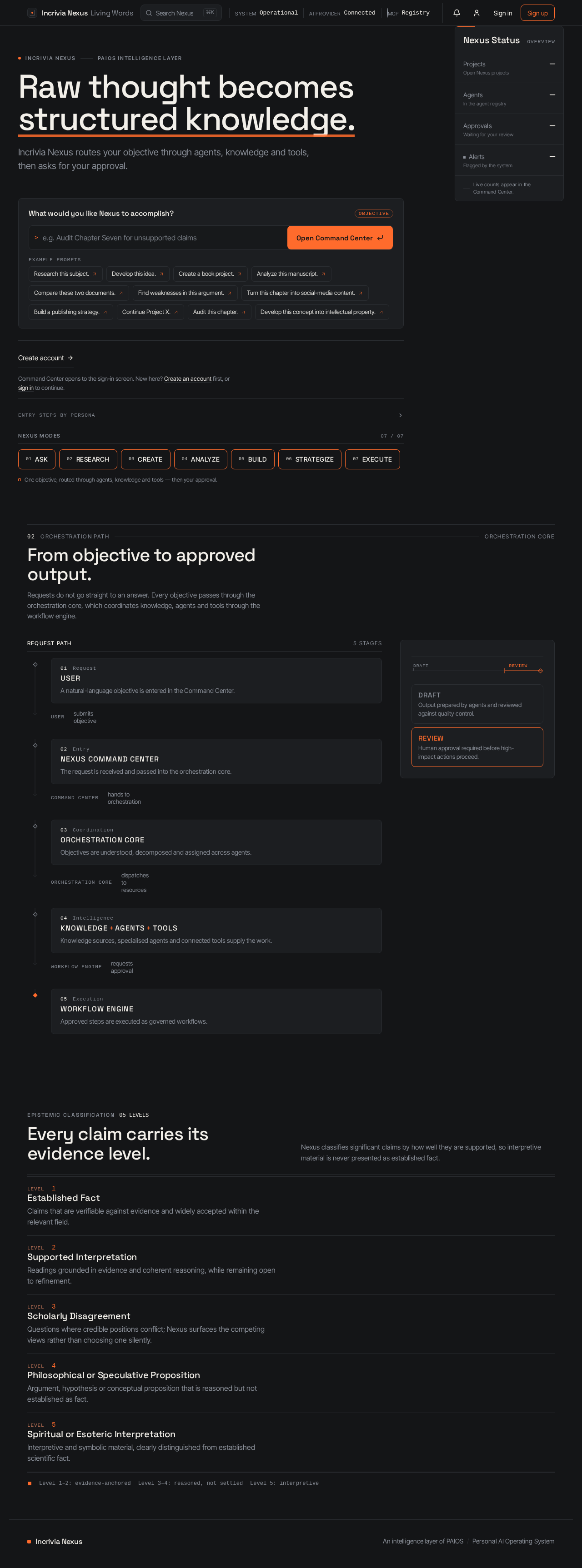
Incrivia NexusPAIOS intelligence layer
Raw thought becomes structured knowledge.
Incrivia Nexus routes your objective through agents, knowledge and tools, then asks for your approval.
Example prompts
Command Center opens to the sign-in screen. New here? Create an account first, or sign in to continue.
Entry steps by persona
- AdministratorOpen Command Centersign-in requirednew account
- AuthorOpen Command Centerauthor proceeds to sign inauthor has no account
- Copy EditorOpen Command Centernew user needs an accountexisting user proceeds to sign in
- CriticOpen Command Centeruser proceeds to sign inuser has no account
- EditorOpen Command Centernew user needs an accountexisting user opens sign-in
- Intellectual CriticOpen Command Centernew user needs an accountexisting user proceeds to sign in
- Line EditorOpen Command Centeruser proceeds to sign inuser has no account
- Project OwnerOpen Command Centerexisting accountnew account
- PublisherOpen Command Centerpublisher opens the public entry surface
- ResearcherOpen Command Centernew user needs an accountexisting user proceeds to sign in
- TrainerOpen Command Centertrainer needs an accounttrainer already has an account
Nexus modes
One objective, routed through agents, knowledge and tools — then your approval.
Nexus Status
Overview- ProjectsOpen Nexus projects
- —
- AgentsIn the agent registry
- —
- ApprovalsWaiting for your review
- —
- AlertsFlagged by the system
- —
Live counts appear in the Command Center.
From objective to approved output.
Requests do not go straight to an answer. Every objective passes through the orchestration core, which coordinates knowledge, agents and tools through the workflow engine.
- USER
A natural-language objective is entered in the Command Center.
USERsubmits objective - NEXUS COMMAND CENTER
The request is received and passed into the orchestration core.
COMMAND CENTERhands to orchestration - ORCHESTRATION CORE
Objectives are understood, decomposed and assigned across agents.
ORCHESTRATION COREdispatches to resources - KNOWLEDGE+AGENTS+TOOLS
Knowledge sources, specialised agents and connected tools supply the work.
WORKFLOW ENGINErequests approval - WORKFLOW ENGINE
Approved steps are executed as governed workflows.
Epistemic Classification05 levels
Every claim carries its evidence level.
Nexus classifies significant claims by how well they are supported, so interpretive material is never presented as established fact.
| Level | Classification |
|---|---|
| LEVEL 1 | Established FactClaims that are verifiable against evidence and widely accepted within the relevant field. |
| LEVEL 2 | Supported InterpretationReadings grounded in evidence and coherent reasoning, while remaining open to refinement. |
| LEVEL 3 | Scholarly DisagreementQuestions where credible positions conflict; Nexus surfaces the competing views rather than choosing one silently. |
| LEVEL 4 | Philosophical or Speculative PropositionArgument, hypothesis or conceptual proposition that is reasoned but not established as fact. |
| LEVEL 5 | Spiritual or Esoteric InterpretationInterpretive and symbolic material, clearly distinguished from established scientific fact. |
◼Level 1–2: evidence-anchoredLevel 3–4: reasoned, not settledLevel 5: interpretive
Incrivia NexusPAIOS intelligence layer
Raw thought becomes structured knowledge.
Incrivia Nexus routes your objective through agents, knowledge and tools, then asks for your approval.
Example prompts
Command Center opens to the sign-in screen. New here? Create an account first, or sign in to continue.
Entry steps by persona
- AdministratorOpen Command Centersign-in requirednew account
- AuthorOpen Command Centerauthor proceeds to sign inauthor has no account
- Copy EditorOpen Command Centernew user needs an accountexisting user proceeds to sign in
- CriticOpen Command Centeruser proceeds to sign inuser has no account
- EditorOpen Command Centernew user needs an accountexisting user opens sign-in
- Intellectual CriticOpen Command Centernew user needs an accountexisting user proceeds to sign in
- Line EditorOpen Command Centeruser proceeds to sign inuser has no account
- Project OwnerOpen Command Centerexisting accountnew account
- PublisherOpen Command Centerpublisher opens the public entry surface
- ResearcherOpen Command Centernew user needs an accountexisting user proceeds to sign in
- TrainerOpen Command Centertrainer needs an accounttrainer already has an account
Nexus modes
One objective, routed through agents, knowledge and tools — then your approval.
Nexus Status
Overview- ProjectsOpen Nexus projects
- —
- AgentsIn the agent registry
- —
- ApprovalsWaiting for your review
- —
- AlertsFlagged by the system
- —
Live counts appear in the Command Center.
From objective to approved output.
Requests do not go straight to an answer. Every objective passes through the orchestration core, which coordinates knowledge, agents and tools through the workflow engine.
- USER
A natural-language objective is entered in the Command Center.
USERsubmits objective - NEXUS COMMAND CENTER
The request is received and passed into the orchestration core.
COMMAND CENTERhands to orchestration - ORCHESTRATION CORE
Objectives are understood, decomposed and assigned across agents.
ORCHESTRATION COREdispatches to resources - KNOWLEDGE+AGENTS+TOOLS
Knowledge sources, specialised agents and connected tools supply the work.
WORKFLOW ENGINErequests approval - WORKFLOW ENGINE
Approved steps are executed as governed workflows.
Epistemic Classification05 levels
Every claim carries its evidence level.
Nexus classifies significant claims by how well they are supported, so interpretive material is never presented as established fact.
| Level | Classification |
|---|---|
| LEVEL 1 | Established FactClaims that are verifiable against evidence and widely accepted within the relevant field. |
| LEVEL 2 | Supported InterpretationReadings grounded in evidence and coherent reasoning, while remaining open to refinement. |
| LEVEL 3 | Scholarly DisagreementQuestions where credible positions conflict; Nexus surfaces the competing views rather than choosing one silently. |
| LEVEL 4 | Philosophical or Speculative PropositionArgument, hypothesis or conceptual proposition that is reasoned but not established as fact. |
| LEVEL 5 | Spiritual or Esoteric InterpretationInterpretive and symbolic material, clearly distinguished from established scientific fact. |
◼Level 1–2: evidence-anchoredLevel 3–4: reasoned, not settledLevel 5: interpretive
No comments yet. Be the first!