icy-clothing
 Drashti Solanki
i want to build a e-ommerce website for clothing brand





Comments (0)
Sign in to leave a comment
Project Tasks
93Define Database Schema
Design and implement the database schema for users, products, orders, and order items.
Implement NavBar for Signup Page
As a frontend developer, implement the NavBar section for the Signup page. This component includes a logo, navigation links to Home, Catalog, Dressing Room, and Orders, and action buttons for Cart, Notifications, and Account. The Cart and Orders links should be conditionally displayed based on the user's persona. The NavBar also features a hamburger menu that toggles a drawer for mobile views, using a state hook to manage the menu's open state. Page access: Guest User only.
Implement Sidebar for Dashboard
As a frontend developer, implement the Sidebar section for the Dashboard page. This section includes navigation items such as Dashboard, Inventory, Orders, Customers, and Settings, each with an associated icon. The Sidebar should be collapsible, with an 'isOpen' state to toggle visibility, and a close button to hide it. Ensure that the active navigation item is highlighted and includes an active dot indicator. This component is accessible only to Admin users. Page access: Admin only.
Implement SocialStats for Social
As a frontend developer, implement the SocialStats section which displays key statistics about the community using a grid layout. Each stat includes an icon, value, and label. Ensure the layout is responsive and visually appealing. This section is accessible by Guest Users only. Page access: Guest User only.
Implement FeaturedInfluencers for Social
As a frontend developer, implement the FeaturedInfluencers section which showcases top community creators using the InfluencerCard component. Ensure the grid layout is responsive and each card displays the influencer's name, followers, category, and a color-coded image. This section is accessible by Guest Users only. Page access: Guest User only.
Implement UserTestimonials for Social
As a frontend developer, implement the UserTestimonials section which displays user feedback using the TestimonialCard component. Ensure the grid layout is responsive and each card includes a quote, user name, handle, social platform, and avatar color. This section is accessible by Guest Users only. Page access: Guest User only.
Implement CommunityHighlights for Social
As a frontend developer, implement the CommunityHighlights section which features top outfits of the week using the CommunityOutfitCard component. Ensure the grid layout is responsive and each card displays tags, likes, shares, and creator information. This section is accessible by Guest Users only. Page access: Guest User only.
Implement SocialIntegration for Social
As a frontend developer, implement the SocialIntegration section which highlights social sharing features. Ensure the grid layout is responsive and includes features like sharing to Instagram, tagging friends, creating outfit links, and joining challenges. This section is accessible by Guest Users only. Page access: Guest User only.
Implement ShareYourStyle for Social
As a frontend developer, implement the ShareYourStyle section which allows users to upload outfit photos. Ensure the upload area is interactive and includes drag-and-drop functionality, an upload button, and tips for visibility. This section is accessible by Guest Users only. Page access: Guest User only.
Implement TrendingOutfits for Social
As a frontend developer, implement the TrendingOutfits section which displays trending outfit categories using the TrendingOutfitItem component. Ensure the carousel layout is responsive and includes category pills for filtering. This section is accessible by Guest Users only. Page access: Guest User only.
Implement CommunityChallenge for Social
As a frontend developer, implement the CommunityChallenge section which promotes weekly styling challenges. Ensure the layout is responsive and includes a challenge card with a header, description, stats, and a join button. This section is accessible by Guest Users only. Page access: Guest User only.
Implement FilterSidebar for Customers
As a frontend developer, implement the FilterSidebar section for the Customers page. This section includes a collapsible sidebar with filters for customer status, registration date, total orders, average spending, and region. It features interactive elements such as checkboxes, date inputs, and range sliders. This section is accessible by Admin only. Page access: Admin only.
Implement SearchBar for Customers
As a frontend developer, implement the SearchBar section for the Customers page. This section includes a search input for querying by name, email, or phone, a search button, and controls for sorting results and toggling between grid and list views. This section is accessible by Admin only. Page access: Admin only.
Implement CustomerGrid for Customers
As a frontend developer, implement the CustomerGrid section for the Customers page. This section displays a grid of customer cards using dummy data, each card showing customer details such as name, email, phone, registration date, orders, spending, and status. This section is accessible by Admin only. Page access: Admin only.
Implement Pagination for Customers
As a frontend developer, implement the Pagination section for the Customers page. This section includes navigation controls for paginating through customer data, displaying the current page and total pages, and options for selecting the number of rows per page. This section is accessible by Admin only. Page access: Admin only.
Implement ConfirmationHeader for OrderConfirmation
As a frontend developer, implement the ConfirmationHeader section for the OrderConfirmation page. This section includes a checkmark SVG icon, a headline displaying 'Order Confirmed!', and order details such as order number, timestamp, and email notice. Ensure the design matches the provided CSS styles and that the section is accessible only to the Casual Shopper persona. Page access: Casual Shopper only.
Implement OrderSummary for OrderConfirmation
As a frontend developer, implement the OrderSummary section for the OrderConfirmation page. This section displays the order total, status badge, and estimated delivery date with an SVG delivery icon. Ensure the design matches the provided CSS styles and that the section is accessible only to the Casual Shopper persona. Page access: Casual Shopper only.
Implement OrderDetails for OrderConfirmation
As a frontend developer, implement the OrderDetails section for the OrderConfirmation page. This section lists ordered items with details such as name, color, size, quantity, and price. Ensure the design matches the provided CSS styles and that the section is accessible only to the Casual Shopper persona. Page access: Casual Shopper only.
Implement DeliveryInformation for OrderConfirmation
As a frontend developer, implement the DeliveryInformation section for the OrderConfirmation page. This section includes the shipping address, delivery method, and a tracking link with an SVG map icon. Ensure the design matches the provided CSS styles and that the section is accessible only to the Casual Shopper persona. Page access: Casual Shopper only.
Implement PaymentSummary for OrderConfirmation
As a frontend developer, implement the PaymentSummary section for the OrderConfirmation page. This section displays a breakdown of the payment including subtotal, GST, shipping, and total amount, along with the payment method used. Ensure the design matches the provided CSS styles and that the section is accessible only to the Casual Shopper persona. Page access: Casual Shopper only.
Implement NextSteps for OrderConfirmation
As a frontend developer, implement the NextSteps section for the OrderConfirmation page. This section displays a timeline of order processing steps with current status highlighted. Ensure the design matches the provided CSS styles and that the section is accessible only to the Casual Shopper persona. Page access: Casual Shopper only.
Implement CustomerSupport for OrderConfirmation
As a frontend developer, implement the CustomerSupport section for the OrderConfirmation page. This section provides links to FAQ, live chat, contact form, and email support, along with a chat trigger button. Ensure the design matches the provided CSS styles and that the section is accessible only to the Casual Shopper persona. Page access: Casual Shopper only.
Develop API Endpoints
Create API endpoints for product browsing, cart management, order processing, and user authentication.
Implement Hero for Signup Page
As a frontend developer, implement the Hero section for the Signup page. This section includes a headline, subheadline, and two call-to-action buttons: 'Sign Up Now' and 'Browse as Guest'. The 'Sign Up Now' button should link to the SignupForm section. The Hero section also includes a decorative accent element. Page access: Guest User only.
Implement SignupForm for Signup Page
As a frontend developer, implement the SignupForm section for the Signup page. This form includes fields for full name, email, password, and confirm password, with validation for each field. It also includes a checkbox for agreeing to terms. The form uses state hooks to manage form data and errors, and displays password strength dynamically. Upon successful validation, an alert is shown to confirm account creation. Page access: Guest User only.
Implement Testimonials for Signup Page
As a frontend developer, implement the Testimonials section for the Signup page. This section displays cards with icons, statistics, and labels for 'Happy Customers', 'Secure Checkout', and 'Fast Shipping'. Each card is rendered dynamically from an array of items. Page access: Guest User only.
Implement Features for Signup Page
As a frontend developer, implement the Features section for the Signup page. This section includes a title and a grid of feature cards, each with an icon, title, and description. Features include 'Virtual Dressing Room', 'Curated Casual Wear', 'Easy Filtering', and 'Secure Payments'. Page access: Guest User only.
Implement TrustBadges for Signup Page
As a frontend developer, implement the TrustBadges section for the Signup page. This section displays badges with icons and labels for 'SSL Secured', '256-bit Encryption', 'WCAG Compliant', and 'OWASP Secure'. Each badge is rendered dynamically from an array of badges. Page access: Guest User only.
Implement Footer for Signup Page
As a frontend developer, implement the Footer section for the Signup page. This component includes copyright information, links to Privacy, Terms, and Support pages, and social media icons for Instagram and Facebook. Note that the Footer component may already exist from previous pages. Page access: Guest User only.
Implement CatalogHero for Catalog Page
As a frontend developer, implement the CatalogHero section for the Catalog page. This section includes a headline, subheadline, and a link to the featured collection. It also features animated particles for visual enhancement. Ensure the section is responsive and visually appealing. Page access: Casual Shopper, Guest User only.
Implement FilterBar for Catalog Page
As a frontend developer, implement the FilterBar section for the Catalog page. This component displays active filters as chips, with options to remove individual filters or clear all. It includes a toggle button to show or hide the filter panel. Ensure the component is interactive and updates the UI based on user actions. Page access: Casual Shopper, Guest User only.
Implement FilterFacets for Catalog Page
As a frontend developer, implement the FilterFacets section for the Catalog page. This component allows users to filter products by size, color, style, material, and price range. It includes interactive checkboxes and input fields to adjust filters dynamically. Ensure the component is responsive and updates the product list based on selected filters. Page access: Casual Shopper, Guest User only.
Implement SortControls for Catalog Page
As a frontend developer, implement the SortControls section for the Catalog page. This component provides sorting options for products, including newest, price, popularity, and rating. It also includes a view toggle between grid and list views. Ensure the component is functional and updates the product display based on user selections. Page access: Casual Shopper, Guest User only.
Implement ProductGrid for Catalog Page
As a frontend developer, implement the ProductGrid section for the Catalog page. This component displays products in a grid or list view, with options to add products to the cart or wishlist. It includes product images, names, ratings, and prices. Ensure the component is responsive and supports interactions like adding to cart and toggling wishlist. Page access: Casual Shopper, Guest User only.
Implement Pagination for Catalog Page
As a frontend developer, implement the Pagination section for the Catalog page. This component allows users to navigate through multiple pages of products. It includes buttons for previous and next pages, direct page selection, and a jump-to-page feature. Ensure the component is functional and updates the product list based on page changes. Page access: Casual Shopper, Guest User only.
Implement RelatedCategories for Catalog Page
As a frontend developer, implement the RelatedCategories section for the Catalog page. This component displays a carousel of related product categories with images and item counts. Ensure the component is visually appealing and responsive. Page access: Casual Shopper, Guest User only.
Implement DressingRoomIntro for Dressing Room
As a frontend developer, implement the DressingRoomIntro section for the Dressing Room page. This section introduces the personal styling studio with features like choosing body type, selecting skin tone, and mixing & matching items. Each feature is represented with an icon, title, and description. Ensure the layout is responsive and visually appealing. Page access: Casual Shopper, Guest User only.
Implement DressingRoomStudio for Dressing Room
As a frontend developer, implement the DressingRoomStudio section for the Dressing Room page. This interactive section allows users to select body types and skin tones, and add clothing items to their outfit. It includes a 3D mannequin placeholder and controls for selecting options. Implement state management for body type, skin tone, and outfit selection. Page access: Casual Shopper, Guest User only.
Implement OutfitDetails for Dressing Room
As a frontend developer, implement the OutfitDetails section for the Dressing Room page. This section displays the current outfit with items, prices, and a total cost. Users can remove items and view the estimated total. Implement state management for the list of items and ensure the layout is responsive. Page access: Casual Shopper, Guest User only.
Implement RecommendedProducts for Dressing Room
As a frontend developer, implement the RecommendedProducts section for the Dressing Room page. This section suggests additional products to complete the user's look. Each product is displayed with an icon, name, price, and an 'Add to Outfit' button. Ensure the grid layout is responsive and visually appealing. Page access: Casual Shopper, Guest User only.
Implement SocialSharing for Dressing Room
As a frontend developer, implement the SocialSharing section for the Dressing Room page. This section allows users to share their outfit via social media platforms like Instagram, Pinterest, WhatsApp, and Facebook. Implement a copy-to-clipboard feature for the share link and ensure the UI is responsive. Page access: Casual Shopper, Guest User only.
Implement QuickActions for Dressing Room
As a frontend developer, implement the QuickActions section for the Dressing Room page. This section provides buttons for actions like 'Add All to Cart', 'Save Outfit', 'Share Outfit', and 'Start New Outfit'. Ensure the buttons are styled according to their importance and the layout is responsive. Page access: Casual Shopper, Guest User only.
Implement BrowsePrompt for Dressing Room
As a frontend developer, implement the BrowsePrompt section for the Dressing Room page. This section encourages users to explore the full casual collection with buttons for 'Browse All Items' and 'View by Category'. Ensure the call-to-action buttons are prominent and the layout is responsive. Page access: Casual Shopper, Guest User only.
Implement WelcomeBanner for Dashboard
As a frontend developer, implement the WelcomeBanner section for the Dashboard page. This section displays a personalized greeting with the user's name, the current date, and a motivational tagline. It also includes badges showing today's revenue, pending orders, and total products. The 'View Detailed Report' button should be styled with an arrow icon. This component is accessible only to Admin users. Page access: Admin only.
Implement StatsCards for Dashboard
As a frontend developer, implement the StatsCards section for the Dashboard page. This section displays key metrics such as Total Sales, Pending Orders, Inventory Count, and Active Customers. Each card includes an icon, trend indicator (up or down), percentage change, and comparison text. This component is accessible only to Admin users. Page access: Admin only.
Implement SalesChart for Dashboard
As a frontend developer, implement the SalesChart section for the Dashboard page. This section includes a line chart displaying sales data over the past 30 days. It features interactive elements such as tooltips that appear on hover, showing detailed information about each data point. The chart should be responsive and accessible only to Admin users. Page access: Admin only.
Implement OrdersSection for Dashboard
As a frontend developer, implement the OrdersSection for the Dashboard page. This section displays a paginated table of recent orders, including order ID, customer name, amount, status, and date. It includes pagination controls to navigate through pages. The status should be visually distinct with badges. This component is accessible only to Admin users. Page access: Admin only.
Implement InventoryOverview for Dashboard
As a frontend developer, implement the InventoryOverview section for the Dashboard page. This section highlights inventory health with cards showing low stock items and recently added products. Each card includes a list with progress bars indicating stock levels. This component is accessible only to Admin users. Page access: Admin only.
Implement RecentCustomers for Dashboard
As a frontend developer, implement the RecentCustomers section for the Dashboard page. This section lists recent customers with details such as name, email, last purchase date, and lifetime spend. Each customer has an avatar with gradient colors and action buttons for viewing profile and sending messages. This component is accessible only to Admin users. Page access: Admin only.
Implement QuickActions for Dashboard
As a frontend developer, implement the QuickActions section for the Dashboard page. This section provides buttons for actions like 'Add New Product', 'View All Orders', 'Create Discount', and 'Contact Support'. Each button includes an icon and is styled based on its importance. This component is accessible only to Admin users. Page access: Admin only.
Implement InventorySidebar for Inventory
As a frontend developer, implement the InventorySidebar section which includes a navigation menu with links to Dashboard, Inventory, Orders, and Customers. The sidebar should highlight the active link and allow closing via an onClose callback. This section is accessible by Admin ONLY and must conditionally render links based on persona access. Ensure integration with the existing Sidebar component from the Dashboard page. Page access: Admin only.
Implement PageHeader for Customers
As a frontend developer, implement the PageHeader section for the Customers page. This section includes breadcrumb navigation linking to the Dashboard, a title displaying 'Inventory', and statistical cards showing total products, low stock alerts, and recently added items. It also features an 'Add New Product' button with an SVG icon. This section is accessible by Admin only and should include dependencies from the Dashboard page. Page access: Admin only.
Define Database Models
As a Data Engineer, define and implement database models for users, products, orders, order items, and wishlists. Ensure models are optimized for queries and include necessary indexes.
Implement Authentication and RBAC
Set up JWT-based authentication and role-based access control for different user personas.
Integrate Payment Gateway
Integrate Indian payment gateways for secure transactions during checkout.
Build Inventory Management
Develop backend services for inventory management including product addition, update, and removal.
Develop Analytics Dashboard
Create backend services for sales analytics and performance tracking for admin users.
Implement BreadcrumbNav for ProductDetail
As a frontend developer, implement the BreadcrumbNav section for the ProductDetail page. This component displays a breadcrumb navigation trail using an array of items. It includes a back button that navigates to the previous page using window.history.back(). Each breadcrumb item is rendered as a link or a current label based on its active state. Ensure the component is accessible by setting appropriate aria-labels. This section is accessible by Casual Shopper and Guest User personas. Note: This section depends on the Catalog page's CatalogHero implementation. Page access: Casual Shopper, Guest User only.
Implement PageHeader for Inventory
As a frontend developer, implement the PageHeader section which includes breadcrumbs navigation, a title, and statistics cards displaying total products, low stock, and recently added items. The header also features an 'Add New Product' button with an SVG icon. This section is accessible by Admin ONLY. Page access: Admin only.
Implement FilterBar for Inventory
As a frontend developer, implement the FilterBar section which allows filtering products by search, category, status, and sorting options. It includes a clear filters button that resets all filters. This section is accessible by Admin ONLY and interacts with the ProductsGrid to update displayed products. Page access: Admin only.
Implement Business Rules
As a Backend Developer, implement business rules for product filtering, wishlist management, and order processing. Ensure rules are consistent with the SRD and user flows.
Setup Scheduled Jobs
As a Backend Developer, setup scheduled jobs for inventory updates, sales analytics, and user notifications. Ensure jobs run efficiently and do not impact system performance.
Integrate Frontend and Backend
As a Tech Lead, verify the end-to-end integration between the frontend implementation and the backend API. Ensure data flows correctly, API responses are handled properly in the UI, and all interactions work as expected.
QA for Critical Workflows
Conduct QA testing for critical workflows including product browsing, cart management, and checkout.
Setup DevOps Environment
Configure CI/CD pipelines, environment setup, and deployment verification for the icy-clothing platform.
Implement ProductGallery for ProductDetail
As a frontend developer, implement the ProductGallery section for the ProductDetail page. This component displays a gallery of product images with zoom functionality. It uses state hooks to manage the active image index, zoom state, and zoom origin. The gallery supports navigation through images and displays color options. This section is accessible by Casual Shopper and Guest User personas. Page access: Casual Shopper, Guest User only.
Implement ProductInfo for ProductDetail
As a frontend developer, implement the ProductInfo section for the ProductDetail page. This component displays product details such as title, rating, price, stock status, and size options. It includes interactive elements for adding items to the cart or wishlist, with state management for selected size and quantity. This section is accessible by Casual Shopper and Guest User personas. Page access: Casual Shopper, Guest User only.
Implement ProductDescription for ProductDetail
As a frontend developer, implement the ProductDescription section for the ProductDetail page. This component provides tabbed content for product details, materials, care instructions, and fit information. It uses state hooks to manage active tabs and accordion states for mobile view. This section is accessible by Casual Shopper and Guest User personas. Page access: Casual Shopper, Guest User only.
Implement SizeGuide for ProductDetail
As a frontend developer, implement the SizeGuide section for the ProductDetail page. This component displays a size chart and provides a tool for recommending sizes based on user input for height and weight. It uses state hooks to manage modal visibility and user selections. This section is accessible by Casual Shopper and Guest User personas. Page access: Casual Shopper, Guest User only.
Implement RelatedProducts for ProductDetail
As a frontend developer, implement the RelatedProducts section for the ProductDetail page. This component displays a scrollable list of related products with options to add items to the cart. It uses state hooks to manage scroll position and cart interactions. This section is accessible by Casual Shopper and Guest User personas. Page access: Casual Shopper, Guest User only.
Implement SocialHero for Social
As a frontend developer, implement the SocialHero section which includes a visually engaging hero area with floating SVG cards and a call-to-action for users to explore trending outfits or share their own. Ensure the SVG animations and layout are responsive. This section is accessible by Guest Users only and must include conditional navigation links based on persona access. This section depends on the ProductDetail page. Page access: Guest User only.
Implement WishlistHeader for Wishlist
As a frontend developer, implement the WishlistHeader section which displays the title 'My Wishlist' with an accent, a subtitle, and a badge showing the number of items saved. It includes an SVG star icon and an illustration SVG. This section is accessible by Casual Shoppers only. Ensure the component integrates with the ProductDetail page as per the dependency. Page access: Casual Shopper only.
Implement PageHeader for Cart
As a frontend developer, implement the PageHeader section for the Cart page. This section includes a breadcrumb navigation, a title displaying 'Shopping Cart', and an item count that dynamically updates based on the number of items in the cart. It also provides a link to continue shopping. This section is accessible only to Casual Shoppers. Ensure that the breadcrumb navigation correctly reflects the user's path and that the item count is accurate. Page access: Casual Shopper only.
Implement ProductsGrid for Inventory
As a frontend developer, implement the ProductsGrid section which displays a grid of products filtered and sorted based on the FilterBar inputs. Each product card shows an image, name, SKU, price, stock status, and category. This section is accessible by Admin ONLY and must handle empty states when no products match the filters. Page access: Admin only.
Conduct QA Testing
As a QA Engineer, conduct comprehensive testing for all critical workflows including product browsing, cart management, checkout, and user authentication. Ensure all features meet quality standards.
Implement WishlistFilters for Wishlist
As a frontend developer, implement the WishlistFilters section which provides advanced filtering options for size, color, category, and sorting. It includes interactive elements like toggle buttons and a dropdown for sorting. This section is accessible by Casual Shoppers only. Page access: Casual Shopper only.
Implement WishlistGrid for Wishlist
As a frontend developer, implement the WishlistGrid section which displays a grid of wishlist items with options to select, add to cart, or remove items. It includes interactive elements like checkboxes and buttons for actions. This section is accessible by Casual Shoppers only. Page access: Casual Shopper only.
Implement EmptyState for Wishlist
As a frontend developer, implement the EmptyState section which displays a message and illustration when the wishlist is empty. It includes a call-to-action link to browse the catalog. This section is accessible by Casual Shoppers only. Page access: Casual Shopper only.
Implement WishlistActions for Wishlist
As a frontend developer, implement the WishlistActions section which provides actions like select all, add all to cart, remove selected, share all, and clear all. It includes interactive buttons and a master checkbox. This section is accessible by Casual Shoppers only. Page access: Casual Shopper only.
Implement SuggestedItems for Wishlist
As a frontend developer, implement the SuggestedItems section which displays a carousel of suggested items with navigation buttons. It includes interactive elements for scrolling and updating button states. This section is accessible by Casual Shoppers only. Page access: Casual Shopper only.
Implement CartItems for Cart
As a frontend developer, implement the CartItems section for the Cart page. This section displays a list of items in the cart, allowing users to update quantities, view item details, and remove items. It includes interactive elements such as quantity buttons and a remove button, with state management for item quantities. This section is accessible only to Casual Shoppers. Page access: Casual Shopper only.
Implement ApplyCoupon for Cart
As a frontend developer, implement the ApplyCoupon section for the Cart page. This section allows users to enter and apply a promo code, displaying the applied coupon and its description if successful. It includes input handling and button interactions for applying and removing coupons. This section is accessible only to Casual Shoppers. Page access: Casual Shopper only.
Implement OrderSummary for Cart
As a frontend developer, implement the OrderSummary section for the Cart page. This section displays a detailed summary of the order, including subtotal, discounts, shipping options, tax, and total. It features interactive elements for selecting shipping options and toggling their visibility. This section is accessible only to Casual Shoppers. Page access: Casual Shopper only.
Implement CheckoutCTA for Cart
As a frontend developer, implement the CheckoutCTA section for the Cart page. This section includes a button to proceed to checkout and displays security badges and payment method icons. It ensures a secure checkout experience powered by Razorpay. This section is accessible only to Casual Shoppers. Page access: Casual Shopper only.
Implement RelatedItems for Cart
As a frontend developer, implement the RelatedItems section for the Cart page. This section displays a carousel of related products with images, names, and prices. It includes interactive buttons to scroll through the carousel. This section is accessible only to Casual Shoppers. Page access: Casual Shopper only.
Implement Pagination for Inventory
As a frontend developer, implement the Pagination section which provides navigation through multiple pages of products. It includes buttons for previous and next pages, page numbers, and a dropdown to select the number of rows per page. This section is accessible by Admin ONLY and must integrate with the ProductsGrid to update the displayed products. Page access: Admin only.
Implement ProgressIndicator for Checkout
As a frontend developer, implement the ProgressIndicator section for the Checkout page. This section includes a stepper component with steps for 'Shipping', 'Billing', 'Payment', and 'Confirm'. It uses a state hook to track the current step and allows navigation between steps. The component includes a CheckIcon for completed steps and handles click events to update the current step. Ensure accessibility attributes are correctly set for the progress bar. Page access: Casual Shopper only.
Implement CheckoutHeading for Checkout
As a frontend developer, implement the CheckoutHeading section for the Checkout page. This section displays the main heading 'Checkout' and a subheading 'Secure your order in a few simple steps'. It includes a horizontal divider for visual separation. Ensure the styling matches the design specifications. Page access: Casual Shopper only.
Implement BillingDetails for Checkout
As a frontend developer, implement the BillingDetails section for the Checkout page. This section includes input fields for full name, email, and phone number with validation logic. It uses state hooks to manage form data and validation errors. The component provides visual feedback for valid and invalid inputs and includes an option to mark billing details as the same as shipping. Page access: Casual Shopper only.
Implement ShippingAddress for Checkout
As a frontend developer, implement the ShippingAddress section for the Checkout page. This section includes input fields for country, state, city, postal code, and address with validation logic. It uses state hooks to manage form data and validation errors. The component provides visual feedback for valid and invalid inputs and includes options to save the address for future use and mark it as the same as billing. Page access: Casual Shopper only.
Implement OrderReview for Checkout
As a frontend developer, implement the OrderReview section for the Checkout page. This section displays a list of order items with details such as name, size, color, and price. It uses state hooks to manage the list of items and calculates the total quantity, subtotal, tax, discount, and total amount. The component includes scroll shadow effects for overflow handling. Page access: Casual Shopper only.
Implement ApplyCoupon for Checkout
As a frontend developer, implement the ApplyCoupon section for the Checkout page. This section allows users to enter and apply a coupon code. It uses state hooks to manage the input value, applied coupon, and error messages. The component includes validation logic for coupon codes and provides visual feedback for invalid entries with a shake animation. Page access: Casual Shopper only.
Implement OrderSummary for Checkout
As a frontend developer, implement the OrderSummary section for the Checkout page. This section displays a summary of the order including item count, subtotal, discount, shipping, taxes, and grand total. It uses state hooks to manage the visibility of the summary details and includes animations for expanding and collapsing the summary. Page access: Casual Shopper only.
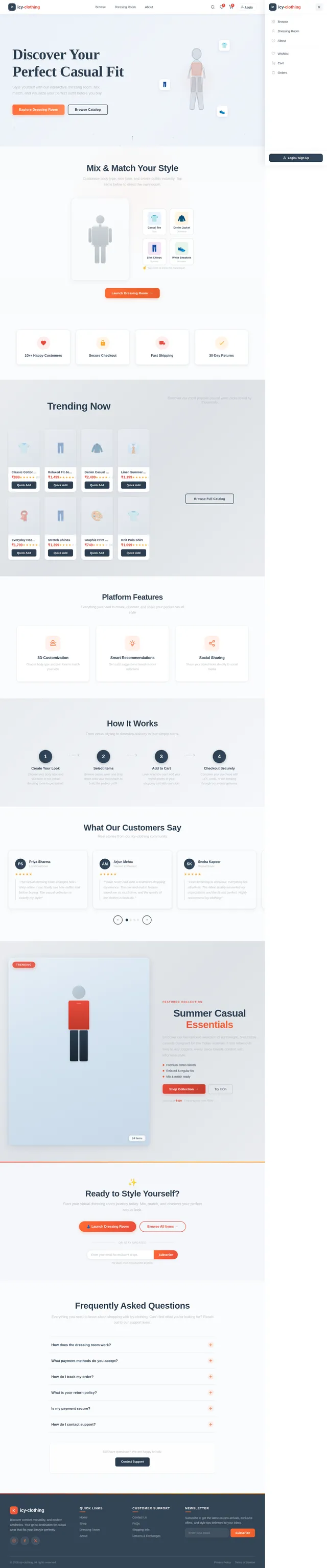
Discover Your Perfect Casual Fit
Style yourself with our interactive dressing room. Mix, match, and visualize your perfect outfit before you buy.
Mix & Match Your Style
Customize body type, skin tone, and create outfits instantly. Tap items below to dress the mannequin.
Trending Now
Discover our most popular casual wear picks loved by thousands
Platform Features
Everything you need to create, discover, and share your perfect casual style
3D Customization
Choose body type and skin tone to match your look
Smart Recommendations
Get outfit suggestions based on your selections
Social Sharing
Share your styled looks directly to social media
How It Works
From virtual styling to doorstep delivery in four simple steps.
What Our Customers Say
Real stories from our icy-clothing community
Priya Sharma
Loyal Customer
"The virtual dressing room changed how I shop online. I can finally see how outfits look before buying. The casual collection is exactly my style!"
Arjun Mehta
Fashion Enthusiast
"I have never had such a seamless shopping experience. The mix-and-match feature saved me so much time, and the quality of the clothes is fantastic."
Sneha Kapoor
Repeat Buyer
"From browsing to checkout, everything felt effortless. The fabric quality exceeded my expectations and the fit was perfect. Highly recommend icy-clothing!"
Rohan Patel
First-Time Buyer
"I was skeptical about buying casual wear online, but the detailed product descriptions and the dressing room preview made me confident in my purchase."
Ananya Desai
Style Blogger
"The 3D customization feature is a game changer. I styled an entire outfit in minutes and shared it straight to my social media. My followers loved it!"
Vikram Singh
Regular Shopper
"Fast shipping, easy returns, and the most comfortable casual wear I have found online. The smart recommendations always suggest exactly what I need."
Featured Collection
Summer Casual Essentials
Discover our handpicked selection of lightweight, breathable casuals designed for the Indian summer. From relaxed-fit tees to airy joggers, every piece blends comfort with effortless style.
Starting at ₹499 · Free shipping over ₹999
Ready to Style Yourself?
Start your virtual dressing room journey today. Mix, match, and discover your perfect casual look.
No spam, ever. Unsubscribe anytime.
Frequently Asked Questions
Everything you need to know about shopping with icy-clothing. Can't find what you're looking for? Reach out to our support team.
Our interactive dressing room lets you create a personalized mannequin by selecting your body type and skin tone. Simply drag and drop clothing items onto the mannequin to mix and match outfits before you buy. It works on both desktop and mobile devices for a seamless styling experience.
We accept all major payment methods including UPI, credit and debit cards (Visa, Mastercard, RuPay), net banking, and popular wallets like Paytm and PhonePe. All transactions are processed through secure, encrypted payment gateways.
Once your order is shipped, you will receive a tracking link via email and SMS. You can also log in to your account, go to the Orders page, and view real-time tracking updates for each order including estimated delivery dates.
We offer a hassle-free 30-day return policy on all items. If you are not satisfied with your purchase, simply initiate a return from your account, and we will arrange a free pickup. Refunds are processed within 5-7 business days after we receive the item.
Absolutely. We use industry-standard SSL encryption and partner with trusted payment providers to ensure your financial information is always protected. We never store your card details on our servers, and every transaction is verified with an additional layer of authentication.
Our support team is available Monday through Saturday, 9 AM to 8 PM IST. You can reach us via the contact form on our website, email us directly, or use the live chat feature for instant assistance. We typically respond within a few hours.
Still have questions? We are happy to help.
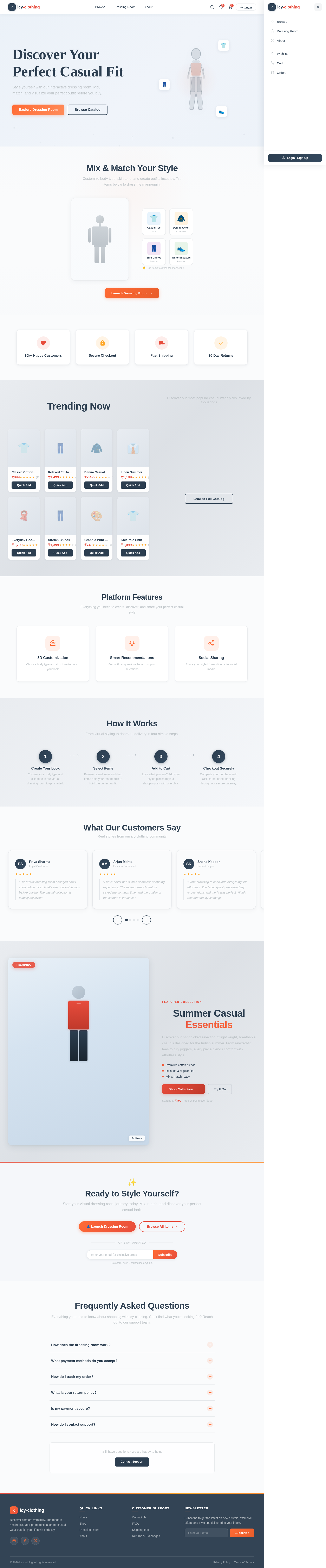
Contact SupportDiscover Your Perfect Casual Fit
Style yourself with our interactive dressing room. Mix, match, and visualize your perfect outfit before you buy.
Mix & Match Your Style
Customize body type, skin tone, and create outfits instantly. Tap items below to dress the mannequin.
Trending Now
Discover our most popular casual wear picks loved by thousands
Platform Features
Everything you need to create, discover, and share your perfect casual style
3D Customization
Choose body type and skin tone to match your look
Smart Recommendations
Get outfit suggestions based on your selections
Social Sharing
Share your styled looks directly to social media
How It Works
From virtual styling to doorstep delivery in four simple steps.
What Our Customers Say
Real stories from our icy-clothing community
Priya Sharma
Loyal Customer
"The virtual dressing room changed how I shop online. I can finally see how outfits look before buying. The casual collection is exactly my style!"
Arjun Mehta
Fashion Enthusiast
"I have never had such a seamless shopping experience. The mix-and-match feature saved me so much time, and the quality of the clothes is fantastic."
Sneha Kapoor
Repeat Buyer
"From browsing to checkout, everything felt effortless. The fabric quality exceeded my expectations and the fit was perfect. Highly recommend icy-clothing!"
Rohan Patel
First-Time Buyer
"I was skeptical about buying casual wear online, but the detailed product descriptions and the dressing room preview made me confident in my purchase."
Ananya Desai
Style Blogger
"The 3D customization feature is a game changer. I styled an entire outfit in minutes and shared it straight to my social media. My followers loved it!"
Vikram Singh
Regular Shopper
"Fast shipping, easy returns, and the most comfortable casual wear I have found online. The smart recommendations always suggest exactly what I need."
Featured Collection
Summer Casual Essentials
Discover our handpicked selection of lightweight, breathable casuals designed for the Indian summer. From relaxed-fit tees to airy joggers, every piece blends comfort with effortless style.
Starting at ₹499 · Free shipping over ₹999
Ready to Style Yourself?
Start your virtual dressing room journey today. Mix, match, and discover your perfect casual look.
No spam, ever. Unsubscribe anytime.
Frequently Asked Questions
Everything you need to know about shopping with icy-clothing. Can't find what you're looking for? Reach out to our support team.
Our interactive dressing room lets you create a personalized mannequin by selecting your body type and skin tone. Simply drag and drop clothing items onto the mannequin to mix and match outfits before you buy. It works on both desktop and mobile devices for a seamless styling experience.
We accept all major payment methods including UPI, credit and debit cards (Visa, Mastercard, RuPay), net banking, and popular wallets like Paytm and PhonePe. All transactions are processed through secure, encrypted payment gateways.
Once your order is shipped, you will receive a tracking link via email and SMS. You can also log in to your account, go to the Orders page, and view real-time tracking updates for each order including estimated delivery dates.
We offer a hassle-free 30-day return policy on all items. If you are not satisfied with your purchase, simply initiate a return from your account, and we will arrange a free pickup. Refunds are processed within 5-7 business days after we receive the item.
Absolutely. We use industry-standard SSL encryption and partner with trusted payment providers to ensure your financial information is always protected. We never store your card details on our servers, and every transaction is verified with an additional layer of authentication.
Our support team is available Monday through Saturday, 9 AM to 8 PM IST. You can reach us via the contact form on our website, email us directly, or use the live chat feature for instant assistance. We typically respond within a few hours.
Still have questions? We are happy to help.
Contact Support
No comments yet. Be the first!