icy-app
create a simple single design of todo

Comments (0)
Sign in to leave a comment
System Requirements
icy-app System Requirements Document
1. Introduction
The purpose of this document is to outline the system requirements for the "icy-app," a simple single-page application designed to manage a to-do list efficiently. This document will detail the functional and non-functional requirements, user personas, core user flows, and design elements specific to the icy-app.
2. System Overview
The icy-app is a single-page application that allows users to manage their tasks through a simple and intuitive interface. The application will be designed to provide a seamless user experience, focusing on ease of use and accessibility. The primary goal is to enable users to add, edit, and delete tasks with minimal effort.
3. Functional Requirements
- As a User, I should be able to add a new task to my to-do list.
- As a User, I should be able to edit an existing task.
- As a User, I should be able to delete a task from my to-do list.
- As a User, I should be able to view all tasks in a list format.
4. User Personas
- User: An individual who wants to manage their daily tasks efficiently through a simple interface.
5. Core User Flows
- User opens the application -> User adds a new task -> User edits a task -> User deletes a task -> User views the updated list of tasks.
6. Visuals Colors and Theme
- primary: #3498db (a calming blue for the main interface)
- primary_light: #85c1e9 (a lighter blue for hover states)
- secondary: #e74c3c (a contrasting red for emphasis)
- accent: #f1c40f (a vibrant yellow for call-to-action buttons)
- highlight: #f39c12 (a warm orange for notifications)
- bg: #ecf0f1 (a light grey for the background)
- surface: rgba(255, 255, 255, 0.9) (a soft white for cards/panels)
- text: #2c3e50 (a dark blue for primary text)
- text_muted: #95a5a6 (a muted grey for secondary text)
- border: rgba(44, 62, 80, 0.2) (a subtle blue-grey for borders)
7. Signature Design Concept
The icy-app will feature an interactive "Task Carousel" on the homepage. This carousel will allow users to swipe through their tasks horizontally, providing a dynamic and engaging way to manage their to-do list. Each task card will flip to reveal editing options when clicked, creating a playful yet functional interaction. The carousel will be built using framer-motion for smooth animations and transitions, ensuring a delightful user experience.
8. Interaction Model & Motion Direction
The interaction model for the icy-app will be "animated," featuring moderate scroll-triggered reveals and hover transitions. The task carousel will incorporate spring physics for interactive elements, providing a polished and responsive feel. This approach will enhance the user experience by making task management both intuitive and enjoyable.
9. Non-Functional Requirements
- The application should load within 2 seconds on a standard internet connection.
- The application should be responsive and accessible on both desktop and mobile devices.
- The application should support the latest versions of major web browsers.
10. Tech Stack
- Frontend: React for Web
- Backend: Not applicable for a single-page design
- Database: Not applicable for a single-page design
11. Assumptions and Constraints
- The application will be developed as a single-page application with no backend integration.
- The design will focus on simplicity and ease of use, with minimalistic features.
12. Glossary
- Task: An item on the to-do list that can be added, edited, or deleted by the user.
- Carousel: An interactive component that allows users to swipe through items horizontally.
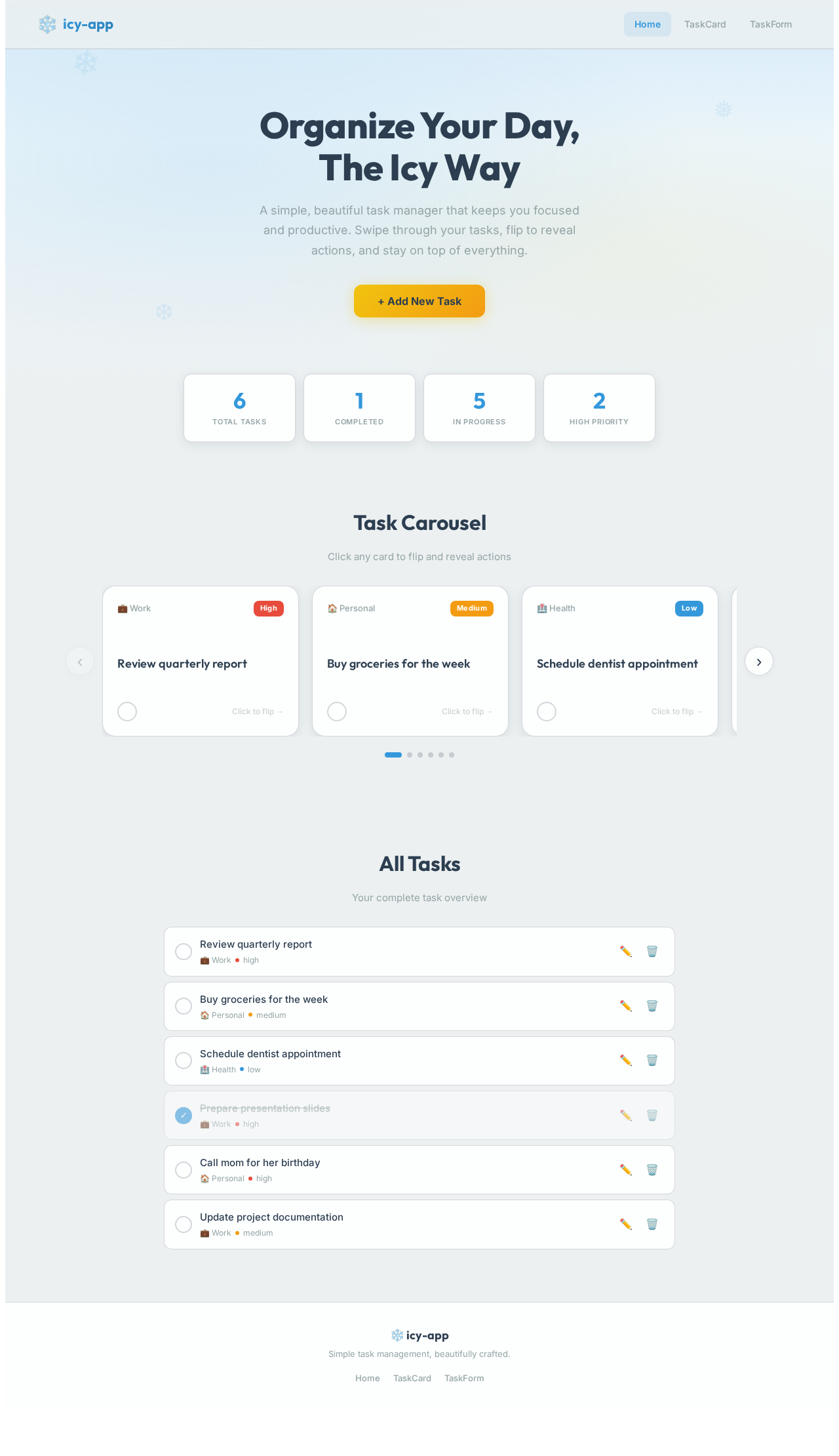
Organize Your Day,
The Icy Way
A simple, beautiful task manager that keeps you focused and productive. Swipe through your tasks, flip to reveal actions, and stay on top of everything.
Task Carousel
Click any card to flip and reveal actions
Review quarterly report
Actions
Review quarterly report
Click to flip backBuy groceries for the week
Actions
Buy groceries for the week
Click to flip backSchedule dentist appointment
Actions
Schedule dentist appointment
Click to flip backPrepare presentation slides
Actions
Prepare presentation slides
Click to flip backCall mom for her birthday
Actions
Call mom for her birthday
Click to flip backUpdate project documentation
Actions
Update project documentation
Click to flip backAll Tasks
Your complete task overview
No comments yet. Be the first!