hyper-productivity
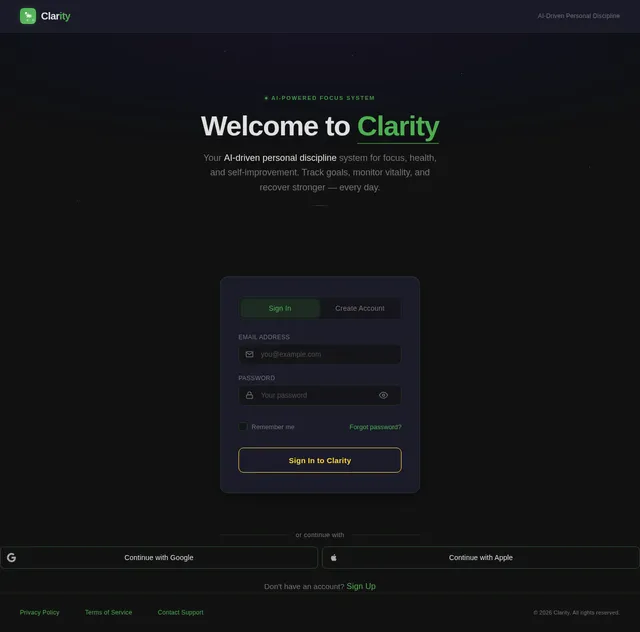
Build a full production-ready mobile app called “Clarity” from scratch. Objective: Clarity is a premium, AI-driven personal discipline and productivity system focused on: focus health dopamine control (scrolling reduction) self-improvement structured daily systems The app must feel like a high-end, polished product (Notion + Apple Health + Calm hybrid). TECH STACK (STRICT) iOS app using SwiftUI + SwiftData Backend: Supabase (Auth + Postgres) Payments: StoreKit (subscriptions: monthly + yearly) Architecture: clean MVVM or modular SwiftUI Local persistence for fast UI + sync-ready structure CORE FEATURES (REQUIRED) 1. AUTH SYSTEM Email + password auth (Supabase) Sign in / sign up / reset password Persistent session handling App state routing: not signed in → auth signed in but no onboarding → onboarding completed onboarding → main app 2. ONBOARDING SYSTEM (HIGHLY IMPORTANT) Multi-step onboarding that builds a personalized system: Collect: age, height, weight sleep, stress, activity level biggest struggle (focus, discipline, energy, dopamine, etc.) goals (weight loss, mindfulness, discipline, sleep, etc.) commitment level (1–10) Generate: personalized plan focus areas daily targets weekly targets Then: show animated plan reveal screen store onboarding profile mark onboarding complete 3. GOALS SYSTEM (CORE FEATURE) Create a template-driven goal system. Data model: GoalItem (title, category, targetType, targetValue, progress, recurring) Categories: weight loss muscle gain mindfulness focus recovery (dopamine) sleep discipline Template system: large library of predefined templates each template includes: daily actions weekly actions difficulty level User can: pick templates OR create custom goals track progress mark complete view categories UI: modern cards animated progress smooth interactions 4. HEALTH SYSTEM Track: water protein steps sleep duration + quality workouts sunlight notes Features: auto-save logs (no manual save) vitality score calculation (0–100) history screen with detail view ability to tap a log → full breakdown page UI: animated progress bars interactive sliders / steppers clean dashboard 5. RECOVERY SYSTEM (DOPAMINE / SCROLLING CONTROL) Features: urge logging (intensity, trigger, mood, outcome) streak tracking recovery plan trigger insights (most common trigger, mood, etc.) relapse review system Include: “Rescue” screen with: breathing delay techniques reset tools 6. DASHBOARD (MAIN SCREEN) Show: today’s goals health summary streaks quick actions Must feel: fast minimal high signal / low clutter 7. SUBSCRIPTIONS Plans: free (basic access) pro monthly pro yearly Requirements: StoreKit integration free users can still use app premium unlocks advanced features (not onboarding access) DESIGN REQUIREMENTS Dark theme (default) Color palette: deep background blue/green accents Rounded cards, soft shadows Glassmorphism where appropriate Smooth animations everywhere: transitions button presses card reveals scroll-based animations ANIMATION REQUIREMENTS Add: spring animations for navigation fade/slide for onboarding animated progress bars micro-interactions (tap, toggle, increment) subtle pulsing CTA buttons FILE STRUCTURE Organize into modules: Auth/ Onboarding/ Dashboard/ Goals/ Health/ Recovery/ Shared UI/ Models/ Managers/ OUTPUT FORMAT Provide full SwiftUI code Include: models views managers (AuthManager, SubscriptionManager, etc.) Code must compile No placeholders except clearly marked ones (API keys, etc.) QUALITY REQUIREMENTS No broken navigation No missing types No undefined components Consistent naming Clean, production-level structure Goal: Produce a complete, high-quality MVP that feels like a real App Store-ready product, not a prototype.

Comments (0)
Sign in to leave a comment
System Requirements
System Requirements Document (SRD)
Project Name: hyper-productivity
1. Introduction
The hyper-productivity project, specifically the mobile app “Clarity,” is a premium, AI-driven personal discipline and productivity system designed to help users achieve focus, health, dopamine control, and self-improvement through structured daily systems.
This document outlines the system requirements for building “Clarity” as a production-ready mobile app with a hybrid personalization model and a clear free/premium tier boundary. The app will combine elements of Notion, Apple Health, and Calm to deliver a polished, high-end experience.
The target audience is primarily U.S.-based users, with locale-specific defaults such as USD currency, EST timezone, and imperial units for measurements.
2. System Overview
“Clarity” is an iOS mobile application built using SwiftUI and SwiftData for the frontend and Supabase for backend services. The app will provide users with a structured framework for productivity and health improvement, evolving into an adaptive system based on user behavior and metrics.
The app will feature:
- Hybrid Personalization: A structured onboarding system that evolves adaptively post-onboarding using user metrics like goal completion rates, stress levels, and sleep quality.
- Subscription Model: A free tier offering full usability and a premium tier unlocking advanced personalization, analytics, AI tools, and custom system creation.
- Core Features: Goal tracking, health monitoring, dopamine recovery tools, and a dynamic dashboard.
3. Functional Requirements
Onboarding System
- As a User, I should be able to complete a multi-step onboarding process that collects my age, height, weight, sleep, stress, activity level, biggest struggles, goals, and commitment level.
- As a User, I should receive a semi-personalized plan based on deterministic rules during onboarding.
- As a User, I should see an animated plan reveal screen after onboarding.
- As a User, I should have my onboarding profile stored and marked as complete.
Goals System
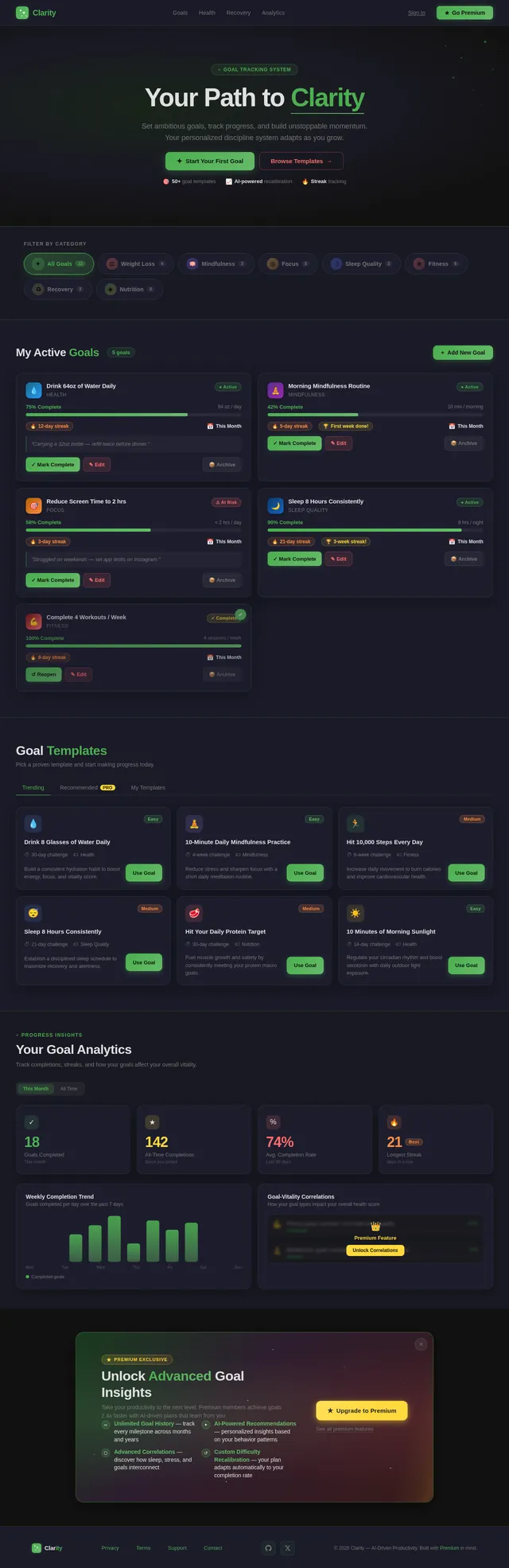
- As a User, I should be able to pick predefined goal templates or create custom goals.
- As a User, I should be able to track progress, mark goals complete, and view categories like weight loss, mindfulness, and focus.
- As a User, I should see modern cards with animated progress and smooth interactions.
Health System
- As a User, I should be able to track water, protein, steps, sleep duration and quality, workouts, sunlight exposure, and notes.
- As a User, I should see a vitality score calculated from my health logs.
- As a User, I should be able to view detailed breakdowns of my logs.
Recovery System
- As a User, I should be able to log urges with intensity, triggers, mood, and outcomes.
- As a User, I should see streak tracking and recovery plans.
- As a User, I should access a “Rescue” screen with breathing exercises, delay techniques, and reset tools.
Dashboard
- As a User, I should see today’s goals, health summaries, streaks, and quick actions on the main screen.
- As a User, I should experience a fast, minimal, and clutter-free dashboard interface.
Subscription System
- As a User, I should be able to subscribe to a monthly or yearly premium plan using StoreKit.
- As a Free User, I should have access to onboarding, basic goals, health tracking, and limited templates/history.
- As a Premium User, I should unlock advanced personalization, full template libraries, long-term analytics, unlimited history, and AI features.
Adaptive Personalization
- As a User, I should have my plan recalculated periodically based on metrics like goal completion rate, stress levels, and sleep quality.
- As a User, I should see adjustments to difficulty and intensity based on my behavior (e.g., reduce difficulty if completion rate < 50%).
4. User Personas
Free User
- Goals: Basic productivity and health tracking.
- Access: Onboarding, basic goals, health tracking, limited templates, and limited history.
Premium User
- Goals: Advanced personalization, deep insights, and custom system creation.
- Access: Adaptive recalibration, full template library, long-term analytics, unlimited history, advanced recovery tools, and AI features.
5. Visuals Colors and Theme
Color Palette
- Background: #121212 (Deep Charcoal)
- Surface: #1E1E2F (Midnight Blue)
- Text: #E0E0E0 (Soft White)
- Accent: #4CAF50 (Emerald Green)
- Muted Tones: #757575 (Ash Gray)
6. Signature Design Concept
Interactive Galaxy Dashboard
The homepage will feature an interactive galaxy map where each star represents a feature or section of the app. Users can tap on stars to navigate to goals, health logs, recovery tools, and subscriptions.
Details:
- Animations: Stars twinkle subtly, and constellations form dynamically as users interact.
- Transitions: Smooth zoom-in/out animations when navigating between sections.
- Micro-interactions: Hovering over stars reveals tooltips with feature descriptions.
- Color Shifts: The galaxy background subtly changes hues based on the time of day (e.g., deep blue at night, soft orange at sunrise).
This design will create an unforgettable first impression, making the app feel immersive and futuristic.
7. Non-Functional Requirements
- The app must load within 2 seconds on modern iOS devices.
- All animations must run at 60 FPS for smooth user experience.
- Data synchronization with Supabase must occur seamlessly in the background.
- The app must comply with Apple’s App Store guidelines.
8. Tech Stack
Frontend
- SwiftUI for iOS app development.
- SwiftData for local persistence.
Backend
- Supabase (Auth + Postgres).
Payments
- StoreKit for subscription management.
Architecture
- Clean MVVM or modular SwiftUI.
9. Assumptions and Constraints
- Users will primarily access the app in the U.S., so defaults like USD currency and imperial units will be used.
- The app will only support iOS devices initially.
- Adaptive personalization recalculations will occur periodically (e.g., weekly).
10. Glossary
- Onboarding: The initial setup process where users provide information to generate a personalized plan.
- Vitality Score: A calculated metric representing overall health based on tracked logs.
- Adaptive Personalization: Dynamic adjustments to user plans based on behavior and metrics.
- StoreKit: Apple’s framework for managing in-app purchases and subscriptions.
- Supabase: A backend-as-a-service platform providing authentication and database services.

Achieve Clarity in Every
Part of Your Life
A premium productivity system that combines focus, health tracking, dopamine recovery, and AI-driven personalization into one beautiful, structured experience.
Three Pillars of Personal Mastery
Clarity combines focus, health, and intelligence into a single adaptive system that grows with you.
Focus & Discipline
Build unshakable daily systems with structured goal tracking, habit stacking, and distraction-free workflows designed to sharpen your mental edge.
- ✓Structured goal templates & custom goals
- ✓Daily habit tracking with streaks
- ✓Distraction-free focus sessions
- ✓Adaptive difficulty based on your progress
Health Integration
Track water, protein, sleep quality, workouts, and sunlight exposure in one place. Your vitality score reflects how your body fuels your ambitions.
- ✓Comprehensive health logging
- ✓Vitality score from real metrics
- ✓Sleep quality & recovery insights
- ✓Workout & sunlight tracking
AI-Powered Insights
Your plan evolves with you. Adaptive personalization recalculates goals, intensity, and recovery recommendations based on your real behavior patterns.
- ✓Personalized plan recalibration
- ✓Behavior-driven adjustments
- ✓Long-term analytics & trends
- ✓Dopamine-aware recommendations
All three pillars work together — because real productivity is more than just a to-do list.
Everything You Need for Clarity
Six integrated systems working together to build focus, track health, break bad habits, and evolve your personal growth plan with AI.
Goal Tracking
Pick from predefined templates or create custom goals. Track progress with animated cards, mark milestones, and stay disciplined across focus, weight loss, and mindfulness categories.
Explore→Health Monitoring
Log water, protein, steps, sleep quality, workouts, and sunlight exposure. Your vitality score updates in real time with detailed breakdowns of every metric.
Explore→Recovery & Streaks
Log urges with intensity and triggers, build streaks, and follow structured recovery plans. Stay accountable with mood tracking and outcome journaling.
Explore→Smart Onboarding
Complete a guided multi-step profile covering sleep, stress, activity, and goals. Receive a semi-personalized plan with an animated reveal tailored to your commitment level.
Explore→Premium Analytics
Unlock long-term trend analysis, completion rate insights, and behavioral correlations. Visualize your progress across goals, health, and recovery in one unified view.
Explore→AI Personalization
Your plan adapts based on goal completion, stress levels, and sleep quality. Difficulty adjusts automatically so you are always challenged but never overwhelmed.
Explore→Two Journeys, One Destination
Whether you start free or go premium, Clarity adapts to your pace. See how each path unfolds toward lasting discipline and growth.
Free User
Everything you need to build daily discipline
Premium User
Unlock the full power of AI-driven growth
Loved by Thousands Finding Clarity
Real stories from people who transformed their productivity, health, and focus with Clarity.
Clarity completely transformed how I approach my daily routine. The galaxy dashboard makes tracking goals feel like an adventure, not a chore. My focus time has increased by 40% in just three weeks.
The dopamine recovery tools are a game-changer. I used to lose hours to mindless scrolling, but the rescue breathing exercises and delay techniques actually work. My productivity streak is at 28 days.
Even on the free tier, Clarity gives me more structure than any planner I have ever tried. The health tracking with the vitality score keeps me accountable. Upgrading to premium is definitely next on my list.
The AI-powered personalization adjusts my plan based on how I am actually performing, not just what I hoped for. It noticed my completion rate dipping and recalibrated my goals. Incredibly smart system.
Free to start. Premium to master.
Clarity is fully usable on the free tier. Upgrade when you want adaptive intelligence, deep analytics, and unlimited access.
Free
Everything you need to build discipline and track your progress.
Free forever, no credit card required
What's included
- ✓Full onboarding experience
Personalized plan generation - ✓Basic goal tracking
Predefined templates included - ✓Health monitoring
Water, sleep, steps, and more - ✓Basic recovery tools
Urge logging and streak tracking - ✓Dashboard overview
Daily summaries and quick actions - ✓Limited history
Last 14 days of activity - ✓Core templates
Essential goal templates
Premium
Adaptive intelligence that evolves with you. Unlock your full potential.
Billed monthly, cancel anytime
Everything in Free, plus
- ✓Adaptive plan recalibration
Auto-adjusts difficulty from your metrics - ✓Full template library
Aggressive fat loss, deep work protocols, and more - ✓Long-term analytics
Weekly and monthly trend insights - ✓Behavior correlations
Sleep vs productivity, stress vs urges - ✓Unlimited history
Complete activity and progress archive - ✓Advanced recovery protocols
Multi-step guided coping strategies - ✓AI-powered suggestions
Dynamic recommendations and habit feedback - ✓Custom system creation
Build and edit your own templates
7-day free trial on all premium plans. No credit card required to start. Cancel anytime from Settings.
Not Just Another Productivity App
Most apps solve one piece of the puzzle. Clarity is the only system that unifies focus, health, and dopamine control with AI that adapts to you.
| Feature | Clarity | Productivity Apps | Health Trackers | Habit Apps |
|---|---|---|---|---|
AI-Driven Personalization Adaptive plans that evolve with your behavior and metrics | ✓ | — | ~ | — |
Integrated Health + Productivity Unified tracking for goals, vitality, sleep, and focus in one system | ✓ | — | ~ | ~ |
Dopamine-Aware Recovery Tools Urge logging, rescue breathing, streak tracking, and trigger insights | ✓ | — | — | ~ |
Adaptive Difficulty Scaling Auto-adjusts intensity based on completion rate, stress, and sleep | ✓ | — | — | — |
Interactive Galaxy Dashboard Immersive constellation-based navigation with time-aware visuals | ✓ | — | — | — |
Premium Analytics & Correlations Sleep vs. productivity, stress vs. urges, and pattern detection | ✓ | ~ | ~ | — |
Vitality Score Holistic health metric calculated from water, sleep, steps, and more | ✓ | — | ~ | — |
Custom Template Creation Build and share your own goal templates with daily and weekly actions | ✓ | ~ | — | ~ |
Ready to experience the difference? Start free today
Ready to Gain Clarity?
Join thousands building better habits with AI-driven discipline systems. Track goals, optimize health, and reclaim your focus — all in one place.
Free Forever
Get Started Free
Full onboarding, basic goal tracking, health metrics, and recovery tools. No limits on daily use.
Sign Up Free→Most Popular
Start Premium Trial
Unlock adaptive AI plans, deep analytics, unlimited history, custom goals, and advanced recovery insights.
7-Day Free Trial→50K+
Active Users
4.9
App Rating
2M+
Goals Completed
No comments yet. Be the first!