hyper-calculator
 Diya Trivedi
create a simple single page design of calculator

Comments (0)
Sign in to leave a comment
System Requirements
System Requirements Document for hyper-calculator
1. Introduction
hyper-calculator is a simple, single-page calculator. The product intent is to present a calculator interface on exactly one page where a person can enter numbers and operators and read the computed result. The audience is anyone who needs to do a quick sum — students, makers, and people at a desk mid-task — and the experience should feel like a well-made, slightly nostalgic tool that is instantly legible and quietly delightful, not a corporate or futuristic dashboard.
The design must be simple and must be contained in a single page. There is no multi-page navigation, no dashboard frame, and no sidebar.
2. System Overview
hyper-calculator is delivered as a single custom page, Calculator, which serves as the anonymous public entry and hosts the calculator interface. The sole active human actor is the Calculator User, who opens the page, enters numbers and operators, and reads the computed result. No accounts, sign-in, or identity establishment are part of the product.
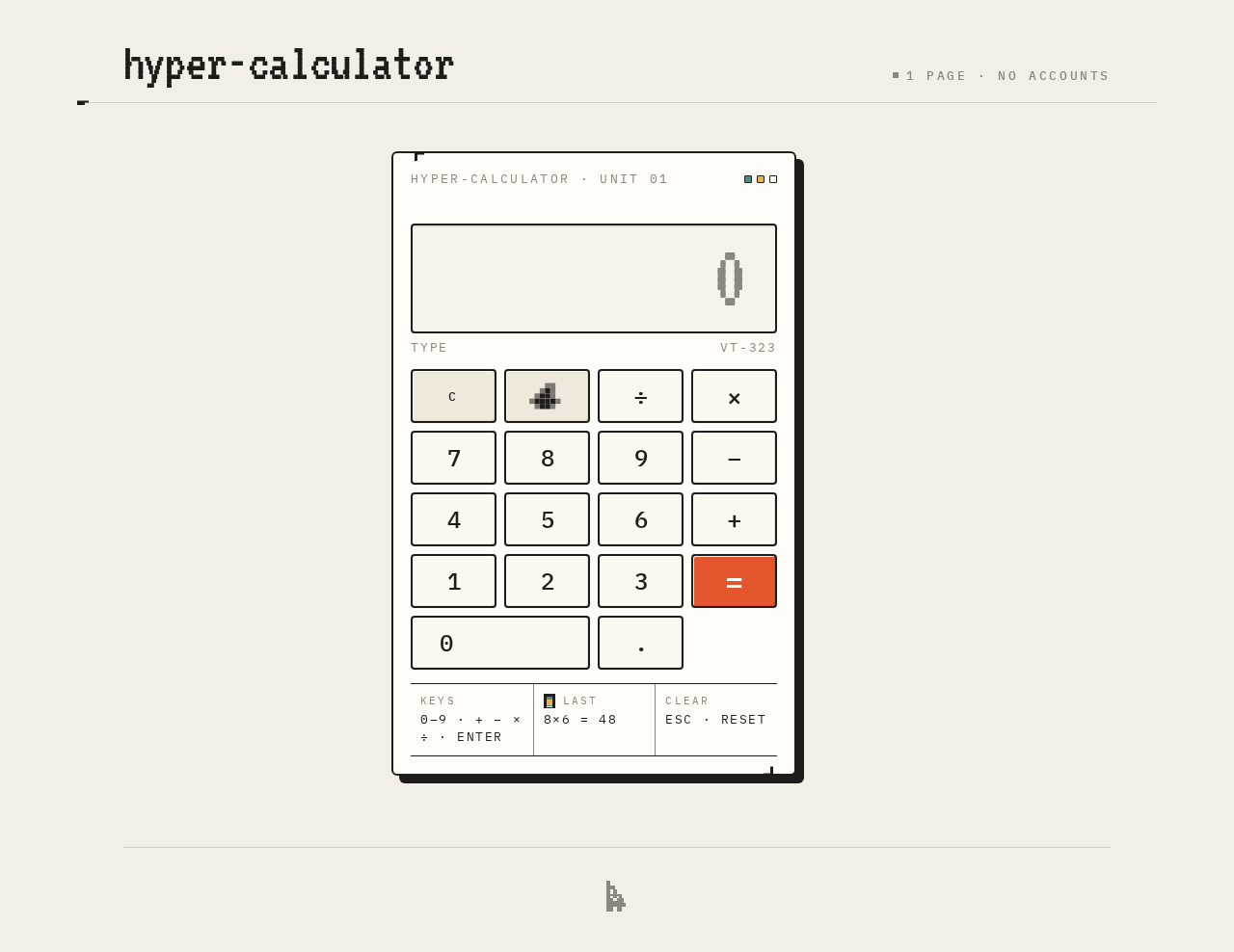
Current accepted behavior is limited to: presenting a calculator interface on one page and performing basic calculations from user-entered numbers and operators. The calculator is rendered as a physical pixel-stepped object on a warm paper ground, with the result readout and keypad as the whole personality of the page.
Narrow exclusions: no multi-page navigation, no dashboard frame, no sidebar, no accounts, no photography, no 3D renders, and no blue–indigo primary accents.
2a. Product Interpretation and Delivery Boundary
The product is a first-party, application-owned, single-page calculator with no authentication boundary. The page is publicly reachable and anonymous; there is no protected state, no durable actor-specific state, and no commitment or value transfer that would require identity continuity. All calculation interaction happens in the browser on the one page.
Everything described in this document is current. There are no accepted future requirements. The calculator is the first and only thing the user sees; there is no marketing headline-plus-CTA hero, and the device itself is the hero.
2b. Source Content Inventory
Not applicable — no reference directive declares a content_source.
2c. Page Content and Component Coverage
Calculator
The single page and anonymous public entry. It hosts the entire calculator interface.
- Information and state
- Current expression being entered (digits and operators).
- Live result readout, displayed in oversized VT323 digits with a blinking block cursor.
- Last expression shown in the micro-note strip beneath the device.
- Pressed-key state (keys depress 2px; a pressed operator key holds a solid accent fill).
- Primary actions
- Enter digits 0–9.
- Enter operators (addition, subtraction, multiplication, division).
- Evaluate the expression with the equals key.
- Clear the current entry/expression.
- Backspace (pixel arrow) to remove the last entered character.
- Supporting actions and elements
- Keyboard input for digits and operators (documented in the micro-note strip).
- Compact masthead: pixel wordmark "hyper-calculator" top-left; a tiny "1 page · no accounts" tag right.
- Hairline-ruled micro-note strip beneath the device with three micro-notes: keyboard shortcuts, history of last expression, and clear.
- Pixel pictograms: floppy-disk "save expression" icon, pixel backspace arrow, smiling pixel cursor in the footer.
- Domain entities
- Expression (sequence of digits and operators).
- Result (computed value).
- Last expression (most recent evaluated expression).
- Component responsibilities
- Masthead: wordmark and page tag.
- Calculator shell: 2px ink border, pixel-stepped corners, hard offset shadow, roughly 420px wide on desktop.
- Result readout: full shell width, VT323, tomato accent on live result digits.
- Keypad: 4-column grid of chunky square keys with 1px inset highlight; equals key is the only tomato-accent element.
- Micro-note strip: 13px uppercase IBM Plex Mono with wide tracking.
- Footer: smiling pixel cursor.
- States
- Loading: shell slides up 12px and keys fade in staggered by 20ms on load (removed under reduced motion).
- Empty: readout shows an empty/zero starting state with blinking cursor block.
- Success: computed result displayed in the readout; last expression updated in the micro-note strip.
- Error/recovery: invalid or incomplete expressions do not produce a result; the user can backspace or clear and continue entering.
- Reduced motion: entrance and blink removed; only the instant press state remains.
3. Functional Requirements
FR-1 — Single-page calculator design (explicit) As a Calculator User, I should see a simple calculator design contained in a single page, so that I can use the calculator without navigating anywhere else.
- Lifecycle: The page loads as the anonymous public entry; the calculator shell is immediately visible.
- Observable acceptance: Exactly one page exists; the calculator interface is present on it; no navigation, sidebar, or dashboard frame is shown.
- Failure/recovery: Not applicable — the page is static entry content.
FR-2 — Calculator interface for basic calculations (explicit) As a Calculator User, I should be presented with a calculator interface for performing basic calculations, so that I can enter numbers and operators and read the computed result.
- Trigger/input: The user presses digit keys and operator keys, then the equals key.
- Observable result: The live result readout displays the computed value in oversized VT323 digits with the tomato accent; the last expression appears in the micro-note strip.
- Access state: Anonymous, public; no identity required.
- Failure/recovery: If the expression is incomplete or invalid, no result is produced; the user can backspace (pixel arrow) or clear and continue.
- Continuation: The user can immediately start a new expression.
FR-3 — Key press feedback (explicit, from creative direction) As a Calculator User, I should see keys depress by 2px with a hard 80ms step when pressed, and a pressed operator key should hold a solid accent fill, so that input feels frame-by-frame and immediate.
- Observable result: Instant press state; no easing theatrics.
- Reduced motion: The instant press state is retained; entrance and blink are removed.
FR-4 — Result readout with cursor block (explicit, from creative direction) As a Calculator User, I should see the live result readout in oversized VT323 digits with a blinking block cursor, so that the answer is the visual focus of the page.
- Observable result: Result digits in tomato accent; cursor block blinks (removed under reduced motion).
FR-5 — Clear and backspace (explicit, from creative direction micro-notes) As a Calculator User, I should be able to clear the current expression and backspace the last entered character, so that I can correct mistakes and start over.
- Observable result: Expression and/or readout reset accordingly; last expression strip updates on evaluation.
FR-6 — Keyboard input (explicit, from creative direction micro-notes) As a Calculator User, I should be able to enter digits and operators via the keyboard, so that I can calculate quickly without reaching for the mouse.
- Observable result: Keyboard input updates the expression and readout identically to keypad presses.
4. User Personas
Calculator User
- Product context: A person who needs to do a quick sum — a student, a maker, or someone at a desk mid-task. They arrive at the single page anonymously and expect the calculator to be the first thing they see.
- Primary goal: Enter numbers and operators and read the computed result quickly and without friction.
- Distinct accepted responsibilities: Entering digits and operators, evaluating with equals, clearing, backspacing, and reading the result and last expression. This is the only human role in the product.
- Relevant inputs or decisions: Which digits and operators to enter; when to evaluate; when to clear or correct.
- Interactions with other accepted participants: None — the Calculator User is the sole active human actor; there are no counterparties, recipients, or beneficiaries.
- Observable success: A working calculator interface on one page that displays the computed result in the readout and the last expression in the micro-note strip.
- Constraints: No accounts, no sign-in, no multi-page navigation. The experience must be simple and contained in a single page.
5. Core User Flows
Flow 1 — Perform a basic calculation
- The Calculator User opens the single Calculator page (anonymous public entry). The calculator shell slides up 12px and keys fade in staggered by 20ms (removed under reduced motion).
- The user presses digit keys to enter the first number. Each key depresses 2px with a hard 80ms step; the digits appear in the result readout with a blinking cursor block.
- The user presses an operator key (addition, subtraction, multiplication, or division). The pressed operator key holds a solid accent fill.
- The user presses digit keys to enter the second number.
- The user presses the equals key — the only tomato-accent element on the page. The computed result appears in the oversized VT323 readout in tomato accent, and the last expression appears in the hairline-ruled micro-note strip beneath the device.
- The user reads the answer and can immediately begin a new expression.
Failure/recovery: If the expression is incomplete or invalid, no result is produced. The user presses the pixel backspace arrow to remove the last character, or clears the expression, and continues entering.
Flow 2 — Correct a mistake
- The Calculator User is mid-entry on the Calculator page.
- The user notices an incorrect digit or operator.
- The user presses the pixel backspace arrow to remove the last entered character, or presses clear to reset the expression.
- The readout updates to reflect the correction.
- The user continues entering the expression and evaluates with equals.
Flow 3 — Calculate via keyboard
- The Calculator User is on the Calculator page.
- The user types digits and operators on the keyboard, guided by the keyboard-shortcuts micro-note in the strip beneath the device.
- The expression and readout update identically to keypad presses.
- The user presses the equals key (or keyboard equivalent) to evaluate.
- The result appears in the readout and the last expression in the micro-note strip.
6. Visuals Colors and Theme
Muse: Susan Kare. Headline direction: Charming clarity — a calculator that feels like a friendly little machine.
Palette (light mode):
- Background:
#F3EFE6(warm paper ground) - Surface:
#FFFDF7(off-white keypad surface) - Text:
#1F1D1A(ink near-black) - Primary:
#1F1D1A - Accent:
#E4572E(tomato — reserved for the equals key and the live result readout only) - Muted:
#8C877C(warm grey for secondary labels and hairline rules) - Supporting pixel tints (tiny icon tiles only, never large fields): soft mustard
#E8B44A, dusty teal#4E8C8A
Typography:
- Headings: VT323 — set large and tight for the wordmark and result readout.
- Body: IBM Plex Mono, medium weight, for keypad labels, operator glyphs, and micro-labels; uppercase with wide tracking for the small "HYPER-CALCULATOR" tag.
- No bold display sans anywhere.
- Scale: 1.25 modular for UI, 1.5 jump for display — 96/64/40/24/16/13 with a 13px uppercase micro-label tier.
- Result readout:
clamp(40px, 9vw, 96px)in VT323; keypad labels 20–24px IBM Plex Mono.
Shape language: Chunky-outline cards with hard 2px ink borders and 6px radii (not soft blobs); pixel-stepped corner notches on the calculator shell; square keys with a 1px inset highlight; a visible 8px dot-grid texture behind the device. Everything looks drawn on a 1x grid and then enlarged, so edges stay crisp and honest.
Layout: Single centered column on a warm paper ground. Compact masthead (pixel wordmark left, tiny "1 page · no accounts" tag right), then the calculator as one physical object sitting slightly off-center on a dot-grid mat, roughly 420px wide on desktop, with the result readout spanning the full shell width above a 4-column keypad. Below the device, a single hairline-ruled strip of three micro-notes (keyboard shortcuts, history of last expression, clear). At 375px the shell goes edge-to-edge with 16px gutters and the keypad keeps a 4-column grid with 56px-min keys; at 768px it centers at 420px with generous mat space around it.
Imagery: No photography. The imagery is the interface itself plus hand-drawn pixel pictograms: a tiny floppy-disk "save expression" icon, a pixel arrow for backspace, and a smiling pixel cursor in the footer. A faint dot-grid mat and pixel-stepped shadow under the shell do the work a hero image would otherwise do.
Avoid: Blue–indigo primary on white; no #2563EB/#4F46E5-family accents anywhere. No Inter, Roboto, Arial, Helvetica, Poppins, or system-ui for headings or body. No gradient blobs, glassmorphism, frosted panels, or soft hover-lift card grids. No rounded pill buttons or 24px soft radii. No centered marketing headline + subtext + CTA hero. No photography, stock people, or 3D renders. No bouncy spring easing or continuous decorative animation. No dashboard frame, sidebar, or multi-page navigation.
Readability: Headlines, wordmarks, labels, numbers, cards' text, and controls stay entirely inside the viewport and their container at 375px, 768px, and 1280px, wrapping or scaling (e.g., font-size: clamp(...)) to fit. No other element covers any part of them.
7. Signature Design Concept
The first screen is the calculator itself as a hero object, not a headline plus CTA. A warm paper field (#F3EFE6) with an 8px dot-grid mat fills the viewport; the calculator shell (#FFFDF7, 2px ink border, pixel-stepped corners, hard offset shadow) sits slightly left of center at roughly 420px wide and 560px tall on desktop, with the oversized VT323 result readout spanning the full shell width at the top and a 4-column keypad beneath. The wordmark "hyper-calculator" in VT323 sits top-left of the page at clamp(28px, 6vw, 56px), and the single tomato accent (#E4572E) appears only on the equals key and the live result digits, so the eye lands on the answer, not on chrome. No gradient, no centered marketing headline, no blue button.
Signature moves:
- Calculator rendered as a physical pixel-stepped object with a hard 2px ink border and a solid offset shadow on a dot-grid mat — the device IS the hero.
- Oversized VT323 result readout spanning the full shell width, digits blinking a block cursor, with the equals key as the only tomato-accent element on the page.
- Chunky square keys with a 1px inset highlight that depress 2px on an 80ms hard step — frame-by-frame, no easing theatrics.
- A hairline-ruled micro-note strip beneath the device showing keyboard shortcuts and the last expression in 13px uppercase IBM Plex Mono with wide tracking.
- Pixel pictograms drawn at 1x and enlarged: a floppy-disk "save expression" icon, a pixel backspace arrow, and a smiling pixel cursor in the footer.
8. Interaction Model & Motion Direction
Interaction Model: Animated Motion Tempo: restrained Hero Dimensionality: flat
Landing Hero Motion Brief
- Focal subject: The calculator shell itself — a physical pixel-stepped object on a dot-grid mat, with the oversized VT323 result readout as the visual anchor.
- Input → transformation → outcome thesis: A key press depresses the key 2px on a hard 80ms step and updates the expression; pressing equals fills the equals key with tomato accent and the computed result appears in the readout in tomato VT323 digits with a blinking cursor block. The transformation is frame-by-frame and immediate — the answer is the outcome.
- Motion vocabulary: Hard 80ms step presses (no easing theatrics); 2px key depression; solid accent fill on pressed operator keys; blinking block cursor in the readout; one restrained entrance — shell slides up 12px with keys fading in staggered by 20ms on load.
- Composed first frame: Warm paper field with dot-grid mat; calculator shell slightly left of center at ~420px wide; wordmark top-left; result readout spanning the shell width; 4-column keypad beneath; micro-note strip below the device; smiling pixel cursor in the footer.
- Reduced-motion state: Entrance and blink removed; only the instant press state remains. The page is fully usable as a static arrangement.
9. Non-Functional Requirements
- NFR-1 — Single page (explicit): The design must be a single page. No multi-page navigation, sidebar, or dashboard frame.
- NFR-2 — Simplicity (explicit): The design should be simple. The calculator is the first and only thing seen; no marketing headline-plus-CTA hero.
- NFR-3 — Anonymous access (required_inference): The page is publicly reachable with no accounts, sign-in, or identity establishment. No durable actor-specific state exists.
- NFR-4 — Readability at all viewports (explicit, from creative direction): Readable text and controls stay whole at 375px, 768px, and 1280px, wrapping or scaling to fit; no other element covers any part of them.
- NFR-5 — Reduced motion (explicit, from creative direction): With
prefers-reduced-motion, the entrance and blink are removed, keeping only the instant press state. - NFR-6 — Palette and typography fidelity (explicit, from creative direction): The specified palette, fonts, surfaces, tone, and layout are preserved; the generic indigo/blue-on-white SaaS template is forbidden.
10. Tech Stack
- Frontend: React (single-page application) with the specified VT323 and IBM Plex Mono fonts.
- Styling: CSS with the specified palette tokens, 2px ink borders, 6px radii, pixel-stepped corners, and dot-grid texture.
- Backend/storage: None required — all calculation interaction happens client-side on the single page; there is no durable state, no accounts, and no server-side behavior.
- Deployment: Static single-page delivery; no Docker, Kubernetes, or separate services are needed for the accepted scope.
11. Assumptions and Constraints
- A-1: The calculator supports basic arithmetic (addition, subtraction, multiplication, division) as implied by "basic calculations." No scientific functions, memory registers, or unit conversion are included.
- A-2: The "save expression" floppy-disk pictogram is a decorative pixel icon within the accepted imagery; no persistence or save capability is accepted beyond what the source states.
- A-3: The "history of last expression" micro-note shows only the most recent evaluated expression, not a persistent history log.
- A-4: Keyboard shortcuts are documented in the micro-note strip; the exact key bindings are a presentation detail, not a separate product capability.
- A-5: No identity, accounts, or permissions exist; the page is anonymous and public.
- A-6: No future requirements are accepted; all behavior described is current.
12. Glossary
- Calculator User: The sole active human actor — a person who opens the single page to enter numbers and operators and read the computed result.
- Calculator shell: The pixel-stepped physical object containing the result readout and keypad, with a 2px ink border and hard offset shadow.
- Result readout: The oversized VT323 display spanning the full shell width showing the live result in tomato accent with a blinking block cursor.
- Micro-note strip: The hairline-ruled strip beneath the device showing keyboard shortcuts, the last expression, and clear in 13px uppercase IBM Plex Mono.
- Dot-grid mat: The 8px dot-grid texture behind the calculator shell on the warm paper ground.
- Expression: The sequence of digits and operators entered by the user.
- Last expression: The most recent evaluated expression shown in the micro-note strip.
hyper-calculator
1 page · no accounts
hyper-calculator
1 page · no accounts
No comments yet. Be the first!