hvac-offshore-platform
 jijo pc
Prepare HVAC design basis for offshore platform in word format

Comments (0)
Sign in to leave a comment
System Requirements
System Requirements Document for hvac-offshore-platform
1. Introduction
This document specifies the system requirements for hvac-offshore-platform, a web application that prepares an HVAC design basis for an offshore platform and delivers it in Word (.docx) format.
The product intent is narrow and explicit: an HVAC Design Engineer working on an offshore platform must be able to produce a formal HVAC design basis document and obtain it as a Word file suitable for review and downstream design hand-off. The application provides a protected working surface where the engineer enters the platform's HVAC design inputs, generates the design basis, and downloads the finished document as a .docx file.
The audience is the HVAC Design Engineer — a licensed, technically serious professional whose work is reviewed and handed off. The interface is therefore treated as a certified instrument rather than a generic dashboard: calm authority, engineering trust, and a deliverable that reads as a physical document object.
2. System Overview
The current delivery is a first-party web application with application-owned identity and a generated-document output.
Actors
- HVAC Design Engineer (active human persona) — prepares the HVAC design basis for an offshore platform and downloads it in Word format.
Accepted behavior
- The product prepares an HVAC design basis for an offshore platform (explicit).
- The HVAC design basis is delivered in Word (.docx) format (explicit).
- Self-service enrollment for the HVAC Design Engineer (required inference).
- Returning verification before accessing protected design basis work (required inference).
Ownership
- Anonymous entry and identity surfaces (Landing, Login, Sign Up) are first-party and reachable without login.
- The Design Basis working surface is first-party and requires login.
- Word document generation is performed by the application backend and delivered to the engineer as a downloadable
.docxfile.
Narrow exclusions
- No stock photography, no light mode, no blue/indigo-on-white template look.
- No presentation of or link to any planning/PRD document in the UI.
- No adjacent account-management capabilities beyond self-service enrollment and returning verification.
- No invitation or provisioning flow is established by the source.
Removed from scope
- None.
2a. Product Interpretation and Delivery Boundary
The product is a single-purpose engineering tool. Its entire value is the production of one deliverable: an HVAC design basis for an offshore platform, in Word format. Everything in the interface serves that outcome.
Access is split into two boundaries. The anonymous boundary (Landing, Login, Sign Up) explains what the product does and lets a self-starting engineer establish identity or verify a returning identity. The protected boundary (Design Basis) is where the actual engineering work happens and where the Word document is generated and downloaded. A protected destination cannot establish access to itself, so enrollment and returning verification live on their own anonymous surfaces.
The Word document is the product's output object. It is generated by the application from the engineer's inputs and delivered as a downloadable file. The application does not claim to replace the engineer's engineering judgment; it structures and formalizes the design basis and produces the document.
Nothing beyond this boundary is current. There is no collaboration, no review workflow, no multi-user sharing, and no external provider surface in the accepted scope.
2c. Page Content and Component Coverage
Landing
Purpose: Anonymous first impression explaining that the product prepares an HVAC design basis for an offshore platform and who it is for, before any protected work.
Information and state
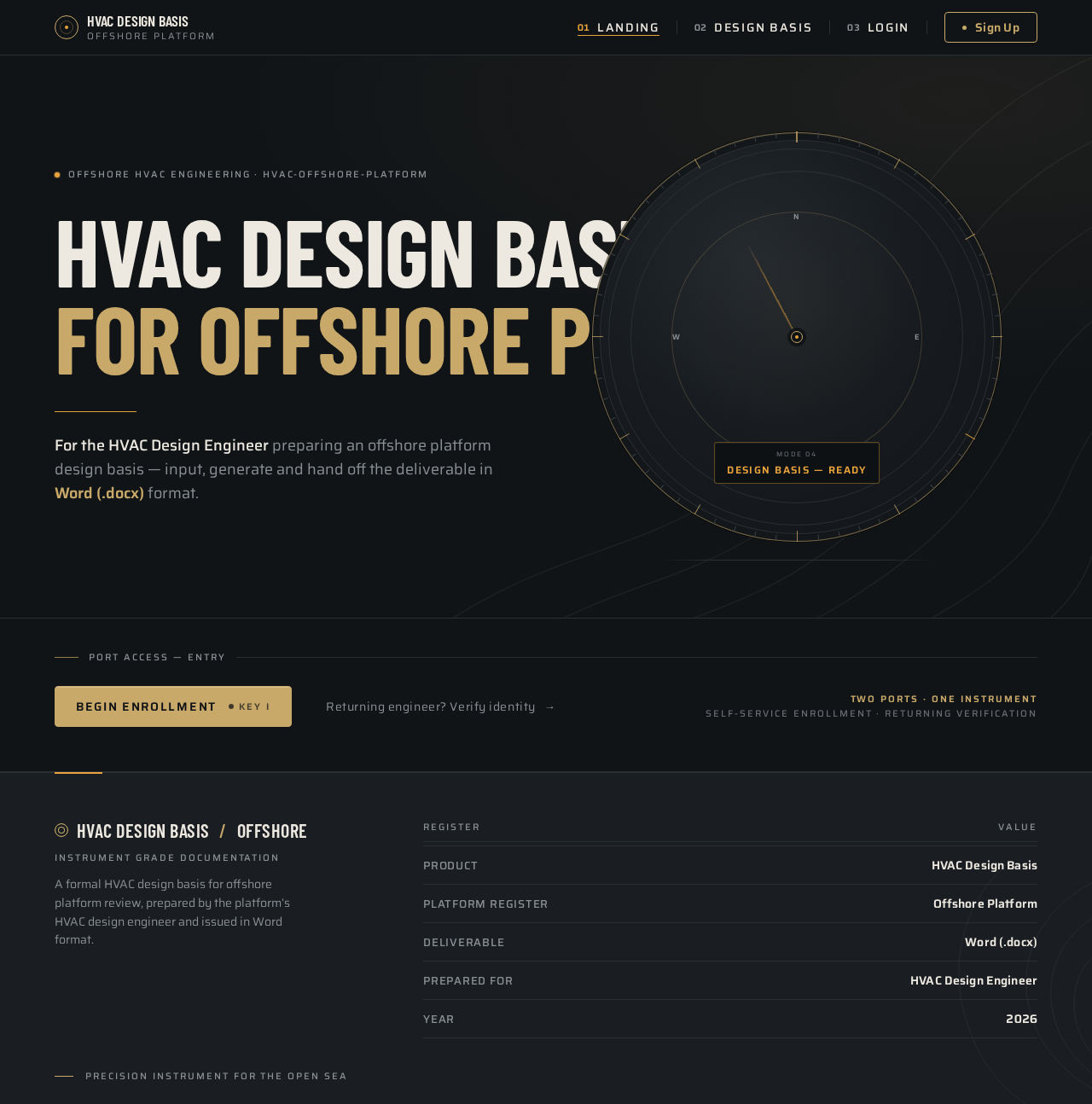
- Product headline: "HVAC DESIGN BASIS / FOR OFFSHORE PLATFORM" (two lines, Barlow Condensed, oversized).
- A single amber rule beneath the headline.
- A short supporting line identifying the audience (HVAC Design Engineer preparing an offshore platform design basis) and the deliverable (Word format).
- Hero instrument dial: CSS-built circular gauge with concentric titanium rings, tick marks, a single amber needle, and a small readout window showing "DESIGN BASIS — READY".
- Faint topographic contour line layer at 6% opacity bleeding off the top-right edge behind the dial.
Primary actions
- Primary CTA (champagne, chamfered 4px radius) pinned to the headline baseline: proceed to enrollment (Sign Up).
- Secondary text link: proceed to returning verification (Login).
Supporting actions
- None beyond the two access entry points.
Domain entities
- None persisted on this page.
Component responsibilities
- Hero headline block (left, columns 1–6 desktop).
- Instrument dial block (right, columns 7–12 desktop; below headline on mobile).
- Topographic contour background layer.
- CTA button and login link.
States
- Loading: static content; no data fetch required.
- Empty: not applicable.
- Success: CTA navigates to Sign Up; link navigates to Login.
- Error: not applicable.
- Recovery: not applicable.
Login
Purpose: Returning verification for the HVAC Design Engineer to reach their protected design basis work.
Information and state
- Centred 420px panel over dark ground with faint topographic line pattern.
- Email field and password field (Saira labels, tabular numerals where numeric).
- Inline validation messages for missing or malformed input.
Primary actions
- Submit credentials to verify identity and open the Design Basis surface.
Supporting actions
- Link to Sign Up for an engineer who has not yet enrolled.
Domain entities
- Engineer identity (email, credential).
Component responsibilities
- Auth panel container.
- Credential form with field-level validation.
- Submit control (chamfered champagne button, 120ms mechanical depress).
- Cross-link to Sign Up.
States
- Loading: submit control shows a pending state while verification runs.
- Empty: fields blank on first render.
- Success: redirect to Design Basis.
- Error: invalid credentials show an inline error and keep the engineer on the page to retry.
- Recovery: the engineer can correct input and resubmit; the Sign Up link remains available.
Sign Up
Purpose: Self-service first-use enrollment for the self-starting HVAC Design Engineer, with no invitation or provisioning boundary established.
Information and state
- Centred 420px panel over dark ground with faint topographic line pattern.
- Email field, password field, and confirmation field.
- Inline validation for missing fields, malformed email, and password mismatch.
Primary actions
- Create the engineer's identity and proceed to the Design Basis surface.
Supporting actions
- Link to Login for an engineer who already has an identity.
Domain entities
- Engineer identity (email, credential).
Component responsibilities
- Auth panel container.
- Enrollment form with field-level validation.
- Submit control (chamfered champagne button, 120ms mechanical depress).
- Cross-link to Login.
States
- Loading: submit control shows a pending state while the identity is created.
- Empty: fields blank on first render.
- Success: identity established; redirect to Design Basis.
- Error: duplicate email or validation failure shows an inline error and keeps the engineer on the page.
- Recovery: the engineer can correct input and resubmit; the Login link remains available.
Design Basis
Purpose: Protected working surface where the HVAC Design Engineer generates the offshore platform HVAC design basis and downloads it as a Word document.
Information and state
- Left rail of numbered instrument-mode section tabs:
01 PLATFORM DATA,02 LOADS,03 VENTILATION,04 OUTPUT, each with a hairline rule and tabular index. - Central ruled data entry panel: label/value pairs separated by 1px hairline dividers, values right-aligned in tabular Saira numerals.
- Right-hand output preview card styled as a document folio: stacked document mock with folded corner, file-type badge, and a champagne "Download .docx" button.
- Generation status readout (e.g., "DESIGN BASIS — READY") in the instrument accent.
Primary actions
- Enter and edit platform data, loads, and ventilation inputs.
- Generate the design basis.
- Download the generated
.docxfile.
Supporting actions
- Switch between numbered section tabs.
- Review the output preview before download.
Domain entities
- Design basis record (owned by the engineer).
- Platform data inputs.
- Load inputs.
- Ventilation inputs.
- Generated Word document.
Component responsibilities
- Section tab rail (numbered instrument modes).
- Ruled data entry panel with per-section fields.
- Output folio card with generation status and download control.
- Generation trigger and status feedback.
States
- Loading: section data and generation status load on entry; a pending indicator shows while generation runs.
- Empty: a new engineer sees blank input rows and an output card in a not-yet-generated state.
- Success: generation completes; the output card shows "DESIGN BASIS — READY" and the download control becomes active.
- Error: generation failure shows an inline error on the output card and preserves the engineer's inputs for retry.
- Recovery: the engineer can correct inputs and regenerate; a previously generated document remains downloadable until replaced.
3. Functional Requirements
FR-1 — Prepare an HVAC design basis for an offshore platform (explicit) As an HVAC Design Engineer, I should be able to prepare an HVAC design basis for an offshore platform within the application, so that the platform's HVAC design is formally documented.
- Trigger/input: the engineer, signed in, opens the Design Basis surface and enters platform data, loads, and ventilation inputs across the numbered sections.
- Observable result: the inputs are captured against the engineer's design basis record and reflected in the ruled data panel.
- Access state: login required.
- Failure/recovery: invalid or missing inputs are flagged inline; the engineer corrects and continues.
- Continuation: the engineer proceeds to generate the design basis.
FR-2 — Deliver the HVAC design basis in Word (.docx) format (explicit) As an HVAC Design Engineer, I should receive the prepared HVAC design basis as a Word (.docx) file, so that I can hand it off for review and downstream design work.
- Trigger/input: the engineer triggers generation from the Design Basis surface after entering inputs.
- Observable result: the output folio card shows the design basis as ready and offers a "Download .docx" control; downloading yields a
.docxfile. - Access state: login required.
- Failure/recovery: if generation fails, an inline error appears on the output card and the engineer's inputs are preserved for retry.
- Continuation: the engineer downloads the file and leaves the application with the deliverable.
FR-3 — Self-service enrollment (required_inference) As an HVAC Design Engineer, I should be able to create my own identity without an invitation, so that I can begin protected design basis work.
- Trigger/input: the engineer selects the primary CTA on Landing and submits email and password on Sign Up.
- Observable result: an identity is established and the engineer is taken to the Design Basis surface.
- Access state: anonymous entry; protected work unavailable until identity is established.
- Failure/recovery: duplicate email or validation failure shows an inline error; the engineer corrects and resubmits, or follows the Login link.
- Continuation: the engineer proceeds to Design Basis.
FR-4 — Returning verification (required_inference) As an HVAC Design Engineer, I should be able to verify my returning identity, so that I can resume my protected design basis work.
- Trigger/input: the engineer opens Login and submits credentials.
- Observable result: identity is verified and the engineer reaches the Design Basis surface.
- Access state: anonymous entry; protected work unavailable until verification succeeds.
- Failure/recovery: invalid credentials show an inline error and allow retry; the Sign Up link remains available.
- Continuation: the engineer resumes work on Design Basis.
4. User Personas
HVAC Design Engineer
Product context. A licensed design engineer preparing the HVAC design basis for an offshore platform. The work is serious, technical, and high-stakes: salt air, load calculations, compliance hand-off. The engineer needs a formal document, not a dashboard.
Primary goal. Produce a complete HVAC design basis for the offshore platform and obtain it as a Word document for review and downstream design work.
Distinct accepted responsibilities.
- Establish identity (self-service enrollment) or verify a returning identity.
- Enter platform data, loads, and ventilation inputs on the Design Basis surface.
- Generate the design basis.
- Download the resulting
.docxfile.
Relevant inputs and decisions.
- Platform data, load inputs, and ventilation inputs across the numbered sections.
- The decision to generate once inputs are complete.
- The decision to download the deliverable.
Interactions with other accepted participants. None. The engineer is the sole active human persona; the application backend generates the document on the engineer's behalf.
Observable success. The output folio card reads "DESIGN BASIS — READY" and the engineer holds a downloaded .docx file of the design basis.
5. Core User Flows
Flow A — First-time engineer enrolls and prepares a design basis
- The engineer opens the application and lands on Landing (anonymous). The headline "HVAC DESIGN BASIS / FOR OFFSHORE PLATFORM" and the instrument dial establish what the product does and for whom.
- The engineer selects the champagne primary CTA and is taken to Sign Up.
- On Sign Up, the engineer enters email, password, and confirmation. Inline validation confirms the fields.
- The engineer submits. The identity is established and the engineer is redirected to Design Basis (protected).
- On Design Basis, the engineer works through the numbered section tabs —
01 PLATFORM DATA,02 LOADS,03 VENTILATION— entering values in the ruled data rows. - The engineer moves to
04 OUTPUTand triggers generation. The output card shows a pending state. - Generation completes; the output card shows "DESIGN BASIS — READY" and the "Download .docx" control becomes active.
- The engineer downloads the
.docxfile and leaves with the deliverable.
Failure/recovery. If enrollment fails (duplicate email or validation error), an inline error appears on Sign Up and the engineer corrects and resubmits, or follows the Login link. If generation fails, an inline error appears on the output card and the engineer's inputs are preserved for retry.
Flow B — Returning engineer resumes and downloads
- The engineer opens Login (anonymous) and enters credentials.
- On success, the engineer is taken to Design Basis (protected).
- The engineer reviews or updates inputs across the numbered sections.
- The engineer triggers generation and, on completion, downloads the
.docxfile.
Failure/recovery. Invalid credentials show an inline error on Login and allow retry; the Sign Up link remains available.
6. Visuals Colors and Theme
Muse: MARQ by Garmin — luxury instrument aesthetic. Precision instrument for the open sea: titanium darkness, dial-grade data, one amber signal.
Mode: Dark only. No light mode or white-first surfaces.
Colour tokens (exact hex by role)
- Background (graphite-titanium ground):
#111417 - Surface (raised panel):
#1A1E22 - Text (warm off-white, body and headings):
#EDE9E1 - Primary (champagne metallic, interactive elements and thin bezel strokes):
#C9A96A - Accent (amber instrument accent, live readouts, active states, hero dial needle):
#E8A33D - Muted (secondary labels, rules, metadata):
#8A8F94 - Hairline stroke:
#2A2F34at 1px
Colour ratios: 65% dark grounds, 25% panel surfaces, 6% warm text, 3% champagne, 1% amber.
Typography
- Headings: Barlow Condensed 600–700, uppercase, tight tracking (-0.01em), set large and stacked.
- Body and form labels: Saira 400/500.
- Buttons and data values: Saira 600.
- Tabular numerals in Saira for all engineering figures.
- Type scale (1.5 modular for display): 40px mobile → 72px tablet → 112px desktop for hero; 28/22/18/16/14 for section titles, labels, and body.
- Micro-labels: 11px uppercase with 0.18em tracking.
- Body line-height: 1.55.
Shape language
- Circular gauges and bezels as the recurring motif.
- Rounded-rectangle panels with 12px radius and 1px
#2A2F34borders. - Ruled data rows with hairline dividers.
- Chamfered corners on primary buttons (4px radius).
- Thin 1px champagne stroke on active instruments.
- No soft drop shadows; depth comes from surface value and a 1px top highlight.
Layout
- Asymmetric instrument-panel grid: 12-column desktop grid; hero dial occupies columns 7–12, headline spans columns 1–6; mobile single column with dial below headline.
- Design Basis: left rail of numbered section tabs, central ruled data entry panel, right-hand output preview card styled as a document folio.
- Auth pages: centred 420px panel over dark ground with faint topographic line pattern.
- Every data value right-aligned in tabular numerals.
Imagery
- No stock photography.
- Hero visual is a CSS-built circular instrument dial (concentric rings, tick marks, needle, amber readout window) with a faint topographic contour line pattern at 6% opacity behind it.
- Cards use schematic diagrams and ruled data tables rather than illustrations.
- The Word output is represented as a document folio mock with a folded corner and a small file-type badge.
Avoid
- Blue or indigo primary/accent on white.
- Gradient-blob heroes or glassmorphism panels.
- Grids of identical hover-lift cards.
- Inter, Roboto, Arial, Helvetica, Open Sans, Lato, Poppins, or system-ui.
- Stock photography of people or offices.
- Playful bounce, springy easing, or confetti.
- Presenting or linking to the planning/PRD document anywhere in the UI.
- Light mode or white-first surfaces.
7. Signature Design Concept
The public entry (Landing) is a split composition on a graphite ground.
Left half (columns 1–6 desktop): an oversized two-line Barlow Condensed headline — "HVAC DESIGN BASIS / FOR OFFSHORE PLATFORM" — flush left, at 40px mobile → 112px desktop, with a single amber rule beneath it and a champagne primary CTA button pinned to the baseline.
Right half (columns 7–12 desktop): a large CSS-built circular instrument dial (~480px desktop, 260px mobile) with concentric titanium rings, tick marks, a single amber needle, and a small readout window showing "DESIGN BASIS — READY". Faint topographic contour lines bleed off the top-right edge behind the dial.
Signature moves carried through the product
- Hero instrument dial: a CSS-drawn circular gauge with concentric rings, tick marks, and a single amber needle that sweeps once on load — the product's visual identity, not decoration.
- Numbered instrument-mode navigation: the Design Basis section tabs read like watch modes (
01 PLATFORM DATA,02 LOADS,03 VENTILATION,04 OUTPUT), each with a hairline rule and tabular index. - Ruled data rows: every engineering input is a label/value pair separated by a 1px hairline divider with the value right-aligned in tabular Saira numerals, styled like a dial's sub-dial readout.
- Word folio output card: the generated
.docxis presented as a stacked document folio with a folded corner, a file-type badge, and a champagne "Download .docx" button — the deliverable is a physical object, not a link. - Topographic contour layer: a faint 6%-opacity contour line pattern bleeds behind the hero and auth panels, giving the dark ground a charted-seafloor texture without any photographic imagery.
No centred layout, no gradient blobs, no blue.
8. Interaction Model & Motion Direction
Interaction Model: Animated Motion Tempo: restrained Hero Dimensionality: dimensional_css
Landing Hero Motion Brief
Focal subject. The CSS-built circular instrument dial on the right half of the Landing hero: concentric titanium rings, tick marks, a single amber needle, and a small readout window showing "DESIGN BASIS — READY".
Input → transformation → outcome thesis. On load, the dial's amber needle performs one slow sweep from rest to its resting position and then holds; the readout window resolves to "DESIGN BASIS — READY". The transformation is a single, deliberate instrument calibration — the product presenting itself as a certified instrument ready to produce the design basis. The outcome is a composed, still hero that invites the engineer to begin.
Motion vocabulary. One slow needle sweep on load; scroll-linked parallax on the topographic line layer behind the hero (≤8px); number counters on output metrics count up once on reveal; button presses give a 120ms mechanical depress with no bounce.
Composed first frame. Graphite ground #111417; left half holds the two-line Barlow Condensed headline flush left with a single amber rule beneath it and the champagne CTA pinned to the baseline; right half holds the dial at rest with the needle at its starting position and the readout window dimmed; topographic contour lines at 6% opacity bleed off the top-right edge.
Reduced-motion state. With prefers-reduced-motion, the dial renders static with the needle at rest, the readout window shows its final value, counters show final values, and the parallax layer is fixed. The hero remains fully composed and readable.
9. Non-Functional Requirements
NFR-1 — Word format constraint (explicit)
The HVAC design basis must be provided in Word format. The generated deliverable is a .docx file; no other output format satisfies the requirement.
NFR-2 — Protected design basis work (required_inference) The Design Basis surface requires login. Anonymous access to protected design basis work is not permitted; enrollment and returning verification occur on their own anonymous surfaces.
NFR-3 — Durable state (required_inference) The engineer's design basis inputs and generated document are persisted against the engineer's identity so that returning verification resumes the same work.
NFR-4 — Readable text and controls at every viewport (explicit design constraint)
Headlines, wordmarks, labels, numbers, cards' text, and controls stay entirely inside the viewport and their container at 375px, 768px, and 1280px, wrapping or scaling (for example font-size: clamp(...) with its mobile size) to fit. No other element covers any part of them. Imagery, decoration, and motion may be cropped, bled off an edge, rotated, overlapped, or cut as the direction asks, as long as they cover no readable text or control.
NFR-5 — Reduced motion (explicit design constraint)
With prefers-reduced-motion, the interface provides a usable static arrangement: the dial renders static with the needle at rest, counters show final values, and any scrollable content wraps or scrolls so each item can be brought fully into view.
NFR-6 — No planning document exposure (explicit design constraint) The planning/PRD document is never presented or linked anywhere in the UI.
NFR-7 — Dark-only surfaces (explicit design constraint) The interface is dark mode only; no light mode or white-first surfaces.
10. Tech Stack
- Frontend: React web application.
- Backend: Python / FastAPI, extended with routes and modules for design basis persistence and Word document generation.
- Document generation: server-side
.docxgeneration delivered to the engineer as a downloadable file. - Storage: persistent storage for engineer identities and design basis records.
- Deployment: Docker / docker-compose for the frontend and backend services.
11. Assumptions and Constraints
- A-1 (required_inference) — The engineer is the sole active human persona; no collaboration, review, or sharing workflow is in scope.
- A-2 (required_inference) — Identity is application-owned and self-service; no invitation or provisioning boundary is established by the source.
- A-3 (required_inference) — The design basis inputs are organized into the four numbered sections shown in the direction (
01 PLATFORM DATA,02 LOADS,03 VENTILATION,04 OUTPUT); the specific engineering fields within each section are not specified by the source and are filled by the implementation. - A-4 (explicit) — The deliverable is Word (
.docx) format only. - A-5 (explicit design constraint) — The visual direction (palette, fonts, surfaces, tone, layout) is authoritative for presentation and does not add product behavior.
12. Glossary
- HVAC design basis — The formal engineering document establishing the heating, ventilation, and air conditioning design parameters for the offshore platform.
- Offshore platform — The marine structure for which the HVAC design basis is prepared.
- Design Basis surface — The protected working page where the engineer enters inputs, generates the design basis, and downloads the Word document.
- Word (.docx) — The Microsoft Word document format in which the design basis is delivered.
- Instrument mode — One of the numbered section tabs on the Design Basis surface (
01 PLATFORM DATA,02 LOADS,03 VENTILATION,04 OUTPUT). - Output folio — The document-style preview card presenting the generated
.docxas a physical deliverable with a download control. - HVAC Design Engineer — The active human persona who prepares the design basis and downloads it in Word format.
HVAC Design Basisfor Offshore Platform
For the HVAC Design Engineer preparing an offshore platform design basis — input, generate and hand off the deliverable in Word (.docx) format.
Port access — Entry
HVAC Design Basisfor Offshore Platform
For the HVAC Design Engineer preparing an offshore platform design basis — input, generate and hand off the deliverable in Word (.docx) format.
Port access — Entry
No comments yet. Be the first!