hud-builder-sensitivity
 JASNOOR SINGH
UPGRADE RED DRAGON WITH A COMPLETE DEVICE HUD BUILDER. DEVICE COMPATIBILITY: - All iPhone models - Samsung Galaxy - Vivo - Oppo - Realme - Redmi - Poco - OnePlus - Motorola - Google Pixel - iPad - Samsung tablets - Other Android tablets DEVICE DETECTION: - Detect screen width and height. - Detect device pixel ratio. - Detect screen orientation. - Let users manually select their exact phone model. - Never claim exact model detection if unavailable. HUD BUILDER: - 2-finger HUD - 3-finger HUD - 4-finger HUD - 5-finger HUD - Custom fire button size. - Custom joystick position. - Custom scope and jump button positions. - Visual HUD preview. - Save and copy configurations. - Export configuration as an image. SENSITIVITY: - Device-specific recommended profiles. - General sensitivity. - Red Dot. - 2X Scope. - 4X Scope. - Sniper Scope. - Free Look. - Editable values from 0 to 200. - Training-mode adjustment guide. VIP ACCESS: Weekly: ₹99 Monthly: ₹299 Lifetime: ₹1,099 All devices, HUD layouts and sensitivity profiles must be included in the existing VIP memberships. Do not charge extra for individual phone models. Build a working interface with a real database, user accounts and secure admin dashboard. Do not claim configurations have been tested on devices unless they actually have been tested. Do not modify Free Fire game files.

Comments (0)
Sign in to leave a comment
System Requirements
System Requirements Document for Red Dragon
1. Introduction
Red Dragon is a mobile-first HUD builder and sensitivity tuning tool for Free Fire players in India. It upgrades the existing Red Dragon product with a complete device HUD builder: device detection, manual exact-model selection, 2- to 5-finger HUD layouts with custom fire button size and joystick/scope/jump positions, a visual HUD preview, save/copy/export of configurations, device-specific recommended sensitivity profiles across six sensitivity channels editable from 0 to 200, a training-mode adjustment guide, and VIP access at Weekly ₹99, Monthly ₹299 and Lifetime ₹1,099.
The product is delivered as a working interface backed by a real database, with user accounts and a secure admin dashboard. All devices, HUD layouts and sensitivity profiles are included in the existing VIP memberships; no extra charge applies to individual phone models. Red Dragon never claims exact model detection when detection is unavailable, never claims configurations were tested on devices unless they actually were, and never modifies Free Fire game files.
The audience is Free Fire players on the full spread of supported hardware — all iPhone models, Samsung Galaxy, Vivo, Oppo, Realme, Redmi, Poco, OnePlus, Motorola, Google Pixel, iPad, Samsung tablets and other Android tablets — who want precise, trustworthy control over their on-screen layout and aim sensitivity, plus the administrators who operate the membership and content behind it.
2. System Overview
Red Dragon is a three-service application. A React frontend delivers the public entry, identity surfaces, the device setup, HUD builder, sensitivity workspace, VIP plans and the admin surfaces. A shared FastAPI backend serves all application APIs and domain modules. MariaDB holds application-owned persistent data: accounts, device selections, saved HUD configurations, sensitivity profiles, VIP membership records and admin-managed content.
Two active human personas use the product: the VIP Member (HUD and sensitivity user), who selects an exact phone model, builds and previews 2- to 5-finger HUD layouts, tunes six sensitivity channels, saves/copies/exports configurations and holds a VIP membership; and the Admin, who signs in to a secure dashboard and manages user accounts and VIP membership plans and reviews the device, HUD and sensitivity content the product publishes.
Access is application-owned. Anonymous visitors reach the Landing page and the Sign Up, Login and Admin Login surfaces. Device Setup, HUD Builder, Sensitivity, VIP Plans and Admin Dashboard are protected and require an established identity; the Admin Dashboard is restricted to the Admin role. Identity establishment never happens inside a protected destination.
The product is a planning and configuration tool only. It reads browser-reported screen metrics and user-selected models; it does not read, patch, inject into, or otherwise modify Free Fire game files, and it does not assert that any configuration has been validated on hardware unless a real test record exists.
Removed from scope
- None. No concept from the authoritative requirement thread was removed or replaced by the latest refinement.
2a. Product Interpretation and Delivery Boundary
Red Dragon is delivered as a first-party web application with its own accounts and database. Everything the VIP Member does — choosing a device, building a HUD, tuning sensitivity, saving, copying, exporting, and viewing VIP plans — happens inside Red Dragon's own interface and is persisted to Red Dragon's own database. Nothing is delegated to a game client, a third-party overlay, or a provider surface.
Device detection is honest by construction. The product reads what the browser can report — screen width, screen height, device pixel ratio and screen orientation — and presents those readings as measured values. It never presents a browser-reported or guessed string as an exact phone model. The exact model is always the one the user selects manually, and the interface labels it as user-selected.
Testing claims are bounded by evidence. A configuration carries a testing status; the product only displays a tested claim when a corresponding test record exists. Otherwise the configuration is shown as untested, and the interface says so plainly.
The VIP boundary is a single membership gate. All devices, all HUD layouts and all sensitivity profiles are included in every VIP tier; there is no per-model purchase, no per-layout purchase and no per-profile purchase anywhere in the product.
Current scope covers the nine accepted destinations and the behaviors described in this document. Nothing in this document is deferred to a future horizon; the requirement thread contains no future-only commitments.
2c. Page Content and Component Coverage
Landing
- Information and state: Anonymous public entry. Product name Red Dragon, the hero headline "Build your HUD like an instrument", the subline "Set your fingers, fire size and sensitivity on your own phone. Save it and copy it.", and the call to action "Open the builder". A live gauge cluster reading the visitor's detected screen width, height, device pixel ratio and orientation. A summary of supported device families (all iPhone models, Samsung Galaxy, Vivo, Oppo, Realme, Redmi, Poco, OnePlus, Motorola, Google Pixel, iPad, Samsung tablets, other Android tablets). A summary of the HUD builder capabilities (2-, 3-, 4- and 5-finger layouts; custom fire button size; custom joystick, scope and jump positions; visual preview; save, copy and image export). A summary of the six sensitivity channels and the 0–200 range. A VIP band showing Weekly ₹99, Monthly ₹299 and Lifetime ₹1,099 with the statement that all devices, HUD layouts and sensitivity profiles are included and no extra charge applies per phone model. A statement that Red Dragon does not modify Free Fire game files.
- Primary action: "Open the builder" — routes an anonymous visitor to Sign Up (new) or Login (returning); a signed-in VIP Member routes directly to Device Setup.
- Supporting actions: Navigate to Login, Sign Up, VIP Plans (public summary), and Admin Login.
- Domain entities: Device family catalog (read-only summary), VIP plan catalog (read-only summary), detected screen metrics (ephemeral, client-side).
- Component responsibilities: Hero with gauge cluster (renders live detected width, height, pixel ratio, orientation as dial readings; teal marks the active dial); capability summary rows; VIP price band; footer with the no-game-file-modification statement.
- States: Loading — gauge cluster shows placeholder dials with a "reading device" label until metrics resolve. Empty — not applicable. Success — dials show measured values. Error/recovery — if the browser withholds a metric, that dial shows "unavailable" rather than a fabricated value, and the page remains fully usable.
Sign Up
- Information and state: Anonymous identity establishment for a new VIP Member. Fields for the account credentials the product requires to create an account, plus the terms acknowledgment. Clear statement that an account is needed to save HUD configurations and sensitivity profiles.
- Primary action: Create account — on success, establishes the session and routes to Device Setup.
- Supporting actions: Navigate to Login for an existing account; return to Landing.
- Domain entities: User account (created), session.
- Component responsibilities: Credential form with inline validation; submit control with pending state; error region.
- States: Loading — submit disabled with pending indicator. Empty — blank form. Success — account created, session established, redirect to Device Setup. Error/recovery — duplicate account, invalid input or server failure shows a specific message, preserves entered values and allows retry.
Login
- Information and state: Anonymous identity verification for a returning VIP Member.
- Primary action: Sign in — on success, establishes the session and routes to Device Setup (or to the destination the user was attempting).
- Supporting actions: Navigate to Sign Up; return to Landing.
- Domain entities: User account, session.
- Component responsibilities: Credential form; submit control with pending state; error region.
- States: Loading — submit disabled with pending indicator. Empty — blank form. Success — session established, redirect. Error/recovery — invalid credentials or server failure shows a specific message without revealing whether the account exists, preserves the identifier field and allows retry.
Device Setup
- Information and state: Protected; requires a signed-in VIP Member. Shows the detected screen width, screen height, device pixel ratio and screen orientation as measured readings, each labeled as detected. Shows the manually selected exact phone model, labeled as user-selected. Shows the device family the selected model belongs to. Shows the recommended sensitivity profile associated with the selected device. Explicitly states that exact model detection is not claimed when the browser cannot supply it.
- Primary action: Confirm device — persists the selected model and detected metrics to the account and routes to HUD Builder.
- Supporting actions: Search and select the exact phone model from the supported catalog; re-read detected metrics; change orientation and re-read; navigate to HUD Builder, Sensitivity, VIP Plans.
- Domain entities: Device model catalog (family, model name), device selection (per account), detected screen metrics snapshot.
- Component responsibilities: Ruled label/value device rows with a small gold model badge; model search and selection control; detected-metrics panel with per-metric availability state; recommended-profile panel.
- States: Loading — metrics and catalog fetch show ruled skeleton rows. Empty — no model selected yet, with a prompt to select one. Success — model and metrics persisted, confirmation shown. Error/recovery — if a metric is unavailable it is shown as "unavailable" and never substituted; if the catalog fails to load, a retry control is offered and the rest of the page remains usable.
HUD Builder
- Information and state: Protected; requires a signed-in VIP Member. Finger-count selector for 2-finger, 3-finger, 4-finger and 5-finger layouts. Fire button size control. Joystick position control. Scope position control. Jump position control. Visual HUD preview inside a phone bezel frame reflecting the current layout and the selected device's aspect ratio. Configuration name. Testing status badge (tested only when a test record exists; otherwise untested). List of the member's saved configurations.
- Primary action: Save configuration — persists the current layout to the account.
- Supporting actions: Switch finger count; adjust fire button size; drag or set joystick, scope and jump positions; preview live; copy configuration (duplicate a saved configuration into a new editable one); export configuration as an image; load a saved configuration for editing; navigate to Device Setup, Sensitivity, VIP Plans.
- Domain entities: HUD configuration (owner account, device model reference, finger count, fire button size, joystick position, scope position, jump position, name, testing status, timestamps).
- Component responsibilities: Finger-count selector; control-size and position editors; phone-bezel preview stage with a 1px gold hairline and a teal ring around the active control; save/copy/export action bar; saved-configuration list with ruled rows.
- States: Loading — saved list and preview stage show skeleton state. Empty — no saved configurations yet, with a prompt to build and save the first one. Success — save confirmation with the configuration name and testing status; copy produces a new named entry; export produces a downloadable image. Error/recovery — a failed save preserves the in-progress layout and offers retry; a failed export offers retry without losing the layout; a configuration whose device model is no longer in the catalog remains viewable and is flagged for device re-selection.
Sensitivity
- Information and state: Protected; requires a signed-in VIP Member. Six editable channels — General, Red Dot, 2X Scope, 4X Scope, Sniper Scope, Free Look — each with a value from 0 to 200. The device-specific recommended profile for the member's selected device shown alongside the member's current values. The training-mode adjustment guide. Testing status for the profile.
- Primary action: Save sensitivity profile — persists the six values to the account.
- Supporting actions: Edit each channel within 0–200; apply the device-recommended profile as a starting point; read the training-mode adjustment guide; navigate to Device Setup, HUD Builder, VIP Plans.
- Domain entities: Sensitivity profile (owner account, device model reference, six channel values, testing status, timestamps), recommended profile (per device model).
- Component responsibilities: Ruled value table with tabular condensed numerals and a 0–200 scale under each channel; recommended-profile comparison rows; training-mode guide panel; save action.
- States: Loading — value table shows skeleton rows. Empty — no saved profile yet, with the recommended profile offered as a starting point. Success — save confirmation with testing status. Error/recovery — a value outside 0–200 is rejected at input with the bound shown; a failed save preserves edited values and offers retry; if no recommended profile exists for the selected device, the panel says so and the member can still set values manually.
VIP Plans
- Information and state: Protected; requires a signed-in VIP Member. Three plans — Weekly ₹99, Monthly ₹299, Lifetime ₹1,099 — each stating that all devices, HUD layouts and sensitivity profiles are included and that no extra charge applies for individual phone models. The member's current membership status and expiry where applicable.
- Primary action: Select a plan — records the member's chosen plan and membership period on the account.
- Supporting actions: Compare plans; view current membership status; navigate to Device Setup, HUD Builder, Sensitivity.
- Domain entities: VIP plan (name, price, duration), VIP membership (owner account, plan, start, expiry, status).
- Component responsibilities: Horizontal band of three ruled price cells with the lifetime cell in champagne gold; membership status row; inclusion statement.
- States: Loading — plan band shows skeleton cells. Empty — no active membership, with plans presented for selection. Success — membership recorded and status updated. Error/recovery — a failed selection preserves the chosen plan and offers retry; an expired membership is shown as expired with the plans available again.
Admin Login
- Information and state: Anonymous identity verification for the Admin. Distinct from the member Login surface.
- Primary action: Sign in as admin — on success, establishes an admin session and routes to Admin Dashboard.
- Supporting actions: Return to Landing.
- Domain entities: Admin account, admin session.
- Component responsibilities: Credential form; submit control with pending state; error region.
- States: Loading — submit disabled with pending indicator. Empty — blank form. Success — admin session established, redirect to Admin Dashboard. Error/recovery — invalid credentials or insufficient privilege shows a specific message without revealing account existence, preserves the identifier field and allows retry.
Admin Dashboard
- Information and state: Protected; restricted to the Admin role. User account list with account status. VIP membership records with plan, period and status. Device model catalog entries. HUD and sensitivity content the product publishes, with each item's testing status. Aggregate counts of accounts and active memberships.
- Primary action: Manage a user account or VIP membership record — update account status or membership plan/period/status.
- Supporting actions: Search and filter accounts and memberships; review device catalog entries; review published HUD and sensitivity content and its testing status; sign out.
- Domain entities: User account, VIP membership, device model catalog entry, HUD configuration (review view), sensitivity profile (review view), test record.
- Component responsibilities: Ruled account and membership tables; record detail panel; testing-status column that never shows "tested" without a test record; sign-out control.
- States: Loading — tables show skeleton rows. Empty — no accounts or memberships yet, stated plainly. Success — updates confirmed inline on the affected row. Error/recovery — a failed update preserves the attempted change and offers retry; an unauthorized session is returned to Admin Login with a clear message.
3. Functional Requirements
FR-1 — Supported device families. As a VIP Member, I should be able to use Red Dragon on any of the supported device families — all iPhone models, Samsung Galaxy, Vivo, Oppo, Realme, Redmi, Poco, OnePlus, Motorola, Google Pixel, iPad, Samsung tablets and other Android tablets — so that no supported device is excluded. Provenance: explicit. Lifecycle: the member opens the product on any supported device; the interface renders and the device catalog offers the matching family. Observable acceptance: every listed family is present in the device catalog and reachable through model selection. Failure/recovery: an unrecognized family still allows manual model selection from the catalog. Continuation: the member proceeds to Device Setup.
FR-2 — Screen metric detection. As a VIP Member, I should see my detected screen width, screen height, device pixel ratio and screen orientation so that my HUD and sensitivity work is grounded in my actual screen. Provenance: explicit. Lifecycle: the member opens Device Setup; the product reads the four metrics from the browser and displays each as a measured reading. Observable acceptance: all four values are shown and labeled as detected. Failure/recovery: any metric the browser withholds is shown as "unavailable" and never fabricated. Continuation: the member confirms the device.
FR-3 — Manual exact model selection. As a VIP Member, I should manually select my exact phone model so that my configuration is tied to the right device. Provenance: explicit. Lifecycle: the member searches the catalog and selects a model; the selection is labeled as user-selected and persisted to the account. Observable acceptance: the selected model appears on Device Setup and is referenced by saved HUD and sensitivity records. Failure/recovery: if the catalog fails to load, a retry is offered and the rest of the page stays usable. Continuation: the member proceeds to HUD Builder.
FR-4 — No false model-detection claim. As a VIP Member, I should never be told the product detected my exact model when it did not, so that I can trust what the interface reports. Provenance: explicit. Lifecycle: whenever the product displays device information, detected metrics are labeled as detected and the exact model is labeled as user-selected. Observable acceptance: no surface presents a browser-reported or guessed string as an exact model. Failure/recovery: when detection is unavailable, the interface says so. Continuation: the member selects the model manually.
FR-5 — Finger-count HUD layouts. As a VIP Member, I should build 2-finger, 3-finger, 4-finger and 5-finger HUD layouts so that my layout matches how I play. Provenance: explicit. Lifecycle: the member selects a finger count in HUD Builder; the preview stage updates to that layout. Observable acceptance: all four finger counts are selectable and each produces a distinct preview. Failure/recovery: switching finger count preserves the member's other control settings where they still apply. Continuation: the member adjusts controls and saves.
FR-6 — Custom fire button size. As a VIP Member, I should set a custom fire button size so that the fire control fits my grip. Provenance: explicit. Lifecycle: the member adjusts fire button size; the preview reflects the new size immediately. Observable acceptance: the size change is visible in the preview and persisted on save. Failure/recovery: an out-of-range size is rejected at input with the bound shown. Continuation: the member saves the configuration.
FR-7 — Custom joystick position. As a VIP Member, I should set a custom joystick position so that movement control sits where my thumb rests. Provenance: explicit. Lifecycle: the member moves the joystick in the preview; the new position is reflected and persisted on save. Observable acceptance: the joystick position is visible in the preview and stored on the configuration. Failure/recovery: a position outside the preview bounds is clamped to the nearest valid position with the clamp shown. Continuation: the member saves.
FR-8 — Custom scope and jump positions. As a VIP Member, I should set custom scope and jump button positions so that both controls sit within reach. Provenance: explicit. Lifecycle: the member moves the scope and jump controls in the preview; both positions are reflected and persisted on save. Observable acceptance: both positions are visible in the preview and stored on the configuration. Failure/recovery: a position outside the preview bounds is clamped to the nearest valid position with the clamp shown. Continuation: the member saves.
FR-9 — Visual HUD preview. As a VIP Member, I should see a visual HUD preview so that I can judge the layout before saving it. Provenance: explicit. Lifecycle: the preview stage renders the current layout inside a phone bezel frame matching the selected device's aspect ratio and updates on every control change. Observable acceptance: the preview reflects finger count, fire button size and joystick, scope and jump positions. Failure/recovery: if the device aspect ratio is unknown, a default frame is used and labeled as a default. Continuation: the member saves, copies or exports.
FR-10 — Save HUD configurations. As a VIP Member, I should save HUD configurations so that I can return to them later. Provenance: explicit. Lifecycle: the member names and saves the current layout; the configuration is persisted to the account and appears in the saved list. Observable acceptance: the saved configuration reloads with identical values. Failure/recovery: a failed save preserves the in-progress layout and offers retry. Continuation: the member loads, copies or exports the saved configuration.
FR-11 — Copy HUD configurations. As a VIP Member, I should copy a HUD configuration so that I can create a variation without rebuilding from scratch. Provenance: explicit. Lifecycle: the member copies a saved configuration; a new editable configuration is created with the same values and a distinct name. Observable acceptance: the copy appears as a separate saved entry and edits to it do not alter the original. Failure/recovery: a failed copy leaves the original untouched and offers retry. Continuation: the member edits and saves the copy.
FR-12 — Export HUD configuration as image. As a VIP Member, I should export a HUD configuration as an image so that I can keep or share a visual reference. Provenance: explicit. Lifecycle: the member triggers export on a configuration; the product produces a downloadable image of the layout. Observable acceptance: the downloaded image depicts the configuration's finger count, fire button size and control positions. Failure/recovery: a failed export offers retry without losing the layout. Continuation: the member continues editing or returns to the saved list.
FR-13 — Device-specific recommended sensitivity profiles. As a VIP Member, I should see a recommended sensitivity profile for my selected device so that I have a credible starting point. Provenance: explicit. Lifecycle: after device selection, the Sensitivity page shows the recommended profile for that device alongside the member's current values. Observable acceptance: the recommended profile is specific to the selected device model and can be applied as a starting point. Failure/recovery: when no recommended profile exists for the selected device, the panel says so and manual editing remains available. Continuation: the member tunes values and saves.
FR-14 — Six sensitivity channels. As a VIP Member, I should tune General, Red Dot, 2X Scope, 4X Scope, Sniper Scope and Free Look sensitivity so that each aiming context is set independently. Provenance: explicit. Lifecycle: the member edits each of the six channels; each value is independent and persisted on save. Observable acceptance: all six channels are present and independently editable. Failure/recovery: a failed save preserves edited values and offers retry. Continuation: the member saves the profile.
FR-15 — Sensitivity range 0 to 200. As a VIP Member, I should edit each sensitivity value from 0 to 200 so that I can reach both extremes. Provenance: explicit. Lifecycle: each channel accepts integer values from 0 through 200 inclusive; the ruled scale under each channel shows the 0–200 range. Observable acceptance: 0 and 200 are both accepted; values outside the range are rejected at input with the bound shown. Failure/recovery: rejection keeps the last valid value. Continuation: the member saves.
FR-16 — Training-mode adjustment guide. As a VIP Member, I should follow a training-mode adjustment guide so that I know how to refine my sensitivity in practice. Provenance: explicit. Lifecycle: the member opens the guide from Sensitivity and reads the adjustment steps for the six channels. Observable acceptance: the guide is reachable from Sensitivity and covers adjustment of the six channels. Failure/recovery: if the guide fails to load, a retry is offered and the value table stays usable. Continuation: the member returns to the value table and adjusts values.
FR-17 — VIP plans and pricing. As a VIP Member, I should see and select Weekly ₹99, Monthly ₹299 or Lifetime ₹1,099 so that I can hold a membership. Provenance: explicit. Lifecycle: the member opens VIP Plans, compares the three plans and selects one; the membership is recorded on the account with its period. Observable acceptance: the three plans show exactly ₹99 weekly, ₹299 monthly and ₹1,099 lifetime. Failure/recovery: a failed selection preserves the chosen plan and offers retry. Continuation: the member's membership status updates and the member returns to HUD Builder or Sensitivity.
FR-18 — Full inclusion in VIP memberships. As a VIP Member, I should get all devices, HUD layouts and sensitivity profiles within my VIP membership so that I never hit a per-item paywall. Provenance: explicit. Lifecycle: any VIP member reaches every device model, every HUD layout and every sensitivity profile without an additional purchase step. Observable acceptance: no surface offers a per-model, per-layout or per-profile purchase. Failure/recovery: not applicable. Continuation: the member uses any device, layout or profile.
FR-19 — No extra charge per phone model. As a VIP Member, I should never be charged extra for an individual phone model so that switching devices costs nothing. Provenance: explicit. Lifecycle: selecting any device model never introduces a price or a purchase step. Observable acceptance: VIP Plans states the inclusion and no per-model price exists anywhere in the product. Failure/recovery: not applicable. Continuation: the member selects another model freely.
FR-20 — Working interface with a real database. As a VIP Member, I should have my accounts, device selections, HUD configurations, sensitivity profiles and membership persisted in a real database so that my work survives sessions. Provenance: explicit. Lifecycle: every save writes to MariaDB and every load reads from it. Observable acceptance: saved records reload identically after sign-out and sign-in. Failure/recovery: a database write failure surfaces a specific error and offers retry without discarding the member's in-progress work. Continuation: the member retries or continues editing.
FR-21 — User accounts. As a VIP Member, I should create an account and sign in so that my configurations are bound to me. Provenance: explicit (accounts); required_inference (the sign-up and sign-in steps that make it executable). Lifecycle: an anonymous visitor creates an account on Sign Up or signs in on Login; a session is established and protected destinations become reachable. Observable acceptance: after sign-up or sign-in the member reaches Device Setup; after sign-out protected destinations require sign-in again. Failure/recovery: invalid credentials or a duplicate account show a specific message and allow retry. Continuation: the member proceeds to Device Setup.
FR-22 — Secure admin dashboard. As an Admin, I should sign in to a secure dashboard and manage user accounts and VIP memberships so that the product is operated correctly. Provenance: explicit (dashboard); required_inference (the admin sign-in that makes it executable). Lifecycle: the Admin signs in on Admin Login, reaches Admin Dashboard, reviews accounts, memberships, device catalog entries and published content with testing status, and updates account status or membership records. Observable acceptance: updates persist and are reflected on the affected row; a non-admin session cannot reach Admin Dashboard. Failure/recovery: a failed update preserves the attempted change and offers retry; an unauthorized session returns to Admin Login with a clear message. Continuation: the Admin continues reviewing or signs out.
FR-23 — No false device-testing claims. As a VIP Member, I should never be told a configuration was tested on a device unless it actually was, so that I can judge what I am applying. Provenance: explicit. Lifecycle: every HUD configuration and sensitivity profile carries a testing status derived from a real test record; the interface displays "tested" only when such a record exists and otherwise displays "untested". Observable acceptance: no surface shows a tested claim without a corresponding test record. Failure/recovery: if testing status cannot be resolved, the item is shown as untested. Continuation: the member decides whether to apply the configuration.
FR-24 — No modification of Free Fire game files. As a VIP Member, I should be able to use Red Dragon without it modifying Free Fire game files so that my game installation stays untouched. Provenance: explicit. Lifecycle: Red Dragon only reads browser-reported metrics and user input and writes to its own database; it performs no read, patch, injection or write against Free Fire game files. Observable acceptance: the product contains no game-file access path, and the Landing page states the boundary. Failure/recovery: not applicable. Continuation: the member uses the product normally.
4. User Personas
VIP Member (HUD and sensitivity user)
Product context. A Free Fire player in India on one of the supported device families — an iPhone, a Samsung Galaxy, a Vivo, Oppo, Realme, Redmi, Poco, OnePlus, Motorola or Google Pixel phone, an iPad, a Samsung tablet or another Android tablet. The member plays on a specific physical device whose screen geometry matters, and wants a layout and sensitivity setup that fits that device and that grip.
Primary goal. Produce a HUD layout and a sensitivity profile that match the member's own phone and hand, keep them, and be able to reproduce or share them.
Distinct accepted responsibilities. Select the exact phone model manually and confirm the detected screen width, height, pixel ratio and orientation. Choose a 2-, 3-, 4- or 5-finger layout. Set the fire button size and the joystick, scope and jump positions. Judge the result in the visual preview. Save, copy and export configurations as images. Tune six sensitivity channels — General, Red Dot, 2X Scope, 4X Scope, Sniper Scope and Free Look — each from 0 to 200, starting from the device-recommended profile. Follow the training-mode adjustment guide. Hold a VIP membership at Weekly ₹99, Monthly ₹299 or Lifetime ₹1,099.
Relevant inputs and decisions. Which exact model to select; which finger count matches the grip; how large the fire button should be; where the joystick, scope and jump controls belong; whether to start from the recommended profile or from current values; how far to push each sensitivity channel; which VIP plan to hold.
Interactions with other accepted participants. The member's saved configurations, sensitivity profiles and membership are visible to the Admin for review and account management. The member never interacts with the Admin directly; the Admin's actions affect account status and membership records that the member then experiences.
Observable success. The member's saved configuration reloads with identical values, the exported image depicts the layout, the six sensitivity values persist within 0–200, the membership status reflects the chosen plan, and every device, layout and profile is reachable without an additional purchase.
What makes this role distinct. The member's work is measurement and tuning on a specific physical device. Every decision is grounded in that device's screen geometry and the member's own hands, and the value of the product is that the result is reproducible and honestly labeled — never that it was validated on hardware the product has not actually tested.
Admin
Product context. The operator of Red Dragon. The Admin is responsible for the accounts and memberships behind the product and for the honesty of the content the product publishes.
Primary goal. Keep user accounts and VIP memberships correct, and keep published device, HUD and sensitivity content accurately labeled.
Distinct accepted responsibilities. Sign in on the dedicated Admin Login surface. Review user accounts and their status. Review and update VIP membership records — plan, period and status. Review device model catalog entries. Review published HUD and sensitivity content together with each item's testing status. Confirm that no item is labeled tested without a test record.
Relevant inputs and decisions. Which account status to set; which membership plan or period to correct; whether a catalog entry is accurate; whether a published item's testing status matches its evidence.
Interactions with other accepted participants. The Admin's updates change what VIP Members experience — an account status change or a membership correction is felt by the member on their next visit. The Admin does not build HUD layouts or tune sensitivity on the member's behalf.
Observable success. Updates persist and appear on the affected row, membership records match the three accepted plans, and no published item shows a tested claim without a test record.
What makes this role distinct. The Admin's work is custodial and evidentiary rather than creative. The Admin does not design layouts or choose sensitivity values; the Admin ensures that the records behind those choices are correct and that the product's claims stay within what has actually been verified.
5. Core User Flows
Flow A — A new VIP Member builds and saves a HUD configuration
- The visitor opens Landing. The hero gauge cluster reads the visitor's screen width, height, device pixel ratio and orientation and shows each as a dial reading; any metric the browser withholds shows "unavailable".
- The visitor selects Open the builder. Because no session exists, the product routes to Sign Up.
- On Sign Up, the visitor enters account credentials and submits. The account is created, a session is established, and the product routes to Device Setup.
- On Device Setup, the member sees the four detected metrics labeled as detected. The member searches the catalog and selects the exact phone model; the selection is labeled as user-selected and the matching device family and recommended sensitivity profile appear.
- The member selects Confirm device. The model and detected metrics are persisted to the account and the product routes to HUD Builder.
- On HUD Builder, the member selects a finger count — 2, 3, 4 or 5. The preview stage inside the phone bezel frame updates to that layout.
- The member adjusts the fire button size and moves the joystick, scope and jump controls. The preview reflects each change immediately, with a teal ring around the active control. Any position outside the preview bounds is clamped to the nearest valid position with the clamp shown.
- The member names the configuration and selects Save. The configuration is written to the database, appears in the saved list with its testing status (untested unless a test record exists), and a save confirmation is shown.
- Failure and recovery: if the save fails, the in-progress layout is preserved and a retry is offered; the member retries without rebuilding.
- Continuation: the member selects Copy to create a variation, or Export to download an image of the layout. A failed export offers retry without losing the layout.
Flow B — A returning VIP Member tunes sensitivity from the device-recommended profile
- The returning member opens Login, enters credentials and signs in. A session is established and the product routes to Device Setup, where the previously selected model and freshly detected metrics are shown.
- The member selects Confirm device (or changes the model) and proceeds to Sensitivity.
- On Sensitivity, the member sees the device-specific recommended profile for the selected device alongside current values, and the six channels — General, Red Dot, 2X Scope, 4X Scope, Sniper Scope and Free Look — each with a ruled 0–200 scale.
- The member applies the recommended profile as a starting point, then edits each channel. Values count up as the member drags; a value outside 0–200 is rejected at input with the bound shown and the last valid value is kept.
- The member opens the training-mode adjustment guide, reads the adjustment steps for the six channels, and returns to the value table to refine values.
- The member selects Save. The six values are written to the database and a save confirmation shows the profile's testing status.
- Failure and recovery: if the save fails, the edited values are preserved and a retry is offered. If no recommended profile exists for the selected device, the panel says so and manual editing remains available.
- Continuation: the member returns to HUD Builder to pair the profile with a saved layout, or opens VIP Plans.
Flow C — A VIP Member selects a membership plan
- The signed-in member opens VIP Plans.
- The member sees the three ruled price cells — Weekly ₹99, Monthly ₹299, Lifetime ₹1,099 — with the lifetime cell in champagne gold, and the statement that all devices, HUD layouts and sensitivity profiles are included with no extra charge for individual phone models.
- The member selects a plan. The membership is recorded on the account with its plan and period, and the membership status row updates.
- Failure and recovery: if the selection fails, the chosen plan is preserved and a retry is offered.
- Continuation: the member returns to HUD Builder or Sensitivity and uses any device, layout or profile without an additional purchase step.
Flow D — The Admin reviews accounts and memberships
- The Admin opens Admin Login and enters admin credentials. An admin session is established and the product routes to Admin Dashboard.
- On Admin Dashboard, the Admin reviews the user account list with account status, the VIP membership records with plan, period and status, the device model catalog entries, and the published HUD and sensitivity content with each item's testing status.
- The Admin selects an account or membership record, updates its status or plan/period, and confirms. The update is written to the database and confirmed inline on the affected row.
- The Admin reviews published content and confirms that no item shows a tested claim without a corresponding test record; any item without a record is shown as untested.
- Failure and recovery: if an update fails, the attempted change is preserved and a retry is offered. If the admin session is unauthorized or expires, the Admin is returned to Admin Login with a clear message.
- Continuation: the Admin continues reviewing or signs out.
Flow E — A VIP Member exports a configuration as an image
- The signed-in member opens HUD Builder and loads a saved configuration from the saved list.
- The preview stage renders the configuration inside the phone bezel frame with the selected device's aspect ratio.
- The member selects Export. The product produces a downloadable image depicting the configuration's finger count, fire button size and control positions.
- Failure and recovery: if the export fails, a retry is offered and the layout is not lost.
- Continuation: the member continues editing, copies the configuration, or returns to the saved list.
6. Visuals Colors and Theme
The visual system follows the MARQ by Garmin precision-instrument muse: dark titanium surfaces, dial data, ruled rows and champagne gold marking the brand. The product must never read as a playful game toy or as a generic indigo/blue-on-white SaaS template.
Mode. Dark mode only.
Colour tokens (exact hex, by role).
- Background / graphite ground:
#14171A - Surface / panel:
#1E2327 - Text / primary:
#EDE8DF - Primary / champagne gold (brand, headings, hairlines, lifetime price cell):
#C8A96A - Accent / teal (live values, active controls, primary actions):
#2FD3C0 - Muted (labels, rules, secondary text):
#8C9196
Graphite ground covers roughly 80 percent of any surface; champagne gold marks the brand and headings; teal marks live values and actions; muted grey holds labels and rules.
Typography.
- Headings: Saira Condensed, condensed, uppercase, weight 600, wide tracking on labels, tight leading on large numbers.
- Body: Barlow.
- Scale: 1.25 modular — 48 / 36 / 28 / 20 / 16 / 14.
- Display:
clamp(40px, 8vw, 96px)from mobile to desktop.
Shape language. Circular gauge rings and ruled data rows. Thin 1px gold hairlines. Sharp corners on panels — no rounded pill buttons. One 2px teal edge on active controls.
Spacing rhythm. Compact controls on an 8-pt grid.
Layout. Edge-to-edge dark hero with a dial cluster. A ruled value table for sensitivity. The HUD preview sits in a phone bezel frame.
Imagery style. Macro material textures in graphite and titanium; topographic line fields behind the hero; a phone frame render as the HUD preview stage.
Readability rule. Headlines, wordmarks, labels, numbers, cards' text and controls stay entirely inside the viewport and their container at 375px, 768px and 1280px, wrapping or scaling to fit, with no other element covering them. Imagery and decoration may bleed, crop or overlap; readable text and controls may not.
7. Signature Design Concept
The public entry is a full-bleed graphite ground. On the left, a large condensed headline in champagne gold — "Build your HUD like an instrument" — sits over ruled lines, with the subline "Set your fingers, fire size and sensitivity on your own phone. Save it and copy it." beneath it. On the right, a circular gauge cluster shows the visitor's live detected screen width, height, device pixel ratio and orientation as dial readings, with teal marking the active dial. A teal CTA bar reading "Open the builder" sits under the gauge, left-aligned rather than centred. Topographic line fields run behind the hero at low contrast, and a phone frame render anchors the lower edge as the HUD preview stage.
The concept recomposes only accepted content: the detected metrics, the product name, the hero copy, the CTA and the device and VIP summaries. It introduces no new behavior or destination.
8. Interaction Model & Motion Direction
Interaction Model: Animated Motion Tempo: restrained Hero Dimensionality: flat
Landing Hero Motion Brief
- Focal subject. The circular gauge cluster reading the visitor's live detected screen width, height, device pixel ratio and orientation, set against the graphite ground with topographic line fields behind it.
- Input → transformation → outcome thesis. On load, the browser reports the four screen metrics; the gauge needles sweep slowly from their resting position to the measured values while the numerals count up; the outcome is a composed first frame in which the visitor sees their own device measured as instrument readings, with teal marking the active dial and the teal CTA bar beneath the cluster.
- Motion vocabulary. Slow needle sweeps and counting numbers on load; precise 180ms state changes on interaction; no bounce and no particles.
- Composed first frame. Graphite ground edge to edge; champagne-gold condensed headline over ruled lines on the left; gauge cluster on the right with needles at rest and numerals at zero; teal CTA bar under the gauge, left-aligned.
- Reduced-motion state. With
prefers-reduced-motion, the needles and numerals render directly at their measured values with no sweep and no counting; the layout is unchanged and every reading and control remains fully readable.
9. Non-Functional Requirements
- NFR-1 — Honest detection labeling. Every surface that displays device information must distinguish detected metrics (width, height, pixel ratio, orientation) from the user-selected exact model. No surface may present a browser-reported or guessed string as an exact model. Provenance: explicit. Rationale: the requirement thread forbids claiming exact model detection when unavailable.
- NFR-2 — Honest testing labeling. Every HUD configuration and sensitivity profile must carry a testing status derived from a real test record; "tested" may be displayed only when such a record exists. Provenance: explicit. Rationale: the requirement thread forbids claiming configurations were tested unless they actually were.
- NFR-3 — No game-file modification. The product must contain no path that reads, patches, injects into or writes Free Fire game files. Provenance: explicit. Rationale: the requirement thread forbids modifying Free Fire game files.
- NFR-4 — Persistence. Accounts, device selections, HUD configurations, sensitivity profiles, VIP memberships and admin-managed records must persist in MariaDB and reload identically across sessions. Provenance: explicit. Rationale: the requirement thread requires a real database.
- NFR-5 — Secure admin access. Admin Dashboard must be reachable only with an established Admin session; a non-admin or expired session must be returned to Admin Login. Provenance: explicit (secure dashboard); required_inference (the session gate that makes it secure). Rationale: the requirement thread requires a secure admin dashboard.
- NFR-6 — Sensitivity bounds. Every sensitivity channel must accept integer values from 0 through 200 inclusive and reject values outside that range at input. Provenance: explicit. Rationale: the requirement thread specifies editable values from 0 to 200.
- NFR-7 — Membership inclusion. No surface may offer a per-model, per-layout or per-profile purchase; all devices, HUD layouts and sensitivity profiles must be reachable within any VIP membership. Provenance: explicit. Rationale: the requirement thread requires full inclusion and forbids extra charges per phone model.
- NFR-8 — Responsive readability. Headlines, labels, numbers, cards' text and controls must remain entirely inside the viewport and their container at 375px, 768px and 1280px, with no element covering them. Provenance: explicit (user design constraints). Rationale: the design constraints require readable text and controls to stay whole at every viewport.
- NFR-9 — Reduced motion. With
prefers-reduced-motion, the interface must present a usable static arrangement with all readings and controls fully readable. Provenance: explicit (user design constraints). Rationale: the design constraints require a usable static arrangement under reduced motion.
10. Tech Stack
- Frontend: React application UI, delivering Landing, Sign Up, Login, Device Setup, HUD Builder, Sensitivity, VIP Plans, Admin Login and Admin Dashboard. Device metrics are read from browser APIs (screen width, height, device pixel ratio, orientation). HUD image export is produced client-side from the preview stage.
- Backend: a single shared FastAPI process serving all application APIs and domain modules — accounts and sessions, device catalog and selections, HUD configurations, sensitivity profiles and recommended profiles, VIP plans and memberships, admin management, and testing-status records. Feature APIs extend this existing process rather than adding new services.
- Database: MariaDB for application-owned persistent data.
- Infrastructure:
docker-compose.ymlwith the three services —backend(FastAPI),database(MariaDB) andfrontend(React). No additional infrastructure is required for the accepted workflows.
11. Assumptions and Constraints
- A-1. Screen width, height, device pixel ratio and orientation are read from browser-reported values; the product treats them as measured readings and never as an exact model identification. [Assumption — required_inference]
- A-2. The exact phone model is always the user's manual selection from the product's device catalog; the catalog covers all iPhone models, Samsung Galaxy, Vivo, Oppo, Realme, Redmi, Poco, OnePlus, Motorola, Google Pixel, iPad, Samsung tablets and other Android tablets. [Assumption — required_inference]
- A-3. A testing status exists per HUD configuration and per sensitivity profile, and "tested" is displayed only when a corresponding test record exists. [Assumption — required_inference]
- A-4. VIP membership selection records the chosen plan and period on the member's account; the requirement thread specifies the three prices and full inclusion but does not specify a payment provider, so no payment-provider integration is assumed. [Assumption — required_inference]
- A-5. Admin Dashboard is restricted to the Admin role; VIP Members cannot reach it. [Assumption — required_inference]
- C-1. All devices, HUD layouts and sensitivity profiles must be included in the existing VIP memberships. [Constraint — explicit]
- C-2. Do not charge extra for individual phone models. [Constraint — explicit]
- C-3. Do not claim configurations have been tested on devices unless they actually have been tested. [Constraint — explicit]
- C-4. Do not modify Free Fire game files. [Constraint — explicit]
- C-5. Never claim exact model detection if unavailable. [Constraint — explicit]
- C-6. VIP prices are fixed at Weekly ₹99, Monthly ₹299 and Lifetime ₹1,099. [Constraint — explicit]
- C-7. Sensitivity values are integers from 0 to 200 inclusive. [Constraint — explicit]
12. Glossary
- HUD — the on-screen control layout a Free Fire player uses; in Red Dragon, a configuration of finger count, fire button size and joystick, scope and jump positions.
- Finger count — the number of fingers a HUD layout is designed for: 2, 3, 4 or 5.
- Fire button size — the adjustable size of the fire control within a HUD configuration.
- Joystick position — the placement of the movement control within a HUD configuration.
- Scope position — the placement of the scope control within a HUD configuration.
- Jump position — the placement of the jump control within a HUD configuration.
- Visual HUD preview — the live rendering of a HUD configuration inside a phone bezel frame.
- Sensitivity channel — one of the six independently editable sensitivity values: General, Red Dot, 2X Scope, 4X Scope, Sniper Scope and Free Look.
- Recommended profile — the device-specific sensitivity starting values associated with a selected device model.
- Training-mode adjustment guide — the guide on the Sensitivity page describing how to refine the six channels in practice.
- Detected metrics — browser-reported screen width, screen height, device pixel ratio and screen orientation.
- User-selected model — the exact phone model the member chooses manually from the device catalog.
- Testing status — the label on a HUD configuration or sensitivity profile indicating whether a real test record exists; "tested" appears only when one does.
- VIP membership — the paid access tier at Weekly ₹99, Monthly ₹299 or Lifetime ₹1,099, including all devices, HUD layouts and sensitivity profiles.
- VIP Member — the active human persona who builds HUD layouts and tunes sensitivity.
- Admin — the active human persona who operates the secure dashboard for accounts and memberships.
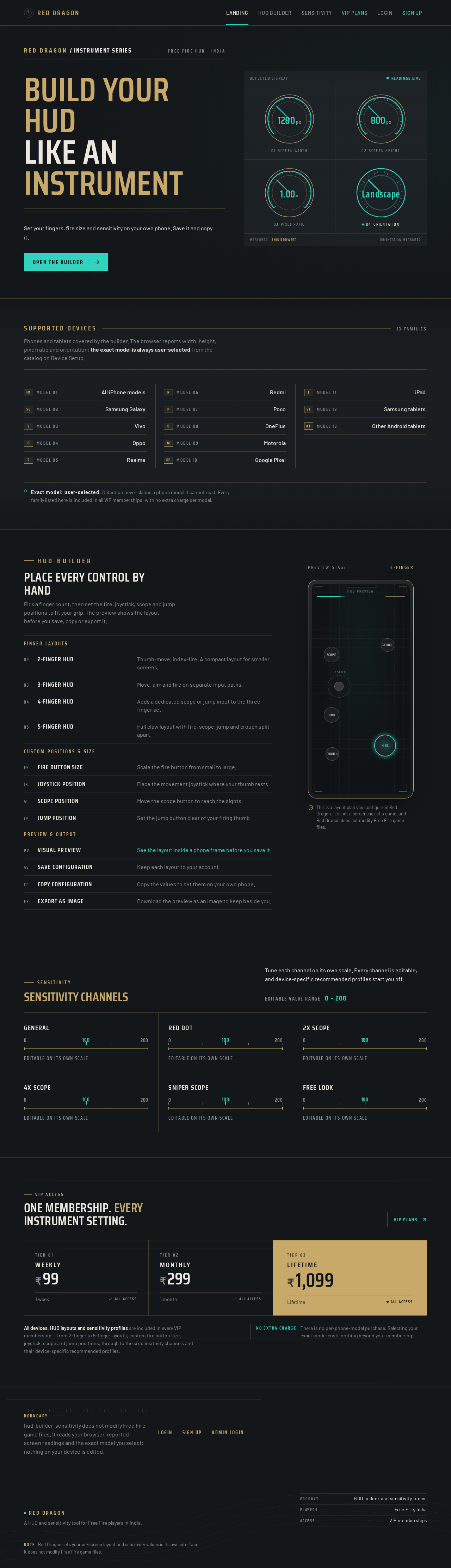
Build your HUD
like an instrument
Set your fingers, fire size and sensitivity on your own phone. Save it and copy it.
Open the builderSupported devices
13 familiesPhones and tablets covered by the builder. The browser reports width, height, pixel ratio and orientation; the exact model is always user-selected from the catalog on Device Setup.
- Model 01All iPhone models
- Model 02Samsung Galaxy
- Model 03Vivo
- Model 04Oppo
- Model 05Realme
- Model 06Redmi
- Model 07Poco
- Model 08OnePlus
- Model 09Motorola
- Model 10Google Pixel
- Model 11iPad
- Model 12Samsung tablets
- Model 13Other Android tablets
HUD Builder
Place every control by hand
Pick a finger count, then set the fire, joystick, scope and jump positions to fit your grip. The preview shows the layout before you save, copy or export it.
- 2-finger HUDThumb-move, index-fire. A compact layout for smaller screens.
- 3-finger HUDMove, aim and fire on separate input paths.
- 4-finger HUDAdds a dedicated scope or jump input to the three-finger set.
- 5-finger HUDFull claw layout with fire, scope, jump and crouch split apart.
- Fire button sizeScale the fire button from small to large.
- Joystick positionPlace the movement joystick where your thumb rests.
- Scope positionMove the scope button to reach the sights.
- Jump positionSet the jump button clear of your firing thumb.
- Visual previewSee the layout inside a phone frame before you save it.
- Save configurationKeep each layout to your account.
- Copy configurationCopy the values to set them on your own phone.
- Export as imageDownload the preview as an image to keep beside you.
This is a layout plan you configure in Red Dragon. It is not a screenshot of a game, and Red Dragon does not modify Free Fire game files.
Sensitivity
Sensitivity channels
Tune each channel on its own scale. Every channel is editable, and device-specific recommended profiles start you off.
Editable value range 0 – 200
General
Editable on its own scale
Red Dot
Editable on its own scale
2X Scope
Editable on its own scale
4X Scope
Editable on its own scale
Sniper Scope
Editable on its own scale
Free Look
Editable on its own scale
One membership. Every instrument setting.
All devices, HUD layouts and sensitivity profiles are included in every VIP membership — from 2-finger to 5-finger layouts, custom fire button size, joystick, scope and jump positions, through to the six sensitivity channels and their device-specific recommended profiles.
No extra chargeThere is no per-phone-model purchase. Selecting your exact model costs nothing beyond your membership.
Boundary
hud-builder-sensitivity does not modify Free Fire game files. It reads your browser-reported screen readings and the exact model you select; nothing on your device is edited.
No comments yet. Be the first!