hud-builder-sensitivity
 JASNOOR SINGH
UPGRADE RED DRAGON WITH A COMPLETE DEVICE HUD BUILDER. DEVICE COMPATIBILITY: - All iPhone models - Samsung Galaxy - Vivo - Oppo - Realme - Redmi - Poco - OnePlus - Motorola - Google Pixel - iPad - Samsung tablets - Other Android tablets DEVICE DETECTION: - Detect screen width and height. - Detect device pixel ratio. - Detect screen orientation. - Let users manually select their exact phone model. - Never claim exact model detection if unavailable. HUD BUILDER: - 2-finger HUD - 3-finger HUD - 4-finger HUD - 5-finger HUD - Custom fire button size. - Custom joystick position. - Custom scope and jump button positions. - Visual HUD preview. - Save and copy configurations. - Export configuration as an image. SENSITIVITY: - Device-specific recommended profiles. - General sensitivity. - Red Dot. - 2X Scope. - 4X Scope. - Sniper Scope. - Free Look. - Editable values from 0 to 200. - Training-mode adjustment guide. VIP ACCESS: Weekly: ₹99 Monthly: ₹299 Lifetime: ₹1,099 All devices, HUD layouts and sensitivity profiles must be included in the existing VIP memberships. Do not charge extra for individual phone models. Build a working interface with a real database, user accounts and secure admin dashboard. Do not claim configurations have been tested on devices unless they actually have been tested. Do not modify Free Fire game files.

Comments (0)
Sign in to leave a comment
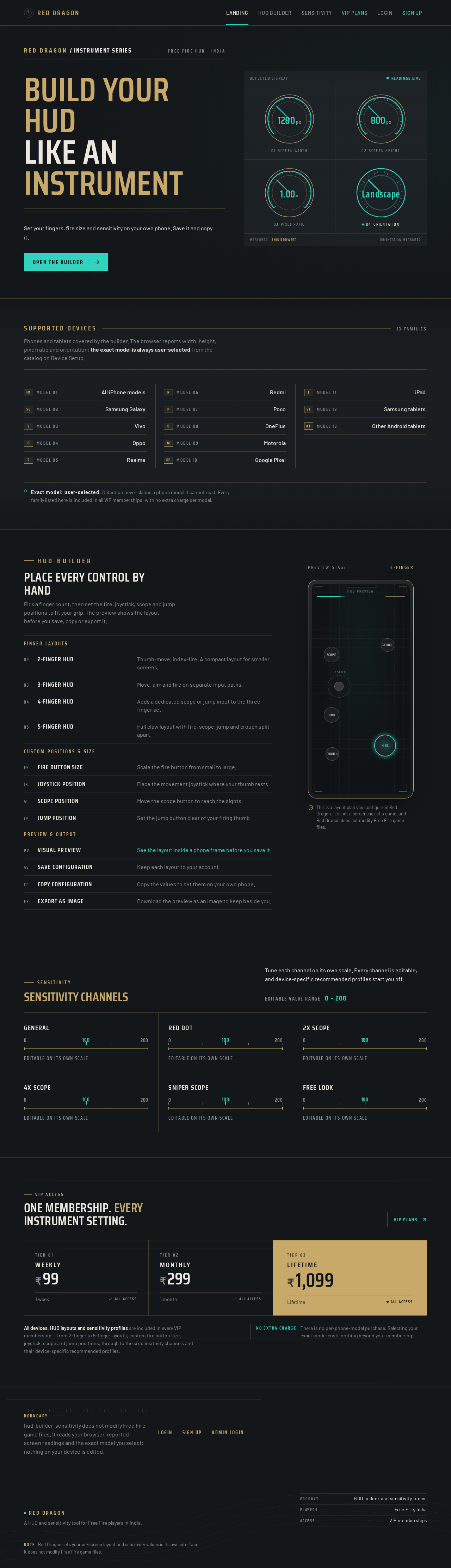
Build your HUD
like an instrument
Set your fingers, fire size and sensitivity on your own phone. Save it and copy it.
Open the builderSupported devices
13 familiesPhones and tablets covered by the builder. The browser reports width, height, pixel ratio and orientation; the exact model is always user-selected from the catalog on Device Setup.
- Model 01All iPhone models
- Model 02Samsung Galaxy
- Model 03Vivo
- Model 04Oppo
- Model 05Realme
- Model 06Redmi
- Model 07Poco
- Model 08OnePlus
- Model 09Motorola
- Model 10Google Pixel
- Model 11iPad
- Model 12Samsung tablets
- Model 13Other Android tablets
HUD Builder
Place every control by hand
Pick a finger count, then set the fire, joystick, scope and jump positions to fit your grip. The preview shows the layout before you save, copy or export it.
- 2-finger HUDThumb-move, index-fire. A compact layout for smaller screens.
- 3-finger HUDMove, aim and fire on separate input paths.
- 4-finger HUDAdds a dedicated scope or jump input to the three-finger set.
- 5-finger HUDFull claw layout with fire, scope, jump and crouch split apart.
- Fire button sizeScale the fire button from small to large.
- Joystick positionPlace the movement joystick where your thumb rests.
- Scope positionMove the scope button to reach the sights.
- Jump positionSet the jump button clear of your firing thumb.
- Visual previewSee the layout inside a phone frame before you save it.
- Save configurationKeep each layout to your account.
- Copy configurationCopy the values to set them on your own phone.
- Export as imageDownload the preview as an image to keep beside you.
This is a layout plan you configure in Red Dragon. It is not a screenshot of a game, and Red Dragon does not modify Free Fire game files.
Sensitivity
Sensitivity channels
Tune each channel on its own scale. Every channel is editable, and device-specific recommended profiles start you off.
Editable value range 0 – 200
General
Editable on its own scale
Red Dot
Editable on its own scale
2X Scope
Editable on its own scale
4X Scope
Editable on its own scale
Sniper Scope
Editable on its own scale
Free Look
Editable on its own scale
One membership. Every instrument setting.
All devices, HUD layouts and sensitivity profiles are included in every VIP membership — from 2-finger to 5-finger layouts, custom fire button size, joystick, scope and jump positions, through to the six sensitivity channels and their device-specific recommended profiles.
No extra chargeThere is no per-phone-model purchase. Selecting your exact model costs nothing beyond your membership.
Boundary
hud-builder-sensitivity does not modify Free Fire game files. It reads your browser-reported screen readings and the exact model you select; nothing on your device is edited.
No comments yet. Be the first!