html-css
 Cyrus Blazo
Make a code using html and css for design

Comments (0)
Sign in to leave a comment
System Requirements
System Requirements Document for html-css
1. Introduction
html-css is a design deliverable for a web-based sugarcane delivery coordination system. It presents both requested flowcharts: an administrative flowchart covering transactions, reports, and users, and a farmer/driver flowchart showing delivery coordination. The design must be implemented using HTML and CSS.
The intended audience is the Admin, Farmer, and Driver personas. The flowcharts make each role’s steps and handoffs understandable at a glance.
2. System Overview
The current deliverable is a custom HTML/CSS design with an anonymous landing page and two separately navigable flowchart pages. Both flowcharts must be presented; neither may be omitted in favor of the other.
The Admin flowchart depicts administrative work involving transactions, reports, and users. The Delivery flowchart depicts coordination between farmers and drivers. These are explanatory diagrams, not an implementation of the operational system: the accepted requirements do not ask the design to execute transactions, generate reports, manage accounts, dispatch drivers, or process deliveries.
The active human personas are exactly Admin, Farmer, and Driver. No application identity, login, or differentiated access is required for viewing the diagrams.
2a. Product Interpretation and Delivery Boundary
The product is a design deliverable, not a functioning sugarcane logistics service. Its purpose is to show both flowcharts clearly using HTML and CSS. The diagrams communicate the accepted administrative and delivery workflows; they do not perform the depicted operational actions.
The three supplied pages are the complete current page contract, in order: Landing, Admin Flowchart, and Delivery Flowchart. All are anonymously accessible. The Landing page introduces the design and provides navigation to both diagrams. The Admin Flowchart and Delivery Flowchart pages each present their respective diagram.
The supplied reference images provide context for the flowchart content. The project-wide creative direction governs the visual design: a warm paper palette, pixel-inspired diagram styling, and clear green and orange lanes. The images do not authorize adding operational capabilities or changing the page contract.
2c. Page Content and Component Coverage
Landing
- Information and state: Introduces the two-flowchart design and offers access to both diagrams. The initial state is the public entry; no identity or session state is needed.
- Primary actions: Navigate to Admin Flowchart or Delivery Flowchart.
- Supporting content: A compact visual preview of both flowcharts may reinforce that both are included. It must not replace either full diagram.
- Domain entities: Admin flowchart, delivery flowchart.
- Component responsibilities: Hero headline and short explanatory copy; two clearly labeled navigation controls; optional miniature diagram preview; persistent navigation that exposes the two flowchart destinations.
- States: The page is immediately available as a static design. If a destination cannot be opened, keep the other destination available and provide a clear way back to the Landing page. No data-loading state is required.
Admin Flowchart
- Information and state: Presents the administrative workflow as an ordered diagram covering transactions, reports, and users. The reference image includes a start, admin login and dashboard, three administrative branches, and an end.
- Primary actions: Read the ordered flow and its branch labels. Use the page navigation to return to Landing or open Delivery Flowchart.
- Supporting content: A legend may explain diagram node types and lane colors, without adding workflow steps.
- Domain entities: Admin, transaction, report, user, sugarcane pricing, receipt, farmer, driver.
- Component responsibilities: A readable ordered flowchart; distinct, labeled branches for transaction, feedback/reports, and user management; connectors and node labels; navigation to the other supplied pages.
- States: The diagram is available as a complete static flow. If connectors or decorative effects are unavailable, the ordered text representation remains readable. If the page fails to render, navigation provides a route back to Landing.
Delivery Flowchart
- Information and state: Presents the coordinated sugarcane delivery workflow for Farmer and Driver as an ordered diagram with participant lanes and the pickup decision.
- Primary actions: Read the farmer-side and driver-side steps, including the decision and its labeled outcomes. Use the page navigation to return to Landing or open Admin Flowchart.
- Supporting content: A legend may explain diagram node types and lane colors, without adding workflow steps.
- Domain entities: Farmer, Driver, farm and cane details, delivery request, driver match, driver status, pickup, delivery status.
- Component responsibilities: A readable ordered flowchart with separate Farmer and Driver lanes, labeled handoffs, the “Cane Picked Up?” decision and its Yes/No branches, and navigation to the other supplied pages.
- States: The diagram is available as a complete static flow. If connectors or decorative effects are unavailable, the ordered text representation remains readable. If the page fails to render, navigation provides a route back to Landing.
3. Functional Requirements
FR-1 — Build the design using HTML and CSS
As a project stakeholder, I should receive a design built using HTML and CSS.
- Provenance:
explicit - Trigger/input: The project design is created.
- Observable result: The design is implemented using HTML and CSS.
- Access: No identity is required.
- Failure and recovery: If the design does not render, correct the HTML/CSS so the intended content is visible.
- Continuation: The rendered design presents both flowcharts through the supplied pages.
FR-2 — Present the administrative flowchart
As an Admin, I should be able to view the admin flowchart covering transactions, reports, and users.
- Provenance:
explicitfor the administrative flowchart and its named areas;required_inferencefor the page owner. - Trigger/input: The Admin opens Admin Flowchart from the Landing page or page navigation.
- Observable result: The page presents an ordered administrative flowchart covering transactions, reports, and users. The supplied reference image depicts a start, admin login and dashboard, transaction branch, feedback and reports branch, user-management branch, and end.
- Access: Anonymous viewing; no application identity is required.
- Failure and recovery: If the diagram’s visual connectors fail, its ordered content remains readable. If the page fails, the Admin can return to Landing and retry.
- Continuation: The Admin can return to Landing or open Delivery Flowchart.
FR-3 — Present the farmer/driver delivery coordination flowchart
As a Farmer, I should be able to view the delivery flowchart showing my part in coordinating sugarcane delivery with a Driver.
- Provenance:
explicitfor the farmer/driver delivery coordination flowchart;required_inferencefor the page owner and readable participant lanes. - Trigger/input: The Farmer opens Delivery Flowchart from the Landing page or page navigation.
- Observable result: The page presents an ordered delivery flowchart showing the Farmer’s steps, the Driver’s steps, their handoffs, and the pickup decision.
- Access: Anonymous viewing; no application identity is required.
- Failure and recovery: If the diagram’s visual connectors fail, its ordered content remains readable. If the page fails, the Farmer can return to Landing and retry.
- Continuation: The Farmer can return to Landing or open Admin Flowchart.
FR-4 — Show the Driver’s side of delivery coordination
As a Driver, I should be able to view my part in the delivery coordination flowchart alongside the Farmer’s part.
- Provenance:
explicitfor the farmer/driver delivery coordination flowchart;required_inferencefor the Driver’s participant-facing view and page owner. - Trigger/input: The Driver opens Delivery Flowchart from the Landing page or page navigation.
- Observable result: The Driver can read the Driver-side steps and the handoffs connecting them to the Farmer-side steps.
- Access: Anonymous viewing; no application identity is required.
- Failure and recovery: If the diagram’s visual connectors fail, its ordered content remains readable. If the page fails, the Driver can return to Landing and retry.
- Continuation: The Driver can return to Landing or open Admin Flowchart.
FR-5 — Present both flowcharts together as part of the design
As a project stakeholder, I should be able to find both flowcharts in the same design rather than only one.
- Provenance:
explicit - Trigger/input: A visitor opens Landing or navigates between the flowchart pages.
- Observable result: The design provides access to both Admin Flowchart and Delivery Flowchart. The Landing page may preview both; each full diagram remains available on its own supplied page.
- Access: Anonymous viewing.
- Failure and recovery: If one destination is unavailable, the other remains reachable from the Landing page or navigation.
- Continuation: The visitor can open either diagram and return to the Landing page.
4. User Personas
Admin
- Product context: An administrative participant in the sugarcane delivery operation.
- Primary goal: Understand and communicate the administrative workflow.
- Accepted responsibilities: Use the Admin Flowchart to understand the depicted transaction, report, and user-management areas.
- Relevant inputs or decisions: The diagram presents administrative branches and their depicted steps; the Admin’s accepted interaction with this design is to read and understand them.
- Interaction with other accepted participants: The Admin flowchart includes user-related work involving farmers and drivers, but the design does not implement account changes or require those participants to respond within the product.
- Observable success: The administrative process is clearly depicted and the Admin can locate all three named areas.
Farmer
- Product context: A participant in sugarcane delivery coordination.
- Primary goal: Understand the Farmer’s steps and handoffs in the delivery flow.
- Accepted responsibilities: Use the Delivery Flowchart to understand the farmer-side process.
- Relevant inputs or decisions: The diagram depicts farm and cane details, a request for a truck/driver, matching, tracking, and the pickup decision.
- Interaction with other accepted participants: The Farmer’s depicted workflow connects to the Driver’s lane. The design communicates that handoff; it does not execute it.
- Observable success: The Farmer can identify their steps, the Driver handoff, and the pickup decision in the diagram.
Driver
- Product context: A participant coordinating sugarcane deliveries alongside Farmers.
- Primary goal: Understand the Driver’s steps and handoffs in the delivery flow.
- Accepted responsibilities: Use the Delivery Flowchart to understand the driver-side process.
- Relevant inputs or decisions: The diagram depicts viewing available requests, accepting a delivery request, navigating to the farm, picking up sugarcane, and updating location/status through notification.
- Interaction with other accepted participants: The Driver’s lane connects to the Farmer’s lane and the delivery outcome. The design communicates that coordination; it does not execute it.
- Observable success: The Driver can identify the driver-side steps and how they connect to the Farmer’s steps.
5. Core User Flows
5.1 Admin views the administrative flowchart
- The Admin opens Landing anonymously.
- The Admin selects Admin flow or the Admin Flowchart navigation item.
- Admin Flowchart presents the ordered administrative diagram, including its transaction, feedback/reports, and user-management branches.
- The Admin reads the depicted steps and branches. The diagram communicates the process; it does not perform administrative operations.
- If the diagram’s connectors are unavailable, the ordered content remains readable. If the page fails, the Admin returns to Landing and retries or opens Delivery Flowchart.
- The Admin returns to Landing or opens Delivery Flowchart.
5.2 Farmer views the delivery coordination flowchart
- The Farmer opens Landing anonymously.
- The Farmer selects Delivery flow or the Delivery Flowchart navigation item.
- Delivery Flowchart presents the Farmer and Driver lanes, their depicted handoffs, and the pickup decision.
- The Farmer reads the farmer-side steps and the Driver’s corresponding steps. The Driver’s lane is visible as part of the same diagram; no operational response is performed by the Driver through this design.
- If the diagram’s connectors are unavailable, the ordered content remains readable. If the page fails, the Farmer returns to Landing and retries or opens Admin Flowchart.
- The Farmer returns to Landing or opens Admin Flowchart.
5.3 Driver views the delivery coordination flowchart
- The Driver opens Landing anonymously.
- The Driver selects Delivery flow or the Delivery Flowchart navigation item.
- Delivery Flowchart presents the Driver and Farmer lanes, their depicted handoffs, and the pickup decision.
- The Driver reads the driver-side steps and the Farmer’s corresponding steps. The Farmer’s lane is visible as part of the same diagram; no operational response is performed by the Farmer through this design.
- If the diagram’s connectors are unavailable, the ordered content remains readable. If the page fails, the Driver returns to Landing and retries or opens Admin Flowchart.
- The Driver returns to Landing or opens Admin Flowchart.
5.4 Visitor finds both flowcharts
- A visitor opens Landing anonymously.
- The Landing page identifies both flowcharts and provides a separate navigation action for each.
- The visitor opens either flowchart and can return to Landing to open the other.
- If one destination is unavailable, the visitor can still access the other destination and retry the unavailable one from Landing.
6. Visuals Colors and Theme
Creative direction: Charming clarity — flowchart as icon set, after Susan Kare.
The design should feel like a practical, reassuring, well-labeled machine panel for sugarcane delivery coordination. The flowchart itself is the imagery: no photography, stock people, illustrations, gradients, or blobs.
Color tokens
| Role | Token |
|---|---|
| Warm paper background | #F4F1E4 |
| Off-white surface and node tiles | #FFFDF6 |
| Ink text and outlines | #1B1B1B |
| Admin/system lane and primary | #2E5E4E |
| Delivery lane, active states, arrowheads, and single CTA accent | #E4572E |
| Muted labels, rules, and inactive nodes | #8C8778 |
| Decision nodes | #E8B33C |
| Tiny legend chips only | #3E7CB1 |
Use no blue for large fields or controls; the blue token is restricted to tiny legend chips at 12px. The palette should remain approximately 70% paper/off-white, 20% ink and greys, and 10% saturated color.
Typography
- Headings and node-class headings: VT323, used at 20px or larger; all-caps labels with
0.04emtracking. - Body, node titles, and UI: Karla, weights 400, 600, and 700, with generous line-height around
1.6. - Node titles: Karla 700 at 15–17px.
- Step numerals: Karla tabular figures.
- Type scale: Display
clamp(40px, 8vw, 96px); section headings 24/32px; node titles 15/17px; body 16/17px; micro-labels 11/12px, all-caps with0.12emtracking. - Do not use Inter, Roboto, Arial, Helvetica, Open Sans, Lato, Poppins, or system-ui for headings or body.
Shape, layout, and diagram language
- Use chunky rounded-rectangle node tiles with a 3px ink outline and a hard 4px offset shadow, without blur.
- Decision nodes are rotated squares with counter-rotated labels. Label Yes/No branches with pill chips in decision yellow and muted grey.
- Draw arrows as 3px CSS strokes with solid triangular heads.
- Use 20px CSS box-shadow-grid pixel glyphs inside node tiles; do not use image assets for these icons.
- Use a visible 12-column grid on a warm paper ground and a persistent top bar with Admin, Delivery, and Both states. Both stacks the two diagrams vertically.
- On mobile, diagrams are vertical sequences. On desktop, use two- or three-column zig-zags with elbow connectors and a numbered left gutter.
- Keep a legend sticky at the right on desktop; on mobile, use a horizontally scrollable chip row.
- Use a single decorative band of repeating 8px squares in muted tones at section tops.
- The Landing hero is a full-width paper-colored band with a 40px pixel-motif rule at the top. Its left two-thirds carry the stacked headline “TWO FLOWS. ONE HARVEST.”, with HARVEST in orange, and two chunky outlined buttons: Admin flow in green and Delivery flow in orange. Its right third may show a miniature of both flowcharts as two vertical columns of tiny 8px node squares with 3px connectors. The miniature may bleed off the viewport edge as decoration, but must not cover readable text or controls.
- Do not use a centered headline/subtext/single-CTA composition, a grid of identical hover-lift cards, glassmorphism, frosted panels, soft blurred shadows, or a generic indigo/blue-on-white SaaS template.
Responsive readability
At 375px, 768px, and 1280px, keep all readable text and controls fully inside the viewport and their containers. Wrap or scale content as needed; node labels must not clip, truncate, overlap, or be covered. Decorative imagery may bleed or crop as directed, provided it covers no readable text or control. Scrollable content must allow every item to become fully readable. Under reduced motion, wrap items into rows or allow horizontal scrolling so each item can be brought fully into view.
7. Signature Design Concept
Build the Landing page as a warm-paper diagram panel. A 40px pixel-motif rule introduces the hero. On the left, the large VT323 headline “TWO FLOWS. ONE HARVEST.” is stacked across three lines, with HARVEST in orange. Beneath it, place the two accepted navigation controls: Admin flow and Delivery flow, each with a small CSS pixel glyph and a chunky outlined treatment.
On the right, compose a miniature preview of both flowcharts as two narrow vertical lanes of tiny node squares and 3px connectors. It is a visual preview of the accepted diagrams, not a new workflow or destination. At smaller widths, preserve the headline and controls within the viewport; the decorative miniature may be cropped or repositioned only where it does not obscure readable content.
8. Interaction Model & Motion Direction
Interaction Model: Animated
Motion Tempo: restrained
Hero Dimensionality: flat
Landing Hero Motion Brief
- Focal subject: The two miniature flowchart lanes, one green for Admin and one orange for Delivery, beside the headline.
- Input → transformation → outcome: A visitor chooses Admin flow or Delivery flow; the corresponding accepted diagram becomes the destination. The hero preview communicates that both flows are available.
- Motion vocabulary: Frame-by-frame, stepped node reveals using
steps(2, end); stepped arrow dash reveals; instant blink-and-slide lane changes; physical press feedback that snaps a node’s hard shadow from 4px to 0px. Avoid eased or bouncy motion. - First frame: The paper-colored hero, pixel-motif rule, stacked headline, two labeled navigation controls, and miniature green/orange lanes are composed together. Readable text and controls remain fully visible.
- Reduced motion: Show the complete diagrams immediately, with no stepped animation or blinking. Keep content usable as a static arrangement; wrap or allow horizontal scrolling for content that cannot fit at once.
9. Non-Functional Requirements
NFR-1 — HTML and CSS implementation
- Requirement: Implement the design using HTML and CSS.
- Provenance:
explicit. - Rationale: This is an explicit implementation constraint.
NFR-2 — Responsive readable content
- Requirement: At 375px, 768px, and 1280px, readable text and controls must remain fully inside the viewport and their containers. Diagram labels must not clip, truncate, overlap, or be covered. Scrollable content must allow each item to become fully readable.
- Provenance:
explicitin the creative direction. - Rationale: The design must remain legible across the specified viewport widths.
NFR-3 — Reduced-motion usability
- Requirement: Under
prefers-reduced-motion, provide a usable static arrangement with all diagram content visible or reachable through wrapping or scrolling. - Provenance:
explicitin the creative direction. - Rationale: The direction specifies a static, fully visible diagram without stepped animation or blinking.
NFR-4 — Diagram text remains readable without connectors
- Requirement: Each flowchart must remain readable as ordered text when connectors are hidden or unavailable.
- Provenance:
explicitin the creative direction. - Rationale: The diagrams are required to communicate their order independently of connector rendering.
10. Tech Stack
- HTML and CSS: Required by the explicit user constraint.
- No additional framework, runtime, backend, or storage technology is specified or required for this design deliverable.
11. Assumptions and Constraints
- Current scope: A design that presents both flowcharts using HTML and CSS.
- Page contract: The current ordered pages are Landing, Admin Flowchart, and Delivery Flowchart. Their access is anonymous.
- No operational implementation: The accepted requirements ask for flowchart design, not execution of the depicted administrative or delivery operations.
- Reference-image content: The supplied images inform the depicted flowchart content. They do not override the project-wide creative direction or authorize additional product capabilities.
- No identity requirement: Viewing the diagrams does not require application-owned identity, login, or account management.
- No additional personas: The active human persona set is exactly Admin, Farmer, and Driver.
- No future requirements were specified.
12. Glossary
- Admin Flowchart: The diagram of administrative work covering transactions, reports, and users.
- Delivery Flowchart: The diagram of sugarcane delivery coordination between Farmers and Drivers.
- Flowchart: An ordered visual representation of steps and their connections.
- HTML: The markup technology required for the design.
- CSS: The styling technology required for the design.
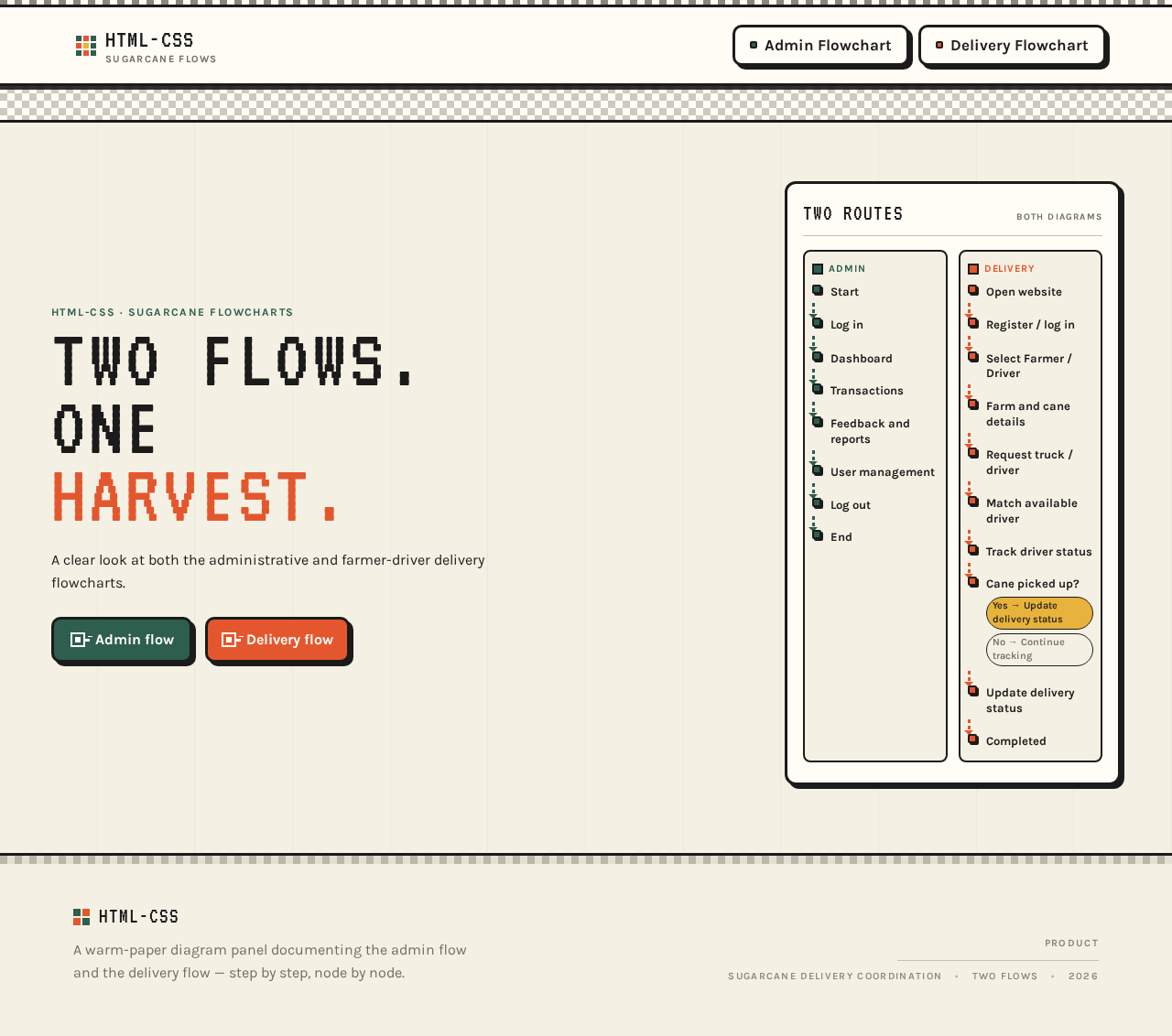
html-css · sugarcane flowcharts
TWO FLOWS.ONEHARVEST.
A clear look at both the administrative and farmer-driver delivery flowcharts.
html-css · sugarcane flowcharts
TWO FLOWS.ONEHARVEST.
A clear look at both the administrative and farmer-driver delivery flowcharts.
No comments yet. Be the first!