hotel-3d

bySfweth .f

Esi same website is hotel ki esi website same bana do 3d website bana do hotel ki

Landing
Landing

Comments (0)

No comments yet. Be the first!

System Requirements

System Requirements Document for hotel-3d

1. Introduction

hotel-3d is a 3D hotel website. The requester asked, in Hindi-English, for a hotel website built "the same" as a hotel website they referred to as "esi same website", and explicitly demanded that it be a 3D website for the hotel. No URL for the referenced site was supplied, so the reference cannot be inspected; the product therefore delivers the accepted hotel capabilities (browsing rooms and property information, making a reservation, and staff management of rooms and reservations) with a self-sufficient, first-class 3D presentation rather than a copy of an unseen template.

The audience is two-fold: leisure travellers and couples browsing on phones who want to explore the property and book a stay, and hotel staff who keep room listings and incoming reservations accurate.

Success Criteria

  • A first-time visitor can reach the 3D tour, browse rooms, and submit a reservation request without any prior account.
  • A guest can return, sign in, and see the status of their own reservation.
  • Hotel staff can sign in, create/edit/remove room listings, and review and update reservation statuses.
  • The 3D presentation is the hero of the site and remains usable (static composed frame) under reduced-motion preferences.
Page 1 of 17

2. System Overview

hotel-3d is delivered as a React front end, a shared FastAPI backend process exposing the application APIs and domain modules, and a MariaDB database for application-owned persistent data. The front end renders the public hotel experience (landing, 3D tour, rooms, reservation) and the staff console (room management, reservations), with shared identity surfaces (Login, Sign Up).

Actors:

  • Hotel guest / prospective booker — anonymous browsing, self-service enrollment, reservation submission, and returning status checks.
  • Hotel staff / manager — returning verification, room listing management, and reservation review/status updates.

Accepted behavior: a 3D hotel website modeled on the referenced hotel site (structure/features unverifiable without a URL), room and property browsing, room reservation, and staff management of room listings and reservations. Identity is application-owned: guests self-enroll before submitting a reservation request and return to check status; staff verify on return before reaching room management and reservations, with staff role authorization governing those management surfaces.

Removed from scope

  • None — no concept was explicitly removed by the user.
Page 2 of 17

2a. Product Interpretation and Delivery Boundary

The public hotel experience is anonymous and open: Landing, 3D Tour, and Rooms require no identity. The Reservation surface is protected — a guest must establish identity (Sign Up) or verify on return (Login) before submitting a reservation request, and the same identity lets them return to check reservation status. The staff console (Room Management, Reservations) is protected and role-restricted to hotel staff; staff verify through Login before reaching it. Login and Sign Up are anonymous entry surfaces and never require prior identity to reach.

The 3D presentation is a current, first-class delivery commitment, not a future idea. The referenced hotel website could not be inspected (no URL), so its exact structure, features, and visuals are not replicated; the site's own structure and 3D presentation stand on their own. No future-horizon capabilities are accepted.

2c. Page Content and Component Coverage

Page 3 of 17

Landing

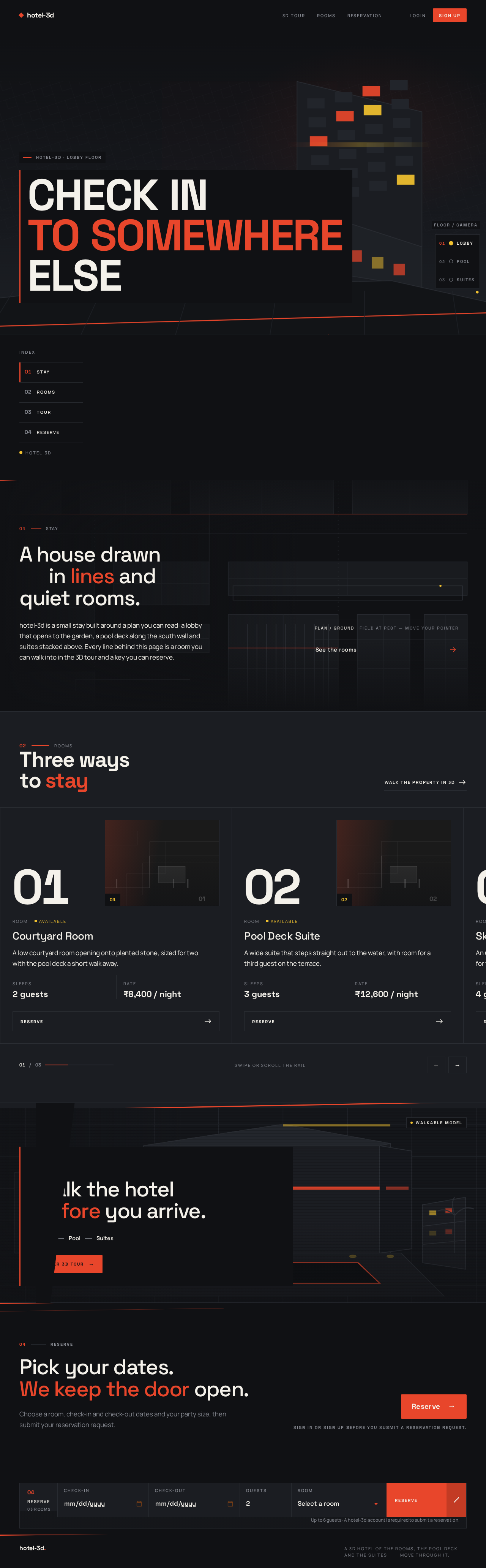
  • Information/state: hotel identity wordmark, full-viewport 3D hero scene (facade and pool deck), stacked display headline, floor-pip rail (Lobby / Pool / Suites), section index (01 Stay, 02 Rooms, 03 Tour, 04 Reserve), booking bar.
  • Primary actions: enter 3D Tour, browse Rooms, open Reserve (routes to Reservation, which requires identity), open Login / Sign Up.
  • Supporting actions: scroll-scrub camera via floor pips; dock booking bar on scroll.
  • Domain entities: Hotel property, Room (summary), Floor (Lobby/Pool/Suites).
  • Component responsibilities: hero canvas (cursor-reactive orbit, reduced-motion frozen frame), kinetic headline, section index, docking booking bar, generative line field behind section openers.
  • States: loading (scene assets), empty (n/a), success (scene composed), error (scene asset failure → static fallback image with headline intact), recovery (retry scene load).

3D Tour

  • Information/state: full-bleed 3D canvas of the hotel property, floating floor-pip rail, bottom info strip describing the current area.
  • Primary actions: move between Lobby, Pool, Suites via pips; orbit/explore the scene.
  • Supporting actions: return to Landing or continue to Rooms / Reserve.
  • Domain entities: Floor, Area, Room.
  • Component responsibilities: 3D scene renderer, floor-pip rail, info strip.
  • States: loading (scene), empty (n/a), success (area focused), error (WebGL unavailable → static composed frame + textual area description), recovery (fallback to static).
Page 4 of 17

Rooms

  • Information/state: horizontal scroll-snap rail of room panels, each led by a large tabular room numeral, room details (name, description, capacity, rate/availability as maintained by staff).
  • Primary actions: browse rooms, select a room to reserve (routes to Reservation).
  • Supporting actions: scroll/swipe the rail; open 3D Tour.
  • Domain entities: Room.
  • Component responsibilities: scroll-snap rail, room panel (numeral, photo, details), reserve CTA.
  • States: loading (room list), empty (no rooms published → message), success (rooms listed), error (fetch failure → retry).

Reservation

  • Information/state: selected room summary, date/guests/room strip, guest identity context, submitted reservation status.
  • Primary actions: submit reservation request (requires signed-in guest); view confirmation/status.
  • Supporting actions: change room/dates; sign in if not authenticated.
  • Domain entities: Reservation, Room, Guest.
  • Component responsibilities: booking form, validation, submission, status confirmation.
  • States: loading, empty (no room selected → prompt to choose), success (request submitted with pending status), error (validation or submission failure → inline recovery), unauthenticated (prompt to Sign Up / Login).
Page 5 of 17

Room Management

  • Information/state: staff-only list of room listings with editable fields (numeral, name, description, capacity, rate, availability).
  • Primary actions: create room listing, edit room listing, remove room listing.
  • Supporting actions: navigate to Reservations.
  • Domain entities: Room.
  • Component responsibilities: dense tabular rows, create/edit form, delete confirmation.
  • States: loading, empty (no rooms → create prompt), success (saved), error (save/delete failure → retry), unauthorized (redirect to Login).

Reservations

  • Information/state: staff-only list of incoming reservations with guest, room, dates, and status.
  • Primary actions: review reservation, update reservation status (e.g., pending → confirmed).
  • Supporting actions: filter/sort by status; navigate to Room Management.
  • Domain entities: Reservation, Guest, Room.
  • Component responsibilities: reservation table, status chips (sunflower for confirmed/pending), status update control.
  • States: loading, empty (no reservations), success (status updated), error (update failure → retry), unauthorized (redirect to Login).
Page 6 of 17

Login

  • Information/state: email/password fields; anonymous entry.
  • Primary actions: verify returning guest or staff; route to Reservation (guest) or Room Management/Reservations (staff).
  • Supporting actions: link to Sign Up.
  • Domain entities: Account (guest or staff).
  • Component responsibilities: credential form, error messaging, role-based routing.
  • States: idle, submitting, success (routed by role), error (invalid credentials → retry).

Sign Up

  • Information/state: guest enrollment fields (name, email, password); anonymous entry.
  • Primary actions: create guest account; continue to Reservation.
  • Supporting actions: link to Login.
  • Domain entities: Guest account.
  • Component responsibilities: enrollment form, validation, post-signup routing.
  • States: idle, submitting, success (account created → Reservation), error (duplicate email / validation → retry).
Page 7 of 17

3. Functional Requirements

  • FR-1 (explicit): As a hotel guest / prospective booker, I should browse a 3D hotel website so that I can explore the property and its rooms. Lifecycle: initiator = guest; trigger = opening the site; observable result = Landing hero and 3D Tour render; failure/recovery = static fallback if WebGL unavailable; continuation = proceed to Rooms. Access: anonymous.
  • FR-2 (explicit): As a hotel guest / prospective booker, I should browse the hotel's rooms and property information so that I can decide on a stay. Lifecycle: trigger = opening Rooms; result = room list with details; failure/recovery = retry on fetch error; continuation = select a room. Access: anonymous.
  • FR-3 (explicit): As a hotel guest / prospective booker, I should make a room reservation through the website so that I can book a stay. Lifecycle: initiator = guest; prerequisite = signed-in guest identity (FR-5); trigger = submitting the reservation form; result = reservation recorded with pending status and confirmation shown; failure/recovery = validation/submission error with inline retry; continuation = return later to check status (FR-6). Access: role-restricted (signed-in guest).
  • FR-4 (explicit): As hotel staff / manager, I should manage room listings and reservations so that the public site stays accurate and guest bookings are handled. Lifecycle: initiator = staff; prerequisite = staff verification (FR-7) and staff role authorization (FR-8); trigger = create/edit/remove room or update reservation status; result = persisted change reflected on public site / reservation list; failure/recovery = save error with retry; continuation = continue managing. Access: role-restricted (staff).
Page 8 of 17
  • FR-5 (required_inference): As a hotel guest / prospective booker, I should self-enroll before submitting a reservation request so that my reservation is bound to me. Lifecycle: trigger = choosing Reserve while anonymous; result = guest account created and routed to Reservation; failure/recovery = duplicate email/validation error; continuation = submit reservation. Access: anonymous entry (Sign Up).
  • FR-6 (required_inference): As a hotel guest / prospective booker, I should verify on return so that I can check my reservation status. Lifecycle: trigger = opening Login; result = signed-in guest sees own reservation status; failure/recovery = invalid credentials retry; continuation = view status. Access: anonymous entry (Login).
  • FR-7 (required_inference): As hotel staff / manager, I should verify on return before accessing room management and reservations. Lifecycle: trigger = opening Login; result = staff routed to staff console; failure/recovery = invalid credentials retry; continuation = manage. Access: anonymous entry (Login).
  • FR-8 (required_inference): As hotel staff / manager, I should be authorized by staff role for room listing and reservation management so that guests cannot access staff functions. Lifecycle: trigger = accessing Room Management/Reservations; result = staff-only access enforced; failure/recovery = unauthorized → redirect to Login. Access: role-restricted.

4. User Personas

Page 9 of 17

Hotel guest / prospective booker

  • Product context: Leisure traveller or couple browsing on a phone, drawn in by the 3D hotel presentation.
  • Primary goal: Explore the property and rooms, then complete a room reservation.
  • Distinct responsibilities: Anonymous browsing (Landing, 3D Tour, Rooms); self-service enrollment (Sign Up); submitting a reservation request (Reservation); returning to check reservation status (Login → Reservation).
  • Inputs/decisions: Room choice, dates, guest count; decision to enroll and book.
  • Interactions: With hotel staff indirectly — staff review and update the status of the guest's reservation.
  • Observable success: Reservation request submitted with a visible status; status checkable on return.

Hotel staff / manager

  • Product context: Hotel operations staff maintaining the public site's accuracy and handling bookings.
  • Primary goal: Keep room listings current and manage guest reservations.
  • Distinct responsibilities: Returning verification (Login); creating/editing/removing room listings (Room Management); reviewing and updating reservation status (Reservations).
  • Inputs/decisions: Room details (numeral, name, description, capacity, rate, availability); reservation status decisions (e.g., confirm).
  • Interactions: With guests indirectly — staff decisions change the status guests observe.
  • Observable success: Listings reflected on the public site; reservation statuses updated and visible to guests.
Page 10 of 17

5. Core User Flows

Flow A — Guest explores and books

  1. Guest opens Landing (anonymous); 3D hero scene composes with headline and floor-pip rail.
  2. Guest opens 3D Tour, moves between Lobby/Pool/Suites via pips; info strip describes the area.
  3. Guest opens Rooms, scrolls the rail, selects a room.
  4. Guest chooses Reserve; since anonymous, is routed to Sign Up.
  5. Guest completes enrollment on Sign Up; account created; routed to Reservation.
  6. Guest confirms dates/guests/room on Reservation and submits; reservation recorded with pending status; confirmation shown.
  7. Failure/recovery: validation or submission error shows inline message; guest corrects and resubmits. If WebGL unavailable, 3D surfaces show a static composed frame with textual description.

Flow B — Guest returns to check status

  1. Guest opens Login (anonymous), enters credentials.
  2. On success, guest is routed to Reservation and sees their reservation status.
  3. Failure/recovery: invalid credentials show error; guest retries.
Page 11 of 17

Flow C — Staff manages rooms and reservations

  1. Staff opens Login (anonymous), enters credentials.
  2. On success, staff is routed to the staff console (Room Management / Reservations).
  3. Staff creates/edits/removes a room listing on Room Management; change persists and reflects on Rooms.
  4. Staff reviews incoming reservations on Reservations and updates a reservation's status; the guest observes the updated status on their next check.
  5. Failure/recovery: save/update errors show retry; unauthorized access redirects to Login.
Page 12 of 17

6. Visuals Colors and Theme

Muse: Yugo Nakamura — "Interaction as delight — a hotel you move through."

  • Mode: dark default; staff console light.
  • Colors (dark): background #101114; surface #1B1D22; text #F4F1EA; primary #E8462B; accent #F2C230; muted #8B8E96; card border #2A2D33.
  • Colors (light staff console): ground #F4F1EA; ink #101114; same primary #E8462B and accent #F2C230.
  • Typography: headings Space Grotesk 500–700, tracking -0.03em, flush-left short stacks; room numerals Space Grotesk 700 tabular. Body Manrope. Micro-labels 11px uppercase, 0.18em tracking. Scale: display clamp(44px, 9vw, 128px); h2 clamp(30px, 4.5vw, 56px); h3 28px; body 17px / 1.65.
  • Shape: hard-edged rectangles, 0–4px radii; full-bleed colour-block bands; flat panels with 1px #2A2D33 border, no shadows; only round elements are the cursor-follow dot and floor-selector pips; diagonal 3px vermilion section rules.
  • Layout: full-viewport hero; 12-column grid; persistent left section index (01 Stay, 02 Rooms, 03 Tour, 04 Reserve); horizontal scroll-snap room rail; full-bleed 3D canvas with right floor-pip rail and bottom info strip; docking booking bar; light-mode dense tabular staff console.
  • Imagery: stylised low-detail architectural 3D model (charcoal with vermilion/sunflower light accents); tightly cropped monochrome architectural photography with a single colour wash; generative line fields from floor-plan geometry.
Page 13 of 17

7. Signature Design Concept

The public entry is a full-bleed charcoal 3D scene of the hotel facade and pool deck occupying the first viewport, camera slowly orbiting and easing toward the pointer. The display headline "CHECK IN / TO SOMEWHERE / ELSE" is set in three stacked Space Grotesk lines flush-left in the lower-left third, warm paper-white with the middle word in vermilion, sitting on a solid #101114 block that masks only the scene beneath it. Top-left a small wordmark; top-right a single vermilion Reserve pill; bottom-right a thin floor-pip rail (Lobby / Pool / Suites) that scroll-scrubs the camera. No centred headline, no gradient, no stock-photo collage. All readable text and controls stay whole at 375/768/1280px.

Page 14 of 17

8. Interaction Model & Motion Direction

Interaction Model: Animated Motion Tempo: cinematic Hero Dimensionality: layered_2d

Landing Hero Motion Brief

  • Focal subject: the stylised 3D hotel facade and pool deck.
  • Thesis: pointer movement → camera orbit/ease and generative line-field drift → the guest feels they are stepping into the property, then scroll-scrubs the floor-pip rail to move between Lobby, Pool, Suites.
  • Motion vocabulary: cursor-reactive parallax, kinetic headline words sliding in with 60ms stagger, scroll-snap rails with momentum, 12px image slide and numeral flip to vermilion on room hover, 240ms colour-block wipe on navigation.
  • Composed first frame: charcoal scene, three-line headline lower-left on solid block, wordmark top-left, Reserve pill top-right, floor-pip rail bottom-right.
  • Reduced-motion state: all reveals instant, rails swipeable/scrollable, hero canvas frozen on one composed frame.
Page 15 of 17

9. Non-Functional Requirements

  • NFR-1 (explicit): The website must be a 3D website for the hotel; 3D presentation is a core promise, not decoration.
  • NFR-2 (explicit): The website must be modeled on the referenced hotel website; since no URL was supplied, exact structure/features cannot be replicated and the site stands on its own.
  • NFR-3 (required_inference): Application-owned identity with session continuity for guests and staff; staff role authorization enforced on management surfaces.
  • NFR-4 (required_inference): Persistent storage (MariaDB) for rooms, reservations, and accounts.
  • NFR-5 (direction): Readable text and controls stay whole at 375/768/1280px; reduced-motion provides a usable static arrangement.

10. Tech Stack

  • Frontend: React application UI (3D scene rendering in-browser).
  • Backend: shared FastAPI process for application APIs and domain modules.
  • Database: MariaDB for application-owned persistent data.
  • Infrastructure: docker-compose with backend, database, frontend services.
Page 16 of 17

11. Assumptions and Constraints

  • No URL was supplied for the referenced hotel website; its structure, features, and visuals are unverifiable and not replicated.
  • Identity is application-owned; guests self-enroll; staff verify on return with role authorization.
  • Reservation is role-restricted to signed-in guests; Room Management and Reservations are role-restricted to staff.
  • 3D rendering degrades to a static composed frame when WebGL is unavailable or reduced motion is preferred.

12. Glossary

  • 3D Tour: Immersive 3D exploration of the hotel property across Lobby, Pool, Suites.
  • Floor-pip rail: Circular selector pips that scroll-scrub the 3D camera between floors.
  • Reservation: A guest's room booking request with a status (e.g., pending, confirmed).
  • Room listing: A staff-maintained room record shown on the public Rooms page.
  • Staff console: The light-mode, role-restricted Room Management and Reservations surfaces.
Page 17 of 17
Live
Landing design preview
Landing: 1. View 3D hero scene
Landing: Scroll-scrub floor pips
Landing: 2. Retry scene load
3D Tour: Explore hotel scene
3D Tour: Move between floors
3D Tour: Read area description
Rooms: 1. Browse room rail
Rooms: 2. Retry room fetch
Rooms: Select room to reserve
Sign Up: 1. Create guest account
Sign Up: 2. Correct enrollment error
Reservation: Confirm dates and guests
Reservation: 1. Submit reservation request
Reservation: 2. Correct validation error
Reservation: View pending confirmation
Login: 1. Enter credentials
Login: 2. Retry invalid credentials
Reservation: Check reservation status
Live
Landing design preview
Landing: 1. View 3D hero scene
Landing: Scroll-scrub floor pips
Landing: 2. Retry scene load
3D Tour: Explore hotel scene
3D Tour: Move between floors
3D Tour: Read area description
Rooms: 1. Browse room rail
Rooms: 2. Retry room fetch
Rooms: Select room to reserve
Sign Up: 1. Create guest account
Sign Up: 2. Correct enrollment error
Reservation: Confirm dates and guests
Reservation: 1. Submit reservation request
Reservation: 2. Correct validation error
Reservation: View pending confirmation
Login: 1. Enter credentials
Login: 2. Retry invalid credentials
Reservation: Check reservation status