hosting-video-18
 Jerry Andrews
Buat website hosting video 18+ dengan desain modern, responsif untuk Android dan desktop, serta tema gelap. Fitur yang dibutuhkan: * Halaman utama dengan daftar video dan gambar thumbnail. * Kategori video dan fitur pencarian. * Halaman pemutar video HTML5 dengan kontrol pemutaran. * Dashboard admin untuk mengelola judul, deskripsi, kategori, dan URL video. * Sistem login admin yang aman. * Halaman profil, kebijakan privasi, syarat penggunaan, dan formulir pelaporan konten. * Peringatan usia 18+ sebelum mengakses konten. * Gunakan video contoh dan thumbnail placeholder terlebih dahulu. * Pisahkan penyimpanan video dari aplikasi utama agar nantinya dapat menggunakan penyedia hosting video eksternal. * Buat struktur kode yang rapi dan petunjuk untuk menjalankannya. Jangan gunakan konten seksual eksplisit dalam contoh. Pastikan fitur backend, autentikasi, dan upload benar-benar berfungsi sebelum dinyatakan selesai.

Comments (0)
Sign in to leave a comment
System Requirements
System Requirements Document for hosting-video-18
1. Introduction
hosting-video-18 is a dark-themed, modern, responsive website for hosting and presenting 18+ video content. The product serves two audiences: anonymous adult visitors on Android and desktop who need a fast, discreet, credible archive of videos to browse, search, and watch; and a single admin operator who needs a dense, functional control surface to manage the video catalogue.
The product intent is a members-only vault aesthetic — an interface that withholds more than it shows, treats categories as a coded classification system, and presents the catalogue as a printed archive index rather than a grid of identical cards. The experience is built around a mandatory 18+ age gate, a catalogue index with thumbnail listings, category browsing, search, an HTML5 player with playback controls, a secure admin login and dashboard for managing titles, descriptions, categories, and video URLs, plus supporting pages for profile, privacy policy, terms of use, and content reporting.
Video storage is deliberately decoupled from the main application so that an external video hosting provider can be adopted later without restructuring the application. Sample videos and placeholder thumbnails are used initially, and no explicit sexual content is permitted in any sample material.
2. System Overview
The current delivery is a first-party web application with a public-facing catalogue and a protected admin surface. Anonymous visitors pass through an age gate before accessing video content, then browse the catalogue index, filter by category, search, and watch videos in an HTML5 player. A content reporting form is available to any visitor. A single admin operator authenticates through a secure login and manages the catalogue through a dashboard.
Actors:
- Pengunjung (Viewer) — anonymous adult visitor who browses, searches, and watches videos.
- Admin — authenticated operator who manages the catalogue.
- Pelapor Konten — user who submits a content report.
Ownership and delivery boundary:
- The application owns all custom UI surfaces: the home catalogue index, the age gate, the video player page, the admin dashboard, the profile page, the privacy policy page, the terms of use page, the content reporting form, and the admin login.
- Video storage is separated from the main application. The application stores video URLs and metadata; the actual video files are served from a decoupled storage layer that can be swapped for an external video hosting provider without changing the application's catalogue or player logic.
- Backend, authentication, and upload functionality must be genuinely functional before the product is considered complete.
Narrow exclusions:
- No explicit sexual content in sample videos or placeholder thumbnails.
- No adjacent account-management capabilities beyond what is required for admin access continuity.
2a. Product Interpretation and Delivery Boundary
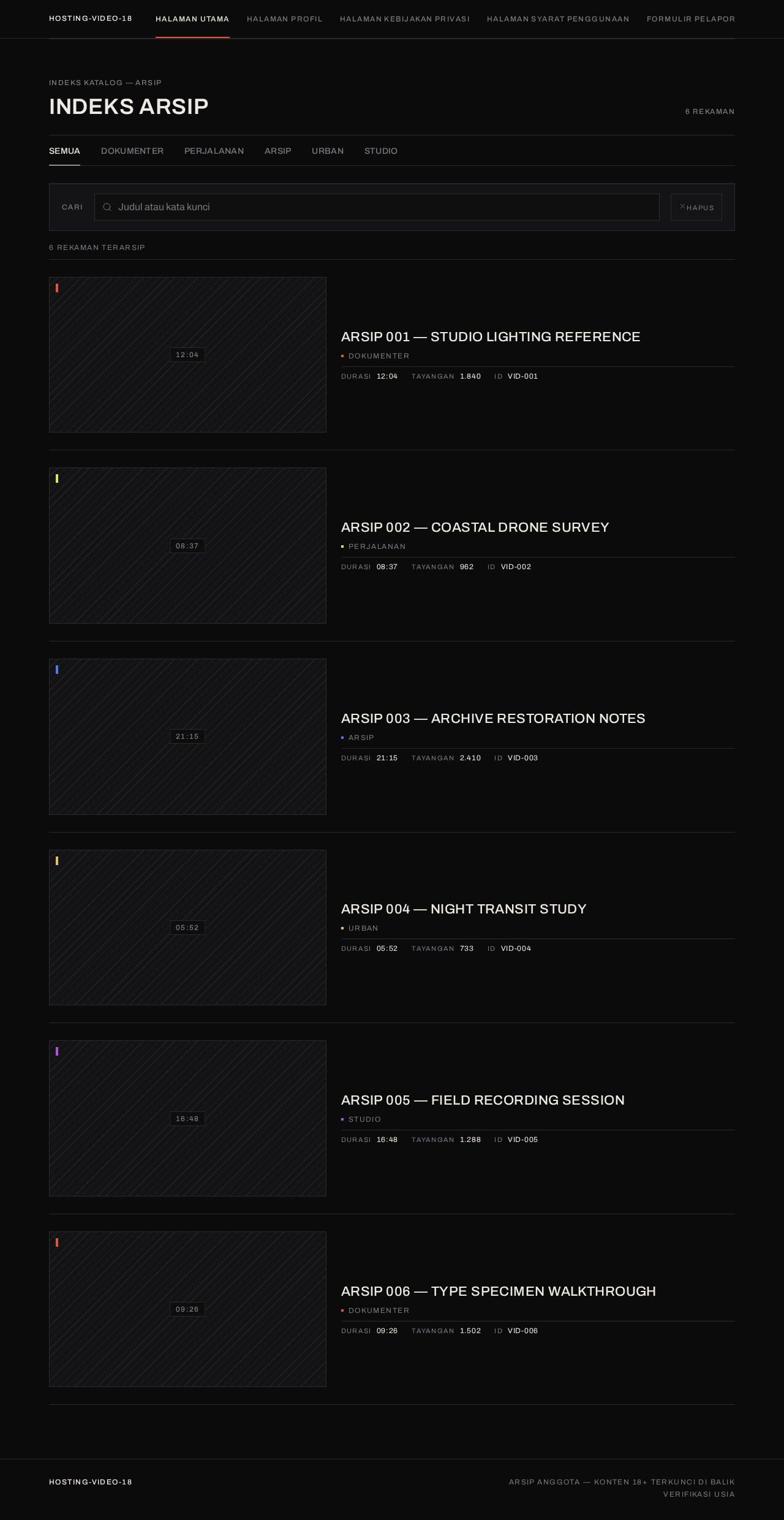
The product is a gated video archive. The first screen a visitor encounters is not a marketing hero but an age gate — a coded specimen on a dark plate that requires explicit 18+ confirmation before any video content becomes accessible. Once confirmed, the visitor enters a catalogue index organized as a printed archive listing: full-width category rail, then asymmetric rows of 16:9 thumbnails with metadata blocks, separated by hairline rules.
The catalogue, player, and supporting pages are publicly reachable without an account. The admin dashboard is protected and requires authentication. Admin access is provisioned or invited before first use, and the admin verifies identity on return. The login surface is anonymously reachable so that an unauthenticated admin can establish access; the dashboard itself remains protected.
Video storage is decoupled: the application manages catalogue metadata and video URLs, while the video files live in a separate storage layer. This boundary is current and intentional — it allows an external video hosting provider to be adopted later without restructuring the application.
2b. Source Content Inventory
No content_source reference directive was supplied. This section is intentionally omitted.
2c. Page Content and Component Coverage
Halaman utama
- Information/state: Full-width category rail of colour-coded tabs; asymmetric two-column catalogue list (16:9 thumbnail left, metadata block right) at desktop, collapsing to a single stacked list at 375px; search input; hairline rules between rows.
- Primary actions: Select a category tab; enter a search query; select a video row to open the player page.
- Supporting actions: Navigate to profile, privacy policy, terms of use, and content reporting form.
- Domain entities: Video (title, thumbnail, category, duration, views), Category (name, colour code).
- Component responsibilities: Category rail renders five colour-coded tabs with 2px active underline; catalogue list renders video rows with flush-left thumbnails, colour-code squares, and metadata blocks; search input filters the catalogue; empty state when no videos match; loading state while catalogue fetches.
- States: Loading (skeleton rows), empty (no videos or no search results), success (catalogue rendered), error (catalogue fetch failure with retry).
Peringatan Usia
- Information/state: Full-viewport #0B0B0C field; 1px-stroke circle (96px mobile, 160px desktop) containing "18" in wide Archivo; uppercase 12px tracked metadata line "KONTEN DEWASA — VERIFIKASI USIA DIPERLUKAN"; two flush-left zero-radius buttons on one hairline row; thin vertical hairline running full viewport height through the circle; 12px tracked wordmark top-left.
- Primary actions: Confirm "SAYA 18+" to proceed; select "KELUAR" to leave.
- Supporting actions: None.
- Domain entities: Age confirmation state.
- Component responsibilities: Gate card renders the coded specimen; confirm button triggers a 240ms colour wipe from #E8552A to transparent; exit button navigates away; confirmation state persists so the gate is not re-shown on subsequent visits.
- States: Default (gate displayed), confirming (colour wipe in progress), confirmed (gate dismissed, catalogue accessible), declined (visitor leaves).
Halaman pemutar video
- Information/state: Dark stage layout — HTML5 video bled to the left page margin across columns 1–8 with zero radius and a 1px frame; narrow metadata column 9–12 holding title, category code, duration, and report link.
- Primary actions: Play, pause, seek, adjust volume, toggle fullscreen via native HTML5 controls.
- Supporting actions: Navigate to the content reporting form; return to the catalogue.
- Domain entities: Video (title, URL, category, duration), Category (colour code).
- Component responsibilities: HTML5 video element with native playback controls; metadata column renders title, category code square, duration, and report link; error state when video URL fails to load.
- States: Loading (video buffering), success (video playing), error (video unavailable with message and return link).
Dashboard admin
- Information/state: Ruled ledger layout — title/description/category/URL rows aligned as label-value pairs on a strict grid with hairline rules; monospace-numeral IDs; lime #C6F24E chips for published/draft status.
- Primary actions: Create a new video entry; edit title, description, category, and URL of an existing entry; save changes; delete an entry.
- Supporting actions: Review content reports; sign out.
- Domain entities: Video (title, description, category, URL, status), Content Report (submitted reports).
- Component responsibilities: Ledger table renders video rows with label-value pairs; edit form validates required fields; save action persists changes to backend; status chips indicate published/draft; report list displays submitted reports with status.
- States: Loading (ledger fetch), empty (no videos yet), success (changes saved and reflected in catalogue), error (save failure with retry), validation error (missing required fields).
Halaman profil
- Information/state: Static informational page describing the service profile.
- Primary actions: Read content.
- Supporting actions: Navigate to other pages.
- Domain entities: None.
- Component responsibilities: Static content renderer.
- States: Success (content rendered).
Halaman kebijakan privasi
- Information/state: Static informational page presenting the privacy policy.
- Primary actions: Read content.
- Supporting actions: Navigate to other pages.
- Domain entities: None.
- Component responsibilities: Static content renderer.
- States: Success (content rendered).
Halaman syarat penggunaan
- Information/state: Static informational page presenting the terms of use.
- Primary actions: Read content.
- Supporting actions: Navigate to other pages.
- Domain entities: None.
- Component responsibilities: Static content renderer.
- States: Success (content rendered).
Formulir pelaporan konten
- Information/state: Form with fields for reporting problematic content; confirmation state after submission.
- Primary actions: Submit a content report.
- Supporting actions: Navigate back to the catalogue.
- Domain entities: Content Report (reason, description, submitted timestamp).
- Component responsibilities: Form renders input fields; submit action validates and sends report to backend; confirmation state displays lime #C6F24E "report received" chip.
- States: Default (empty form), validation error (missing required fields), submitting (in progress), success (report received confirmation), error (submission failure with retry).
Login
- Information/state: Anonymous access surface for admin authentication; credential input fields.
- Primary actions: Enter credentials and submit; verify identity on return.
- Supporting actions: None.
- Domain entities: Admin session.
- Component responsibilities: Login form renders credential inputs; submit action authenticates against backend; error state for invalid credentials; successful authentication redirects to dashboard.
- States: Default (empty form), validation error (missing fields), submitting (in progress), error (invalid credentials), success (redirect to dashboard).
3. Functional Requirements
FR-01 — Dark, responsive 18+ video hosting website As a Pengunjung (Viewer), I should access a modern, responsive website with a dark theme that works on Android and desktop, so that I can browse video content comfortably on any device.
- Provenance: explicit
- Lifecycle: Initiator — Pengunjung (Viewer); Trigger — visitor opens the site; Observable result — dark-themed responsive layout renders correctly at 375px, 768px, and 1280px; Failure/recovery — layout remains usable if assets fail to load; Continuation — visitor proceeds to the age gate or catalogue.
- Acceptance: The site renders with the specified dark palette and responsive layout at all target viewports.
FR-02 — Home page with video list and thumbnails As a Pengunjung (Viewer), I should see a home page listing videos with thumbnail images, so that I can browse the available catalogue.
- Provenance: explicit
- Lifecycle: Initiator — Pengunjung (Viewer); Trigger — visitor reaches the home page after age confirmation; Observable result — catalogue index renders video rows with 16:9 thumbnails and metadata; Failure/recovery — empty state message when no videos exist; Continuation — visitor selects a video to watch.
- Acceptance: The home page displays video rows with thumbnails and metadata.
FR-03 — Video categories As a Pengunjung (Viewer), I should browse videos by category, so that I can find content in a specific classification.
- Provenance: explicit
- Lifecycle: Initiator — Pengunjung (Viewer); Trigger — visitor selects a category tab; Observable result — catalogue filters to the selected category with a 2px active underline in the category's colour code; Failure/recovery — empty state when category has no videos; Continuation — visitor selects a video or switches category.
- Acceptance: Selecting a category filters the catalogue and shows the active state.
FR-04 — Search feature As a Pengunjung (Viewer), I should search for videos, so that I can find specific content by title or keyword.
- Provenance: explicit
- Lifecycle: Initiator — Pengunjung (Viewer); Trigger — visitor enters a search query; Observable result — catalogue filters to matching videos; Failure/recovery — empty state message when no results match; Continuation — visitor clears search or selects a result.
- Acceptance: Search returns matching videos and displays an empty state when no matches exist.
FR-05 — HTML5 video player with playback controls As a Pengunjung (Viewer), I should watch videos in an HTML5 player with playback controls, so that I can play, pause, seek, and adjust volume.
- Provenance: explicit
- Lifecycle: Initiator — Pengunjung (Viewer); Trigger — visitor selects a video from the catalogue; Observable result — player page renders the video in a dark stage layout with native HTML5 controls; Failure/recovery — error message with return link when video URL fails to load; Continuation — visitor returns to the catalogue or reports the video.
- Acceptance: The player renders and plays the video with functional native controls.
FR-06 — Admin dashboard for catalogue management As an Admin, I should manage video titles, descriptions, categories, and URLs through a dashboard, so that I can maintain the catalogue.
- Provenance: explicit
- Lifecycle: Initiator — Admin; Trigger — admin opens the dashboard after authentication; Observable result — ledger layout renders video rows with label-value pairs and status chips; Failure/recovery — save failure shows error with retry; Continuation — admin continues editing or signs out.
- Acceptance: Admin can create, edit, and delete video entries with title, description, category, and URL.
FR-07 — Secure admin login system As an Admin, I should authenticate through a secure login system, so that the dashboard and backend are protected.
- Provenance: explicit
- Lifecycle: Initiator — Admin; Trigger — admin navigates to the login surface; Observable result — successful authentication grants access to the dashboard; Failure/recovery — invalid credentials show an error and allow retry; Continuation — admin proceeds to the dashboard.
- Acceptance: Only authenticated admins can access the dashboard.
FR-08 — Admin provisioning and return verification As an Admin, I should receive provisioning or invitation before first use and verify my identity on return, so that my access remains bound to the correct operator.
- Provenance: required_inference
- Lifecycle: Initiator — Admin; Trigger — first use requires provisioning; return visits require verification; Observable result — admin gains access after provisioning and re-verifies on return; Failure/recovery — failed verification shows an error and allows retry; Continuation — admin proceeds to the dashboard.
- Acceptance: Admin access is provisioned before first use and verified on return.
FR-09 — Profile page As a Pengunjung (Viewer), I should read a profile page, so that I can learn about the service.
- Provenance: explicit
- Lifecycle: Initiator — Pengunjung (Viewer); Trigger — visitor navigates to the profile page; Observable result — static content renders; Failure/recovery — content remains readable if assets fail; Continuation — visitor navigates elsewhere.
- Acceptance: The profile page renders its content.
FR-10 — Privacy policy page As a Pengunjung (Viewer), I should read the privacy policy, so that I understand how my data is handled.
- Provenance: explicit
- Lifecycle: Initiator — Pengunjung (Viewer); Trigger — visitor navigates to the privacy policy page; Observable result — static content renders; Failure/recovery — content remains readable if assets fail; Continuation — visitor navigates elsewhere.
- Acceptance: The privacy policy page renders its content.
FR-11 — Terms of use page As a Pengunjung (Viewer), I should read the terms of use, so that I understand the conditions of using the service.
- Provenance: explicit
- Lifecycle: Initiator — Pengunjung (Viewer); Trigger — visitor navigates to the terms of use page; Observable result — static content renders; Failure/recovery — content remains readable if assets fail; Continuation — visitor navigates elsewhere.
- Acceptance: The terms of use page renders its content.
FR-12 — Content reporting form As a Pelapor Konten, I should submit a content report, so that problematic content can be recorded and acted upon.
- Provenance: explicit
- Lifecycle: Initiator — Pelapor Konten; Trigger — user opens the reporting form; Observable result — report is submitted and a lime #C6F24E "report received" confirmation is shown; Failure/recovery — submission failure shows an error with retry; Continuation — user returns to the catalogue.
- Acceptance: Reports are submitted and recorded for follow-up.
FR-13 — 18+ age warning before content access As a Pengunjung (Viewer), I should confirm I am 18+ before accessing video content, so that the platform enforces its age restriction.
- Provenance: explicit
- Lifecycle: Initiator — Pengunjung (Viewer); Trigger — visitor opens the site; Observable result — age gate renders and blocks content until confirmation; Failure/recovery — declining navigates away; Continuation — confirming dismisses the gate and grants access to the catalogue.
- Acceptance: Video content is inaccessible until the age gate is confirmed.
FR-14 — Age confirmation must succeed before content access As a Pengunjung (Viewer), I should have my age confirmation succeed before any video content becomes accessible, so that the gate is enforced.
- Provenance: required_inference
- Lifecycle: Initiator — Pengunjung (Viewer); Trigger — visitor selects "SAYA 18+"; Observable result — confirmation state is recorded and the gate is dismissed; Failure/recovery — if confirmation fails, the gate remains and content stays blocked; Continuation — visitor proceeds to the catalogue.
- Acceptance: Content remains blocked until confirmation succeeds.
FR-15 — Sample videos and placeholder thumbnails As a Pengunjung (Viewer), I should see sample videos and placeholder thumbnails initially, so that the catalogue is populated before real content is added.
- Provenance: explicit
- Lifecycle: Initiator — Pengunjung (Viewer); Trigger — visitor browses the catalogue; Observable result — sample videos and diagrammatic placeholder thumbnails render; Failure/recovery — placeholder rendering failure shows a fallback block; Continuation — visitor selects a video.
- Acceptance: Sample videos and placeholder thumbnails are present in the initial catalogue.
FR-16 — No explicit sexual content in samples As a Pengunjung (Viewer), I should not encounter explicit sexual content in sample videos or placeholder thumbnails, so that the initial catalogue complies with the content constraint.
- Provenance: required_inference
- Lifecycle: Initiator — Pengunjung (Viewer); Trigger — visitor browses the catalogue; Observable result — sample material contains no explicit sexual content; Failure/recovery — non-compliant material is replaced; Continuation — visitor continues browsing.
- Acceptance: No sample video or placeholder thumbnail contains explicit sexual content.
FR-17 — Decoupled video storage As an Admin, I should have video storage separated from the main application, so that an external video hosting provider can be adopted later.
- Provenance: explicit
- Lifecycle: Initiator — Admin; Trigger — admin manages video URLs; Observable result — video files are served from a decoupled storage layer while the application stores only URLs and metadata; Failure/recovery — storage failure shows an error in the player; Continuation — admin continues managing the catalogue.
- Acceptance: Video storage is decoupled and the application references videos by URL.
FR-18 — Backend persistence for catalogue, reports, auth, and URLs As an Admin, I should have backend persistence for catalogue changes, content reports, authentication, and video URLs, so that data survives across sessions.
- Provenance: required_inference
- Lifecycle: Initiator — Admin; Trigger — admin saves a change or a report is submitted; Observable result — data is persisted and reflected in the catalogue; Failure/recovery — persistence failure shows an error with retry; Continuation — admin continues managing the catalogue.
- Acceptance: Catalogue changes, reports, authentication state, and video URLs persist in the backend.
FR-19 — Functional backend, authentication, and upload As an Admin, I should have backend, authentication, and upload functionality that genuinely works, so that the product is complete.
- Provenance: explicit
- Lifecycle: Initiator — Admin; Trigger — admin authenticates and manages the catalogue; Observable result — backend, authentication, and upload operations succeed; Failure/recovery — failures show errors with retry; Continuation — admin continues managing the catalogue.
- Acceptance: Backend, authentication, and upload functionality are verified working before completion.
FR-20 — Clean code structure and run instructions As an Admin, I should have a clean code structure and instructions for running the project, so that the project can be set up and maintained.
- Provenance: explicit
- Lifecycle: Initiator — Admin; Trigger — admin follows the run instructions; Observable result — the project runs successfully; Failure/recovery — instructions include troubleshooting for common failures; Continuation — admin operates the product.
- Acceptance: The project has a clean code structure and documented run instructions.
4. User Personas
Pengunjung (Viewer)
Product context: An anonymous adult visitor who has confirmed they are 18+ and wants to browse a discreet, credible video archive on Android or desktop. The visitor arrives without an account and expects fast, uncluttered access to the catalogue.
Primary goal: Find and watch a video of interest without friction.
Distinct accepted responsibilities:
- Confirm the 18+ age gate before accessing content.
- Browse the catalogue index of videos with thumbnails.
- Filter videos by category using the colour-coded category rail.
- Search for videos by title or keyword.
- Select a video and watch it in the HTML5 player with playback controls.
- Navigate to the profile, privacy policy, and terms of use pages.
- Submit a content report when encountering problematic content.
Relevant inputs or decisions: Age confirmation decision; category selection; search query; video selection; playback control decisions; report submission decision.
Interactions with other accepted participants: The viewer's actions populate the catalogue that the Admin manages. The viewer may also act as a Pelapor Konten when submitting a report.
Observable success: The viewer finds and watches a video without obstruction, and the catalogue reflects the Admin's latest changes.
Admin
Product context: A single operator responsible for maintaining the video catalogue. The admin works through a dense, ruled ledger interface that prioritizes functional clarity over decoration.
Primary goal: Keep the catalogue accurate and complete so that viewers see correct titles, descriptions, categories, and URLs.
Distinct accepted responsibilities:
- Authenticate through the secure login system.
- Receive provisioning or invitation before first use.
- Verify identity on return.
- Create, edit, and delete video entries with title, description, category, and URL.
- Review content reports submitted by users.
- Sign out.
Relevant inputs or decisions: Credentials; video metadata (title, description, category, URL); publish/draft status; report review decisions.
Interactions with other accepted participants: The admin's catalogue changes are visible to Pengunjung (Viewer). The admin reviews reports submitted by Pelapor Konten.
Observable success: Catalogue changes are saved and reflected in the viewer-facing catalogue.
Pelapor Konten
Product context: A user who encounters problematic content and wants to report it. The reporter may be a viewer or any visitor who has passed the age gate.
Primary goal: Submit a content report so that problematic content is recorded and acted upon.
Distinct accepted responsibilities:
- Open the content reporting form.
- Provide the report details.
- Submit the report.
- Receive confirmation that the report was received.
Relevant inputs or decisions: Report reason; report description; submission decision.
Interactions with other accepted participants: The report is recorded for the Admin to review and act upon.
Observable success: The report is submitted and a confirmation is shown.
5. Core User Flows
Flow 1 — Pengunjung (Viewer) passes the age gate and browses the catalogue
- The visitor opens the site on Android or desktop.
- The Peringatan Usia page renders: a full-viewport #0B0B0C field with a 1px-stroke circle containing "18", the metadata line "KONTEN DEWASA — VERIFIKASI USIA DIPERLUKAN", and two buttons: "SAYA 18+" and "KELUAR".
- The visitor selects "SAYA 18+".
- The gate performs a 240ms colour wipe from #E8552A to transparent, the confirmation state is recorded, and the gate is dismissed.
- The visitor lands on Halaman utama, which renders the category rail and the catalogue index of video rows with 16:9 thumbnails and metadata blocks.
- The visitor browses the catalogue, optionally selects a category tab or enters a search query.
- Failure/recovery: If the catalogue fails to load, an error state with a retry action is shown.
- Continuation: The visitor selects a video row to open the player page.
Flow 2 — Pengunjung (Viewer) filters by category
- On Halaman utama, the visitor selects a category tab from the colour-coded rail.
- A 2px underline slides in 180ms to the selected tab in the category's colour code.
- The catalogue filters to videos in the selected category.
- Failure/recovery: If the category has no videos, an empty state message is shown.
- Continuation: The visitor selects a video or switches to another category.
Flow 3 — Pengunjung (Viewer) searches for a video
- On Halaman utama, the visitor enters a search query in the search input.
- The catalogue filters to matching videos.
- Failure/recovery: If no results match, an empty state message is shown.
- Continuation: The visitor clears the search or selects a result.
Flow 4 — Pengunjung (Viewer) watches a video
- The visitor selects a video row on Halaman utama.
- The Halaman pemutar video renders: the HTML5 video bled to the left page margin across columns 1–8 with a 1px frame, and the metadata column 9–12 holding title, category code, duration, and report link.
- The visitor uses the native HTML5 playback controls to play, pause, seek, adjust volume, or toggle fullscreen.
- Failure/recovery: If the video URL fails to load, an error message with a return link is shown.
- Continuation: The visitor returns to the catalogue or selects the report link.
Flow 5 — Pelapor Konten submits a content report
- The user opens the Formulir pelaporan konten page.
- The form renders input fields for the report.
- The user fills in the report details and submits.
- Failure/recovery: If required fields are missing, a validation error is shown. If submission fails, an error with retry is shown.
- On success, a lime #C6F24E "report received" confirmation is displayed.
- Continuation: The user returns to the catalogue.
Flow 6 — Admin authenticates and accesses the dashboard
- The admin navigates to the Login page.
- The login form renders credential input fields.
- The admin enters credentials and submits.
- Failure/recovery: If credentials are invalid, an error is shown and the admin can retry.
- On success, the admin is redirected to Dashboard admin.
- Continuation: The admin manages the catalogue.
Flow 7 — Admin manages the catalogue
- On Dashboard admin, the admin views the ruled ledger of video entries with label-value pairs and lime #C6F24E status chips.
- The admin creates a new video entry or selects an existing entry to edit.
- The admin updates the title, description, category, and URL.
- The admin saves the changes.
- Failure/recovery: If required fields are missing, a validation error is shown. If the save fails, an error with retry is shown.
- On success, the changes are persisted and reflected in the viewer-facing catalogue.
- Continuation: The admin continues editing or signs out.
Flow 8 — Admin reviews content reports
- On Dashboard admin, the admin views the list of submitted content reports with status chips.
- The admin reviews the report details.
- Continuation: The admin takes action on the report or continues managing the catalogue.
Flow 9 — Pengunjung (Viewer) reads supporting pages
- The visitor navigates to Halaman profil, Halaman kebijakan privasi, or Halaman syarat penggunaan.
- The static content renders.
- Continuation: The visitor navigates to another page.
6. Visuals Colors and Theme
Muse: Peter Saville. Headline: Austere code-language for a dark, gated video archive.
The visual language is a gate: one precise artefact, coded colour, small metadata set against silence, and a colour-alphabet system that reads as classification rather than decoration. The dark ground satisfies the explicit dark-theme requirement, while the restraint and institutional credibility suit an adult video archive.
Palette (dark mode):
- Background:
#0B0B0C— near-black ground carrying ~75% of every screen. - Surface:
#141416— used only for player chrome, admin tables, and the age-gate card, never as a card grid. - Text:
#EDEAE4— warm off-white, not pure white; reads as paper against the black. - Primary:
#E8552A— exact spot orange; the single voice of action (age-gate confirm, play control, active nav rule, admin save). - Accent:
#C6F24E— acid lime; reserved exclusively for status/verification ("verified 18+", report-received, published/draft chips). - Muted:
#7A7A7E— metadata only (duration, views, timestamps, footnotes). - Hairline:
#2A2A2D— primary structural device. - Category codes:
#E8552A,#C6F24E,#4E7DF2,#E8C24E,#B44EE8— each used as a 4px rule or small square, never as a filled card.
Typography:
- Headings: Archivo Expanded (variable width axis on Archivo), 500-weight, width axis pushed wide, tracking +0.02em, uppercase for all labels, section titles, and the wordmark. Display moments use the same family at 600 in wide width — never a display face, never italic.
- Body: Archivo, 16px mobile / 17px desktop at 1.6 leading.
- Metadata: 12px uppercase, tracking +0.12em.
- Scale: 1.25 modular, fluid: 18/22/28/36/48/64 with a single display step
clamp(40px, 9vw, 64px)for the age-gate line.
Shape language: Hard edges everywhere — 0px radius on cards, buttons, inputs, and the player frame. 1px hairline rules in #2A2A2D as the primary structural device. 4px colour-code squares and 2px active-state rules as the only "graphic" shapes. No pills, no blobs, no soft shadows; depth is expressed by hairline borders and a single 1px inner highlight on surfaces.
Layout: 12-column strict grid with 24px gutters, max-width 1440px, 32px page margin at 375px and 80px at 1280px. Home is a catalogue index: a full-width category rail of colour-coded tabs, then a two-column asymmetric list (thumbnail 16:9 left, metadata block right, hairline rule between rows) at desktop, collapsing to a single stacked list at 375px. Thumbnails sit flush to the grid edge with zero radius. The player page is a dark stage: player occupies columns 1–8 full-bleed to the left margin, with a narrow metadata column 9–12.
Imagery: Thumbnails are treated as found artefacts — desaturated placeholder stills (CSS-generated 16:9 blocks with a diagonal hairline pattern and a centred duration stamp) rather than photographic content. Each thumbnail carries a small colour-code square in the top-left corner identifying its category. No illustration, no characters, no stock people, no gradient blobs. The only non-photographic imagery is the diagrammatic age-gate mark: a single 1px circle with "18" set inside it, centred in vast dark space.
7. Signature Design Concept
The age gate as a coded specimen.
The first screen is a gate, not a marketing hero. A full-viewport #0B0B0C field. Dead centre sits a 1px-stroke circle, 96px at mobile and 160px at desktop, containing "18" in wide Archivo at clamp(40px, 9vw, 64px). Directly beneath, a single line of uppercase 12px tracked metadata reads "KONTEN DEWASA — VERIFIKASI USIA DIPERLUKAN". Below that, two flush-left, zero-radius buttons on one hairline row: "SAYA 18+" filled #E8552A with #0B0B0C text, and "KELUAR" as outlined #2A2A2D with muted text. A thin vertical hairline runs from the top of the viewport down to the circle, and a matching one from the circle to the bottom edge, so the composition reads as a coded specimen on a dark plate. Nothing else is on screen — no nav, no logo lockup beyond a 12px tracked wordmark in the top-left corner, no imagery, no gradient.
This concept recomposes accepted content and controls only: the age gate, the confirmation action, and the exit action. It introduces no new behaviour, page, or destination.
8. Interaction Model & Motion Direction
Interaction Model: Static Motion Tempo: still Hero Dimensionality: flat
Landing Hero Motion Brief:
- Focal subject: The age-gate mark — a 1px-stroke circle containing "18", bisected by a full-viewport vertical hairline, on a pure
#0B0B0Cground. - Input → transformation → outcome thesis: The visitor selects "SAYA 18+"; the gate card performs a single 240ms colour wipe from
#E8552Ato transparent; the gate is dismissed and the catalogue becomes accessible. - Motion vocabulary: Very little, and precise. Page transitions are 160ms opacity fades; the age-gate confirm does one 240ms colour wipe from
#E8552Ato transparent across the gate card; category tab selection slides a 2px underline in 180ms; thumbnails do not lift — on hover a hairline border goes from#2A2A2Dto the category's code colour and the title's tracking widens by 0.01em. No parallax, no scroll animation, no bouncy easing. - Composed first frame: Full-viewport
#0B0B0Cfield; 1px-stroke circle centred with "18" inside; vertical hairline running full viewport height through the circle; metadata line beneath; two flush-left zero-radius buttons on one hairline row; 12px tracked wordmark top-left. - Reduced-motion state: All motion is disabled under
prefers-reduced-motion, leaving instant state changes. The gate dismisses immediately on confirmation without the colour wipe.
9. Non-Functional Requirements
NFR-01 — Dark theme The site must use a dark theme with the specified palette. Provenance: explicit. Rationale: The user explicitly requested a dark theme.
NFR-02 — Responsive design for Android and desktop The site must be responsive and usable on Android and desktop viewports. Provenance: explicit. Rationale: The user explicitly requested responsive design for Android and desktop.
NFR-03 — Modern design The site must present a modern design consistent with the creative direction. Provenance: explicit. Rationale: The user explicitly requested a modern design.
NFR-04 — Secure admin authentication The admin login system must be secure. Provenance: explicit. Rationale: The user explicitly requested a secure admin login system.
NFR-05 — Functional backend, authentication, and upload Backend, authentication, and upload functionality must genuinely work before the product is declared complete. Provenance: explicit. Rationale: The user explicitly required this verification.
NFR-06 — Decoupled video storage Video storage must be separated from the main application so that an external video hosting provider can be adopted later. Provenance: explicit. Rationale: The user explicitly required this separation.
NFR-07 — No explicit sexual content in samples Sample videos and placeholder thumbnails must not contain explicit sexual content. Provenance: explicit. Rationale: The user explicitly prohibited this.
NFR-08 — Clean code structure and run instructions The project must have a clean code structure and instructions for running it. Provenance: explicit. Rationale: The user explicitly requested this.
NFR-09 — Readable text and controls at all viewports Headlines, wordmarks, labels, numbers, cards' text, and controls must stay entirely inside the viewport and their container at 375px, 768px, and 1280px, wrapping or scaling to fit. Provenance: explicit (creative direction). Rationale: The creative direction requires readable text and controls to stay whole at every viewport.
NFR-10 — Reduced-motion support
All motion must be disabled under prefers-reduced-motion, leaving instant state changes. Provenance: explicit (creative direction). Rationale: The creative direction requires reduced-motion support.
10. Tech Stack
- Frontend: React (web), responsive for Android and desktop.
- Backend: Python / FastAPI.
- Storage: Appropriate storage for catalogue metadata, content reports, authentication state, and video URLs. Video files are stored separately from the main application in a decoupled storage layer.
- Containerization: Docker / docker-compose for running the application services.
- Deployment: Kubernetes only if deployment requires it.
11. Assumptions and Constraints
Assumptions:
- The initial catalogue uses sample videos and placeholder thumbnails; real content is added later.
- Video storage is decoupled from the main application, allowing an external video hosting provider to be adopted later without restructuring the application.
- Admin access is provisioned or invited before first use, and the admin verifies identity on return.
- The age gate confirmation state persists so that the gate is not re-shown on subsequent visits.
Constraints:
- No explicit sexual content in sample videos or placeholder thumbnails.
- Sample videos and placeholder thumbnails are used initially.
- Video storage must be separated from the main application.
- Backend, authentication, and upload functionality must genuinely work before the product is declared complete.
- The 18+ age warning is mandatory before accessing content.
- The site must use a dark theme and be responsive for Android and desktop.
- The admin login system must be secure.
- The project must have a clean code structure and instructions for running it.
12. Glossary
- Age gate: The mandatory 18+ confirmation screen that blocks video content until the visitor confirms they are an adult.
- Catalogue index: The home page layout presenting video rows with thumbnails and metadata, organized as a printed archive listing rather than a card grid.
- Category code: A 4px colour square or 2px underline drawn from the five-colour alphabet (
#E8552A,#C6F24E,#4E7DF2,#E8C24E,#B44EE8) used to classify video categories. - Colour wipe: The 240ms colour transition from
#E8552Ato transparent that occurs when the age gate is confirmed. - Content report: A submission from a user reporting problematic content, recorded for admin review.
- Decoupled video storage: A storage layer separate from the main application that serves video files, allowing an external video hosting provider to be adopted later.
- HTML5 player: The native browser video player with playback controls used on the video player page.
- Ledger: The ruled, label-value layout of the admin dashboard, with hairline rules and monospace-numeral IDs.
- Placeholder thumbnail: A CSS-generated 16:9 block with a diagonal hairline pattern and a centred duration stamp, used in place of photographic content.
- Provisioning: The process by which an admin receives access before first use.
- Sample video: A non-explicit video used to populate the initial catalogue.
No comments yet. Be the first!