
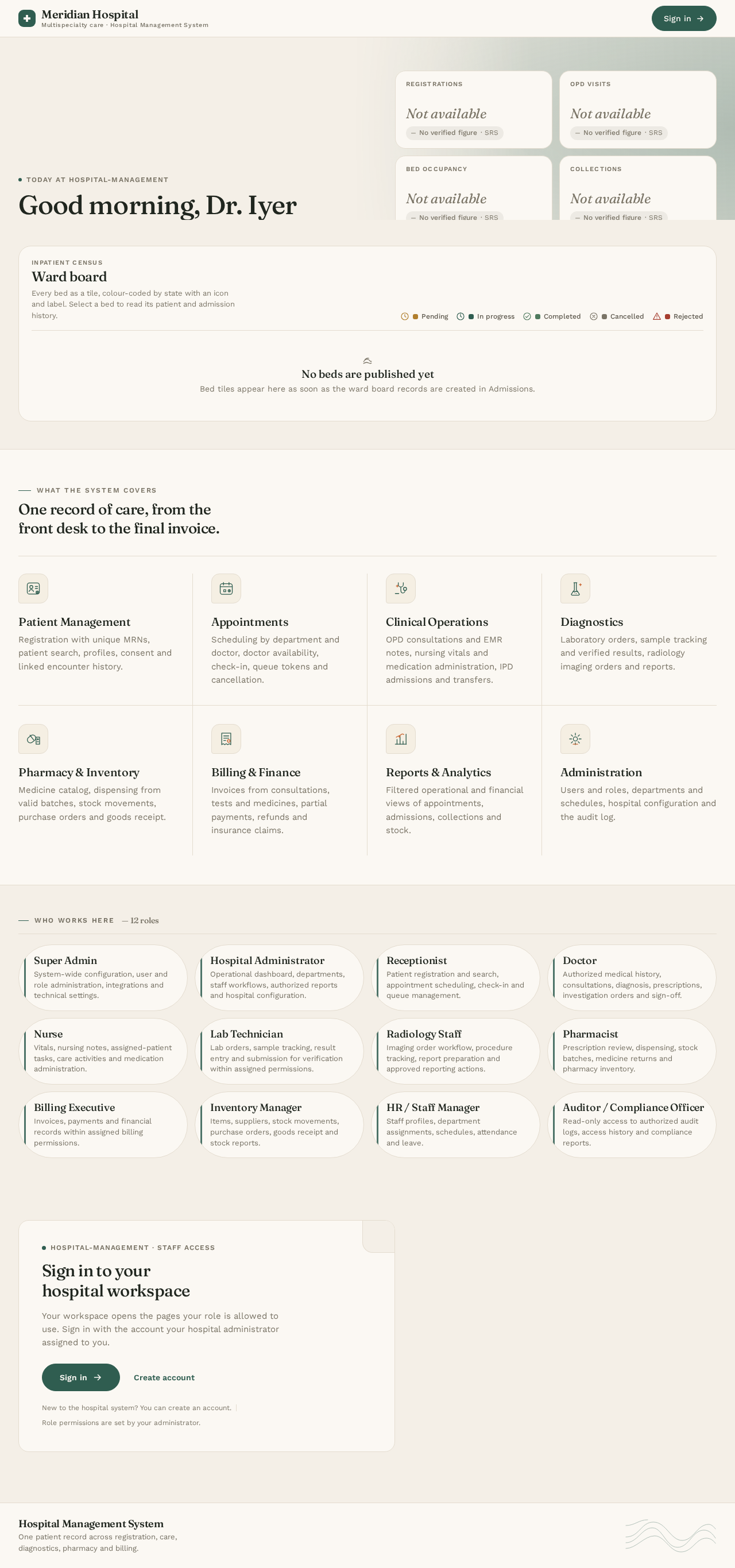
hospital-management

bytest 123

Build a production-quality visual prototype that behaves like a real hospital management application. The result must not be a static mockup, wireframe, or flowchart. It must contain functional navigation, interactive forms, clickable buttons, working dropdowns, tables, filters, modals, drawers, tabs, and connected workflows. Use the uploaded SRS as the primary source of truth for modules, roles, requirements, validation rules, and business workflows. 3. Design System and Layout Create a premium, modern healthcare enterprise dashboard. Desktop-first responsive web application. Recommended desktop viewport: 1440 × 900 px. Use a persistent left sidebar and a top navigation bar. Include page titles, breadcrumbs, contextual actions, search, notifications, and user profile controls. Use MUI theme configuration for consistent colors, typography, spacing, shape, and component variants. Use MUI Paper, Card, Button, IconButton, TextField, Select, MenuItem, Dialog, Drawer, Tabs, Chip, Tooltip, Snackbar, Alert, and other appropriate MUI components. Use MUI Data Grid or MUI Table for data-heavy screens. Use MUI icons consistently. Maintain accessible contrast, readable typography, clear visual hierarchy, and appropriate whitespace. Use consistent status colors and labels. Build reusable components rather than duplicating screen implementations. Support smaller screen sizes with responsive layouts. I need morden ui design similar like upload in dribble and behance website.

LandingDashboardLoginPatientsPatient DetailsSign UpAppointmentsEncountersOPD Queue
Landing

Comments (0)

No comments yet. Be the first!

System Requirements

System Requirements Document for hospital-management

1. Introduction

Page 1 of 67

1.1 Source overview

SOFTWARE REQUIREMENTS

SPECIFICATION

Hospital Management System (HMS)

Document version

1.0

System type

Web-based multispecialty hospital management application

Primary users

Document status

Draft baseline for stakeholder review

Prepared

28 October 2026

Purpose

This document defines the proposed scope, functional requirements, user roles, workflows, data requirements, non-functional

requirements, and acceptance criteria for a web-based Hospital Management System for a multispecialty hospital.

Hospital Management System | SRS v1.0

Page 2

Document contents

Page 2 of 67
  1. Introduction and objectives
  2. Scope and assumptions
  3. User roles and permissions

Hospital Management System | SRS v1.0

Page 3

  1. Introduction and objectives

1.1 Purpose

The HMS will centralize hospital operations across patient registration, outpatient care, inpatient care, diagnostics, pharmacy,

billing, inventory, staff administration, and reporting. It should provide consistent information across departments while

preserving clinical, financial, and operational accountability.

1.2 Business objectives

G

Maintain a single patient record across hospital departments and encounters.

G

Streamline registration, appointments, consultations, admissions, transfers, and discharge.

G

Improve visibility into queues, bed occupancy, departmental workload, and pending tasks.

G

Page 3 of 67

Connect clinical services with laboratory, radiology, pharmacy, and billing workflows.

G

Reduce duplicate records, manual paperwork, and avoidable data-entry errors.

G

Protect sensitive medical and financial information through controlled access and auditability.

G

1.3 Intended audience

Hospital leadership, product owners, clinical department heads, operations managers, finance, IT/security, software developers,

QA testers, UX designers, and implementation partners.

Hospital Management System | SRS v1.0

Page 4

Hospital Management System | SRS v1.0

Page 5

Hospital Management System | SRS v1.0

G

G

Hospital Management System | SRS v1.0

Page 7

Page 4 of 67

G

G

G

G

Hospital Management System | SRS v1.0

Page 8

G

G

G

Hospital Management System | SRS v1.0

Hospital Management System | SRS v1.0

Page 10

G

G

G

Hospital Management System | SRS v1.0

Hospital Management System | SRS v1.0

Page 12

  1. End-to-end workflows

5.1 Outpatient consultation (OPD)

7

Page 5 of 67

Hospital Management System | SRS v1.0

Page 13

End of document

2. System Overview

Page 6 of 67

2.1 Source overview

  1. Core data requirements
  2. External integrations

Integration

Purpose

Scope

SMS / Email gateway

Appointment reminders and operational alerts

Should

Payment gateway

Online payments and payment confirmation

Should

LIS / lab instruments

Exchange test orders and results

Hospital Management System | SRS v1.0

Page 15

  1. UI/UX requirements

9.1 Recommended navigation

G

Dashboard

Page 7 of 67

3. Functional Requirements

Build a production-quality visual prototype that behaves like a real hospital management application. The result must not be a static mockup, wireframe, or flowchart. It must contain functional navigation, interactive forms, clickable buttons, working dropdowns, tables, filters, modals, drawers, tabs, and connected workflows. Use the uploaded SRS as the primary source of truth for modules, roles, requirements, validation rules, and business workflows. Design System and Layout: Create a premium, modern healthcare enterprise dashboard. Desktop-first responsive web application. Recommended desktop viewport: 1440 × 900 px. Use a persistent left sidebar and a top navigation bar. Include page titles, breadcrumbs, contextual actions, search, notifications, and user profile controls. Use MUI theme configuration for consistent colors, typography, spacing, shape, and component variants. Use MUI Paper, Card, Button, IconButton, TextField, Select, MenuItem, Dialog, Drawer, Tabs, Chip, Tooltip, Snackbar, Alert, and other appropriate MUI components. Use MUI Data Grid or MUI Table for data-heavy screens. Use MUI icons consistently. Maintain accessible contrast, readable typography, clear visual hierarchy, and appropriate whitespace. Use consistent status colors and labels. Build reusable components rather than duplicating screen implementations. Support smaller screen sizes with responsive layouts. The user wants a modern UI design similar to designs uploaded on Dribbble and Behance websites. The user chose the project name hospital-management.

Page 8 of 67

3.1 Source overview

  1. Functional requirements and acceptance criteria

Provide operational and financial reports for authorized decision-makers.

G

Dashboard, patient registration, patient profile, medical history, appointments, and queue management.

G

OPD consultation, electronic medical records, prescriptions, and follow-up.

G

IPD admission, ward/bed allocation, nursing, transfer, discharge, and discharge summary.

G

Laboratory and radiology order/result workflows.

Pharmacy, medicine batches, stock management, procurement, billing, payments, and optional insurance workflows.

Reports, notifications, audit logs, and approved external integrations.

Invoices, payment entry, outstanding balances, authorized adjustments, and receipts.

G

Require configured approvals for refunds, invoice adjustments, clinical amendments, and other high-risk actions.

G

Page 9 of 67

Emergency access, if enabled, must be controlled, justified, and audited.

G

Deactivated users must not initiate new authenticated sessions.

  1. Functional requirements and acceptance criteria

4.1 Authentication and access control

ID

Requirement

Priority

FR-AUTH-001

Support secure login using authorized credentials.

Must

FR-AUTH-002

Support password reset and account recovery.

Must

FR-AUTH-003

Enforce role-based permissions for screens, records, and actions.

Must

FR-AUTH-004

Support secure logout and configurable session expiry.

Must

FR-AUTH-005

Page 10 of 67

Allow authorized administrators to activate/deactivate users and assign roles.

Must

FR-AUTH-006

Maintain login and security event logs.

Must

FR-AUTH-007

Support MFA and configurable password policies where required.

Should

Acceptance criteria

G

Valid credentials open the user's authorized landing page; invalid credentials are rejected with a non-sensitive message.

G

Direct access to an unauthorized function is denied, including attempts through a URL or API.

G

Deactivated accounts cannot start new sessions; logout or session expiry blocks further protected actions.

G

Role changes take effect according to the approved session and security policy.

4.2 Hospital dashboard

Page 11 of 67

ID

Requirement

Priority

FR-DASH-001

Show patient registrations and visits for a selected period.

Must

FR-DASH-002

Show appointments by status.

Must

FR-DASH-003

Show inpatient census and bed states.

Must

FR-DASH-004

Show billed amount, collections, and outstanding balances according to permissions.

Must

FR-DASH-005

Show pending lab orders, critical-result alerts, and operational tasks.

Must

FR-DASH-006

Provide relevant date, department, doctor, and location filters.

Page 12 of 67

Should

FR-DASH-007

Allow drill-down from metrics to authorized detail lists.

Must

User story

As a hospital administrator, I want to monitor daily hospital activity so that I can identify workload, capacity, and operational

issues.

Acceptance criteria

G

Filters update dependent metrics and charts consistently and use the configured hospital time zone.

G

Drill-down opens a matching filtered list only if the user is authorized.

G

Bed occupancy uses configured bed states and current inpatient assignments.

G

Financial metrics clearly distinguish billed amounts, collections, refunds, and outstanding balances.

4.3 Patient registration and management

ID

Requirement

Page 13 of 67

Priority

FR-PAT-001

Register patients and generate a unique medical record number (MRN).

Must

FR-PAT-002

Capture demographics, contact details, address, and emergency contact.

Must

FR-PAT-003

Search by MRN, name, phone, and other authorized identifiers.

Must

FR-PAT-004

Detect potential duplicate records before creating a patient.

Must

FR-PAT-005

Store authorized allergies, medical history, and clinical documents.

Must

FR-PAT-006

Maintain linked visits, appointments, admissions, and discharge records.

Must

FR-PAT-007

Record demographic changes in an audit trail.

Page 14 of 67

Must

FR-PAT-008

Record applicable consent and privacy preferences.

Must

Acceptance criteria

G

Required fields are validated before saving; a successful registration generates a unique MRN.

G

Potential duplicates are flagged for review; records are not automatically merged based only on similar names.

G

Saving a profile displays a confirmation and MRN.

4.4 Appointment and queue management

Priority

FR-APT-001

Schedule appointments by patient, department, doctor, date, and time.

Must

FR-APT-002

Display doctor availability, clinic hours, and appointment duration.

Must

FR-APT-003

Page 15 of 67

Prevent conflicting bookings under scheduling rules.

Must

FR-APT-004

Reschedule/cancel appointments and capture reasons when required.

Must

FR-APT-005

Support walk-ins and queue-token generation.

Must

FR-APT-006

Track scheduled, checked-in, waiting, in consultation, completed, cancelled, and missed states.

Must

FR-APT-007

Support configurable reminders and notification channels.

Should

FR-APT-008

Provide calendar, table, and doctor-wise views.

Should

User story

As a receptionist, I want to book available doctor slots so that patients can be scheduled appropriately.

Acceptance criteria

Page 16 of 67

G

Only valid slots can be booked; conflicting appointments are rejected unless an authorized override is configured.

G

Rescheduling preserves previous scheduling history.

G

Check-in updates the queue and makes the patient visible to the relevant department.

G

Cancellation captures a reason when configured.

G

Users can filter appointments by date, department, doctor, and status.

4.5 Doctor consultation and electronic medical records

ID

Requirement

Priority

FR-EMR-001

Display authorized medical history and prior encounters.

Must

FR-EMR-002

Record complaints, examination findings, and consultation notes.

Must

Page 17 of 67

FR-EMR-003

Record vitals, diagnoses, and treatment plans.

Must

FR-EMR-004

Create prescriptions with medicine, dose, route, frequency, and duration.

Must

FR-EMR-005

Create laboratory and radiology orders.

Must

FR-EMR-006

Support drafts and signing/finalization of clinical notes.

Must

FR-EMR-007

Record follow-up recommendations and referrals.

Must

FR-EMR-008

Maintain version history and corrections for finalized records.

Must

User story

As a doctor, I want to document a consultation and treatment in one place so that clinical decisions are recorded consistently.

Page 18 of 67

Acceptance criteria

G

The encounter is linked to the correct patient; known allergies and relevant alerts are prominent.

G

Required clinical fields follow configured workflow rules.

Draft and signed/finalized notes are clearly distinguished.

Signed notes cannot be silently overwritten; corrections use an authorized amendment process.

Prescriptions and orders are linked to the encounter and retain their history.

4.6 Inpatient management and bed allocation

ID

Requirement

Priority

FR-IPD-001

Create an admission linked to an existing patient.

Must

FR-IPD-002

Capture admission time, doctor, department, diagnosis, and admission type.

Must

FR-IPD-003

Page 19 of 67

Show beds by ward, room, type, and required capabilities.

Must

FR-IPD-004

Assign beds and manage ward/bed transfers.

Must

FR-IPD-005

Track admission, transfer, discharge, and cancellation history.

Must

FR-IPD-006

Record discharge summaries, instructions, and follow-up plans.

Must

FR-IPD-007

Calculate applicable room and service charges.

Must

FR-IPD-008

Support planned discharge and readiness tracking.

Should

Acceptance criteria

G

Admission cannot be completed without required patient and admission details.

Page 20 of 67

G

Occupied, blocked, or unavailable beds cannot be assigned as available.

G

Concurrent requests cannot allocate one bed to two patients.

G

Transfers record source, destination, effective time, and authorized user.

G

Clinical discharge approval and financial settlement are separate processes; bed release follows the configured workflow.

4.7 Nursing management

ID

Requirement

Priority

FR-NUR-001

Record patient vitals with units and observation timestamps.

Must

FR-NUR-002

Record nursing notes and care activities.

Must

FR-NUR-003

Display assigned patients and pending nursing tasks.

Page 21 of 67

Must

FR-NUR-004

Record medication administration, omission, or refusal.

Must

FR-NUR-005

Support care plans and shift handover.

Should

FR-NUR-006

Escalate configured abnormal observations and alerts.

G

Vitals include value, unit, time, and recording user.

G

Medication administration links to the relevant medication order.

Omission or refusal requires a reason when configured.

Abnormal observations trigger approved alert rules.

Completed tasks retain completion time and responsible user.

4.8 Laboratory management

ID

Requirement

Priority

FR-LAB-001

Page 22 of 67

Receive and manage orders from authorized encounters.

Must

FR-LAB-002

Track sample collection, labeling, receipt, processing, and rejection.

Must

FR-LAB-003

Maintain test status and sample identification.

Must

FR-LAB-004

Enter results with units and configured reference ranges.

Must

FR-LAB-005

Support result verification and report authorization.

Must

FR-LAB-006

Flag critical results and record acknowledgment/escalation.

Must

FR-LAB-007

Generate printable or downloadable reports.

Must

FR-LAB-008

Page 23 of 67

Support instrument integration if required.

Should

Acceptance criteria

G

Every order is linked to a patient and ordering encounter.

G

Samples can be tracked through configured statuses; rejected samples require a reason.

G

Draft, submitted, verified, and amended results are distinguishable.

G

Only authorized personnel can verify/finalize reports.

G

Critical results trigger configured notification and escalation; amendments preserve prior values.

4.9 Radiology management

ID

Requirement

Priority

FR-RAD-001

Receive and track imaging orders.

Must

Page 24 of 67

FR-RAD-002

Schedule procedures and record completion.

Must

FR-RAD-003

Record radiology findings and reports.

Must

FR-RAD-004

Support verification and amendment history.

Must

FR-RAD-005

Link images through an approved imaging system when integrated.

Should

User story

As radiology staff, I want to manage imaging requests and reports so that clinicians can access appropriate findings.

Acceptance criteria

G

Orders show patient, requesting clinician, procedure, and status.

Reports are linked to the correct order.

Only authorized users can finalize or amend reports.

Image retrieval failures are clearly indicated when an external integration is unavailable.

Page 25 of 67

Page 9

4.10 Pharmacy management

ID

Requirement

Priority

FR-PHR-001

Maintain medicine catalog, formulations, strengths, and units.

Must

FR-PHR-002

Track stock by medicine, batch, expiry, and location.

Must

FR-PHR-003

Receive and dispense prescribed medicines.

Must

FR-PHR-004

Prevent dispensing of expired or recalled stock.

Must

FR-PHR-005

Generate low-stock and near-expiry alerts.

Must

FR-PHR-006

Page 26 of 67

Support returns, stock adjustments, and authorized cancellations.

Must

FR-PHR-007

Manage suppliers, purchase orders, and goods receipt.

Should

FR-PHR-008

Track stock movements and inventory valuation.

Should

User story

As a pharmacist, I want to dispense prescribed medicines from valid stock so that dispensing is safe and inventory stays

accurate.

Acceptance criteria

G

Dispensing is linked to a valid prescription or authorized workflow.

G

Medicine, strength, dosage instructions, and quantity can be verified.

G

Expired, recalled, or insufficient stock cannot be dispensed.

G

Batch selection follows configured stock rotation, such as first-expiry-first-out.

Page 27 of 67

G

Successful dispensing updates stock; returns and adjustments retain reason and user.

4.11 Billing and payments

ID

Requirement

Priority

FR-BIL-001

Generate invoices for consultations, tests, procedures, medicines, room stays, and configured

services.

Must

FR-BIL-002

Maintain price lists and effective dates.

Must

FR-BIL-003

Record payments using configured methods.

Must

FR-BIL-004

Support partial payments, deposits, balances, and refunds.

Must

FR-BIL-005

Page 28 of 67

Support authorized discounts, adjustments, and cancellations.

Must

FR-BIL-006

Generate printable invoices and receipts.

Must

FR-BIL-007

Support insurance/corporate billing when in scope.

Should

FR-BIL-008

Reconcile external payment confirmations when integrated.

Should

User story

As a billing executive, I want to generate accurate invoices from hospital services so that charges and payments are traceable.

Acceptance criteria

G

Every invoice has a unique number and itemized charges, discounts, applicable taxes, and total.

G

Payments are linked to the correct invoice/account and outstanding balance is recalculated.

G

Page 29 of 67

Pending or failed external payments are not treated as successful collections.

Refunds and adjustments require configured authorization and a reason.

Issued invoices remain traceable after correction or cancellation; reports distinguish billed, collected, refunded, and

outstanding amounts.

4.12 Inventory and procurement

ID

Requirement

Priority

FR-INV-001

Maintain items, units, categories, and storage locations.

Must

Record receipts, issues, transfers, and adjustments.

Must

FR-INV-003

Generate purchase requests and purchase orders.

Should

FR-INV-004

Record suppliers and goods receipt against orders.

Should

FR-INV-005

Page 30 of 67

Alert authorized staff to low stock and expiry.

Must

FR-INV-006

Maintain stock movement and adjustment history.

Must

As an inventory manager, I want to monitor stock and record movements so that essential supplies remain available.

Acceptance criteria

G

Each movement records item, quantity, source/destination where relevant, timestamp, and user.

G

Stock changes occur only after a successful transaction.

G

Restricted adjustments and purchase orders require appropriate approval.

G

Low-stock alerts use configurable thresholds; reports filter by category, location, and date.

4.13 Staff and department management

ID

Requirement

Priority

Page 31 of 67

FR-HR-001

Maintain staff profiles and unique employee identifiers.

Must

FR-HR-002

Configure departments, specialties, and assignments.

Must

FR-HR-003

Manage doctor schedules and clinic availability.

Must

FR-HR-004

Maintain shifts, leave, and attendance records.

Should

FR-HR-005

Restrict staff record access to authorized roles.

Must

User story

As a hospital administrator, I want to maintain departments and staff schedules so that services can be planned correctly.

Acceptance criteria

G

Each staff member has a unique employee identifier.

Page 32 of 67

Inactive staff cannot be assigned new appointments unless an authorized exception is configured.

Doctor availability reflects approved hours and leave.

Role and department changes are auditable.

Page 11

4.14 Reports and analytics

ID

Requirement

Priority

FR-RPT-001

Generate patient registration and visit reports.

Must

FR-RPT-002

Generate appointment and doctor workload reports.

Must

FR-RPT-003

Generate admission, discharge, and occupancy reports.

Must

FR-RPT-004

Generate billing, collection, and outstanding balance reports.

Must

Page 33 of 67

FR-RPT-005

Generate pharmacy and inventory reports.

Must

FR-RPT-006

Support relevant date, department, doctor, and status filters.

Must

FR-RPT-007

Export authorized reports to CSV, Excel, or PDF.

Should

FR-RPT-008

Restrict access to sensitive reports.

Must

G

Reports apply filters consistently and show an informative empty state when no records match.

G

Totals reconcile with source records and documented calculation rules.

G

Exports respect permissions and selected filters.

G

Report access or generation is logged where required by policy.

Page 34 of 67

4.15 Notifications and audit logs

ID

Requirement

Priority

FR-NOT-001

Generate appointment reminders and operational notifications.

Should

FR-NOT-002

Alert relevant users to critical results and urgent tasks.

Must

FR-NOT-003

Alert inventory staff to low stock and expiry.

Must

FR-AUD-001

Record important create, update, delete, approval, and cancellation events.

Must

FR-AUD-002

Record actor, timestamp, affected record, and action details.

Must

FR-AUD-003

Restrict audit-log access and prevent unauthorized alteration.

Page 35 of 67

Must

FR-AUD-004

Provide authorized audit search and filtering.

Must

User story

As a compliance officer, I want to review who changed a record and when so that sensitive operations can be investigated.

Acceptance criteria

G

Audited events include actor, timestamp, action, and affected entity.

G

Changes to critical records preserve previous/new values where appropriate and lawful.

G

Unauthorized users cannot edit or delete audit events.

G

Failed notification delivery is tracked and handled according to configured retry policy.

Key rules: encounters reference the correct patient; orders retain their encounter link; clinical sign-off is separate from payment;

payment alone must not mark a patient medically cleared.

Key rules: concurrent bed allocation must prevent double booking; transfers preserve location history; clinical discharge and

Page 36 of 67

financial settlement are separate; bed release follows discharge and housekeeping policy.

5.3 Laboratory order and result

Step

Action

6

Report is made available to authorized clinicians.

7

Critical results trigger the required notification and acknowledgment workflow.

Make reference data (departments, specialties, services, units, and status lists) configurable to authorized users.

Financial reconciliation and exports

Should

Identity provider

Single sign-on and centralized authentication

Optional

Health information exchange

Clinical data exchange using applicable standards

G

Patient Management: patient list, registration, profile, encounter history

G

Page 37 of 67

Appointments: calendar, queue, doctor availability

G

Clinical Operations: OPD, EMR, nursing, IPD

G

Diagnostics: laboratory and radiology

G

Pharmacy & Inventory: dispensing, stock, procurement

G

Billing & Finance: invoices, payments, insurance

G

Reports & Analytics

G

Administration: users, roles, departments, configuration

9.2 UX standards

G

Use a persistent, role-aware sidebar and global patient search where permitted.

G

Provide tables with sorting, filtering, pagination, and configurable column visibility.

Confirm destructive or irreversible actions and provide clear success/error feedback.

Page 38 of 67

Distinguish draft, saved, submitted, approved, and finalized records.

Preserve user-entered data when validation fails, where safe.

Register new patient

Unique MRN generated; profile saved.

UAT-002

Search existing patient

Correct matching records shown to authorized users.

UAT-003

Book overlapping appointments

Conflict prevented or authorized override required.

UAT-004

Complete doctor consultation

Notes, diagnoses, prescriptions, and orders linked to encounter.

UAT-005

Assign one bed to concurrent requests

Only one valid assignment succeeds.

UAT-006

Verify laboratory report

Authorization recorded; report released according to workflow.

UAT-007

Dispense expired medicine

Page 39 of 67

System blocks dispensing.

UAT-008

Record partial payment

Paid amount and outstanding balance are correct.

UAT-009

Attempt unauthorized access

Operation denied; relevant security event logged.

UAT-010

Amend finalized clinical record

Amendment is traceable; original record preserved.

UAT-011

Export filtered report

Export matches authorized filters and source totals.

G

Patient identity and duplicate-detection workflows are validated.

Billing, payments, pharmacy, inventory, procurement, optional insurance

4. User Personas

Page 40 of 67

4.1 Source overview

Hospital staff and administrators

  1. User roles and permissions

Role

Core permissions

Super Admin

System-wide configuration, user/role administration, integrations, and technical settings. Clinical content

access remains policy-controlled.

Hospital Administrator

Operational dashboard, departments, staff workflows, authorized reports, and hospital configuration.

Receptionist

Patient registration/search, appointment scheduling, check-in, and queue management.

Doctor

Authorized medical history, consultations, diagnosis, prescriptions, investigation orders, clinical notes,

and sign-off.

Nurse

Vitals, nursing notes, assigned-patient tasks, care activities, and medication administration.

Page 41 of 67

Lab Technician

Lab orders, sample tracking, result entry, and submission for verification within assigned permissions.

Radiology Staff

Imaging order workflow, procedure tracking, report preparation, and approved reporting actions.

Pharmacist

Prescription review, dispensing, stock batches, medicine returns, and pharmacy inventory.

Billing Executive

Inventory Manager

Items, suppliers, stock movements, purchase orders, goods receipt, and stock reports.

HR / Staff Manager

Staff profiles, department assignments, schedules, attendance, and leave.

Auditor / Compliance Officer

Read-only access to authorized audit logs, access history, and compliance reports.

User story

As a hospital administrator, I want to assign roles to staff so that users access only the functions needed for their job.

User story

Page 42 of 67

As a receptionist, I want to register and retrieve patient profiles so that duplicate records and repeated data entry are minimized.

User story

As an admission coordinator, I want to assign an available bed and track inpatient movement so that capacity is managed

accurately.

Must

User story

As a nurse, I want to record observations and medication administration so that the care team has an accurate record.

Acceptance criteria

User story

As an inventory manager, I want to monitor stock and record movements so that essential supplies remain available.

User story

As a hospital administrator, I want filtered operational and financial reports so that I can review performance.

Acceptance criteria

5. Core User Flows

Page 43 of 67

5.1 Source overview

  1. End-to-end workflows

User story

As a lab technician, I want to process orders and enter results so that authorized clinicians can review verified reports.

Step

Action

Responsible role

1

Register or search for patient

Receptionist

2

Book appointment or register walk-in

Receptionist

3

Check in and add patient to queue

Receptionist / Nurse

4

Record vitals and conduct consultation

Nurse / Doctor

Page 44 of 67

5

Record diagnosis, prescription, and test orders

Doctor

6

Complete pharmacy and laboratory services

Pharmacist / Lab staff

7

Process billing, payment, and follow-up

Billing / Reception

5.2 Inpatient admission and discharge

Step

Action

1

Create admission request and capture required clinical/administrative details.

2

Complete admission approval where hospital policy requires it.

3

Allocate an eligible available bed and record assignment.

4

Record nursing care, doctor rounds, investigations, medication, and procedures.

Page 45 of 67

5

Complete discharge planning and obtain medical clearance.

6

Prepare final bill and process settlement according to policy.

Complete discharge documentation and release bed through the configured workflow.

1

Doctor creates a test order.

2

Laboratory receives order and identifies sample.

3

Sample is collected, received, processed, or rejected with reason.

4

Authorized staff enter results, units, and reference ranges.

5

Authorized personnel verify/finalize report.

6. Visuals Colors and Theme

[Design proposal; unspecified choices are defaults.]

Page 46 of 67

6.1 Humane instrument

Muse: Yves Béhar. Headline: Good morning, Dr. Iyer — 3 critical results need your sign-off.

A warm-material healthcare interface for hospital-management, designed as calm authority under clinical pressure rather than a cold enterprise console. Use the authoritative light-mode palette: warm oat canvas #F4EFE7; warm surface/sidebar #FBF8F3; hairline border #E4DCCF; text #20261F; primary deep sage #2F5D50; hot signal terracotta #C8632E; muted text #7A7466. Status tokens are mustard pending #B07E2C, sage in progress #2F5D50, leaf completed #4F7A5E, stone cancelled #7A7466, and brick rejected #A63D2E. Every status pairs its colour with an icon and text label; clinical alerts never rely on colour alone.

Use Fraunces at weight 500–600, SOFT axis high and WONK low, for page titles, greetings, KPI numerals and major values. Use Work Sans 400/500/600 for navigation, forms, tables and metadata. Base text is 15px with 1.55 line-height; use the 1.25 scale: 15, 18.75, 23.4, 29.3, 36.6, 45.8, 57.3px. Page titles scale from 30px mobile to 46px desktop; section titles 20–24px; KPI numerals 40–56px; table text 14px; metadata 12px; tracked 12px labels only for card labels and navigation group labels. Use tabular numerals for MRNs, bed numbers, invoice totals and lab values.

Page 47 of 67

Use soft continuous forms: cards at 18px radius, dialogs and drawer leading edges at 24px, buttons and chips pill-shaped, inputs at 12px. Resting surfaces use no shadow—only the 1px hairline and warm surface steps. Reserve 0 12px 32px rgba(32,38,31,0.08) for dialogs and the notification drawer. Maintain the persistent 264px sidebar, 64px top bar, 32px content gutter and 1280px content maximum within the desktop-first 1440×900 frame. At 768px collapse to a 72px icon rail; at 375px use a bottom-sheet navigation behind a menu button, with stacked grids and horizontally scrollable tables. Use MUI theme tokens and components with accessible labels, keyboard navigation, readable contrast and responsive containment.

6.2 Source overview

  1. UI/UX requirements

9.2 UX standards

G

Use consistent status labels for pending, in progress, completed, cancelled, and rejected.

G

7. Signature Design Concept

[Design proposal; unspecified choices are defaults.]

Page 48 of 67

7.1 Signature design concept: The humane instrument

The signed-in dashboard is the public entry/first accepted page: a full-width 200px warm-oat greeting band with a restrained sage-to-oat wash bleeding only through the right edge. The left side carries the Fraunces greeting and a terracotta-outlined critical-results chip. Four compact KPI tiles in #FBF8F3 overlap the lower edge by 24px, using editorial Fraunces numerals for registrations, OPD visits, bed occupancy and collections, with Work Sans labels and delta chips.

Below, make the ward board the dominant visual element: a physical-looking grid of up to 40 rounded bed tiles with a small notched corner. Each tile shows the bed number and patient initials, uses the accepted status system, and includes an icon plus text label. A tile can open the accepted bed drawer containing patient, admission and transfer history. Follow with the appointments-by-status bar and pending-work queue table. Data screens retain the same instrument language: filter bar, sortable MUI table, sticky header, configurable column visibility and pagination.

Use a persistent role-aware sidebar grouped under Dashboard, Patients, Appointments, Clinical, Diagnostics, Pharmacy & Inventory, Billing, Reports and Administration. The top bar contains breadcrumbs, permitted global patient search, keyboard hint, notification count and profile controls. Search opens the accepted command-palette drawer showing MRN, name, age and last visit, with a duplicate-warning banner when two records match. Use thin topographic line motifs for empty states, warm duotone department pictograms, and initials-based patient avatars; never use stock photography, glassmorphism, blue/indigo-on-white styling or decorative illustration that competes with clinical work.

Page 49 of 67

8. Interaction Model & Motion Direction

[Design proposal; unspecified choices are defaults.]

Interaction Model: Animated Motion Tempo: restrained Hero Dimensionality: layered_2d

8.1 Landing Hero Motion Brief

Focal subject: the signed-in dashboard greeting, critical-results chip, overlapping KPI strip and ward-board bed tiles—the interface itself is the hero.

Input → transformation → outcome: when the dashboard loads, accepted KPI values count up once and settle into their final registrations, OPD visits, occupancy and collections values; a bed-state update applies a 400ms sage wash to the affected tile; selecting a bed opens its history drawer. The result is an immediate, legible view of hospital capacity and pending clinical work without adding a new destination or behaviour.

Use 220–320ms cubic-bezier(0.22, 0.61, 0.36, 1) easing for drawers, dialogs and page transitions, and 160ms for button and chip states. Toasts slide from the bottom-right. Keep the motion breathing and composed: no bounce, parallax, particles or hover-lift grids. The first frame is the complete warm-oat greeting band with readable greeting and chip, the four KPI tiles overlapping its base, and the ward board visible below. With prefers-reduced-motion, disable count-up and bed washes, show final values immediately, and preserve a static, usable layout.

9. Non-Functional Requirements

Page 50 of 67

9.1 Source overview

  1. Non-functional requirements

G

Enforce authorization on the server for every protected screen, record, and operation.

G

Apply department, patient-care relationship, and record-level restrictions where needed.

G

Record important actions with actor, timestamp, affected record, and action details.

G

Loading, empty, and error states are shown when data is unavailable.

Page 6

G

Authorized edits retain previous/new values, user, and timestamp where required by policy.

G

Clinical information is visible only to appropriately authorized users.

ID

Requirement

Page 51 of 67

G

Store and display date/time values consistently, including time-zone handling.

G

Hospital Management System | SRS v1.0

Page 14

  1. Non-functional requirements

ID

Category

Requirement / proposed target

NFR-001

Performance

Common searches and screen operations should complete within 2 seconds under agreed

normal load, excluding external dependencies.

NFR-002

Reporting

Long-running reports provide progress feedback and do not block unrelated workflows.

NFR-003

Availability

Proposed target: 99.9% monthly availability, excluding agreed maintenance.

Page 52 of 67

NFR-004

Security

Encrypt network traffic and sensitive stored data using approved mechanisms.

NFR-005

Authorization

Enforce server-side access control on every protected operation.

NFR-006

Auditability

Maintain tamper-resistant audit records for security-sensitive and regulated actions.

NFR-007

Backup

Define automated backups, retention, recovery testing, and isolated/off-site copies.

NFR-008

Recovery

Agree RTO and RPO with hospital management and validate through recovery tests.

NFR-009

Scalability

Support agreed peak concurrent users, patient volume, and data growth.

Page 53 of 67

NFR-010

Usability

Provide consistent navigation, validation, accessible contrast, and clear status indicators.

NFR-011

Compatibility

Support agreed current versions of major desktop browsers.

NFR-012

Privacy

Apply data minimization, retention, consent, and disclosure rules required by applicable law.

NFR-013

Interoperability

Use documented, authenticated interfaces for approved integrations.

NFR-014

Maintainability

Maintain versioned configuration, deployment procedures, error logs, and technical

documentation.

7.1 Security and privacy controls

G

Use role-based and context-based authorization where needed.

Page 54 of 67

G

Apply additional authentication for high-risk actions where appropriate.

G

Protect sensitive data in transit and at rest.

G

Use session expiry and account lockout or throttling controls.

G

Log sensitive-record access where required by policy.

Avoid exposing sensitive clinical details in unnecessary notifications or logs.

Maintain tested backup, disaster recovery, incident response, and access-revocation procedures.

Every integration must define authentication, data mapping, error handling, retry behavior, reconciliation, monitoring, and

source-of-truth ownership. The system must communicate when an external dependency is unavailable.

Support keyboard navigation, accessible labels, readable contrast, and responsive layouts.

Provide loading, empty, error, and permission-denied states.

Display clinical alerts prominently and do not rely on color alone.

  1. Acceptance testing and release criteria

Test ID

Page 55 of 67

Scenario

Expected result

UAT-001

UAT-012

Restore backup

Recovery meets approved RTO/RPO.

G

Clinical and financial calculations are verified.

G

Audit logs, authorization, and sensitive-data controls are tested.

G

Backup restoration and disaster recovery are tested.

G

Integration failure and recovery scenarios are tested.

G

UAT is signed off by relevant departments.

G

Staff training and operational documentation are complete.

10. Tech Stack

Page 56 of 67

10.1 Source overview

  1. External integrations

11. Assumptions and Constraints

Page 57 of 67

11.1 Source overview

Important: This is a proposed requirements baseline. Hospital leadership, clinical owners, IT/security, finance, and compliance

stakeholders should validate policies, workflows, integrations, and legal obligations before implementation.

  1. Acceptance testing and release criteria
  2. Implementation roadmap

Requirement priority definitions: Must = required for the proposed baseline; Should = important but may be phased; Optional = subject to scope and

stakeholder approval.

  1. Scope and assumptions

2.1 In scope

G

Authentication, role-based access, user administration, and hospital configuration.

2.2 Initial-release exclusions

Patient-facing mobile application and self-service portal.

Telemedicine/video consultations and AI-assisted diagnosis.

G

Payroll or replacement of a full accounting system.

G

Advanced medical-device integrations not confirmed during discovery.

Page 58 of 67

2.3 Assumptions

G

The first release serves one hospital location, with future expansion considered in the architecture.

G

Every patient has a unique hospital medical record number (MRN).

G

Clinical and financial workflows follow hospital-approved policies.

G

Currency, language, time zone, billing rules, and legal requirements are configurable.

G

External integrations are subject to vendor access, data mapping, security review, and testing.

3.1 Permission rules

6.1 Data integrity rules

G

Use unique identifiers for primary entities and preserve relationships between patients, encounters, orders, results, invoices,

and payments.

G

Do not automatically merge patients based only on similar names.

Page 59 of 67

G

Use traceable reversals/adjustments for financial transactions rather than silently overwriting them.

Depends on infrastructure

PACS / DICOM

Retrieve and manage radiology images

Depends on infrastructure

Insurance / TPA

Eligibility, authorization, claims, status

Depends on payer

Accounting software

Optional

10.1 Release checklist

G

All Must requirements are implemented and tested.

Hospital Management System | SRS v1.0

Page 16

G

Role permissions are approved by hospital management.

Applicable legal and regulatory reviews are complete.

  1. Implementation roadmap
Page 60 of 67

Phase

Focus

Indicative deliverables

1 — Foundation

Core administration

Authentication, roles, departments, staff, dashboard, patient registration

2 — OPD

Outpatient operations

Appointments, queues, consultations, EMR, prescriptions

3 — IPD & diagnostics

Clinical expansion

Admissions, beds, nursing, lab, radiology, discharge

4 — Finance & stock

Operational control

5 — Validation & go-live

Readiness

Reports, integrations, security testing, UAT, training, deployment

The sequence is indicative, not a committed delivery schedule. Clinical safety, integration dependencies, hospital readiness, and

implementation capacity should determine the final plan.

12.1 Decisions to confirm before development

Page 61 of 67

Decision

Proposed default / action

Hospital locations

Start with one location; confirm multi-site requirements.

Patient identifier

Unique hospital-wide MRN.

Currency and localization

Configurable; use INR and India-specific settings if applicable.

Insurance

Enable only after payer and workflow requirements are confirmed.

Clinical terminology

Confirm diagnosis, procedure, medicine, and test catalogs.

Clinical approvals

Define sign-off and amendment rules with clinical leadership.

Data retention

Confirm retention and disclosure rules with legal/compliance stakeholders.

Hosting

Choose cloud or on-premises after IT/security review.

Integrations

Confirm existing LIS, PACS, payment, accounting, and identity systems.

Regulatory note

Page 62 of 67

For deployment in India, the project team should assess applicable data-protection law and rules in force, relevant health-sector

guidance, and applicable ABDM interoperability requirements. Compliance must be validated against the actual deployment and

legal obligations; this SRS is not legal advice.

12. Glossary

Page 63 of 67

12.1 Source overview

  1. Open decisions and glossary

G

G

G

G

G

G

FR-INV-002

  1. Core data requirements

Entity

Key information

Patient

MRN, demographics, contacts, emergency contact

Encounter

Encounter ID, patient, department, doctor, date, status

Appointment

Appointment ID, patient, doctor, slot, status, reason

Staff / User

Employee ID, profile, department, account, role, status

Page 64 of 67

Clinical Note / Diagnosis

Encounter, author, clinical content, diagnosis code, signature, version

Prescription / Administration

Medicine, dose, route, frequency, duration, administration event

Admission / Bed Assignment

Admission ID, ward/bed, assignment start/end, transfer history

Lab Order / Result

Order, sample, test, value, unit, reference range, verification state

Radiology Order

Procedure, requesting clinician, status, report, image link

Inventory Item / Batch

Item, unit, batch, quantity, expiry, location

Invoice / Payment

Invoice number, line items, totals, payment, method, status, reference

Insurance Claim

Payer, policy reference, authorization, amount, status

Notification

Recipient, event, channel, delivery status, timestamp

Audit Event

Actor, action, entity, timestamp, change details

G

Page 65 of 67

G

G

G

G

G

G

G

  1. Open decisions and glossary

Hospital Management System | SRS v1.0

Page 17

12.2 Glossary

Term

Definition

HMS

Hospital Management System

MRN

Medical Record Number; unique hospital patient identifier

OPD

Outpatient Department

IPD

Inpatient Department

Page 66 of 67

EMR

Electronic Medical Record

LIS

Laboratory Information System

PACS

Picture Archiving and Communication System

DICOM

Digital Imaging and Communications in Medicine

TPA

Third-Party Administrator, commonly used in insurance workflows

RTO

Recovery Time Objective

RPO

Recovery Point Objective

UAT

User Acceptance Testing

Page 67 of 67
Live
Landing design preview
valid credentials
forgot password
password reset complete
new user
account created
invoice generated
payment recorded
refund required
payment successful
claim submitted
filters applied
Landing: View landing page
Landing: Go to sign in
Login: 1. Sign in
Login: 2. Reset password
Sign Up: Create account
Billing: View invoices
Billing: Generate invoice
Billing: Record payment
Billing: Check outstanding balance
Billing: Process refund
Billing: Print receipt
Insurance Claims: View claims
Insurance Claims: Submit claim
Insurance Claims: Track claim status
Reports: View reports
Reports: Filter reports
Reports: Export report
Beds: View bed availability
Live
Landing design preview
valid credentials
forgot password
password reset complete
new user
account created
invoice generated
payment recorded
refund required
payment successful
claim submitted
filters applied
Landing: View landing page
Landing: Go to sign in
Login: 1. Sign in
Login: 2. Reset password
Sign Up: Create account
Billing: View invoices
Billing: Generate invoice
Billing: Record payment
Billing: Check outstanding balance
Billing: Process refund
Billing: Print receipt
Insurance Claims: View claims
Insurance Claims: Submit claim
Insurance Claims: Track claim status
Reports: View reports
Reports: Filter reports
Reports: Export report
Beds: View bed availability