honest-start
 Diya Trivedi
start a project to build a single simple page design of todo

Comments (0)
Sign in to leave a comment
System Requirements
System Requirements Document for honest-start
1. Introduction
honest-start is a single-page todo tool. Its entire product intent is one simple page on which a person can add a todo item, see the current list of items, mark an item complete, and delete an item. Nothing more: the design is deliberately limited to a single simple page, and the page's only job is to make a personal task list legible and current.
The audience is a single person keeping a personal list of tasks — the "Todo user" — who wants a clear, up-to-date view of what remains to be done without accounts, navigation, or surrounding application chrome. The emotional register is calm control and clarity: the page should read like a well-set timetable, not a consumer app.
2. System Overview
honest-start is delivered as one custom first-party page, Todo, which is the public entry surface of the product. A visitor arriving at the page is immediately the Todo user: there is no sign-in, no account, and no separate landing experience. The page hosts the complete accepted lifecycle in one place:
- an add field with a submit control that creates a new todo item,
- the list of current todo items, each rendered as a ruled row,
- a completion control on each row that marks that item complete,
- a delete control on each row that removes that item,
- a live remaining count that reflects how many items are not yet complete.
The page is anonymous and public-ephemeral: no application-owned identity, no session continuity requirement, and no differentiated permissions are established by the source. The list is the working state of the single page itself.
Removed from scope
- Multi-page navigation or any second destination (also: page count, single page limit)
- User accounts, sign-in, or identity continuity (also: authentication, login)
- Editing the text of an existing todo item
- Due dates, priorities, categories, tags, or filters
- Sharing, collaboration, or multiple lists
- Notifications, reminders, or background processing
2a. Product Interpretation and Delivery Boundary
The requester asked for a single simple page design of a todo list. That request is the whole current delivery: one first-party page, owned by the application, reachable anonymously, containing the add / view / complete / delete lifecycle and nothing adjacent to it.
Access is intentionally open. The source establishes no account, no provider-owned surface, and no external destination. The page is the product; there is no protected area behind it and therefore no identity-establishment journey to design. Any durable persistence of the list beyond the page's own working state is not requested by the source and is not part of the current delivery boundary.
Everything outside the four accepted operations — editing item text, scheduling, categorisation, sharing, multi-list management, accounts — is outside the current horizon. No future section is asserted here because the source states no future requirements.
2c. Page Content and Component Coverage
Todo
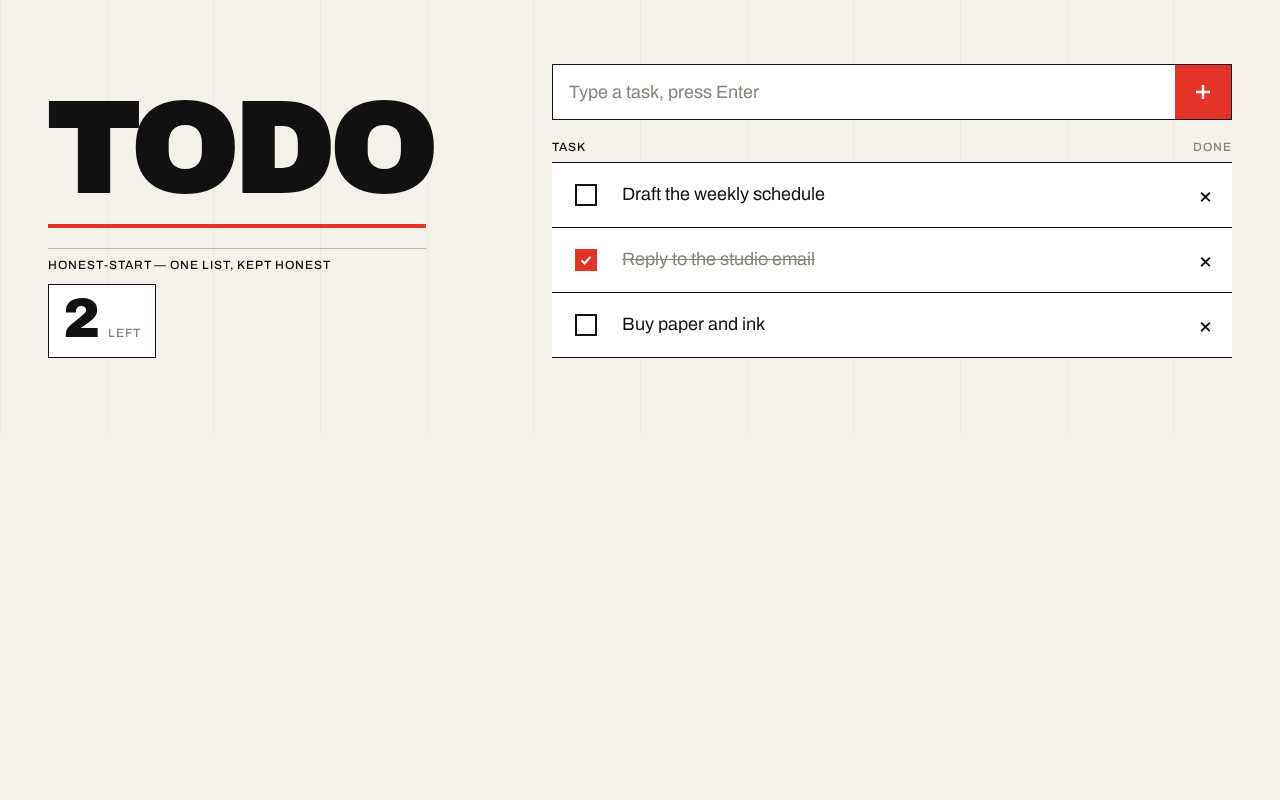
The single page of the product, and its public entry surface. It presents the product as a Swiss-poster composition on a warm paper ground and hosts the entire todo lifecycle.
Information and state
- The masthead: an oversized flush-left "TODO" wordmark, a vermilion rule beneath it, and a tabular remaining-count block reading "N LEFT".
- The remaining count: the number of todo items not yet marked complete, rendered as a large tabular numeral with a small-caps "LEFT" label.
- The add field: a single-line text input with a hard black border, holding the text of the item being entered.
- The task list: the ordered set of current todo items, each with its text, its completion state, and its row controls.
- Per-item state: incomplete (black text, empty square checkbox) or complete (muted grey text with strikethrough, checkbox filled solid vermilion).
- A faint 12-column grid line set at 4% black over the paper ground, as structural texture only.
Primary actions
- Type into the add field and submit (via the solid vermilion square button or pressing Enter) to add a new todo item.
- Toggle an item's checkbox to mark it complete, or to return it to incomplete.
- Delete an item via the hard-edged × at the row end.
Supporting actions
- None beyond the above; the page has no menus, filters, or secondary controls.
Domain entities
- Todo item: a single task with its text and its completion state. It is created by the add action, displayed in the list, changed by the completion toggle, and removed by the delete action.
- Remaining count: a derived figure over the current todo items — the number whose completion state is incomplete.
Component responsibilities
- Masthead block: renders the "TODO" wordmark, the vermilion rule, and the remaining-count block; the count block re-renders whenever the item set or any item's completion state changes.
- Add field and submit button: captures item text, validates that it is non-empty, creates the item, and clears the field on success.
- Task list: renders one ruled row per item in list order, separated by 1px black hairlines.
- Task row: renders the square checkbox, the item text, and the delete ×; owns the completion toggle and the delete action for its item.
- Remaining-count derivation: recomputes from the item set on every add, toggle, and delete.
States
- Loading: not applicable in a material sense; the page renders its masthead, add field, and list immediately.
- Empty: when there are no items, the list area shows a quiet empty state — a ruled line and a small-caps label indicating the list is empty — and the remaining count reads "0 LEFT". The add field remains the focal control.
- Success: a newly added item appears at the end of the list and the field clears; a toggled item flips to its new visual state and the count snaps to its new numeral; a deleted item disappears and the count updates.
- Error: if the add field is submitted empty or whitespace-only, no item is created and the field retains focus so the user can type; no error banner is introduced.
- Recovery: the user can retype and resubmit after an empty submission; a mistakenly completed item can be toggled back to incomplete; a deleted item cannot be restored, and the user re-adds it through the add field if needed.
3. Functional Requirements
FR-1 — Add a todo item (explicit) As a Todo user I should add a new todo item so that it appears in my list.
- Trigger/input: the user types text into the add field and submits via the vermilion square button or the Enter key.
- Observable result: a new todo item with that text appears at the end of the task list, in the incomplete state, and the add field clears.
- Access state: anonymous; the page is public and requires no identity.
- Failure/recovery: an empty or whitespace-only submission creates no item and returns focus to the field.
- Continuation: the user can immediately add another item or act on the new row.
- Owner: Todo page.
FR-2 — View the list of todo items (explicit) As a Todo user I should view the list of todo items so that I can see what remains to be done.
- Trigger/input: opening the Todo page, or any change to the item set.
- Observable result: every current todo item is shown as a ruled row with its text and completion state, and the remaining count reflects the number of incomplete items.
- Access state: anonymous.
- Failure/recovery: when there are no items, the list area shows its empty state and the count reads "0 LEFT".
- Continuation: the user acts on any row, or adds an item.
- Owner: Todo page.
FR-3 — Mark a todo item complete (explicit) As a Todo user I should mark a todo item as complete so that I can see it is done and track what is left.
- Trigger/input: the user activates the square checkbox on a task row.
- Observable result: the checkbox fills solid vermilion, the item text turns muted grey with a strikethrough, and the remaining count decreases by one.
- Access state: anonymous.
- Failure/recovery: activating the checkbox again returns the item to incomplete, restores its black text, and increases the count by one.
- Continuation: the user continues with other rows or adds a new item.
- Owner: Todo page.
FR-4 — Delete a todo item (explicit) As a Todo user I should delete a todo item so that items I no longer need leave the list.
- Trigger/input: the user activates the × at the end of a task row.
- Observable result: the item is removed from the list, the remaining rows close up, and the remaining count updates if the deleted item was incomplete.
- Access state: anonymous.
- Failure/recovery: deletion is immediate and not undoable on the page; the user re-adds the item through the add field if it was removed in error.
- Continuation: the user continues with the remaining rows.
- Owner: Todo page.
FR-5 — Single simple page (explicit) As a Todo user I should encounter the whole todo tool on one simple page so that I never navigate away to do my work.
- Trigger/input: any visit to the product.
- Observable result: the masthead, add field, task list, and remaining count are all present on the one Todo page; there is no navigation to any other destination.
- Access state: anonymous.
- Failure/recovery: not applicable.
- Continuation: the user works entirely within the page.
- Owner: Todo page.
4. User Personas
Todo user
Product context. A single person keeping a personal list of tasks. They arrive at the page with something in mind that they need to remember to do, and they want the page to hold that list plainly — no setup, no account, no surrounding application. The page is the whole product for them.
Primary goal. A clear, up-to-date view of what remains to be done, on one simple page.
Distinct accepted responsibilities.
- Adding new todo items as tasks occur to them.
- Reading the current list to see what is outstanding.
- Marking items complete as they finish them, so the list reflects reality.
- Deleting items they no longer need, so the list stays honest.
Relevant inputs and decisions. The text of each task; the judgement of whether a task is done (toggle complete) or no longer wanted (delete). The user decides the order of their own work by the order in which they add items.
Interactions with other participants. None. The Todo user is the only active human participant; there is no counterparty, reviewer, or recipient of the list in the accepted scope.
Observable success. The list shows exactly the tasks the user still needs to do, completed tasks are visibly struck through and greyed, and the remaining count matches the number of outstanding items.
5. Core User Flows
Flow 1 — Add a todo item
- The Todo user opens the Todo page. The masthead, add field, and current list are visible immediately; the remaining count shows the current number of incomplete items.
- The user clicks into the add field and types the text of a task.
- The user submits by clicking the solid vermilion square button at the right edge of the field, or by pressing Enter.
- The new item appears at the end of the task list as a ruled row in the incomplete state, and the add field clears.
- The remaining count snaps to its new numeral.
- Failure/recovery: if the field is empty or whitespace-only, no item is created and focus returns to the field so the user can type.
- Continuation: the user can immediately type another item, or act on any row in the list.
Flow 2 — View the list
- The Todo user opens the Todo page.
- Every current todo item is shown as a ruled row with its text and completion state; the remaining count block shows "N LEFT".
- Empty case: if there are no items, the list area shows its empty state and the count reads "0 LEFT"; the add field remains the focal control.
- Continuation: the user adds an item (Flow 1) or acts on an existing row (Flows 3 and 4).
Flow 3 — Mark a todo item complete
- The Todo user views the task list and identifies an item they have finished.
- The user activates the square checkbox at the start of that row.
- The checkbox fills solid vermilion, the item text turns muted grey with a strikethrough, and the remaining count decreases by one.
- Recovery: if the item was marked complete in error, the user activates the checkbox again; the item returns to incomplete with black text and the count increases by one.
- Continuation: the user continues with other rows or adds a new item.
Flow 4 — Delete a todo item
- The Todo user views the task list and identifies an item they no longer need.
- The user activates the × at the end of that row.
- The item is removed from the list, the remaining rows close up, and the remaining count updates if the deleted item was incomplete.
- Recovery: deletion is immediate and not undoable on the page; if the item was removed in error, the user re-adds it through the add field (Flow 1).
- Continuation: the user continues with the remaining rows.
6. Visuals Colors and Theme
The visual language is Swiss geometric rigour after Josef Müller-Brockmann: a grid-locked poster in which rules, numerals, and one signal colour carry all hierarchy.
Colour tokens (light mode)
- Background / paper ground:
#F4F1EA - Surface (task rows, count block):
#FFFFFF - Text / primary:
#111111 - Accent (single signal colour):
#E63329— completion fills, the add button, the vermilion rule, the active count - Muted (metadata, completed text):
#8A857C - Grid texture:
#111111at 4% opacity
No second accent colour. Colour is wayfinding, not decoration.
Typography
- Headings: Archivo — Archivo Black or Archivo 800 for the oversized page title, flush-left, tight tracking
-0.03em, uppercase for the masthead line. - Body: Archivo 400/500 at generous measure, with small-caps labels for section rules.
- Numerals: large and tabular, so the remaining count reads as a poster figure.
- Scale (1.5 modular): 88 / 56 / 36 / 24 / 18 / 16 / 14 px. Hero: 56px mobile, 128px desktop. Task text: 18px. Labels: 12px uppercase with
0.08emtracking.
Shape language
- Hard edges only:
0pxradius on the input, buttons, and task rows. - Rules are 1px black hairlines; the accent block is a solid rectangle.
- Geometry is the decoration: a red square bullet, a rotated numeral, a thick horizontal band.
- No shadows, no pills, no rounded cards.
Layout
- A strict 12-column grid on the paper ground.
- Left column (cols 1–4): the masthead — a giant "TODO" in Archivo Black stacked over a vermilion rule and the live remaining count.
- Right column (cols 6–12): the working surface — a full-width add field with a hard black border and a red square submit button, then the task list as ruled rows (checkbox square, task text, delete ×) separated by 1px lines.
- Mobile: the masthead becomes a full-width top band and the list sits beneath, still grid-aligned.
- Everything sits in one viewport-width column with visible column edges.
Imagery
- No photography. The visual content is the typographic composition itself: the oversized TODO masthead, the red square bullet system, and the ruled task list. A faint 12-column grid line set at 4% black shows through the paper ground as structural texture.
Readability constraint
- Headlines, wordmarks, labels, numbers, and controls stay entirely inside the viewport and their container at 375px, 768px, and 1280px, wrapping or scaling (for example
font-size: clamp(...)with its mobile size) to fit. No element covers any part of readable text or a control.
7. Signature Design Concept
The first screen is a poster, not a SaaS hero. On the warm paper ground (#F4F1EA), a 9-column-wide "TODO" in Archivo Black at 56px mobile to 128px desktop sits flush-left and cropped tight to the left margin, above a 4px vermilion rule. To its right, a tabular "3 LEFT" count in 36px sits in a white block with a hard black border. Beneath the rule, the add field spans the full content width with a solid red square button flush against its right edge. There is no centred headline, no subtext paragraph, and no gradient — the composition is a grid with one hot accent.
The signature moves that carry the concept through the working surface:
- Task rows as ruled ledger lines: 1px black hairline separators, a square red checkbox that fills solid on completion, and a hard-edged delete × at the row end.
- The add field as a bordered black rectangle with a solid vermilion square submit button flush against its right edge — no rounded corners anywhere.
- A visible 12-column grid line set at 4% black over the paper ground, so the page reads as a Swiss poster with its structure exposed.
- Completed tasks flip to muted grey with a strikethrough, and the remaining count snaps to a new numeral with a linear 120ms change.
8. Interaction Model & Motion Direction
Interaction Model: Animated Motion Tempo: restrained Hero Dimensionality: flat
Landing Hero Motion Brief
- Focal subject: the oversized flush-left "TODO" masthead and the vermilion rule beneath it, with the tabular "N LEFT" count block to its right.
- Input → transformation → outcome thesis: on first paint, the vermilion rule draws left-to-right in 400ms, revealing the masthead's baseline and settling the composition; thereafter every state change is instant and mechanical — the checkbox fills with red in 120ms linear, completed text greys and strikes through, and the remaining count snaps to its new numeral.
- Motion vocabulary: linear timing only; no easing theatrics, no hover lift, no decorative animation beyond the single rule draw.
- Composed first frame: the paper ground with its faint 12-column grid, the "TODO" wordmark fully set, the count block in place, and the vermilion rule at its final width — the rule draw is the only entrance gesture.
- Reduced-motion state: with
prefers-reduced-motion, the rule appears at its final width immediately and all state changes apply without transition; the page remains fully usable and legible.
9. Non-Functional Requirements
- Single-page constraint (explicit): the design is limited to a single simple page. There is exactly one destination, the Todo page; no navigation, routing to other views, or secondary screens.
- Anonymous access (explicit, via planning scope): the page requires no identity, account, or sign-in; it is reachable by any visitor.
- Readability at every viewport (explicit, creative direction): readable text and controls stay whole and inside their container at 375px, 768px, and 1280px; nothing covers them.
- Accessible contrast (required_inference): text and controls meet readable contrast against the paper ground and white surfaces; muted grey is used only for metadata and completed text at body size, never below 16px for body copy.
- Reduced motion (required_inference): a usable static arrangement is provided under
prefers-reduced-motion, as described in the motion brief. - Immediate feedback (required_inference): every add, toggle, and delete produces its observable result without a perceptible wait, since the list is the page's own working state.
10. Tech Stack
- Frontend: React, rendering the single Todo page as a client-side application.
- Styling: plain CSS with the token set in Section 6 (custom properties for the palette, the 1.5 modular type scale, and the 12-column grid); Archivo served as a web font.
- State: the todo item list and its completion states held in the page's own client state; no server-side persistence is required by the source.
- Backend: none required for the accepted scope. If a shared backend is later introduced for persistence, it should be a single small service rather than a new stack.
11. Assumptions and Constraints
- Assumption (required_inference): the todo list lives for the duration of the page's working state; the source does not request durable storage, accounts, or sync, so none is designed.
- Assumption (required_inference): new items are appended to the end of the list in the order they are added; the source specifies no sorting or reordering.
- Constraint (explicit): exactly one page. No additional destinations may be introduced.
- Constraint (explicit): the page is anonymous and public; no identity establishment is designed.
- Constraint (explicit, creative direction): hard edges only, one accent colour (
#E63329), no shadows, no pills, no gradients, no glass, no playful illustrations or emoji, and no decorative animation beyond the single rule draw. - Constraint (explicit, creative direction): the generic indigo/blue-on-white SaaS template is forbidden.
12. Glossary
- Todo item — a single task in the list, with its text and its completion state.
- Remaining count — the number of todo items not yet marked complete, shown as "N LEFT".
- Task row — the ruled line in the list representing one todo item, containing its checkbox, text, and delete ×.
- Masthead — the poster block at the top of the page: the "TODO" wordmark, the vermilion rule, and the remaining-count block.
- Add field — the bordered text input with the solid vermilion square submit button used to create a todo item.
- Paper ground — the warm background colour
#F4F1EAon which the whole page is composed.
TODO
honest-start — one list, kept honest
- Draft the weekly schedule
- Reply to the studio email
- Buy paper and ink
TODO
honest-start — one list, kept honest
- Draft the weekly schedule
- Reply to the studio email
- Buy paper and ink
No comments yet. Be the first!