honest-jade
 Pip Pip
مرحبا


Comments (0)
Sign in to leave a comment
System Requirements
System Requirements Document for مرحبا
1. Introduction
مرحبا (project name: honest-jade) is a luxury trading application. The product intent, derived from the authoritative requirement thread, is a trading app whose defining quality is a very luxurious look and feel: a premium, glossy, optimistic surface that makes market data and trade entry feel calm and confident rather than cold or institutional. The app presents current market data and lets a trader start a trade, and it must feel premium to every trader on every visit.
The audience is the Trader — a calm, confident person who opens the app to see market data and to place a trade, and who expects each interaction to feel luxurious — and the App Owner, who sets the luxury look and the trading content of the app and wants that premium feeling delivered to each trader.
This document is the System Requirements Document for the product; it specifies the product's features, pages, personas, flows, visual language, and technical delivery exactly as bounded by the accepted requirements.
2. System Overview
مرحبا is a web trading application delivered as a React frontend, a shared FastAPI backend, and a MariaDB database for application-owned persistent data. The current product surface consists of five pages: an anonymous Landing page that introduces the luxury trading app, Sign Up and Login for application-owned identity, and the protected Markets and Trade pages where the trader reads market data and starts a trade.
Actors are the Trader (the active human who trades and reads market data) and the App Owner (the active human who sets the luxury look and the trading content). The backend and database are non-persona system actors that persist trader identity and trade records and serve market data to the UI.
Accepted behavior in scope: self-service enrollment for a new trader, returning verification at Login, viewing current market data on Markets, and starting a trade on Trade, all inside a very luxurious visual system (pearl ground, bubblegum pink actions, lime live-change markers, rounded Comfortaa/Quicksand typography, capsule and blob shapes, glossy highlights).
Working identity and luxury-surface repair (current, binding): account creation on Sign Up and identity verification on Login MUST actually work end to end against the shared backend and MariaDB — a submitted enrollment creates a persisted account and a server-validated session, and a submitted login verifies the stored credential and establishes a session — with no dead form, no silently swallowed request, and no client-only fake session. The luxury requirement is also raised: the current surface was judged not luxurious enough, so every page MUST be delivered at the full premium level of Sections 6–8 (pearl ground, oversized glossy pink blob forms, glossy highlight sweeps, capsule and blob shapes, 32px radii, curved 120px section edges, generous airy spacing, Comfortaa display type at up to 120px desktop) rather than a plain form-on-white layout. A page that renders functional but visually plain does not satisfy this document.
Narrow exclusions: no stock photography of people, no blue or indigo primary color, no white-first neutral dashboard look, no grid of identical hover-lift cards, no sharp corners or hard grid lines, and no flat clip-art charts. No adjacent capabilities (portfolio analytics, social features, news feeds, watchlists, payments, or administrative back-office) are accepted by the source and none are specified here.
Removed from scope
- None — the authoritative thread contains no explicit removals.
2a. Product Interpretation and Delivery Boundary
The product is a first-party, application-owned web application. All five pages are owned and rendered by the application itself; there is no provider-owned or external surface in the accepted scope. Identity is application-owned: a new trader establishes identity through self-service enrollment on Sign Up, and a returning trader verifies identity on Login. Landing, Sign Up, and Login are anonymously reachable; Markets and Trade require login, and a protected page never establishes access to itself — an unauthenticated visitor is routed to Login (or Sign Up) first.
The luxury requirement is a hard, current constraint on every page, not a future aspiration. The visual system described in Sections 6–8 is the current delivery of that constraint, and it is applied at full strength on the identity pages (Sign Up, Login) as well as on Landing, Markets, and Trade — the identity pages are luxury surfaces, not bare utility forms. Market data and trade records are persisted by the shared backend in MariaDB so a trader's trade records survive sessions and can be revisited.
Identity is functional, not decorative: Sign Up and Login each submit to a real backend endpoint on the shared FastAPI process, which validates input, hashes and stores the credential in MariaDB, and returns a server-validated session that the frontend carries on subsequent requests. A failed request surfaces a visible inline error instead of leaving the form inert, and a successful request always navigates the trader into the protected app.
Everything in this document is current scope. No future-horizon features are accepted by the source.
2c. Page Content and Component Coverage
Landing
- Information/state: Anonymous public entry. Presents the product name مرحبا, the hero headline "تداول فخم، بهدوء وثقة", the subline "منصة تداول أنيقة تعرض بيانات السوق وتبدأ صفقتك في لحظات.", and the call to action "ابدأ الآن". Communicates the luxury trading purpose and the two paths: begin (Sign Up) or return (Login).
- Primary actions: "ابدأ الآن" capsule CTA leading to Sign Up; a secondary, quieter link to Login for returning traders.
- Supporting actions: Navigation to Login from the header area.
- Domain entities: None persisted; page is presentational plus navigation.
- Component responsibilities: Full-bleed pearl hero field with one oversized glossy pink blob bleeding off the right edge; Arabic headline in rounded Comfortaa at up to 120px desktop / 56px mobile; lime capsule CTA pinned beneath the headline; curved 120px section edge transitioning into a wide pink data band that previews the market-row visual language with capsule price chips.
- States: Loading — not applicable (static content). Empty — not applicable. Success — hero and CTA render fully at 375px, 768px, and 1280px with no readable text or control cropped or covered. Error — not applicable. Recovery — if fonts fail to load, fall back to a rounded system sans stack while preserving layout.
Sign Up
- Information/state: Anonymous identity-establishment surface for a new trader. Collects the minimum credentials needed to create an application-owned account (display name, email, password) and shows inline validation state.
- Primary actions: Submit enrollment to create the account and continue into the protected app.
- Supporting actions: Navigate to Login if the trader already has an account; return to Landing.
- Domain entities: Trader account (identifier, display name, email, credential hash, created timestamp).
- Component responsibilities: Luxury enrollment composition on the pearl ground — an oversized glossy pink blob form bleeding off one edge behind the form, a 120px curved section edge, and a Comfortaa display heading above the form; capsule input fields on white surfaces with soft glossy focus rings; pink capsule submit button with a slow glossy highlight sweep on hover; inline field-level error text in a blob panel; link to Login. The form posts to the shared backend and never renders as a dead, non-submitting form.
- States: Loading — submit button shows a restrained in-button progress state and is disabled during the request; the request is actually dispatched to the backend. Empty — pristine form with placeholder guidance. Success — account created and persisted in MariaDB, session established, trader lands on Markets. Error — duplicate email, invalid email format, or weak/mismatched password shown inline next to the offending field with the form preserved; a network or server failure shows a visible blob-panel error with a retry action rather than failing silently. Recovery — the trader corrects the field and resubmits without re-entering other fields.
Login
- Information/state: Anonymous returning-verification surface. Collects email and password and verifies identity to reach trade records.
- Primary actions: Submit credentials to verify identity and enter the protected app.
- Supporting actions: Navigate to Sign Up for a new trader; return to Landing.
- Domain entities: Trader account (email, credential hash), session.
- Component responsibilities: Luxury verification composition matching Sign Up — glossy pink blob form bleeding off an edge, curved section edge, Comfortaa display heading, capsule inputs on white surfaces with glossy focus rings, pink capsule submit with glossy hover sweep, inline error region in a blob panel, link to Sign Up. The form posts to the shared backend and never renders as a dead, non-submitting form.
- States: Loading — submit disabled with in-button progress while the request is in flight. Empty — pristine form. Success — credential verified against the stored hash, session established, and the trader is routed to Markets (or to the originally requested protected page). Error — incorrect credentials shown as a single non-revealing inline message; the form is preserved; a network or server failure shows a visible blob-panel error with a retry action rather than failing silently. Recovery — retry after correction; repeated failures keep the same non-revealing message.
Markets
- Information/state: Protected page showing current market data for instruments the trader may trade. Each row shows instrument name/symbol, current price, and change, with change direction marked by capsule price chips: lime for gains, pink for losses.
- Primary actions: Select an instrument row to proceed to Trade for that instrument.
- Supporting actions: Refresh market data; navigate to Trade.
- Domain entities: Instrument (symbol, name, current price, change, change direction, last-updated timestamp).
- Component responsibilities: Ruled market table with capsule price chips; wide pink data band as the page's anchor; asymmetric single-column flow; loading skeleton rows in the same ruled rhythm; empty and error regions styled as blob panels.
- States: Loading — skeleton rows in the ruled table rhythm. Empty — a blob panel explaining that no market data is currently available, with a refresh action. Success — rows render with lime/pink capsule chips and readable numbers at all three viewports. Error — a blob panel with a retry action; previously loaded rows remain visible if available. Recovery — retry re-fetches and replaces the table.
Trade
- Information/state: Protected page where the trader starts a trade. Shows the selected instrument's current price and change, a side selection (buy/sell), a quantity input, and a computed order summary. After submission, shows the recorded trade and its confirmation state.
- Primary actions: Choose side, enter quantity, review the summary, and submit the trade.
- Supporting actions: Return to Markets to change instrument; view the recorded trade confirmation.
- Domain entities: Trade record (identifier, trader reference, instrument reference, side, quantity, price at submission, status, created timestamp).
- Component responsibilities: Instrument header with capsule price chip; capsule side toggle; capsule quantity input with validation; pink capsule submit with glossy hover sweep; confirmation blob panel; inline error region.
- States: Loading — instrument price and summary load with a restrained skeleton. Empty — if no instrument is selected, a blob panel directing the trader to Markets. Success — confirmation blob panel showing the recorded trade's side, quantity, price, and timestamp. Error — validation errors inline (quantity must be a positive number); submission failure shown in a blob panel with a retry action that preserves the entered values. Recovery — retry resubmits the preserved values; the trader can also return to Markets.
3. Functional Requirements
FR-1 — Luxury presentation across the app (explicit) As a Trader, I should experience every page of the app as very luxurious — pearl ground, glossy pink actions, rounded Comfortaa/Quicksand typography, capsule and blob shapes, and soft glossy highlights — so that trading feels premium and calm.
- Trigger/input: any page load.
- Observable result: the visual system in Sections 6–8 is applied consistently; no blue/indigo primary, no white-first neutral dashboard, no sharp corners, no stock photography of people.
- Access state: all pages, anonymous and protected.
- Failure/recovery: if a font or asset fails, a rounded fallback stack preserves layout and readability.
- Continuation: the trader proceeds with the page's primary action.
- Acceptance: at 375px, 768px, and 1280px every headline, label, number, and control is fully inside the viewport and its container, uncropped and uncovered.
FR-2 — Anonymous landing introduction (required_inference) As a visitor (Trader or App Owner), I should see an anonymous Landing page that explains the luxury trading app and its purpose, so that I understand what the product is and how to begin.
- Trigger/input: visiting the app root while unauthenticated.
- Observable result: hero headline "تداول فخم، بهدوء وثقة", subline "منصة تداول أنيقة تعرض بيانات السوق وتبدأ صفقتك في لحظات.", and CTA "ابدأ الآن" render with the signature hero.
- Access state: anonymous.
- Failure/recovery: static content; font fallback as in FR-1.
- Continuation: CTA leads to Sign Up; a secondary link leads to Login.
FR-3 — Self-service enrollment (explicit) As a new Trader, I should complete self-service enrollment on Sign Up so that I have an application-owned account that keeps my trade records.
- Trigger/input: submitting display name, email, and password on Sign Up.
- Observable result: the form submits to the shared backend, an account is created and persisted in MariaDB with a hashed credential, a server-validated session is established, and the trader is routed to Markets.
- Access state: anonymous entry; the resulting session unlocks Markets and Trade.
- Failure/recovery: duplicate email, invalid email, or weak/mismatched password shown inline with the form preserved; a network or server failure shows a visible error with retry; the trader corrects and resubmits. Enrollment MUST NOT fail silently or leave the submit control inert.
- Continuation: the trader proceeds to Markets.
- Acceptance: a fresh visitor can create an account and reach Markets in one pass; the created account can then be used to log in on a later visit.
FR-4 — Returning verification (explicit) As a returning Trader, I should verify my identity on Login so that I can reach my trade records and continue trading.
- Trigger/input: submitting email and password on Login.
- Observable result: the form submits to the shared backend, the credential is verified against the stored hash, a server-validated session is established, and the trader is routed to Markets (or the originally requested protected page).
- Access state: anonymous entry; protected pages require the resulting session.
- Failure/recovery: incorrect credentials produce a single non-revealing inline message; the form is preserved for retry; a network or server failure shows a visible error with retry. Login MUST NOT fail silently or leave the submit control inert.
- Continuation: the trader proceeds to Markets.
- Acceptance: an account created on Sign Up can log in on a later visit and reach Markets.
FR-5 — View current market data (required_inference) As a Trader, I should see current market data on Markets so that I can decide which instrument to trade.
- Trigger/input: opening Markets while logged in, or refreshing.
- Observable result: a ruled table of instruments with current price and change, with lime capsule chips for gains and pink capsule chips for losses, and a last-updated timestamp.
- Access state: login required.
- Failure/recovery: loading skeletons during fetch; an empty blob panel with refresh when no data; an error blob panel with retry that preserves previously loaded rows.
- Continuation: selecting a row proceeds to Trade for that instrument.
FR-6 — Start a trade (required_inference) As a Trader, I should start a trade on Trade so that my decision is recorded against my account.
- Trigger/input: selecting an instrument on Markets, choosing buy or sell, entering a positive quantity, and submitting.
- Observable result: a trade record is persisted with trader reference, instrument, side, quantity, price at submission, status, and timestamp; a confirmation blob panel shows these values.
- Access state: login required.
- Failure/recovery: non-positive or non-numeric quantity shown inline; submission failure shown in a blob panel with retry that preserves entered values; the trader may return to Markets to change instrument.
- Continuation: the trader reviews the confirmation and may return to Markets for another trade.
FR-7 — Set the luxury look and trading content (required_inference) As the App Owner, I should have the app's luxury look and its trading content (the instruments and their market data) set so that each trader experiences a premium, coherent product.
- Trigger/input: the owner's configured visual system (Sections 6–8) and the instrument/market data served by the backend.
- Observable result: every trader-facing page renders the configured luxury system and the current instrument set.
- Access state: owner configuration is applied at delivery; no separate owner-facing administrative page is accepted by the source.
- Failure/recovery: missing market data surfaces the Markets empty state rather than a broken table.
- Continuation: traders see the configured look and current data on each visit.
4. User Personas
Trader
- Product context: A calm, confident person who opens مرحبا to trade and to see market data. They expect a luxury, calm interface for each trade and are put off by cold, institutional trading surfaces.
- Primary goal: Read current market data and start a trade quickly, with each interaction feeling premium.
- Distinct accepted responsibilities: Enrolls via Sign Up (new) or verifies via Login (returning); reads the Markets table; selects an instrument; chooses side and quantity on Trade; submits and reviews the confirmation.
- Relevant inputs/decisions: Which instrument to trade; buy vs. sell; quantity; whether to retry after an error.
- Interactions with other participants: Consumes the luxury look and trading content set by the App Owner; relies on the backend to persist trade records and serve market data.
- Observable success: A recorded trade with a clear confirmation, reached through a calm, glossy, readable interface at any viewport.
App Owner
- Product context: The person responsible for the app's premium identity and its trading content. They want the app to feel premium to each trader and to present a coherent, current instrument set.
- Primary goal: Ensure every trader experiences a very luxurious product with correct, current trading content.
- Distinct accepted responsibilities: Sets the luxury look (palette, typography, shape language, motion) and the trading content (instruments and market data) that the app serves.
- Relevant inputs/decisions: Visual system choices within the accepted direction; which instruments and market data are published.
- Interactions with other participants: Their configuration is experienced by every Trader; the backend serves their content to the UI.
- Observable success: Traders encounter the intended luxury system and current data on Landing, Sign Up, Login, Markets, and Trade without visual or data breakage.
5. Core User Flows
Flow A — New Trader enrolls and reaches the market
- The visitor opens the app root while unauthenticated and lands on Landing.
- The visitor reads the hero headline "تداول فخم، بهدوء وثقة" and subline, and taps the lime capsule CTA "ابدأ الآن".
- The app routes the visitor to Sign Up (anonymous).
- The trader enters display name, email, and password and submits; the form posts to the shared backend.
- On success, the account is persisted in MariaDB with a hashed credential, a server-validated session is established, and the trader is routed to Markets.
- Failure/recovery: if the email is already registered or a field is invalid, an inline message appears next to the offending field and the form is preserved; a network or server failure shows a visible error with retry; the trader corrects and resubmits.
- Continuation: the trader sees the Markets table and may proceed to Flow C.
Flow B — Returning Trader verifies identity
- The returning trader opens the app and chooses the Login link from Landing (or is redirected to Login when requesting a protected page).
- The trader enters email and password on Login and submits; the form posts to the shared backend.
- On success, the credential is verified against the stored hash, a server-validated session is established, and the trader is routed to Markets (or the originally requested protected page).
- Failure/recovery: incorrect credentials produce a single non-revealing inline message; the form is preserved and the trader retries; a network or server failure shows a visible error with retry.
- Continuation: the trader proceeds to Flow C.
Flow C — Trader reads market data and starts a trade
- The logged-in trader opens Markets.
- While data loads, skeleton rows appear in the ruled table rhythm; on success, rows render with instrument name/symbol, current price, and change, with lime capsule chips for gains and pink capsule chips for losses.
- Failure/recovery: if no data is available, a blob panel offers refresh; if the fetch fails, an error blob panel offers retry and previously loaded rows remain visible.
- The trader selects an instrument row and is routed to Trade for that instrument.
- On Trade, the trader sees the instrument header with its capsule price chip, chooses buy or sell, and enters a positive quantity; the order summary updates.
- The trader submits the trade.
- On success, the trade record is persisted and a confirmation blob panel shows side, quantity, price at submission, and timestamp.
- Failure/recovery: a non-positive or non-numeric quantity shows an inline error; a submission failure shows a blob panel with retry that preserves the entered values.
- Continuation: the trader reviews the confirmation and may return to Markets for another trade.
Flow D — App Owner sets the luxury look and trading content
- The App Owner configures the app's luxury visual system within the accepted direction (palette, Comfortaa/Quicksand typography, capsule/blob shapes, glossy motion) and the instrument set and market data.
- The backend serves the configured instrument data to the UI.
- A Trader visiting Landing, Markets, or Trade observes the configured luxury system and current data.
- Failure/recovery: if market data is missing, traders see the Markets empty state rather than a broken table.
- Continuation: the owner's configuration persists across visits.
6. Visuals Colors and Theme
Muse and headline: Karim Rashid — sensual pop minimalism for a luxury trading app. Headline intent: glossy, organic luxury that keeps trading data warm and calm.
Mode: Light mode only.
Color tokens (exact hex by role):
| Role | Hex | Use |
|---|---|---|
| Background | #F7F2EE | Warm pearl ground covering most of every page |
| Surface | #FFFFFF | Cards, inputs, table surfaces |
| Text | #1E1A1F | All readable text |
| Primary | #E8386F | Bubblegum pink — actions, key numbers, the wide data band, losses chips |
| Accent | #B6E03A | Lime — live market change (gains) only, and the hero CTA capsule |
| Muted | #8C7F88 | Secondary labels, timestamps, helper text |
Typography:
- Headings: Comfortaa — rounded geometric caps at light weight, wide tracking, generous size; soft curves, never sharp corners.
- Body: Quicksand.
- Scale: 1.333 modular — 56 / 40 / 28 / 18 / 16 px. Display: 56px mobile, 120px desktop (use
clamp()so headlines stay whole at 375px, 768px, and 1280px).
Shape language: Capsule buttons; blob panels; curved section edges; 32px corner radii; glossy highlights sit on pink surfaces.
Layout: Asymmetric single-column flow with one wide pink data band. Market rows align in a ruled table with capsule price chips.
Spacing rhythm: Generous, airy — base unit 8px; section padding scales 24 / 40 / 64px across mobile / tablet / desktop.
Imagery style: Glossy 3D blobs and candy-color product renders on pearl grounds. No stock people; no flat clip-art charts.
Luxury floor (binding on every page, including Sign Up and Login): each page carries at least one oversized glossy pink blob form bleeding off an edge, a curved 120px section edge, a Comfortaa display heading at the scale above, capsule controls, and a slow glossy highlight sweep on pink surfaces. A page that reduces to a plain white form on a flat ground, a default browser form, or a neutral utility layout does not meet this floor.
Avoid: No blue or indigo primary; no white-first neutral dashboard look; no grid of identical hover-lift cards; no sharp corners or hard grid lines; no stock photography of people.
7. Signature Design Concept
The public entry (Landing) is a full-bleed pearl field holding one large glossy pink blob form that bleeds off the right edge. The Arabic headline "تداول فخم، بهدوء وثقة" sits left in rounded Comfortaa at up to 120px on desktop, with the subline beneath in Quicksand and a lime capsule CTA "ابدأ الآن" pinned under the headline. A slow glossy highlight sweeps across the pink surfaces. Below the hero, a 120px curved section edge transitions into a wide pink data band that previews the market-row language with capsule price chips — lime for gains, pink for losses — so the visitor sees the product's defining state before signing up. All readable text and controls remain whole and uncovered at every viewport; the blob and curve carry the gesture, not the text.
8. Interaction Model & Motion Direction
Interaction Model: Animated Motion Tempo: expressive Hero Dimensionality: layered_2d
Landing Hero Motion Brief
- Focal subject: the oversized glossy pink blob at the right edge of the pearl hero field.
- Input → transformation → outcome thesis: as the page loads and the pointer moves, the blob's glossy highlight drifts and the blob softly morphs; the headline and lime CTA settle into place; the outcome is a calm, premium first frame that invites "ابدأ الآن" — using only accepted Landing content and navigation.
- Motion vocabulary: liquid morphs on hover, a slow glossy highlight sweep across the hero and pink buttons, soft short bounces.
- Composed first frame: pearl ground, pink blob bleeding off the right, headline left in Comfortaa, lime capsule CTA beneath, curved edge into the pink data band.
- Reduced-motion state:
prefers-reduced-motiondisables the sweep and morphs; the blob, headline, CTA, and data band render as a static, fully readable arrangement, and any horizontally arranged market preview wraps or scrolls so each item can be brought fully into view.
Identity Surface Motion Brief (Sign Up and Login)
- Focal subject: the glossy pink blob form bleeding off the edge behind the enrollment / verification form.
- Input → transformation → outcome thesis: as the page loads, the blob's glossy highlight drifts and the form capsule settles into place; on focus and hover the capsule inputs and the pink submit button carry a slow glossy highlight sweep; the outcome is a calm, premium identity surface that makes creating an account or logging in feel as luxurious as the hero.
- Motion vocabulary: liquid morphs on hover, a slow glossy highlight sweep across pink surfaces, soft short bounces.
- Composed first frame: pearl ground, pink blob bleeding off one edge, Comfortaa display heading, capsule inputs on white surfaces, pink capsule submit, curved section edge.
- Reduced-motion state:
prefers-reduced-motiondisables the sweep and morphs; the blob, heading, inputs, and submit render as a static, fully readable arrangement.
9. Non-Functional Requirements
- Luxury visual constraint (explicit): the app must look very luxurious on every page; the palette, typography, shape language, and motion in Sections 6–8 are binding, and the forbidden patterns (blue/indigo primary, white-first neutral dashboard, identical hover-lift card grids, sharp corners, stock people photography) must not appear. The luxury floor in Section 6 applies to Sign Up and Login as well as to Landing, Markets, and Trade.
- Working identity (explicit): account creation on Sign Up and identity verification on Login must function end to end against the shared backend and MariaDB; a form that does not submit, a request that fails silently, or a client-only session is a defect, not an accepted state.
- Readability and containment (explicit): at 375px, 768px, and 1280px, headlines, wordmarks, labels, numbers, and controls stay entirely inside the viewport and their container, wrapping or scaling (e.g.,
clamp()) to fit, with no element covering them. Decoration may crop or bleed; readable text and controls may not. - Reduced motion (explicit): with
prefers-reduced-motion, a usable static arrangement is provided; moving or scrollable content wraps or scrolls so every item can be brought fully into view. - Durable state (required_inference): trader accounts and trade records persist in MariaDB across sessions.
- Access control (required_inference): Markets and Trade require an authenticated session; Landing, Sign Up, and Login are anonymous; a protected page never establishes access to itself.
- Performance (basic_default): market data and trade submission respond within a few seconds under normal load, with loading states shown meanwhile.
- Security (basic_default): passwords are stored hashed; login errors are non-revealing; sessions are server-validated.
10. Tech Stack
- Frontend: React application UI (single-page app) implementing the five pages and the visual system in Sections 6–8.
- Backend: shared FastAPI process hosting application APIs and domain modules (identity, market data, trades). Identity endpoints for enrollment and login live in this same process and are the only path by which a session is established; the frontend never fabricates a session locally.
- Database: MariaDB for application-owned persistent data (trader accounts, trade records, instrument data).
- Infrastructure: Docker / docker-compose with the three services —
frontend,backend,database— with the frontend depending on the backend and the backend depending on the database. No additional services are required for the accepted scope.
11. Assumptions and Constraints
- Assumption (required_inference): identity is application-owned and self-service; no invitation or provisioning flow is accepted by the source.
- Assumption (required_inference): market data is served by the shared backend from application-owned instrument data set by the App Owner; no external market-data provider is specified.
- Assumption (basic_default): the app is a responsive web application; no native mobile client is specified.
- Constraint (explicit): the app must look very luxurious; the visual system in Sections 6–8 is binding.
- Constraint (explicit): no blue or indigo primary, no white-first neutral dashboard, no grid of identical hover-lift cards, no sharp corners or hard grid lines, no stock photography of people.
- Constraint (explicit): readable text and controls stay whole and uncovered at 375px, 768px, and 1280px.
- Constraint (required_inference): Markets and Trade are login-protected; Landing, Sign Up, and Login are anonymous.
- Constraint (explicit): Sign Up and Login must actually create and verify accounts against the shared backend; the luxury floor applies to those pages too.
12. Glossary
- Trader: The active human who reads market data and starts trades.
- App Owner: The active human who sets the luxury look and the trading content of the app.
- Instrument: A tradable market item with a symbol, name, current price, and change.
- Capsule chip: A pill-shaped price marker; lime for gains, pink for losses.
- Blob panel: A soft, organic-cornered surface used for empty, error, and confirmation states.
- Data band: The wide pink horizontal band anchoring the market-row layout.
- Session: The server-validated authenticated state established at Sign Up or Login that unlocks Markets and Trade.
- Trade record: The persisted record of a submitted trade (trader, instrument, side, quantity, price at submission, status, timestamp).
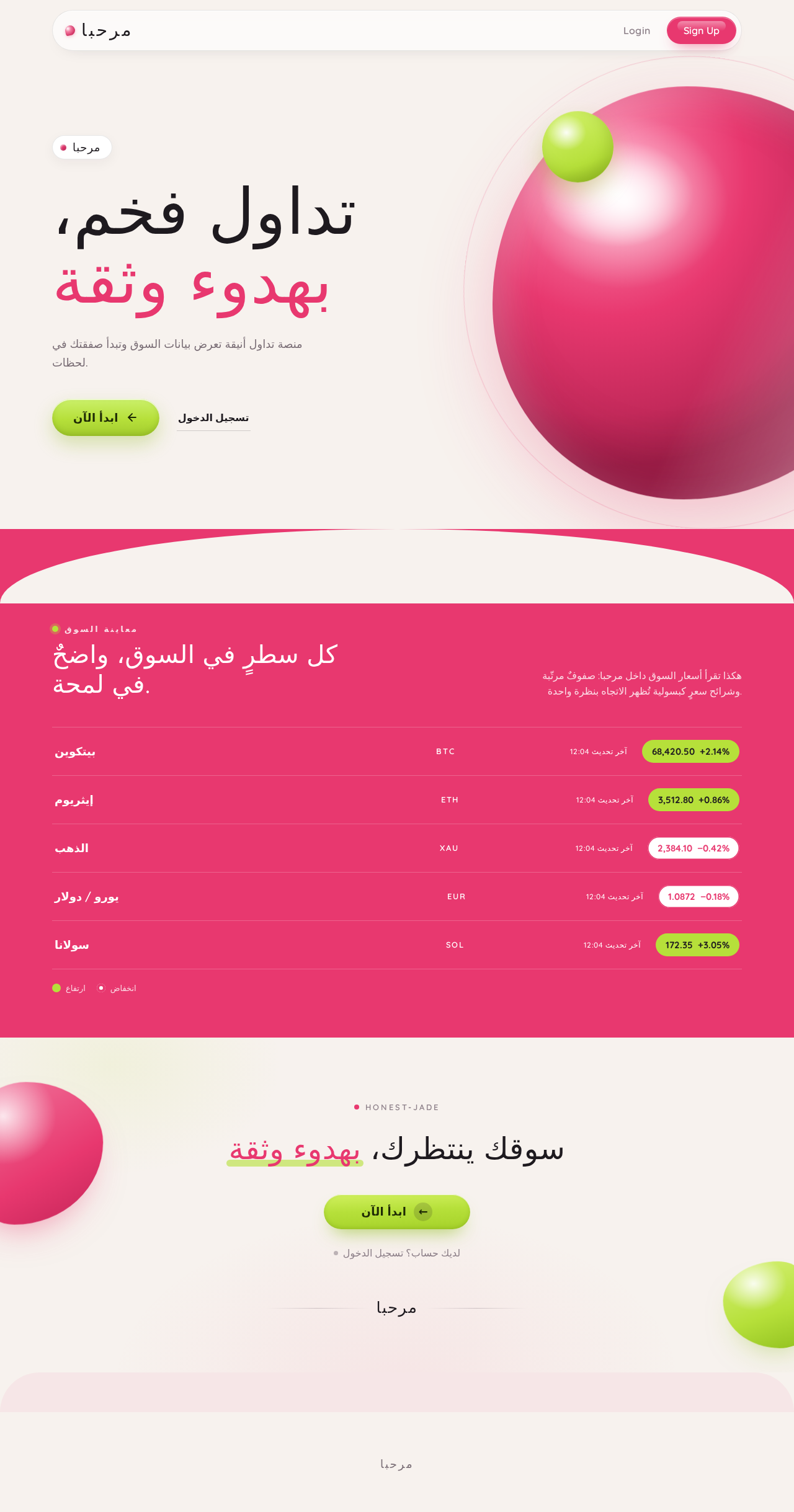
تداول فخم، بهدوء وثقة
منصة تداول أنيقة تعرض بيانات السوق وتبدأ صفقتك في لحظات.
كل سطرٍ في السوق، واضحٌ في لمحة.
هكذا تقرأ أسعار السوق داخل مرحبا: صفوفٌ مرتّبة وشرائح سعرٍ كبسولية تُظهر الاتجاه بنظرة واحدة.
- بيتكوينBTC68,420.50+2.14%آخر تحديث 12:04
- إيثريومETH3,512.80+0.86%آخر تحديث 12:04
- الذهبXAU2,384.10−0.42%آخر تحديث 12:04
- يورو / دولارEUR1.0872−0.18%آخر تحديث 12:04
- سولاناSOL172.35+3.05%آخر تحديث 12:04
No comments yet. Be the first!