home-loan-emi
 sachin patel
need to make a website in nextjs for home loan related where Month Opening Balance Monthly Interest Regular EMI Extra Payment Closing Balance Total Payment Status 04-Nov-2026 2140000 13375 ₹18,450 ₹3,500 2131425 ₹21,950 Paid all relavant amount as per enter and tenure and all with beatiful one page site

Comments (0)
Sign in to leave a comment
System Requirements
System Requirements Document for Home Loan Tracker
1. Introduction
Home Loan Tracker is a single-page Next.js website for a home loan borrower who wants to see exactly how a home loan amortizes month by month. The borrower enters the loan amount, the interest rate and the tenure; the site computes every relevant amount from those entries and the tenure, and presents a month-wise ledger with the columns Month, Opening Balance, Monthly Interest, Regular EMI, Extra Payment, Closing Balance, Total Payment and Status. Each month row carries a Paid status. The page also presents the borrower's Home Loan Repayment Plan summary — Current Outstanding 2140000, Annual Interest Rate 7.50%, Current EMI ₹18,450, Extra Monthly Payment ₹3,500, Total Monthly Payment ₹21,950 and Target Remaining Balance 559574.1672 — alongside the ledger.
The product intent is precision and control: the borrower should be able to read the full schedule as a trusted instrument — exact figures, ruled rows, tabular numerals — rather than fill in a bank form. The audience is a single home loan borrower in India working in rupees (₹), who wants one beautiful page that holds the inputs, the computed schedule and the status of every month.
The site is explicitly one page. It is a public entry surface with no account requirement: the borrower opens the page, enters values, and reads the computed ledger.
2. System Overview
2a. Product Interpretation and Delivery Boundary
The delivered product is one Next.js page, "Home Loan Tracker", which is both the public entry surface and the working surface. It has four cohesive regions on that single page:
- An instrument-panel header holding the three loan inputs (loan amount, interest rate, tenure) as dial-like fields, plus the entry hero copy.
- A circular bezel gauge that shows the closing balance in champagne.
- A Home Loan Repayment Plan summary block showing Current Outstanding 2140000, Annual Interest Rate 7.50%, Current EMI ₹18,450, Extra Monthly Payment ₹3,500, Total Monthly Payment ₹21,950 and Target Remaining Balance 559574.1672.
- A full-width ledger table below, on a lighter graphite band, listing every month of the tenure with the eight required columns and a Paid status per row.
All amounts are computed in the browser from the entered loan amount, interest rate and tenure. The page is publicly reachable with no sign-in, no account creation and no stored borrower identity; the borrower's entries live in the page session only. There is no multi-user, permissioned or shared-state behavior in the accepted requirements, so no role-based visibility or account management is introduced.
The provisioned backend (shared FastAPI process) and MariaDB database remain available infrastructure for application APIs and domain modules, but the accepted workflow does not require server-side persistence of the borrower's loan: the schedule is derived from the entered values and tenure on the page. No domain entities, authentication or ER model are introduced by the presence of the database. Future ideas are kept out of the current page and acceptance (see Section 11).
Removed from scope
- None — no concept was explicitly removed by the user.
2c. Page Content and Component Coverage
Home Loan Tracker
Information and state
- Entry hero: headline "See every month of your home loan", subline "Enter amount, rate and tenure. Read the full month-wise schedule with interest, EMI and closing balance.", call to action "Open the tracker".
- Loan inputs: loan amount (₹), interest rate (annual %, e.g. 7.5), tenure (months or years). Defaults may be pre-filled to demonstrate the schedule (for example loan amount 2,140,000, rate consistent with a monthly interest of 13,375, tenure producing the sample row), but every value is editable by the borrower.
- Home Loan Repayment Plan summary: Current Outstanding 2140000, Annual Interest Rate 7.50%, Current EMI ₹18,450, Extra Monthly Payment ₹3,500, Total Monthly Payment ₹21,950, Target Remaining Balance 559574.1672. Each figure is shown as a labelled row with tabular numerals; the summary reflects the borrower's current entries and recomputes with them.
- Derived summary state: closing balance shown on the circular bezel gauge; the computed schedule rows.
- Per-row state: Month (e.g. 04-Nov-2026), Opening Balance, Monthly Interest, Regular EMI, Extra Payment, Closing Balance, Total Payment, Status (Paid).
Primary actions
- Enter or change loan amount, interest rate and tenure.
- Trigger computation of the month-wise schedule from the entered values and tenure.
- Read the ledger table and the closing-balance gauge.
- Read the Home Loan Repayment Plan summary (Current Outstanding, Annual Interest Rate, Current EMI, Extra Monthly Payment, Total Monthly Payment, Target Remaining Balance).
Supporting actions
- "Open the tracker" call to action scrolls/focuses the input panel and ledger on the same page.
- Adjust the extra payment per month where the borrower wants to see its effect on closing balance and total payment.
Domain entities
- Loan: amount, annual interest rate, tenure.
- Repayment plan: current outstanding, annual interest rate, current EMI, extra monthly payment, total monthly payment, target remaining balance.
- Schedule row: month label, opening balance, monthly interest, regular EMI, extra payment, closing balance, total payment, status.
Component responsibilities
- Hero panel: dark titanium full-width panel; condensed headline over a faint topographic line field; bezel gauge on the right showing closing balance in champagne.
- Input dials: three dial-like rounded rectangles in a ruled row, label text above each value, tabular numerals; one column on mobile, three in a row at 768px and wider.
- Bezel gauge: circular gauge with champagne needle sweep on value change; displays the closing balance.
- Repayment plan summary: ruled label/value rows on the instrument surface, labels in muted grey, figures in champagne with tabular numerals; wraps to a single column on mobile so every label and figure stays whole.
- Ledger table: full-width ruled rows, tabular numerals, teal Paid pill per row; horizontally scrollable on narrow viewports so every column remains readable.
- Status pill: teal Paid indicator.
States
- Loading: initial computation on first paint shows the gauge and table with a brief counting/sweep animation; reduced-motion users see the final values immediately.
- Empty: before valid inputs exist, the table shows a prompt to enter loan amount, rate and tenure; the gauge shows a neutral zero/placeholder reading.
- Success: the full schedule renders with every month row and Paid status; the gauge shows the final closing balance; the repayment plan summary shows Current Outstanding 2140000, Annual Interest Rate 7.50%, Current EMI ₹18,450, Extra Monthly Payment ₹3,500, Total Monthly Payment ₹21,950 and Target Remaining Balance 559574.1672.
- Error: invalid or missing input (non-numeric, zero or negative amount, rate or tenure) shows an inline message next to the offending field and does not render a misleading schedule.
- Recovery: correcting the field recomputes the schedule and restores the gauge and table.
3. Functional Requirements
FR-1 — Next.js one-page site (explicit) As a home loan borrower, I should use a Next.js website that is a single beautiful page, so that all loan inputs and the full schedule live in one place.
- Trigger/input: the borrower opens the site.
- Observable result: one page renders with the hero, the three input dials, the closing-balance gauge, the Home Loan Repayment Plan summary and the ledger table.
- Access: public, no sign-in.
- Failure/recovery: if the page fails to load, reloading restores the same single page.
- Continuation: the borrower proceeds to enter loan values.
FR-2 — Enter loan amount, interest rate and tenure (explicit; borrower entry required_inference) As a home loan borrower, I should enter the loan amount, interest rate and tenure, so that the site can compute my schedule.
- Trigger/input: the borrower types or adjusts values in the three input dials.
- Observable result: the entered values are reflected in the fields with tabular numerals.
- Access: public.
- Failure/recovery: invalid entries (non-numeric, zero, negative) show an inline error and block computation until corrected.
- Continuation: valid entries feed FR-3.
FR-3 — Compute all relevant amounts from entered values and tenure (explicit; computation required_inference) As a home loan borrower, I should have the site calculate all relevant amounts from my entered values and tenure, so that I see accurate figures without doing the math myself.
- Trigger/input: valid loan amount, interest rate and tenure.
- Observable result: monthly interest, regular EMI, closing balance and total payment are computed for every month of the tenure.
- Access: public.
- Failure/recovery: if inputs are invalid, no schedule is produced and the error state from FR-2 is shown.
- Continuation: computed values populate the ledger (FR-4) and the gauge.
FR-4 — Month-wise ledger table with the eight required columns (explicit) As a home loan borrower, I should see a month-wise table with columns Month, Opening Balance, Monthly Interest, Regular EMI, Extra Payment, Closing Balance, Total Payment and Status, so that I can read each month's money movement.
- Trigger/input: a computed schedule.
- Observable result: one row per month, in order, with all eight columns populated; the sample row reads 04-Nov-2026, 2140000, 13375, ₹18,450, ₹3,500, 2131425, ₹21,950, Paid.
- Access: public.
- Failure/recovery: on narrow viewports the table scrolls horizontally so no column is lost; empty state prompts for inputs.
- Continuation: the borrower reads the closing balance and the gauge.
FR-5 — Paid status per month row (explicit) As a home loan borrower, I should see a Paid status on each month row, so that I know the month's payment is settled.
- Trigger/input: a rendered schedule row.
- Observable result: each row shows a teal Paid pill.
- Access: public.
- Failure/recovery: if a row cannot be computed, it is not rendered as Paid.
- Continuation: the borrower scans the ledger for status.
FR-6 — Extra payment reflected in the schedule (explicit, from the sample row's Extra Payment column) As a home loan borrower, I should see the extra payment column and its effect on the closing balance and total payment, so that I understand how extra payments change my loan.
- Trigger/input: the extra payment value (default ₹3,500 as in the sample) and the loan inputs.
- Observable result: Extra Payment and Total Payment columns reflect the extra amount; Closing Balance accounts for it.
- Access: public.
- Failure/recovery: an invalid extra payment shows an inline error and blocks recomputation.
- Continuation: the borrower compares closing balances across months.
FR-7 — Closing-balance gauge (explicit via creative direction; presentation of accepted computed state) As a home loan borrower, I should see the closing balance on a circular bezel gauge in champagne, so that the headline figure is immediately readable.
- Trigger/input: computed schedule or a change in inputs.
- Observable result: the gauge needle sweeps to the new closing balance; reduced-motion users see the final value without sweep.
- Access: public.
- Failure/recovery: with no valid inputs, the gauge shows a neutral placeholder.
- Continuation: the borrower refines inputs and watches the gauge update.
FR-8 — Home Loan Repayment Plan summary (explicit) As a home loan borrower, I should see my Home Loan Repayment Plan summary on the page, so that I can read my current outstanding, rate, EMI, extra payment, total monthly payment and target remaining balance at a glance.
- Trigger/input: the borrower opens the page or changes any loan input.
- Observable result: the summary shows Current Outstanding 2140000, Annual Interest Rate 7.50%, Current EMI ₹18,450, Extra Monthly Payment ₹3,500, Total Monthly Payment ₹21,950 and Target Remaining Balance 559574.1672, each as a labelled row with tabular numerals in Indian rupee formatting.
- Access: public.
- Failure/recovery: if an input is invalid, the affected summary figures show a neutral placeholder rather than a misleading value, and the inline error from FR-2 is shown.
- Continuation: the borrower compares the summary figures with the ledger rows and the gauge.
4. User Personas
Home loan borrower
Product context. A single borrower in India with an active or planned home loan in rupees, who wants to see exactly how the loan amortizes month by month. They arrive at the public page with their loan amount, interest rate and tenure in mind, and they want the numbers to be exact and calm to read.
Primary goal. Enter loan amount, interest rate and tenure, then read the complete month-wise schedule — opening balance, monthly interest, regular EMI, extra payment, closing balance, total payment and Paid status — and see the closing balance on the gauge.
Distinct accepted responsibilities.
- Enters the three loan inputs (FR-2).
- Reads the computed schedule and the eight-column ledger (FR-3, FR-4).
- Reads the Paid status per month (FR-5).
- Adjusts the extra payment and observes its effect on closing balance and total payment (FR-6).
- Reads the closing balance on the bezel gauge (FR-7).
- Reads the Home Loan Repayment Plan summary — Current Outstanding, Annual Interest Rate, Current EMI, Extra Monthly Payment, Total Monthly Payment and Target Remaining Balance (FR-8).
Inputs and decisions. Loan amount, annual interest rate, tenure, and the monthly extra payment. The borrower decides whether the computed schedule matches their expectation and adjusts inputs accordingly.
Interactions with other participants. None — the borrower is the only active human participant; computation is performed by the site itself.
Observable success. The ledger shows every month of the tenure with all eight columns populated, each row marked Paid, the gauge shows the final closing balance in champagne, and the repayment plan summary shows Current Outstanding 2140000, Annual Interest Rate 7.50%, Current EMI ₹18,450, Extra Monthly Payment ₹3,500, Total Monthly Payment ₹21,950 and Target Remaining Balance 559574.1672.
5. Core User Flows
Flow A — Enter loan values and read the full schedule
- The borrower opens the public Home Loan Tracker page. The hero panel renders with the headline "See every month of your home loan", the subline and the "Open the tracker" call to action.
- The borrower clicks "Open the tracker" (or scrolls) to reach the three input dials.
- The borrower enters the loan amount (e.g. 2,140,000), the interest rate (e.g. 7.50%) and the tenure.
- The site validates the entries. If any entry is invalid, an inline error appears next to that field and no schedule is produced; the borrower corrects the field and the error clears.
- On valid entries, the site computes the month-wise schedule from the entered values and tenure.
- The ledger table renders one row per month with Month, Opening Balance, Monthly Interest, Regular EMI, Extra Payment, Closing Balance, Total Payment and Status. The first row reads 04-Nov-2026, 2140000, 13375, ₹18,450, ₹3,500, 2131425, ₹21,950, Paid.
- The bezel gauge sweeps its champagne needle to the closing balance; reduced-motion users see the final value immediately.
- The borrower reads down the ledger to the final month, where the closing balance reaches zero.
- Continuation: the borrower changes any input and the schedule and gauge recompute.
Flow B — Adjust the extra payment and compare closing balances
- From the rendered schedule, the borrower changes the extra payment value (default ₹3,500).
- The site recomputes the schedule with the new extra payment.
- The Extra Payment, Closing Balance and Total Payment columns update for every affected month, and the gauge sweeps to the new closing balance.
- The borrower compares the closing balance across months to see the effect of the extra payment.
- Failure/recovery: an invalid extra payment shows an inline error and blocks recomputation until corrected.
Flow D — Read the Home Loan Repayment Plan summary
- The borrower opens the page or changes a loan input.
- The repayment plan summary renders as labelled rows: Current Outstanding 2140000, Annual Interest Rate 7.50%, Current EMI ₹18,450, Extra Monthly Payment ₹3,500, Total Monthly Payment ₹21,950, Target Remaining Balance 559574.1672.
- The borrower reads the summary figures with tabular numerals and Indian rupee grouping.
- The borrower compares the summary with the ledger rows and the closing-balance gauge.
- Failure/recovery: with an invalid input, the affected summary figures show a neutral placeholder and the inline field error is shown.
- Continuation: the borrower adjusts an input and the summary, schedule and gauge recompute together.
Flow C — Read the Paid status of each month
- The borrower scans the Status column of the ledger.
- Each month row shows a teal Paid pill.
- The borrower confirms every month of the tenure is marked Paid.
- Continuation: the borrower returns to the inputs to explore a different tenure or rate.
6. Visuals Colors and Theme
Muse and headline. MARQ by Garmin — precision instrument luxury for a home loan ledger. The page must feel like a trusted instrument, not a bank form.
Mode. Dark mode.
Colour tokens (exact hex by role)
- Background:
#12151A(graphite ground, fills most of the page) - Surface:
#1C2128(instrument panel and ledger band) - Text:
#EDE6D8(primary readable text) - Primary:
#C8A96A(champagne — key figures, rules, gauge needle) - Accent:
#2FB3A6(teal — Paid status pill and extra payment) - Muted:
#8A8F98(labels and secondary text)
Typography
- Headings: Saira Condensed, weight 600, condensed uppercase, wide tracking on labels.
- Body: Barlow.
- Numerals: Barlow tabular figures.
- Scale: 1.25 modular — desktop 64/48/32/20/16, mobile 40/32/24/17/15.
Shape language. Circular gauges and bezels, hairline rules, ruled data rows. Corners small at 4px. No soft blobs.
Layout. A dark instrument panel at the top holds three input dials and the Home Loan Repayment Plan summary as ruled label/value rows. The full-width ledger table sits below on a lighter graphite band. One column on mobile; three dials in a row at 768px and wider.
Imagery. Macro material textures and fine topographic lines as faint background art. No stock people.
Readability rule. Headlines, wordmarks, labels, numbers, cards' text and controls stay entirely inside the viewport and their container at 375px, 768px and 1280px, wrapping or scaling (e.g. clamp()) to fit. Decoration and motion may bleed or crop; readable text and controls never do.
Forbidden. Blue or indigo accents on white; gradient blob heroes; identical hover-lift cards; rounded playful fonts; stock photography of people; the generic indigo/blue-on-white SaaS template.
7. Signature Design Concept
The public entry is a full-width dark titanium instrument panel. On the left, an oversized condensed headline — "See every month of your home loan" — spans the panel width at 40px on mobile and 64px on desktop, sitting over a thin topographic line field. On the right, a circular bezel gauge shows the closing balance in champagne, its needle sweeping on change. Beneath the headline, three input dials sit in a ruled row: dial-like rounded rectangles with label text above each value, tabular numerals inside. Below the dials, the Home Loan Repayment Plan summary reads as ruled label/value rows — Current Outstanding 2140000, Annual Interest Rate 7.50%, Current EMI ₹18,450, Extra Monthly Payment ₹3,500, Total Monthly Payment ₹21,950, Target Remaining Balance 559574.1672 — with muted labels and champagne figures. Below the panel, the ledger table occupies a lighter graphite band with ruled rows, tabular numerals and a teal Paid pill per row. The composition recomposes only the accepted inputs, computed schedule, repayment plan summary and status — no new behavior.
8. Interaction Model & Motion Direction
Interaction Model: Animated Motion Tempo: restrained Hero Dimensionality: dimensional_css
Landing Hero Motion Brief
- Focal subject: the circular bezel gauge showing the closing balance in champagne, set against the topographic line field.
- Input → transformation → outcome thesis: the borrower enters loan amount, rate and tenure in the three dials; the site computes the schedule; the repayment plan summary figures count to their new values, the gauge needle sweeps to the new closing balance and the ledger rows fade in one after another.
- Motion vocabulary: needle sweeps, counting numbers on load, sequential row fade-in.
- Composed first frame: dark titanium panel, condensed headline left, bezel gauge right at rest, three dials in a ruled row beneath, repayment plan summary rows below the dials, ledger band below.
- Reduced-motion state: all motion stops under
prefers-reduced-motion; the gauge shows the final value and the table renders fully without fade-in.
9. Non-Functional Requirements
- Framework: the site must use Next.js (explicit).
- Single page: the site must be one page (explicit).
- Beauty: the site must be a beautiful one-page site, following the creative direction in Sections 6–8 (explicit).
- Currency: all amounts are shown in Indian rupees (₹) with Indian digit grouping (explicit via sample row).
- Numerals: tabular figures for all monetary values so columns align (creative direction).
- Responsiveness: readable text and controls stay whole at 375px, 768px and 1280px; the ledger scrolls horizontally on narrow viewports rather than clipping columns (creative direction).
- Accessibility:
prefers-reduced-motionstops all motion and provides a usable static arrangement (creative direction). - Privacy: no account, no stored borrower identity; entries live in the page session (required_inference from public access).
10. Tech Stack
- Frontend: Next.js (React) — the single page, hero, input dials, gauge and ledger table. (explicit)
- Styling: CSS with the tokens in Section 6; Saira Condensed and Barlow via web fonts.
- Backend: shared FastAPI process for application APIs and domain modules (provisioned; available for future server-side computation or persistence, not required by the current accepted workflow).
- Database: MariaDB (provisioned; no domain entities or authentication are introduced by its presence).
- Deployment: Docker / docker-compose for the frontend, backend and database services.
11. Assumptions and Constraints
- Assumption: the borrower is a single user in India working in rupees; no multi-user or shared-state behavior is required.
- Assumption: the schedule is computed in the browser from the entered values and tenure; the provisioned backend and database are not required for the current workflow.
- Assumption: the sample row (04-Nov-2026, 2140000, 13375, ₹18,450, ₹3,500, 2131425, ₹21,950, Paid) is illustrative of the required columns and formatting, not a fixed dataset.
- Assumption: the Home Loan Repayment Plan figures (Current Outstanding 2140000, Annual Interest Rate 7.50%, Current EMI ₹18,450, Extra Monthly Payment ₹3,500, Total Monthly Payment ₹21,950, Target Remaining Balance 559574.1672) are the borrower's stated plan values and are shown as given; they recompute from the borrower's entries when an input changes.
- Constraint: the site must be Next.js and must be one page.
- Constraint: the palette, fonts, surfaces, tone and layout in Sections 6–8 are binding; the generic indigo/blue-on-white SaaS template is forbidden.
- Future (not current): server-side persistence of loans, multiple saved scenarios, export of the schedule, and any account features are out of scope for this generation and must not appear on the current page.
12. Glossary
- EMI: Equated Monthly Instalment — the regular monthly payment toward the loan.
- Opening Balance: the loan balance at the start of a month.
- Closing Balance: the loan balance at the end of a month after interest, EMI and extra payment.
- Monthly Interest: the interest charged for the month on the opening balance.
- Regular EMI: the scheduled EMI amount for the month.
- Extra Payment: an additional amount paid in a month beyond the regular EMI.
- Total Payment: the total paid in the month (regular EMI plus extra payment).
- Tenure: the loan duration over which the schedule is computed.
- Paid: the status marking a month's payment as settled.
- Bezel gauge: the circular instrument dial showing the closing balance.
- Current Outstanding: the loan balance the borrower currently owes, shown as 2140000 in the repayment plan.
- Target Remaining Balance: the remaining balance the borrower's repayment plan targets, shown as 559574.1672.
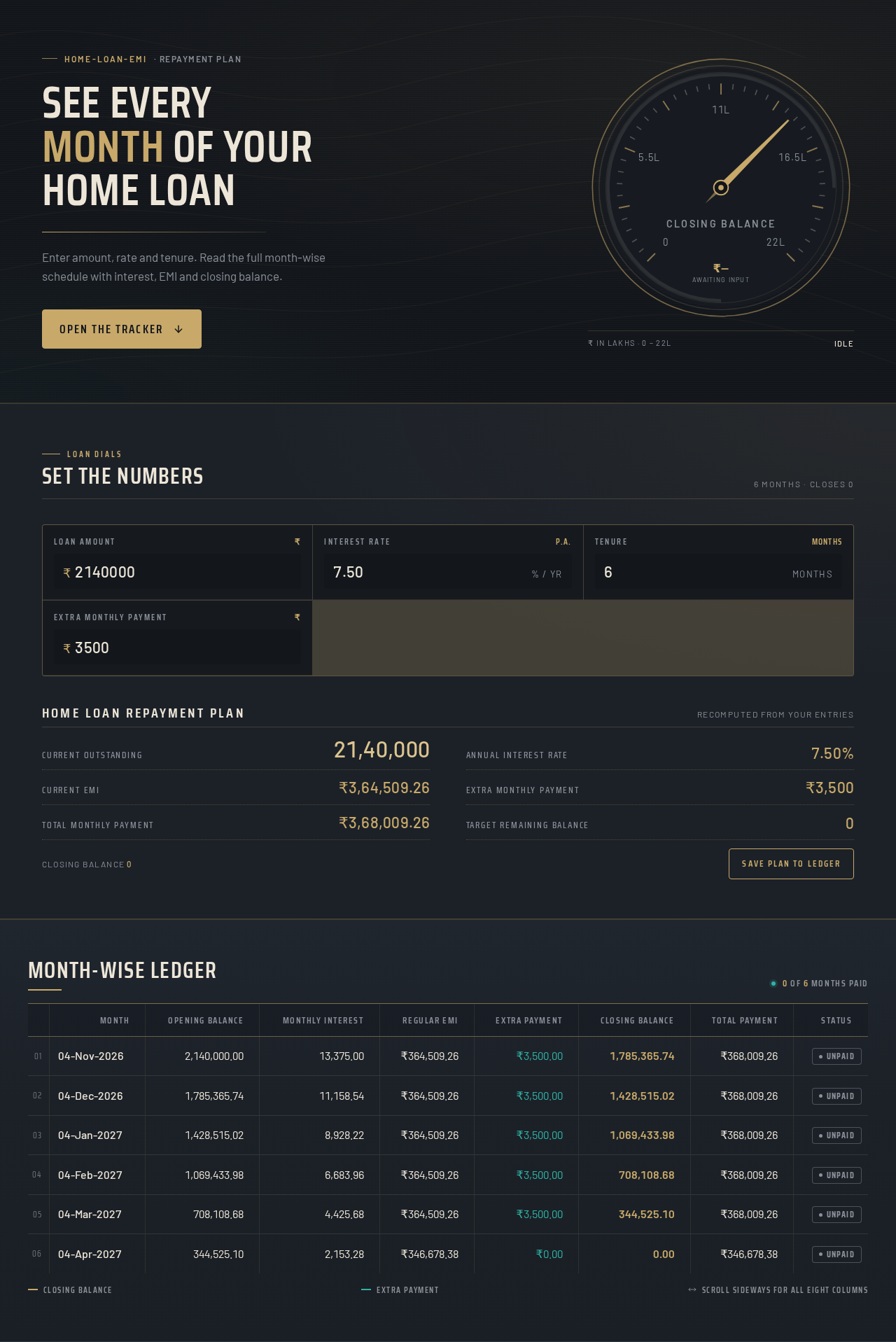
home-loan-emi· Repayment plan
See every month of your home loan
Enter amount, rate and tenure. Read the full month-wise schedule with interest, EMI and closing balance.
Set the numbers
Home Loan Repayment Plan
Recomputed from your entries- Current Outstanding
- 21,40,000
- Annual Interest Rate
- 7.50%
- Current EMI
- ₹3,64,509.26
- Extra Monthly Payment
- ₹3,500
- Total Monthly Payment
- ₹3,68,009.26
- Target Remaining Balance
- 0
Month-wise ledger
| Month | Opening Balance | Monthly Interest | Regular EMI | Extra Payment | Closing Balance | Total Payment | Status | |
|---|---|---|---|---|---|---|---|---|
| 04-Nov-2026 | 2,140,000.00 | 13,375.00 | ₹364,509.26 | ₹3,500.00 | 1,785,365.74 | ₹368,009.26 | Unpaid | |
| 04-Dec-2026 | 1,785,365.74 | 11,158.54 | ₹364,509.26 | ₹3,500.00 | 1,428,515.02 | ₹368,009.26 | Unpaid | |
| 04-Jan-2027 | 1,428,515.02 | 8,928.22 | ₹364,509.26 | ₹3,500.00 | 1,069,433.98 | ₹368,009.26 | Unpaid | |
| 04-Feb-2027 | 1,069,433.98 | 6,683.96 | ₹364,509.26 | ₹3,500.00 | 708,108.68 | ₹368,009.26 | Unpaid | |
| 04-Mar-2027 | 708,108.68 | 4,425.68 | ₹364,509.26 | ₹3,500.00 | 344,525.10 | ₹368,009.26 | Unpaid | |
| 04-Apr-2027 | 344,525.10 | 2,153.28 | ₹346,678.38 | ₹0.00 | 0.00 | ₹346,678.38 | Unpaid |
Closing balanceExtra paymentScroll sideways for all eight columns
home-loan-emi· Repayment plan
See every month of your home loan
Enter amount, rate and tenure. Read the full month-wise schedule with interest, EMI and closing balance.
Set the numbers
Home Loan Repayment Plan
Recomputed from your entries- Current Outstanding
- 21,40,000
- Annual Interest Rate
- 7.50%
- Current EMI
- ₹3,64,509.26
- Extra Monthly Payment
- ₹3,500
- Total Monthly Payment
- ₹3,68,009.26
- Target Remaining Balance
- 0
Month-wise ledger
| Month | Opening Balance | Monthly Interest | Regular EMI | Extra Payment | Closing Balance | Total Payment | Status | |
|---|---|---|---|---|---|---|---|---|
| 04-Nov-2026 | 2,140,000.00 | 13,375.00 | ₹364,509.26 | ₹3,500.00 | 1,785,365.74 | ₹368,009.26 | Unpaid | |
| 04-Dec-2026 | 1,785,365.74 | 11,158.54 | ₹364,509.26 | ₹3,500.00 | 1,428,515.02 | ₹368,009.26 | Unpaid | |
| 04-Jan-2027 | 1,428,515.02 | 8,928.22 | ₹364,509.26 | ₹3,500.00 | 1,069,433.98 | ₹368,009.26 | Unpaid | |
| 04-Feb-2027 | 1,069,433.98 | 6,683.96 | ₹364,509.26 | ₹3,500.00 | 708,108.68 | ₹368,009.26 | Unpaid | |
| 04-Mar-2027 | 708,108.68 | 4,425.68 | ₹364,509.26 | ₹3,500.00 | 344,525.10 | ₹368,009.26 | Unpaid | |
| 04-Apr-2027 | 344,525.10 | 2,153.28 | ₹346,678.38 | ₹0.00 | 0.00 | ₹346,678.38 | Unpaid |
Closing balanceExtra paymentScroll sideways for all eight columns
No comments yet. Be the first!