home-healthcare-caregivers
 Leon Leek
Build "Utugi", a home healthcare gig marketplace for Kenya. Families post care jobs, verified caregivers accept them, and payment is made after the visit. Build version 1 completely. Do not add features I haven't listed. STACK React + TypeScript frontend (mobile-first, responsive). Node.js + TypeScript backend. PostgreSQL with Prisma and migrations (do NOT use SQLite or libsql). Docker and a Render-ready config. .env.example, README and seed script. English and Kiswahili i18n scaffolding. Currency shown as "KSh 1,500". ROLES Patient/family, Caregiver, Admin (sub-roles: Verifier, Support, Finance, Super admin). One account per phone number, with role profiles on top. Phone number + one-time code sign-in (provider behind an interface, with a dev mock), attempt limits and rate limiting. Seed a Super admin from env vars SUPERADMIN_PHONE and SUPERADMIN_PASSWORD. Never hardcode credentials. CORE FLOW 1. Family posts a job: who it's for, service (Home care assistant, Child care, Nursing visit, Companion), date, time, duration, area, notes. 2. Matching: only caregivers who are Verified, online, in the service area, offering that service and free at that time (no overlap) see the job. Show the approximate area only. First accept wins, enforced by a database row lock; others get "already taken". Requests expire (default 10 minutes, configurable). If the family used "request this caregiver again", offer it to that caregiver first for a short window, then open it to others. If nobody accepts, show a clear "no match" state with options to widen time or area, or cancel. 3. On acceptance the caregiver sees the exact address and access notes. The family sees the caregiver's name, role and badges. 4. Visit: En route, Arrived (with a 4-digit arrival code the family gives the caregiver), In progress, Completed (confirmation step). 5. PAYMENT IS AFTER THE SERVICE. When the visit is done, the family reviews the cost and pays by M-Pesa STK push. Nothing is charged at booking. States: Awaiting payment, Paid, Overdue. Reminders on day 1, 3 and 7. After 7 days the case goes to support and the family's new requests pause. Caregiver earnings stay pending until the family pays. 6. Rating and review, "Book again" and favourites, optional recurring care. PAYMENTS A PaymentProvider interface with a mock implementation and an M-Pesa Daraja sandbox implementation. Idempotency keys on every payment call. Payment confirmed only by the provider webhook, never by the client. Store no card numbers and no PINs. Double-entry ledger: job total, platform fee, commission, caregiver earnings. Withdraw to M-Pesa via a payout interface (mocked). Make commission and fees configurable, not hardcoded. CAREGIVER VERIFICATION Per-item statuses: Not submitted, Under review, Action required, Verified, Expired. Items: ID (photo and selfie), professional licence (nurses), references, certificate of good conduct, M-Pesa payout number. The online switch is locked until ID and licence are Verified. Documents are stored encrypted and served by short-lived signed URLs. Expiry reminders 30 days ahead. ADMIN Overview with a to-do list (pending verifications, overdue payments, no-match jobs, open support or safety cases). Verification desk with approve, request fix and reject using a reason list. Jobs list with filters and an event trail. Payments (awaiting, overdue, reconciliation). Support and safety cases (safety reports first). Audit log that cannot be edited. Role-based access: Verifier sees credentials only; Support sees masked contact details and no health notes; Finance sees payments only; Super admin changes settings, with a second approver for fee changes. PRIVACY AND SAFETY Data minimisation. Health notes are optional, encrypted and hidden from support by default. Opening them requires a typed reason and is logged. Notifications use generic wording. In-app messaging so phone numbers aren't exchanged. Show "In an emergency, call 999 or 112. Utugi is not an emergency service." in the family app. Label all sample data as demo. Never present mock payments, verification or tracking as real. PAGES Patient: Home ("Hello {name}", one request panel with service chips, current job, upcoming, past visits with Try again / Rebook / Request again, my caregivers, emergency help card), Request care, Job page (status, caregiver, messages, pay), Recurring, My caregivers. Caregiver: Home (online switch, next visit, open requests with pay as the biggest number, earnings awaiting payment, verification status), Requests, Visits, Earnings, Verification, Profile. Admin: Overview, Verifications, Jobs, Payments, Support and safety, Audit log, Settings. Public: Join page with choices (I need care, I'm a caregiver), phone sign-in. DESIGN Warm and premium. Ivory background #FFF9EF, cream #F5EBDD, gold #C69A36 (primary actions and active tabs only), deep gold #A87922, dark brown text #292821, taupe #827B70, success green #287D52, error red #B83B36. Serif headings (Fraunces), Inter for body. 14 to 16 px radii, thin sand borders, one gold button per screen, 44 px minimum touch targets, visible focus states, 4.5:1 contrast, works at 200% text size. Logo: a gold house with a cream heart, brown roof, lowercase "utugi" wordmark in dark brown, tagline "All your home healthcare needs under


Comments (0)
Sign in to leave a comment
System Requirements
System Requirements Document for Utugi
1. Introduction
Utugi is a home healthcare gig marketplace for Kenya. Families post care jobs; verified caregivers accept them; payment happens after the visit. Version 1 is to be built completely, and no features beyond those listed here are in scope.
The product serves two sides of a care relationship plus an internal operations team. Families need trustworthy, verified help at home without paying up front. Caregivers need a fair, first-come matching system, clear visit steps, and reliable earnings. Utugi's staff need to verify credentials, watch payments, and handle support and safety cases under strict, role-scoped access to sensitive data.
The audience is Kenyan households arranging home care (elderly care, child care, nursing visits, companionship) and caregivers offering those services, reached primarily on mobile phones. Currency is displayed in the form KSh 1,500. The interface ships with English and Kiswahili i18n scaffolding.
2. System Overview
Utugi is a mobile-first web marketplace with three application surfaces: a family (patient) app, a caregiver app, and an admin console, plus a public entry and phone sign-in. One account exists per phone number, with role profiles layered on top. Sign-in is by phone number plus a one-time code, with the SMS provider behind an interface and a development mock. Attempt limits and rate limiting protect the code flow. A Super admin is seeded from the environment variables SUPERADMIN_PHONE and SUPERADMIN_PASSWORD; credentials are never hardcoded.
The core loop is: a family posts a job (who it is for, service, date, time, duration, area, notes); only Verified, online caregivers in the service area who offer that service and are free at that time see it, with only the approximate area shown; the first accept wins under a database row lock and other caregivers get "already taken"; requests expire after a configurable default of 10 minutes; a "request this caregiver again" job is offered to that caregiver first for a short window before opening to others; if nobody accepts, the family sees a no-match state with options to widen time or area, or cancel. On acceptance the caregiver sees the exact address and access notes, and the family sees the caregiver's name, role and badges. The visit moves through En route, Arrived (with a 4-digit arrival code the family gives the caregiver), In progress, and Completed with a confirmation step.
Payment is strictly after the service. Nothing is charged at booking. When the visit is done the family reviews the cost and pays by M-Pesa STK push. Payment states are Awaiting payment, Paid and Overdue; reminders go out on day 1, 3 and 7; after 7 days the case goes to support and the family's new requests pause. Caregiver earnings stay pending until the family pays. Families rate and review, book again, keep favourites, and can set optional recurring care.
Payments run through a PaymentProvider interface with a mock implementation and an M-Pesa Daraja sandbox implementation. Every payment call carries an idempotency key. Payment is confirmed only by the provider webhook, never by the client. No card numbers and no PINs are stored. A double-entry ledger records job total, platform fee, commission and caregiver earnings. Withdrawal to M-Pesa goes through a mocked payout interface. Commission and fees are configurable, not hardcoded.
Caregiver verification tracks per-item statuses (Not submitted, Under review, Action required, Verified, Expired) for ID (photo and selfie), professional licence (nurses), references, certificate of good conduct, and M-Pesa payout number. The online switch is locked until ID and licence are Verified. Documents are stored encrypted and served by short-lived signed URLs. Expiry reminders go out 30 days ahead.
The admin console provides an Overview to-do list (pending verifications, overdue payments, no-match jobs, open support or safety cases), a verification desk with approve, request fix and reject using a reason list, a jobs list with filters and an event trail, payments (awaiting, overdue, reconciliation), support and safety cases with safety reports first, an audit log that cannot be edited, and settings. Role-based access is strict: Verifier sees credentials only; Support sees masked contact details and no health notes; Finance sees payments only; Super admin changes settings, with a second approver for fee changes.
Privacy and safety rules apply throughout: data minimisation; health notes are optional, encrypted and hidden from support by default, and opening them requires a typed reason and is logged; notifications use generic wording; in-app messaging keeps phone numbers from being exchanged; the family app shows "In an emergency, call 999 or 112. Utugi is not an emergency service."; all sample data is labelled as demo; and mock payments, verification or tracking are never presented as real.
Provisioned infrastructure consists of a shared backend process for application APIs and domain modules, a relational database for application-owned persistent data, and a React frontend. The user's stack requires PostgreSQL with Prisma and migrations (explicitly not SQLite or libsql); the provisioned database service is therefore to be run as PostgreSQL, and the backend is to be implemented in Node.js + TypeScript as the user specified. Docker and a Render-ready configuration, .env.example, README and seed script are part of delivery.
Removed from scope
- None. No concept was removed by the user; the "do not add features I haven't listed" constraint is a boundary, not a removal.
2a. Product Interpretation and Delivery Boundary
Utugi is delivered as a first-party web application. The public Join page and phone sign-in are anonymously reachable; every other destination requires a signed-in account and is scoped to the role profile(s) on that account. Identity is application-owned because families and caregivers must privately own and resume durable, actor-specific state (their jobs, visits, earnings, verification items, favourites, recurring plans) and because payment obligations and visit confirmations must remain bound to the correct participant.
The one-time code provider sits behind an interface with a development mock; the M-Pesa payment provider sits behind a PaymentProvider interface with a mock and a Daraja sandbox implementation; payouts sit behind a mocked payout interface. These are provider-owned integrations, not separate product surfaces. Payment confirmation is owned by the provider webhook, not by any client screen. Background automation owns request expiry, payment reminders on day 1/3/7, the 7-day overdue escalation to support and request pause, verification expiry reminders 30 days ahead, and the short first-offer window for "request this caregiver again".
Version 1 is the complete current scope described in this document. Nothing is deferred to a future horizon by the user; the "do not add features" constraint means no adjacent capabilities (for example, no card payments, no emergency dispatch, no clinical records beyond the optional health notes) are part of this delivery.
2c. Page Content and Component Coverage
Join page
- Information/state: Public entry. Cream hero block filling the viewport with the gold house logo (cream heart, brown roof) and lowercase "utugi" wordmark top left; large Fraunces headline "Care at home, from people you can trust"; subline "Post a care job. A verified caregiver accepts it. You pay after the visit."; one gold button "Find care"; a soft natural-light photo of a home room bleeding off the right edge. Below the hero, two choices: "I need care" and "I'm a caregiver". Tagline "All your home healthcare needs under" appears with the logo lockup.
- Primary actions: Choose "I need care" or "I'm a caregiver" (both lead to phone sign-in); "Find care" gold button.
- Supporting actions: Switch language between English and Kiswahili.
- Domain entities: None persisted on this page.
- Component responsibilities: Hero block, logo lockup, choice cards, language toggle, link to sign-in.
- States: Loading (static content, no data fetch); empty (not applicable); success (choice navigates to sign-in); error (if sign-in service is unreachable, a plain message with retry); recovery (retry).
Login
- Information/state: Anonymous phone sign-in. Phone number entry, then one-time code entry. Attempt limits and rate limiting are surfaced as clear messages. Dev mock provider is used in development and is labelled as a mock.
- Primary actions: Submit phone number to receive a one-time code; submit the code to sign in.
- Supporting actions: Resend code within allowed limits; change phone number; switch language.
- Domain entities: Account (one per phone number), role profiles on the account, one-time code challenge.
- Component responsibilities: Phone input, code input, attempt/rate-limit messaging, provider indicator (mock vs. real, never presented as real when mocked).
- States: Loading (sending code, verifying code); empty (no code requested yet); success (signed in, routed to the role-appropriate Home); error (invalid code, too many attempts, rate limited, provider failure) with recovery by waiting or resending within limits.
Home
- Information/state: Family home. Greeting "Hello {name}". One request panel with service chips (Home care assistant, Child care, Nursing visit, Companion). Current job. Upcoming visits. Past visits with Try again / Rebook / Request again. My caregivers. Emergency help card in cream with a brown rule and the line "In an emergency, call 999 or 112. Utugi is not an emergency service." Caregiver home (same destination, role-scoped): online switch (locked until ID and licence are Verified), next visit, open requests with pay shown as the biggest number, earnings awaiting payment, verification status.
- Primary actions: Family: start a request from the request panel (one gold button per screen); open current job; open upcoming or past visit; Try again / Rebook / Request again from a past visit; open My caregivers. Caregiver: toggle online switch (when unlocked); open next visit; open an open request; open earnings; open verification status.
- Supporting actions: Switch language; open emergency help card.
- Domain entities: Account, role profile, job, visit, request, caregiver verification summary, earnings summary, favourites.
- Component responsibilities: Greeting, request panel with service chips, current job card, upcoming list, past visits list with the three re-engagement actions, my caregivers strip, emergency card, online switch with lock explanation, next visit card, open requests list with pay as the largest number, earnings-awaiting card, verification status summary.
- States: Loading (skeletons for job/visit/earnings data); empty (no current job, no upcoming, no past visits, no open requests, no earnings awaiting); success (populated cards); error (data fetch failure with retry); recovery (retry, and for the online switch a locked state explaining which verification items are outstanding).
Request care
- Information/state: Job posting form: who it is for, service (Home care assistant, Child care, Nursing visit, Companion), date, time, duration, area, notes. Health notes are optional and marked as such. Nothing is charged at booking, and this is stated on the form.
- Primary actions: Submit the job request (one gold button).
- Supporting actions: Select service via soft pill chips; cancel and return to Home; switch language.
- Domain entities: Job request with who-it-is-for, service, date, time, duration, area, notes, optional health notes.
- Component responsibilities: Form fields, service chips, validation messaging, no-charge notice.
- States: Loading (submitting); empty (blank form); success (job posted, routed to Job page showing matching in progress); error (validation errors, submission failure) with recovery by correcting fields or retrying.
Job page
- Information/state: Family view: job status, caregiver (name, role, badges once accepted), messages, arrival code, pay. Status rail showing En route, Arrived, In progress, Completed as soft steps. Payment states Awaiting payment, Paid, Overdue. No-match state with options to widen time or area, or cancel. Caregiver view (role-scoped): exact address and access notes after acceptance, visit controls, in-app messages. Mock payments are labelled as mock and never presented as real.
- Primary actions: Family: give the 4-digit arrival code to the caregiver; review the cost and pay by M-Pesa STK push when the visit is done; widen time or area, or cancel, in the no-match state; send a message. Caregiver: accept an open request (first accept wins; "already taken" if lost); advance the visit through En route, Arrived, In progress, Completed with a confirmation step; send a message.
- Supporting actions: Open messages; switch language.
- Domain entities: Job, request, visit, arrival code, message thread, payment, ledger entries.
- Component responsibilities: Status rail, caregiver card with badges, arrival code display, message thread, pay panel with cost review and STK push trigger, no-match panel with widen/cancel, mock-payment label.
- States: Loading (matching in progress, payment pending); empty (no messages yet); success (accepted, visit advanced, payment confirmed by webhook); error (already taken, expired request, payment failure, webhook not yet received) with recovery (retry payment, wait for confirmation, widen or cancel).
Recurring
- Information/state: Optional recurring care plans for the family, derived from an existing job's service, area, cadence and time preferences.
- Primary actions: Create a recurring plan (one gold button); pause or cancel a plan.
- Supporting actions: Switch language.
- Domain entities: Recurring plan linked to a family and service.
- Component responsibilities: Plan list, plan creation form, pause/cancel controls.
- States: Loading; empty (no recurring plans); success (plan saved); error (validation or save failure) with recovery.
My caregivers
- Information/state: Favourites, ratings and reviews, book again, request this caregiver again.
- Primary actions: Rate and review a caregiver; mark or unmark a favourite; Book again; Request again (which offers the job to that caregiver first for a short window).
- Supporting actions: Switch language.
- Domain entities: Favourite, rating, review, caregiver profile summary.
- Component responsibilities: Caregiver list, rating/review form, favourite toggle, Book again and Request again actions.
- States: Loading; empty (no caregivers yet); success (saved); error (save failure) with recovery.
Requests
- Information/state: Caregiver view of open requests visible only to Verified, online caregivers in the service area who offer the service and are free at that time. Approximate area only. Pay shown as the biggest number. After acceptance, exact address and access notes.
- Primary actions: Accept a request (first accept wins under a database row lock); view accepted request details.
- Supporting actions: Switch language.
- Domain entities: Job request, acceptance, caregiver availability.
- Component responsibilities: Request list, pay emphasis, accept control, already-taken messaging, post-acceptance address and access notes.
- States: Loading; empty (no matching requests); success (accepted); error (already taken, expired) with recovery.
Visits
- Information/state: Caregiver visit lifecycle: En route, Arrived (4-digit arrival code entered from the family), In progress, Completed with a confirmation step.
- Primary actions: Advance the visit through each state; enter the arrival code; confirm completion.
- Supporting actions: Switch language.
- Domain entities: Visit, arrival code, completion confirmation.
- Component responsibilities: Status rail, state-advance controls, arrival code entry, completion confirmation.
- States: Loading; empty (no visits); success (state advanced); error (invalid arrival code, out-of-order transition) with recovery.
Earnings
- Information/state: Earnings awaiting payment (pending until the family pays), paid earnings, withdrawal to M-Pesa via the mocked payout interface. Mock payouts are labelled as mock.
- Primary actions: Withdraw to M-Pesa.
- Supporting actions: Switch language.
- Domain entities: Ledger entries (job total, platform fee, commission, caregiver earnings), payout.
- Component responsibilities: Earnings summary, pending vs. paid breakdown, withdrawal control, mock label.
- States: Loading; empty (no earnings); success (withdrawal requested); error (payout failure) with recovery.
Verification
- Information/state: Per-item statuses (Not submitted, Under review, Action required, Verified, Expired) for ID (photo and selfie), professional licence (nurses), references, certificate of good conduct, M-Pesa payout number. Online switch lock explanation. Expiry reminders 30 days ahead.
- Primary actions: Submit or resubmit an item; view status per item.
- Supporting actions: Switch language.
- Domain entities: Verification item, status, document reference (encrypted, served by short-lived signed URLs).
- Component responsibilities: Item list with statuses, upload controls, lock explanation, expiry notice.
- States: Loading; empty (nothing submitted); success (submitted, under review); error (upload failure, action required) with recovery.
Profile
- Information/state: Caregiver role profile on the phone account: name, role, badges, service offerings, service area.
- Primary actions: Edit role profile details (one gold button).
- Supporting actions: Switch language.
- Domain entities: Account, caregiver role profile.
- Component responsibilities: Profile form, badges display, service and area selection.
- States: Loading; empty (incomplete profile); success (saved); error (validation or save failure) with recovery.
Overview
- Information/state: Admin to-do list: pending verifications, overdue payments, no-match jobs, open support or safety cases. Role-scoped: each admin sub-role sees only what its access permits.
- Primary actions: Open a to-do item to its owning admin page.
- Supporting actions: Switch language.
- Domain entities: Verification queue, payment queue, no-match jobs, support and safety cases.
- Component responsibilities: To-do list grouped by category, counts, links.
- States: Loading; empty (nothing to do); success (populated); error (fetch failure) with recovery.
Verifications
- Information/state: Verification desk. Verifier sees credentials only. Per-item statuses and documents served by short-lived signed URLs.
- Primary actions: Approve; request fix; reject using a reason list.
- Supporting actions: Switch language.
- Domain entities: Verification item, decision, reason.
- Component responsibilities: Queue, document viewer, decision controls with reason list.
- States: Loading; empty (no pending items); success (decision recorded); error (decision failure) with recovery.
Jobs
- Information/state: Jobs list with filters and an event trail. Access scoped per admin sub-role.
- Primary actions: Filter jobs; open a job's event trail.
- Supporting actions: Switch language.
- Domain entities: Job, job event.
- Component responsibilities: Filter bar, job list, event trail view.
- States: Loading; empty (no jobs match); success (populated); error (fetch failure) with recovery.
Payments
- Information/state: Finance sees payments only. Awaiting, overdue and reconciliation views. Mock payments labelled as mock.
- Primary actions: Review awaiting, overdue and reconciliation items.
- Supporting actions: Switch language.
- Domain entities: Payment, ledger entries, reconciliation record.
- Component responsibilities: Tabs for awaiting/overdue/reconciliation, payment detail, mock label.
- States: Loading; empty (nothing in a tab); success (populated); error (fetch failure) with recovery.
Support and safety
- Information/state: Support handles support and safety cases with safety reports first. Masked contact details. No health notes by default; opening them requires a typed reason and is logged.
- Primary actions: Open a case (safety reports first); open health notes with a typed reason (logged).
- Supporting actions: Switch language.
- Domain entities: Support case, safety case, health note access log.
- Component responsibilities: Case list ordered with safety first, masked contact display, health-note gate with typed reason, access log entry.
- States: Loading; empty (no open cases); success (case opened, note access logged); error (access failure) with recovery.
Audit log
- Information/state: Super admin reads an audit log that cannot be edited.
- Primary actions: Read and filter the audit log.
- Supporting actions: Switch language.
- Domain entities: Audit entry (immutable).
- Component responsibilities: Log list, filters, read-only presentation.
- States: Loading; empty (no entries); success (populated); error (fetch failure) with recovery.
Settings
- Information/state: Super admin changes settings, including commission and fees (configurable, not hardcoded). Fee changes require a second approver.
- Primary actions: Change a setting; submit a fee change for second approval; approve a pending fee change as the second approver.
- Supporting actions: Switch language.
- Domain entities: Setting, fee change request, approval.
- Component responsibilities: Settings form, fee change submission, second-approver confirmation.
- States: Loading; empty (no pending approvals); success (setting saved, fee change pending or approved); error (validation or approval failure) with recovery.
3. Functional Requirements
FR-1 — Post a care job (explicit) As a Patient/family, I should post a care job with who it is for, service (Home care assistant, Child care, Nursing visit, Companion), date, time, duration, area and notes, so that matching caregivers can see and accept it.
- Trigger/input: family submits the Request care form.
- Observable result: job created in matching state; nothing is charged at booking.
- Access: signed-in family.
- Failure/recovery: validation errors shown inline; submission failure offers retry.
- Continuation: family is taken to the Job page to watch matching.
FR-2 — Matching visibility (explicit) As a Caregiver, I should see only jobs I am eligible for — Verified, online, in the service area, offering that service, and free at that time with no overlap — so that I only see work I can actually take.
- Trigger/input: job enters matching.
- Observable result: eligible caregivers see the job with approximate area only.
- Access: signed-in caregiver with Verified ID and licence, online switch on.
- Failure/recovery: ineligible caregivers do not see the job; no error is shown to them.
- Continuation: eligible caregiver opens the request.
FR-3 — First accept wins (explicit) As a Caregiver, I should have my accept win only if I am first, enforced by a database row lock, so that two caregivers can never both be assigned.
- Trigger/input: caregiver taps accept.
- Observable result: winner is assigned; others receive "already taken".
- Access: signed-in eligible caregiver.
- Failure/recovery: losing caregiver sees "already taken" and returns to the request list.
- Continuation: winner proceeds to the Job page.
FR-4 — Request expiry (explicit) As the system, I should expire requests after a configurable default of 10 minutes, so that stale jobs do not linger.
- Trigger/input: elapsed time since job entered matching.
- Observable result: request expires; family sees the no-match state.
- Access: background automation.
- Failure/recovery: expiry is idempotent; a late accept after expiry is rejected.
- Continuation: family chooses widen or cancel.
FR-5 — Request this caregiver again (explicit) As a Patient/family, I should be able to request a specific caregiver again, so that the job is offered to that caregiver first for a short window before opening to others.
- Trigger/input: family uses Request again from a past visit or My caregivers.
- Observable result: job offered to that caregiver first for a short window, then opened to others.
- Access: signed-in family.
- Failure/recovery: if the caregiver does not accept in the window, the job opens to others automatically.
- Continuation: normal matching continues.
FR-6 — No-match state (explicit) As a Patient/family, I should see a clear no-match state with options to widen time or area, or cancel, so that I can recover when nobody accepts.
- Trigger/input: request expires with no acceptance.
- Observable result: no-match panel with widen time, widen area, cancel.
- Access: signed-in family.
- Failure/recovery: widening re-enters matching; cancel closes the job.
- Continuation: family either re-enters matching or cancels.
FR-7 — Acceptance disclosure (explicit) As a Caregiver, I should see the exact address and access notes on acceptance, and as a Patient/family I should see the caregiver's name, role and badges, so that each side knows who and where.
- Trigger/input: acceptance.
- Observable result: caregiver sees exact address and access notes; family sees caregiver name, role and badges.
- Access: signed-in participants on the job.
- Failure/recovery: if data fails to load, retry.
- Continuation: visit proceeds.
FR-8 — Visit lifecycle (explicit) As a Caregiver, I should move the visit through En route, Arrived (with a 4-digit arrival code the family gives me), In progress, and Completed with a confirmation step, so that the visit is tracked truthfully.
- Trigger/input: caregiver advances state; family supplies arrival code.
- Observable result: status rail updates; completion requires confirmation.
- Access: signed-in caregiver and family on the job.
- Failure/recovery: invalid arrival code is rejected; out-of-order transitions are blocked.
- Continuation: completion leads to payment.
FR-9 — Payment after service (explicit) As a Patient/family, I should review the cost and pay by M-Pesa STK push only after the visit is done, so that nothing is charged at booking.
- Trigger/input: visit completed.
- Observable result: payment state Awaiting payment; STK push initiated on family action.
- Access: signed-in family.
- Failure/recovery: failed STK push offers retry; payment remains Awaiting payment until confirmed.
- Continuation: payment confirmed by webhook.
FR-10 — Payment states and reminders (explicit) As the system, I should track Awaiting payment, Paid and Overdue, and send reminders on day 1, 3 and 7, so that families are reminded and overdue cases escalate.
- Trigger/input: elapsed days since visit completion.
- Observable result: reminders sent; after 7 days the case goes to support and the family's new requests pause.
- Access: background automation.
- Failure/recovery: reminders are idempotent per day.
- Continuation: support handles the case; family requests resume when resolved.
FR-11 — Earnings pending until paid (explicit) As a Caregiver, I should see earnings stay pending until the family pays, so that I am paid only on confirmed payment.
- Trigger/input: payment confirmed by webhook.
- Observable result: earnings move from pending to paid.
- Access: signed-in caregiver.
- Failure/recovery: if webhook is delayed, earnings remain pending.
- Continuation: caregiver can withdraw.
FR-12 — Rating, review, book again, favourites, recurring (explicit) As a Patient/family, I should rate and review, book again, keep favourites, and set optional recurring care, so that I can re-engage caregivers I trust.
- Trigger/input: family action from My caregivers or a past visit.
- Observable result: rating/review saved; favourite toggled; Book again creates a new job; recurring plan saved.
- Access: signed-in family.
- Failure/recovery: save failure offers retry.
- Continuation: new job enters matching; recurring plan is stored.
FR-13 — One account per phone number (explicit) As a person, I should have one account per phone number with role profiles on top, so that my identity is stable across roles.
- Trigger/input: sign-in with a phone number.
- Observable result: a single account is reused; role profiles attach to it.
- Access: anonymous entry at Login.
- Failure/recovery: duplicate phone numbers are rejected.
- Continuation: signed in.
FR-14 — Phone + one-time code sign-in (explicit) As a person, I should sign in with my phone number and a one-time code, with the provider behind an interface and a dev mock, attempt limits and rate limiting, so that access is secure and testable.
- Trigger/input: phone number submitted; code submitted.
- Observable result: session established; mock provider labelled as mock.
- Access: anonymous.
- Failure/recovery: invalid code, too many attempts, rate limited — clear messages with recovery.
- Continuation: routed to role-appropriate Home.
FR-15 — Seed Super admin from env (explicit)
As the system, I should seed a Super admin from SUPERADMIN_PHONE and SUPERADMIN_PASSWORD, never hardcoding credentials, so that the first admin exists securely.
- Trigger/input: seed script run.
- Observable result: Super admin account created from env vars.
- Access: system process.
- Failure/recovery: missing env vars fail the seed with a clear message.
- Continuation: Super admin can sign in.
FR-16 — PaymentProvider interface (explicit)
As the system, I should use a PaymentProvider interface with a mock implementation and an M-Pesa Daraja sandbox implementation, so that payments are swappable and testable.
- Trigger/input: payment call.
- Observable result: provider selected by configuration; mock labelled as mock.
- Access: backend.
- Failure/recovery: provider errors surface to the family with retry.
- Continuation: webhook confirms.
FR-17 — Idempotency keys (explicit) As the system, I should attach an idempotency key to every payment call, so that retries never double-charge.
- Trigger/input: payment call.
- Observable result: duplicate calls are deduplicated.
- Access: backend.
- Failure/recovery: duplicate returns the original result.
- Continuation: single charge.
FR-18 — Webhook-only confirmation (explicit) As the system, I should confirm payment only by the provider webhook, never by the client, so that payment state is trustworthy.
- Trigger/input: provider webhook.
- Observable result: state becomes Paid only on webhook.
- Access: provider webhook.
- Failure/recovery: client-side "success" never flips state; delayed webhook keeps Awaiting payment.
- Continuation: earnings release.
FR-19 — No card numbers or PINs (explicit) As the system, I should store no card numbers and no PINs, so that sensitive payment secrets are never persisted.
- Trigger/input: any payment flow.
- Observable result: no such fields exist in storage.
- Access: backend.
- Failure/recovery: not applicable.
- Continuation: not applicable.
FR-20 — Double-entry ledger (explicit) As the system, I should record job total, platform fee, commission and caregiver earnings in a double-entry ledger, so that money movement is auditable.
- Trigger/input: payment confirmed.
- Observable result: balanced ledger entries.
- Access: backend.
- Failure/recovery: unbalanced entries are rejected.
- Continuation: earnings and payouts reference the ledger.
FR-21 — Withdraw to M-Pesa (explicit) As a Caregiver, I should withdraw to M-Pesa via a mocked payout interface, so that I can cash out.
- Trigger/input: caregiver requests withdrawal.
- Observable result: payout requested; mock labelled as mock.
- Access: signed-in caregiver.
- Failure/recovery: payout failure offers retry.
- Continuation: earnings updated.
FR-22 — Configurable commission and fees (explicit) As a Super admin, I should change commission and fees without code changes, so that pricing is configurable.
- Trigger/input: settings change.
- Observable result: new values applied to future ledger entries.
- Access: Super admin, with second approver for fee changes.
- Failure/recovery: unapproved fee change does not apply.
- Continuation: audit log records the change.
FR-23 — Verification items and statuses (explicit) As a Caregiver, I should submit ID (photo and selfie), professional licence (nurses), references, certificate of good conduct and M-Pesa payout number, each with status Not submitted, Under review, Action required, Verified or Expired, so that my credentials are tracked per item.
- Trigger/input: caregiver submits or resubmits an item.
- Observable result: per-item status updated.
- Access: signed-in caregiver.
- Failure/recovery: Action required shows what to fix.
- Continuation: Verified items unlock the online switch.
FR-24 — Online switch lock (explicit) As a Caregiver, I should have the online switch locked until ID and licence are Verified, so that only verified caregivers go online.
- Trigger/input: caregiver attempts to toggle online.
- Observable result: switch locked with explanation until both items are Verified.
- Access: signed-in caregiver.
- Failure/recovery: lock explanation names outstanding items.
- Continuation: switch unlocks on verification.
FR-25 — Encrypted documents and signed URLs (explicit) As the system, I should store documents encrypted and serve them by short-lived signed URLs, so that credentials are protected.
- Trigger/input: document upload or view.
- Observable result: encrypted at rest; short-lived signed URL on view.
- Access: backend and Verifier.
- Failure/recovery: expired URL requires re-request.
- Continuation: view succeeds.
FR-26 — Expiry reminders 30 days ahead (explicit) As the system, I should send expiry reminders 30 days ahead, so that caregivers renew in time.
- Trigger/input: approaching expiry.
- Observable result: reminder sent 30 days ahead.
- Access: background automation.
- Failure/recovery: idempotent per item.
- Continuation: caregiver renews.
FR-27 — Admin overview to-do list (explicit) As an admin, I should see a to-do list of pending verifications, overdue payments, no-match jobs and open support or safety cases, so that I know what needs attention.
- Trigger/input: admin opens Overview.
- Observable result: grouped to-do list.
- Access: role-scoped admin.
- Failure/recovery: fetch failure offers retry.
- Continuation: open an item.
FR-28 — Verification desk decisions (explicit) As a Verifier, I should approve, request fix or reject using a reason list, so that decisions are consistent.
- Trigger/input: verifier decision.
- Observable result: item status updated; reason recorded.
- Access: Verifier (credentials only).
- Failure/recovery: decision failure offers retry.
- Continuation: caregiver sees the outcome.
FR-29 — Jobs list with filters and event trail (explicit) As an admin, I should filter jobs and read an event trail, so that I can investigate.
- Trigger/input: admin filters or opens a job.
- Observable result: filtered list; event trail shown.
- Access: role-scoped admin.
- Failure/recovery: fetch failure offers retry.
- Continuation: investigation continues.
FR-30 — Payments view (explicit) As Finance, I should see awaiting, overdue and reconciliation payments, so that I can reconcile.
- Trigger/input: Finance opens Payments.
- Observable result: tabbed views.
- Access: Finance (payments only).
- Failure/recovery: fetch failure offers retry.
- Continuation: reconciliation recorded.
FR-31 — Support and safety cases (explicit) As Support, I should handle support and safety cases with safety reports first, so that urgent cases are prioritised.
- Trigger/input: Support opens the case list.
- Observable result: safety reports listed first.
- Access: Support (masked contact details, no health notes by default).
- Failure/recovery: fetch failure offers retry.
- Continuation: case handled.
FR-32 — Health note access with typed reason (explicit) As Support, I should open health notes only with a typed reason, which is logged, so that sensitive data is protected.
- Trigger/input: Support requests to open health notes.
- Observable result: typed reason required; access logged.
- Access: Support.
- Failure/recovery: missing reason blocks access.
- Continuation: note viewed and logged.
FR-33 — Immutable audit log (explicit) As a Super admin, I should read an audit log that cannot be edited, so that history is trustworthy.
- Trigger/input: Super admin opens Audit log.
- Observable result: read-only log.
- Access: Super admin.
- Failure/recovery: fetch failure offers retry.
- Continuation: review continues.
FR-34 — Role-based admin access (explicit) As the system, I should enforce that Verifier sees credentials only, Support sees masked contact details and no health notes, Finance sees payments only, and Super admin changes settings with a second approver for fee changes, so that access is least-privilege.
- Trigger/input: any admin request.
- Observable result: only permitted data returned.
- Access: role-scoped admin.
- Failure/recovery: forbidden access is denied.
- Continuation: permitted work continues.
FR-35 — Data minimisation and generic notifications (explicit) As the system, I should minimise data and use generic notification wording, so that sensitive details are not leaked.
- Trigger/input: notification send.
- Observable result: generic wording.
- Access: background automation.
- Failure/recovery: not applicable.
- Continuation: recipient acts in-app.
FR-36 — In-app messaging (explicit) As a Patient/family and Caregiver, I should message in-app so that phone numbers are not exchanged, so that contact stays on-platform.
- Trigger/input: message sent.
- Observable result: message delivered in-app; phone numbers not exchanged.
- Access: signed-in participants on the job.
- Failure/recovery: send failure offers retry.
- Continuation: conversation continues.
FR-37 — Emergency line (explicit) As a Patient/family, I should see "In an emergency, call 999 or 112. Utugi is not an emergency service." in the family app, so that I know Utugi is not an emergency service.
- Trigger/input: family app rendered.
- Observable result: emergency card visible.
- Access: signed-in family.
- Failure/recovery: not applicable.
- Continuation: not applicable.
FR-38 — Demo labelling and no false realism (explicit) As the system, I should label all sample data as demo and never present mock payments, verification or tracking as real, so that users are not misled.
- Trigger/input: any mock or sample data rendered.
- Observable result: demo/mock labels shown.
- Access: all surfaces.
- Failure/recovery: not applicable.
- Continuation: not applicable.
FR-39 — Stack and delivery (explicit)
As the system, I should be built with React + TypeScript (mobile-first, responsive), Node.js + TypeScript, PostgreSQL with Prisma and migrations (not SQLite or libsql), Docker and a Render-ready config, .env.example, README and seed script, English and Kiswahili i18n scaffolding, and currency shown as "KSh 1,500", so that delivery matches the specified stack.
- Trigger/input: build and deploy.
- Observable result: stack and artifacts present.
- Access: system process.
- Failure/recovery: build failure reported.
- Continuation: deploy.
FR-40 — Design system (explicit) As the system, I should apply the specified palette, Fraunces headings, Inter body, 14–16 px radii, thin sand borders, one gold button per screen, 44 px minimum touch targets, visible focus states, 4.5:1 contrast, 200% text size support, and the specified logo and tagline, so that the product feels warm and premium.
- Trigger/input: any screen rendered.
- Observable result: design tokens applied.
- Access: all surfaces.
- Failure/recovery: not applicable.
- Continuation: not applicable.
4. User Personas
Patient/family
A Kenyan household arranging care at home — for an elderly parent, a child, a nursing visit, or companionship. They post a job with who it is for, service, date, time, duration, area and notes, and watch matching happen. They see only the approximate area disclosed to caregivers until acceptance, then the caregiver's name, role and badges. During the visit they give the 4-digit arrival code and confirm completion. After the visit they review the cost and pay by M-Pesa STK push; nothing is charged at booking. They rate and review, book again, keep favourites, request a caregiver again, and can set optional recurring care. They see the emergency line and use in-app messaging so phone numbers are not exchanged. Success: a verified caregiver arrives, the visit completes, and payment is made after the fact without surprise charges.
Caregiver
A verified home care worker offering Home care assistant, Child care, Nursing visit or Companion services in a service area. They keep their verification items current (ID photo and selfie, professional licence for nurses, references, certificate of good conduct, M-Pesa payout number) and can only go online once ID and licence are Verified. They see only jobs they are eligible for, with approximate area only, and accept first-come under a row lock. On acceptance they see the exact address and access notes. They move the visit through En route, Arrived (entering the family's 4-digit code), In progress, and Completed with confirmation. They watch earnings stay pending until the family pays, then withdraw to M-Pesa. Success: accepted work, completed visits, and paid earnings.
Verifier
An admin sub-role that sees credentials only. They work the verification desk, approving, requesting a fix, or rejecting using a reason list, and view documents through short-lived signed URLs. They do not see payments, health notes, or unmasked contact details. Success: consistent, reasoned decisions that keep only qualified caregivers online.
Support
An admin sub-role that handles support and safety cases with safety reports first. They see masked contact details and no health notes by default; opening health notes requires a typed reason and is logged. They receive overdue cases after 7 days. Success: safety cases handled first, sensitive data accessed only with a logged reason.
Finance
An admin sub-role that sees payments only. They work awaiting, overdue and reconciliation views. Success: payments reconciled and overdue cases visible.
Super admin
An admin sub-role that changes settings, including commission and fees, with a second approver for fee changes, and reads an audit log that cannot be edited. Seeded from SUPERADMIN_PHONE and SUPERADMIN_PASSWORD. Success: settings changed safely, fee changes double-approved, and history trustworthy.
5. Core User Flows
Flow A — Family posts a job and gets a caregiver
- Family opens the Join page and chooses "I need care", landing on Login.
- Family signs in with phone number and one-time code (attempt limits and rate limiting apply).
- Family lands on Home, sees "Hello {name}", and taps the request panel.
- On Request care, family fills who it is for, service (Home care assistant, Child care, Nursing visit, Companion), date, time, duration, area, notes (health notes optional), and submits. Nothing is charged.
- Family is taken to the Job page, which shows matching in progress.
- Eligible caregivers (Verified, online, in area, offering the service, free at that time) see the job on Requests with approximate area only and pay as the biggest number.
- First caregiver to accept wins under a database row lock; others get "already taken".
- On acceptance, the caregiver sees the exact address and access notes; the family sees the caregiver's name, role and badges on the Job page.
- If the request expires (default 10 minutes, configurable) with no acceptance, the family sees the no-match state and chooses to widen time or area, or cancel. Widening re-enters matching; cancel closes the job.
Flow B — Request this caregiver again
- Family opens My caregivers or a past visit on Home and taps Request again.
- The job is offered to that caregiver first for a short window.
- If the caregiver accepts, Flow A step 8 applies. If not, the job opens to others and normal matching continues.
Flow C — Caregiver completes a visit
- Caregiver signs in and, once ID and licence are Verified, turns the online switch on from Home.
- Caregiver opens Requests, sees eligible jobs with approximate area only, and accepts one (first accept wins).
- Caregiver sees the exact address and access notes on the Job page.
- Caregiver opens Visits and advances to En route.
- On arrival, caregiver taps Arrived and enters the 4-digit arrival code the family gives them. An invalid code is rejected.
- Caregiver advances to In progress, then to Completed with a confirmation step.
- Family sees the status rail update on the Job page.
Flow D — Family pays after the visit
- On completion, the family reviews the cost on the Job page. Payment state is Awaiting payment; nothing was charged at booking.
- Family triggers M-Pesa STK push. Every payment call carries an idempotency key.
- Payment is confirmed only by the provider webhook; the client never confirms. Until then the state stays Awaiting payment.
- On webhook confirmation the state becomes Paid, the double-entry ledger records job total, platform fee, commission and caregiver earnings, and the caregiver's earnings move from pending to paid.
- If unpaid, reminders go out on day 1, 3 and 7. After 7 days the state is Overdue, the case goes to support, and the family's new requests pause.
- Family can retry a failed STK push; the state remains Awaiting payment until confirmed.
Flow E — Caregiver withdraws earnings
- Caregiver opens Earnings and sees earnings awaiting payment (pending until the family pays) and paid earnings.
- Caregiver requests withdrawal to M-Pesa via the mocked payout interface; the mock is labelled as mock.
- On success, earnings update. On failure, the caregiver retries.
Flow F — Caregiver verification
- Caregiver opens Verification and submits ID (photo and selfie), professional licence (nurses), references, certificate of good conduct and M-Pesa payout number.
- Each item shows Not submitted, Under review, Action required, Verified or Expired.
- Verifier works the Verifications desk, approving, requesting a fix, or rejecting with a reason.
- Caregiver sees the outcome; Action required shows what to fix and allows resubmission.
- Once ID and licence are Verified, the online switch unlocks on Home.
- Expiry reminders go out 30 days ahead.
Flow G — Family rates, reviews, books again, favourites, recurring
- Family opens My caregivers or a past visit on Home.
- Family rates and reviews a caregiver, toggles a favourite, taps Book again (creating a new job that enters matching), or sets an optional recurring plan on Recurring.
- Save failures offer retry.
Flow H — Admin handles the to-do list
- Admin signs in and lands on Overview, seeing pending verifications, overdue payments, no-match jobs, and open support or safety cases, scoped to their sub-role.
- Verifier opens Verifications and decides with a reason list.
- Finance opens Payments and reviews awaiting, overdue and reconciliation.
- Support opens Support and safety, sees safety reports first, and opens health notes only with a typed reason, which is logged.
- Super admin opens Settings to change commission and fees (second approver required for fee changes) and reads the immutable Audit log.
6. Visuals Colors and Theme
Muse: Yves Béhar — humane technology for care at home. Warm, safe, premium; not clinical.
Headline: "Care at home, from people you can trust."
Colour tokens (light mode):
- Background:
#FFF9EF(ivory) - Surface:
#F5EBDD(cream) - Text:
#292821(dark brown) - Primary:
#C69A36(gold — primary actions and active tabs only) - Accent:
#A87922(deep gold — hover and link states) - Muted:
#827B70(taupe) - Success:
#287D52 - Error:
#B83B36
Typography: Headings Fraunces at 500–600 weight, sentence case, tight leading. Body Inter at 400 and 500. Modular scale 1.25: 40/32/24/18/16/14 px. Hero headline clamp(40px, 7vw, 72px).
Shape language: 14–16 px radii on cards, chips and inputs. Thin 1 px sand borders. Soft pill chips for the four services. No sharp corners.
Layout: Mobile-first single column, 16 px gutters. Home puts one request panel first, then current job, upcoming visits, past visits. Cards stack in a calm sequence.
Imagery: Soft natural-light photos of hands, tea cups and home rooms. No stock smiling doctors. Gold house logo with cream heart on every public page.
Logo: Gold house with a cream heart, brown roof, lowercase "utugi" wordmark in dark brown, tagline "All your home healthcare needs under".
Accessibility: 44 px minimum touch targets, visible focus states, 4.5:1 contrast, works at 200% text size.
7. Signature Design Concept
The public entry is a cream #F5EBDD block that fills the viewport. The gold house logo with cream heart and lowercase "utugi" wordmark sits top left. A large Fraunces headline in dark brown #292821 spans the block: "Care at home, from people you can trust." Beneath it, the subline "Post a care job. A verified caregiver accepts it. You pay after the visit." and one gold button "Find care". A soft natural-light photo of a home room bleeds off the right edge. Below the hero, two choice cards — "I need care" and "I'm a caregiver" — lead to phone sign-in. The tagline "All your home healthcare needs under" sits with the logo lockup. The composition recomposes only accepted content and controls; it adds no new behaviour.
8. Interaction Model & Motion Direction
Interaction Model: Animated Motion Tempo: restrained Hero Dimensionality: layered_2d
Landing Hero Motion Brief
- Focal subject: the cream hero block with the gold house logo, oversized Fraunces headline, and a soft home-room photo bleeding off the right edge.
- Input→transformation→outcome thesis: on load, the headline and subline fade and rise gently into place (200–300 ms, slow easing, no bounce), the photo settles into its bleed position, and the single gold "Find care" button fades in last — outcome is a calm, composed first frame that invites the choice between "I need care" and "I'm a caregiver".
- Motion vocabulary: slow easing at 200–300 ms on card reveals and status changes; no bounce; status rail steps on the Job page transition softly.
- Composed first frame: logo top left, headline spanning the block, subline beneath, one gold button, photo bleeding right, choice cards below.
- Reduced-motion state: static layout with all elements in final position; no fades or rises.
9. Non-Functional Requirements
- NFR-1 — Stack (explicit): React + TypeScript frontend (mobile-first, responsive); Node.js + TypeScript backend; PostgreSQL with Prisma and migrations; no SQLite or libsql.
- NFR-2 — Delivery artifacts (explicit): Docker and a Render-ready config;
.env.example; README; seed script. - NFR-3 — i18n (explicit): English and Kiswahili i18n scaffolding.
- NFR-4 — Currency (explicit): displayed as "KSh 1,500".
- NFR-5 — Auth security (explicit): one account per phone number; phone + one-time code with provider interface and dev mock; attempt limits and rate limiting; Super admin seeded from env vars; never hardcode credentials.
- NFR-6 — Matching integrity (explicit): first accept wins enforced by a database row lock; requests expire after a configurable default of 10 minutes.
- NFR-7 — Payment integrity (explicit): idempotency keys on every payment call; payment confirmed only by provider webhook; no card numbers or PINs stored; double-entry ledger; configurable commission and fees.
- NFR-8 — Document security (explicit): documents stored encrypted and served by short-lived signed URLs.
- NFR-9 — Privacy (explicit): data minimisation; health notes optional, encrypted, hidden from support by default; opening requires a typed reason and is logged; generic notification wording; in-app messaging so phone numbers are not exchanged.
- NFR-10 — Admin access (explicit): Verifier sees credentials only; Support sees masked contact details and no health notes; Finance sees payments only; Super admin changes settings with a second approver for fee changes; audit log cannot be edited.
- NFR-11 — Honesty (explicit): all sample data labelled as demo; mock payments, verification or tracking never presented as real.
- NFR-12 — Accessibility and design (explicit): 44 px minimum touch targets, visible focus states, 4.5:1 contrast, works at 200% text size; one gold button per screen; 14–16 px radii; thin sand borders.
- NFR-13 — Emergency line (explicit): "In an emergency, call 999 or 112. Utugi is not an emergency service." shown in the family app.
10. Tech Stack
- Frontend: React + TypeScript, mobile-first responsive.
- Backend: Node.js + TypeScript, shared process for application APIs and domain modules.
- Database: PostgreSQL with Prisma and migrations (not SQLite or libsql). The provisioned database service is run as PostgreSQL to satisfy the explicit stack requirement.
- Payments:
PaymentProviderinterface with mock and M-Pesa Daraja sandbox implementations; mocked payout interface. - Auth: phone + one-time code provider behind an interface with a dev mock.
- Delivery: Docker, Render-ready config,
.env.example, README, seed script. - i18n: English and Kiswahili scaffolding.
11. Assumptions and Constraints
- A-1 (explicit): Do not add features the user has not listed.
- A-2 (explicit): Do NOT use SQLite or libsql; use PostgreSQL with Prisma and migrations.
- A-3 (explicit): Never hardcode credentials.
- A-4 (explicit): Nothing is charged at booking; payment is after the service.
- A-5 (explicit): Payment is confirmed only by the provider webhook, never by the client.
- A-6 (explicit): Store no card numbers and no PINs.
- A-7 (explicit): The online switch is locked until ID and licence are Verified.
- A-8 (explicit): Health notes are hidden from support by default.
- A-9 (explicit): Verifier sees credentials only; Support sees masked contact details and no health notes; Finance sees payments only; Super admin changes settings with a second approver for fee changes.
- A-10 (explicit): The audit log cannot be edited.
- A-11 (explicit): Commission and fees are configurable, not hardcoded.
- A-12 (explicit): All sample data must be labelled as demo.
- A-13 (explicit): Never present mock payments, verification or tracking as real.
- A-14 (explicit): One account per phone number.
- A-15 (explicit): Only caregivers who are Verified, online, in the service area, offering that service and free at that time see the job.
- A-16 (explicit): Show the approximate area only before acceptance.
- A-17 (required_inference): The provisioned database service is configured as PostgreSQL to satisfy the explicit stack requirement.
- A-18 (required_inference): The backend is implemented in Node.js + TypeScript as specified, within the shared backend process.
12. Glossary
- Job: A care request posted by a family with who it is for, service, date, time, duration, area and notes.
- Request: A job in matching, visible to eligible caregivers until accepted or expired.
- Accept: A caregiver claiming a request; first accept wins under a database row lock.
- No-match: The state when a request expires with no acceptance.
- Arrival code: A 4-digit code the family gives the caregiver to confirm arrival.
- STK push: M-Pesa prompt sent to the family's phone to authorise payment.
- Webhook: The provider callback that alone confirms payment.
- Double-entry ledger: Balanced records of job total, platform fee, commission and caregiver earnings.
- Verification item: ID, professional licence, references, certificate of good conduct, or M-Pesa payout number, each with its own status.
- Online switch: The caregiver's availability toggle, locked until ID and licence are Verified.
- Demo/mock: Sample or simulated data and integrations, always labelled as such.
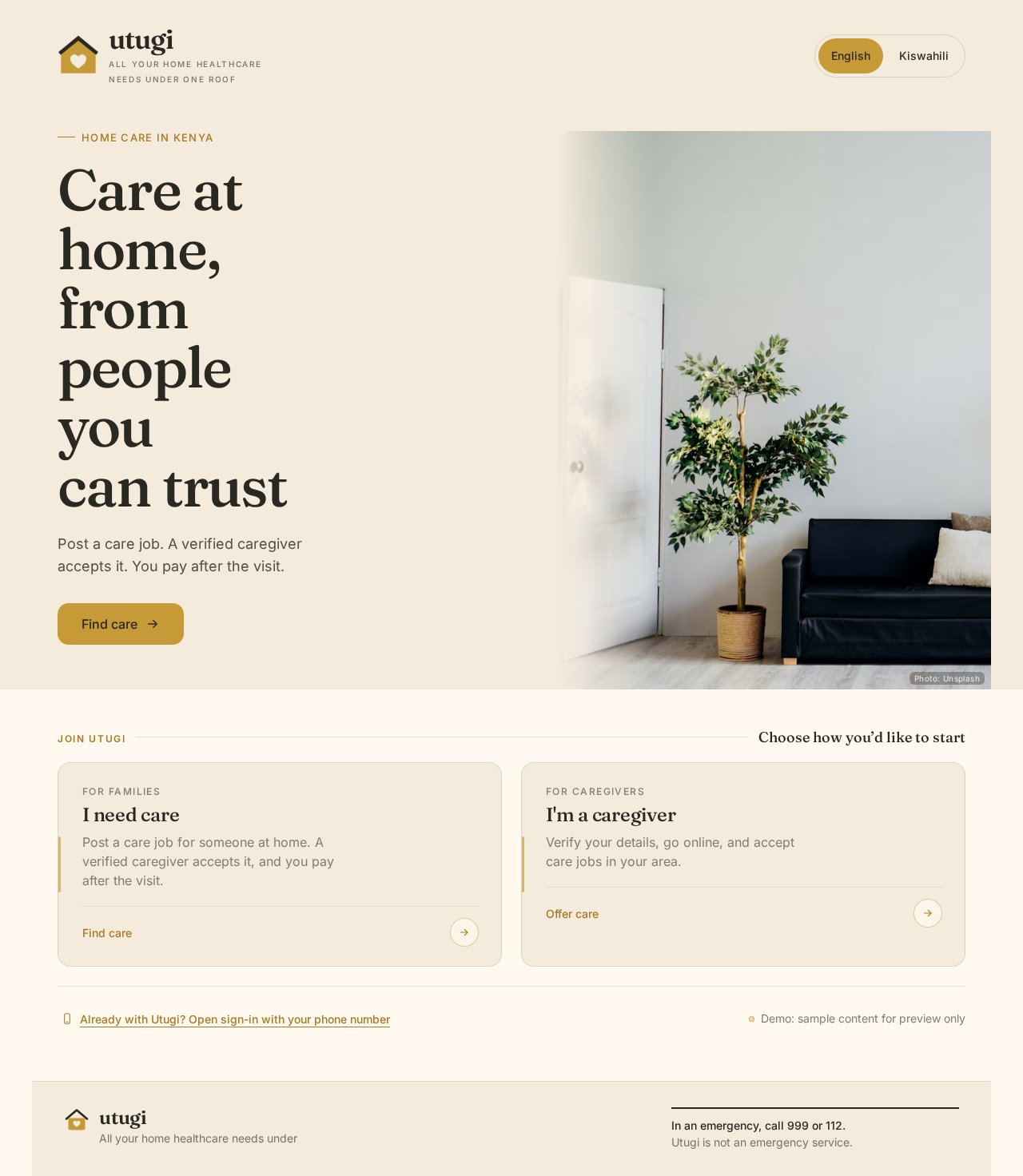
utugi
All your home healthcare needs under one roof
Home care in Kenya
Care at home, from people you can trust
Post a care job. A verified caregiver accepts it. You pay after the visit.
Find care Photo: Unsplash
utugi
All your home healthcare needs under one roof
Home care in Kenya
Care at home, from people you can trust
Post a care job. A verified caregiver accepts it. You pay after the visit.
Find carePhoto: Unsplash
No comments yet. Be the first!