hollow-start
 Diya Trivedi
start a project for building simple single page design of the todo application

Comments (0)
Sign in to leave a comment
System Requirements
System Requirements Document for hollow-start
1. Introduction
The project "hollow-start" aims to develop a simple, single-page design for a todo application. The primary audience for this application is everyday users seeking a warm and approachable interface to manage their tasks efficiently.
2. System Overview
The hollow-start project will deliver a single-page todo application that allows users to manage their tasks in a simple and user-friendly environment. The application will persist the task list on the local device, enabling users to return to the page and continue managing their todos seamlessly. The design will be warm and inviting, following the creative direction inspired by Pablo Stanley's design language.
2a. Product Interpretation and Delivery Boundary
The application is explicitly designed as a single-page interface, with no additional pages or complex navigation. It will be publicly accessible without requiring user authentication. The todo list will be stored locally on the user's device to ensure continuity and ease of use. The design constraints emphasize a warm, friendly, and approachable aesthetic, avoiding corporate or overly formal styles.
2b. Source Content Inventory
Not applicable as no content source directive is provided.
2c. Page Content and Component Coverage
Todo
-
Task List Display
- Show all current tasks in a rounded card format with soft shadows.
- Tasks are displayed in a single-column layout with generous whitespace.
-
Task Management Actions
- Add a new task using a primary-colored button.
- Edit existing tasks directly within the task card.
- Delete tasks with a secondary action button.
-
Local Persistence
- Automatically save tasks to local storage to ensure continuity.
-
User Interface Elements
- Rounded pill buttons for actions.
- Friendly, rounded typography for all text elements.
- Warm cream background with vibrant orange accents for key actions.
-
Loading and Error States
- Display a loading indicator when tasks are being retrieved from local storage.
- Show error messages in a muted color if task persistence fails.
-
Interactive Elements
- Springy hover states for buttons and task cards to enhance user interaction.
3. Functional Requirements
- As a Todo User, I should be able to view my task list on a single page to manage my tasks easily. (Provenance: explicit)
- As a Todo User, I should be able to add new tasks to my list using a clearly visible button. (Provenance: explicit)
- As a Todo User, I should be able to edit existing tasks directly on the page to update task details. (Provenance: explicit)
- As a Todo User, I should be able to delete tasks from my list to keep it organized. (Provenance: explicit)
- As a Todo User, I should have my task list persist on my local device so I can return and continue managing my todos. (Provenance: required_inference)
4. User Personas
Todo User
The Todo User is an individual looking to manage their tasks in a simple and pleasant environment. Their primary goal is to keep their tasks organized using a single-page interface. They interact with the application by adding, editing, and deleting tasks. Success for the Todo User is measured by the ease of managing tasks and the application's ability to persist data locally for continuity.
5. Core User Flows
5.1 Managing Tasks
- Starting Context: The Todo User opens the todo application.
- View Task List: The user sees all current tasks displayed in a single-column layout.
- Add Task: The user clicks the "Add Task" button, enters task details, and saves the task.
- Edit Task: The user selects a task to edit, modifies the details, and saves changes.
- Delete Task: The user clicks the delete button on a task card to remove it from the list.
- Persistence: Tasks are automatically saved to local storage, ensuring they are available upon return.
- Continuation: The user can close the application and return later to find their tasks intact.
6. Visuals Colors and Theme
- Muse: Pablo Stanley
- Palette:
- Background: #FFF8E1 (warm cream)
- Surface: #FFFFFF
- Text: #333333
- Primary: #FF5722
- Accent: #FFC107
- Muted: #BDBDBD
- Typography:
- Headings: DM Sans — Bold
- Body: Nunito
- Scale: 1.414 modular (48/34/24/16/14)
- Shape Language: Rounded shapes with pill buttons and cards with soft shadows.
- Layout: Single-column layout with centered elements and generous whitespace.
- Imagery: Modular vector illustrations with hand-drawn accents.
7. Signature Design Concept
The public entry page will feature a large, friendly illustration of a person organizing tasks on the left side, with the todo list on a warm cream background on the right. The design will use rounded cards with soft shadows to display tasks, and springy hover states for interactive elements. The color palette will be warm and inviting, with friendly, rounded typography for all text elements.
8. Interaction Model & Motion Direction
- Interaction Model: Animated
- Motion Tempo: Expressive
- Hero Dimensionality: Layered_2d
- Landing Hero Motion Brief:
- Focal Subject: A person organizing tasks.
- Transformation: As the user interacts with the task list, elements animate with springy transitions.
- Outcome: Tasks are added, edited, or deleted with smooth animations.
- Reduced-motion State: Animations are minimized for accessibility.
9. Non-Functional Requirements
- The application must load quickly and perform efficiently on modern web browsers.
- The design must be responsive and accessible, adhering to WCAG 2.1 AA standards.
10. Tech Stack
- Frontend: React
- Storage: Local Storage for task persistence
- Styling: CSS-in-JS (Styled Components or Emotion)
11. Assumptions and Constraints
- The application will be a single-page design as explicitly requested by the user.
- No user authentication is required; the application is publicly accessible.
- Task data is stored locally and not synced across devices.
12. Glossary
- Todo User: The individual using the application to manage their tasks.
- Task List: A collection of tasks that the user can view, add to, edit, and delete.
- Local Storage: A web storage mechanism for persisting data on the user's device.
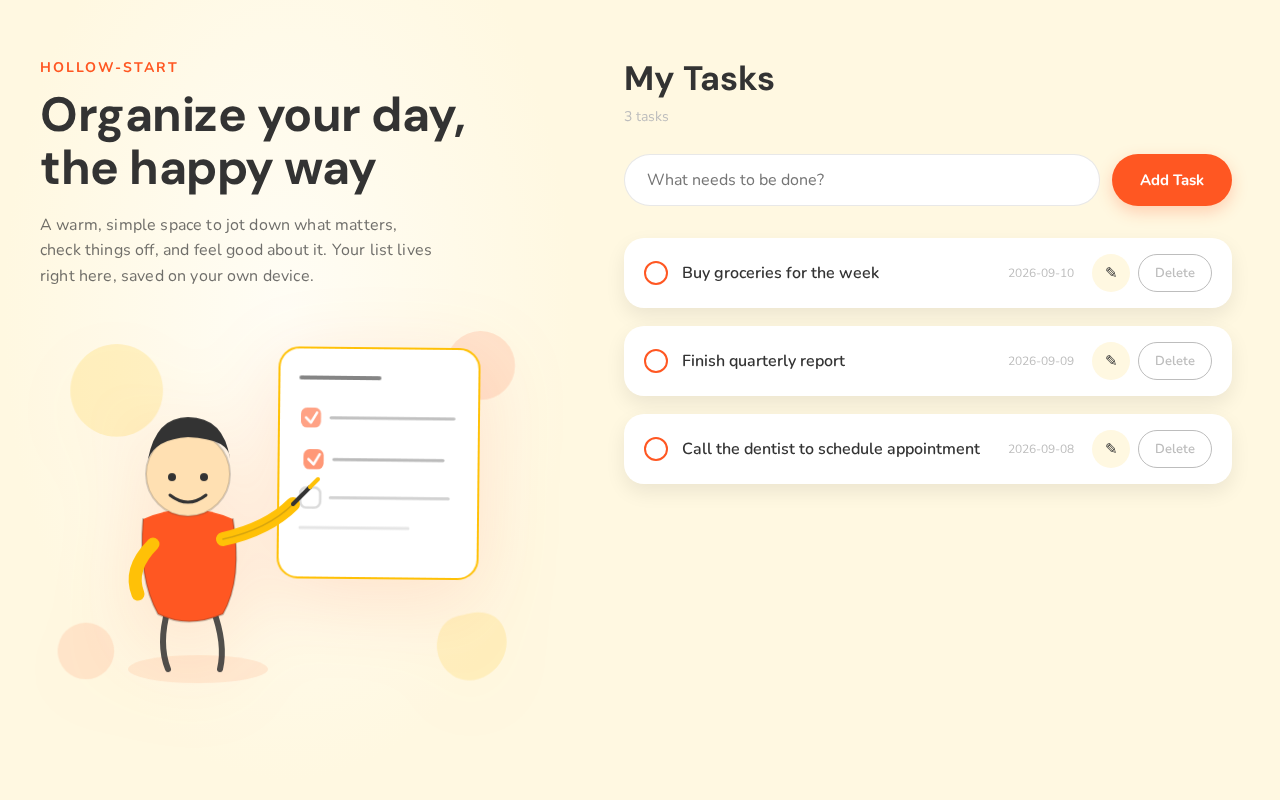
Organize your day, the happy way
A warm, simple space to jot down what matters, check things off, and feel good about it. Your list lives right here, saved on your own device.
My Tasks
3 tasks
Organize your day, the happy way
A warm, simple space to jot down what matters, check things off, and feel good about it. Your list lives right here, saved on your own device.
My Tasks
3 tasks
No comments yet. Be the first!