hollow-binomo
 areza ikhwanudin
BINOMO DEMO AUTO-TRADING AGENT — 24/7 MODE OPERASI - Operasikan sistem selama 24 jam sehari, 7 hari seminggu, jika scheduler dan infrastruktur cloud mendukung. - Akun DEMO saja. Dilarang menggunakan akun REAL. - Jalankan pemeriksaan pasar setiap 15 menit. - Jangan bergantung pada HP agar tetap menyala. Proses harus berjalan di server cloud jika fitur tersebut tersedia. - Jika scheduler berhenti atau koneksi gagal, laporkan kegagalan dan jangan mengklaim sistem masih aktif. PARAMETER TRANSAKSI - Nominal tetap: Rp14.000 per transaksi. - Target profit bersih harian: Rp500.000. - Stop-loss harian: Rp42.000. - Berhenti setelah 3 kekalahan berturut-turut. - Maksimal satu posisi aktif pada satu waktu. - Dilarang martingale, menaikkan nominal setelah kalah, atau mengejar kerugian. ANALISIS - Periksa data harga aktual dan timestamp candle. - Analisis EMA 20/50, RSI 14, MACD, ATR, support/resistance, momentum, struktur harga, dan volatilitas jika data tersedia. - Gunakan M1 untuk pengujian entry, serta M5, M15, dan H1 untuk konteks. - Periksa berita ekonomi berdampak tinggi. - Hasil keputusan: UP, DOWN, atau NO TRADE. - Jangan melakukan entry ketika data basi, sinyal bertentangan, atau kondisi pasar tidak memenuhi aturan strategi. EKSEKUSI - Gunakan eksekusi DEMO otomatis hanya jika integrasi yang sah dan didukung benar-benar tersedia. - Verifikasi setiap hasil transaksi. - Jangan membuka posisi ganda. - Jangan melakukan transaksi REAL. - Jika eksekusi otomatis tidak tersedia, jalankan analisis dan paper trading tanpa mengklaim transaksi sungguhan telah dilakukan. PENGHENTIAN DAN PEMULIHAN - Hentikan transaksi baru jika profit bersih harian mencapai Rp500.000. - Hentikan transaksi baru jika kerugian harian mencapai Rp42.000. - Hentikan setelah 3 kekalahan beruntun. - Setelah batas tercapai, tetap lakukan pemeriksaan kesehatan sistem tanpa membuka transaksi baru. - Reset statistik hanya ketika hari perdagangan baru dimulai. - Setelah error, koneksi pulih, atau server restart, verifikasi kembali akun DEMO, saldo, status posisi, dan batas risiko sebelum melanjutkan. LAPORAN Catat waktu, instrumen, keputusan, nominal, hasil transaksi, saldo, profit/loss harian, kekalahan beruntun, status data, dan status scheduler. Mulai dengan memeriksa apakah seluruh komponen tersedia. Laporkan secara jujur apakah operasi 24/7 benar-benar aktif, atau masih membutuhkan konfigurasi.

Comments (0)
Sign in to leave a comment
System Requirements
System Requirements Document for hollow-binomo
1. Introduction
hollow-binomo is a 24/7 cloud-hosted auto-trading agent console for a single operator running a Binomo DEMO account only. The product's intent is to run continuous market analysis and DEMO-only trade execution on a cloud server — independent of any phone staying awake — while enforcing hard risk rules and reporting its own operational status with complete honesty.
The product exists to answer one question truthfully at any moment: is the agent actually running, and what has it done? It must never claim the system is active when the scheduler has stopped or the connection has failed, and it must never claim a real transaction occurred when only analysis or paper trading was possible.
The audience is one technically literate Indonesian retail trader (areza ikhwanudin) who leaves the system running unattended on a cloud server and needs to trust it at a glance. The interface is therefore built as a measuring instrument — graphite ground, hairline rules, tabular numerals, one hot tangerine signal — not as a marketing page.
Hard product boundaries carried from the source:
- DEMO accounts only. REAL accounts are forbidden.
- No REAL transactions, ever.
- No martingale, no increasing stake after a loss, no chasing losses.
- Fixed stake: Rp14.000 per transaction.
- Maximum one active position at a time; no double positions.
- 24/7 operation only if the scheduler and cloud infrastructure support it.
- Automatic DEMO execution only if a legitimate, supported integration genuinely exists; otherwise analysis and paper trading run without claiming real transactions.
2. System Overview
hollow-binomo is a first-party web console backed by a cloud-hosted backend that runs a 15-minute market-check loop. Each cycle the backend fetches actual price data with candle timestamps, evaluates multi-timeframe indicators (EMA 20/50, RSI 14, MACD, ATR, support/resistance, momentum, price structure, volatility) on M1 for entry testing and M5/M15/H1 for context, checks high-impact economic news, and produces exactly one decision: UP, DOWN, or NO TRADE. Entry is refused when data is stale, signals conflict, or market conditions do not satisfy the strategy rules.
When a decision is actionable and a legitimate supported DEMO execution integration is available, the agent places a single fixed-stake DEMO trade of Rp14.000 and verifies the result. When that integration is not available, the agent runs analysis and paper trading and never claims a real transaction took place. Risk gates halt new trades when daily net profit reaches Rp500.000, when daily loss reaches Rp42.000, or after 3 consecutive losses; after a halt the system continues health checks without opening new positions. Statistics reset only when a new trading day begins. After an error, connection recovery, or server restart, the agent re-verifies the DEMO account, balance, position status, and risk limits before resuming.
Actors: one accepted human persona — the Operator Agen Auto-Trading — plus typed non-persona actors: the cloud scheduler, the market data source, the high-impact news source, the DEMO execution integration (when available), and the paper-trading simulator.
Delivery and access: the console is a first-party application with application-owned identity. Anonymous visitors reach the public entry surface; the operator establishes identity on first use and verifies it on return; all operational state is protected.
Narrow exclusions: no REAL trading, no martingale or stake escalation, no multiple simultaneous positions, no phone-dependent operation, no fabricated success states for paper trades, and no claim of 24/7 activity when the scheduler or connection is down.
2a. Product Interpretation and Delivery Boundary
The product is delivered as a cloud-hosted, always-on agent plus a first-party operator console. The agent process runs on the server, not on the operator's phone; the phone or browser is only a window into durable server state. Because the operator must return across days to inspect accumulated decisions, balances, streaks, and logs, the console owns application identity: a first-use self-service enrollment and a returning verification step. The public entry surface is anonymous and explains the agent, its DEMO-only boundary, and its honest status reporting before any protected state is reachable.
Everything the operator monitors — scheduler health, market analysis, decisions, DEMO trades, paper trades, risk limits, recovery verification, and activity logs — is current scope. There is no accepted future horizon in the source; nothing is deferred. The DEMO execution integration is treated as a conditional capability: it is used only when a legitimate, supported integration genuinely exists, and the product must remain fully usable and honest when it does not.
2b. Source Content Inventory
Not applicable — no reference directive in this project declares a content_source.
2c. Page Content and Component Coverage
Landing
- Information/state: anonymous explanation of the agent — what it does (24/7 DEMO auto-trading with 15-minute market checks), its DEMO-only boundary, its hard risk rules (Rp14.000 fixed stake, Rp500.000 daily target, Rp42.000 daily stop-loss, halt after 3 consecutive losses, one position at a time), and its honesty contract (it reports failure rather than claiming activity). A live status line shows whether the cloud scheduler is currently reachable and whether 24/7 operation is active or still requires configuration.
- Primary actions: proceed to establish identity (Sign Up) or verify returning identity (Login).
- Supporting actions: read the DEMO-only and no-REAL-trading statement; read the honest-status explanation.
- Domain entities: system status summary (scheduler reachable / not reachable, configuration required / active), risk-rule constants.
- Component responsibilities: control-room header block with wordmark and a tangerine-bordered
DEMO ONLYchip; live scheduler line with the 8px pulse dot and next-check countdown; ruled instrument strip preview; risk-rule summary rows. - States: loading — status line shows a neutral pending state, never a fabricated "active"; empty — no status yet available, explicitly labeled as unknown; success — status line reports active or configuration-required truthfully; error — status line reports the failure and states that activity is not claimed; recovery — status refreshes on reconnect and re-reports truthfully.
Login
- Information/state: returning-verification form for the operator.
- Primary actions: submit credentials to verify identity and reach protected operational state.
- Supporting actions: navigate to Sign Up if no identity exists yet.
- Domain entities: operator identity.
- Component responsibilities: credential fields, submit control, inline error region, link to enrollment.
- States: loading — submit disabled with progress indication; empty — pristine form; success — redirect to Dashboard; error — invalid credentials shown inline without revealing which field failed; recovery — form remains usable and retryable.
Sign Up
- Information/state: self-service first-use enrollment form; no invitation or provisioning boundary is defined by the source.
- Primary actions: create the operator identity and proceed to the protected console.
- Supporting actions: navigate to Login if an identity already exists.
- Domain entities: operator identity.
- Component responsibilities: enrollment fields, submit control, inline validation region, link to verification.
- States: loading — submit disabled with progress indication; empty — pristine form; success — identity established and operator admitted to protected state; error — validation or creation failure shown inline; recovery — form retains entered values and is retryable.
Dashboard
- Information/state: the monitoring hub — daily net P/L against the Rp500.000 target and Rp42.000 stop-loss, current balance, win/loss streak, number of open positions (0 or 1), data freshness, scheduler status, DEMO account status, and the most recent decisions and activity.
- Primary actions: read current operational state; navigate to any operational surface.
- Supporting actions: refresh state; follow a recent decision into its detail.
- Domain entities: daily P/L, balance, streak count, open position, data freshness, scheduler status, recent decisions, recent activity.
- Component responsibilities: persistent left rail with DEMO badge, scheduler status, next-check countdown, and cloud/uptime; five-cell ruled instrument strip (daily P/L, balance, win/loss streak, positions open, data freshness); stop-loss progress bar notched at Rp42.000 with a target line at Rp500.000; decision log table; risk panel listing the three hard stops with live counters.
- States: loading — cells show pending placeholders, never stale values presented as current; empty — no decisions yet today, explicitly labeled; success — all cells populated with current values; error — failed data fetch is labeled as a failure and the affected cells are marked unavailable rather than showing old numbers as live; recovery — values repopulate after reconnect and the failure is cleared.
System Health
- Information/state: availability of every component the agent depends on — scheduler, connection, DEMO execution integration, and market data source — and an explicit verdict on whether 24/7 operation is genuinely active or still requires configuration.
- Primary actions: run the component availability check; read the honest verdict.
- Supporting actions: navigate to Scheduler for scheduling detail; navigate to Recovery when a failure requires re-verification.
- Domain entities: component availability records, configuration-required verdict, check timestamp.
- Component responsibilities: component checklist with per-component status, verdict banner, last-check timestamp, link into Recovery on failure.
- States: loading — check in progress with per-component pending status; empty — no check has been run yet, explicitly labeled; success — every component available and the verdict states 24/7 is active; error — one or more components unavailable and the verdict states operation requires configuration, with the failing components named; recovery — re-running the check updates the verdict truthfully.
Scheduler
- Information/state: the 15-minute market-check schedule running on the cloud server — next check time, last check time, check history, and any scheduler failure.
- Primary actions: inspect the schedule and its history; read scheduler failure reports.
- Supporting actions: navigate to System Health for the full component verdict.
- Domain entities: scheduled check, next check time, last check time, check outcome, scheduler failure event.
- Component responsibilities: countdown to the next 15-minute check as a ticking monospace numeral; scheduler pulse indicator (breathing tangerine when healthy, solid muted grey with
SCHEDULER DOWNwhen not); check history list; failure report region. - States: loading — countdown and history show pending state; empty — no checks recorded yet, explicitly labeled; success — healthy pulse, countdown ticking, history populated; error — pulse frozen to muted grey with
SCHEDULER DOWN, failure reported, and no claim of activity; recovery — pulse resumes and the failure is recorded as resolved.
Market Analysis
- Information/state: actual price data with candle timestamps, multi-timeframe indicator readings (EMA 20/50, RSI 14, MACD, ATR, support/resistance, momentum, price structure, volatility) with M1 for entry testing and M5/M15/H1 for context, and high-impact economic news.
- Primary actions: inspect current analysis inputs and their freshness.
- Supporting actions: inspect the inline price sparkline with EMA 20/50 hairlines, ATR volatility band, and RSI/MACD ruled gauges; inspect the pipeline strip showing DATA → ANALYSIS → RISK GATE → EXECUTION with the current stage lit.
- Domain entities: price series, candle timestamps, indicator values per timeframe, support/resistance levels, momentum and structure readings, volatility reading, high-impact news items, data freshness status.
- Component responsibilities: timeframe selector across M1/M5/M15/H1; indicator readouts with tabular numerals; stroke-based sparkline and gauges; news list; data-freshness indicator; pipeline strip.
- States: loading — indicator cells pending; empty — an indicator unavailable in the source data is labeled unavailable rather than omitted silently; success — all available indicators and news rendered with timestamps; error — stale or missing data is labeled as stale and the freshness indicator reflects it; recovery — fresh data replaces stale data and the freshness indicator clears.
Decisions
- Information/state: the decision produced each cycle — UP, DOWN, or NO TRADE — with the reason for any withheld entry (stale data, conflicting signals, or market conditions not meeting strategy rules).
- Primary actions: read decisions and their reasons.
- Supporting actions: follow a decision into its analysis context; follow an actionable decision into Demo Trades or Paper Trading.
- Domain entities: decision record (timestamp, instrument, decision, reason, stake, result, P/L).
- Component responsibilities: decision log table with tabular monospace numerals and no zebra striping; decision chips as 4px-radius outlined labels in 11px letterspaced caps (
UPtangerine,DOWNteal,NO TRADEmuted) with the reason string inline in monospace; newest row carrying a 1px tangerine left edge. - States: loading — table pending; empty — no decisions yet, explicitly labeled; success — decisions listed newest-first with reasons; error — failed fetch labeled as failure rather than showing an empty table as if no decisions occurred; recovery — table repopulates after reconnect.
Demo Trades
- Information/state: DEMO execution state — whether a legitimate supported DEMO integration is available, the single active position if one exists, the fixed Rp14.000 stake on every trade, and the verified result of each trade.
- Primary actions: inspect DEMO execution availability and the current position; inspect verified trade results.
- Supporting actions: navigate to Paper Trading when DEMO execution is unavailable.
- Domain entities: DEMO integration availability, DEMO position (at most one), stake (fixed Rp14.000), trade result, verification record.
- Component responsibilities: integration-availability banner; single-position panel; fixed-stake display; trade result list with verification status; explicit DEMO-only labeling.
- States: loading — availability and position pending; empty — no DEMO trades yet, explicitly labeled; success — availability, position, and verified results shown; error — integration unavailable or verification failed, reported honestly with no fabricated success state; recovery — availability re-checked and results re-verified before any new trade.
Paper Trading
- Information/state: simulated trading state used when automatic DEMO execution is unavailable — simulated positions, simulated results, and an explicit statement that no real transaction occurred.
- Primary actions: inspect simulated trades and their outcomes.
- Supporting actions: navigate to Demo Trades to check whether DEMO execution has become available.
- Domain entities: paper position, paper result, simulation record, explicit no-real-transaction statement.
- Component responsibilities: simulation status banner stating no real transaction occurred; simulated trade list; clear visual separation from DEMO execution results.
- States: loading — simulation state pending; empty — no simulated trades yet, explicitly labeled; success — simulated trades listed with the no-real-transaction statement visible; error — simulation failure reported without any success animation or
TRADE PLACEDclaim; recovery — simulation resumes and the failure is recorded.
Risk Controls
- Information/state: the three hard stops with live counters — daily net profit against Rp500.000, daily loss against Rp42.000, and consecutive losses against 3 — plus the current halt state and the daily statistics reset boundary.
- Primary actions: read the current risk state and whether new trades are halted.
- Supporting actions: inspect the stop-loss progress bar with its hard notch at Rp42.000 and target line at Rp500.000.
- Domain entities: daily net profit, daily loss, consecutive-loss count, halt state, trading-day boundary, reset record.
- Component responsibilities: three ruled risk rows with live counters; notched progress bar; halt-state banner; reset-boundary indicator.
- States: loading — counters pending; empty — no trading activity yet today, explicitly labeled; success — counters current and halt state accurate; error — failed counter fetch labeled as failure rather than showing stale counters as live; recovery — counters repopulate and halt state is re-confirmed.
Recovery
- Information/state: post-incident re-verification state after an error, connection recovery, or server restart — DEMO account status, balance, position status, and risk limits, each with its verification result.
- Primary actions: run re-verification of DEMO account, balance, position status, and risk limits before resuming.
- Supporting actions: navigate to System Health for the component verdict; navigate to Risk Controls for limit detail.
- Domain entities: incident record (error, connection recovery, or restart), DEMO account verification, balance verification, position verification, risk-limit verification, resume authorization.
- Component responsibilities: incident banner naming the trigger; four verification rows with individual results; resume control that remains blocked until all four verifications pass.
- States: loading — verification in progress per item; empty — no incident recorded, explicitly labeled; success — all four verifications pass and resumption is authorized; error — one or more verifications fail and resumption stays blocked with the failing item named; recovery — re-running verification updates results and unblocks resumption only when all pass.
Activity Logs
- Information/state: the complete record — time, instrument, decision, stake, transaction result, balance, daily profit/loss, consecutive losses, data status, and scheduler status.
- Primary actions: review the log; filter by the recorded fields.
- Supporting actions: follow a log entry into its related decision or trade.
- Domain entities: log entry with time, instrument, decision, stake, result, balance, daily P/L, consecutive losses, data status, scheduler status.
- Component responsibilities: ruled log table with tabular monospace numerals; column set covering every recorded field; newest-row tangerine left edge; monospace terminal-style presentation.
- States: loading — table pending; empty — no log entries yet, explicitly labeled; success — entries listed newest-first with all recorded fields; error — failed fetch labeled as failure rather than presenting an empty log as if nothing happened; recovery — table repopulates after reconnect.
3. Functional Requirements
Each requirement is a distinct story point with provenance, lifecycle facts, and observable acceptance.
FR-01 — 24/7 operation when infrastructure supports it (explicit) As the Operator Agen Auto-Trading, I should have the agent operate 24 hours a day, 7 days a week when the scheduler and cloud infrastructure support it, so that market checks continue without my intervention.
- Trigger/input: the agent process running on the cloud server with a healthy scheduler.
- Observable result: continuous 15-minute check cycles with no gap attributable to the operator's device.
- Access state: protected operational state; the operator observes it after verifying identity.
- Failure/recovery: if the scheduler or cloud infrastructure cannot support continuous operation, the system reports the limitation rather than claiming 24/7 activity.
- Continuation: operation continues until a risk halt, a scheduler stop, or a connection failure.
FR-02 — DEMO accounts only (explicit) As the Operator Agen Auto-Trading, I should have the agent operate exclusively on a DEMO account, so that no REAL account is ever used.
- Trigger/input: any execution attempt.
- Observable result: every trade is labeled DEMO and no REAL transaction is ever placed.
- Access state: protected operational state.
- Failure/recovery: if a REAL account is detected or configured, the agent refuses to execute and reports the condition.
- Continuation: DEMO-only operation continues.
FR-03 — 15-minute market checks (explicit) As the Operator Agen Auto-Trading, I should have the agent run a market check every 15 minutes, so that decisions are based on a regular, predictable cadence.
- Trigger/input: the scheduler firing on its 15-minute interval.
- Observable result: a new check cycle with a recorded timestamp, visible as the next-check countdown and check history.
- Access state: protected operational state.
- Failure/recovery: a missed or failed check is reported as a scheduler failure and is not silently skipped.
- Continuation: the next scheduled check proceeds.
FR-04 — Cloud-hosted, not phone-dependent (explicit) As the Operator Agen Auto-Trading, I should have the process run on a cloud server rather than depending on my phone staying on, so that operation survives my device being off.
- Trigger/input: deployment of the agent process to the cloud server.
- Observable result: checks continue while the operator's phone is off or disconnected.
- Access state: protected operational state.
- Failure/recovery: if cloud hosting is unavailable, the system reports that 24/7 operation requires configuration.
- Continuation: operation continues on the server.
FR-05 — Honest failure reporting (explicit) As the Operator Agen Auto-Trading, I should have the system report failure when the scheduler stops or the connection fails, and never claim the system is still active, so that I can trust the status I read.
- Trigger/input: scheduler stop or connection failure.
- Observable result: the scheduler indicator freezes to muted grey with
SCHEDULER DOWN, the failure is reported, and no surface claims activity. - Access state: protected operational state; the public entry surface also reflects truthful status.
- Failure/recovery: the failure is recorded; on recovery the indicator resumes and the failure is marked resolved.
- Continuation: health checks continue without new trades until recovery.
FR-06 — Fixed stake of Rp14.000 (explicit) As the Operator Agen Auto-Trading, I should have every transaction use a fixed nominal of Rp14.000, so that stake size never varies.
- Trigger/input: an actionable decision reaching execution.
- Observable result: the stake is Rp14.000 on every trade, displayed as such.
- Access state: protected operational state.
- Failure/recovery: any attempt to use a different stake is refused and reported.
- Continuation: the next trade also uses Rp14.000.
FR-07 — Daily net profit target of Rp500.000 (explicit) As the Operator Agen Auto-Trading, I should have the agent stop opening new trades when daily net profit reaches Rp500.000, so that the day's target is respected.
- Trigger/input: daily net profit reaching Rp500.000.
- Observable result: new trades halt; the target line on the progress bar is reached; the halt state is displayed.
- Access state: protected operational state.
- Failure/recovery: if the counter cannot be read, the halt decision is not made on stale data and the failure is reported.
- Continuation: health checks continue without new trades; statistics reset only when a new trading day begins.
FR-08 — Daily stop-loss of Rp42.000 (explicit) As the Operator Agen Auto-Trading, I should have the agent stop opening new trades when daily loss reaches Rp42.000, so that the day's loss is capped.
- Trigger/input: daily loss reaching Rp42.000.
- Observable result: new trades halt; the stop-loss notch on the progress bar is reached; the halt state is displayed.
- Access state: protected operational state.
- Failure/recovery: if the counter cannot be read, the halt decision is not made on stale data and the failure is reported.
- Continuation: health checks continue without new trades; statistics reset only when a new trading day begins.
FR-09 — Halt after 3 consecutive losses (explicit) As the Operator Agen Auto-Trading, I should have the agent stop opening new trades after 3 consecutive losses, so that a losing run cannot continue unchecked.
- Trigger/input: the consecutive-loss counter reaching 3.
- Observable result: new trades halt; the streak counter shows 3; the halt state is displayed.
- Access state: protected operational state.
- Failure/recovery: if the counter cannot be read, the halt decision is not made on stale data and the failure is reported.
- Continuation: health checks continue without new trades; statistics reset only when a new trading day begins.
FR-10 — Maximum one active position (explicit) As the Operator Agen Auto-Trading, I should have at most one active position at any time, so that exposure stays bounded.
- Trigger/input: an actionable decision while a position is already open.
- Observable result: no second position is opened; the open-position count never exceeds 1.
- Access state: protected operational state.
- Failure/recovery: if position status cannot be determined, no new position is opened and the uncertainty is reported.
- Continuation: the next actionable decision is evaluated only after the position closes.
FR-11 — No martingale, no stake escalation, no loss chasing (explicit) As the Operator Agen Auto-Trading, I should have the agent never use martingale, never increase the nominal after a loss, and never chase losses, so that risk cannot compound.
- Trigger/input: any loss outcome.
- Observable result: the next stake remains Rp14.000 and no escalation logic runs.
- Access state: protected operational state.
- Failure/recovery: any escalation attempt is refused and reported.
- Continuation: fixed-stake operation continues.
FR-12 — Actual price data and candle timestamps (explicit) As the Operator Agen Auto-Trading, I should have the agent check actual price data and candle timestamps, so that analysis is grounded in real, time-stamped market data.
- Trigger/input: each 15-minute check cycle.
- Observable result: price data and candle timestamps are recorded and displayed with a freshness indicator.
- Access state: protected operational state.
- Failure/recovery: missing or stale data is labeled as stale and blocks entry.
- Continuation: the next cycle re-fetches data.
FR-13 — Multi-indicator analysis (explicit) As the Operator Agen Auto-Trading, I should have the agent analyze EMA 20/50, RSI 14, MACD, ATR, support/resistance, momentum, price structure, and volatility when the data is available, so that decisions rest on a complete technical picture.
- Trigger/input: each check cycle with available data.
- Observable result: each available indicator is computed and displayed; unavailable indicators are labeled unavailable.
- Access state: protected operational state.
- Failure/recovery: an indicator that cannot be computed is reported as unavailable rather than silently omitted.
- Continuation: analysis proceeds with the indicators that are available.
FR-14 — Multi-timeframe usage (explicit) As the Operator Agen Auto-Trading, I should have the agent use M1 for entry testing and M5, M15, and H1 for context, so that entry timing and broader context are both considered.
- Trigger/input: each check cycle.
- Observable result: M1 readings drive entry testing while M5/M15/H1 readings supply context, all visible per timeframe.
- Access state: protected operational state.
- Failure/recovery: a missing timeframe is labeled unavailable and its absence is reflected in the decision reasoning.
- Continuation: analysis proceeds with available timeframes.
FR-15 — High-impact economic news check (explicit) As the Operator Agen Auto-Trading, I should have the agent check high-impact economic news, so that entries are not taken blindly into news events.
- Trigger/input: each check cycle.
- Observable result: high-impact news items are listed with their timestamps and factored into the decision.
- Access state: protected operational state.
- Failure/recovery: if news cannot be retrieved, the condition is reported and treated as a reason to withhold entry.
- Continuation: the next cycle re-checks news.
FR-16 — UP, DOWN, or NO TRADE decision (explicit) As the Operator Agen Auto-Trading, I should have each cycle produce exactly one decision of UP, DOWN, or NO TRADE, so that the outcome is unambiguous.
- Trigger/input: completion of analysis for a cycle.
- Observable result: a single decision chip (UP tangerine, DOWN teal, NO TRADE muted) recorded with its timestamp and instrument.
- Access state: protected operational state.
- Failure/recovery: if analysis cannot complete, the cycle produces NO TRADE with the failure as its reason.
- Continuation: the next cycle produces its own decision.
FR-17 — No entry on stale data, conflicting signals, or unmet strategy rules (explicit) As the Operator Agen Auto-Trading, I should have the agent refuse entry when data is stale, signals conflict, or market conditions do not meet the strategy rules, so that poor conditions never produce a trade.
- Trigger/input: an analysis cycle where any of these conditions holds.
- Observable result: the decision is NO TRADE with the specific reason (stale data, conflicting signals, or unmet strategy rules) shown inline in monospace beside the chip.
- Access state: protected operational state.
- Failure/recovery: the reason is recorded so the non-trade is auditable.
- Continuation: the next cycle re-evaluates.
FR-18 — Automatic DEMO execution only with a legitimate supported integration (explicit) As the Operator Agen Auto-Trading, I should have automatic DEMO execution used only when a legitimate, supported integration genuinely exists, so that the agent never pretends to execute.
- Trigger/input: an actionable decision and an availability check of the DEMO integration.
- Observable result: when available, a single DEMO trade is placed; when not, the system states that execution is unavailable.
- Access state: protected operational state.
- Failure/recovery: an unavailable or unsupported integration is reported honestly with no fabricated success state.
- Continuation: the agent falls back to analysis and paper trading.
FR-19 — Verify every transaction result (explicit) As the Operator Agen Auto-Trading, I should have every transaction result verified, so that recorded outcomes reflect what actually happened.
- Trigger/input: completion of a DEMO trade.
- Observable result: the trade's result is verified and recorded with its verification status.
- Access state: protected operational state.
- Failure/recovery: an unverifiable result is reported as unverified rather than assumed.
- Continuation: the verified result feeds the daily P/L, streak, and risk counters.
FR-20 — No double positions (explicit) As the Operator Agen Auto-Trading, I should have the agent never open a double position, so that the one-position rule is enforced at execution.
- Trigger/input: an execution attempt while a position is open.
- Observable result: the attempt is refused and the refusal is recorded.
- Access state: protected operational state.
- Failure/recovery: if position status is unknown, execution is refused and the uncertainty is reported.
- Continuation: execution resumes only after the position closes.
FR-21 — No REAL transactions (explicit) As the Operator Agen Auto-Trading, I should have the agent never perform a REAL transaction, so that no real money is ever at risk.
- Trigger/input: any execution path.
- Observable result: every transaction is DEMO; no REAL transaction is ever placed.
- Access state: protected operational state.
- Failure/recovery: any REAL execution path is refused and reported.
- Continuation: DEMO-only operation continues.
FR-22 — Paper trading fallback without false claims (explicit) As the Operator Agen Auto-Trading, I should have the agent run analysis and paper trading when automatic execution is unavailable, without claiming that real transactions occurred, so that I still get signal coverage without deception.
- Trigger/input: automatic DEMO execution being unavailable.
- Observable result: simulated trades are recorded and clearly labeled as simulations with an explicit no-real-transaction statement.
- Access state: protected operational state.
- Failure/recovery: a simulation failure is reported without any success animation or
TRADE PLACEDclaim. - Continuation: the agent keeps checking whether DEMO execution becomes available.
FR-23 — Continue health checks after a limit is reached (explicit) As the Operator Agen Auto-Trading, I should have the system continue health checks after a limit is reached while opening no new trades, so that I still know whether the system is alive.
- Trigger/input: any of the three halt conditions being met.
- Observable result: scheduler, connection, and component health continue to be checked and reported; no new trade is opened.
- Access state: protected operational state.
- Failure/recovery: a health failure during a halt is reported as a failure.
- Continuation: health checks continue until the next trading day resets statistics.
FR-24 — Reset statistics only at a new trading day (explicit) As the Operator Agen Auto-Trading, I should have statistics reset only when a new trading day begins, so that daily limits are not reset prematurely.
- Trigger/input: the start of a new trading day.
- Observable result: daily P/L, loss, and consecutive-loss counters reset; the reset boundary is visible.
- Access state: protected operational state.
- Failure/recovery: if the trading-day boundary cannot be determined, statistics are not reset and the uncertainty is reported.
- Continuation: the new day begins with cleared counters and active trading eligibility.
FR-25 — Re-verify after error, reconnect, or restart (explicit) As the Operator Agen Auto-Trading, I should have the agent re-verify the DEMO account, balance, position status, and risk limits after an error, connection recovery, or server restart before continuing, so that resumption is safe.
- Trigger/input: an error, a connection recovery, or a server restart.
- Observable result: four verification results are shown; resumption stays blocked until all four pass.
- Access state: protected operational state.
- Failure/recovery: a failed verification keeps resumption blocked and names the failing item.
- Continuation: once all four pass, normal operation resumes.
FR-26 — Record the full activity log (explicit) As the Operator Agen Auto-Trading, I should have the system record time, instrument, decision, nominal, transaction result, balance, daily profit/loss, consecutive losses, data status, and scheduler status, so that every cycle is auditable.
- Trigger/input: every check cycle and every transaction.
- Observable result: a log entry containing all ten recorded fields.
- Access state: protected operational state.
- Failure/recovery: a failed log write is reported rather than silently dropped.
- Continuation: logging continues for every subsequent cycle.
FR-27 — Start by checking component availability and report honestly (explicit) As the Operator Agen Auto-Trading, I should have the system start by checking whether all components are available and report honestly whether 24/7 operation is actually active or still requires configuration, so that I know the true state from the outset.
- Trigger/input: system start or an operator-initiated availability check.
- Observable result: a per-component availability result and an explicit verdict of active or configuration-required.
- Access state: the verdict is visible on the public entry surface and in full on the protected System Health surface.
- Failure/recovery: unavailable components are named and the verdict states that configuration is required.
- Continuation: the check can be re-run after configuration changes.
FR-28 — Self-service enrollment before first use (required_inference) As the Operator Agen Auto-Trading, I should be able to establish my identity on first use without an invitation or provisioning step, so that I can reach the protected console.
- Trigger/input: first visit with no existing identity.
- Observable result: an identity is established and the operator reaches protected operational state.
- Access state: anonymous entry surface; protected state becomes available only after enrollment.
- Failure/recovery: a validation or creation failure is shown inline and the form remains retryable.
- Continuation: subsequent visits use returning verification.
FR-29 — Returning verification before protected access (required_inference) As the Operator Agen Auto-Trading, I should verify my identity on return before accessing protected operational state, so that my durable operational history stays bound to me.
- Trigger/input: a returning visit to a protected destination.
- Observable result: identity is verified and protected state becomes reachable.
- Access state: anonymous entry surface; protected destinations require verification.
- Failure/recovery: invalid credentials are shown inline without revealing which field failed, and the form remains retryable.
- Continuation: the operator proceeds to the console.
FR-30 — Scheduler and cloud infrastructure availability (required_inference) As the Operator Agen Auto-Trading, I should have the scheduler and cloud infrastructure available for 24/7 operation, so that continuous checking is actually possible.
- Trigger/input: system start and each check cycle.
- Observable result: scheduler and cloud availability are reported per component.
- Access state: protected operational state; the summary verdict is also visible on the public entry surface.
- Failure/recovery: unavailability is reported as a failure and 24/7 activity is not claimed.
- Continuation: availability is re-checked on recovery.
FR-31 — Legitimate supported DEMO integration availability (required_inference) As the Operator Agen Auto-Trading, I should have a legitimate, supported DEMO execution integration available for automatic transactions, and paper trading when it is not, so that the agent's execution mode is always truthful.
- Trigger/input: an actionable decision and an integration availability check.
- Observable result: the active mode (DEMO execution or paper trading) is displayed, and the mode determines where the trade is recorded.
- Access state: protected operational state.
- Failure/recovery: an unavailable integration switches the agent to paper trading and states so explicitly.
- Continuation: availability is re-checked each cycle.
FR-32 — Post-incident re-verification before resumption (required_inference) As the Operator Agen Auto-Trading, I should have the agent re-verify the DEMO account, balance, position status, and risk limits after an error, connection recovery, or restart before resuming, so that resumption never happens on unverified state.
- Trigger/input: an error, a connection recovery, or a server restart.
- Observable result: four verification results are shown and resumption is authorized only when all four pass.
- Access state: protected operational state.
- Failure/recovery: a failed verification keeps resumption blocked and names the failing item.
- Continuation: normal operation resumes once all four pass.
4. User Personas
Operator Agen Auto-Trading
Product context. The operator is a single technically literate Indonesian retail trader who runs the hollow-binomo agent on a cloud server and checks in from a browser or phone. The agent trades a Binomo DEMO account only; the operator's job is not to place trades but to verify that the agent is genuinely running, that its risk rules are holding, and that its reports are honest.
Primary goal. Keep the DEMO auto-trading agent running 24/7 within its hard risk limits, and know truthfully at any moment whether it is active or still requires configuration.
Distinct accepted responsibilities.
- Verify that every component the agent depends on is available — scheduler, connection, DEMO execution integration, and market data source — and read the honest verdict on whether 24/7 operation is active or requires configuration.
- Monitor the 15-minute market-check cadence and read scheduler failures when they occur.
- Review the analysis inputs the agent used: actual price data with candle timestamps, EMA 20/50, RSI 14, MACD, ATR, support/resistance, momentum, price structure, and volatility across M1 (entry testing) and M5/M15/H1 (context), plus high-impact economic news.
- Read each cycle's decision — UP, DOWN, or NO TRADE — and the reason for any withheld entry.
- Inspect DEMO execution and its verified results, or paper trading when automatic execution is unavailable, without ever being shown a false claim of a real transaction.
- Watch the three hard stops — Rp500.000 daily net profit, Rp42.000 daily loss, and 3 consecutive losses — and confirm that new trades halt when any is reached while health checks continue.
- Confirm that statistics reset only when a new trading day begins.
- After an error, connection recovery, or server restart, re-verify the DEMO account, balance, position status, and risk limits before allowing resumption.
- Review the activity log covering time, instrument, decision, nominal, result, balance, daily profit/loss, consecutive losses, data status, and scheduler status.
Relevant inputs and decisions. The operator reads status rather than entering trading parameters: the stake is fixed at Rp14.000, the limits are fixed, and the strategy rules are fixed. The operator's decisions are operational — whether to trust the reported state, whether to investigate a failure, and whether to authorize resumption after re-verification passes.
Interactions with other accepted participants. The operator is the only accepted human actor. The cloud scheduler, market data source, high-impact news source, DEMO execution integration, and paper-trading simulator are non-persona actors whose state the operator observes and whose failures the operator must be told about truthfully.
Observable success. The operator can state, from the console alone, whether the agent is genuinely running 24/7 or still requires configuration; can see every decision with its reason; can see that no REAL transaction was ever placed and no martingale or stake escalation ever occurred; and can confirm that after any incident the agent re-verified the DEMO account, balance, position status, and risk limits before resuming.
Source-backed constraints. DEMO only; no REAL transactions; fixed Rp14.000 stake; no martingale, no stake increase after a loss, no loss chasing; maximum one active position; halt on Rp500.000 daily profit, Rp42.000 daily loss, or 3 consecutive losses; no entry on stale data, conflicting signals, or unmet strategy rules; honest failure reporting; cloud-hosted rather than phone-dependent.
5. Core User Flows
Flow 1 — First use: establish identity and reach the console
- The operator opens the Landing page anonymously and reads what the agent does, its DEMO-only boundary, its hard risk rules, and its honesty contract.
- The operator reads the live status line, which reports truthfully whether the cloud scheduler is reachable and whether 24/7 operation is active or still requires configuration.
- The operator selects the path to establish identity and arrives at Sign Up.
- The operator submits enrollment details. On success, identity is established and the operator is admitted to protected operational state. On failure, validation errors appear inline and the form remains retryable with entered values retained.
- The operator lands on Dashboard and sees the current operational state.
Flow 2 — Returning use: verify identity and resume monitoring
- The operator opens a protected destination and is directed to Login.
- The operator submits credentials. On success, protected state becomes reachable. On failure, an inline error appears without revealing which field failed, and the form remains retryable.
- The operator lands on Dashboard and reads the instrument strip: daily P/L against the Rp500.000 target and Rp42.000 stop-loss, balance, win/loss streak, open positions, and data freshness.
- The operator reads the left rail: DEMO badge, scheduler status, next-check countdown, and cloud/uptime.
- The operator continues into whichever operational surface needs attention.
Flow 3 — Verify that all components are available and read the honest 24/7 verdict
- From Dashboard, the operator opens System Health.
- The operator runs the component availability check. Each component — scheduler, connection, DEMO execution integration, and market data source — shows its own status.
- The verdict banner states either that 24/7 operation is genuinely active or that it still requires configuration, naming any unavailable component.
- If a component is unavailable, the operator follows the link into Recovery to re-verify DEMO account, balance, position status, and risk limits.
- If all components are available, the operator returns to Dashboard and continues monitoring.
Flow 4 — Monitor the 15-minute market-check cadence
- From Dashboard, the operator opens Scheduler.
- The operator reads the countdown to the next 15-minute check as a ticking monospace numeral, and the last check time.
- While the scheduler is healthy, the 8px tangerine pulse dot breathes on its 2.4s loop and the check history accumulates.
- If the scheduler stops, the pulse freezes to muted grey with
SCHEDULER DOWN, the failure is reported, and no surface claims the system is active. - On recovery, the pulse resumes and the failure is recorded as resolved.
Flow 5 — Review the analysis behind a decision
- From Dashboard, the operator opens Market Analysis.
- The operator inspects actual price data with candle timestamps and the data-freshness indicator.
- The operator selects timeframes and reads EMA 20/50, RSI 14, MACD, ATR, support/resistance, momentum, price structure, and volatility — M1 for entry testing, M5/M15/H1 for context. Any indicator unavailable in the source data is labeled unavailable rather than omitted silently.
- The operator reads the high-impact economic news list with timestamps.
- The operator reads the pipeline strip showing DATA → ANALYSIS → RISK GATE → EXECUTION with the current stage lit in tangerine.
- If data is stale, the freshness indicator says so and the operator expects the cycle to withhold entry.
Flow 6 — Read the cycle decision and its reason
- From Dashboard, the operator opens Decisions.
- The operator reads the newest decision row, which carries a 1px tangerine left edge until the next check replaces it.
- The operator reads the decision chip —
UPtangerine,DOWNteal, orNO TRADEmuted — with the reason string inline in monospace beside it. - For a NO TRADE, the operator reads the specific reason: stale data, conflicting signals, or market conditions not meeting strategy rules.
- The operator follows an actionable decision into Demo Trades or, when execution is unavailable, into Paper Trading.
Flow 7 — Inspect DEMO execution and verified results
- From Decisions or Dashboard, the operator opens Demo Trades.
- The operator reads the integration-availability banner and confirms whether a legitimate, supported DEMO integration is currently available.
- If available and a position is open, the operator sees the single active position with its fixed Rp14.000 stake; the open-position count never exceeds 1.
- When the trade completes, the operator reads the verified result with its verification status. An unverifiable result is shown as unverified rather than assumed.
- If a second position is attempted while one is open, the attempt is refused and the refusal is recorded.
- The operator confirms that every transaction is DEMO and that no REAL transaction was placed.
Flow 8 — Follow paper trading when automatic execution is unavailable
- From Demo Trades, the operator follows the path into Paper Trading because automatic DEMO execution is unavailable.
- The operator reads the simulation status banner, which explicitly states that no real transaction occurred.
- The operator reads the simulated trades and their outcomes, clearly separated from DEMO execution results.
- If a simulation fails, the failure is reported with no success animation and no
TRADE PLACEDclaim. - The operator returns to Demo Trades to check whether DEMO execution has become available.
Flow 9 — Watch the risk limits and confirm a halt
- From Dashboard, the operator opens Risk Controls.
- The operator reads the three ruled risk rows with live counters: daily net profit against Rp500.000, daily loss against Rp42.000, and consecutive losses against 3.
- The operator reads the stop-loss progress bar with its hard notch at Rp42.000 and target line at Rp500.000, filled in tangerine as profit accrues and turning teal once trading is halted.
- When any limit is reached, the halt-state banner appears and new trades stop.
- The operator confirms that health checks continue during the halt and that no new trade is opened.
- The operator confirms that statistics reset only when a new trading day begins, and that the reset boundary is visible.
Flow 10 — Recover after an error, connection recovery, or server restart
- An error, a connection recovery, or a server restart occurs, and the operator is directed to Recovery.
- The incident banner names the trigger.
- The operator runs re-verification. Four rows report individually: DEMO account, balance, position status, and risk limits.
- Resumption stays blocked until all four verifications pass. A failing item is named and resumption remains blocked.
- Once all four pass, resumption is authorized and the operator returns to Dashboard to confirm normal operation.
Flow 11 — Audit the full activity log
- From Dashboard, the operator opens Activity Logs.
- The operator reads the ruled log table with tabular monospace numerals, newest-first, with the newest row carrying a 1px tangerine left edge.
- Each entry shows time, instrument, decision, nominal, transaction result, balance, daily profit/loss, consecutive losses, data status, and scheduler status.
- The operator filters by the recorded fields to isolate a period or an instrument.
- If the log fetch fails, the failure is labeled as a failure rather than presenting an empty log as if nothing happened.
6. Visuals Colors and Theme
Muse and headline. Instrument craft after Rasmus Andersson — a graphite trading terminal where every number is tabular and every rule is visible. The register is instrument-grade vigilance: calm, exact, slightly cold, with the tension of a live system that can stop itself. Honesty is the product's core value, so the interface must look like a measuring instrument, not a marketing page.
Palette (dark mode).
| Role | Token | Hex |
|---|---|---|
| Page ground (graphite) | --bg | #141517 |
| Raised panel surface | --surface | #1C1E21 |
| Hairline rule / border | --hairline | #2A2D31 |
| Body text and numerals | --text | #EDEAE4 |
| Primary display figures | --primary | #F5F1E8 |
| Accent — single hot signal | --accent | #FF6B2C |
| Muted labels, timestamps, disabled | --muted | #8A8F98 |
| DOWN / loss semantic pair | --teal | #4FA3A0 |
| Terminal log ground | --terminal | #020617 |
Proportion: 70% graphite ground, 20% panel surface, 7% warm off-white type, 3% tangerine. Semantic pair for outcomes is accent #FF6B2C (UP / profit) against muted teal #4FA3A0 (DOWN / loss) — never red/green traffic lights.
Typography. Headings Inter Tight at 600–700 weight with tight -0.03em tracking; uppercase micro-labels at 11px with +0.14em letterspacing. All numeric content set in JetBrains Mono with tabular figures so P/L columns, candle timestamps, and balances never shift width. No italics anywhere; emphasis comes from weight and the tangerine accent, never from size alone.
Type scale. 1.250 modular with a display outlier. Mobile: 44 / 30 / 22 / 16 / 13 / 11. Desktop: 96 / 48 / 28 / 18 / 14 / 11. Display figures (daily P/L, balance, countdown to next 15-minute check) use clamp(44px, 9vw, 96px) in Inter Tight 700 tabular. Section heads clamp(24px, 3.4vw, 32px). Body 16px/1.55. Labels 11px uppercase +0.14em.
Shape language. Hard-edged rectangles with 6px radii on panels and 4px on chips — nothing pill-shaped, nothing blobby. Structure is expressed through 1px hairlines (#2A2D31) and 4/8-pt spacing increments, not elevation. The instrument strip uses a ruled-row grid like an oscilloscope readout; the risk-limit panel uses a horizontal bar with a hard notch at the stop-loss threshold. One deliberate softness: the scheduler pulse dot is a perfect 8px circle — the only round element on the page — so it reads as a live indicator rather than decoration.
Spacing rhythm. 4/8-pt increments throughout; hairline-separated ruled rows rather than card padding.
Imagery style. No photography, no illustration, no 3D. The imagery is the interface and its data: a small inline SVG price sparkline with EMA 20/50 as two hairlines, an ATR volatility band, and RSI/MACD as compact ruled gauges in the analysis drawer. Candle data is drawn as 1px-stroke vertical bars, not glossy candlesticks. Diagrams are schematic: a pipeline strip showing DATA → ANALYSIS → RISK GATE → EXECUTION with the current stage lit in tangerine. Everything is stroke-based, monochrome plus the one accent, and legible at 1px on a dark ground.
Layout. A 12-column grid at 1280px with a persistent left rail (240px) holding the system state stack — DEMO badge, scheduler status, next check countdown, cloud/uptime — and the main canvas holding a two-row composition: a top instrument strip of five ruled metric cells (daily P/L, balance, win/loss streak, positions open, data freshness) and below it a split of the decision log table (8 cols) against the risk panel (4 cols). At 768px the rail collapses to a horizontal status bar above the strip and the split stacks. At 375px everything becomes a single column with the instrument strip as a horizontally scrollable row of ruled cells, each cell fitting the viewport when brought into view. The log table never paginates into a card grid — rows stay rows, with columns dropping to timestamp + decision + result + P/L only.
Readable text and controls. Headlines, wordmarks, labels, numbers, card text, and controls stay entirely inside the viewport and their container at 375px, 768px, and 1280px, wrapping or scaling to fit, with no other element covering any part of them.
7. Signature Design Concept
The running instrument. The first screen is a control-room header, not a marketing hero.
Top-left: a 96px-wide block reading HOLLOW / BINOMO in Inter Tight 700 uppercase, with a tangerine-bordered DEMO ONLY chip locked to its right. Beneath it, the live scheduler line — an 8px pulsing dot plus CLOUD SCHEDULER · NEXT CHECK 04:12 in 11px letterspaced caps.
The dominant element is a full-width ruled instrument strip: five hairline-separated cells across 1280px, each with an 11px uppercase label above and a tabular numeral below. The daily P/L cell carries the page's single largest figure — clamp(44px, 9vw, 96px) in warm off-white — with the Rp500.000 target and Rp42.000 stop-loss rendered as a thin progress bar notched at the limit and filled in tangerine as profit accrues.
Below the strip, the composition splits asymmetrically: an 8-column decision log table (timestamp, instrument, decision chip, stake Rp14.000, result, P/L) against a 4-column risk panel listing the three hard stops as ruled rows with live counters.
Nothing is centred. There is no gradient, no hero image, and no button. The page's first impression is a running instrument that reports its own health — and the largest object on the page is a number, not a headline.
8. Interaction Model & Motion Direction
Interaction Model: Static Motion Tempo: restrained Hero Dimensionality: flat
Landing Hero Motion Brief
- Focal subject. The live scheduler line and the ruled instrument strip — the agent's own health and the day's numbers, not an illustration.
- Input → transformation → outcome thesis. The scheduler fires on its 15-minute interval → the instrument strip and decision log update with the new cycle's numbers and decision → the operator reads a truthful, current picture of whether the agent is running and what it did. No input is decorative; every change corresponds to an accepted state change.
- Motion vocabulary. Fast and functional, 120–200ms,
cubic-bezier(0.2, 0, 0, 1)— no bounce, no float, no gradient drift. The one continuous loop is the scheduler pulse: an 8px tangerine dot breathing opacity 1 → 0.35 → 1 over 2.4s while the scheduler is healthy; it goes solid muted grey and stops dead when the scheduler is down, which is the entire visual grammar of honest status. New log rows slide in 8px from the right over 160ms. The countdown to the next 15-minute market check ticks as a monospace numeral with no animation. Decision chips cross-fade between UP/DOWN/NO TRADE over 140ms. - Composed first frame. Graphite ground
#141517. Top-left wordmark block with the tangerine-borderedDEMO ONLYchip. Live scheduler line with the breathing dot and next-check countdown. Full-width ruled instrument strip with the daily P/L numeral as the largest object on the page. Below it, the decision log table against the risk panel. Nothing centred, no gradient, no hero image, no button. - Reduced-motion state. The pulse becomes a static filled dot with the text label
SCHEDULER LIVE; rows appear without translation; the countdown still ticks because it is information, not decoration.
Avoid. Any blue, indigo, or violet accent (#0057FF, #2563EB, #6366F1 and neighbours) — the accent is tangerine #FF6B2C only. A white or near-white page ground. Plain Inter, Roboto, Arial, Helvetica, or system-ui for headings or body. Green/red profit-loss traffic lights. A centred marketing hero with a subhead and a CTA button, gradient blob backgrounds, or a grid of identical hover-lift cards. Rounded pill buttons, soft drop shadows, glow effects, or glossy candlestick charts. Any element that implies live execution when integration is unavailable — no fake TRADE PLACED toast, no animated success state for paper trades. Decorative motion: no particles, no parallax, no scroll-scrubbed camera, no marquee.
9. Non-Functional Requirements
NFR-01 — Continuous operation (explicit) The agent must operate 24 hours a day, 7 days a week when the scheduler and cloud infrastructure support it. Rationale: the source requires continuous operation as the product's core mode.
NFR-02 — Cloud-hosted execution (explicit) The agent process must run on a cloud server and must not depend on the operator's phone staying on. Rationale: the source explicitly forbids phone-dependent operation.
NFR-03 — Honest status reporting (explicit) No surface may claim the system is active when the scheduler has stopped or the connection has failed, and no surface may claim a real transaction occurred when only analysis or paper trading ran. Rationale: honesty is the product's core value and an explicit source constraint.
NFR-04 — DEMO-only safety boundary (explicit) The system must never place a REAL transaction and must never use a REAL account. Rationale: explicit hard constraint.
NFR-05 — Fixed-stake and anti-escalation enforcement (explicit) The stake must remain Rp14.000 on every transaction, and no martingale, post-loss stake increase, or loss-chasing logic may exist. Rationale: explicit hard constraint.
NFR-06 — Single-position enforcement (explicit) At most one active position may exist at any time, and double positions must be refused. Rationale: explicit hard constraint.
NFR-07 — Risk-limit enforcement (explicit) New trades must halt when daily net profit reaches Rp500.000, when daily loss reaches Rp42.000, or after 3 consecutive losses; health checks must continue after a halt. Rationale: explicit hard constraint.
NFR-08 — Daily statistics boundary (explicit) Statistics must reset only when a new trading day begins. Rationale: explicit hard constraint.
NFR-09 — Post-incident re-verification (explicit) After an error, connection recovery, or server restart, the DEMO account, balance, position status, and risk limits must be re-verified before resuming. Rationale: explicit hard constraint.
NFR-10 — Data freshness gating (explicit) Entry must be refused when data is stale, signals conflict, or market conditions do not meet the strategy rules. Rationale: explicit hard constraint.
NFR-11 — Complete audit record (explicit) Every cycle and transaction must be recorded with time, instrument, decision, nominal, result, balance, daily profit/loss, consecutive losses, data status, and scheduler status. Rationale: explicit reporting requirement.
NFR-12 — Durable operational state (required_inference) Operational state — decisions, trades, balances, streaks, halt state, and logs — must persist across sessions and restarts so that the operator can resume monitoring and the agent can re-verify after an incident. Rationale: indispensable for the accepted 24/7 lifecycle and post-incident re-verification.
NFR-13 — Application-owned identity continuity (required_inference) The console must bind durable operational state to the correct operator through first-use enrollment and returning verification. Rationale: indispensable for the accepted multi-day monitoring lifecycle.
NFR-14 — Accessible, non-overlapping presentation (explicit design constraint) Readable text and controls must stay whole and fully inside the viewport and their container at 375px, 768px, and 1280px, with no other element covering them. Rationale: explicit design constraint.
NFR-15 — Reduced-motion support (explicit design constraint)
With prefers-reduced-motion, the scheduler pulse must become a static filled dot with a text label, rows must appear without translation, and the countdown must continue ticking. Rationale: explicit design constraint.
10. Tech Stack
- Frontend: React (web console), styled to the graphite/tangerine instrument system with Inter Tight and JetBrains Mono.
- Backend: Python / FastAPI, hosting the 15-minute scheduler loop, market analysis, decision engine, risk gates, execution/paper-trading routing, verification, and logging.
- Storage: durable relational storage for decisions, trades, balances, streaks, halt state, verification records, and activity logs.
- Cache / coordination: Redis for scheduler coordination and short-lived operational state.
- Containerization: Docker with docker-compose, running the backend (including the scheduler loop) and Redis; the frontend served alongside.
- Deployment: cloud-hosted so the agent runs independently of the operator's phone.
[Default — not specified by user] for the specific framework versions, database engine, and hosting provider; the source specifies only that the process must run on a cloud server if such a feature is available.
11. Assumptions and Constraints
Assumptions
- [Default — not specified by user] The operator is the only human user of the console; no additional roles, permissions, or shared-state visibility rules are defined by the source.
- [Default — not specified by user] The trading instrument(s) the agent analyzes are not named in the source; the agent records the instrument per decision and per log entry.
- [Default — not specified by user] The "new trading day" boundary follows the operator's local trading day; the source does not specify a timezone.
- [Default — not specified by user] High-impact economic news is retrieved from an external news source; the source does not name a provider.
- [Default — not specified by user] The DEMO execution integration is conditional: it is used only when a legitimate, supported integration genuinely exists, and paper trading is the fallback otherwise.
Constraints
- DEMO accounts only. REAL accounts are forbidden.
- No REAL transactions.
- No martingale, no increasing the nominal after a loss, no chasing losses.
- Fixed nominal: Rp14.000 per transaction.
- Maximum one active position at a time; no double positions.
- Do not depend on the phone staying on; the process must run on a cloud server if that feature is available.
- Use automatic DEMO execution only if a legitimate, supported integration genuinely exists.
- If automatic execution is unavailable, run analysis and paper trading without claiming real transactions occurred.
- Do not enter when data is stale, signals conflict, or market conditions do not meet the strategy rules.
- If the scheduler stops or the connection fails, report the failure and do not claim the system is still active.
- Halt new trades when daily net profit reaches Rp500.000, when daily loss reaches Rp42.000, or after 3 consecutive losses; after a limit is reached, continue health checks without opening new trades.
- Reset statistics only when a new trading day begins.
- 24/7 operation only if the scheduler and cloud infrastructure support it.
12. Glossary
- DEMO account — a Binomo practice account used exclusively by this product; no real funds are involved.
- REAL account / REAL transaction — a live-money account or transaction; explicitly forbidden by this product.
- Market check — the analysis cycle the agent runs every 15 minutes.
- Decision — the single outcome of a market check: UP, DOWN, or NO TRADE.
- NO TRADE — a decision to withhold entry, with a recorded reason (stale data, conflicting signals, or unmet strategy rules).
- Fixed nominal — the constant Rp14.000 stake used on every transaction.
- Daily net profit target — Rp500.000; reaching it halts new trades for the day.
- Daily stop-loss — Rp42.000; reaching it halts new trades for the day.
- Consecutive losses — the running count of losses in a row; reaching 3 halts new trades.
- Halt state — the condition in which new trades are stopped while health checks continue.
- Trading day — the boundary at which daily statistics reset.
- Paper trading — simulated trading used when automatic DEMO execution is unavailable; it never represents a real transaction.
- Scheduler — the cloud process that fires the 15-minute market checks.
- Scheduler pulse — the 8px tangerine indicator that breathes while the scheduler is healthy and freezes to muted grey with
SCHEDULER DOWNwhen it is not. - Instrument strip — the five-cell ruled metric row showing daily P/L, balance, win/loss streak, positions open, and data freshness.
- Data freshness — the status of the price data and candle timestamps used by a check; stale data blocks entry.
- Re-verification — the post-incident check of DEMO account, balance, position status, and risk limits required before resuming.
- Operator Agen Auto-Trading — the single accepted human persona who runs and supervises the agent.
HollowBinomo
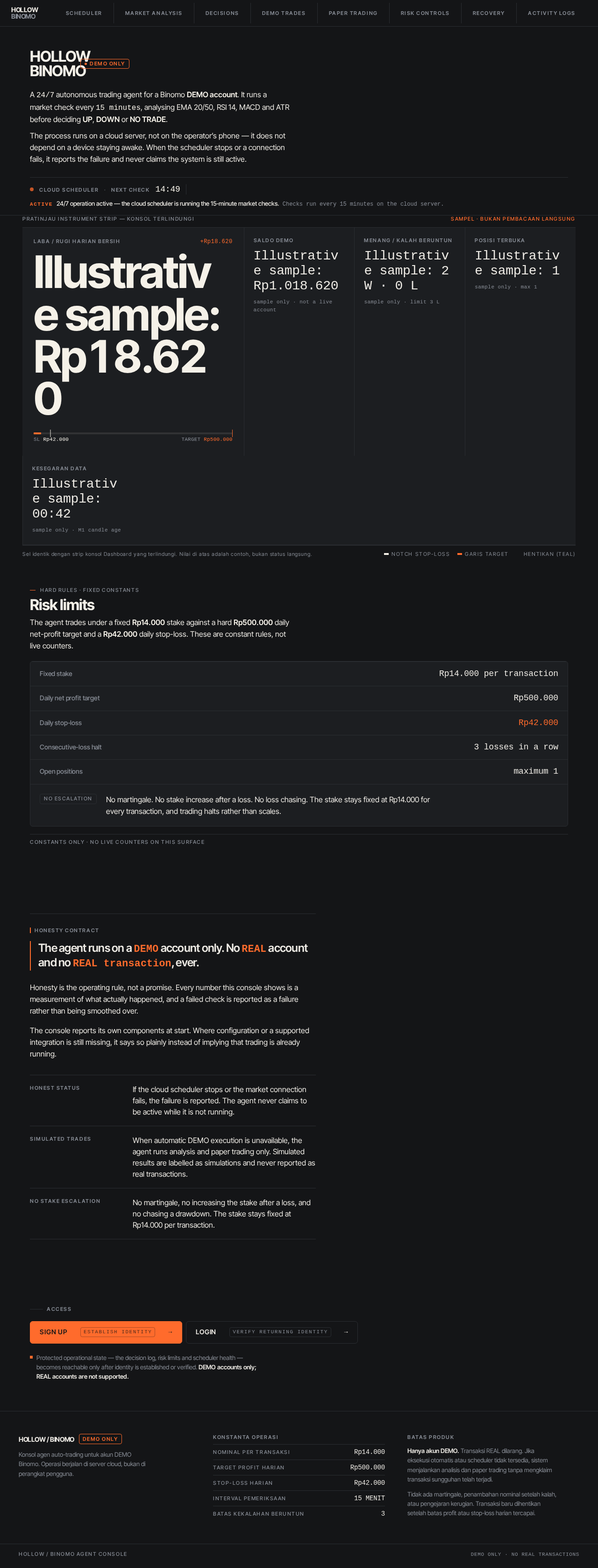
Demo OnlyA 24/7 autonomous trading agent for a Binomo DEMO account. It runs a market check every 15 minutes, analysing EMA 20/50, RSI 14, MACD and ATR before deciding UP, DOWN or NO TRADE.
The process runs on a cloud server, not on the operator’s phone — it does not depend on a device staying awake. When the scheduler stops or a connection fails, it reports the failure and never claims the system is still active.
Laba / Rugi harian bersih
+Rp18.620Illustrative sample: Rp18.620
Saldo DEMO
Illustrative sample: Rp1.018.620
sample only · not a live account
Menang / Kalah beruntun
Illustrative sample: 2 W · 0 L
sample only · limit 3 L
Posisi terbuka
Illustrative sample: 1
sample only · max 1
Kesegaran data
Illustrative sample: 00:42
sample only · M1 candle age
Sel identik dengan strip konsol Dashboard yang terlindungi. Nilai di atas adalah contoh, bukan status langsung.
HARD RULES · FIXED CONSTANTS
Risk limits
The agent trades under a fixed Rp14.000 stake against a hard Rp500.000 daily net-profit target and a Rp42.000 daily stop-loss. These are constant rules, not live counters.
Fixed stake
Rp14.000 per transaction
Daily net profit target
Rp500.000
Daily stop-loss
Rp42.000
Consecutive-loss halt
3 losses in a row
Open positions
maximum 1
No martingale. No stake increase after a loss. No loss chasing. The stake stays fixed at Rp14.000 for every transaction, and trading halts rather than scales.
Constants only · No live counters on this surface
Honesty contract
The agent runs on a DEMO account only. No REAL account and no REAL transaction, ever.
Honesty is the operating rule, not a promise. Every number this console shows is a measurement of what actually happened, and a failed check is reported as a failure rather than being smoothed over.
The console reports its own components at start. Where configuration or a supported integration is still missing, it says so plainly instead of implying that trading is already running.
Access
Protected operational state — the decision log, risk limits and scheduler health — becomes reachable only after identity is established or verified. DEMO accounts only; REAL accounts are not supported.
HollowBinomo
Demo OnlyA 24/7 autonomous trading agent for a Binomo DEMO account. It runs a market check every 15 minutes, analysing EMA 20/50, RSI 14, MACD and ATR before deciding UP, DOWN or NO TRADE.
The process runs on a cloud server, not on the operator’s phone — it does not depend on a device staying awake. When the scheduler stops or a connection fails, it reports the failure and never claims the system is still active.
Laba / Rugi harian bersih
+Rp18.620Illustrative sample: Rp18.620
Saldo DEMO
Illustrative sample: Rp1.018.620
sample only · not a live account
Menang / Kalah beruntun
Illustrative sample: 2 W · 0 L
sample only · limit 3 L
Posisi terbuka
Illustrative sample: 1
sample only · max 1
Kesegaran data
Illustrative sample: 00:42
sample only · M1 candle age
Sel identik dengan strip konsol Dashboard yang terlindungi. Nilai di atas adalah contoh, bukan status langsung.
HARD RULES · FIXED CONSTANTS
Risk limits
The agent trades under a fixed Rp14.000 stake against a hard Rp500.000 daily net-profit target and a Rp42.000 daily stop-loss. These are constant rules, not live counters.
Fixed stake
Rp14.000 per transaction
Daily net profit target
Rp500.000
Daily stop-loss
Rp42.000
Consecutive-loss halt
3 losses in a row
Open positions
maximum 1
No martingale. No stake increase after a loss. No loss chasing. The stake stays fixed at Rp14.000 for every transaction, and trading halts rather than scales.
Constants only · No live counters on this surface
Honesty contract
The agent runs on a DEMO account only. No REAL account and no REAL transaction, ever.
Honesty is the operating rule, not a promise. Every number this console shows is a measurement of what actually happened, and a failed check is reported as a failure rather than being smoothed over.
The console reports its own components at start. Where configuration or a supported integration is still missing, it says so plainly instead of implying that trading is already running.
Access
Protected operational state — the decision log, risk limits and scheduler health — becomes reachable only after identity is established or verified. DEMO accounts only; REAL accounts are not supported.
No comments yet. Be the first!