heroic-start
 Diya Trivedi
start a project to build a simple single page design of calculator

Comments (0)
Sign in to leave a comment
System Requirements
System Requirements Document for heroic-start
1. Introduction
heroic-start is a simple calculator delivered as a single-page design. The product intent is narrow and complete: a person opens one page, enters numbers and operators, and reads the computed result on that same page. There is no account, no saved history, no multi-page navigation, and no adjacent productivity suite.
The audience is broad — anyone who needs quick arithmetic — so the interface must stay instantly legible while the surrounding atmosphere carries the product's personality. The visual language is "data made physical, arithmetic made luminous": a near-black generative particle field behind a solid graphite calculator slab, with the result rendered as a luminous data readout.
The explicit hard constraint from the requester is that the design must be a single page. This document therefore describes exactly one page, one human role, and one core arithmetic lifecycle.
2. System Overview
heroic-start is a single-page web calculator. The page presents a calculator module — a display and a keypad — inside a full-viewport dark canvas. A visitor enters an expression using the keypad, the display shows the expression as it is entered, and pressing equals computes and shows the result. All of this happens on one page with no navigation.
Current delivery consists of:
- Frontend (React): the single calculator page, including the calculator shell, display, keypad, and the generative particle field rendered from the calculator's own data.
- Backend (FastAPI): a shared application process exposing the arithmetic evaluation endpoint used by the page. It is the single backend for the product.
- Database (MariaDB): provisioned application-owned storage. The accepted calculator behavior is stateless per session and requires no persisted domain data; the database is provisioned infrastructure and is not used to store expressions, results, or user data by this document.
Actors: one human role, Calculator User. There are no system, provider, or external actors beyond the application's own frontend and backend.
Accepted behavior: entering digits and operators, clearing, deleting, and computing a result, all on the single page.
Narrow exclusions: no accounts, no authentication, no saved history, no memory keys, no scientific functions beyond the four basic operators and decimal input, no multi-page navigation, no sharing or export.
Removed from scope
- Multi-page navigation (also: routing, page transitions)
- User accounts and authentication (also: sign-in, login, profiles)
- Calculation history and persistence (also: memory, saved expressions)
- Scientific or advanced functions (also: trigonometry, logarithms, parentheses grouping beyond the accepted expression entry)
2a. Product Interpretation and Delivery Boundary
heroic-start is a first-party, publicly reachable single-page application. The page is anonymously accessible: no identity is established, no session is owned, and no durable actor-specific state exists. Because the accepted calculator lifecycle is ephemeral — an expression is entered and a result is read within one visit — application-owned identity is neither required nor introduced.
The frontend owns all human interaction: keypad input, expression display, result display, and the visual particle field. The backend owns arithmetic evaluation only, exposed as an API the page calls when the user requests a result. The database is provisioned but carries no accepted product data.
Everything described in this document is current. No future-horizon features are accepted.
2c. Page Content and Component Coverage
Landing
The single page of heroic-start. It is both the public entry and the calculator itself, kept cohesive by the explicit single-page constraint.
- Information and state
- Oversized left-aligned headline "Numbers, made luminous" at
clamp(48px, 8vw, 96px). - A sparse row of three micro-features below the fold — "numbers", "operators", "result" — separated by hairline rules.
- Calculator state: current expression string, current result (or empty), and an error state when evaluation fails.
- Oversized left-aligned headline "Numbers, made luminous" at
- Primary actions
- Press digit keys
0–9to append digits to the expression. - Press
.to append a decimal point. - Press operator keys
+,−,×,÷to append an operator. - Press
=to evaluate the expression and show the result.
- Press digit keys
- Supporting actions
- Press
C(clear) to reset the expression and result to empty. - Press
\xe2\x8c\xab(delete) to remove the last entered character.
- Press
- Domain entities
- Expression: the ordered string of digits, decimal points, and operators the user has entered.
- Result: the numeric value returned by evaluation, or an error indicator.
- Component responsibilities
- Hero canvas: full-viewport near-black (
#08080C) WebGL particle field; 1200 points drifting through a Perlin-noise field; digits spawn clusters, operators tint the field toward coral (#FF5C3A); a faint topographic contour line traces beneath the result from the last computed value.
- Hero canvas: full-viewport near-black (
- Headline block: left 6 columns, flush-left, Space Grotesk Medium, tight tracking.
- Calculator shell: solid
#12121Aslab, 28px outer radius, right 6 columns, vertically centered, max-width 640px. - Display: 72px tabular numerals in
#F2F0EBwith a soft coral outer glow; shows the live expression and, after=, the result. Separated from the keypad by a 1px hairline rule in#6E6A78at 30% opacity. - Keypad: 4×5 grid of graphite keys with 18px radii, separated by 1px hairline rules rather than borders. The
=key is the only solid coral element on the page. - Micro-feature row: three ruled items below the fold.
- States
- Loading: the page shell and calculator render immediately; the particle field initializes asynchronously and fades in. The keypad is usable before the field is ready.
- Empty: expression and result are blank; the display shows a muted placeholder (
0in#6E6A78). - Success: after
=, the result appears in the display with a 300ms ease-out count-up and the contour line redraws from the computed value. - Error: if the expression is malformed (for example a trailing operator or division by zero), the display shows a short error message in the coral accent; the expression is preserved so the user can correct it.
- Recovery: pressing
Cclears the error and expression; pressing\xe2\x8c\xabedits the expression and clears the error state. - Reduced motion: the particle field freezes into a static gradient, the keypress pulse is removed, and the result appears without count-up.
3. Functional Requirements
FR-1 — Enter digits and operators As a Calculator User I should press digit and operator keys to build an arithmetic expression on the single page, so that I can compose the calculation I want.
- Provenance: explicit (simple calculator, single page).
- Lifecycle: actor presses a key → the expression string updates → the display shows the updated expression and the particle field reacts (digit spawns a cluster, operator tints the field coral). Access: anonymous. Failure: none for valid keypresses. Continuation: the user keeps pressing keys.
- Acceptance: each keypress appends exactly one character to the expression and the display reflects it immediately.
FR-2 — Compute a result
As a Calculator User I should press = to evaluate my expression, so that I see the correct arithmetic result on the same page.
- Provenance: explicit (calculator computes a result).
- Lifecycle: actor presses
=→ the page sends the expression to the backend evaluation endpoint → the backend returns the numeric result → the display shows the result with a 300ms ease-out count-up and the contour line redraws. Access: anonymous. Failure: malformed expression or division by zero returns an error shown in the display with the expression preserved. Continuation: the user may edit and re-evaluate, or clear. - Acceptance: for a valid expression the displayed result equals the mathematically correct value; for an invalid expression an error is shown and the expression is not lost.
FR-3 — Clear the calculator
As a Calculator User I should press C to reset the expression and result, so that I can start a new calculation.
- Provenance: explicit (basic calculator behavior).
- Lifecycle: actor presses
C→ expression and result reset to empty → display shows the muted placeholder. Access: anonymous. Failure: none. Continuation: the user begins a new expression. - Acceptance: after
C, the display shows the empty placeholder and no prior expression or result remains.
FR-4 — Delete the last character
As a Calculator User I should press \xe2\x8c\xab to remove the last entered character, so that I can correct a mistake without clearing everything.
- Provenance: explicit (basic calculator behavior).
- Lifecycle: actor presses
\xe2\x8c\xab→ the last character of the expression is removed → the display updates; any error state is cleared. Access: anonymous. Failure: pressing\xe2\x8c\xabon an empty expression leaves it empty. Continuation: the user continues editing. - Acceptance: each press removes exactly one trailing character; an empty expression stays empty.
FR-5 — Read the live expression and result As a Calculator User I should see my current expression and, after evaluation, the result in a large luminous display, so that I can verify what I entered and read the outcome.
- Provenance: explicit (single-page calculator display).
- Lifecycle: the display continuously reflects the current expression; after
=it shows the result. Access: anonymous. Failure: error state shown in the display. Continuation: the user reads and continues. - Acceptance: the display always shows the current expression or result, in 72px tabular numerals, fully legible at 375px, 768px, and 1280px viewports.
FR-6 — Generative particle field derived from the expression As a Calculator User I should see the background particle field respond to my input, so that the page feels like a living instrument rather than a spreadsheet.
- Provenance: explicit (creative direction: imagery derived from the calculator's own data).
- Lifecycle: digits spawn clusters; operators shift the field's hue toward coral; the contour line traces the last computed value. Access: anonymous. Failure: if WebGL is unavailable, a static gradient fallback is shown. Continuation: the field continues to respond to further input.
- Acceptance: the field reacts to input; with
prefers-reduced-motionit freezes into a static gradient and the keypress pulse is removed.
4. User Personas
Calculator User
- Product context: A broad-audience visitor who needs quick arithmetic and opens heroic-start's single page directly. They have no account and no prior state on the page.
- Primary goal: Enter an arithmetic expression and read the correct result on the same page, quickly and without friction.
- Distinct accepted responsibilities: Composing an expression with digit and operator keys, requesting evaluation with
=, correcting mistakes with\xe2\x8c\xab, and resetting withC. They are the only human participant; there is no counterparty, recipient, or approver. - Relevant inputs or decisions: Which digits and operators to enter; when to evaluate; whether to correct or clear after an error.
- Interactions with other accepted participants: None beyond the application itself. The backend evaluates on their behalf but is a system actor, not a persona.
- Observable success: The display shows the mathematically correct result for the entered expression, legibly, on the single page.
5. Core User Flows
Flow 1 — Perform a calculation
- The Calculator User opens heroic-start. The single page loads: the headline "Numbers, made luminous" appears flush-left, the graphite calculator slab appears at center-right, and the particle field fades in. The display shows the muted
0placeholder. - The user presses digit keys to enter the first number. Each press appends a digit to the expression; the display updates immediately and the particle field spawns a small cluster per digit.
- The user presses an operator key (
+,−,×, or÷). The operator is appended to the expression and the particle field's hue shifts toward coral. - The user presses digit keys to enter the second number.
- The user presses
=. The page sends the expression to the backend evaluation endpoint. The backend returns the numeric result. The display shows the result in 72px tabular numerals with a coral glow, counting up over 300ms with an ease-out; the contour line redraws beneath the result from the computed value. - Continuation: the user may press
Cto clear and start a new calculation, or press\xe2\x8c\xabto edit the expression and evaluate again.
Flow 2 — Correct a mistake
- The user is mid-expression and realizes a digit is wrong.
- The user presses
\xe2\x8c\xab. The last character is removed and the display updates. Any error state is cleared. - The user presses the correct digit key and continues.
- The user presses
=to evaluate the corrected expression and reads the result.
Flow 3 — Recover from an invalid expression
- The user presses
=on a malformed expression (for example a trailing operator) or one that divides by zero. - The backend returns an error. The display shows a short error message in the coral accent; the expression is preserved.
- The user presses
\xe2\x8c\xabto remove the offending character, orCto clear entirely. - The user re-enters a valid expression and presses
=to read the result.
Flow 4 — Reduced-motion use
- The user's system has
prefers-reduced-motionenabled. - The page loads with the particle field frozen into a static gradient; the keypress pulse is removed.
- The user enters an expression and presses
=as in Flow 1. The result appears without count-up. - The user reads the result and continues or clears.
6. Visuals Colors and Theme
The creative direction is authoritative for this section.
- Muse and headline: Refik Anadol — "Data made physical, arithmetic made luminous." Headline: "Numbers, made luminous."
- Mode: dark.
- Colour tokens (exact hex by role):
- Background:
#08080C - Surface (calculator shell):
#12121A - Text:
#F2F0EB - Primary:
#E8E4DA - Accent (equals key, active operator, particle glow):
#FF5C3A - Muted (secondary labels, hairline rules):
#6E6A78 - No blue anywhere.
- Background:
- Typography: Space Grotesk for headings and body. Headings Medium weight, tight tracking (−0.02em), lowercase wordmark, uppercase micro-labels at 11px with 0.18em tracking. Numerals use tabular figures. Scale 1.333 modular: 96/72/48/32/20/16/14 at desktop; clamp down to 48/40/28/20/16/14 at mobile. Display headline uses
clamp(48px, 8vw, 96px). - Shape language: Soft continuous-curve radii on the calculator shell (28px outer, 18px keys); the page itself is hard-edged. Hairline 1px rules in
#6E6A78at 30% opacity separate the display from the keypad. The particle field is the only organic form. - Layout: Single column, centered on a 12-column grid with a 640px max-width calculator module. Full-viewport dark canvas; the calculator floats as a solid graphite slab at center-right, offset from a large left-aligned headline. Below the fold, a sparse row of three micro-features (numbers, operators, result) on ruled dividers. No cards, no hover-lift grid.
- Imagery: No photography, no illustration. The only imagery is the generative particle field derived from the current expression; a faint topographic contour line traces the result.
- Avoid: white or near-white background; blue or indigo accents; centered headline with subtext and a blue CTA; gradient blobs or glassmorphism; cards with hover-lift shadows; Inter, Roboto, Arial, Helvetica, Poppins; playful bouncy easing; photography or stock people.
7. Signature Design Concept
The public entry is a full-bleed near-black canvas carrying a slow-drifting particle field. A single oversized headline — "Numbers, made luminous" — sits flush-left at clamp(48px, 8vw, 96px), occupying the left 6 columns. The calculator module is a solid #12121A slab with a 28px radius, offset to the right 6 columns, vertically centered. Its display shows a live result in 72px tabular numerals with a coral glow; the keypad is a 4×5 grid of graphite keys with hairline dividers. The equals key is the only solid coral element on the page — a single hot rectangle in an otherwise monochrome dark field. A topographic contour line traces beneath the result, drawn from the last computed value, as a quiet data-sculpture gesture.
This concept recomposes only accepted content, states, and controls: the headline, the calculator shell, the display, the keypad, and the particle field derived from the calculator's own data.
8. Interaction Model & Motion Direction
Interaction Model: Animated Motion Tempo: cinematic Hero Dimensionality: webgl
Landing Hero Motion Brief
- Focal subject: the calculator display as a particle data field — 1200 points drifting through a Perlin-noise field, tinted coral near the result display.
- Input → transformation → outcome thesis: each digit keypress spawns a small cluster of particles; each operator keypress shifts the field's hue toward coral; pressing
=causes the result to count up over 300ms with an ease-out while the contour line redraws from the computed value. The field is derived entirely from the calculator's own data. - Motion vocabulary: slow continuous drift; brief pulse of light traveling from the pressed key to the display; 300ms ease-out count-up; no bouncy easing.
- Composed first frame: near-black canvas, headline flush-left, graphite slab at center-right with the muted
0placeholder in the display, particle field drifting at rest. - Reduced-motion state: the particle field freezes into a static gradient, the keypress pulse is removed, and the result appears without count-up.
Landing Hero 3D Scene Brief — DIRECTION-DERIVED
A single crafted real-time WebGL scene: a particle field of 1200 points drifting through a Perlin-noise field on a near-black ground, with coral tinting near the result display and a topographic contour line tracing the last computed value. The scene shows the product's defining state — numbers flowing into a result — and reacts to the calculator's own data. With prefers-reduced-motion, the scene renders as a static gradient.
9. Non-Functional Requirements
- Single-page constraint (explicit): the product is delivered as exactly one page. No routing, no additional destinations.
- Legibility at every viewport (explicit): headlines, wordmarks, labels, numbers, and controls stay entirely inside the viewport and their container at 375px, 768px, and 1280px, wrapping or scaling to fit. No element covers any part of readable text or controls.
- Reduced motion (explicit): with
prefers-reduced-motion, the particle field freezes into a static gradient, the keypress pulse is removed, and the result appears without count-up. - WebGL fallback (required_inference): when WebGL is unavailable, a static gradient is shown in place of the particle field; the calculator remains fully usable.
- Accessibility (required_inference): the keypad keys are operable by keyboard and expose accessible names; the display is announced as a live region when the result changes.
- Performance (required_inference): the calculator shell and keypad render and become usable before the particle field finishes initializing.
10. Tech Stack
- Frontend: React application UI, rendering the single calculator page and the WebGL particle field.
- Backend: shared FastAPI process exposing the arithmetic evaluation endpoint.
- Database: MariaDB, provisioned application-owned storage. Not used to persist expressions, results, or user data by this document.
- Deployment: docker-compose with the
frontend,backend, anddatabaseservices.
11. Assumptions and Constraints
- Assumption (required_inference): the calculator supports the four basic operators (
+,−,×,÷), decimal input, clear, and delete. No scientific functions, memory keys, or parentheses grouping are accepted. - Assumption (required_inference): arithmetic evaluation is performed by the backend so that the frontend remains a presentation layer; the backend is the single evaluation owner.
- Assumption (required_inference): the calculator is stateless per visit; no expression or result is persisted.
- Constraint (explicit): the design must be a single page.
- Constraint (explicit): the visual direction is authoritative — dark mode, the specified palette, Space Grotesk, and the particle field. No blue, no white background, no generic SaaS template.
- Constraint (explicit): readable text and controls stay whole at every viewport; decoration and motion may be cropped or bled but never cover readable text or controls.
12. Glossary
- Expression: the ordered string of digits, decimal points, and operators the user has entered.
- Result: the numeric value returned by evaluating an expression, or an error indicator.
- Particle field: the generative WebGL background derived from the calculator's own data.
- Contour line: the faint topographic line tracing the last computed value beneath the result.
- Calculator User: the single human role that enters expressions and reads results on the page.
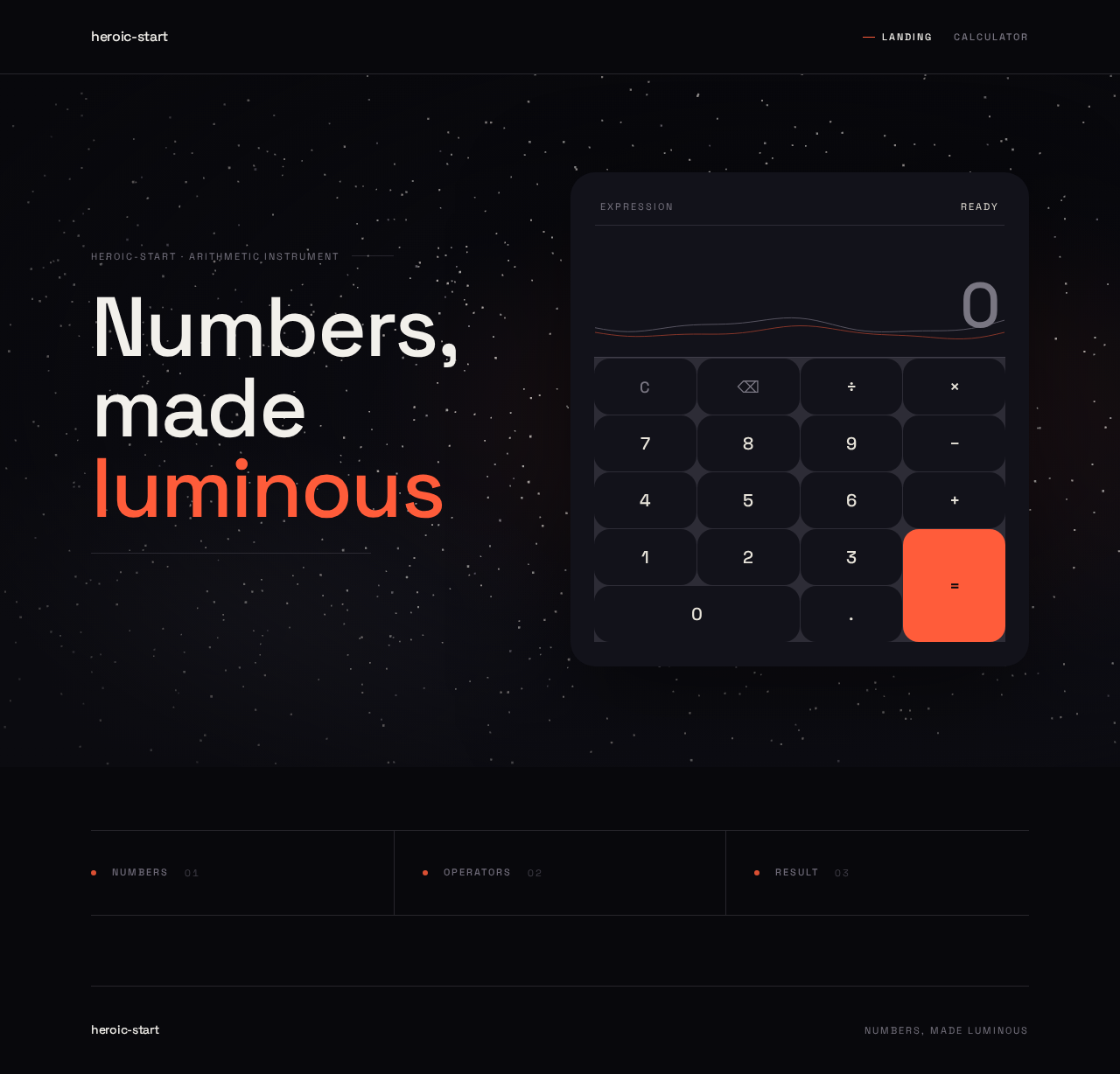
heroic-start · arithmetic instrument
Numbers,
made luminous
The three ingredients of a calculation
- numbers
- operators
- result
heroic-start · arithmetic instrument
Numbers,
made luminous
The three ingredients of a calculation
- numbers
- operators
- result
No comments yet. Be the first!