heroic-framer
 Hitesh Patil
create framer product login page


Comments (0)
Sign in to leave a comment
System Requirements
System Requirements Document for heroic-framer
1. Introduction
The "heroic-framer" project is focused on creating a login page for a Framer product. This page is designed to enhance user experience by providing a modern, tech-forward interface that aligns with Framer's innovative brand. The target audience is users who are comfortable with contemporary, technology-driven interfaces.
2. System Overview
The system will deliver a login page for the Framer product, allowing users to sign in and access protected features. The login page will be designed with a cinematic future tech aesthetic, inspired by Gleb Kuznetsov's hyper-futuristic 3D interfaces. The system will include backend processing for login attempts and ensure user identity continuity.
2a. Product Interpretation and Delivery Boundary
The project will deliver a custom login page as the primary access surface for the Framer product. It will support user self-service enrollment and returning user verification. The system will maintain application-owned identity to ensure secure access. The login page will be the only protected destination, with a public landing page providing an anonymous first impression.
2b. Source Content Inventory
Not applicable as no content source directive was provided.
2c. Page Content and Component Coverage
Landing
- Information/State: Introduction to the Framer product, its purpose, and user benefits.
- Primary Actions: Navigate to the login page.
- Supporting Actions: None.
- Domain Entities: Framer product overview.
- Components: Full-bleed 3D scene, floating glass panels, electric cyan and magenta accents.
- States: Loading, success, error, recovery.
login page
- Information/State: User credentials input, login status.
- Primary Actions: Enter credentials, submit login attempt.
- Supporting Actions: Password recovery, account creation.
- Domain Entities: User account, login session.
- Components: Credential fields, submit button, feedback messages.
- States: Loading, success, error, recovery.
3. Functional Requirements
- As a Product user, I should be able to access the login page to enter my credentials and submit a login attempt. (Provenance: explicit)
- As a Product user, I should be able to create an account through the login page for first-time access. (Provenance: required_inference)
- As a Product user, I should be able to verify my identity on returning visits through the login page. (Provenance: required_inference)
- The system should process submitted login attempts and provide access outcomes. (Provenance: required_inference)
4. User Personas
- Product user: Responsible for accessing the Framer product through the login page. Outcomes include successful login, account creation, and identity verification.
5. Core User Flows
-
Accessing the Landing Page
- The Product user visits the Landing page.
- The user views information about the Framer product.
- The user navigates to the login page.
-
Logging In
- The Product user enters credentials on the login page.
- The user submits the login attempt.
- The system processes the login and provides feedback.
- On success, the user gains access to protected features.
-
Creating an Account
- The Product user selects the account creation option on the login page.
- The user provides necessary information for account creation.
- The system processes the information and creates an account.
- The user receives confirmation and can log in with the new account.
-
Returning User Verification
- The Product user accesses the login page.
- The user enters credentials and submits a login attempt.
- The system verifies the user's identity and provides access.
6. Visuals Colors and Theme
- Muse: Gleb Kuznetsov
- Palette:
- Background: #000000
- Surface: #141414
- Text: #FFFFFF
- Primary: #00FFFF
- Accent: #FF00FF
- Muted: #333333
- Typography:
- Headings: Space Grotesk — Wide, uppercase, tight tracking
- Body: Orbitron
- Scale: 1.414 modular, 64/36/24/16/12
- Shape Language: Floating glass panels, thin luminous strokes, radial layouts
- Imagery Style: Abstract 3D objects, particle fields, product holograms
7. Signature Design Concept
The login page will feature a full-bleed 3D hologram hero scene with floating glass panels and electric cyan and magenta accents. This design will create a bold, immersive entry point, aligning with the cinematic future tech aesthetic.
8. Interaction Model & Motion Direction
- Interaction Model: Animated
- Motion Tempo: Cinematic
- Hero Dimensionality: webgl
- Landing Hero Motion Brief: The hero scene will feature a continuous slow orbit with parallax effects, light sweeps, and data streams. The focal subject will be an abstract 3D object, transforming as the user interacts with the page.
9. Non-Functional Requirements
- The system must ensure secure processing of login credentials.
- The interface should be responsive and accessible across devices.
- The design must adhere to the cinematic future tech aesthetic.
10. Tech Stack
- Frontend: React
- Backend: Python/FastAPI
- Storage: Appropriate database for user credentials
- Deployment: Docker/docker-compose, Kubernetes (if required)
11. Assumptions and Constraints
- The login page will be the primary access point for the Framer product.
- Users must have internet access to interact with the login page.
- The system will not include adjacent account-management capabilities beyond those specified.
12. Glossary
- Framer product: The application for which the login page is being developed.
- Product user: An individual who uses the Framer product and interacts with the login page.
- Login page: The interface where users enter credentials to access the Framer product.
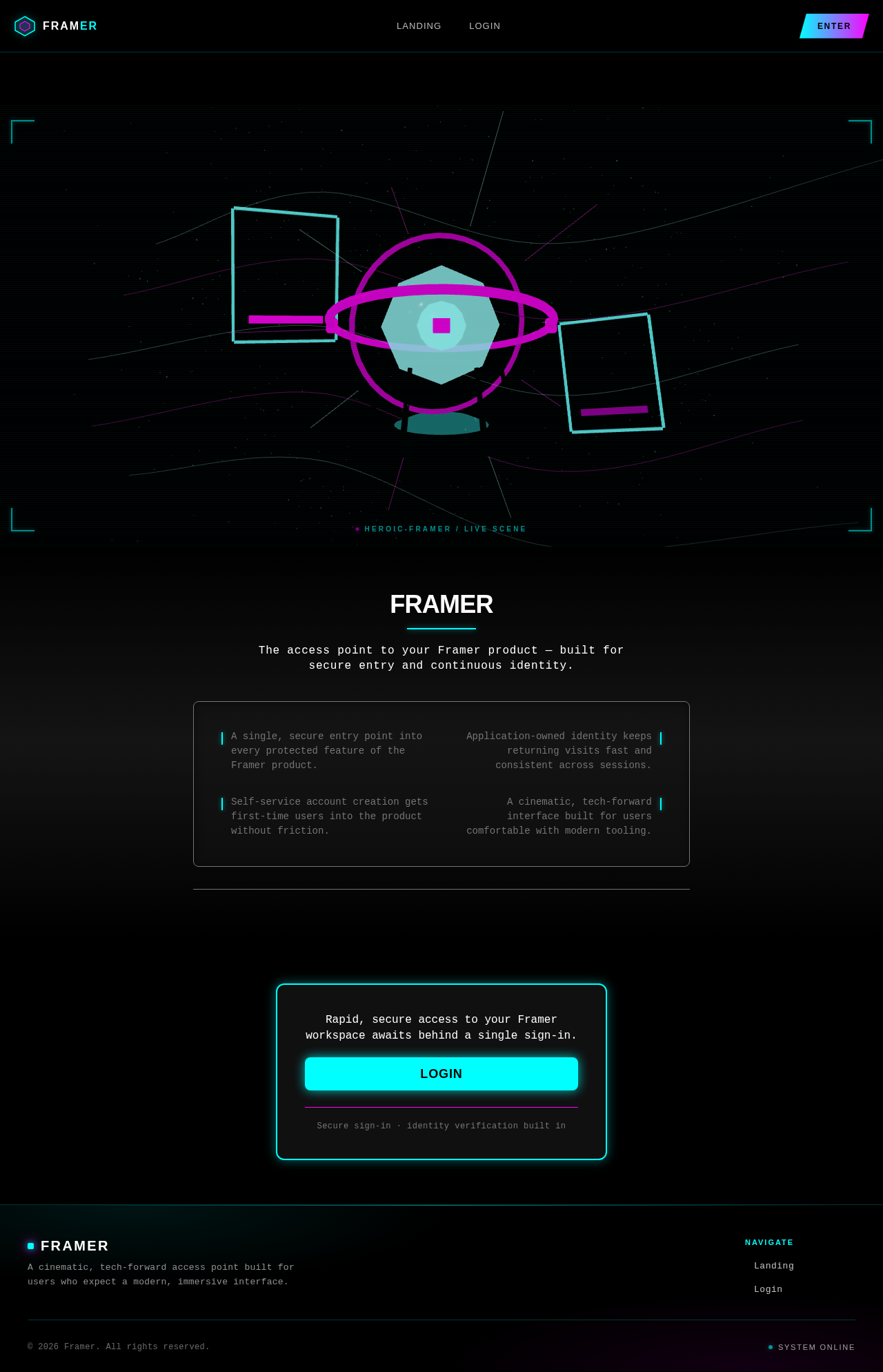
Framer
The access point to your Framer product — built for secure entry and continuous identity.
- A single, secure entry point into every protected feature of the Framer product.
- Application-owned identity keeps returning visits fast and consistent across sessions.
- Self-service account creation gets first-time users into the product without friction.
- A cinematic, tech-forward interface built for users comfortable with modern tooling.
Rapid, secure access to your Framer workspace awaits behind a single sign-in.
LoginSecure sign-in · identity verification built in
Framer
The access point to your Framer product — built for secure entry and continuous identity.
- A single, secure entry point into every protected feature of the Framer product.
- Application-owned identity keeps returning visits fast and consistent across sessions.
- Self-service account creation gets first-time users into the product without friction.
- A cinematic, tech-forward interface built for users comfortable with modern tooling.
Rapid, secure access to your Framer workspace awaits behind a single sign-in.
LoginSecure sign-in · identity verification built in
No comments yet. Be the first!