hardy-menu
 Yug anil bhai Patel
**Project Title:** Smart Digital Menu for Restaurants **Description:** I want to build a modern, fast, and mobile-friendly smart menu website for restaurants. This will replace traditional paper menus and provide a smooth digital experience for customers. **Core Features:** * A clean homepage with the restaurant name, logo, and a minimal hero section * Category-based menu system (e.g., Pizza, Burgers, Drinks, Desserts) * When a category is selected, items update dynamically without reloading the page * Each menu item should include: * Image * Name * Price * Short description * A search bar to quickly find menu items * Smooth animations (simple and fast, no heavy effects or shadows) * Fully responsive design (optimized for mobile first) **Performance Requirements:** * Fast loading (no lag) * Optimized images and minimal JavaScript usage * Avoid unnecessary re-rendering or heavy animations **Design Style:** * Minimalistic and modern UI * Clean spacing and well-aligned menu cards * Soft color palette (primary color: #CDC1FF) * Focus on readability and user experience **Advanced Features (Optional but Preferred):** * QR code access (customers scan and open menu) * Admin panel for restaurant owners to: * Add/edit/remove menu items * Change prices and categories * Online ordering integration (optional future feature) **Target Users:** Small to medium restaurants that want a digital menu solution without building a full app. **Goal:** Create a professional, smooth, and lightweight smart menu that restaurants can easily use and show to customers.

Comments (0)
Sign in to leave a comment
System Requirements
System Requirements Document (SRD)
Project Name: hardy-menu
Table of Contents
- Introduction
- System Overview
- Functional Requirements
- User Personas
- Visuals Colors and Theme
- Signature Design Concept
- Non-Functional Requirements
- Tech Stack
- Assumptions and Constraints
- Glossary
1. Introduction
The hardy-menu project aims to revolutionize the dining experience by replacing traditional paper menus with a sleek, modern, and mobile-friendly digital menu system. This system will cater to both restaurant customers and owners, providing a seamless and efficient way to browse and manage menus.
The project is designed with a focus on performance, usability, and aesthetics, ensuring a smooth experience for all users. By including an admin panel, restaurant owners will have full control over their digital menu, making it a versatile and self-sufficient solution.
This document outlines the system requirements for the hardy-menu project, ensuring clarity and alignment with the project's goals.
2. System Overview
The hardy-menu system will consist of two primary components:
-
Customer-Facing Smart Menu:
- A dynamic and responsive digital menu that allows customers to browse categories, view menu items, and search for specific dishes.
- Accessible via QR code scanning for convenience.
-
Admin Panel for Restaurant Owners:
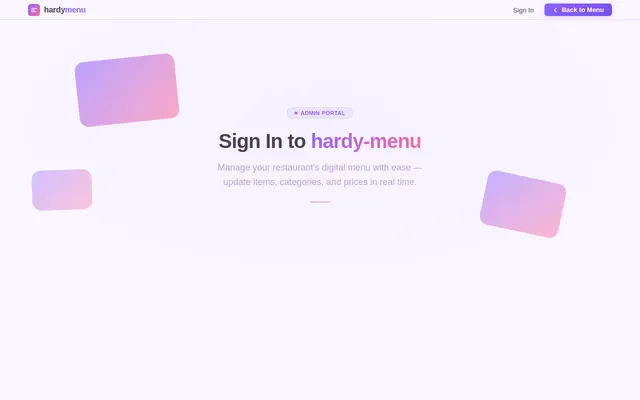
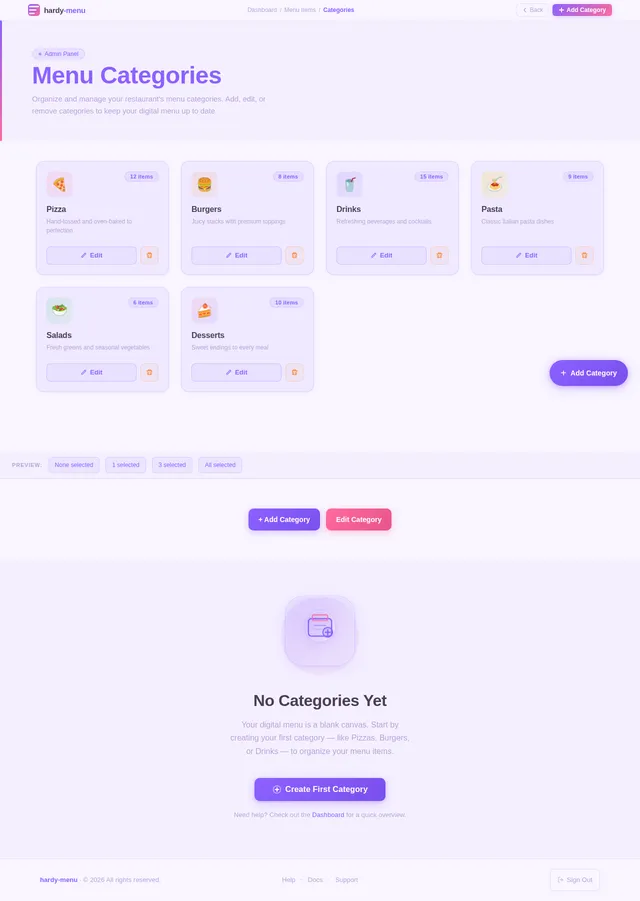
- A user-friendly interface for managing menu items, categories, and prices.
- Designed to empower restaurant staff with full control over their digital menu.
The system will prioritize speed, simplicity, and a mobile-first design, ensuring optimal performance and usability across devices.
3. Functional Requirements
Customer-Facing Smart Menu
- As a Customer, I should be able to view the restaurant's menu categorized into sections (e.g., Pizza, Burgers, Drinks).
- As a Customer, I should be able to search for specific menu items using a search bar.
- As a Customer, I should be able to view details of each menu item, including an image, name, price, and short description.
- As a Customer, I should experience smooth animations and fast loading times while navigating the menu.
- As a Customer, I should be able to access the menu by scanning a QR code.
Admin Panel
- As an Admin, I should be able to add new menu items with details such as name, price, image, and description.
- As an Admin, I should be able to edit existing menu items to update their details.
- As an Admin, I should be able to remove menu items that are no longer available.
- As an Admin, I should be able to create, edit, and delete menu categories.
- As an Admin, I should be able to update prices for menu items.
4. User Personas
1. Customer
- Description: A restaurant patron who uses the hardy-menu system to browse and select dishes.
- Goals: Quickly find and explore menu items with a smooth and intuitive interface.
2. Admin (Restaurant Owner/Staff)
- Description: A restaurant owner or staff member responsible for managing the digital menu.
- Goals: Easily update and maintain the menu to reflect current offerings and prices.
5. Visuals Colors and Theme
The hardy-menu will adopt a unique and modern color palette to enhance its visual appeal while maintaining readability and usability.
Color Palette:
- Background: #F9F5FF (soft lavender white)
- Surface: #E8E1FF (light lavender)
- Text: #4A3F55 (deep plum)
- Accent: #8C61FF (vivid violet)
- Muted Tones: #B8A4D8 (soft lilac)
This palette reflects a clean and minimalistic design, aligning with the project's modern and professional aesthetic.
6. Signature Design Concept
The hardy-menu homepage will feature an interactive "floating menu card" design.
Concept Details:
-
Visual Layout:
The homepage will display a large, central floating card that dynamically updates as users interact with the menu categories. Each category will "slide in" with a smooth animation, giving the impression of flipping through a physical menu. -
Animations:
Subtle hover effects will make menu items feel tactile, while transitions between categories will include a sliding or flipping animation. -
Interactive Elements:
The QR code will be prominently displayed on the homepage, with a glowing animation to draw attention. Clicking on it will provide instructions for scanning. -
Micro-Interactions:
Buttons and icons will have responsive feedback, such as color shifts or slight enlargements, to enhance user engagement.
This design will create a memorable first impression, blending functionality with a touch of elegance.
7. Non-Functional Requirements
- The system must load within 2 seconds on a standard 4G mobile connection.
- The design must be fully responsive, adapting seamlessly to devices of all sizes.
- Images must be optimized to balance quality and performance.
- The admin panel must be secure, requiring authentication for access.
- The system must support at least 100 simultaneous users without performance degradation.
8. Tech Stack
Frontend
- React for Web
Backend
- Python
- FastAPI
Database
- MySQL (with Alembic for migrations)
AI Tools
- GPT 5.4 for user-friendly responses
Local Orchestration
- Docker
- docker-compose
Server-Side Orchestration
- Kubernetes
9. Assumptions and Constraints
- The system assumes that restaurants will provide high-quality images and accurate details for menu items.
- The admin panel will initially support English only, with potential for multilingual support in future updates.
- The system will be hosted on a cloud platform to ensure scalability and reliability.
- QR code functionality assumes customers have smartphones with QR code scanning capabilities.
10. Glossary
- Customer: A restaurant patron using the hardy-menu system to browse and select dishes.
- Admin: A restaurant owner or staff member managing the digital menu via the admin panel.
- QR Code: A machine-readable code used to access the digital menu.
- Responsive Design: A design approach that ensures the system adapts to different screen sizes and devices.
- FastAPI: A modern web framework for building APIs with Python.
- Alembic: A database migration tool for managing schema changes in MySQL.

Revolutionize Your Dining Experience
Skip the paper menu. Embrace digital simplicity.
Everything You Need
Powerful features that make your digital menu stand out and keep customers coming back.
Optimized for speed so your customers never wait. Menus load instantly, even on slow connections.
Designed for smartphones from the ground up. A seamless experience on every screen size.
Smooth transitions and micro-interactions that make browsing your menu a delight.
Customers find exactly what they crave with powerful search and category filtering.
Change a price or add a dish — your live menu reflects updates the moment you save.
Full management dashboard to add, edit, and organize your entire menu effortlessly.
Your Journey to a Digital Menu
From scanning to exploring, the entire experience takes just seconds. Here is how customers interact with your hardy-menu.
Scan QR Code
View Restaurant Info
Browse Menu
Explore Details
See the Floating Menu in Action
Watch your menu come alive with smooth animations and beautiful category browsing — just like your customers will experience.
Pizza
Margherita Classic
$12.99
San Marzano tomato, fresh mozzarella, basil, extra virgin olive oil
Truffle Mushroom
$16.49
Wild mushroom medley, truffle cream, fontina cheese, arugula
Spicy Pepperoni
$14.99
Double pepperoni, jalapeño, hot honey drizzle, mozzarella
Restaurant Admin Control
- Add/Edit Menu Items
- Manage Categories
- Update Prices
- View Analytics
- Secure Dashboard
What Restaurant Owners Say
Trusted by restaurants worldwide to deliver exceptional digital dining experiences
hardy-menu transformed our restaurant overnight. Customers love scanning the QR code and browsing our dishes on their phones. We saw a 30% increase in dessert orders because people actually discover them now!
The admin panel is incredibly intuitive. I can update prices, add seasonal items, and manage categories in minutes. No more reprinting menus every time something changes.
Our guests constantly compliment the beautiful menu presentation. The smooth animations and fast loading make it feel premium. It perfectly matches the dining experience we strive for.
Setting up was a breeze. Within an hour, all our menu items were live with photos and descriptions. The search feature helps customers find exactly what they want instantly.
We manage three locations, and hardy-menu makes it effortless to keep every menu up to date across all of them. The real-time updates save us hours every week.
The mobile-first design is exactly what our younger clientele expects. Our table turnover improved because customers browse the menu before the server even arrives. Brilliant tool!
Choose the Right Plan for Your Restaurant
From small cafes to multi-location chains, hardy-menu scales with your business. No hidden fees, cancel anytime.
Starter
- ✓Up to 20 menu items
- ✓Single category support
- ✓QR code menu access
- ✓Mobile-responsive design
- ✓Basic item descriptions
- ✓Community support
Professional
- ✓Unlimited menu items
- ✓Unlimited categories
- ✓Full admin panel access
- ✓Real-time menu updates
- ✓Image uploads & optimization
- ✓Priority email support
Enterprise
- ✓Everything in Professional
- ✓Multi-location support
- ✓Advanced analytics dashboard
- ✓Custom branding & theming
- ✓API access & integrations
- ✓Dedicated account manager
Ready to Transform Your Restaurant?
Replace paper menus with a sleek digital experience. Set up in minutes, delight your customers from day one.
No comments yet. Be the first!