hardy-calculator
 Diya Trivedi
start a project to build a simple single page design of calculator

Comments (0)
Sign in to leave a comment
System Requirements
System Requirements Document for hardy-calculator
1. Introduction
hardy-calculator is a single-page calculator: one anonymous person opens one page, enters numbers and operators, and reads a correct arithmetic result. The product intent is deliberately narrow — a simple, single-page design of a calculator, presented as a calm, well-made instrument rather than a marketing site. The audience is any person who needs to perform basic arithmetic in a browser without accounts, navigation, or surrounding application chrome.
The design brief is "less, but better arithmetic": a Braun-panel calculator in the spirit of Dieter Rams — a strict grid, aligned label/value pairs, muted warm surfaces, and one saturated signal colour marking the result and the equals key.
2. System Overview
hardy-calculator is delivered as a single custom page, Calculator, reachable anonymously with no sign-in, no account, and no additional routes. The page presents a display panel and a 4×5 keypad; the user presses digit and operator keys, the expression is shown beneath the display, and pressing equals commits a computed result to the display.
Actors:
- Calculator User — the single active human persona; performs basic arithmetic on the one page and reads the result.
- Calculator Engine (system process) — evaluates the entered expression and produces the displayed result; it has no separate human-facing surface.
Current scope is exactly one page and one arithmetic workflow. There is no history, no memory storage beyond a display indicator, no accounts, no settings, no multi-page navigation, and no server-side persistence. Future ideas are not part of the current product.
2a. Product Interpretation and Delivery Boundary
The product is a first-party, browser-delivered, single-page utility. Access is anonymous and public: the Calculator page is the entry surface and requires no identity, so no authentication, registration, or session continuity is introduced. All arithmetic interaction happens on that one page; the calculator engine runs in support of the page's interaction and is not a separate destination.
The explicit hard boundary is the page count: the design must be a single page, and no additional pages are requested. The design must be simple. Anything not needed to enter numbers and operators and read a computed result — navigation, dashboards, saved history, account management, marketing sections — is outside the current delivery boundary.
2c. Page Content and Component Coverage
Calculator
The single page of the product. Anonymous public entry; no identity required.
Information and state
- Current display value: a right-aligned, tabular numeral,
0on load, rendered at display scale. - Expression string: the sequence of entered digits and operators, shown in small caps beneath the display.
- Memory indicator: a small-caps
MEMORYlabel with a filled or hollow 6px dot reflecting whether a value is held. - Operator context: the most recently selected operator, reflected in the keypad state.
- Error state: an invalid expression (for example division by zero or a malformed operator sequence) replaces the display with an error indication and offers clear recovery.
Primary actions
- Press digit keys
0–9to append digits to the current entry. - Press operator keys
+,−,×,÷to select an operation. - Press the decimal key to enter a fractional value.
- Press the equals key to commit the computation and show the result.
- Press the clear key to reset the current entry and expression.
Supporting actions
- Keyboard input mirrors the keypad: digits, operators, decimal, equals/Enter, and clear/Escape.
- Keyboard hints are shown in a bottom ruled strip in 10px caps.
Domain entities
- Expression: ordered list of numeric operands and operators.
- Operand: a numeric value entered by the user.
- Result: the computed numeric value committed to the display.
- Operator: one of addition, subtraction, multiplication, division.
Component responsibilities
- Page frame: full-viewport-width 1px ink hairline rule at top carrying the small-caps wordmark
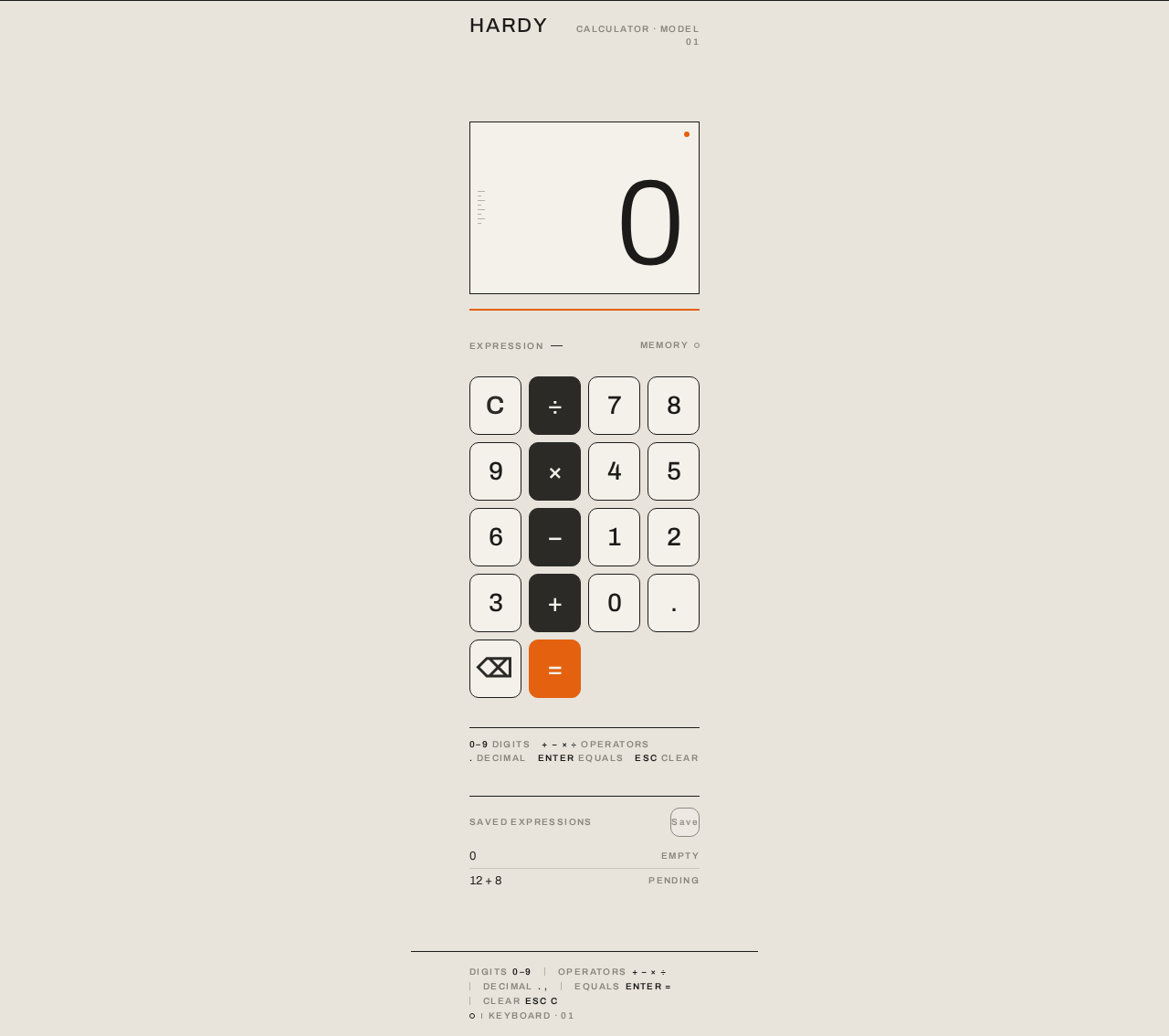
HARDYat left andCALCULATOR · MODEL 01at right; mirrored bottom rule carrying keyboard hints. - Display panel: full-width rectangle with 1px ink hairline border, a 2px Braun-orange rule directly beneath, the tabular number right-aligned, a faint schematic tick-mark scale of eight 1px ticks along the left edge, and a tiny orange power-indicator dot at top-right.
- Metadata row:
EXPRESSIONlabel and expression string at left;MEMORYlabel and dot at right, in 10px muted small caps. - Keypad: strict 4×5 grid of 10px-radius rounded-rectangle keys with 1px hairline borders and 8px gutters; digits in off-white with ink labels, operators in graphite with off-white labels, exactly one orange equals key at bottom-right.
- Key press feedback: 1px depression with a 1px inset line over a 60ms linear transition.
States
- Loading: not applicable — the page renders immediately with display
0and an empty expression. - Empty: display
0, expression empty, memory dot hollow. - Success: pressing equals commits the result; the display number crossfades over 120ms and the orange rule brightens by 8% for 150ms.
- Error: invalid expression or division by zero shows an error indication in the display; the user recovers by pressing clear and re-entering.
- Recovery: clear resets display to
0and expression to empty at any time.
3. Functional Requirements
FR-1 — Open the calculator page (explicit)
As a Calculator User I should open the single Calculator page and immediately see a display reading 0 and a full keypad, so that I can begin arithmetic without any setup.
- Trigger: navigating to the product's only route.
- Observable result: the page renders with display
0, empty expression, hollow memory dot, and all keys visible. - Access: anonymous, no identity required.
- Failure/recovery: none applicable; the page is static on load.
- Continuation: the user presses a digit key.
FR-2 — Enter digits (explicit)
As a Calculator User I should press digit keys 0–9 and see each digit appended to the current entry in the display, so that I can build the number I want to compute.
- Trigger: pressing a digit key or typing a digit.
- Observable result: the display numeral updates to include the new digit; the expression string reflects the entry.
- Failure/recovery: leading zeros are normalized so the display shows a single
0before a non-zero digit. - Continuation: the user presses an operator or equals.
FR-3 — Enter a decimal value (explicit) As a Calculator User I should press the decimal key to add a fractional part to the current entry, so that I can compute with non-integer numbers.
- Trigger: pressing the decimal key.
- Observable result: a decimal point appears in the current entry; a second decimal point in the same entry is ignored.
- Failure/recovery: pressing decimal on an empty entry begins
0.. - Continuation: the user continues entering digits or selects an operator.
FR-4 — Select an operator (explicit)
As a Calculator User I should press +, −, ×, or ÷ to choose the operation, so that the next entered number is combined with the current value.
- Trigger: pressing an operator key.
- Observable result: the selected operator is reflected in the expression string and keypad state; the display is ready for the next operand.
- Failure/recovery: pressing a second operator consecutively replaces the pending operator rather than stacking operations.
- Continuation: the user enters the next operand.
FR-5 — Commit a result with equals (explicit) As a Calculator User I should press the equals key and see the computed result replace the display, so that I can read the answer to my arithmetic.
- Trigger: pressing equals or Enter with a complete expression.
- Observable result: the display number crossfades over 120ms to the computed result; the orange rule beneath the display brightens by 8% for 150ms; the expression string shows the completed expression.
- Failure/recovery: pressing equals with an incomplete expression leaves the display unchanged.
- Continuation: the user may continue computing from the result or clear.
FR-6 — Clear and recover (explicit) As a Calculator User I should press the clear key to reset the current entry and expression, so that I can start a new calculation or recover from a mistake.
- Trigger: pressing clear or Escape.
- Observable result: display returns to
0, expression empties, memory dot returns to hollow. - Failure/recovery: clear is always available and never leaves the page in an unusable state.
- Continuation: the user begins a new calculation.
FR-7 — Handle invalid arithmetic (required_inference) As a Calculator User I should see a clear error indication when my expression cannot be evaluated (for example division by zero), so that I understand the result is not a number and can recover.
- Trigger: pressing equals on an expression that cannot produce a finite result.
- Observable result: the display shows an error indication instead of a number; the expression remains visible for reference.
- Failure/recovery: pressing clear resets the display to
0and the expression to empty. - Continuation: the user re-enters a valid expression.
FR-8 — Keyboard operation (required_inference) As a Calculator User I should be able to operate the calculator with my keyboard (digits, operators, decimal, Enter for equals, Escape for clear), so that I can compute without reaching for the mouse.
- Trigger: keydown events on the page.
- Observable result: the same display and expression updates as the corresponding key presses.
- Failure/recovery: unrecognized keys are ignored without changing state.
- Continuation: the user continues with either input method.
FR-9 — Evaluate expressions (required_inference) As the Calculator Engine I should evaluate the entered expression using standard operator precedence and produce a finite numeric result, so that the Calculator User's committed result is correct.
- Trigger: an equals commit from the page.
- Observable result: a numeric result returned to the display, or an error signal for non-finite results.
- Failure/recovery: non-finite or malformed expressions return an error signal rather than a number.
- Continuation: the page renders the result or error.
4. User Personas
Calculator User
Product context. A single anonymous person who opens hardy-calculator to do a quick piece of basic arithmetic — adding up a few amounts, checking a multiplication, dividing a figure. They arrive with a number in mind and no patience for setup, sign-in, or navigation. The page is the whole product.
Primary goal. Enter numbers and operators and read a correct result on the one page, without leaving it.
Distinct accepted responsibilities.
- Entering digits and decimal values to build operands.
- Selecting one of the four basic operators.
- Committing the computation with equals and reading the result.
- Clearing the entry to start over or recover from a mistake.
- Optionally operating the calculator by keyboard.
Relevant inputs and decisions. Which digits to enter, which operator applies, when the expression is complete enough to commit, and whether to continue from the result or clear.
Interactions with other participants. The Calculator User interacts only with the Calculator page and, through it, the Calculator Engine, which evaluates the committed expression and returns the result or an error. There are no other human participants.
Observable success. The display shows the correct computed result after equals; the expression string reflects what was entered; the page never requires the user to leave it or sign in.
Constraints. The experience must remain simple and confined to one page; no history, accounts, or additional destinations are part of this role's work.
5. Core User Flows
Flow A — Perform a basic calculation
- The Calculator User navigates to the product's only route. The Calculator page renders anonymously with display
0, an empty expression, a hollow memory dot, and the full 4×5 keypad. - The user presses digit keys to enter the first operand. Each digit appends to the display numeral and the expression string updates.
- The user presses an operator key (
+,−,×, or÷). The operator appears in the expression string and the keypad reflects the selection. - The user enters the second operand with digit and decimal keys.
- The user presses equals. The Calculator Engine evaluates the expression with standard precedence and returns a finite result.
- The Calculator page commits the result: the display number crossfades over 120ms to the result, the orange rule beneath the display brightens by 8% for 150ms, and the expression string shows the completed expression.
- Continuation: the user may continue computing from the result or press clear to start a new calculation.
Flow B — Recover from a mistake or invalid arithmetic
- The user is mid-entry on the Calculator page and realizes the expression is wrong, or presses equals on an expression that cannot be evaluated (for example division by zero).
- If the expression is invalid, the Calculator Engine returns an error signal and the page shows an error indication in the display while keeping the expression visible.
- The user presses clear (or Escape). The display resets to
0, the expression empties, and the memory dot returns to hollow. - The user re-enters a valid expression and presses equals to obtain the correct result.
Flow C — Operate by keyboard
- The user is on the Calculator page with focus on the document.
- The user types digits, operators, and a decimal point; the page updates the display and expression exactly as the corresponding key presses would.
- The user presses Enter to commit equals; the Calculator Engine evaluates and the page shows the result.
- The user presses Escape to clear; the display resets to
0. - Unrecognized keys are ignored without changing state, and the user continues with either input method.
6. Visuals Colors and Theme
Muse and headline. Dieter Rams — "Less, but better arithmetic." A Braun-panel calculator: a small, dense, honest control surface where every key is a function and nothing decorative is permitted.
Mode. Light mode only.
Colour tokens (exact hex by role)
- Background (warm ground):
#E8E4DC - Surface (calculator panel and number keys):
#F4F1EA - Text / ink:
#1C1B19 - Primary (graphite operator keys):
#2B2A27 - Accent (Braun orange):
#E4610F - Muted (small-caps labels):
#8A857B
Colour usage rules. Warm off-white ground covers the page; the calculator body is a slightly lighter panel with a 1px #1C1B19 hairline border and no shadow. Number keys are #F4F1EA with ink labels; operator keys are graphite #2B2A27 with off-white labels. Braun orange is used only twice: the equals key face and the thin rule under the display — never as a large field. Proportions: 70% warm neutrals, 25% graphite, 5% orange.
Typography
- Headings and wordmark: Archivo, medium weight (500), tight small caps with +0.08em tracking.
- Display numerals: Archivo 300, tabular figures, right-aligned,
clamp(56px, 11vw, 132px). - Labels: Archivo 600 uppercase at 10–11px with +0.14em tracking.
- Body: Archivo; helper text 13px; minimum body 13px.
- Key labels: 24px on mobile, 28px on desktop.
- Scale: 1.25 modular on a 4px baseline. No italics, no display serif, no rounded face.
Shape language. Rounded-rectangle keys with a 10px radius on a 4px grid, uniform 8px gutters, a 1px hairline border on every key, and hard-edged rectangular panels for the display and surrounding frame. Nothing is a pill, a blob, or a circle except the two tiny indicator dots beside the display labels. Keys depress 1px with a 1px inset line — mechanical, not soft.
Layout. A single centred column, max-width 420px on mobile and 380px at 1280px, on the warm ground with generous margins (64px+ on desktop). Vertical stack: small-caps wordmark HARDY top-left with a ruled line running to the right edge of the column; the display panel (full-width rectangle, 1px ink hairline, orange rule beneath, tabular number right-aligned at display scale, metadata row underneath); the 4×5 keypad grid with equal 8px gutters; a bottom ruled strip with keyboard hints in 10px caps. On desktop the instrument is flanked by two thin vertical rules at the page edges, like a schematic frame, and the wordmark scales up to sit on the top rule.
Imagery. No photography, no illustration, no 3D. The only "image" is the instrument itself plus diagrammatic line work: hairline rules, the 4×5 grid, small-caps labels, and a faint schematic tick-mark scale of eight 1px ticks at 4px intervals along the left edge of the display panel. A single tiny orange dot sits at the top-right of the display as a power indicator.
Avoid. Gradient blobs, glassmorphism, drop shadows on keys or panels; blue or indigo accents of any kind; rounded pill buttons or circular keys; playful illustrations, emoji, or character mascots; bouncy or springy key animations; a centred marketing headline with subhead and CTA button; hover-lift card grids; serif or rounded display typefaces.
Readability constraint. Headlines, wordmarks, labels, numbers, and controls stay entirely inside the viewport and their container at 375px, 768px, and 1280px, wrapping or scaling (for example clamp(...) with its mobile size) to fit, with no other element covering them.
7. Signature Design Concept
The first screen is not a marketing hero — it is the instrument, presented like a Braun product shot on a warm grey ground.
A full-viewport-width 1px ink hairline rule runs across the top of the page, carrying the small-caps wordmark HARDY at the left and the label CALCULATOR · MODEL 01 at the right. Below it, centred, the calculator panel occupies roughly 60% of the viewport height. The display rectangle (#F4F1EA, 1px ink border, a 2px orange rule directly beneath) holds a right-aligned tabular number at clamp(56px, 11vw, 132px) — 0 on load — with the expression string and a small-caps MEMORY indicator beneath in 10px muted caps. Eight 1px tick marks run along the display panel's left edge as a schematic measuring scale, and a single tiny orange dot sits at the top-right as a power indicator.
The keypad sits directly below in a strict 4×5 grid of rounded rectangles: graphite operators on the right column, off-white digits with ink labels, and a single orange equals key at the bottom-right. A second hairline rule closes the frame at the bottom with keyboard hints.
Dominant element: the oversized tabular number. Palette roles: the warm ground recedes, graphite keys anchor the lower half, and orange appears exactly once as a rule and once as the equals key. The page is framed like a technical drawing, not a website.
8. Interaction Model & Motion Direction
Interaction Model: Animated Motion Tempo: restrained Hero Dimensionality: flat
Landing Hero Motion Brief
- Focal subject. The calculator instrument itself: the oversized tabular display number above the 4×5 keypad, framed by top and bottom hairline rules.
- Input → transformation → outcome thesis. A key press (input) depresses the key 1px with a 1px inset line over a 60ms linear transition and updates the expression string; pressing equals (transformation) commits the computation, crossfading the display number over 120ms and brightening the orange rule by 8% for 150ms (outcome) — the result is the loudest thing on the page, loud through size, not weight.
- Motion vocabulary. Functional and instantaneous: 60ms linear key depression with no bounce; 120ms opacity crossfade on result commit; 150ms orange-rule brighten on equals; 1px border darken on hover, no hover lift. No entrance animations.
- Composed first frame. The page at rest: top rule with
HARDYandCALCULATOR · MODEL 01, the display panel showing0with an empty expression and hollow memory dot, the full keypad visible, the bottom rule with keyboard hints. - Reduced-motion state. With
prefers-reduced-motion, the crossfade is removed and the display number swaps instantly; the orange-rule brighten is retained as a brief state change or removed; key depression remains as an instant 1px shift. The static arrangement is fully usable.
9. Non-Functional Requirements
- Single page (explicit). The product consists of exactly one page, the Calculator. No additional routes, navigation, or pages are introduced.
- Simplicity (explicit). The design must be simple: only the controls needed to enter numbers and operators and read a result are present.
- Anonymous access (explicit). The Calculator page requires no identity, account, or sign-in.
- Responsive readability (explicit). Readable text and controls stay whole at 375px, 768px, and 1280px, scaling or wrapping to fit without being covered.
- Reduced motion (explicit).
prefers-reduced-motionremoves the display crossfade and keeps the instant swap. - Correct arithmetic (required_inference). The Calculator Engine evaluates expressions with standard operator precedence and returns finite numeric results or an error signal for invalid input.
- No persistence (required_inference). No calculation history or memory value is stored beyond the current page session; the memory indicator reflects only the current session state.
10. Tech Stack
- Frontend: React single-page application rendering the Calculator page. (Default — not specified by user)
- Styling: CSS with the exact tokens in Section 6; Archivo loaded as the sole typeface. (Default — not specified by user)
- Arithmetic: Client-side evaluation in the browser; no backend service is required for the accepted single-page arithmetic workflow. (Default — not specified by user)
- Build and serving: A static build served over HTTP; no database, queue, or container orchestration is needed for the current scope. (Default — not specified by user)
11. Assumptions and Constraints
- Assumption (narrow): "Basic arithmetic" means the four operations — addition, subtraction, multiplication, and division — with decimal input, evaluated with standard operator precedence. No scientific functions, memory storage operations, or history are included.
- Assumption (narrow): The memory indicator is a display element reflecting current-session state only; no memory store/recall keys are part of the accepted keypad.
- Constraint (explicit): The design is a single page; no additional pages are requested.
- Constraint (explicit): The design must be simple.
- Constraint (explicit): The page is anonymous and public; no authentication or account management is introduced.
- Constraint (explicit): The visual direction in Sections 6–8 is authoritative for palette, typography, shape, layout, and motion; the generic indigo/blue-on-white SaaS template is forbidden.
- Out of scope (current): Calculation history, saved memory, user accounts, settings, multi-page navigation, server-side persistence, and any marketing sections.
12. Glossary
- Calculator page — the single page of the product; the anonymous entry surface containing the display and keypad.
- Display — the panel showing the current numeral, the expression string, and the memory indicator.
- Expression — the ordered sequence of operands and operators entered by the user.
- Operand — a numeric value entered by the user.
- Operator — one of addition, subtraction, multiplication, or division.
- Result — the computed numeric value committed to the display by equals.
- Calculator Engine — the system process that evaluates the expression and returns a result or error signal.
- Memory indicator — the small-caps
MEMORYlabel with a filled or hollow dot reflecting current-session state. - Equals key — the single orange key at the bottom-right of the keypad that commits the computation.
HARDY
CALCULATOR · MODEL 01- 0empty
- 12 + 8pending
HARDY
CALCULATOR · MODEL 01- 0empty
- 12 + 8pending
No comments yet. Be the first!