happy-transform
 Velocitix Agency
Transform this single-file HTML SEO spintax tool into a fully functional, production-ready SaaS application. Keep the exact same dark theme UI, design, and core client-side logic, but build a robust backend for it. Add user authentication (signup, login, dashboard), a database to manage user sessions/data, and integrate Stripe subscription billing so users must pay monthly to access and use the tool. Ensure the application is secure, scalable, and ready for public launch


Comments (0)
Sign in to leave a comment
System Requirements
System Requirements Document for happy-transform
Introduction
This document outlines the requirements for transforming the existing single-file HTML SEO spintax tool into a fully functional, production-ready SaaS application. The project involves maintaining the current dark theme UI and core client-side logic while building a robust backend to support user authentication, subscription billing, and data management.
System Overview
The system will be a SaaS application that allows users to generate SEO-friendly text variations using spintax. It will include user authentication, subscription management, and a scalable backend to handle user data and sessions. The application will be secure and ready for public launch.
Product Interpretation and Delivery Boundary
The application will maintain the existing dark theme UI and client-side logic. It will require user authentication and a monthly subscription via Stripe for access. The backend will manage user sessions and data securely. The application will be scalable to handle increased usage and suitable for public launch.
Page Content and Component Coverage
Landing
- Information/State: Introduction to the SaaS spintax product, intended users, and core capabilities.
- Primary Actions: Navigate to sign-up or login.
- Components: Informational content, navigation links.
Sign-up Page
- Information/State: User registration form.
- Primary Actions: Submit registration details.
- Components: Input fields for user details, submit button.
Login Page
- Information/State: User login form.
- Primary Actions: Submit login credentials.
- Components: Input fields for username and password, submit button.
Dashboard
- Information/State: User account details and subscription status.
- Primary Actions: View account information, navigate to billing or spintax tool.
- Components: Account summary, subscription status, navigation links.
Billing
- Information/State: Subscription plan details and payment status.
- Primary Actions: Select and complete subscription plan via Stripe.
- Components: Subscription options, payment processing interface.
Spintax Tool
- Information/State: Spintax configuration and output.
- Primary Actions: Input spintax template, specify word count, choose anchor position, add keyword/URL pairs, filter spam, generate text variations, copy output.
- Components: Input fields, buttons for generation and copying, output display in multiple formats.
Users
- Information/State: User account and subscription management.
- Primary Actions: View and manage user accounts and subscriptions.
- Components: User list, account management tools.
Monitoring
- Information/State: Application performance and security metrics.
- Primary Actions: Monitor system performance and security.
- Components: Performance dashboards, security alerts.
Functional Requirements
-
As a Registered User, I should be able to sign up for an account to access the spintax tool.
- Trigger: User visits the sign-up page.
- Result: Account is created, and user can log in.
- Access: Anonymous access to sign-up page.
-
As a Registered User, I should be able to log in to my account to use the spintax tool.
- Trigger: User enters credentials on the login page.
- Result: User is authenticated and redirected to the dashboard.
- Access: Anonymous access to login page.
-
As a Registered User, I should be able to view a dashboard that shows my account details and subscription status.
- Trigger: User logs in successfully.
- Result: User sees account and subscription information.
- Access: Authenticated access required.
-
As a Registered User, I should be able to subscribe to a monthly plan via Stripe to access the tool.
- Trigger: User selects a subscription plan.
- Result: Payment is processed, and subscription is activated.
- Access: Authenticated access required.
-
As a Registered User, I should be able to input a spintax template to generate text variations.
- Trigger: User inputs spintax template in the tool.
- Result: Text variations are generated.
- Access: Authenticated and subscribed access required.
-
As a Registered User, I should be able to specify a target word count for the generated text.
- Trigger: User specifies word count in the tool.
- Result: Text is generated with specified word count.
- Access: Authenticated and subscribed access required.
-
As a Registered User, I should be able to choose the anchor position for keywords in the generated text.
- Trigger: User selects anchor position in the tool.
- Result: Keywords are positioned accordingly in the text.
- Access: Authenticated and subscribed access required.
-
As a Registered User, I should be able to add multiple keyword/URL pairs for inclusion in the generated text.
- Trigger: User adds keyword/URL pairs in the tool.
- Result: Keywords and URLs are included in the generated text.
- Access: Authenticated and subscribed access required.
-
As a Registered User, I should be able to filter out spammy phrases from the generated text.
- Trigger: User enables spam filter in the tool.
- Result: Generated text is free from spammy phrases.
- Access: Authenticated and subscribed access required.
-
As a Registered User, I should be able to generate text variations and view them in different formats (rendered, HTML, BBCode, plain text).
- Trigger: User generates text variations.
- Result: Text is displayed in multiple formats.
- Access: Authenticated and subscribed access required.
-
As a Registered User, I should be able to copy the generated output to the clipboard for easy use.
- Trigger: User clicks copy button.
- Result: Output is copied to clipboard.
- Access: Authenticated and subscribed access required.
-
As a Registered User, I want the application to be secure and protect my data.
- Trigger: User interacts with the application.
- Result: Data is protected and secure.
- Access: Application-wide security.
-
As a Registered User, I want the application to be scalable to handle increased usage.
- Trigger: Increased user load.
- Result: Application scales to accommodate usage.
- Access: Application-wide scalability.
-
As an Administrator, I should be able to manage user accounts and subscriptions.
- Trigger: Admin accesses the Users page.
- Result: Admin can view and manage accounts.
- Access: Role-restricted access required.
-
As an Administrator, I should be able to monitor application performance and security.
- Trigger: Admin accesses the Monitoring page.
- Result: Admin can view performance and security metrics.
- Access: Role-restricted access required.
User Personas
- Registered User: A user who has signed up and subscribed to the service. They can log in, manage their account, and use the spintax tool to generate and copy output.
- Administrator: A system administrator who manages user accounts, subscriptions, and oversees the application's performance and security.
Core User Flows
Registered User Flow
- Sign Up: User visits the sign-up page, enters their details, and creates an account.
- Log In: User enters credentials on the login page and accesses their dashboard.
- Subscription: User selects a subscription plan and completes payment via Stripe.
- Using the Tool:
- User inputs a spintax template.
- User specifies the target word count and anchor position.
- User adds keyword/URL pairs.
- User generates text variations and views them in the desired format.
- User copies the output for use.
Administrator Flow
- Manage Users: Admin views and manages user accounts and subscriptions.
- Monitor System: Admin monitors application performance and security.
Visuals Colors and Theme
- Background: #00001A
- Surface: #1A1A2E
- Text: #E6E6FF
- Primary: #C700FF
- Accent: #00FFFF
- Muted: #33334D
Signature Design Concept
- Maintain the existing dark theme UI with a focus on usability and accessibility.
- Incorporate a full-bleed hero with a glowing 3D object orbiting slowly in the center.
Interaction Model & Motion Direction
- Interaction Model: Animated
- Motion Tempo: Cinematic
- Hero Dimensionality: WebGL
- Landing Hero Motion Brief: A floating, glowing 3D object as the focal point, accented by electric cyan and violet glows against a deep black ground. Continuous slow orbit and light sweeps complement interactive data streams.
Non-Functional Requirements
- Security: Ensure data protection and secure transactions.
- Scalability: Design the system to handle increased user load.
- Performance: Optimize for fast response times and efficient processing.
Tech Stack
- Frontend: HTML, CSS, JavaScript (existing client-side logic)
- Backend: Node.js or similar for server-side processing
- Database: PostgreSQL or similar for user data and session management
- Payment Integration: Stripe for subscription billing
Assumptions and Constraints
- The existing client-side logic and UI design will be retained.
- The application must integrate with Stripe for payment processing.
- The system must be scalable and secure for public launch.
Glossary
- Spintax: A method of generating multiple variations of text using a template with interchangeable words or phrases.
- SEO: Search Engine Optimization, the practice of optimizing content to rank higher in search engine results.
- SaaS: Software as a Service, a software distribution model in which applications are hosted by a service provider and made available to customers over the internet.
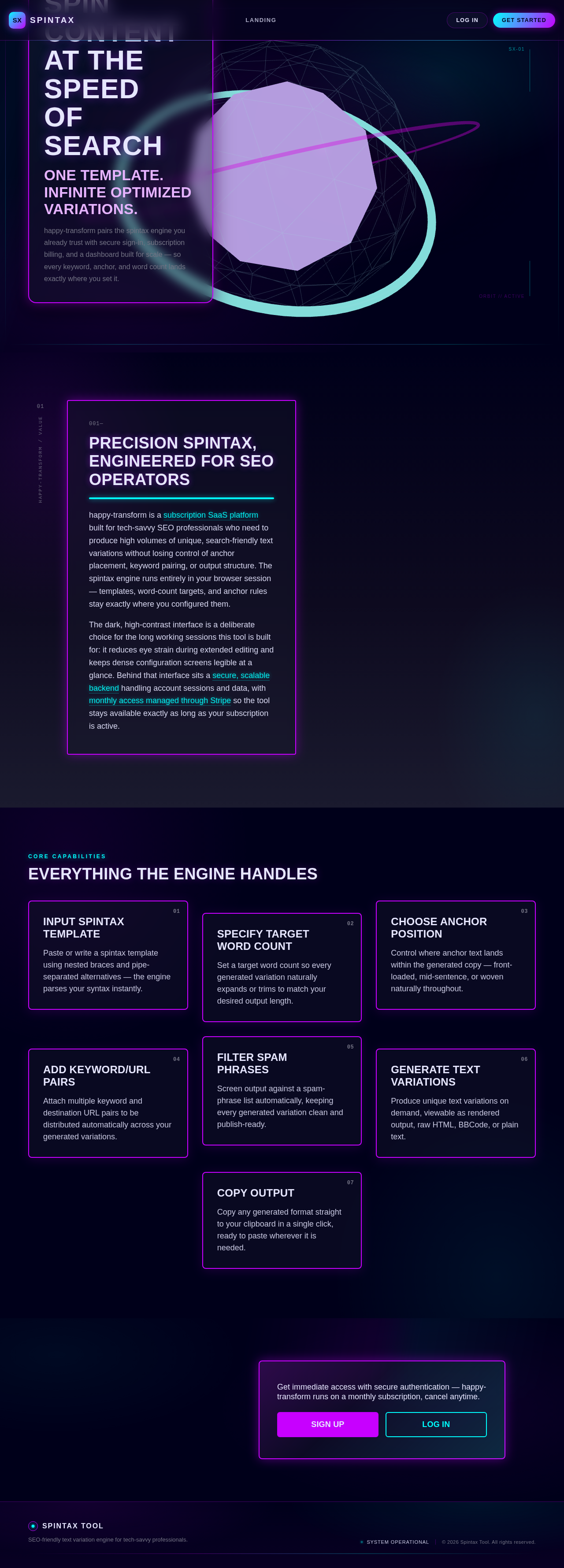
Spin Content
At The Speed
Of Search
One Template. Infinite Optimized Variations.
happy-transform pairs the spintax engine you already trust with secure sign-in, subscription billing, and a dashboard built for scale — so every keyword, anchor, and word count lands exactly where you set it.
Precision Spintax,
Engineered For SEO Operators
happy-transform is a subscription SaaS platform built for tech-savvy SEO professionals who need to produce high volumes of unique, search-friendly text variations without losing control of anchor placement, keyword pairing, or output structure. The spintax engine runs entirely in your browser session — templates, word-count targets, and anchor rules stay exactly where you configured them.
The dark, high-contrast interface is a deliberate choice for the long working sessions this tool is built for: it reduces eye strain during extended editing and keeps dense configuration screens legible at a glance. Behind that interface sits a secure, scalable backend handling account sessions and data, with monthly access managed through Stripe so the tool stays available exactly as long as your subscription is active.
Everything The Engine Handles
Input Spintax Template
Paste or write a spintax template using nested braces and pipe-separated alternatives — the engine parses your syntax instantly.
Specify Target Word Count
Set a target word count so every generated variation naturally expands or trims to match your desired output length.
Choose Anchor Position
Control where anchor text lands within the generated copy — front-loaded, mid-sentence, or woven naturally throughout.
Add Keyword/URL Pairs
Attach multiple keyword and destination URL pairs to be distributed automatically across your generated variations.
Filter Spam Phrases
Screen output against a spam-phrase list automatically, keeping every generated variation clean and publish-ready.
Generate Text Variations
Produce unique text variations on demand, viewable as rendered output, raw HTML, BBCode, or plain text.
Copy Output
Copy any generated format straight to your clipboard in a single click, ready to paste wherever it is needed.
Get immediate access with secure authentication — happy-transform runs on a monthly subscription, cancel anytime.
Spin Content
At The Speed
Of Search
One Template. Infinite Optimized Variations.
happy-transform pairs the spintax engine you already trust with secure sign-in, subscription billing, and a dashboard built for scale — so every keyword, anchor, and word count lands exactly where you set it.
Precision Spintax,
Engineered For SEO Operators
happy-transform is a subscription SaaS platform built for tech-savvy SEO professionals who need to produce high volumes of unique, search-friendly text variations without losing control of anchor placement, keyword pairing, or output structure. The spintax engine runs entirely in your browser session — templates, word-count targets, and anchor rules stay exactly where you configured them.
The dark, high-contrast interface is a deliberate choice for the long working sessions this tool is built for: it reduces eye strain during extended editing and keeps dense configuration screens legible at a glance. Behind that interface sits a secure, scalable backend handling account sessions and data, with monthly access managed through Stripe so the tool stays available exactly as long as your subscription is active.
Everything The Engine Handles
Input Spintax Template
Paste or write a spintax template using nested braces and pipe-separated alternatives — the engine parses your syntax instantly.
Specify Target Word Count
Set a target word count so every generated variation naturally expands or trims to match your desired output length.
Choose Anchor Position
Control where anchor text lands within the generated copy — front-loaded, mid-sentence, or woven naturally throughout.
Add Keyword/URL Pairs
Attach multiple keyword and destination URL pairs to be distributed automatically across your generated variations.
Filter Spam Phrases
Screen output against a spam-phrase list automatically, keeping every generated variation clean and publish-ready.
Generate Text Variations
Produce unique text variations on demand, viewable as rendered output, raw HTML, BBCode, or plain text.
Copy Output
Copy any generated format straight to your clipboard in a single click, ready to paste wherever it is needed.
Get immediate access with secure authentication — happy-transform runs on a monthly subscription, cancel anytime.
No comments yet. Be the first!