happy-man
 kiran Chettri
Make this man handsome
Comments (0)
Sign in to leave a comment
System Requirements
System Requirements Document (SRD) for happy-man
1. Introduction
The happy-man project is a heartfelt initiative by Kiran Chettri from Israel, aimed at enhancing the appearance of his father by removing his hat from an image and making him look more decent and handsome. This document outlines the system requirements to achieve this goal, ensuring the final output reflects Kiran's vision and sentiment.
2. System Overview
The happy-man project focuses on image editing and enhancement. The primary objective is to process an image of Kiran's father, remove the hat, and apply enhancements to make him look polished, decent, and handsome. The system will leverage advanced AI-based image editing tools to achieve natural and visually appealing results. The final output will be a high-quality, edited image that aligns with Kiran's expectations.
The system will:
- Use AI-powered tools for precise hat removal and facial enhancement.
- Ensure the edited image retains a natural and realistic appearance.
- Provide options for further customization based on user feedback.
3. Functional Requirements
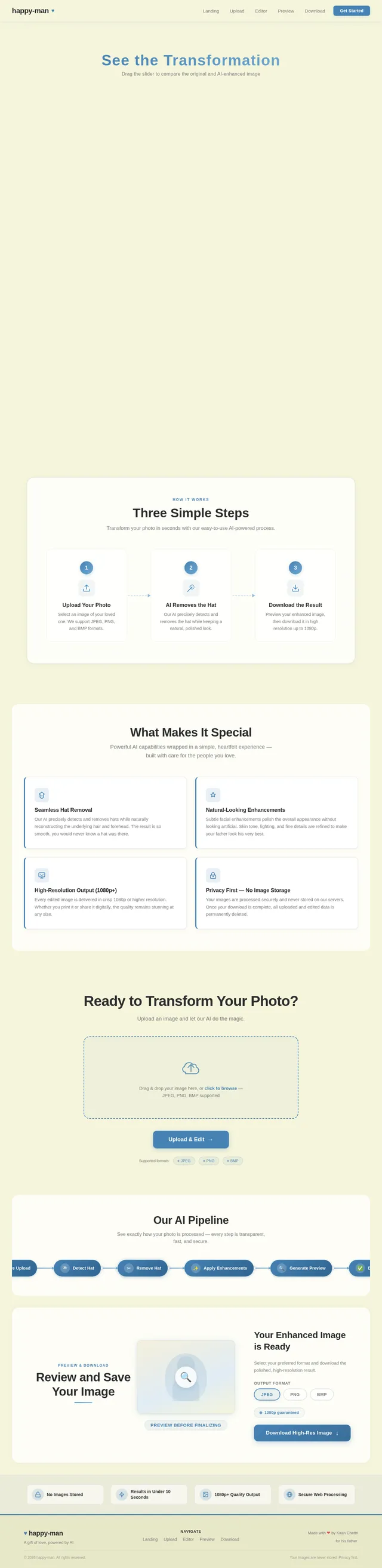
- As a User, I should be able to upload an image of my father.
- As a User, I should be able to remove the hat from the image seamlessly.
- As a User, I should be able to enhance the appearance of the image to make my father look decent and handsome.
- As a User, I should be able to preview the edited image before finalizing it.
- As a User, I should be able to download the final edited image in high resolution.
4. User Personas
1. Primary User: Kiran Chettri
- Role: The main user who uploads the image and provides feedback on the edits.
- Goals: To enhance the appearance of his father by removing the hat and making him look more handsome.
- Pain Points: Ensuring the edits look natural and meet his expectations.
2. Image Editor (AI System)
- Role: The backend system responsible for processing and editing the image.
- Goals: To perform precise hat removal and apply enhancements to the image.
- Pain Points: Maintaining the natural look of the image while making significant edits.
5. Visuals Colors and Theme
To reflect the personal and heartfelt nature of this project, the following unique color palette has been designed:
- Background: #F5F5DC (Beige)
- Surface: #FFFFFF (White)
- Text: #2C2C2C (Charcoal Gray)
- Accent: #4682B4 (Steel Blue)
- Muted Tones: #D3D3D3 (Light Gray)
This palette conveys warmth, elegance, and simplicity, aligning with the project's goal of creating a polished and handsome appearance.
6. Signature Design Concept
The happy-man project will feature a visually striking and interactive landing page that sets the tone for the heartfelt nature of the project. The homepage will be designed as a "Before and After Gallery", where the uploaded image of Kiran's father is displayed on the left side, and the enhanced, hat-removed version is displayed on the right side.
Key Features:
- Interactive Slider: A draggable slider will allow users to seamlessly compare the original and edited images by sliding left or right.
- Subtle Animations: When the page loads, the images will fade in gently, and the slider will have a smooth, elastic animation to invite interaction.
- Personalized Touch: A heartfelt message from Kiran, such as "For my father, with love," will be displayed in elegant typography at the top of the page.
- Dynamic Background: The background will feature a soft, animated gradient that shifts between warm tones of beige and steel blue, creating a soothing and elegant atmosphere.
- Micro-Interactions: Hovering over buttons or interactive elements will trigger subtle animations, such as a gentle glow or a slight upward motion.
This design concept ensures the project is not only functional but also emotionally resonant and visually captivating.
7. Non-Functional Requirements
- The system should process image uploads and edits within 10 seconds.
- The edited image should maintain a resolution of at least 1080p.
- The system should ensure data privacy and not store uploaded images after editing.
- The user interface should be intuitive and accessible for non-technical users.
- The system should support multiple image formats, including JPEG, PNG, and BMP.
8. Tech Stack
Frontend
- React for Web
Backend
- Python
- FastAPI
Database
- MySQL (for storing user preferences and session data)
- WeaviateDB (if vector-based image processing metadata is required)
AI Models
- Google Nano Banana for image generation and enhancement
- GPT 5.2 for user-friendly responses and guidance
AI Tools
- Litellm for LLM Routing
- Langchain for workflow orchestration
Local Orchestration
- Docker
- docker-compose
Server-Side Orchestration
- Kubernetes
9. Assumptions and Constraints
- The user will provide a high-quality image of the father for optimal editing results.
- The system will not store or share any user-uploaded images to ensure privacy.
- The project will focus solely on image editing and enhancement; no additional features like video editing will be included.
- The system will be designed for web-based access and may not include a mobile app unless specified in future updates.
10. Glossary
- AI (Artificial Intelligence): Technology used to perform tasks that typically require human intelligence, such as image editing.
- Frontend: The part of the application that users interact with directly.
- Backend: The server-side logic and infrastructure that support the application.
- RDBMS (Relational Database Management System): A database system based on a relational model, such as MySQL.
- VectorDB: A type of database optimized for handling vector data, such as WeaviateDB.
- Docker: A platform for developing, shipping, and running applications in containers.
- Kubernetes: A system for automating deployment, scaling, and management of containerized applications.
This document captures the essence of the happy-man project and provides a clear roadmap for its development. Kiran, your vision to enhance your father's image is both touching and inspiring, and this SRD ensures that the project is executed with precision and care.
No comments yet. Be the first!