happy-dashboard
 Fx Team
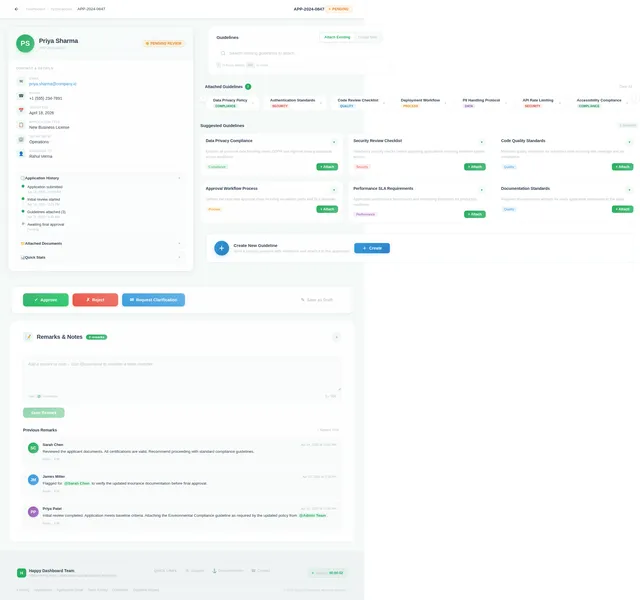
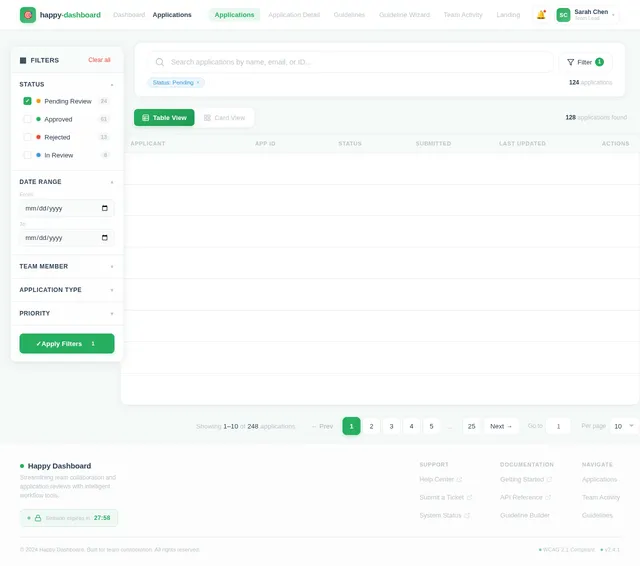
okay the reeuirement is to design the ui for the one team dashboard like ther is application coming to teams and the team can see the detaisl of the application and then team's work is to attach teh guidlines whihc are already present there or can create new oen and attch too i ahve some uiu but that is not good can you generate new one

Comments (0)
Sign in to leave a comment
System Requirements
System Requirements Document (SRD)
Project Name: happy-dashboard
1. Introduction
The happy-dashboard project is designed to streamline team collaboration by providing a centralized dashboard where team members can view application details and attach or create guidelines. This tool aims to enhance productivity and ensure consistency in processes, particularly for teams managing applications and their associated workflows.
2. System Overview
The happy-dashboard system will serve as a team-oriented application dashboard. It will allow users to:
- View detailed information about applications submitted to the team.
- Attach predefined guidelines to applications.
- Create new guidelines and attach them to applications.
- Collaborate efficiently with intuitive UI features.
The system will prioritize usability, responsiveness, and modern design aesthetics to ensure seamless interaction for all users.
3. Functional Requirements
As a User:
- I should be able to view application details, including applicant information, submission date, and status.
- I should be able to search and attach existing guidelines to applications.
- I should be able to create new guidelines and attach them to applications.
- I should be able to add remarks or notes to applications.
- I should be able to approve, reject, or request clarification for applications.
As an Admin:
- I should be able to manage predefined guidelines.
- I should be able to oversee team activity and application statuses.
4. User Personas
1. Team Member
- Role: Responsible for reviewing applications and attaching guidelines.
- Needs: Easy access to application details and guidelines.
2. Admin
- Role: Manages guidelines and oversees team workflows.
- Needs: Tools to manage guidelines and monitor team activity.
5. Visuals Colors and Theme
Color Palette:
Based on the reference design, the updated color palette is:
- Background:
#F5F9F8(soft greenish-white for a clean look) - Surface:
#FFFFFF(pure white for cards and sections) - Text:
#2C3E50(dark blue-gray for readability) - Accent:
#27AE60(vivid green for buttons and highlights) - Muted Tones:
#BDC3C7(light gray for secondary elements)
6. Signature Design Concept
Enhanced Guidelines Interaction
The guidelines attachment and creation section will feature:
- Drag-and-Drop Functionality: Users can drag guidelines from a list and drop them onto applications.
- Interactive Search Bar: Autocomplete suggestions for existing guidelines as users type.
- Expandable Cards: Guidelines will appear as collapsible cards with detailed descriptions when clicked.
- Animated Feedback: Subtle animations (e.g., guidelines "snapping" into place) to confirm actions.
- Custom Condition Builder: A modal with a step-by-step wizard for creating new guidelines, featuring live previews and validation.
The page design will include:
- Two-Column Layout: Application details on the left and guideline actions on the right for clear organization.
- Glassmorphism Panels: Semi-transparent panels with blurred backgrounds for a modern aesthetic.
- Micro-Interactions: Hover effects and transitions for buttons and cards to enhance engagement.
7. Non-Functional Requirements
- Performance: The system should load application details and guidelines within 2 seconds.
- Scalability: Support up to 10,000 applications and guidelines without performance degradation.
- Security: Ensure secure access control for team members and admins.
- Accessibility: Adhere to WCAG 2.1 standards for accessibility.
8. Tech Stack
Frontend:
- React for Web
Backend:
- Python
- FastAPI
Database:
- MySQL (preferred for structured data)
- Alembic for migrations
AI Models:
- GPT 5.4 for user-friendly responses
AI Tools:
- LangChain for workflow automation
Orchestration:
- Docker for local development
- Kubernetes for server-side orchestration
9. Assumptions and Constraints
Assumptions:
- Users are familiar with basic dashboard functionalities.
- Guidelines are predefined or created by team members.
Constraints:
- The system must integrate seamlessly with existing team workflows.
- The design must align with the provided visual reference.
10. Glossary
- Guidelines: Predefined or custom rules attached to applications.
- Application: A submission requiring team review and action.
- Drag-and-Drop: A UI feature allowing users to move items visually.
- Glassmorphism: A design style using semi-transparent elements with blurred backgrounds.
End of Document

Streamline Team Collaboration
Centralized Dashboard for Application Management. Review, attach guidelines, and collaborate with your team — all in one place.
Policy Compliance Review
3 guidelines attached
Onboarding Workflow
5 guidelines attached
Security Audit Request
2 guidelines pending
Streamlined workflows across thousands of team applications with zero downtime.
Trusted by enterprise teams worldwide to centralize their dashboard operations.
SOC 2 compliant with end-to-end encryption and role-based access control.
Everything You Need to Streamline Workflows
Powerful tools designed to help your team manage applications, enforce guidelines, and collaborate effortlessly.
Application Management
View and manage all team applications in one centralized dashboard. Track statuses, review details, and take action seamlessly.
Guideline Library
Access a comprehensive library of predefined guidelines. Search, filter, and attach them to applications in seconds.
Drag-and-Drop Workflow
Attach guidelines to applications with intuitive drag-and-drop. Animated feedback confirms every action instantly.
Real-Time Collaboration
Work together with your team in real time. See updates, share notes, and coordinate reviews without missing a beat.
Dynamic Guidelines Interaction
Drag and drop guidelines onto applications with real-time feedback, snapping animations, and intuitive visual cues.
Guideline Library
Data Privacy Compliance
Security & Compliance
Ensures all submitted applications adhere to GDPR and internal data handling policies before approval.
Performance Benchmarks
Quality Assurance
Validates application response times and resource usage meet team-defined thresholds.
Accessibility Standards
UX Requirements
Ensures WCAG 2.1 compliance for all user-facing application interfaces and workflows.
Attach Guidelines
Drop guidelines here to attach to application
Drag & Drop Workflow
Attach guidelines with intuitive drag-and-drop interactions
Instant Feedback
Real-time snapping animations confirm every action
Smart Suggestions
Autocomplete search finds the right guidelines instantly
Your Team Dashboard at a Glance
Manage applications, attach guidelines, and track team activity — all from one centralized, intuitive interface.
Application Overview
No signup required — try the interactive demo
Built for Every Role on Your Team
Whether you review applications or manage workflows, happy-dashboard adapts to the way you work.
Team Member
Application Reviewer
Responsible for reviewing incoming applications, attaching relevant guidelines, and ensuring each submission meets team standards.
Key Capabilities
- View application details, applicant info, submission dates and status at a glance
- Search and attach existing guidelines to applications with drag-and-drop ease
- Add remarks, notes, and approve or reject applications directly from the dashboard
Admin
Workflow Manager
Manages predefined guidelines, oversees team workflows, and ensures the entire review pipeline runs smoothly and efficiently.
Key Capabilities
- Create, edit, and manage predefined guidelines with the step-by-step wizard
- Monitor team activity, track review progress, and oversee application statuses
- Configure workflows, set permissions, and ensure process consistency across the team
Your Workflow, Simplified
From login to final decision — manage applications and guidelines in five straightforward steps.
Log In Securely
Access your team dashboard with secure authentication and role-based permissions.
View Dashboard
Get an instant overview of all incoming applications, statuses, and team activity.
Search & Filter
Quickly find applications using smart search, filters, and autocomplete suggestions.
Attach Guidelines
Drag and drop guidelines onto applications or create new ones with the wizard.
Approve or Reject
Review applications, add remarks, and take action with a single click.
Ready to Transform Your Team Workflow?
Centralize application management, streamline guideline attachment, and empower your team to collaborate more effectively — all from one intuitive dashboard.
Frequently Asked Questions
Everything you need to know about managing applications and guidelines with your team.
Still have questions?
Get started and explore the dashboard →
No comments yet. Be the first!