happy-calculator
 Diya Trivedi
start a project to build simple single page design of calculator

Comments (0)
Sign in to leave a comment
System Requirements
System Requirements Document for happy-calculator
1. Introduction
happy-calculator is a simple calculator delivered as a single page. The product intent is narrow and explicit: one page where a person enters numbers and arithmetic operations and reads the result on that same page. The design must be simple — no multi-page navigation, no account, no surrounding workflow.
The audience is everyday people who need quick, friendly basic arithmetic. The visual direction is warm modular clarity after Pablo Stanley: a cream field, a single white calculator card, rounded keys, a large live result, and a sunny tangerine equals key, so arithmetic feels light and happy rather than technical.
2. System Overview
happy-calculator is a single-page web calculator. The page is the public entry and the calculator itself: the user presses digit and operator keys, sees the running expression and a large live result, and presses the tangerine equals key to commit the calculation. There is no sign-in, no saved history, and no second destination.
Current delivery consists of a React frontend that renders the single Calculator page, a shared FastAPI backend process for application APIs, and a MariaDB database provisioned as application-owned persistent storage. The calculator's arithmetic is a client-side interaction on the single page; the provisioned backend and database exist as the shared application infrastructure and do not by themselves introduce accounts, saved calculations, or additional product behavior.
Actors: the single accepted human persona, Calculator user, who opens the page and performs arithmetic. No other human participants are affected by the calculator's state, so no handoff, counterparty, or recipient lifecycle exists.
Removed from scope
- Multi-page navigation or additional destinations (the design is a single page).
- User accounts, sign-in, or identity establishment (no access requirement on the page).
- Saved calculation history or persistence of past calculations as a product feature.
2a. Product Interpretation and Delivery Boundary
The product is one first-party page, publicly reachable with no access requirement. A visitor lands directly on the calculator; there is no anonymous pre-identity lifecycle, because no protected state exists and nothing must be privately owned or resumed. All accepted behavior — entering operands and operators, reading the live result, committing with equals, clearing, and recovering from invalid input — happens on that one page.
The backend and database are provisioned infrastructure for the application. They are not a delivery boundary that adds product scope: the accepted calculator workflow requires no server round-trip, no stored record, and no cross-session continuity. Future ideas are kept out of the current page and acceptance.
2c. Page Content and Component Coverage
Calculator
The single public page and the entire product. It is reachable directly with no access requirement and no identity.
Information and state
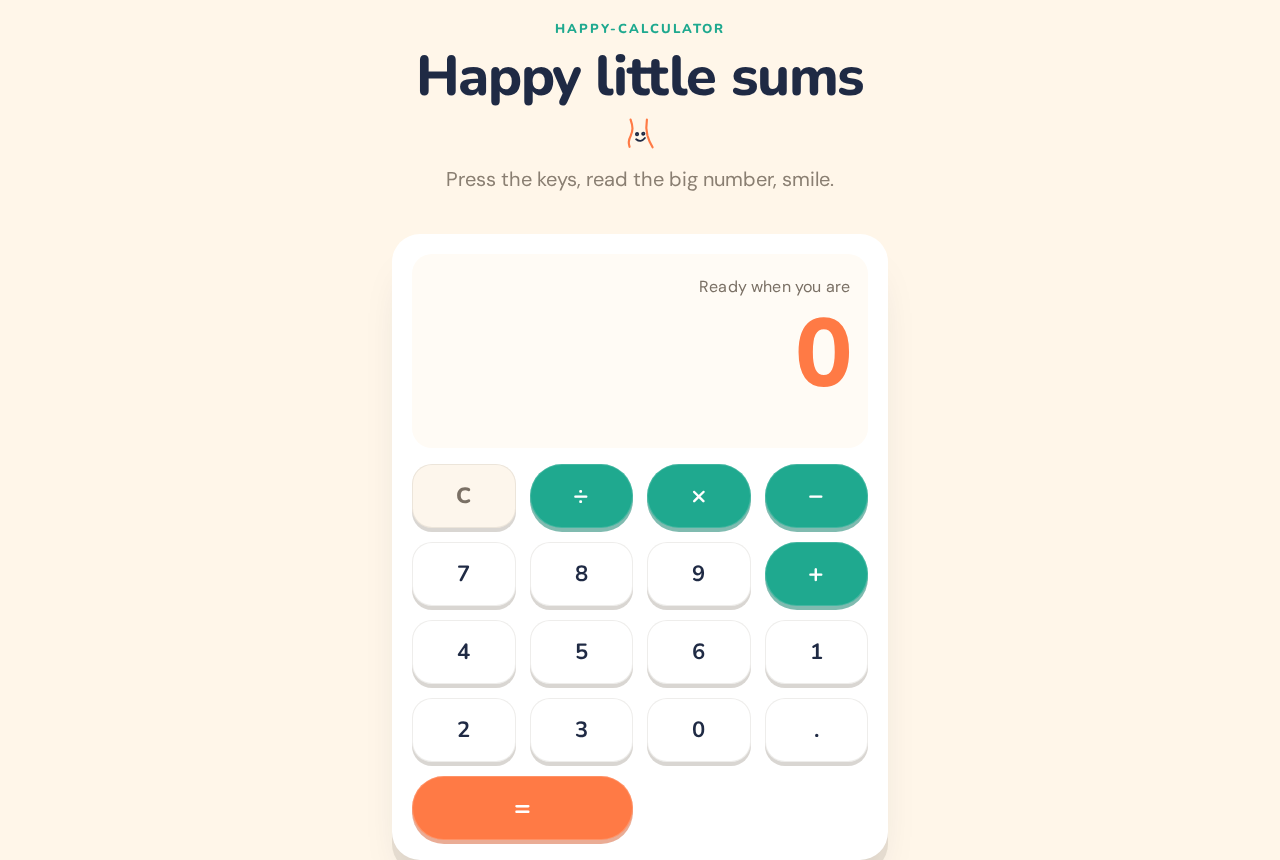
- A short Nunito headline above the card, with a small hand-drawn smiling plus doodle at the headline baseline.
- A single white calculator card (28px radius, soft warm-grey offset shadow, no hard border) containing:
- A result strip showing the current live result at
clamp(44px, 12vw, 96px)in Nunito ExtraBold, tangerine#FF7A45. - A secondary line showing the current expression/operand entry in ink
#1F2A44at body scale. - A 4-column key grid of rounded keys (20px radius, 64px tall on desktop, 48px on mobile, 4px warm-grey offset shadow dropping to 2px on press).
- A result strip showing the current live result at
- Key set: digits
0–9, decimal point, operators+,−,×,÷(teal#1FA98F, full pills),=(tangerine#FF7A45pill spanning two grid columns, anchored bottom right), andC(clear). - State values: empty/initial (result shows
0), entering first operand, operator selected awaiting second operand, second operand entering, result committed, and error (division by zero or malformed expression).
Primary actions
- Press a digit or decimal key to append to the current operand.
- Press an operator key to select the operation and begin the second operand.
- Press
=to evaluate and commit the result to the result strip. - Press
Cto reset to the initial empty state.
Supporting actions
- Continue calculating from a committed result by pressing an operator (the result becomes the first operand).
Domain entities
- Current operand entry (string of digits and at most one decimal point).
- Pending operator.
- Live/committed result (numeric display value).
- Error state (message such as "Cannot divide by zero").
Component responsibilities
- Headline + doodle: static framing, no interaction.
- Result strip: renders the live result and expression; pops once with a small scale when the value changes.
- Key grid: renders all keys, handles press feedback (2px press-down settling in 120ms), and dispatches key actions.
- Calculator state module: holds operand, operator, result, and error; performs arithmetic; enforces single-decimal and division-by-zero rules.
States
- Loading: none required; the page renders immediately with result
0. - Empty/initial: result strip shows
0, expression line empty. - Success: committed result shown large in tangerine; expression line shows the evaluated expression.
- Error: division by zero or malformed entry shows an inline error message in the result strip area; keys remain usable and
Cor a digit press recovers to a clean entry. - Recovery:
Calways returns to the initial state; pressing a digit after an error starts a fresh operand.
3. Functional Requirements
FR-1 — Single-page calculator (explicit) As a Calculator user, I should get the whole calculator on one simple page, so that I can do arithmetic without navigating anywhere.
- Trigger: opening the page.
- Observable result: the headline, result strip, and full key grid render on one page; no other destination exists.
- Access: public, no identity.
- Failure/recovery: not applicable; the page is static content plus local interaction.
- Continuation: the user immediately begins entering numbers.
FR-2 — Enter operands (explicit) As a Calculator user, I should press digit keys to build a number, so that I can supply the values I want to calculate.
- Trigger: pressing digit keys
0–9. - Observable result: the entered digits appear in the expression line and the result strip reflects the current entry.
- Constraint: at most one decimal point per operand; a leading zero is replaced by the next digit.
- Failure/recovery: pressing a digit after an error starts a fresh operand.
- Continuation: the user presses an operator.
FR-3 — Select an operation (explicit)
As a Calculator user, I should press an operator key (+, −, ×, ÷) to choose the operation, so that the calculator knows what to do with my numbers.
- Trigger: pressing an operator key after an operand.
- Observable result: the operator is recorded as pending and the expression line shows it; the next digit begins the second operand.
- Failure/recovery: pressing a different operator before entering the second operand replaces the pending operator.
- Continuation: the user enters the second operand.
FR-4 — Commit with equals (explicit) As a Calculator user, I should press the tangerine equals key to evaluate, so that I see the result of my calculation.
- Trigger: pressing
=with a pending operator and a second operand. - Observable result: the result strip shows the computed value at large tangerine type and pops once with a small scale; the expression line shows the evaluated expression.
- Failure/recovery: pressing
=without a complete expression leaves the current state unchanged. - Continuation: the user may press an operator to continue from the result, or
Cto reset.
FR-5 — Live result display (explicit, from creative direction) As a Calculator user, I should see the current result set large above the keys, so that I can read my number at a glance.
- Trigger: any change to the current value.
- Observable result: the result strip updates at
clamp(44px, 12vw, 96px)in Nunito ExtraBold, tangerine#FF7A45, and pops once with a small scale on change. - Failure/recovery: on error the strip shows the error message instead of a number.
- Continuation: the user keeps entering keys.
FR-6 — Clear and recover (required_inference)
As a Calculator user, I should press C to reset the calculator, so that I can start a new calculation or recover from a mistake or error.
- Trigger: pressing
C. - Observable result: result strip returns to
0, expression line clears, pending operator and operands are discarded. - Failure/recovery: this is the recovery path for division by zero and malformed entry.
- Continuation: the user begins a new calculation.
FR-7 — Division-by-zero handling (required_inference) As a Calculator user, I should be told when I divide by zero, so that I understand why there is no result.
- Trigger: pressing
=on an expression whose divisor is0. - Observable result: an inline error message appears in the result strip area; the calculator does not display a numeric result.
- Failure/recovery:
Cor a fresh digit press clears the error. - Continuation: the user corrects the divisor or resets.
4. User Personas
Calculator user
Product context. An everyday person who needs a quick piece of basic arithmetic — a total, a difference, a split, a percentage-free simple sum — and wants it done in seconds on a friendly, uncluttered page. They arrive directly at the calculator with no account and no setup.
Primary goal. Enter two numbers and an operation and read the correct result on the same page.
Distinct accepted responsibilities.
- Enters operands using digit and decimal keys.
- Selects the operation with
+,−,×, or÷. - Commits the calculation with the tangerine equals key.
- Reads the large live result above the keys.
- Clears with
Cto start over or recover from an error.
Relevant inputs and decisions. Which numbers to enter, which operation to apply, whether to continue from a committed result or reset, and how to respond to a division-by-zero error.
Interactions with other participants. None. The calculator's state affects only this user; there is no counterparty, recipient, or handoff.
Observable success. The result strip shows the correct value in large tangerine type immediately after = is pressed, and the user can read it without scrolling or navigating.
5. Core User Flows
Flow 1 — Perform a basic calculation
- Start: The Calculator user opens the happy-calculator page directly. The cream field, Nunito headline with the smiling plus doodle, and the white calculator card render with the result strip showing
0. (Owner: Calculator page) - The user presses digit keys to enter the first operand; the digits appear in the expression line and the result strip reflects the entry.
- The user presses an operator key (
+,−,×, or÷); the operator is recorded as pending and shown in the expression line. - The user presses digit keys to enter the second operand.
- The user presses the tangerine equals key; the result strip shows the computed value at large tangerine type and pops once with a small scale, and the expression line shows the evaluated expression.
- Continuation: The user presses an operator to continue from the result, or
Cto reset to0.
Flow 2 — Recover from an error
- Start: The user is mid-calculation on the Calculator page.
- The user enters a divisor of
0and presses=. - The result strip shows an inline error message ("Cannot divide by zero") instead of a number.
- Recovery: The user presses
Cto reset to0, or presses a digit to start a fresh operand; the error clears and normal entry resumes. - Continuation: The user completes a corrected calculation as in Flow 1.
Flow 3 — Reset and start over
- Start: The user is on the Calculator page with a committed result or partial entry.
- The user presses
C. - The result strip returns to
0and the expression line clears; pending operator and operands are discarded. - Continuation: The user begins a new calculation as in Flow 1.
6. Visuals Colors and Theme
Muse and headline. Warm modular clarity after Pablo Stanley — a small utility with a warm, human voice, rounded keys, and sunny colour so arithmetic feels easy and happy.
Mode. Light mode only.
Colour tokens (exact hex by role)
- Background / cream ground:
#FFF6E9 - Surface (calculator card and keys):
#FFFFFF - Text / ink:
#1F2A44 - Primary (equals key and live result):
#FF7A45(tangerine) - Accent (operator keys):
#1FA98F(teal) - Muted (secondary text, shadows):
#8A7F72
Typography
- Headings: Nunito — Nunito ExtraBold, tight tracking, sentence case, large result numerals.
- Body: DM Sans.
- Scale: 1.25 modular — 56 / 44 / 32 / 20 / 16.
- Result display:
clamp(44px, 12vw, 96px).
Shape language. Large radii: 28px on the calculator shell, 20px on keys, full pills on operators. Soft offset shadows in warm grey; no hard borders.
Layout. One centred column. A short Nunito headline sits above a single white calculator card. The card holds a result strip, then a 4-column key grid. Keys grow to 64px tall on desktop and stay 48px on mobile.
Imagery. No photos. One small hand-drawn vector doodle of a smiling plus sign sits beside the headline at its baseline.
Avoid. Blue or indigo accents on white; gradients, glass panels, or blob shapes behind the card; a grid of identical hover-lift cards; photos or stock people; Inter, Roboto, or system fonts.
Readability. Headlines, labels, numbers, and controls stay entirely inside the viewport and their container at 375px, 768px, and 1280px, wrapping or scaling with clamp(...) to fit; no element covers readable text or controls.
7. Signature Design Concept
The calculator card is the hero. It sits centred on a cream #FFF6E9 field, tilted 0 degrees, with a 44px-to-96px live result above the keys. A short Nunito ExtraBold headline runs above the card, with a hand-drawn smiling plus doodle at the headline baseline. The white card carries a 28px radius and a soft warm-grey offset shadow, no hard border. Inside, the result strip holds the live result in tangerine #FF7A45 at clamp(44px, 12vw, 96px), and the 4-column key grid sits below with rounded white keys, teal operator pills, and a tangerine equals pill spanning two grid columns anchored bottom right. Each key has a 4px warm-grey offset shadow that drops to 2px on press. The composition recomposes only accepted content — headline, doodle, result strip, and key grid — and introduces no new behavior or destination.
8. Interaction Model & Motion Direction
Interaction Model: Animated Motion Tempo: restrained Hero Dimensionality: layered_2d
Landing Hero Motion Brief
- Focal subject: the centred white calculator card with its large tangerine live result and the tangerine equals pill.
- Input → transformation → outcome thesis: a key press depresses the key 2px and settles in 120ms; when the result value changes, the result number pops once with a small scale; the outcome is a readable, committed result in large tangerine type.
- Motion vocabulary: restrained key press-down (2px, 120ms settle), single small-scale pop on result change, soft offset shadows shifting from 4px to 2px on press.
- Composed first frame: cream field, Nunito headline with smiling plus doodle at the baseline, white card centred with result strip showing
0and the full 4-column key grid, equals pill anchored bottom right. - Reduced-motion state: with
prefers-reduced-motion, key press and result pop are suppressed; the calculator remains fully usable with static press states and the result updates without animation.
9. Non-Functional Requirements
- Single page (explicit): the product is exactly one page; no routing to additional destinations.
- Simplicity (explicit): the interface contains only the headline, doodle, result strip, and key grid; no adjacent modules.
- Responsive readability (explicit, from creative direction): readable text and controls stay whole and inside the viewport and their container at 375px, 768px, and 1280px; keys are 64px tall on desktop and 48px on mobile.
- Accessibility (required_inference): keys are operable by keyboard and pointer, with visible focus states and accessible labels for operators and equals; the result strip is announced on change for assistive technology.
- Reduced motion (explicit, from creative direction): a usable static arrangement is provided under
prefers-reduced-motion. - No identity or persistence (explicit): the page has no access requirement and stores no calculation history.
10. Tech Stack
- Frontend: React application rendering the single Calculator page.
- Backend: shared FastAPI process for application APIs and domain modules (provisioned infrastructure; the calculator interaction is client-side).
- Database: MariaDB for application-owned persistent data (provisioned; no calculator domain entities are stored).
- Containerization: Docker / docker-compose with the
frontend,backend, anddatabaseservices.
11. Assumptions and Constraints
- Assumption: the calculator supports the four basic operations (
+,−,×,÷), digits, a decimal point, equals, and clear — the minimum implied by "simple calculator." (required_inference) - Assumption: arithmetic is performed client-side on the single page; the provisioned backend and database do not add product behavior. (required_inference)
- Constraint: the design is a single page. (explicit)
- Constraint: the design is simple. (explicit)
- Constraint: the page has no access requirement and no identity. (explicit)
- Constraint: the visual direction (palette, fonts, shape, motion) is authoritative for presentation. (explicit)
12. Glossary
- Calculator page: the single public page that is the entire product.
- Result strip: the area above the key grid showing the live result at large tangerine type.
- Expression line: the secondary line showing the current operand entry and pending operator.
- Key grid: the 4-column grid of digit, operator, equals, and clear keys.
- Equals pill: the tangerine
#FF7A45key spanning two grid columns that commits the calculation. - Live result: the current value displayed in the result strip, updated on every change.
happy-calculator
Happy little sums
Press the keys, read the big number, smile.
Ready when you are
0
happy-calculator
Happy little sums
Press the keys, read the big number, smile.
Ready when you are
0
No comments yet. Be the first!